Note
ამ გვერდზე წვდომა ავტორიზაციას მოითხოვს. შეგიძლიათ სცადოთ შესვლა ან დირექტორიების შეცვლა.
ამ გვერდზე წვდომა ავტორიზაციას მოითხოვს. შეგიძლიათ სცადოთ დირექტორიების შეცვლა.
Important
Azure Disk Encryption is scheduled for retirement on September 15, 2028. Until that date, you can continue to use Azure Disk Encryption without disruption. On September 15, 2028, ADE-enabled workloads will continue to run, but encrypted disks will fail to unlock after VM reboots, resulting in service disruption.
Use encryption at host for new VMs, or consider Confidential VM sizes with OS disk encryption for confidential computing workloads. All ADE-enabled VMs (including backups) must migrate to encryption at host before the retirement date to avoid service disruption. See Migrate from Azure Disk Encryption to encryption at host for details.
Caution
CentOS end-of-life notice: This article references CentOS, which is in end-of-life status. If you're using CentOS, review your deployment plans and consider migrating to a supported Linux distribution. For migration guidance and timelines, see CentOS end-of-life guidance.
Applies to: ✔️ Linux VMs ✔️ Flexible scale sets
Azure Disk Encryption helps protect your data to meet your organizational security and compliance commitments. It uses the DM-Crypt feature of Linux to provide volume encryption for the OS and data disks of Azure virtual machines (VMs), and is integrated with Azure Key Vault to help you control and manage the disk encryption keys and secrets.
Azure Disk Encryption is zone resilient, the same way as Azure Virtual Machines. For details, see Azure Services that support Availability Zones.
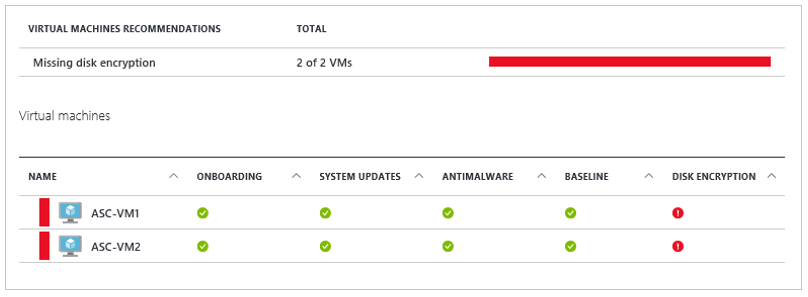
If you use Microsoft Defender for Cloud, you're alerted if you have VMs that aren't encrypted. The alerts show as high severity and the recommendation is to encrypt these VMs.
Warning
- If you have previously used Azure Disk Encryption with Microsoft Entra ID to encrypt a VM, you must continue to use this option to encrypt your VM. See Azure Disk Encryption with Microsoft Entra ID (previous release) for details.
- Certain recommendations might increase data, network, or compute resource usage, resulting in extra license or subscription costs. You must have a valid active Azure subscription to create resources in Azure in the supported regions.
You can learn the fundamentals of Azure Disk Encryption for Linux in just a few minutes with the Create and encrypt a Linux VM with Azure CLI quickstart or the Create and encrypt a Linux VM with Azure PowerShell quickstart.
Supported VMs and operating systems
Supported VMs
Linux VMs are available in a range of sizes. Azure Disk Encryption is supported on Generation 1 and Generation 2 VMs. Azure Disk Encryption is also available for VMs with premium storage.
See Azure VM sizes with no local temporary disk.
Azure Disk Encryption isn't available on Basic, A-series VMs,v6 series VMs, v7 series VMs, or newer, or on virtual machines that don't meet these minimum memory requirements:
Memory requirements
| Virtual machine | Minimum memory requirement |
|---|---|
| Linux VMs when only encrypting data volumes | 2 GB |
| Linux VMs when encrypting both data and OS volumes, and where the root (/) file system usage is 4 GB or less | 8 GB |
| Linux VMs when encrypting both data and OS volumes, and where the root (/) file system usage is greater than 4 GB | The root file system usage * 2. For instance, a 16 GB of root file system usage requires at least 32 GB of RAM |
After the OS disk encryption process is complete on Linux virtual machines, you can configure the VM to run with less memory.
For more exceptions, see Azure Disk Encryption: Restrictions.
Supported operating systems
Azure Disk Encryption is supported on a subset of the Azure-endorsed Linux distributions, which is itself a subset of all possible Linux server distributions.
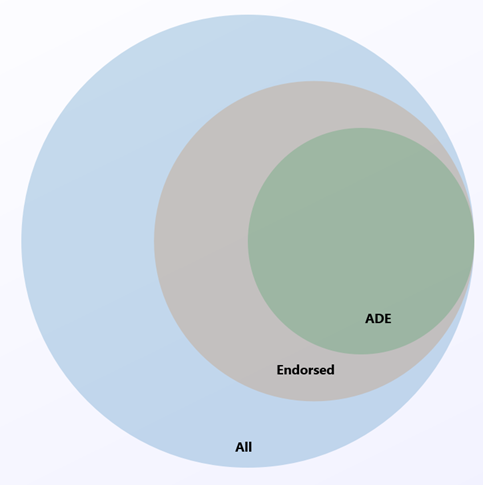
Linux server distributions that Azure doesn't endorse don't support Azure Disk Encryption. Of the distributions that Azure endorses, only the following distributions and versions support Azure Disk Encryption:
| Publisher | Offer | SKU | URN | Volume type supported for encryption |
|---|---|---|---|---|
| Canonical | Ubuntu | 24.04-LTS | Canonical:ubuntu-24_04-lts-daily:server-gen1:latest | OS and data disk |
| Canonical | Ubuntu | 24.04-LTS Gen 2 | Canonical:ubuntu-24_04-lts:server:latest | OS and data disk |
| Canonical | Ubuntu | 22.04-LTS | Canonical:0001-com-ubuntu-server-jammy:22_04-lts:latest | OS and data disk |
| Canonical | Ubuntu | 22.04-LTS Gen2 | Canonical:0001-com-ubuntu-server-jammy:22_04-lts-gen2:latest | OS and data disk |
| Canonical | Ubuntu | 20.04-LTS | Canonical:0001-com-ubuntu-server-focal:20_04-lts:latest | OS and data disk |
| Canonical | Ubuntu | 20.04-DAILY-LTS | Canonical:0001-com-ubuntu-server-focal-daily:20_04-daily-lts:latest | OS and data disk |
| Canonical | Ubuntu | 20.04-LTS Gen2 | Canonical:0001-com-ubuntu-server-focal:20_04-lts-gen2:latest | OS and data disk |
| Canonical | Ubuntu | 20.04-DAILY-LTS Gen2 | Canonical:0001-com-ubuntu-server-focal-daily:20_04-daily-lts-gen2:latest | OS and data disk |
| Canonical | Ubuntu | 18.04-LTS | Canonical:UbuntuServer:18.04-LTS:latest | OS and data disk |
| Canonical | Ubuntu 18.04 | 18.04-DAILY-LTS | Canonical:UbuntuServer:18.04-DAILY-LTS:latest | OS and data disk |
| MicrosoftCBLMariner | cbl-mariner | cbl-mariner-2 | MicrosoftCBLMariner:cbl-mariner:cbl-mariner-2:latest* | OS and data disk |
| MicrosoftCBLMariner | cbl-mariner | cbl-mariner-2-gen2 | MicrosoftCBLMariner:cbl-mariner:cbl-mariner-2-gen2:latest* | OS and data disk |
| OpenLogic | CentOS 8-LVM | 8-LVM | OpenLogic:CentOS-LVM:8-LVM:latest | OS and data disk |
| OpenLogic | CentOS 8.4 | 8_4 | OpenLogic:CentOS:8_4:latest | OS and data disk |
| OpenLogic | CentOS 8.3 | 8_3 | OpenLogic:CentOS:8_3:latest | OS and data disk |
| OpenLogic | CentOS 8.2 | 8_2 | OpenLogic:CentOS:8_2:latest | OS and data disk |
| OpenLogic | CentOS 7-LVM | 7-LVM | OpenLogic:CentOS-LVM:7-LVM:7.9.2021020400 | OS and data disk |
| OpenLogic | CentOS 7.9 | 7_9 | OpenLogic:CentOS:7_9:latest | OS and data disk |
| OpenLogic | CentOS 7.8 | 7_8 | OpenLogic:CentOS:7_8:latest | OS and data disk |
| OpenLogic | CentOS 7.7 | 7.7 | OpenLogic:CentOS:7.7:latest | OS and data disk |
| OpenLogic | CentOS 7.6 | 7.6 | OpenLogic:CentOS:7.6:latest | OS and data disk |
| OpenLogic | CentOS 7.5 | 7.5 | OpenLogic:CentOS:7.5:latest | OS and data disk |
| OpenLogic | CentOS 7.4 | 7.4 | OpenLogic:CentOS:7.4:latest | OS and data disk |
| OpenLogic | CentOS 6.8 | 6.8 | OpenLogic:CentOS:6.8:latest | Data disk only |
| Oracle | Oracle Linux 8.6 | 8.6 | Oracle:Oracle-Linux:ol86-lvm:latest | OS and data disk (see note) |
| Oracle | Oracle Linux 8.6 Gen 2 | 8.6 | Oracle:Oracle-Linux:ol86-lvm-gen2:latest | OS and data disk (see note) |
| Oracle | Oracle Linux 8.5 | 8.5 | Oracle:Oracle-Linux:ol85-lvm:latest | OS and data disk (see note) |
| Oracle | Oracle Linux 8.5 Gen 2 | 8.5 | Oracle:Oracle-Linux:ol85-lvm-gen2:latest | OS and data disk (see note) |
| RedHat | RHEL 9.4 | 9.4 | RedHat:RHEL:9_4:latest | OS and data disk (see note) |
| RedHat | RHEL 9.4 Gen 2 | 9.4 | RedHat:RHEL:94_gen2:latest | OS and data disk (see note) |
| RedHat | RHEL 9.3 | 9.3 | RedHat:RHEL:9_3:latest | OS and data disk (see note) |
| RedHat | RHEL 9.3 Gen 2 | 9.3 | RedHat:RHEL:93-gen2:latest | OS and data disk (see note) |
| RedHat | RHEL 9.2 | 9.2 | RedHat:RHEL:9_2:latest | OS and data disk (see note) |
| RedHat | RHEL 9.2 Gen 2 | 9.2 | RedHat:RHEL:92-gen2:latest | OS and data disk (see note) |
| RedHat | RHEL 9.0 | 9.0 | RedHat:RHEL:9_0:latest | OS and data disk (see note) |
| RedHat | RHEL 9.0 Gen 2 | 9.0 | RedHat:RHEL:90-gen2:latest | OS and data disk (see note) |
| RedHat | RHEL 9-lvm | 9-lvm | RedHat:RHEL:9-lvm:latest | OS and data disk (see note) |
| RedHat | RHEL 9-lvm Gen 2 | 9-lvm-gen2 | RedHat:RHEL:9-lvm-gen2:latest | OS and data disk (see note) |
| RedHat | RHEL 8.9 | 8.9 | RedHat:RHEL:8_9:latest | OS and data disk (see note) |
| RedHat | RHEL 8.9 Gen 2 | 8.9 | RedHat:RHEL:89-gen2:latest | OS and data disk (see note) |
| RedHat | RHEL 8.8 | 8.8 | RedHat:RHEL:8_8:latest | OS and data disk (see note) |
| RedHat | RHEL 8.8 Gen 2 | 8.8 | RedHat:RHEL:88-gen2:latest | OS and data disk (see note) |
| RedHat | RHEL 8.7 | 8.7 | RedHat:RHEL:8_7:latest | OS and data disk (see note) |
| RedHat | RHEL 8.7 Gen 2 | 8.7 | RedHat:RHEL:87-gen2:latest | OS and data disk (see note) |
| RedHat | RHEL 8.6 | 8.6 | RedHat:RHEL:8_6:latest | OS and data disk (see note) |
| RedHat | RHEL 8.6 Gen 2 | 8.6 | RedHat:RHEL:86-gen2:latest | OS and data disk (see note) |
| RedHat | RHEL 8.5 | 8.5 | RedHat:RHEL:8_5:latest | OS and data disk (see note) |
| RedHat | RHEL 8.5 Gen 2 | 8.5 | RedHat:RHEL:85-gen2:latest | OS and data disk (see note) |
| RedHat | RHEL 8.4 | 8.4 | RedHat:RHEL:8.4:latest | OS and data disk (see note) |
| RedHat | RHEL 8.3 | 8.3 | RedHat:RHEL:8.3:latest | OS and data disk (see note) |
| RedHat | RHEL 8-LVM | 8-LVM | RedHat:RHEL:8-LVM:latest | OS and data disk (see note) |
| RedHat | RHEL 8-LVM Gen 2 | 8-lvm-gen2 | RedHat:RHEL:8-lvm-gen2:latest | OS and data disk (see note) |
| RedHat | RHEL 8.2 | 8.2 | RedHat:RHEL:8.2:latest | OS and data disk (see note) |
| RedHat | RHEL 8.1 | 8.1 | RedHat:RHEL:8.1:latest | OS and data disk (see note) |
| RedHat | RHEL 7-LVM | 7-LVM | RedHat:RHEL:7-LVM:7.9.2020111202 | OS and data disk (see note) |
| RedHat | RHEL 7.9 | 7_9 | RedHat:RHEL:7_9:latest | OS and data disk (see note) |
| RedHat | RHEL 7.8 | 7.8 | RedHat:RHEL:7.8:latest | OS and data disk (see note) |
| RedHat | RHEL 7.7 | 7.7 | RedHat:RHEL:7.7:latest | OS and data disk (see note) |
| RedHat | RHEL 7.6 | 7.6 | RedHat:RHEL:7.6:latest | OS and data disk (see note) |
| RedHat | RHEL 7.5 | 7.5 | RedHat:RHEL:7.5:latest | OS and data disk (see note) |
| RedHat | RHEL 7.4 | 7.4 | RedHat:RHEL:7.4:latest | OS and data disk (see note) |
| RedHat | RHEL 6.8 | 6.8 | RedHat:RHEL:6.8:latest | Data disk (see note) |
| RedHat | RHEL 6.7 | 6.7 | RedHat:RHEL:6.7:latest | Data disk (see note) |
| SUSE | openSUSE 42.3 | 42.3 | SUSE:openSUSE-Leap:42.3:latest | Data disk only |
| SUSE | SLES 12-SP4 | 12-SP4 | SUSE:SLES:12-SP4:latest | Data disk only |
| SUSE | SLES HPC 12-SP3 | 12-SP3 | SUSE:SLES-HPC:12-SP3:latest | Data disk only |
* For image versions greater than or equal to May 2023.
Note
RHEL:
- The new Azure Disk Encryption implementation is supported for RHEL OS and data disk for RHEL7 pay-as-you-go images.
- ADE is also supported for RHEL Bring-Your-Own-Subscription Gold Images, but only after the subscription is registered. For more information, see Red Hat Enterprise Linux Bring-Your-Own-Subscription Gold Images in Azure
All distros:
- ADE support for a particular offer type doesn't extend beyond the end-of-life date provided by the publisher.
- The legacy ADE solution (using Microsoft Entra credentials) isn't recommended for new VMs and isn't compatible with RHEL versions later than RHEL 7.8 or with Python 3 as default.
Additional VM requirements
Azure Disk Encryption requires the dm-crypt and vfat modules to be present on the system. Removing or disabling vfat from the default image will prevent the system from reading the key volume and obtaining the key needed to unlock the disks on subsequent reboots. System hardening steps that remove the vfat module from the system or enforce expanding the OS mountpoints/folders on data drives aren't compatible with Azure Disk Encryption.
Before enabling encryption, the data disks to be encrypted must be listed properly in /etc/fstab. Use the "nofail" option when creating entries, and choose a persistent block device name (as device names in the "/dev/sdX" format might not be associated with the same disk across reboots, particularly after encryption; for more detail on this behavior, see: Troubleshoot Linux VM device name changes).
Verify the /etc/fstab settings are configured properly for mounting. To configure these settings, run the mount -a command or reboot the VM and trigger the remount that way. After that step is complete, check the output of the lsblk command to verify that the drive is still mounted.
- If the /etc/fstab file doesn't mount the drive properly before enabling encryption, Azure Disk Encryption won't be able to mount it properly.
- The Azure Disk Encryption process will move the mount information out of /etc/fstab and into its own configuration file as part of the encryption process. Don't be alarmed to see the entry missing from /etc/fstab after data drive encryption completes.
- Before you start encryption, stop all services and processes that could be writing to mounted data disks and disable them, so that they don't restart automatically after a reboot. These processes could keep files open on these partitions, preventing the encryption procedure to remount them, causing failure of the encryption.
- After reboot, the Azure Disk Encryption process takes time to mount the newly encrypted disks. They won't be immediately available after a reboot. The process needs time to start, unlock, and then mount the encrypted drives before other processes can access them. This process might take more than a minute after reboot depending on the system characteristics.
The following example shows of the commands used to mount the data disks and create the necessary /etc/fstab entries:
sudo UUID0="$(blkid -s UUID -o value /dev/sda1)"
sudo UUID1="$(blkid -s UUID -o value /dev/sda2)"
sudo mkdir /data0
sudo mkdir /data1
sudo echo "UUID=$UUID0 /data0 ext4 defaults,nofail 0 0" >>/etc/fstab
sudo echo "UUID=$UUID1 /data1 ext4 defaults,nofail 0 0" >>/etc/fstab
sudo mount -a
Networking requirements
To enable the Azure Disk Encryption feature, the Linux VMs must meet the following network endpoint configuration requirements:
- The Linux VM must be able to connect to an Azure storage endpoint that hosts the Azure extension repository and an Azure storage account that hosts the VHD files.
- If your security policy limits access from Azure VMs to the internet, you can resolve the preceding URI and configure a specific rule to allow outbound connectivity to the IPs. For more information, see Azure Key Vault behind a firewall.
Encryption key storage requirements
Azure Disk Encryption requires an Azure Key Vault to control and manage disk encryption keys and secrets. Your key vault and VMs must reside in the same Azure region and subscription.
For details, see Creating and configuring a key vault for Azure Disk Encryption.
Terminology
The following table defines common terms used in Azure Disk Encryption documentation:
| Terminology | Definition |
|---|---|
| Azure Key Vault | Azure Key Vault is a cryptographic key management service that's based on Federal Information Processing Standards (FIPS) validated hardware security modules. These standards help to safeguard your cryptographic keys and sensitive secrets. For more information, see the Azure Key Vault documentation and Creating and configuring a key vault for Azure Disk Encryption. |
| Azure CLI | The Azure CLI is optimized for managing and administering Azure resources from the command line. |
| DM-Crypt | DM-Crypt is the Linux-based, transparent disk-encryption subsystem that's used to enable disk encryption on Linux VMs. |
| Key encryption key (KEK) | The asymmetric key (RSA 2048) that you can use to protect or wrap the secret. You can provide a hardware security module (HSM)-protected key or software-protected key. For more information, see the Azure Key Vault documentation and Creating and configuring a key vault for Azure Disk Encryption. |
| PowerShell cmdlets | For more information, see Azure PowerShell cmdlets. |
Next steps
- Quickstart - Create and encrypt a Linux VM with Azure CLI
- Quickstart - Create and encrypt a Linux VM with Azure PowerShell
- Azure Disk Encryption scenarios on Linux VMs
- Migrate from Azure Disk Encryption to encryption at host
- Azure Disk Encryption prerequisites CLI script
- Azure Disk Encryption prerequisites PowerShell script
- Creating and configuring a key vault for Azure Disk Encryption