ScrollBar.PageRightCommand 필드
정의
중요
일부 정보는 릴리스되기 전에 상당 부분 수정될 수 있는 시험판 제품과 관련이 있습니다. Microsoft는 여기에 제공된 정보에 대해 어떠한 명시적이거나 묵시적인 보증도 하지 않습니다.
public: static initonly System::Windows::Input::RoutedCommand ^ PageRightCommand;public static readonly System.Windows.Input.RoutedCommand PageRightCommand; staticval mutable PageRightCommand : System.Windows.Input.RoutedCommandPublic Shared ReadOnly PageRightCommand As RoutedCommand 필드 값
예제
다음 예제에서는 사용자 지정 ScrollBar 스타일 템플릿에서 지정 PageRightCommand 하는 방법을 보여 있습니다.
<Style x:Key="ScrollBar_RightTrack"
       BasedOn="{StaticResource ScrollBar_TrackRepeater}"
       TargetType="{x:Type RepeatButton}">
  <Setter Property="Command" Value="ScrollBar.PageRightCommand" />
</Style>
설명
이 명령은 속성 값으로 in의 값을 늘 ValueTrack 입니다LargeChange.ScrollBar
이 명령은 사용자가 오른쪽 Thumb에 있는 페이지 단추를 누를 때 발생합니다. 다음 그림에서는 .의 페이지 단추를 보여 줍니다 ScrollBar.
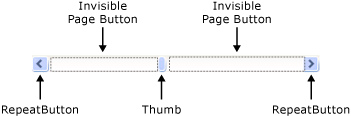
컨트롤 ScrollViewer 의 ScrollViewer 일부로 구현 ScrollBar 하는 경우 이 명령을 실행합니다.
XAML 텍스트 사용
<
object속성="ScrollBar.PageRightCommand"/>
