[이 문서는 시험판 문서이며 변경될 수 있습니다.]
Azure 애플리케이션 Insights를 사용해 관리된 환경에서 내보내는 Copilot Studio agent traces를 모니터링하세요. 내보내기 설정을 마친 후에는 Azure Monitor와 Application Insights를 사용해 에이전트 실행 검증, 노드 및 도구 실행 모니터링, 알림 생성, 운영 분석을 위한 맞춤형 쿼리 및 대시보드 구축을 하세요.
메모
- 표준 하네스와 GitHub Copilot 하네스 모두로 구동되는 에이전트에게 환경 수준의 텔레메트리가 제공됩니다.
- 비공개 미리 보기 이후 루트 에이전트 호출(
invoke_agent)은 이제requests가 아니라 다른 모든 스팬과 마찬가지로dependencies로 출력됩니다. 그 결과, 에이전트 루트 호출 트레이스는 글로벌 롤아웃이 완료될 때까지 테이블에requests계속 나타날 수 있습니다. - 최신 텔레메트리 전략과 기능을 활용해 이 미리보기 기능을 평가하려면, 초기 릴리스 사이클 이 활성화된 비생산 환경에서 테스트할 수 있습니다.
- 이 기능은 현재 전 세계적으로 배포 중이며, 아직 여러분의 환경에서 완전히 제공되지 않을 수 있습니다.
- 이 기능은 관리형 환경에서만 제공됩니다.
- 선언형 에이전트를 제외한 Copilot Studio에서 빌드된 에이전트에 대한 로그만 Application Insights에서 제공됩니다.
- Copilot Studio 에이전트 텔레메트리에 대해 환경 수준 애플리케이션 인사이트 전략만 채택하려면, 조직은 에이전트 수준의 애플리케이션 인사이트 텔레메트리를 비활성화할 수 있습니다.
이 글은 Power Platform 관리자 센터를 통해 Copilot Studio 에이전트 추적을 환경 수준에서 Azure 애플리케이션 Insights로 내보내는 설정을 설명합니다.
Important
이 문서에는 Microsoft Copilot Studio 미리 보기 설명서가 포함되어 있으며 변경될 수 있습니다.
미리 보기 기능은 프로덕션용이 아니며 기능이 제한되었을 수 있습니다. 이러한 기능은 공식 릴리스 이전에 제공되므로 사용자가 조기에 액세스하고 피드백을 제공할 수 있습니다.
프로덕션이 가능한 에이전트를 빌드하는 경우 Microsoft Copilot Studio 개요를 참조하세요.
사전 요구 사항
데이터 내보내기 연결을 설정하기 전에 ' Application Insights로 데이터를 내보내기'의 전제 조건을 완료하세요.
내보내는 항목
내보내기를 활성화하면 Copilot Studio 에이전트 추적 텔레메트리가 추적 지향적이고 OpenTelemetry에 정렬된 관측성 형식으로 Application Insights에 기록되어 조사, 대시보드, 경고를 지원합니다.
Copilot Studio의 에이전트 이벤트는 스팬 형태로 dependencies 테이블에 기록됩니다. 각 내보내는 이벤트(InvokeAgent, ExecuteTool, , 와 OutputMessages)는 단일 스팬 행(itemType = dependency)입니다.
스팬이 어떻게 트레이스를 형성하는가
텔레메트리는 operation_Id 열과 operation_ParentId 열을 통해 재구성되는 OpenTelemetry 트레이스 및 스팬 모델을 따릅니다:
- 에이전트의 각 턴은 각각 하나의 trace이며, 공유
operation_Id로 식별되므로 Application Insights가 해당 턴을 그룹화하고 엔드투엔드 트랜잭션 보기에서 표시할 수 있습니다. - 경간은
InvokeAgent그 회전 궤도의 근 입니다. 해당ExecuteTool아래에는 연결된OutputMessages스팬들이 중첩되어 있으며, 각 스팬은operation_ParentId=InvokeAgent스팬의id값을 가집니다. - 대화는 여러 번의 전환에 걸쳐 이어지며, 각각의 흔적을 남기며 흘러나온다.
gen_ai.conversation.id기준으로 그룹화하거나 필터링하여 하나의 대화에 속한 대화 차례를 다시 이어 보세요. -
OutputMessages스팬은 항상InvokeAgent루트를 생성하는 것은 아니므로, 일치하는 부모 없이 도착해 독립적인 단일 노드 트레이스로 표시될 수 있습니다.
내보내기 패키지 만들기
Power Platform 관리 센터 문서의 '내보내기 패키지 만들기' 안내를 따라 내보내기 타입을 Copilot Studio로 설정한 내보내기 패키지를 만듭니다.
구성 유효성 검사
내보내기 설정을 저장한 후 에이전트와 테스트 대화를 실행하고 텔레메트리가 Application Insights에 도착하는지 확인하세요. 새로운 구성에서는 텔레메트리 전달이 최대 24시간이 걸릴 수 있습니다. 다음 사항을 검증합니다.
- 에이전트 스팬이
dependencies표에 나타납니다. - 각 턴의
InvokeAgent,ExecuteTool,OutputMessages범위는operation_Id를 공유합니다.
응용 인사이트 분야
다음 표는 표 내 dependencies 필드와 세 개의 내보내진 에이전트 이벤트 각각에 대해 채워진 필드를 보여줍니다: InvokeAgent, ExecuteTool, , .OutputMessages 에이전트와 작업의 의미는 네이티브 열이 아니라 customDimensions(예: gen_ai.*와 같은 gen_ai.operation.name 키)에 있습니다.
dependencies 테이블의 필드 |
인보크에이전트 | 실행 도구 | 출력 메시지 | 샘플 값 |
|---|---|---|---|---|
timestamp [UTC] |
✔️ | ✔️ | ✔️ | 6/11/2026, 5:02:13.501 AM |
id |
✔️ | ✔️ | ✔️ | 1111aaa1-aa11-11aa-11a1-a1aaa1111aa1 |
name |
✔️ | ✔️ | ✔️ | InvokeAgent / ExecuteTool / OutputMessages |
resultCode |
✔️ | ✔️ | ✔️ |
OK, ERROR |
type |
✔️ | ✔️ | ✔️ | GenAI |
target |
✔️ | ✔️ | ✔️ | GenAI |
data |
✔️ | ✔️ | ✔️ | invoke_agent / execute_tool / output_messages |
success |
✔️ | ✔️ | ✔️ | True |
duration |
✔️ | ✔️ | ✔️ | 0 |
performanceBucket |
✔️ | ✔️ | ✔️ | <250ms |
itemType |
✔️ | ✔️ | ✔️ | dependency |
customDimensions |
✔️ | ✔️ | ✔️ | customDimension 속성에서 더 알아보세요 |
operation_Id |
✔️ | ✔️ | ✔️ |
trace-1111aaa1-aa11-11aa-11a1-a1aaa1111aa1 (해당 회전 내의 모든 스팬에서 공유됨) |
operation_ParentId |
✔️ | ✔️ | ✔️ | 턴의 InvokeAgentid는 자식 스팬의 경우이고, 트레이스 루트는 InvokeAgent 스팬의 경우입니다 |
client_Type |
✔️ | ✔️ | ✔️ | PC |
client_IP |
✔️ | ✔️ | ✔️ | 0.0.0.0 |
client_City |
✔️ | ✔️ | ✔️ | San Jose |
client_StateOrProvince |
✔️ | ✔️ | ✔️ | California |
client_CountryOrRegion |
✔️ | ✔️ | ✔️ | United States |
appId |
✔️ | ✔️ | ✔️ | 11111a1a-1111-1111-a111-1a1a1a11111a |
appName |
✔️ | ✔️ | ✔️ | - |
iKey |
✔️ | ✔️ | ✔️ | aa111a1a-a1aa-111a-111a-a111a111111a |
sdkVersion |
✔️ | ✔️ | ✔️ | dotnetc:2.23.0-29 |
itemId |
✔️ | ✔️ | ✔️ | a1a1111a-1111-11a1-1111-111111aa1a1a |
itemCount |
✔️ | ✔️ | ✔️ | 1 |
_ResourceId |
✔️ | ✔️ | ✔️ | - |
customDimensions 속성
모든 스팬에는 customDimensions JSON이 포함되어 있습니다. 다음 표는 모든 스팬에 나타나는 공통 키를 보여줍니다:
| 키 | 샘플 값 |
|---|---|
SpanId |
1111aaa1-aa11-11aa-11a1-a1aaa1111aa1 |
error.type |
404 |
Status.code |
1, 2 |
Status.message |
Descriptive failure message |
gen_ai.agent.id |
1aa11a11-1a1a-1a11-1a1a-1111aa1111aa |
gen_ai.agent.name |
MCS Agent |
gen_ai.conversation.id |
aaaaa111-1a1a-1111-1aa1-a111111a11a1 |
gen_ai.request.model |
Sonnet46 |
gen_ai.operation.name |
invoke_agent / execute_tool / output_messages |
env.id |
111a1aa1-a1aa-aaa1-a11a-11a111111111 |
microsoft.tenant.id |
11aaa111-1a11-1a1a-a111-aa1a111a111a |
microsoft.a365.agent.blueprint.id |
1111111a-aa11-1a11-a1a1-a11a1111a1a1 |
microsoft.a365.agent.platform.id |
111a1aa1-…_1a11111a-… |
microsoft.channel.name |
Copilot Studio Test Pane |
resource.provider |
copilot studio |
signal.category |
default |
a365.enabled |
True |
appinsights.enabled |
True |
user.id |
- |
user.email |
My.User@mytenant.onmicrosoft.com |
user.name |
My User |
client.address |
::ffff:00.00.00.00 |
telemetry.sdk.name |
A365ObservabilitySDK |
telemetry.sdk.language |
dotnet |
telemetry.sdk.version |
1.1.9.43597 |
이벤트별 키
다음 표는 이벤트별 키들을 보여줍니다:
| 키 | 인보크에이전트 | 실행 도구 | 출력 메시지 | Description |
|---|---|---|---|---|
gen_ai.input.messages |
✔️ | - | - | JSON 배열의 {role, parts:[{content, type}]}— 사용자 프롬프트 |
gen_ai.output.messages |
- | - | ✔️ | JSON 배열—에이전트의 답변 |
gen_ai.tool.name |
- | ✔️ | - | 예를 들어 workiqsharepoint:mcp_SharePointRemoteServer |
gen_ai.tool.type |
- | ✔️ | - | 예를 들어 MCP - Power Platform Connector |
gen_ai.tool.call.id |
- | ✔️ | - | 도구 호출 식별자 |
gen_ai.tool.call.arguments |
- | ✔️ | - | 도구에 전송된 JSON 페이로드 |
gen_ai.tool.call.result |
- | ✔️ | - | 도구가 반환하는 JSON 페이로드 |
현재 스키마를 발견하기
이 글에 문서화된 스키마는 시간이 지남에 따라 진화할 수 있습니다. 앞서 언급한 테이블에만 의존하기보다는 다음 쿼리를 사용해 최신 스키마를 직접 테스트하세요.
네이티브 테이블 열 목록
다음 쿼리는 테이블의 dependencies 컬럼 수준 스키마를 반환합니다. 쿼리, 대시보드, 알림을 만들 때 사용 가능한 네이티브 컬럼을 확인하는 데 사용하세요.
dependencies
| getschema
| project ColumnName, ColumnType
| order by ColumnName asc
customDimensions 키(동적 속성) 확인하기
다음 쿼리는 테이블 내 customDimensions JSON 내 dependencies 모든 키를 나열합니다: 속성 이름, 나타나는 에이전트 이벤트(InvokeAgent, , ExecuteToolOutputMessages), 그리고 샘플 값. 네이티브 컬럼 스키마와 달리 이 속성들은 동적이어서 SDK가 새로운 gen_ai.* 키를 추가할 때도 이 쿼리가 정확히 유지됩니다. 이를 가용 속성의 실시간 진실의 출처로 활용하세요.
dependencies
| where timestamp > ago(7d)
| mv-expand Key = bag_keys(customDimensions) to typeof(string)
| summarize Events = make_set(name), SampleValue = take_any(tostring(customDimensions[Key])) by Key
| order by Key asc
내보내진 텔레메트리를 모니터링합니다
애플리케이션 인사이트 로그 를 사용하여 에이전트 활동을 조회하고 에이전트 또는 도구 실행을 조사하세요. 내보낸 모든 텔레메트리는 스팬으로 dependencies 테이블에 저장됩니다:
- 각 에이전트 턴은 하나의 트레이스이며, 공통의
operation_Id를 기준으로 그룹화됩니다. -
InvokeAgent스팬은 트레이스 루트이며,ExecuteTool및OutputMessages스팬은operation_ParentId를 통해 그 아래에 중첩됩니다. -
gen_ai.conversation.id를 기준으로 그룹화하여 동일한 대화의 여러 차례 상호작용을 하나의 스레드로 묶고, 해당 ID를_에서 분할해 하위 에이전트 추적 정보를 포함합니다.
에이전트(미리 보기) 블레이드
로그 외에도 Application Insights는 Kusto 쿼리를 작성하지 않고도 내보낸 GenAI 텔레메트리를 시각화하는 내장된 에이전트(미리보기) 뷰를 제공합니다. Copilot Studio가 스팬을 dependencies 테이블에 기록하므로, 이 블레이드는 해당 데이터에서 직접 읽습니다:
-
에이전트 런: 구간에서
InvokeAgent생성된 에이전트 호출 횟수와 그 지속 시간, 성공률, 각 런이 속한 대화를 나열합니다. 몇 가지 제한이 있습니다; 자세한 내용은 '알려진 제한 사항과 고려사항'에서 확인하세요. -
도구: 에이전트가 어떤 도구를 얼마나 자주 호출하는지, 어떻게 작동하는지 보여주기 위해 구간을
ExecuteTool집계합니다. - 모델: 실행 전반에 걸친 모델 사용 요약, 호출된 모델과 호출 패턴을 드러냅니다.
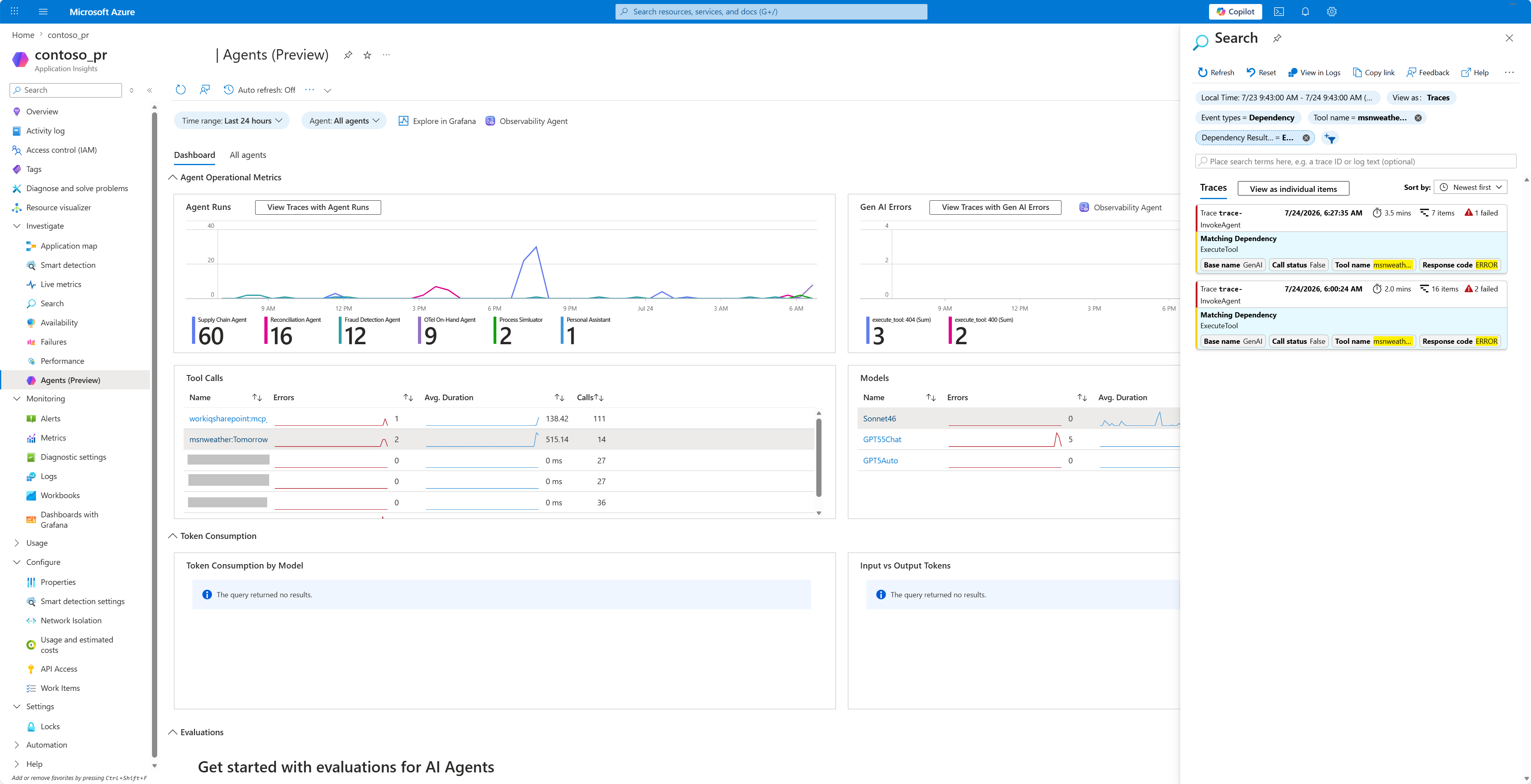
Application Insights를 활용한 에이전트 텔레메트리 분석
환경을 Application Insights에 연결하면, 사용자가 에이전트와 상호작용할 때, Copilot Studio 내 테스트 중에도 에이전트의 텔레메트리 데이터를 기록합니다. 기록된 텔레메트리 데이터를 보려면 Azure의 Application Insights 리소스의 Logs 섹션으로 가세요. 여기서는 Kusto 쿼리 를 사용해 데이터를 조회하고 분석할 수 있습니다. 자세한 내용은 예제 쿼리에서 확인하세요.
예제 쿼리
다음 Kusto 쿼리 예시는 Application Insights의 테이블에서 dependencies Copilot Studio 에이전트 대화를 재구성한 것입니다. 각 턴마다 모든 스팬이 하나의 트레이스 operation_Id를 공유하므로, 쿼리는 각 트레이스 내에서 스팬을 루트 우선 순서(즉, 자식 스팬보다 InvokeAgent 스팬이 먼저)로 정렬합니다.
쿼리 1: 특정 대화 ID에 대해 전체 추적을 반환하기
이 쿼리는 알려진 한 대화의 모든 구간을 반환하며, 각 루트 구간이 자식 구간보다 먼저 나열된 시간 순서로 정렬되어 있습니다.
대화 ID 자리 표시자를 에이전트의 대화 ID로 교체하세요. 커스텀 에이전트를 테스트할 때 다음 명령어를 입력하면 찾을 수 있습니다: /debug conversationid.
let LatestConvo = "<Conversation ID>";
dependencies
| where tostring(customDimensions["gen_ai.conversation.id"]) == LatestConvo
| order by operation_Id asc, iff(name == "InvokeAgent", 0, 1) asc, timestamp asc
| project timestamp, name, id, operation_Id,
          operation_ParentId, duration, target, type, cloud_RoleName,
          resultCode, customDimensions
쿼리 2: 특정 에이전트의 최신 대화를 반환하기
이 쿼리는 지정된 시간 창 내에서 이름 붙여진 에이전트의 가장 최근 대화를 찾습니다. 해당 대화의 모든 스팬을 동일한 시간순 및 루트 우선 순서대로 반환합니다. 에이전트 이름 자리 표시자를 에이전트 이름으로 바꾸세요.
let Window = 7d;
let AgentName = "<Agent name>";
let LatestConvo = toscalar(
    dependencies
    | where timestamp > ago(Window)
    | where tostring(customDimensions["gen_ai.agent.name"]) == AgentName
    | where isnotempty(tostring(customDimensions["gen_ai.conversation.id"]))
    | top 1 by timestamp desc
    | project tostring(customDimensions["gen_ai.conversation.id"])
);
dependencies
| where timestamp > ago(Window)
| where tostring(customDimensions["gen_ai.conversation.id"]) == LatestConvo
| order by operation_Id asc, iff(name == "InvokeAgent", 0, 1) asc, timestamp asc
| project timestamp, name, id, operation_Id,
          operation_ParentId, duration, target, type, cloud_RoleName,
          resultCode, customDimensions
쿼리 3: 알려진 생성형 AI OpenTelemetry 속성을 열로 확장하기
이 쿼리는 쿼리 2와 동일한 트레이스를 반환하지만, 각 알려진 OpenTelemetry 의미 규칙 키를 별도의 이름 있는 열로 파싱합니다. 그 결과, 도구명, 모델, 사용자 프롬프트, 에이전트 응답, 대화 ID 등 생성형 AI 필드를 직접 정렬, 필터링, 스캔할 수 있는 평면적이고 명시적으로 정의된 테이블이 완성됩니다. 에이전트 이름 자리 표시자를 에이전트 이름으로 바꾸세요.
let Window = 7d;
let AgentName = "<Agent name>";
let LatestConvo =
    toscalar(
        dependencies
        | where timestamp > ago(Window)
        | extend
            AgentName_ = tostring(customDimensions["gen_ai.agent.name"]),
            ConversationId_ = tostring(customDimensions["gen_ai.conversation.id"])
        | where AgentName_ == AgentName
        | where isnotempty(ConversationId_)
        | summarize arg_max(timestamp, ConversationId_)
        | project ConversationId_
    );
dependencies
| where timestamp > ago(Window)
| extend
    ConversationId = tostring(customDimensions["gen_ai.conversation.id"])
| where ConversationId == LatestConvo
| extend
    OperationName    = tostring(customDimensions["gen_ai.operation.name"]),
    AgentId          = tostring(customDimensions["gen_ai.agent.id"]),
    AgentName        = tostring(customDimensions["gen_ai.agent.name"]),
    Model            = tostring(customDimensions["gen_ai.request.model"]),
    ToolName         = tostring(customDimensions["gen_ai.tool.name"]),
    ToolType         = tostring(customDimensions["gen_ai.tool.type"]),
    ToolCallId       = tostring(customDimensions["gen_ai.tool.call.id"]),
    ToolArguments    = tostring(customDimensions["gen_ai.tool.call.arguments"]),
    ToolResult       = tostring(customDimensions["gen_ai.tool.call.result"]),
    EnvironmentId    = tostring(customDimensions["env.id"]),
    TenantId         = tostring(customDimensions["microsoft.tenant.id"]),
    ChannelName      = tostring(customDimensions["microsoft.channel.name"]),
    BlueprintId      = tostring(customDimensions["microsoft.a365.agent.blueprint.id"]),
    PlatformId       = tostring(customDimensions["microsoft.a365.agent.platform.id"]),
    ResourceProvider = tostring(customDimensions["resource.provider"]),
    SignalCategory   = tostring(customDimensions["signal.category"]),
    UserId           = tostring(customDimensions["user.id"]),
    UserName         = tostring(customDimensions["user.name"]),
    UserEmail        = tostring(customDimensions["user.email"])
| extend
    InputMessages  = parse_json(tostring(customDimensions["gen_ai.input.messages"])),
    OutputMessages = parse_json(tostring(customDimensions["gen_ai.output.messages"]))
| extend
    UserInput   = tostring(InputMessages[0].parts[0].content),
    AgentOutput = tostring(OutputMessages[0].parts[0].content)
| order by
    operation_Id asc,
    iff(name == "InvokeAgent", 0, 1) asc,
    timestamp asc
| project
    timestamp, name, id, operation_Id, operation_ParentId, OperationName, ConversationId,
    AgentId, AgentName, Model, ToolName, ToolType, ToolCallId, ToolArguments, ToolResult,
    UserInput, AgentOutput, EnvironmentId, TenantId, ChannelName, BlueprintId, PlatformId,
    ResourceProvider, SignalCategory, UserId, UserName, UserEmail, duration, target, type,
    cloud_RoleName, resultCode, customDimensions
쿼리 4: 모든 genAI OpenTelemetry 속성을 동적으로 확장하세요
이 쿼리는 쿼리 3과 동일한 span을 반환하지만, 모든 gen_ai.* 키는 customDimensions에서 동적으로 풀려 각각 고유한 ga_ 접두사가 붙은 열로 반환됩니다. 투영이 동적이기 때문에, SDK가 나중에 내보내는 새로운 gen_ai.* 속성은 쿼리를 변경하지 않고도 자동으로 나타납니다.
에이전트 이름 자리 표시자를 에이전트 이름으로 바꾸세요.
let Window = 7d;
let AgentName = "<Agent name>";
let LatestConvo = toscalar(
    dependencies
    | where timestamp > ago(Window)
    | where tostring(customDimensions["gen_ai.agent.name"]) == AgentName
    | where isnotempty(tostring(customDimensions["gen_ai.conversation.id"]))
    | top 1 by timestamp desc
    | project tostring(customDimensions["gen_ai.conversation.id"])
);
dependencies
| where timestamp > ago(Window)
| where tostring(customDimensions["gen_ai.conversation.id"]) == LatestConvo
| order by operation_Id asc, iff(name == "InvokeAgent", 0, 1) asc, timestamp asc
| mv-apply Key = bag_keys(customDimensions) on (
    where Key startswith "gen_ai."
    | summarize OTelGenAI = make_bag(bag_pack(tostring(Key), customDimensions[tostring(Key)]))
  )
| project timestamp, name, id, operation_Id, operation_ParentId,
          duration, target, type, cloud_RoleName, resultCode,
          OTelGenAI, customDimensions
| evaluate bag_unpack(OTelGenAI, 'ga_')
쿼리 5: 모든 자식 에이전트와 하위 에이전트를 포함한 루트 에이전트의 최신 대화를 반환합니다
이 쿼리는 이름 있는 에이전트에 대한 가장 최근 대화를 반환합니다. 해당 대화와 해당 대화에서 호출한 모든 1단계 하위 에이전트의 모든 스팬을 반환합니다. 에이전트가 다른 에이전트를 도구로 호출하면, 서브에이전트는 부모의 대화 ID를 접미사와 _<subConversationId> 함께 상속받습니다. 트리 전체는 최상위 ID를 기준으로 일치시켜 재구성됩니다.
에이전트 이름 자리 표시자를 에이전트 이름으로 바꾸세요.
let Window = 7d;
let AgentName = "<Agent name>";
let LatestRoot =
    toscalar(
        dependencies
        | where timestamp > ago(Window)
        | extend
            AgentName_ = tostring(customDimensions["gen_ai.agent.name"]),
            ConversationId = tostring(customDimensions["gen_ai.conversation.id"])
        | where AgentName_ == AgentName
        | where isnotempty(ConversationId)
        | where ConversationId !has "_"
        | summarize arg_max(timestamp, ConversationId)
        | project ConversationId
    );
dependencies
| where timestamp > ago(Window)
| extend
    ConversationId = tostring(customDimensions["gen_ai.conversation.id"]),
    AgentName_ = tostring(customDimensions["gen_ai.agent.name"]),
    ToolName = tostring(customDimensions["gen_ai.tool.name"]),
    ToolResult = tostring(customDimensions["gen_ai.tool.callresult"])
| where isnotempty(ConversationId)
| where ConversationId == LatestRoot
    or ConversationId startswith strcat(LatestRoot, "_")
| extend
    Depth = countof(ConversationId, "_"),
    AgentRole = iff(ConversationId == LatestRoot, "root", "sub-agent")
| extend
    InputMessages = parse_json( tostring(customDimensions["gen_ai.input.messages"]) ),
    OutputMessages = parse_json( tostring(customDimensions["gen_ai.output.messages"]) )
| extend
    UserInput = tostring(InputMessages[0].parts[0].content),
    AgentOutput = tostring(OutputMessages[0].parts[0].content)
| order by timestamp asc
| project
    timestamp, name, AgentRole, Depth, AgentName, ToolName, ToolResult, UserInput,
    AgentOutput, id, operation_Id, operation_ParentId, ConversationId, duration,
    target, type, cloud_RoleName, resultCode, customDimensions
알려진 제한 사항 및 고려 사항
-
duration표준 하네스로 구동되는 에이전트 흔적에 대해서는 값을 확인할 수 없습니다. - 에이전트 및 툴 실행 오류가 현재 트레이스 상태에 제대로 반영되지 않습니다.
- 데이터 상주 요구사항에 따라 각 환경 영역별로 전용 Application Insights 자원을 사용하는 것이 좋습니다.
- 서브 에이전트 스팬은 현재 자체 트레이스 내부의
InvokeAgent스팬이 아니라, 에이전트를 호출한InvokeAgent스팬을 부모로 둡니다. - 트레이스 및 스팬 ID는 현재 OpenTelemetry 표준을 완전히 준수하는 32자리 16진수 트레이스 ID 및 16자리 16진수 스팬 ID 형식이 아니라, GUID(필요한 경우 접두사 포함) 형식으로 출력됩니다.
- 대상 애플리케이션 인사이트 리소스에서 로컬 인증 이 활성화되어 있는지 확인하세요.
- 텔레메트리 내보내기는 트랜잭션 방식이 아닙니다. 일시적인 서비스 이벤트 중에는 소량의 데이터 손실이 발생할 수 있습니다.
- 스키마 관련 인제스 업데이트가 도입될 때 데이터 불일치가 발생할 수 있습니다.
-
TopicStart,TopicAction,TopicEnd와 같은 주제 관련 이벤트는 환경 수준 텔레메트리로는 수집되지 않습니다. - 보고 및 문제 해결을 단순화하기 위해, 에이전트 수준과 환경 수준의 텔레메트리를 동일한 Application Insights 인스턴스에 보내지 마세요.
- GitHub Copilot 하네스 기반 에이전트 작성 환경에서 작성된 에이전트에 대해 생성되는 텔레메트리는 표준 하네스 기반 에이전트 작성 환경에서 빌드된 에이전트의 텔레메트리와 다를 수 있습니다.