Nata
Norint pasiekti šį puslapį, reikalingas leidimas. Galite pabandyti prisijungti arba pakeisti katalogus.
Norint pasiekti šį puslapį, reikalingas leidimas. Galite pabandyti pakeisti katalogus.
Important
This feature is in preview.
Microsoft Fabric Dataflow Gen2 can call machine learning model endpoints to get real-time predictions during data transformation. This integration allows you to enrich your data by applying trained machine learning models as part of your dataflow pipeline. You can invoke model endpoints using service principal authentication through M query functions.
Prerequisites
Before you can call ML model endpoints from Dataflow Gen2, ensure you have the following:
- An active machine learning model endpoint in your Microsoft Fabric workspace
- A service principal created in Microsoft Entra ID
- The service principal must have appropriate permissions to access the machine learning model endpoint in Fabric
- Basic familiarity with M query language and Dataflow Gen2
Set up service principal permissions
To allow your service principal to call machine learning model endpoints, you need to grant it the appropriate permissions:
Navigate to the workspace containing your machine learning model in Fabric.
Select Manage access from the workspace menu.
Select Add people or groups.
Search for your service principal by its application name or client ID.
Assign the service principal at least Contributor role to access and invoke model endpoints.
Get the endpoint URL and authentication details
Before creating your M query function, gather the following information:
Endpoint URL: Navigate to your machine learning model in Fabric and copy the endpoint URL from the Endpoint details section.
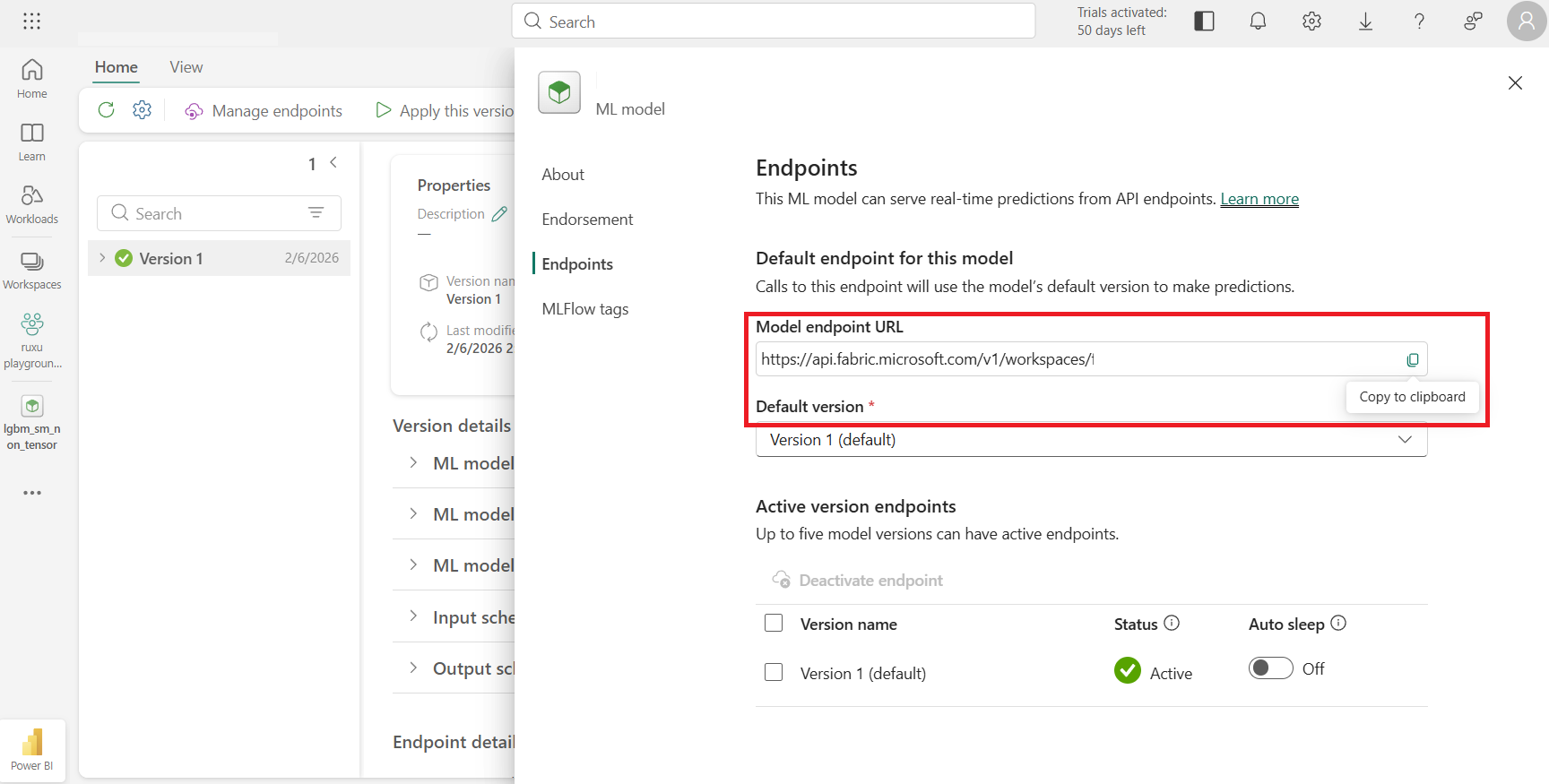
Tenant ID: Find your tenant ID in the Azure portal under Microsoft Entra ID.
Client ID: Locate your service principal's application (client) ID in the Azure portal.
Client Secret: Create or retrieve a client secret for your service principal from the Azure portal.
Create an M query function to call the endpoint
In Dataflow Gen2, you can create a custom M query function that authenticates using the service principal and calls the ML model endpoint.
In your Dataflow Gen2, select Get data > Blank query.
Or get the data you want to enrich and then open the Advanced Editor from the Home tab.
Replace the query with the following M function code:
let
    CallMLEndpoint = (endpointUrl as text, tenantId as text, clientId as text, clientSecret as text, inputData as any) =>
    let
        // Get access token using service principal
        tokenUrl = "https://login.microsoftonline.com/" & tenantId & "/oauth2/v2.0/token",
        tokenBody = "client_id=" & clientId &
                    "&scope=https://api.fabric.microsoft.com/.default" &
                    "&client_secret=" & clientSecret &
                    "&grant_type=client_credentials",
        tokenResponse = Web.Contents(
            tokenUrl,
            [
                Headers = [#"Content-Type" = "application/x-www-form-urlencoded"],
                Content = Text.ToBinary(tokenBody)
            ]
        ),
        tokenJson = Json.Document(tokenResponse),
        accessToken = tokenJson[access_token],

        // Call ML endpoint with bearer token
        requestBody = Json.FromValue(inputData),
        response = Web.Contents(
            endpointUrl,
            [
                Headers = [
                    #"Content-Type" = "application/json",
                    #"Authorization" = "Bearer " & accessToken
                ],
                Content = requestBody
            ]
        ),
        result = Json.Document(response)
    in
        result
in
    CallMLEndpoint
Rename the query to CallMLEndpoint by right-clicking on the query in the Queries pane.
Use the function in your dataflow
Once you've created the function, you can use it to call the ML endpoint for each row in your data:
Load or connect to your source data in the dataflow.
Add a custom column that invokes the ML endpoint function. Select Add column > Custom column.
Use the following formula to call your endpoint (replace the parameters with your actual values):
CallMLEndpoint(
    "<your-machine-learning-endpoint-url>",
    "<your-tenant-id>",
    "<your-client-id>",
    "<your-client-secret>",
    [input1 = [Column1], input2 = [Column2]]
)
The function returns the prediction result from the machine learning model, which you can expand and use in subsequent transformation steps.
Best practices
Secure credentials: Consider using Dataflow Gen2 parameters or variable library integration to store sensitive values like client secrets instead of hardcoding them.
Error handling: Add error handling logic to your M query to gracefully handle endpoint failures or timeout scenarios.
Endpoint availability: Ensure your machine learning model endpoint is active before running the dataflow. Inactive endpoints will cause the dataflow refresh to fail. Disable the auto-sleep capability if you want to consistently call the endpoint.
Performance: Calling machine learning endpoints for each row can be slow for large datasets. Consider filtering or sampling data before applying predictions.
Considerations and limitations
- Service principal authentication is required for calling machine learning endpoints from Dataflow Gen2.
- Calling machine learning endpoints incurs costs for both the dataflow compute and the machine learning endpoint consumption. Monitor your Fabric capacity usage accordingly.
Related content
- Learn more about machine learning model endpoints
- Explore Dataflow Gen2 overview
- Read about service principal support in Data Factory
- Learn about Dataflow Gen2 parameters