Pastaba.
Prieigai prie šio puslapio reikalingas įgaliojimas. Galite bandyti prisijungti arba pakeisti katalogus.
Prieigai prie šio puslapio reikalingas įgaliojimas. Galite bandyti pakeisti katalogus.
A Fabric workspace identity is an automatically managed service principal that can be associated with a Fabric workspace. Fabric workspaces with a workspace identity can securely read or write to firewall-enabled Azure Data Lake Storage Gen2 accounts through trusted workspace access for OneLake shortcuts. Fabric items can use the identity when connecting to resources that support Microsoft Entra authentication. Fabric uses workspace identities to obtain Microsoft Entra tokens without the customer having to manage any credentials.
Workspace identities can be created in the workspace settings of any workspace except My workspaces.
When you create a workspace identity, Fabric creates a service principal in Microsoft Entra ID to represent the identity. An accompanying app registration is also created. Fabric automatically manages the credentials associated with workspace identities, thereby preventing credential leaks and downtime due to improper credential handling.
Note
Fabric workspace identity is generally available. You can create a workspace identity in any workspace except My workspace.
While Fabric workspace identities share some similarities with Azure managed identities, their lifecycle, administration, and governance are different. Fabric manages the independent lifecycle of a workspace identity. You can optionally associate a Fabric workspace with an identity. When you permanently delete the workspace, Fabric deletes the identity. The name of the workspace identity is always the same as the name of the workspace it's associated with.
Create and manage a workspace identity
You must be a workspace admin to be able to create and manage a workspace identity. The workspace you're creating the identity for can't be a My Workspace.
- Sign in to the Microsoft Fabric portal.
- Select Workspaces, and then select the workspace you want to create a workspace identity for.
- In the workspace, select the Workspace settings (gear) icon.
- Select the Workspace identity tab.
- Select the + Workspace identity button.
When the workspace identity has been created, the tab displays the workspace identity details and the list of authorized users.
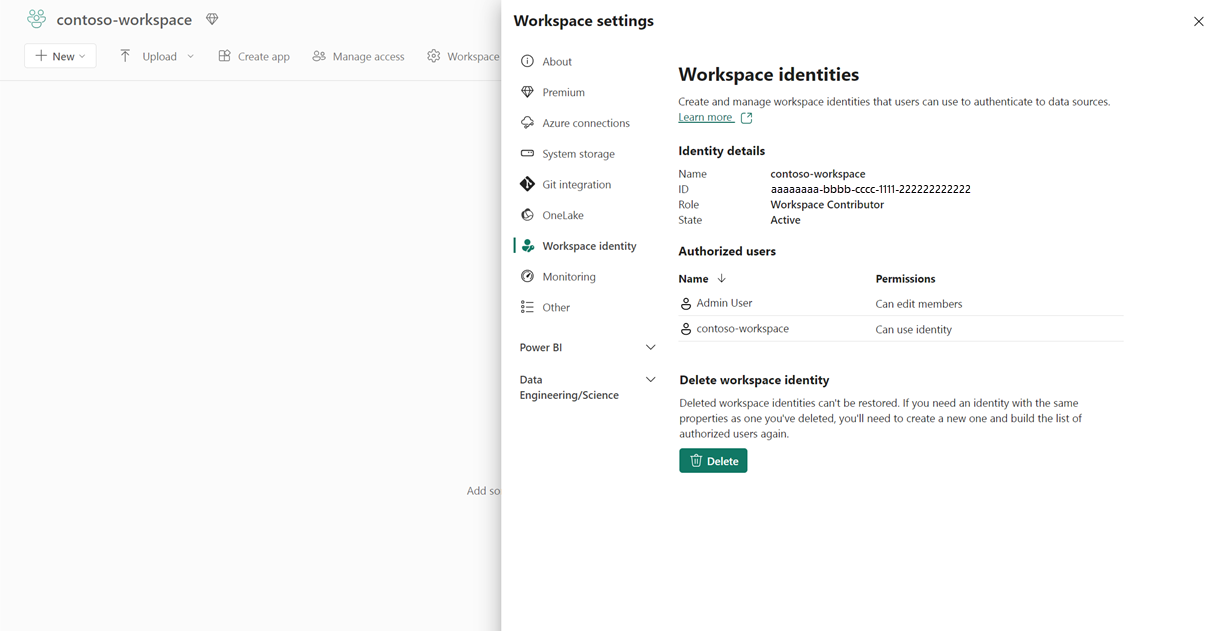
The sections of the workspace identity configuration are described in the following sections.
Identity details
| Detail | Description |
|---|---|
| Name | Workspace identity name. The workspace identity name is the same as the workspace name. |
| ID | The workspace identity GUID. This is a unique identifier for the identity. |
| Role | The workspace role assigned to the identity. |
| State | The state of the workspace. Possible values: Active, Inactive, Deleting, Unusable, Failed, DeleteFailed |
Authorized users
For information, see Access control.
Delete a workspace identity
When an identity is deleted, Fabric items relying on the workspace identity for trusted workspace access or authentication will break. Deleted workspace identities cannot be restored.
Note
When you delete a workspace, Fabric also deletes its workspace identity, but not immediately. The workspace stays in a Deleted state for the duration of the workspace retention period, and Fabric doesn't delete the workspace identity until the workspace is permanently deleted. For details, see Deleting the identity.
If you restore the workspace after deletion, the workspace identity isn't restored. If you want the restored workspace to have a workspace identity, you must create a new one.
How to use workspace identity
Workspace identity currently can be used in two ways:
For authentication: To learn how this identity surfaces as an authentication option when connecting OneLake shortcuts, pipelines, semantic models, and Dataflows Gen2 (CI/CD) to data sources, see Authenticate with workspace identity.
For trusted workspace access: Shortcuts in a workspace that has a workspace identity can be used for trusted service access. For more information, see trusted workspace access.
Security, administration, and governance of the workspace identity
The following sections describe who can use the workspace identity, and how you can monitor it in Microsoft Purview and Azure.
Access control
Workspace identity can be created and deleted by workspace admins. By default, the workspace identity is not granted any workspace role.
Warning
Workspace identity is an automatically managed service principal created by Fabric users. Access to this identity should be carefully managed and monitored, as any individual given access to the identity is allowed to assume it.
Workspace identity is supported for authentication to target resources in connections. Only users with an admin, member, or contributor role in the workspace can configure the workspace identity for authentication in connections.
Application Administrators or users with higher roles can view, modify, and delete the service principal and app registration associated with the workspace identity in Azure.
Warning
Modifying or deleting the service principal or app registration in Azure is not recommended, as it will cause Fabric items relying on workspace identity to stop working. Such changes may be reverted. Adding API permissions to allow access to target resources is supported for workspace identities. Additionally, adhere to the principle of least privilege when managing Application Administrator roles. Ensure that only appropriate users are assigned this role. For more details, refer to Application Administrators
Administer the workspace identity in Fabric
Fabric administrators can manage the workspace identities that they create in their tenant. Use Fabric identities under Configurations in the Govern section of the OneLake catalog.
- In the OneLake catalog, select Govern > Configurations > Fabric identities.
- Select a workspace identity, and then select Details.
- In the Details tab, you can view additional information related to the workspace identity.
- You can also delete a workspace identity.
Note
Workspace identities cannot be restored after deletion. Be sure to review the consequences of deleting a workspace identity described in Delete a workspace identity.
Review workspace identity events in Microsoft Purview Audit
You can view the audit events generated when creating and deleting workspace identities in Microsoft Purview Audit. To access the log:
- Go to Microsoft Purview Audit.
- In the audit search form that appears, use the Activities - friendly names field to search for fabric identity to find the activities related to workspace identities. Currently, the following activities related to workspace identities are:
- Created Fabric Identity for Workspace
- Retrieved Fabric Identity for Workspace
- Deleted Fabric Identity for Workspace
- Retrieved Fabric Identity Token for Workspace
Administer the workspace identity in Azure
The application associated with the workspace identity can be viewed under both Enterprise applications and App registrations in the Azure portal.
Enterprise applications
The application associated with the workspace identity can be seen in Enterprise Applications in the Azure portal. Fabric Identity Management app is its configuration owner.
Warning
Modifications to the application made here will cause the workspace identity to stop working, and such changes may be reverted. Adding API permissions to allow access to target resources is supported for workspace identities. Additionally, adhere to the principle of least privilege when managing Application Administrator roles. Ensure that only appropriate users are assigned this role. For more details, refer to Application Administrators
To view the audit logs and sign-in logs for this identity:
- Sign in to the Azure portal.
- Navigate to Microsoft Entra ID > Enterprise Applications.
- Select either Audit logs or Sign in logs, as desired.
App registrations
The application associated with the workspace identity can be seen under App registrations in the Azure portal. No modifications should be made there, as this will cause the workspace identity to stop working.
The app registration stays listed as long as the workspace identity exists in Fabric, including while a deleted workspace is in its retention period. For more information, see Deleting the identity.
Advanced scenarios
The following sections describe scenarios involving workspace identities that might occur.
Deleting the identity
The workspace identity can be deleted in the workspace settings. When an identity is deleted, Fabric items relying on the workspace identity for trusted workspace access or authentication will break. Deleted workspace identities can't be restored.
Fabric also deletes its workspace identity but keeps the workspace in a Deleted state for the length of the workspace retention period so that an admin can restore it. During the retention period, Fabric doesn't deprovision the workspace identity, and its service principal and app registration remain visible in the Azure portal.
Fabric deprovisions the workspace identity when you permanently delete the workspace. This permanent deletion happens in one of the following ways:
- The retention period expires and a background job permanently deletes the workspace.
- A Fabric admin permanently deletes the workspace during the retention period. For more information, see Permanently delete a deleted collaborative workspace during the retention period.
After permanent deletion starts, the workspace identity moves to the Deleting state, and it might take some time before the associated service principal and app registration no longer appear in Microsoft Entra ID.
If you regularly delete workspaces and recreate them with the same name, you might see more than one app registration with that name in your tenant while the deleted workspaces are still in their retention period. To remove a workspace identity without waiting for the retention period to expire, use one of the following options:
- Before you delete the workspace, delete the workspace identity on the Workspace identity tab of the workspace settings.
- Ask a Fabric admin to permanently delete the workspace during the retention period.
Warning
Don't delete the service principal or app registration of a workspace identity directly in the Azure portal. Fabric can't find the application when it deprovisions the identity, which causes errors and can delay the cleanup of the workspace identity.
If you restore the workspace after deletion, the workspace identity is not restored. If you want the restored workspace to have a workspace identity, you must create a new one.
Renaming the workspace
When a workspace gets renamed, the workspace identity is also renamed to match the workspace name. However its Microsoft Entra application and service principal remain the same. Note that there can be multiple application and app registration objects with same name in a tenant.
Considerations and limitations
You can create a workspace identity in any workspace except My workspace.
You can create and use a workspace identity regardless of the capacity SKU assigned to the workspace.
Using workspace identity as a credential in cloud connections is supported in any capacity.
Trusted workspace access to firewall-enabled Storage accounts requires the workspace to be assigned to a purchased Microsoft Fabric capacity (F SKU).
If you migrate a workspace with a workspace identity to a non-Fabric capacity, to a non-F SKU Fabric capacity, or to a trial capacity, the identity isn't disabled or deleted, but Fabric items that rely on trusted workspace access stop working.
A default of 10,000 workspace identities can be created in a tenant. You can also specify your own maximum in the tenant settings, which becomes the upper limit for Fabric identity creation across your tenant. For more information, see Define maximum number of Fabric identities in a tenant.
Fabric doesn't remove a workspace identity when you delete its workspace. Fabric removes it only after the workspace is permanently deleted. As a result, your tenant can contain more than one app registration with the same name if you delete workspaces and recreate them with the same name. For more information, see Deleting the identity.
Azure Data Lake Storage Gen2 shortcuts in a workspace that has a workspace identity will be capable of trusted service access.
Workspace identity isn’t supported in B2B or cross-tenant scenarios.
Troubleshooting issues with creating a workspace identity
If you can't create a workspace identity because the creation button is disabled, make sure you have the workspace administrator role.
If you run into issues the first time you create a workspace identity in your tenant, try the following steps:
- If the workspace identity state is failed, wait for an hour and then delete the identity.
- After the identity has been deleted, wait 5 minutes and then create the identity again.