Nota
Capaian ke halaman ini memerlukan kebenaran. Anda boleh cuba mendaftar masuk atau menukar direktori.
Capaian ke halaman ini memerlukan kebenaran. Anda boleh cuba menukar direktori.
Note
The information in this article applies only to customer in the European Union (EU), European Free Trade Association (EFTA), and United Kingdom (UK).
To provide additional flexibility in model choice, the Microsoft 365 admin center includes a setting that allows admins to make Claude models from Anthropic available only in Copilot experiences in Microsoft 365 apps.
Claude model availability in Microsoft 365 apps
As the admin, you can manage the Anthropic subprocessor setting in the Microsoft 365 admin center. When this setting is enabled and the All users for Microsoft 365 apps only option is selected, Claude models from Anthropic are available only in Copilot experiences in the following Microsoft 365 apps:
- Excel
- PowerPoint
- Word
Note
- This setting is enabled by default for tenants in the EU, EFTA, and UK that were created after March 25, 2026.
- For tenants in the EU, EFTA and UK that existed on or before March 25, 2026, tenant administrators are encouraged to check their tenant's setting in the Microsoft 365 admin center.
All tenant administrators are encouraged to check their tenant's Anthropic subprocessor setting to make sure it aligns with their organization's requirements.
Data processing and the EU Data Boundary
When Claude models from Anthropic are used in Copilot experiences in Excel, PowerPoint, or Word, data processing for these models occurs outside of the EU Data Boundary.
When Anthropic operates as a Microsoft subprocessor it's governed by the Microsoft Product Terms and the Microsoft Data Protection Addendum (DPA). For more information, see Claude models from Anthropic in Microsoft Online Services.
Manage the setting in the Microsoft 365 admin center
You must be a member of the AI Administrator or Global Administrator role to perform this task. For more information, see About administrator roles in the Microsoft 365 admin center.
To make Claude models available only in Microsoft 365 apps:
Go to the Microsoft 365 admin center and select Copilot > Settings > View all.
Select AI providers operating as Microsoft subprocessors.
On the AI providers operating as Microsoft subprocessors page, under Available subprocessors for your organization, select Anthropic.
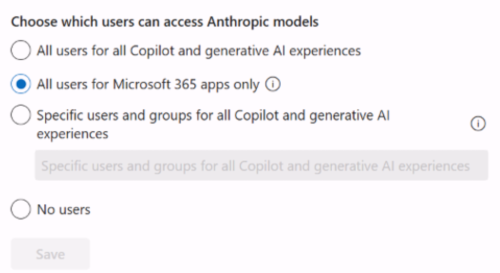
Under Choose which users can access Anthropic models, select All users for Microsoft 365 apps only, and then select Save.
Note
Prior to mid-September 2026, the All users for Microsoft 365 apps only option was named Allow Anthropic models in Copilot experiences within Microsoft 365 apps.
If you want to make Claude models available to your users beyond just Copilot experiences in Microsoft 365 apps, select All users, or specify users and groups, and then select Save.