InlineUIContainer.Child Eigenschap
Definitie
Belangrijk
Bepaalde informatie heeft betrekking op een voorlopige productversie die aanzienlijk kan worden gewijzigd voordat deze wordt uitgebracht. Microsoft biedt geen enkele expliciete of impliciete garanties met betrekking tot de informatie die hier wordt verstrekt.
Hiermee haalt u de gehoste op of stelt u deze UIElement in door de InlineUIContainer.
public:
 property System::Windows::UIElement ^ Child { System::Windows::UIElement ^ get(); void set(System::Windows::UIElement ^ value); };
public System.Windows.UIElement Child { get; set; }member this.Child : System.Windows.UIElement with get, setPublic Property Child As UIElementWaarde van eigenschap
De UIElement host door de InlineUIContainer.
Voorbeelden
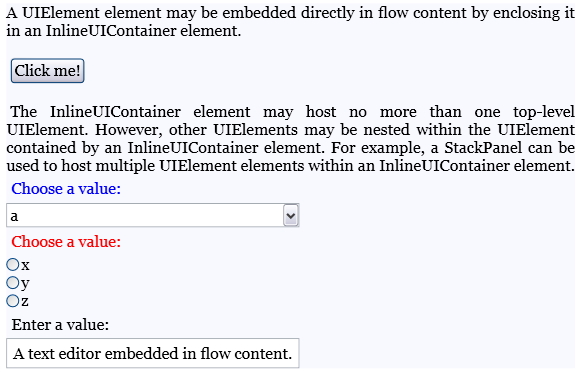
In het volgende voorbeeld ziet u hoe u de InlineUIContainer elementen gebruikt om elementen binnen stroominhoud te hosten UIElement .
<FlowDocument ColumnWidth="400">
  <Paragraph Background="GhostWhite">
    <Run>
      A UIElement element may be embedded directly in flow content
      by enclosing it in an InlineUIContainer element.
    </Run>
    <LineBreak/>
    <LineBreak/>
    <InlineUIContainer>
      <Button>Click me!</Button>
    </InlineUIContainer>
    <LineBreak/>
    <LineBreak/>
    <Run>
      The InlineUIContainer element may host no more than one top-level
      UIElement.  However, other UIElements may be nested within the
      UIElement contained by an InlineUIContainer element.  For example,
      a StackPanel can be used to host multiple UIElement elements within
      an InlineUIContainer element.
    </Run>
    <InlineUIContainer>
      <StackPanel>
        <Label Foreground="Blue">Choose a value:</Label>
        <ComboBox>
          <ComboBoxItem IsSelected="True">a</ComboBoxItem>
          <ComboBoxItem>b</ComboBoxItem>
          <ComboBoxItem>c</ComboBoxItem>
        </ComboBox>
        <Label Foreground ="Red">Choose a value:</Label>
        <StackPanel>
          <RadioButton>x</RadioButton>
          <RadioButton>y</RadioButton>
          <RadioButton>z</RadioButton>
        </StackPanel>
        <Label>Enter a value:</Label>
        <TextBox>
          A text editor embedded in flow content.
        </TextBox>
      </StackPanel>
    </InlineUIContainer>
  </Paragraph>
</FlowDocument>
In de volgende afbeelding ziet u hoe dit voorbeeld wordt weergegeven.
In het volgende voorbeeld ziet u hoe u de Child eigenschap programmatisch gebruikt.
Paragraph parx = new Paragraph();
Run run1 = new Run(" Text to precede the button... ");
Run run2 = new Run(" Text to follow the button... ");

// Create a new button to be hosted in the paragraph.
Button buttonx = new Button();
buttonx.Content = "Click me!";

// Create a new InlineUIContainer, and assign the button
// as the UI container's child.
InlineUIContainer uiCont = new InlineUIContainer();
uiCont.Child = buttonx;

// Add the text runs and UI container to the paragraph, in order.
parx.Inlines.Add(run1);
parx.Inlines.Add(uiCont);
parx.Inlines.Add(run2);
Dim parx As New Paragraph()
Dim run1 As New Run(" Text to precede the button... ")
Dim run2 As New Run(" Text to follow the button... ")

' Create a new button to be hosted in the paragraph.
Dim buttonx As New Button()
buttonx.Content = "Click me!"

' Create a new InlineUIContainer, and assign the button
' as the UI container's child.
Dim uiCont As New InlineUIContainer()
uiCont.Child = buttonx

' Add the text runs and UI container to the paragraph, in order.
parx.Inlines.Add(run1)
parx.Inlines.Add(uiCont)
parx.Inlines.Add(run2)
Opmerkingen
Een InlineUIContainer kan niet meer dan één UIElement onderliggend element hosten. Het onderliggende element dat wordt gehost door een InlineUIContainer kind kan echter zelf onderliggende elementen hosten.
In XAML is het verpakken van een UIElement in een InlineUIContainer gelijk aan het UIElement instellen als de waarde van de Child eigenschap.
