Notitie
Voor toegang tot deze pagina is autorisatie vereist. U kunt proberen u aan te melden of de directory te wijzigen.
Voor toegang tot deze pagina is autorisatie vereist. U kunt proberen de mappen te wijzigen.
De platforms Copilot Studio en Dynamics 365 for Customer Service verschillen enigszins in de manier waarop ze rich media-berichten ondersteunen op basis van het kanaal en het type rich media-bericht. In dit artikel wordt beschreven hoe u rich media-berichten kunt ondersteunen in Copilot Studio.
Agent JSON voor Apple Messages for Business ophalen
- Selecteer productiviteit in ondersteuning in het siteoverzicht van het Copilot Service-beheercentrum.
- Selecteer op de pagina Productiviteit de optie Beheren voor uitgebreide berichten.
- Selecteer in de lijst met alle beschikbare lijstberichten een uitgebreid bericht dat u naar het gesprek wilt verzenden.
- Voor Apple Messages for Business rich messages gebruikt u de Microsoft.Omnichannel.sendMessageToConversation-API om JSON-bestanden te verzenden.
Haal agent JSON op voor Live Chat-formulieren, Live Chat aangepaste JSON en voorgestelde antwoorden van WhatsApp
Selecteer productiviteit in ondersteuning in het siteoverzicht van het Copilot Service-beheercentrum.
Selecteer op de pagina Productiviteit de optie Beheren voor uitgebreide berichten.
Zoek het rich media-bericht dat u wilt dat een agent verzendt en als er JSON beschikbaar is, wordt het weergegeven onder de kolom JSON voor Copilot Studio . Selecteer JSON weergeven en het specifieke kanaaltype om de JSON te kopiëren.
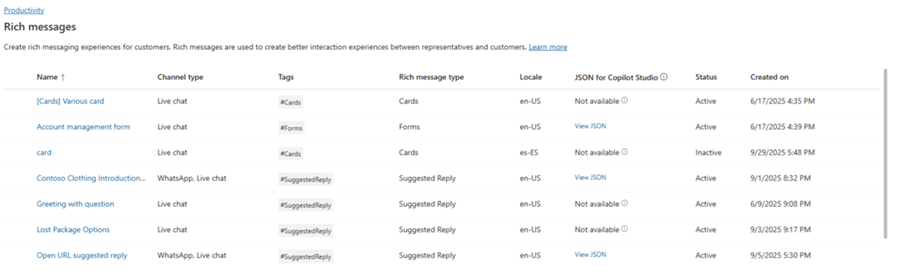
Voor Live Chat- en WhatsApp-sjablonen voor rich media kun je de JSON rechtstreeks in een adaptieve kaartnode in Copilot Studio plakken.
JSON-voorbeelden voor rich messages voor Apple Messages for Business
Deze sectie bevat JSON-voorbeelden voor de uitgebreide berichttypen die beschikbaar zijn in het Apple Messages for Business-kanaal in Omnichannel for Customer Service. Meer informatie: Uitgebreide berichten beheren
Opmerking
Het is niet mogelijk om berichten met opmaak van formulieren naar gesprekken te verzenden.
Apple Betalen
let applePayJSON = // <copy_and_paste_details_content>
applePayJSON.survey = { Questions: JSON.parse(applePayJSON.survey)[0].Questions, Answers: JSON.parse(applePayJSON.survey)[1].Answers };
applePayJSON.survey.Answers.AppleMessagesforBusinessJSON = JSON.parse(applePayJSON.survey.Answers.AppleMessagesforBusinessJSON);
applePayJSON.survey.Answers.AppleMessagesforBusinessJSON = JSON.stringify(applePayJSON.survey.Answers.AppleMessagesforBusinessJSON);
applePayJSON.survey = JSON.stringify(applePayJSON.survey);

// Can now send this payload using the API
Microsoft.Omnichannel.sendMessageToConversation(applePayJSON, false);

// Or take the JSON elsewhere for use in bringing your own logic
copy(applePayJSON);
Authenticatie
let authJSON = // <copy_and_paste_details_content>
authJSON.survey = { Questions: JSON.parse(authJSON.survey)[0].Questions, Answers: JSON.parse(authJSON.survey)[1].Answers };
authJSON.survey = JSON.stringify(authJSON.survey);

// Can now send this payload using the API
Microsoft.Omnichannel.sendMessageToConversation(authJSON, false);

// Or take the JSON elsewhere for use in bringing your own logic
copy(authJSON);
Aangepaste JSON (iMessage-toepassing)
let customJSON = // <copy_and_paste_details_content>
customJSON.survey = { Questions: JSON.parse(customJSON.survey)[0].Questions, Answers: JSON.parse(customJSON.survey)[1].Answers };
customJSON.survey.Answers.AppleMessagesforBusinessJSON = JSON.parse(customJSON.survey.Answers.AppleMessagesforBusinessJSON);
customJSON.survey.Answers.AppleMessagesforBusinessJSON = JSON.stringify(customJSON.survey.Answers.AppleMessagesforBusinessJSON);
customJSON.survey = JSON.stringify(customJSON.survey);

// Can now send this payload using the API
Microsoft.Omnichannel.sendMessageToConversation(customJSON, false);

// Or take the JSON elsewhere for use in bringing your own logic
copy(customJSON);
Lijst kiezer
listPickerJSON = // <copy_and_paste_details_content>
listPickerJSON.survey = { Questions: JSON.parse(lpFromDetails.survey)[0].Questions, Answers: JSON.parse(listPickerJSON.survey)[1].Answers };
listPickerJSON.survey = JSON.stringify(listPickerJSON.survey);

// Can now send this payload using the API
Microsoft.Omnichannel.sendMessageToConversation(listPickerJSON, false);

// Or take the JSON elsewhere for use in bringing your own logic
copy(listPickerJSON);
Voorgesteld antwoord
suggestedReplyJSON = // <copy_and_paste_details_content>
suggestedReplyJSON.survey = { Questions: JSON.parse(suggestedReplyJSON.survey)[0].Questions, Answers: JSON.parse(suggestedReplyJSON.survey)[1].Answers };
suggestedReplyJSON.survey = JSON.stringify(suggestedReplyJSON.survey);

// Can now send this payload using the API
Microsoft.Omnichannel.sendMessageToConversation(suggestedReplyJSON, false);

// Or take the JSON elsewhere for use in bringing your own logic
copy(suggestedReplyJSON);
Tijdkiezer
timePickerJSON = // <copy_and_paste_details_content>
timePickerJSON.survey = { Questions: JSON.parse(timePickerJSON.survey)[0].Questions, Answers: JSON.parse(timePickerJSON.survey)[1].Answers };
timePickerJSON.survey = JSON.stringify(timePickerJSON.survey);

// Can now send this payload using the API
Microsoft.Omnichannel.sendMessageToConversation(timePickerJSON, false);

// Or take the JSON elsewhere for use in bringing your own logic
copy(timePickerJSON);
Rijke videolink
videoRichLinkJSON = // <copy_and_paste_details_content>
videoRichLinkJSON.survey = { Questions: JSON.parse(videoRichLinkJSON.survey)[0].Questions, Answers: JSON.parse(videoRichLinkJSON.survey)[1].Answers };
timePickerJSON.survey = JSON.stringify(videoRichLinkJSON.survey);

// Can now send this payload using the API
Microsoft.Omnichannel.sendMessageToConversation(videoRichLinkJSON, false);

// Or take the JSON elsewhere for use in bringing your own logic
copy(videoRichLinkJSON);
Website rijke link
websiteRichLinkJSON = // <copy_and_paste_details_content>
websiteRichLinkJSON.survey = { Questions: JSON.parse(websiteRichLinkJSON.survey)[0].Questions, Answers: JSON.parse(websiteRichLinkJSON.survey)[1].Answers };
timePickerJSON.survey = JSON.stringify(websiteRichLinkJSON.survey);

// Can now send this payload using the API
Microsoft.Omnichannel.sendMessageToConversation(websiteRichLinkJSON, false);

// Or take the JSON elsewhere for use in bringing your own logic
copy(websiteRichLinkJSON);
Configureer agenten om Live Chat, voorgestelde antwoorden en kaarten/carrousels te verzenden
Copilot Studio ondersteunt standaard suggesties voor antwoorden en basiskaarten. Meer informatie vindt u in Een bericht verzenden - Microsoft Copilot Studio.
Opmerking
Copilot Studio verwijst naar voorgestelde antwoorden als snelle antwoorden.
Verwante informatie
Referentie voor live chat-SDK JavaScript-API
Omnichannel JavaScript API-referentie
sendMessageToConversation