Notatka
Dostęp do tej strony wymaga autoryzacji. Może spróbować zalogować się lub zmienić katalogi.
Dostęp do tej strony wymaga autoryzacji. Możesz spróbować zmienić katalogi.
Platformy Copilot Studio i Dynamics 365 for Customer Service różnią się nieznacznie sposobem obsługi wiadomości multimedialnych w zależności od kanału i typu wiadomości multimedialnej. W tym artykule opisano, jak można obsługiwać wiadomości multimedialne w programie Copilot Studio.
Pobieranie kodu JSON agenta dla usługi Apple Messages dla firm
- Na mapie witryny centrum administracyjnego usługi Copilot wybierz pozycję Produktywność w środowisku pomocy technicznej.
- Na stronie Produktywność wybierz pozycję Zarządzaj dla wiadomości sformatowanych.
- Z listy wszystkich dostępnych wiadomości z listy wybierz wiadomość sformatowaną, którą chcesz wysłać do konwersacji.
- W przypadku wiadomości sformatowanych Apple Messages dla firm użyj interfejsu API Microsoft.Omnichannel.sendMessageToConversation do wysyłania plików JSON.
Pobieranie kodu JSON agenta dla formularzy Live Chat, niestandardowego kodu JSON Live Chat i sugerowanych odpowiedzi WhatsApp
Na mapie witryny centrum administracyjnego usługi Copilot wybierz pozycję Produktywność w środowisku pomocy technicznej.
Na stronie Produktywność wybierz pozycję Zarządzaj dla wiadomości sformatowanych.
Znajdź wiadomość multimedialną, którą ma wysłać agent, a jeśli ma ona dostępny kod JSON, pojawi się w kolumnie JSON dla Copilot Studio . Wybierz pozycję Wyświetl kod JSON i określony typ kanału, aby skopiować kod JSON.
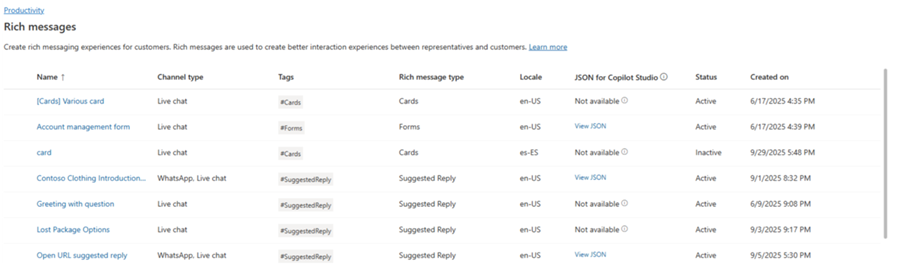
W przypadku szablonów multimedialnych Live Chat i WhatsApp możesz wkleić kod JSON bezpośrednio do węzła karty adaptacyjnej w Copilot Studio.
Przykłady JSON dla sformatowanych wiadomości dla usługi Apple Messages dla firm
Ta sekcja zawiera przykłady JSON dla typów wiadomości sformatowanych dostępnych w kanale Apple Messages dla firm w aplikacji Obsługa wielokanałowa dla Customer Service. Więcej informacji: Zarządzanie wiadomościami sformatowanymi
Uwaga / Notatka
Nie można wysyłać wiadomości sformatowanych typu Formularze do konwersacji.
Apple Pay
let applePayJSON = // <copy_and_paste_details_content>
applePayJSON.survey = { Questions: JSON.parse(applePayJSON.survey)[0].Questions, Answers: JSON.parse(applePayJSON.survey)[1].Answers };
applePayJSON.survey.Answers.AppleMessagesforBusinessJSON = JSON.parse(applePayJSON.survey.Answers.AppleMessagesforBusinessJSON);
applePayJSON.survey.Answers.AppleMessagesforBusinessJSON = JSON.stringify(applePayJSON.survey.Answers.AppleMessagesforBusinessJSON);
applePayJSON.survey = JSON.stringify(applePayJSON.survey);

// Can now send this payload using the API
Microsoft.Omnichannel.sendMessageToConversation(applePayJSON, false);

// Or take the JSON elsewhere for use in bringing your own logic
copy(applePayJSON);
Authentication
let authJSON = // <copy_and_paste_details_content>
authJSON.survey = { Questions: JSON.parse(authJSON.survey)[0].Questions, Answers: JSON.parse(authJSON.survey)[1].Answers };
authJSON.survey = JSON.stringify(authJSON.survey);

// Can now send this payload using the API
Microsoft.Omnichannel.sendMessageToConversation(authJSON, false);

// Or take the JSON elsewhere for use in bringing your own logic
copy(authJSON);
Niestandardowy kod JSON (aplikacja iMessage)
let customJSON = // <copy_and_paste_details_content>
customJSON.survey = { Questions: JSON.parse(customJSON.survey)[0].Questions, Answers: JSON.parse(customJSON.survey)[1].Answers };
customJSON.survey.Answers.AppleMessagesforBusinessJSON = JSON.parse(customJSON.survey.Answers.AppleMessagesforBusinessJSON);
customJSON.survey.Answers.AppleMessagesforBusinessJSON = JSON.stringify(customJSON.survey.Answers.AppleMessagesforBusinessJSON);
customJSON.survey = JSON.stringify(customJSON.survey);

// Can now send this payload using the API
Microsoft.Omnichannel.sendMessageToConversation(customJSON, false);

// Or take the JSON elsewhere for use in bringing your own logic
copy(customJSON);
Selektor list
listPickerJSON = // <copy_and_paste_details_content>
listPickerJSON.survey = { Questions: JSON.parse(lpFromDetails.survey)[0].Questions, Answers: JSON.parse(listPickerJSON.survey)[1].Answers };
listPickerJSON.survey = JSON.stringify(listPickerJSON.survey);

// Can now send this payload using the API
Microsoft.Omnichannel.sendMessageToConversation(listPickerJSON, false);

// Or take the JSON elsewhere for use in bringing your own logic
copy(listPickerJSON);
Sugerowana odpowiedź
suggestedReplyJSON = // <copy_and_paste_details_content>
suggestedReplyJSON.survey = { Questions: JSON.parse(suggestedReplyJSON.survey)[0].Questions, Answers: JSON.parse(suggestedReplyJSON.survey)[1].Answers };
suggestedReplyJSON.survey = JSON.stringify(suggestedReplyJSON.survey);

// Can now send this payload using the API
Microsoft.Omnichannel.sendMessageToConversation(suggestedReplyJSON, false);

// Or take the JSON elsewhere for use in bringing your own logic
copy(suggestedReplyJSON);
Wybór godziny
timePickerJSON = // <copy_and_paste_details_content>
timePickerJSON.survey = { Questions: JSON.parse(timePickerJSON.survey)[0].Questions, Answers: JSON.parse(timePickerJSON.survey)[1].Answers };
timePickerJSON.survey = JSON.stringify(timePickerJSON.survey);

// Can now send this payload using the API
Microsoft.Omnichannel.sendMessageToConversation(timePickerJSON, false);

// Or take the JSON elsewhere for use in bringing your own logic
copy(timePickerJSON);
Rich link do filmu
videoRichLinkJSON = // <copy_and_paste_details_content>
videoRichLinkJSON.survey = { Questions: JSON.parse(videoRichLinkJSON.survey)[0].Questions, Answers: JSON.parse(videoRichLinkJSON.survey)[1].Answers };
timePickerJSON.survey = JSON.stringify(videoRichLinkJSON.survey);

// Can now send this payload using the API
Microsoft.Omnichannel.sendMessageToConversation(videoRichLinkJSON, false);

// Or take the JSON elsewhere for use in bringing your own logic
copy(videoRichLinkJSON);
Bogaty link do witryny
websiteRichLinkJSON = // <copy_and_paste_details_content>
websiteRichLinkJSON.survey = { Questions: JSON.parse(websiteRichLinkJSON.survey)[0].Questions, Answers: JSON.parse(websiteRichLinkJSON.survey)[1].Answers };
timePickerJSON.survey = JSON.stringify(websiteRichLinkJSON.survey);

// Can now send this payload using the API
Microsoft.Omnichannel.sendMessageToConversation(websiteRichLinkJSON, false);

// Or take the JSON elsewhere for use in bringing your own logic
copy(websiteRichLinkJSON);
Konfigurowanie agentów do wysyłania sugerowanych odpowiedzi na czacie na żywo oraz kart/karuzeli
Copilot Studio obsługuje sugerowane odpowiedzi i podstawowe karty po wyjęciu z pudełka. Dowiedz się więcej w temacie Wysyłanie wiadomości — Microsoft Copilot Studio.
Uwaga / Notatka
Copilot Studio określa sugerowane odpowiedzi jako szybkie odpowiedzi.
Informacje pokrewne
Dokumentacja interfejsu API JavaScript zestawu SDK czatu na żywo
Dokumentacja interfejsu API JavaScript aplikacji Obsługa wielokanałowa
sendMessageToConversation