Nota
O acesso a esta página requer autorização. Pode tentar iniciar sessão ou alterar os diretórios.
O acesso a esta página requer autorização. Pode tentar alterar os diretórios.
Este documento demonstra como criar uma rede de blocos de mensagens assíncronas que executam o processamento de imagem.
A rede determina quais operações executar em uma imagem com base em suas características. Este exemplo usa o modelo de fluxo de dados para rotear imagens pela rede. No modelo de fluxo de dados, componentes independentes de um programa se comunicam entre si enviando mensagens. Quando um componente recebe uma mensagem, ele pode executar alguma ação e, em seguida, passar o resultado dessa ação para outro componente. Compare isso com o modelo de fluxo de controle , no qual um aplicativo usa estruturas de controle, por exemplo, instruções condicionais, loops e assim por diante, para controlar a ordem das operações em um programa.
Uma rede baseada no fluxo de dados cria um pipeline de tarefas. Cada estágio do pipeline executa simultaneamente parte da tarefa geral. Uma analogia a isso é uma linha de montagem para fabricação de automóveis. À medida que cada veículo passa pela linha de montagem, uma estação monta o quadro, outra instala o motor e assim por diante. Ao permitir que vários veículos sejam montados simultaneamente, a linha de montagem oferece melhor rendimento do que a montagem de veículos completos um de cada vez.
Pré-requisitos
Leia os seguintes documentos antes de iniciar este passo a passo:
Também recomendamos que você entenda os conceitos básicos do GDI+ antes de começar este passo a passo.
Secções
Este passo a passo contém as seguintes seções:
Definindo a funcionalidade de processamento de imagem
Esta seção mostra as funções de suporte que a rede de processamento de imagem usa para trabalhar com imagens que são lidas do disco.
As seguintes funções, GetRGB e MakeColor, extraem e combinam os componentes individuais da cor dada, respectivamente.
// Retrieves the red, green, and blue components from the given
// color value.
void GetRGB(DWORD color, BYTE& r, BYTE& g, BYTE& b)
{
   r = static_cast<BYTE>((color & 0x00ff0000) >> 16);
   g = static_cast<BYTE>((color & 0x0000ff00) >> 8);
   b = static_cast<BYTE>((color & 0x000000ff));
}

// Creates a single color value from the provided red, green,
// and blue components.
DWORD MakeColor(BYTE r, BYTE g, BYTE b)
{
   return (r<<16) | (g<<8) | (b);
}
A função a seguir, ProcessImage, chama o objeto std::function fornecido para transformar o valor de cor de cada pixel em um objeto Bitmap GDI+. A ProcessImage função usa o algoritmo concurrency::parallel_for para processar cada linha do bitmap em paralelo.
// Calls the provided function for each pixel in a Bitmap object.
void ProcessImage(Bitmap* bmp, const function<void (DWORD&)>& f)
{
   int width = bmp->GetWidth();
   int height = bmp->GetHeight();

   // Lock the bitmap.
   BitmapData bitmapData;
   Rect rect(0, 0, bmp->GetWidth(), bmp->GetHeight());
   bmp->LockBits(&rect, ImageLockModeWrite, PixelFormat32bppRGB, &bitmapData);

   // Get a pointer to the bitmap data.
   DWORD* image_bits = (DWORD*)bitmapData.Scan0;

   // Call the function for each pixel in the image.
   parallel_for (0, height, [&, width](int y)
   {
      for (int x = 0; x < width; ++x)
      {
         // Get the current pixel value.
         DWORD* curr_pixel = image_bits + (y * width) + x;

         // Call the function.
         f(*curr_pixel);
      }
   });

   // Unlock the bitmap.
   bmp->UnlockBits(&bitmapData);
}
As seguintes funções, Grayscale, Sepiatone, ColorMask e Darken, chamam a função ProcessImage para transformar o valor de cor de cada pixel num objeto Bitmap. Cada uma dessas funções usa uma expressão lambda para definir a transformação de cor de um pixel.
// Converts the given image to grayscale.
Bitmap* Grayscale(Bitmap* bmp)
{
   ProcessImage(bmp,
      [](DWORD& color) {
         BYTE r, g, b;
         GetRGB(color, r, g, b);

         // Set each color component to the average of
         // the original components.
         BYTE c = (static_cast<WORD>(r) + g + b) / 3;
         color = MakeColor(c, c, c);
      }
   );
   return bmp;
}

// Applies sepia toning to the provided image.
Bitmap* Sepiatone(Bitmap* bmp)
{
   ProcessImage(bmp,
      [](DWORD& color) {
         BYTE r0, g0, b0;
         GetRGB(color, r0, g0, b0);

         WORD r1 = static_cast<WORD>((r0 * .393) + (g0 *.769) + (b0 * .189));
         WORD g1 = static_cast<WORD>((r0 * .349) + (g0 *.686) + (b0 * .168));
         WORD b1 = static_cast<WORD>((r0 * .272) + (g0 *.534) + (b0 * .131));

         color = MakeColor(min(0xff, r1), min(0xff, g1), min(0xff, b1));
      }
   );
   return bmp;
}

// Applies the given color mask to each pixel in the provided image.
Bitmap* ColorMask(Bitmap* bmp, DWORD mask)
{
   ProcessImage(bmp,
      [mask](DWORD& color) {
         color = color & mask;
      }
   );
   return bmp;
}

// Darkens the provided image by the given amount.
Bitmap* Darken(Bitmap* bmp, unsigned int percent)
{
   if (percent > 100)
      throw invalid_argument("Darken: percent must less than 100.");

   double factor = percent / 100.0;

   ProcessImage(bmp,
      [factor](DWORD& color) {
         BYTE r, g, b;
         GetRGB(color, r, g, b);
         r = static_cast<BYTE>(factor*r);
         g = static_cast<BYTE>(factor*g);
         b = static_cast<BYTE>(factor*b);
         color = MakeColor(r, g, b);
      }
   );
   return bmp;
}
A seguinte função, GetColorDominance, também chama a função ProcessImage. No entanto, em vez de alterar o valor de cada cor, essa função usa concurrency::combinable objects para calcular se o componente de cor vermelha, verde ou azul domina a imagem.
// Determines which color component (red, green, or blue) is most dominant
// in the given image and returns a corresponding color mask.
DWORD GetColorDominance(Bitmap* bmp)
{
   // The ProcessImage function processes the image in parallel.
   // The following combinable objects enable the callback function
   // to increment the color counts without using a lock.
   combinable<unsigned int> reds;
   combinable<unsigned int> greens;
   combinable<unsigned int> blues;

   ProcessImage(bmp,
      [&](DWORD& color) {
         BYTE r, g, b;
         GetRGB(color, r, g, b);
         if (r >= g && r >= b)
            reds.local()++;
         else if (g >= r && g >= b)
            greens.local()++;
         else
            blues.local()++;
      }
   );

   // Determine which color is dominant and return the corresponding
   // color mask.

   unsigned int r = reds.combine(plus<unsigned int>());
   unsigned int g = greens.combine(plus<unsigned int>());
   unsigned int b = blues.combine(plus<unsigned int>());

   if (r + r >= g + b)
      return 0x00ff0000;
   else if (g + g >= r + b)
      return 0x0000ff00;
   else
      return 0x000000ff;
}
A função a seguir, GetEncoderClsid, recupera o identificador de classe para determinado tipo MIME de um codificador. O aplicativo usa essa função para recuperar o codificador para um bitmap.
// Retrieves the class identifier for the given MIME type of an encoder.
int GetEncoderClsid(const WCHAR* format, CLSID* pClsid)
{
   UINT  num = 0;          // number of image encoders
   UINT  size = 0;         // size of the image encoder array in bytes

   ImageCodecInfo* pImageCodecInfo = nullptr;

   GetImageEncodersSize(&num, &size);
   if(size == 0)
      return -1;  // Failure

   pImageCodecInfo = (ImageCodecInfo*)(malloc(size));
   if(pImageCodecInfo == nullptr)
      return -1;  // Failure

   GetImageEncoders(num, size, pImageCodecInfo);

   for(UINT j = 0; j < num; ++j)
   {
      if( wcscmp(pImageCodecInfo[j].MimeType, format) == 0 )
      {
         *pClsid = pImageCodecInfo[j].Clsid;
         free(pImageCodecInfo);
         return j;  // Success
      }
   }

   free(pImageCodecInfo);
   return -1;  // Failure
}
[Topo]
Criando a rede de processamento de imagens
Esta seção descreve como criar uma rede de blocos de mensagens assíncronas que executam o processamento de imagem em cada imagem JPEG (.jpg) em um determinado diretório. A rede executa as seguintes operações de processamento de imagem:
Para qualquer imagem de autoria de Tom, converta em escala de cinza.
Para qualquer imagem que tenha o vermelho como cor dominante, remova os componentes verde e azul e, em seguida, escureça-a.
Para qualquer outra imagem, aplique tonalização sépia.
A rede aplica apenas a primeira operação de processamento de imagem que corresponda a uma dessas condições. Por exemplo, se uma imagem for de autoria de Tom e tiver vermelho como cor dominante, a imagem será convertida apenas em escala de cinza.
Depois que a rede executa cada operação de processamento de imagem, ela salva a imagem no disco como um arquivo bitmap (.bmp).
As etapas a seguir mostram como criar uma função que implementa essa rede de processamento de imagem e aplica essa rede a cada imagem JPEG em um determinado diretório.
Para criar a rede de processamento de imagem
Crie uma função,
ProcessImages, que leva o nome de um diretório no disco.void ProcessImages(const wstring& directory) { }Na função
ProcessImages, crie uma variávelcountdown_event. Acountdown_eventclasse é mostrada mais adiante neste passo a passo.// Holds the number of active image processing operations and // signals to the main thread that processing is complete. countdown_event active(0);Crie um objeto std::map que associe um
Bitmapobjeto ao seu nome de arquivo original.// Maps Bitmap objects to their original file names. map<Bitmap*, wstring> bitmap_file_names;Adicione o seguinte código para definir os membros da rede de processamento de imagem.
// // Create the nodes of the network. // // Loads Bitmap objects from disk. transformer<wstring, Bitmap*> load_bitmap( [&](wstring file_name) -> Bitmap* { Bitmap* bmp = new Bitmap(file_name.c_str()); if (bmp != nullptr) bitmap_file_names.insert(make_pair(bmp, file_name)); return bmp; } ); // Holds loaded Bitmap objects. unbounded_buffer<Bitmap*> loaded_bitmaps; // Converts images that are authored by Tom to grayscale. transformer<Bitmap*, Bitmap*> grayscale( [](Bitmap* bmp) { return Grayscale(bmp); }, nullptr, [](Bitmap* bmp) -> bool { if (bmp == nullptr) return false; // Retrieve the artist name from metadata. UINT size = bmp->GetPropertyItemSize(PropertyTagArtist); if (size == 0) // Image does not have the Artist property. return false; PropertyItem* artistProperty = (PropertyItem*) malloc(size); bmp->GetPropertyItem(PropertyTagArtist, size, artistProperty); string artist(reinterpret_cast<char*>(artistProperty->value)); free(artistProperty); return (artist.find("Tom ") == 0); } ); // Removes the green and blue color components from images that have red as // their dominant color. transformer<Bitmap*, Bitmap*> colormask( [](Bitmap* bmp) { return ColorMask(bmp, 0x00ff0000); }, nullptr, [](Bitmap* bmp) -> bool { if (bmp == nullptr) return false; return (GetColorDominance(bmp) == 0x00ff0000); } ); // Darkens the color of the provided Bitmap object. transformer<Bitmap*, Bitmap*> darken([](Bitmap* bmp) { return Darken(bmp, 50); }); // Applies sepia toning to the remaining images. transformer<Bitmap*, Bitmap*> sepiatone( [](Bitmap* bmp) { return Sepiatone(bmp); }, nullptr, [](Bitmap* bmp) -> bool { return bmp != nullptr; } ); // Saves Bitmap objects to disk. transformer<Bitmap*, Bitmap*> save_bitmap([&](Bitmap* bmp) -> Bitmap* { // Replace the file extension with .bmp. wstring file_name = bitmap_file_names[bmp]; file_name.replace(file_name.rfind(L'.') + 1, 3, L"bmp"); // Save the processed image. CLSID bmpClsid; GetEncoderClsid(L"image/bmp", &bmpClsid); bmp->Save(file_name.c_str(), &bmpClsid); return bmp; }); // Deletes Bitmap objects. transformer<Bitmap*, Bitmap*> delete_bitmap([](Bitmap* bmp) -> Bitmap* { delete bmp; return nullptr; }); // Decrements the event counter. call<Bitmap*> decrement([&](Bitmap* _) { active.signal(); });Adicione o seguinte código para conectar a rede.
// // Connect the network. // load_bitmap.link_target(&loaded_bitmaps); loaded_bitmaps.link_target(&grayscale); loaded_bitmaps.link_target(&colormask); colormask.link_target(&darken); loaded_bitmaps.link_target(&sepiatone); loaded_bitmaps.link_target(&decrement); grayscale.link_target(&save_bitmap); darken.link_target(&save_bitmap); sepiatone.link_target(&save_bitmap); save_bitmap.link_target(&delete_bitmap); delete_bitmap.link_target(&decrement);Adicione o seguinte código para enviar ao chefe da rede o caminho completo de cada arquivo JPEG no diretório.
// Traverse all files in the directory. wstring searchPattern = directory; searchPattern.append(L"\\*"); WIN32_FIND_DATA fileFindData; HANDLE hFind = FindFirstFile(searchPattern.c_str(), &fileFindData); if (hFind == INVALID_HANDLE_VALUE) return; do { if (!(fileFindData.dwFileAttributes & FILE_ATTRIBUTE_DIRECTORY)) { wstring file = fileFindData.cFileName; // Process only JPEG files. if (file.rfind(L".jpg") == file.length() - 4) { // Form the full path to the file. wstring full_path(directory); full_path.append(L"\\"); full_path.append(file); // Increment the count of work items. active.add_count(); // Send the path name to the network. send(load_bitmap, full_path); } } } while (FindNextFile(hFind, &fileFindData) != 0); FindClose(hFind);Aguarde até que a
countdown_eventvariável atinja zero.// Wait for all operations to finish. active.wait();
A tabela a seguir descreve os membros da rede.
| Membro | Descrição |
|---|---|
load_bitmap |
Um objeto concurrency::transformer que carrega um Bitmap objeto do disco e adiciona uma entrada ao map objeto para associar a imagem ao seu nome de arquivo original. |
loaded_bitmaps |
Um objeto concurrency::unbounded_buffer que envia as imagens carregadas para os filtros de processamento de imagem. |
grayscale |
Um transformer objeto que converte em tons de cinza as imagens criadas por Tom. Ele usa os metadados da imagem para determinar seu autor. |
colormask |
Um transformer objeto que remove os componentes de cor verde e azul de imagens que têm vermelho como a cor dominante. |
darken |
Um transformer objeto que escurece imagens que têm o vermelho como cor dominante. |
sepiatone |
Um transformer objeto que aplica tonalidade sépia a imagens que não são de autoria de Tom e não são predominantemente vermelhas. |
save_bitmap |
Um transformer objeto que guarda o processado image no disco como um bitmap.
save_bitmap recupera o map nome do arquivo original do objeto e altera sua extensão de nome de arquivo para .bmp. |
delete_bitmap |
Um transformer objeto que libera a memória para as imagens. |
decrement |
Um objeto concurrency::call que atua como o nó terminal na rede. Ele diminui o countdown_event objeto para sinalizar ao aplicativo principal que uma imagem foi processada. |
O loaded_bitmaps buffer de mensagens é importante porque, como um unbounded_buffer objeto, ele oferece Bitmap objetos para vários recetores. Quando um bloco de destino aceita um Bitmap objeto, o unbounded_buffer objeto não oferece esse Bitmap objeto a nenhum outro destino. Portanto, a ordem na qual você vincula objetos a um unbounded_buffer objeto é importante. Os blocos de mensagem grayscale, colormask e sepiatone usam um filtro para aceitar apenas determinados Bitmap objetos. O decrement buffer de mensagens é um destino importante para o loaded_bitmaps buffer de mensagens porque aceita todos os Bitmap objetos rejeitados pelos outros buffers de mensagens. Um unbounded_buffer objeto é necessário para propagar mensagens em ordem. Portanto, um unbounded_buffer objeto bloqueia até que um novo bloco de destino seja vinculado a ele e aceite a mensagem se nenhum bloco de destino atual aceitar essa mensagem.
Se o seu aplicativo exigir que vários blocos de mensagens processem a mensagem, em vez de apenas um bloco de mensagem que primeiro aceita a mensagem, você pode usar outro tipo de bloco de mensagem, como overwrite_buffer. A overwrite_buffer classe mantém uma mensagem de cada vez, mas propaga essa mensagem para cada um de seus destinos.
A ilustração a seguir mostra a rede de processamento de imagem:

O countdown_event objeto neste exemplo permite que a rede de processamento de imagem informe o aplicativo principal quando todas as imagens tiverem sido processadas. A countdown_event classe usa um objeto concurrency::event para sinalizar quando um valor de contador atinge zero. O aplicativo principal incrementa o contador sempre que envia um nome de arquivo para a rede. O nó terminal da rede diminui o contador após o processamento de cada imagem. Depois que o aplicativo principal atravessa o diretório especificado, ele aguarda que o countdown_event objeto sinalize que seu contador atingiu zero.
O seguinte exemplo mostra a classe countdown_event:
// A synchronization primitive that is signaled when its
// count reaches zero.
class countdown_event
{
public:
countdown_event(unsigned int count = 0)
: _current(static_cast<long>(count))
{
// Set the event if the initial count is zero.
if (_current == 0L)
_event.set();
}
// Decrements the event counter.
void signal() {
if(InterlockedDecrement(&_current) == 0L) {
_event.set();
}
}
// Increments the event counter.
void add_count() {
if(InterlockedIncrement(&_current) == 1L) {
_event.reset();
}
}
// Blocks the current context until the event is set.
void wait() {
_event.wait();
}
private:
// The current count.
volatile long _current;
// The event that is set when the counter reaches zero.
event _event;
// Disable copy constructor.
countdown_event(const countdown_event&);
// Disable assignment.
countdown_event const & operator=(countdown_event const&);
};
[Topo]
O exemplo completo
O código a seguir mostra o exemplo completo. A wmain função gerencia a biblioteca GDI+ e chama a ProcessImages função para processar os arquivos JPEG no Sample Pictures diretório.
// image-processing-network.cpp
// compile with: /DUNICODE /EHsc image-processing-network.cpp /link gdiplus.lib
#include <windows.h>
#include <gdiplus.h>
#include <iostream>
#include <map>
#include <agents.h>
#include <ppl.h>
using namespace concurrency;
using namespace Gdiplus;
using namespace std;
// Retrieves the red, green, and blue components from the given
// color value.
void GetRGB(DWORD color, BYTE& r, BYTE& g, BYTE& b)
{
r = static_cast<BYTE>((color & 0x00ff0000) >> 16);
g = static_cast<BYTE>((color & 0x0000ff00) >> 8);
b = static_cast<BYTE>((color & 0x000000ff));
}
// Creates a single color value from the provided red, green,
// and blue components.
DWORD MakeColor(BYTE r, BYTE g, BYTE b)
{
return (r<<16) | (g<<8) | (b);
}
// Calls the provided function for each pixel in a Bitmap object.
void ProcessImage(Bitmap* bmp, const function<void (DWORD&)>& f)
{
int width = bmp->GetWidth();
int height = bmp->GetHeight();
// Lock the bitmap.
BitmapData bitmapData;
Rect rect(0, 0, bmp->GetWidth(), bmp->GetHeight());
bmp->LockBits(&rect, ImageLockModeWrite, PixelFormat32bppRGB, &bitmapData);
// Get a pointer to the bitmap data.
DWORD* image_bits = (DWORD*)bitmapData.Scan0;
// Call the function for each pixel in the image.
parallel_for (0, height, [&, width](int y)
{
for (int x = 0; x < width; ++x)
{
// Get the current pixel value.
DWORD* curr_pixel = image_bits + (y * width) + x;
// Call the function.
f(*curr_pixel);
}
});
// Unlock the bitmap.
bmp->UnlockBits(&bitmapData);
}
// Converts the given image to grayscale.
Bitmap* Grayscale(Bitmap* bmp)
{
ProcessImage(bmp,
[](DWORD& color) {
BYTE r, g, b;
GetRGB(color, r, g, b);
// Set each color component to the average of
// the original components.
BYTE c = (static_cast<WORD>(r) + g + b) / 3;
color = MakeColor(c, c, c);
}
);
return bmp;
}
// Applies sepia toning to the provided image.
Bitmap* Sepiatone(Bitmap* bmp)
{
ProcessImage(bmp,
[](DWORD& color) {
BYTE r0, g0, b0;
GetRGB(color, r0, g0, b0);
WORD r1 = static_cast<WORD>((r0 * .393) + (g0 *.769) + (b0 * .189));
WORD g1 = static_cast<WORD>((r0 * .349) + (g0 *.686) + (b0 * .168));
WORD b1 = static_cast<WORD>((r0 * .272) + (g0 *.534) + (b0 * .131));
color = MakeColor(min(0xff, r1), min(0xff, g1), min(0xff, b1));
}
);
return bmp;
}
// Applies the given color mask to each pixel in the provided image.
Bitmap* ColorMask(Bitmap* bmp, DWORD mask)
{
ProcessImage(bmp,
[mask](DWORD& color) {
color = color & mask;
}
);
return bmp;
}
// Darkens the provided image by the given amount.
Bitmap* Darken(Bitmap* bmp, unsigned int percent)
{
if (percent > 100)
throw invalid_argument("Darken: percent must less than 100.");
double factor = percent / 100.0;
ProcessImage(bmp,
[factor](DWORD& color) {
BYTE r, g, b;
GetRGB(color, r, g, b);
r = static_cast<BYTE>(factor*r);
g = static_cast<BYTE>(factor*g);
b = static_cast<BYTE>(factor*b);
color = MakeColor(r, g, b);
}
);
return bmp;
}
// Determines which color component (red, green, or blue) is most dominant
// in the given image and returns a corresponding color mask.
DWORD GetColorDominance(Bitmap* bmp)
{
// The ProcessImage function processes the image in parallel.
// The following combinable objects enable the callback function
// to increment the color counts without using a lock.
combinable<unsigned int> reds;
combinable<unsigned int> greens;
combinable<unsigned int> blues;
ProcessImage(bmp,
[&](DWORD& color) {
BYTE r, g, b;
GetRGB(color, r, g, b);
if (r >= g && r >= b)
reds.local()++;
else if (g >= r && g >= b)
greens.local()++;
else
blues.local()++;
}
);
// Determine which color is dominant and return the corresponding
// color mask.
unsigned int r = reds.combine(plus<unsigned int>());
unsigned int g = greens.combine(plus<unsigned int>());
unsigned int b = blues.combine(plus<unsigned int>());
if (r + r >= g + b)
return 0x00ff0000;
else if (g + g >= r + b)
return 0x0000ff00;
else
return 0x000000ff;
}
// Retrieves the class identifier for the given MIME type of an encoder.
int GetEncoderClsid(const WCHAR* format, CLSID* pClsid)
{
UINT num = 0; // number of image encoders
UINT size = 0; // size of the image encoder array in bytes
ImageCodecInfo* pImageCodecInfo = nullptr;
GetImageEncodersSize(&num, &size);
if(size == 0)
return -1; // Failure
pImageCodecInfo = (ImageCodecInfo*)(malloc(size));
if(pImageCodecInfo == nullptr)
return -1; // Failure
GetImageEncoders(num, size, pImageCodecInfo);
for(UINT j = 0; j < num; ++j)
{
if( wcscmp(pImageCodecInfo[j].MimeType, format) == 0 )
{
*pClsid = pImageCodecInfo[j].Clsid;
free(pImageCodecInfo);
return j; // Success
}
}
free(pImageCodecInfo);
return -1; // Failure
}
// A synchronization primitive that is signaled when its
// count reaches zero.
class countdown_event
{
public:
countdown_event(unsigned int count = 0)
: _current(static_cast<long>(count))
{
// Set the event if the initial count is zero.
if (_current == 0L)
_event.set();
}
// Decrements the event counter.
void signal() {
if(InterlockedDecrement(&_current) == 0L) {
_event.set();
}
}
// Increments the event counter.
void add_count() {
if(InterlockedIncrement(&_current) == 1L) {
_event.reset();
}
}
// Blocks the current context until the event is set.
void wait() {
_event.wait();
}
private:
// The current count.
volatile long _current;
// The event that is set when the counter reaches zero.
event _event;
// Disable copy constructor.
countdown_event(const countdown_event&);
// Disable assignment.
countdown_event const & operator=(countdown_event const&);
};
// Demonstrates how to set up a message network that performs a series of
// image processing operations on each JPEG image in the given directory and
// saves each altered image as a Windows bitmap.
void ProcessImages(const wstring& directory)
{
// Holds the number of active image processing operations and
// signals to the main thread that processing is complete.
countdown_event active(0);
// Maps Bitmap objects to their original file names.
map<Bitmap*, wstring> bitmap_file_names;
 //
 // Create the nodes of the network.
 //

 // Loads Bitmap objects from disk.
 transformer<wstring, Bitmap*> load_bitmap(
    [&](wstring file_name) -> Bitmap* {
       Bitmap* bmp = new Bitmap(file_name.c_str());
       if (bmp != nullptr)
          bitmap_file_names.insert(make_pair(bmp, file_name));
       return bmp;
    }
 );

 // Holds loaded Bitmap objects.
 unbounded_buffer<Bitmap*> loaded_bitmaps;

 // Converts images that are authored by Tom to grayscale.
 transformer<Bitmap*, Bitmap*> grayscale(
    [](Bitmap* bmp) {
       return Grayscale(bmp);
    },
    nullptr,
    [](Bitmap* bmp) -> bool {
       if (bmp == nullptr)
          return false;

       // Retrieve the artist name from metadata.
       UINT size = bmp->GetPropertyItemSize(PropertyTagArtist);
       if (size == 0)
          // Image does not have the Artist property.
          return false;

       PropertyItem* artistProperty = (PropertyItem*) malloc(size);
       bmp->GetPropertyItem(PropertyTagArtist, size, artistProperty);
       string artist(reinterpret_cast<char*>(artistProperty->value));
       free(artistProperty);

       return (artist.find("Tom ") == 0);
    }
 );

 // Removes the green and blue color components from images that have red as
 // their dominant color.
 transformer<Bitmap*, Bitmap*> colormask(
    [](Bitmap* bmp) {
       return ColorMask(bmp, 0x00ff0000);
    },
    nullptr,
    [](Bitmap* bmp) -> bool {
       if (bmp == nullptr)
          return false;
       return (GetColorDominance(bmp) == 0x00ff0000);
    }
 );

 // Darkens the color of the provided Bitmap object.
 transformer<Bitmap*, Bitmap*> darken([](Bitmap* bmp) {
    return Darken(bmp, 50);
 });

 // Applies sepia toning to the remaining images.
 transformer<Bitmap*, Bitmap*> sepiatone(
    [](Bitmap* bmp) {
       return Sepiatone(bmp);
    },
    nullptr,
    [](Bitmap* bmp) -> bool { return bmp != nullptr; }
 );

 // Saves Bitmap objects to disk.
 transformer<Bitmap*, Bitmap*> save_bitmap([&](Bitmap* bmp) -> Bitmap* {
    // Replace the file extension with .bmp.
    wstring file_name = bitmap_file_names[bmp];
    file_name.replace(file_name.rfind(L'.') + 1, 3, L"bmp");

    // Save the processed image.
    CLSID bmpClsid;
    GetEncoderClsid(L"image/bmp", &bmpClsid);
    bmp->Save(file_name.c_str(), &bmpClsid);

    return bmp;
 });

 // Deletes Bitmap objects.
 transformer<Bitmap*, Bitmap*> delete_bitmap([](Bitmap* bmp) -> Bitmap* {
    delete bmp;
    return nullptr;
 });

 // Decrements the event counter.
 call<Bitmap*> decrement([&](Bitmap* _) {
    active.signal();
 });
//
// Connect the network.
//

load_bitmap.link_target(&loaded_bitmaps);

loaded_bitmaps.link_target(&grayscale);
loaded_bitmaps.link_target(&colormask);
colormask.link_target(&darken);
loaded_bitmaps.link_target(&sepiatone);
loaded_bitmaps.link_target(&decrement);

grayscale.link_target(&save_bitmap);
darken.link_target(&save_bitmap);
sepiatone.link_target(&save_bitmap);

save_bitmap.link_target(&delete_bitmap);
delete_bitmap.link_target(&decrement);
// Traverse all files in the directory.
wstring searchPattern = directory;
searchPattern.append(L"\\*");

WIN32_FIND_DATA fileFindData;
HANDLE hFind = FindFirstFile(searchPattern.c_str(), &fileFindData);
if (hFind == INVALID_HANDLE_VALUE)
   return;
do
{
   if (!(fileFindData.dwFileAttributes & FILE_ATTRIBUTE_DIRECTORY))
   {
      wstring file = fileFindData.cFileName;

      // Process only JPEG files.
      if (file.rfind(L".jpg") == file.length() - 4)
      {
         // Form the full path to the file.
         wstring full_path(directory);
         full_path.append(L"\\");
         full_path.append(file);

         // Increment the count of work items.
         active.add_count();

         // Send the path name to the network.
         send(load_bitmap, full_path);
      }
   }
}
while (FindNextFile(hFind, &fileFindData) != 0);
FindClose(hFind);
// Wait for all operations to finish.
active.wait();
}
int wmain()
{
GdiplusStartupInput gdiplusStartupInput;
ULONG_PTR gdiplusToken;
// Initialize GDI+.
GdiplusStartup(&gdiplusToken, &gdiplusStartupInput, nullptr);
// Perform image processing.
// TODO: Change this path if necessary.
ProcessImages(L"C:\\Users\\Public\\Pictures\\Sample Pictures");
// Shutdown GDI+.
GdiplusShutdown(gdiplusToken);
}
A ilustração a seguir mostra a saída de exemplo. Cada imagem de origem está acima de sua imagem modificada correspondente.
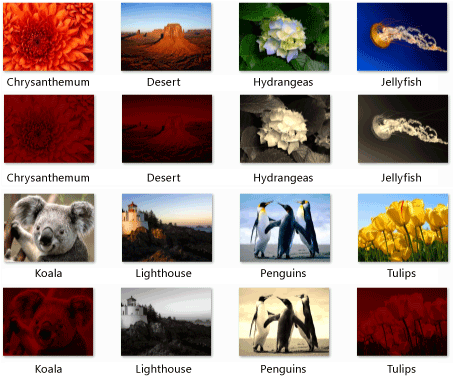
Lighthouse é de autoria de Tom Alphin e por isso foi convertido para escala de cinza.
Chrysanthemum, Desert, Koala, e Tulips têm o vermelho como a cor dominante e, portanto, têm os componentes de cor azul e verde removidos e são escurecidos.
Hydrangeas, Jellyfishe Penguins correspondem aos critérios padrão e, portanto, são em tom sépia.
[Topo]
Compilando o código
Copie o código de exemplo e cole-o em um projeto do Visual Studio ou cole-o em um arquivo chamado image-processing-network.cpp e, em seguida, execute o seguinte comando em uma janela do prompt de comando do Visual Studio.
cl.exe /DUNICODE /EHsc image-processing-network.cpp /link gdiplus.lib