Notă
Accesul la această pagină necesită autorizare. Puteți încerca să vă conectați sau să modificați directoarele.
Accesul la această pagină necesită autorizare. Puteți încerca să modificați directoarele.
Platformele Copilot Studio și Dynamics 365 for Customer Service diferă ușor în ceea ce privește modul în care acceptă mesaje media îmbogățite pe baza canalului și a tipului de mesaj media îmbogățit. Acest articol descrie modul în care puteți accepta mesaje media îmbogățite în Copilot Studio.
Preluarea JSON agentului pentru Apple Messages for Business
- În harta site-ului centrului de administrare Copilot Service, selectați Productivitate în experiența de asistență.
- Pe pagina Productivitate , selectați Gestionare pentru mesaje îmbogățite.
- Din lista cu toate mesajele disponibile din listă, selectați un mesaj îmbogățit pe care doriți să-l trimiteți conversației.
- Pentru mesajele îmbogățite Apple Messages for Business, utilizați API-ul Microsoft.Omnichannel.sendMessageToConversation pentru a trimite fișiere JSON.
Preluați JSON de agent pentru formularele de chat live, JSON personalizat de chat live și răspunsurile sugerate WhatsApp
În harta site-ului centrului de administrare Copilot Service, selectați Productivitate în experiența de asistență.
Pe pagina Productivitate , selectați Gestionare pentru mesaje îmbogățite.
Găsiți mesajul rich media pe care doriți să îl trimită un agent și, dacă are JSON disponibil, acesta apare sub coloana JSON pentru Copilot Studio . Selectați Vizualizare JSON și tipul de canal specific pentru a copia JSON.
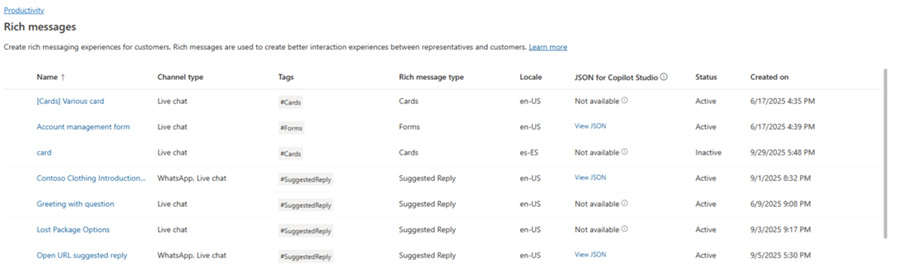
Pentru șabloanele Live Chat și WhatsApp rich media, puteți lipi JSON direct într-un nod de card adaptiv în Copilot Studio.
Exemple JSON pentru mesaje îmbogățite pentru Apple Messages for Business
Această secțiune include exemple JSON pentru tipurile de mesaje îmbogățite disponibile în canalul Apple Messages for Business din Omnicanal pentru Customer Service. Informații suplimentare: Gestionarea mesajelor îmbogățite
Notă
Nu puteți trimite mesaje îmbogățite de tip Formulare către conversații.
Apple Pay
let applePayJSON = // <copy_and_paste_details_content>
applePayJSON.survey = { Questions: JSON.parse(applePayJSON.survey)[0].Questions, Answers: JSON.parse(applePayJSON.survey)[1].Answers };
applePayJSON.survey.Answers.AppleMessagesforBusinessJSON = JSON.parse(applePayJSON.survey.Answers.AppleMessagesforBusinessJSON);
applePayJSON.survey.Answers.AppleMessagesforBusinessJSON = JSON.stringify(applePayJSON.survey.Answers.AppleMessagesforBusinessJSON);
applePayJSON.survey = JSON.stringify(applePayJSON.survey);

// Can now send this payload using the API
Microsoft.Omnichannel.sendMessageToConversation(applePayJSON, false);

// Or take the JSON elsewhere for use in bringing your own logic
copy(applePayJSON);
Autentificarea
let authJSON = // <copy_and_paste_details_content>
authJSON.survey = { Questions: JSON.parse(authJSON.survey)[0].Questions, Answers: JSON.parse(authJSON.survey)[1].Answers };
authJSON.survey = JSON.stringify(authJSON.survey);

// Can now send this payload using the API
Microsoft.Omnichannel.sendMessageToConversation(authJSON, false);

// Or take the JSON elsewhere for use in bringing your own logic
copy(authJSON);
JSON personalizat (aplicație iMessage)
let customJSON = // <copy_and_paste_details_content>
customJSON.survey = { Questions: JSON.parse(customJSON.survey)[0].Questions, Answers: JSON.parse(customJSON.survey)[1].Answers };
customJSON.survey.Answers.AppleMessagesforBusinessJSON = JSON.parse(customJSON.survey.Answers.AppleMessagesforBusinessJSON);
customJSON.survey.Answers.AppleMessagesforBusinessJSON = JSON.stringify(customJSON.survey.Answers.AppleMessagesforBusinessJSON);
customJSON.survey = JSON.stringify(customJSON.survey);

// Can now send this payload using the API
Microsoft.Omnichannel.sendMessageToConversation(customJSON, false);

// Or take the JSON elsewhere for use in bringing your own logic
copy(customJSON);
Selector de liste
listPickerJSON = // <copy_and_paste_details_content>
listPickerJSON.survey = { Questions: JSON.parse(lpFromDetails.survey)[0].Questions, Answers: JSON.parse(listPickerJSON.survey)[1].Answers };
listPickerJSON.survey = JSON.stringify(listPickerJSON.survey);

// Can now send this payload using the API
Microsoft.Omnichannel.sendMessageToConversation(listPickerJSON, false);

// Or take the JSON elsewhere for use in bringing your own logic
copy(listPickerJSON);
Răspuns sugerat
suggestedReplyJSON = // <copy_and_paste_details_content>
suggestedReplyJSON.survey = { Questions: JSON.parse(suggestedReplyJSON.survey)[0].Questions, Answers: JSON.parse(suggestedReplyJSON.survey)[1].Answers };
suggestedReplyJSON.survey = JSON.stringify(suggestedReplyJSON.survey);

// Can now send this payload using the API
Microsoft.Omnichannel.sendMessageToConversation(suggestedReplyJSON, false);

// Or take the JSON elsewhere for use in bringing your own logic
copy(suggestedReplyJSON);
Selector de oră
timePickerJSON = // <copy_and_paste_details_content>
timePickerJSON.survey = { Questions: JSON.parse(timePickerJSON.survey)[0].Questions, Answers: JSON.parse(timePickerJSON.survey)[1].Answers };
timePickerJSON.survey = JSON.stringify(timePickerJSON.survey);

// Can now send this payload using the API
Microsoft.Omnichannel.sendMessageToConversation(timePickerJSON, false);

// Or take the JSON elsewhere for use in bringing your own logic
copy(timePickerJSON);
Link bogat video
videoRichLinkJSON = // <copy_and_paste_details_content>
videoRichLinkJSON.survey = { Questions: JSON.parse(videoRichLinkJSON.survey)[0].Questions, Answers: JSON.parse(videoRichLinkJSON.survey)[1].Answers };
timePickerJSON.survey = JSON.stringify(videoRichLinkJSON.survey);

// Can now send this payload using the API
Microsoft.Omnichannel.sendMessageToConversation(videoRichLinkJSON, false);

// Or take the JSON elsewhere for use in bringing your own logic
copy(videoRichLinkJSON);
Link îmbogățit pentru site-ul web
websiteRichLinkJSON = // <copy_and_paste_details_content>
websiteRichLinkJSON.survey = { Questions: JSON.parse(websiteRichLinkJSON.survey)[0].Questions, Answers: JSON.parse(websiteRichLinkJSON.survey)[1].Answers };
timePickerJSON.survey = JSON.stringify(websiteRichLinkJSON.survey);

// Can now send this payload using the API
Microsoft.Omnichannel.sendMessageToConversation(websiteRichLinkJSON, false);

// Or take the JSON elsewhere for use in bringing your own logic
copy(websiteRichLinkJSON);
Configurați agenții pentru a trimite răspunsuri sugerate și carduri/carusele din Live Chat
Copilot Studio acceptă răspunsuri sugerate și carduri de bază gata din cutie. Aflați mai multe în Trimiterea unui mesaj - Microsoft Copilot Studio.
Notă
Copilot Studio se referă la răspunsurile sugerate ca răspunsuri rapide.
Informații corelate
Referință API JavaScript SDK chat live
Referință API JavaScript omnicanal
sendMessageToConversation