Notă
Accesul la această pagină necesită autorizare. Puteți încerca să vă conectați sau să modificați directoarele.
Accesul la această pagină necesită autorizare. Puteți încerca să modificați directoarele.
A Microsoft Fabric deployment plan is a workspace item that adds explicit item order and automated actions to a deployment operation. Use a plan to deploy items in a specific sequence. You can also use it to run a notebook, data pipeline, or another supported item before or after an item deploys.
A deployment plan works with these deployment tools:
- Git integration
- Deployment pipelines
- Supported REST APIs
In this article, deployment tool refers to any of these supported tools. You don't run a plan by itself. You attach it when you start an operation with a deployment tool.
Important
This feature is in preview.
When to use a deployment plan
Use a deployment plan when:
| Scenario | How a plan helps |
|---|---|
| Items must deploy in an order that Fabric lineage doesn't represent. | The plan defines explicit dependencies between deployment groups. |
| Work must run before or after an item deploys. | The plan runs supported items as pre-deploy or post-deploy actions. |
| The operation needs both explicit order and Fabric item dependencies. | Fabric combines the plan with lineage when it determines the item order. |
You don't need a deployment plan when the deployment tool's standard order is sufficient and no actions are required.
Deployment plan components
A deployment plan contains the following components:
| Component | Purpose |
|---|---|
| Deployment group | One item to deploy and its pre-deploy or post-deploy actions. |
| Step | Deploys the item in a deployment group. |
| Action | A run of a supported item before or after the group's item deploys. |
For supported action types and action behavior, see Deployment plan actions.
How a deployment plan works
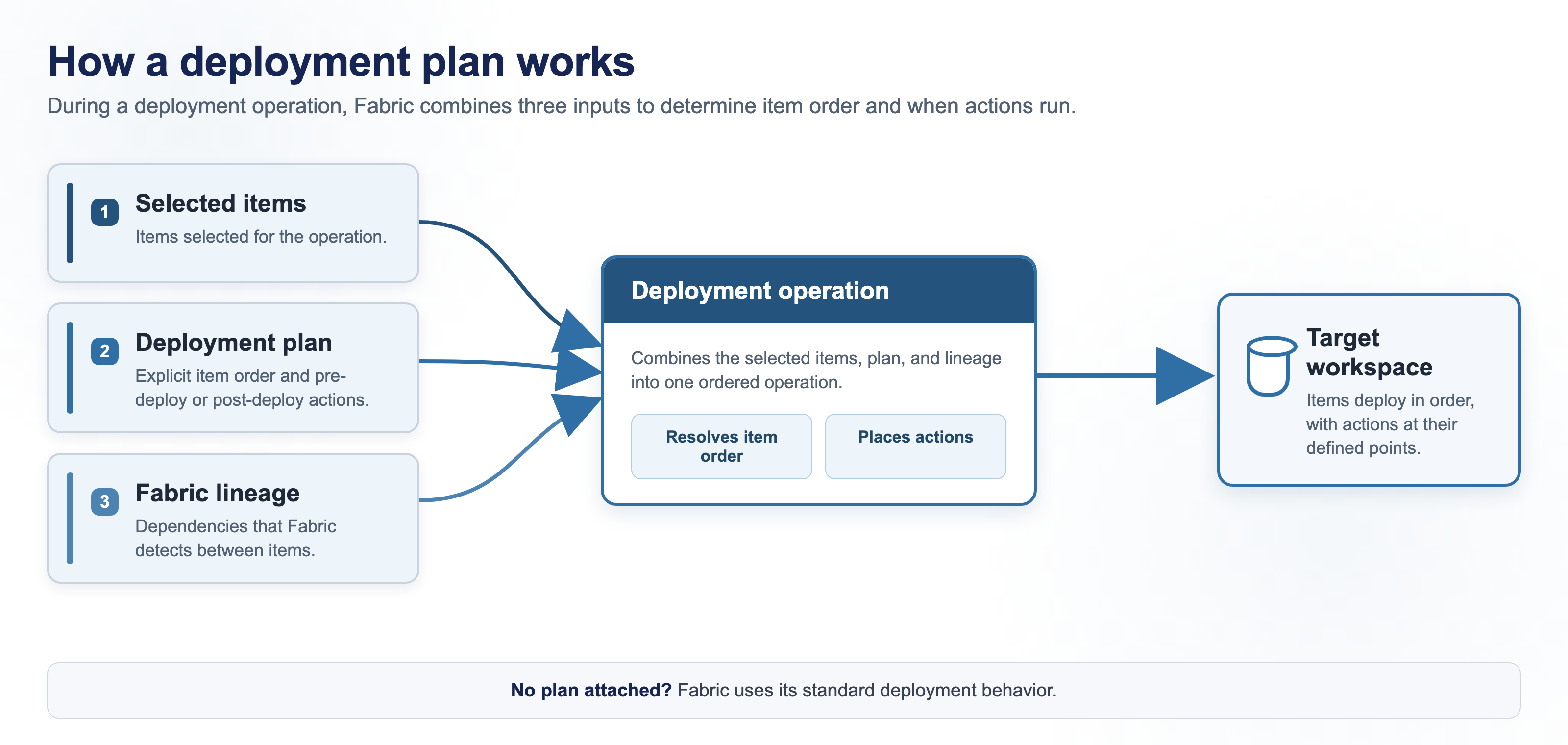
Each deployment operation combines three inputs:
- Selected items: The items selected for the operation.
- Deployment plan: The explicit order and actions associated with those items.
- Fabric lineage: The dependencies Fabric detects between items.
Determine the deployment scope
The deployment tool determines the source, target, and items in the operation. Attaching a plan doesn't replace that selection. Selected items that aren't in a deployment group still deploy by using the tool's standard behavior.
Attaching a plan doesn't automatically select the items that it references. On a selective deployment surface, select the items that you want to deploy, and make sure that the items required by the plan's actions are available in the target workspace when those actions run.
A deployment plan controls item deployment and actions. It doesn't deploy workspace-level configuration such as workspace identities, connections, gateway bindings, or Spark settings. Configure the target workspace before an action depends on those settings.
Resolve the deployment order
Fabric combines explicit dependencies between deployment groups with dependencies detected from lineage. A plan can add an order that lineage doesn't represent, but it doesn't remove dependencies that Fabric detects.
For a detailed scenario that shows how the selected items, plan dependencies, lineage, and runtime actions work together, see Deployment plan examples.
Execute deployment groups and actions
For each deployment group, Fabric runs its pre-deploy actions, deploys the group's item, and then runs its post-deploy actions. Dependencies between groups and actions determine their order. An item's position in the plan file doesn't define its order.
Attaching a plan is optional. Without a plan, the selected deployment tool uses its standard behavior.
Attach a deployment plan
You can attach a plan when you use a supported Git integration operation, deploy content through a deployment pipeline, or call a supported REST API. The attachment applies only to that operation. For the supported surfaces and plan-selection behavior, see Attach a deployment plan.
Create and version a deployment plan
Create a plan on the deployment plan canvas, where you add deployment groups, define their order, and configure actions. For instructions, see Create a deployment plan.
A deployment plan is a workspace item. When the workspace is connected to Git, commit the plan with the items that it references so the plan can move through your CI/CD process.
If an operation fails
The operation stops when an item or action fails and doesn't roll back completed work. For failure behavior and resolution steps, see Troubleshoot deployment plans.
Considerations and limitations
General deployment plan limitations
- You can't use one plan to deploy into more than one workspace in a single run.
- You can attach only one deployment plan to a deployment operation.
Limitations for attaching a plan
- A plan attachment applies only to the current operation. You can't configure a plan as the default for future deployments or schedule the plan itself. If a deployment tool schedules an operation, the operation must attach the plan each time it runs.
- You can't attach a plan to a single-item import operation.
- The
fabric-cicdlibrary doesn't support deployment plans.
Limitations during a deployment
- You can't deploy independent deployment groups in parallel.
- A failed deployment isn't rolled back. Items that already deployed stay in the target workspace, and later items don't deploy.
Limitations for plan actions
- Only supported item and job type combinations can run as pre-deploy or post-deploy actions. See Item types you can run as an action.
- You can't use the same Dataflow Gen2 item in more than one action in a plan. Its refresh job can't run more than once at a time, so the canvas warns you when you add the second occurrence, and the second occurrence is blocked during the deployment.
- You can't return more than 512 KB from a user data function action. Larger output is truncated. The action still succeeds.
- You can't make an action wait for the services it feeds to catch up. An action completes when the action itself ends, so the next action can start before the data it produced is queryable.
- You can't use a deployment plan to change the active value set of a Variable Library during deployment. Variable references resolve against the value set that's already active in the target workspace. In a newly created target workspace, Default is active until you select and save another value set. For more information, see Variable library CI/CD.
Limitations for plan authoring
- You can't add more than one item to a deployment group.
- The canvas supports automatic layout only.
Deployment plan size limits
A plan that exceeds any of these limits is rejected when it's saved. The limits are enforced whenever a plan is saved, so they apply to the canvas, the REST API, a pull from Git, and external tools alike.
| Element | Limit |
|---|---|
| Plan size | 1 MB |
| Length of a group or step name | 60 characters |
| Groups in a plan | 1,000 |
| Dependencies on a group | 1,000 |
| Pre-deploy actions in a group | 20 |
| Post-deploy actions in a group | 20 |
| Dependencies on an action | 20 |
| Parameters on an action | 20 |