หมายเหตุ
การเข้าถึงหน้านี้ต้องได้รับการอนุญาต คุณสามารถลอง ลงชื่อเข้าใช้หรือเปลี่ยนไดเรกทอรีได้
การเข้าถึงหน้านี้ต้องได้รับการอนุญาต คุณสามารถลองเปลี่ยนไดเรกทอรีได้
Governance applies throughout the lifecycle. It controls who can access a plugin or agent, which tools it can use, which data and services it can reach, and whether it remains available. The control you need depends on the object, authoring tool, connection model, and Microsoft 365 experience.
Use this article to find the control that fits your decision and the administration surface that provides it. For the rollout decision, see Make plugins and agents available and govern access.
Many agents are distributed as Microsoft 365 apps and managed in the Microsoft 365 admin center. Other agent and component types use product-specific administration surfaces. Start with the object and control you need instead of assuming that one surface governs the complete plugin.
Note
Administrators who need an end-to-end lifecycle map should begin with Administer Microsoft 365 Copilot plugins and agents.
Identify what you're controlling
| Object | Typical controls |
|---|---|
| Plugin package | Availability, assignment, blocking, and removal |
| Agent | Review, approval, sharing, assignment, ownership, and lifecycle |
| Skill or MCP server | Installation, availability, blocking, runtime control, and removal |
| Connector package | App availability, assignment, and removal |
| Connector connection | Authentication, users, content, schema, synchronization, and operational health |
| External service | Account access, consent, credentials, and revocation |
Applying a package-level control doesn't necessarily change a component, connection, or external service. Name the object and intended effect before you apply a control.
Control availability and assignment
Availability or assignment determines who is permitted to acquire or use an item through the supported path. Blocking is a stronger administrative control. Follow the product-specific procedure to determine its effects on visibility, existing installations, active sessions, dependent packages, components, and external services.
| Control | Objects it applies to | Where to apply it |
|---|---|---|
| Agent access, assignment, availability, and removal | Agents distributed as integrated apps | Manage agents in Microsoft 365 admin center |
| Review and approval | Submitted and requested agents | Manage agent requests |
| Inventory and ownership | Agents from Microsoft, partners, your organization, and individual creators | Manage agent registry |
| Organization settings, including allowed agent types, policy templates, and user access | Agents | Agent settings |
| Sharing limits | Agents that creators share with the organization | Agent settings: sharing |
| Item-level permissions | Agents built with SharePoint | Manage access to agents built with SharePoint |
| Cowork plugin deployment, availability, sharing, blocking, and user enablement | Cowork plugin packages | Manage plugins for Copilot Cowork |
Control tools and components
Use Manage tools for agents to control plugins, skills, MCP servers, connectors, and other supported tools independently of the agents that reference them.
Configure connections and consent
Use Deploy Copilot connectors to configure a connection's access, content, and synchronization. When another administrator needs connector-specific Microsoft Graph permissions, see Grant administrative rights to AI Administrators.
Also review the Microsoft Entra consent and external-service permissions recorded during publishing and deployment. Blocking a package or agent doesn't necessarily revoke an external account, credential, or consent grant.
Block, remove, or retire
Choose the action that matches the object and intended effect:
- Block or unassign a package or agent to stop organizational availability.
- Disable a tool when the component must be unavailable independently of an agent that references it.
- Disable or delete a connector connection when synchronization and indexed content must be addressed.
- Revoke consent, credentials, and external-service access when the dependency must no longer be usable.
- Follow Monitor, update, and retire your plugin or agent to plan communication, replacement, data handling, and rollback.
Product-specific details
Microsoft 365 admin center
Agents for Microsoft 365 Copilot can be packaged and distributed as Microsoft 365 apps that are centrally managed from the Copilot section of Microsoft 365 admin center (admin.microsoft.com).
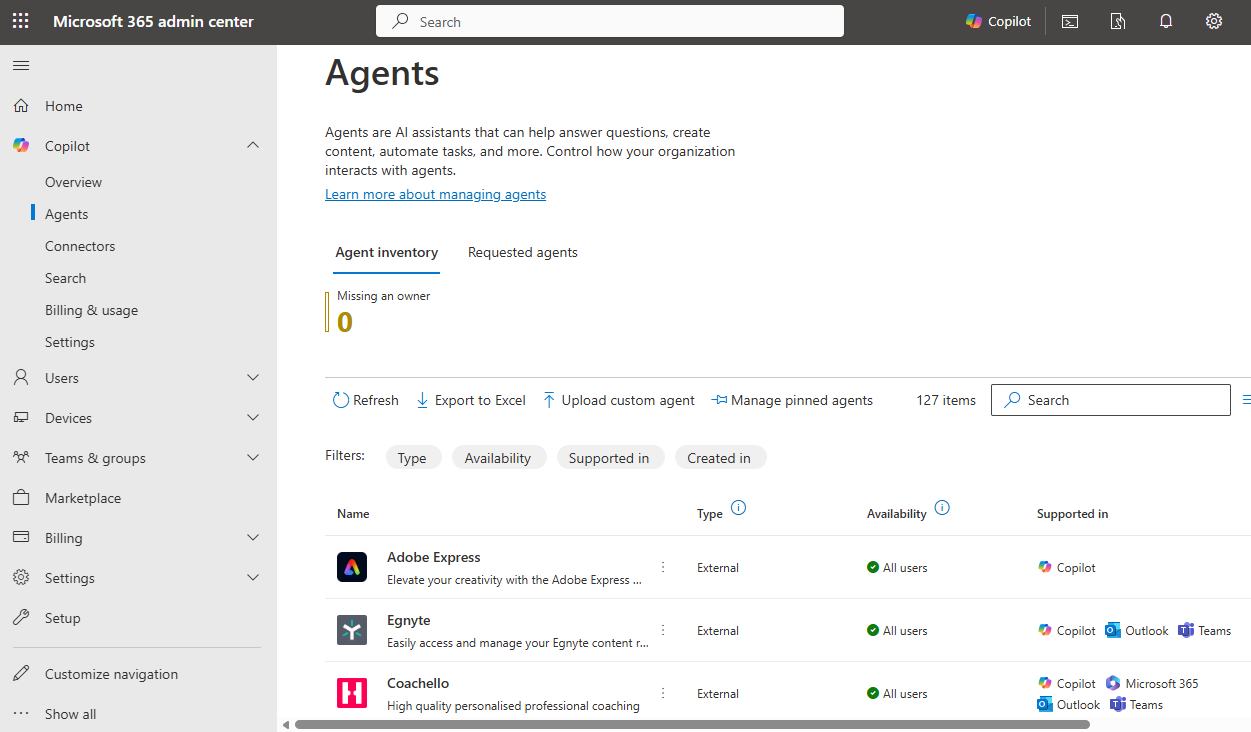
From Microsoft 365 admin center, admins can:
- Manage access to Copilot and Copilot agents for the whole organization or specific users or groups.
- Review and approve agents submitted to the org catalog.
- Monitor and find information about agents that have been shared across the organization.
To learn more, see Manage agents in the Microsoft 365 admin center. To act on agents that are waiting for review, update, or activation, see Manage agent requests.
Agents built with Microsoft 365 Agents Toolkit
Both declarative agents and custom engine agents built with Microsoft 365 Agents Toolkit that are published to the organization or acquired from Microsoft Commercial Marketplace are managed through the Integrated Apps section of Microsoft 365 admin center (admin.microsoft.com).
| Control | Core scenario | Related content |
|---|---|---|
| Upload custom apps | Sideload custom apps to your tenant | Microsoft 365 Agents Toolkit requirements |
| Integrated apps | Manage availability of Copilot agents in your tenant | Manage agents in the Microsoft 365 admin center |
Agents built with Agent Builder in Microsoft 365 Copilot
You can share declarative agents for Microsoft 365 Copilot that you build by using Agent Builder with your entire organization or with specific users. You can manage these agents and the users you share them with.
| Control | Core scenario | Related content |
|---|---|---|
| Allow the following users access to Copilot agents | Enable or disable the entry point for Agent Builder in Microsoft 365 Copilot (Create an agent) | Manage agents in the Microsoft 365 admin center |
| Org-wide sharing | Allow all users, only selected users or groups, or no users to share agents with the organization | Governance and admin controls and Agent settings: sharing |
| Share | Manage access to your agent within your organization | Publish and manage agents |
Changes to the org-wide sharing control apply to new sharing actions. Agents that creators already shared remain accessible until someone updates their sharing settings.
Agents built with Microsoft Copilot Studio
Microsoft 365 Copilot agents built with Microsoft Copilot Studio can be shared with specific users or submitted to the org catalog for administrator review. Follow the publishing route's documentation to determine which administration action applies.
| Control | Core scenario | Related content |
|---|---|---|
| Copilot Studio User License | Enable users in your organization to create and manage agents with Microsoft Copilot Studio | Assign licenses and manage access to Copilot Studio |
| Manage access to Microsoft Power Platform apps | Enable an existing Copilot Studio agent for Microsoft 365 Copilot | Connect and configure an agent for Teams and Microsoft 365 |
| Integrated apps | Manage availability of Copilot agents in your tenant | Manage agents in the Microsoft 365 admin center |
| Security and governance (multiple controls) | Review the full list of Copilot Studio security and governance controls | Key concepts - Copilot Studio security and governance |
Agents built with SharePoint
Agents that are created for SharePoint sites are represented as .agent files in each site's Site Assets library. As such, permissions on the files govern who can access or edit the agents.
| Control | Core scenario | Related content |
|---|---|---|
| Billing | Understand agents pricing | Comparison of Copilot licenses, pay-as-you-go billing, and the trial promotion |
| Microsoft 365 Copilot license details | Control user access to agents | Manage access to agents built with SharePoint |
| Org settings | Set up pay-as-you-go billing for agents built with SharePoint in the Microsoft 365 admin center | Use agents with pay-as-you-go billing |
| PowerShell cmdlet | View status and details on all active and available Copilot agents in the tenant | Get-SPOCopilotAgentInsightsReport |
Copilot connectors
Microsoft 365 Copilot connectors can be connected directly to your organizational Microsoft 365 Copilot experience with the Microsoft Graph API, or packaged as part of a Microsoft 365 app for publish to your organization or submission to Microsoft Commercial Marketplace. Depending on the control, Copilot connectors are managed from Microsoft Entra admin center, Microsoft 365 admin center, and Teams admin center.
Keep package-level availability separate from the controls that apply to a deployed connection. Managing the availability of an app package that includes a connector is a different operation from configuring the connection's users, content, and sync behavior.
| Control | Core scenario | Related content |
|---|---|---|
| App registrations | Register an application and grant admin consent for the required Microsoft Graph permissions | Requirements for Copilot connectors |
| Administrative delegation (optional) | Let AI Administrators register applications and consent to connector permissions without a Global Administrator | Grant administrative rights to AI Administrators |
| Search & intelligence | Ensure that Copilot connectors that you intend for Microsoft Search and Microsoft 365 Copilot are enabled for inline results | Manage connector results in All vertical |
| Copilot connector management | Enable or disable a Copilot connector, and configure its users, content, and sync settings | Deploy connectors in the Microsoft 365 admin center |
Understand control boundaries
Applying a control to one object doesn't necessarily change the others that a plugin brings together.
- Connector, MCP server, agent, and application controls can use different administration surfaces and enforcement mechanisms.
- Reports, audit information, dependency impact, and operation-level controls can vary by object and by Microsoft 365 experience.
- A per-user connection isn't the same as organization-level installation or deployment.
- An agent can exist in more than one distribution path at the same time. An agent built with Agent Builder tracks its shared version and its Agent Store version separately, so a change to one doesn't change the other.
Name the object you're controlling and the effect you expect before you apply a control.
Note
Administration experiences and interface labels can vary during the rollout. Follow the linked product documentation for the current procedure and interface.