หมายเหตุ
การเข้าถึงหน้านี้ต้องได้รับการอนุญาต คุณสามารถลอง ลงชื่อเข้าใช้หรือเปลี่ยนไดเรกทอรีได้
การเข้าถึงหน้านี้ต้องได้รับการอนุญาต คุณสามารถลองเปลี่ยนไดเรกทอรีได้
ColorPicker เป็นชิ้นการจัดรูปแบบอย่างง่ายซึ่งใช้ในการแสดงชนิดวัตถุเติม จากไฟล์ capabilities.json
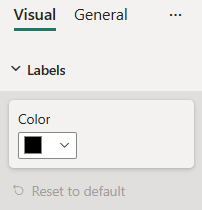
ตัวอย่าง: การใช้งาน ColorPicker
ในตัวอย่างนี้ เราจะแสดงวิธีการสร้าง ColorPicker ชิ้นโดยใช้ยูทิลิตี้แบบจําลองการจัดรูปแบบ
วัตถุ Capabilities
แทรกส่วนย่อย JSON ต่อไปนี้ลงในไฟล์ capabilities.json
{
  // ... same level as dataRoles and dataViewMappings
  "objects": {
    "labels": {
      "properties": {
        "color": {
          "type": {
            "fill": {
              "solid": {
                "color": true
              }
            }
          }
        }
      }
    }
  }
}
การจัดรูปแบบคลาสแบบจําลอง
แทรกส่วนย่อยของโค้ดต่อไปนี้ลงในไฟล์การตั้งค่า
import { formattingSettings } from "powerbi-visuals-utils-formattingmodel";

class LabelsCardSetting extends formattingSettings.SimpleCard {
    name: string = "labels"; // same as capabilities object name
    displayName: string = "Labels";

    public color: formattingSettings.ColorPicker = new formattingSettings.ColorPicker({
        name: "color", // same as capabilities property name
        displayName: "Color",
        value: { value: "#000000" }
    });

    public slices: formattingSettings.Slice[] = [ this.color ];
}

export class VisualSettings extends formattingSettings.Model {
    public labels: LabelsCardSetting = new LabelsCardSetting();
    public cards: formattingSettings.SimpleCard[] = [this.labels];
}