Microsoft Foundry Agent Service, durum bilgisi olan, çok yönlü etkileşimleri desteklemek için üç çekirdek çalışma zamanı bileşeni kullanır: agents, conversations ve responses. Aracı, Dökümhane modeli kataloğundaki bir modeli, yönergeler ve araçlarla birlikte kullanır. Konuşmalar sırayla geçmişi kalıcı hale alır. Yanıt, aracı girişi işlerken ürettiği çıkıştır.
Uygulamanızın ihtiyaç duyduğu davranış ve duruma göre bileşenleri seçin:
| Bileşen |
Ilişki |
Şu durumlarda kullanın: |
|
Aracı |
Bir yanıta yeniden kullanılabilir model, yönergeler ve araçlar sağlar. |
Birden çok istek aynı davranışa veya araç yapılandırmasına ihtiyaç duyar. |
|
Konuşma |
Yanıtlara kalıcı giriş ve çıkış öğeleri sağlar. |
Sonraki turlar sunucu tarafında tutulan geçmişi gerektirir. |
|
Yanıt |
Girişe karşı bir model veya aracı çalıştırır ve çıkış öğeleri üretir. |
Her etkileşim, bir aracı ya da konuşma olsun ya da olmasın, bir yürütme birimine ihtiyaç duyar. |
Tek bir etkileşim için bir yanıtla başlayın. Yeniden kullanılabilir davranış için bir aracı, kalıcı geçmiş için bir konuşma veya her ikisini birden ekleyin. Uygulama ayrıntıları için doğrudan aracı oluşturmaya, yanıt oluşturmaya veya konuşmalar ve konuşma öğeleriyle çalışmaya gidin.
Bileşenler tahmin edilebilir bir yaşam döngüsünde birlikte çalışır. Örneğin, bir takip sorusuna yanıt veren bir destek yardımcısı düşünün:
- Uygulama, destek yönergelerini ve araçlarını tanımlayan bir aracı seçer.
- Bir konuşma oluşturur ve müşterinin ilk sorusunu giriş öğesi olarak ekler.
- Bir yanıt, ajanı konuşma üzerinde çalıştırır ve çıktı öğelerini ekler.
- Sonraki yanıt aynı konuşmayı kullanır, böylece aracı bir takip sorusuna bağlam içinde yanıt verebilir.
Konuşma olmadan uygulama, bağlamı daha önce depolanan bir yanıta başvurarak veya önceki öğeleri yeniden göndererek ileri taşıyabilir. Akış ve arka plan modu, aracılar, konuşmalar ve yanıtlar arasındaki ilişkiyi değil uygulamanın yanıt alma şeklini değiştirir.
Aşağıdaki diyagramda bu bileşenlerin tipik bir aracı döngüsünde nasıl etkileşimde olduğu gösterilmektedir.
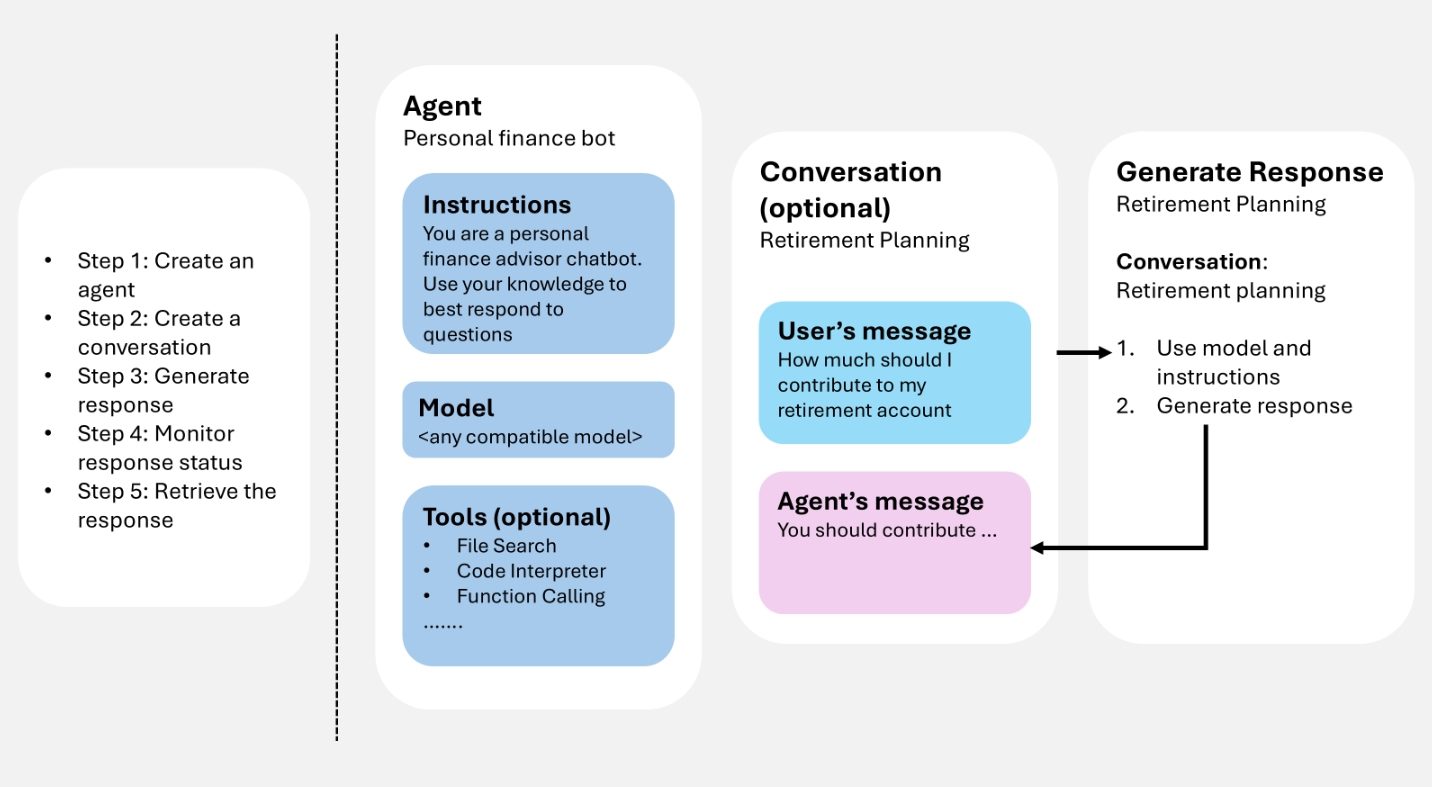
Kullanıcı girişi (ve isteğe bağlı olarak konuşma geçmişi) sağlarsınız, hizmet bir yanıt oluşturur (yapılandırıldığında araç çağrıları dahil) ve sonuçta elde edilen öğeler bir sonraki dönüş için bağlam olarak yeniden kullanılabilir.
Aracıların, konuşmaların ve yanıtların birlikte nasıl çalıştığını tasarlamak için GitHub Copilot gibi bir kodlama aracısı kullanırsanız, Microsoft Döküm Becerisi bu bileşenlerin uygulamanızın iş akışına uygulanmasına yardımcı olabilir.
Önkoşullar
Bu makaledeki örnekleri çalıştırmak için şunlar gerekir:
pip install "azure-ai-projects>=2.0.0"
pip install azure-identity
dotnet add package Azure.AI.Projects
dotnet add package Azure.AI.Projects.Agents
dotnet add package Azure.AI.Extensions.OpenAI
dotnet add package Azure.Identity
npm install @azure/ai-projects
npm install @azure/identity
2.8.0 ile @azure/ai-projects Node.js 22 veya üzerini kullanın.
<dependency>
    <groupId>com.azure</groupId>
    <artifactId>azure-ai-agents</artifactId>
    <version>2.2.0</version>
</dependency>
<dependency>
    <groupId>com.azure</groupId>
    <artifactId>azure-identity</artifactId>
    <version>1.18.4</version>
</dependency>
SDK yüklemesi gerekmez. Erişim belirteci almak için Azure CLI kullanın:
az login
Bir ajan oluştur
Aracı, yapay zeka modellerini, yönergeleri, kodu, araçları, parametreleri ve isteğe bağlı güvenlik veya idare denetimlerini birleştiren kalıcı bir düzenleme tanımıdır.
Yazılım ajanlarını Microsoft Foundry'de adlandırılmış, sürümlenmiş varlıklar olarak depolayın. Yanıt oluşturma sırasında aracı tanımı, kullanıcı girişini işlemek ve yanıtlamak için etkileşim geçmişiyle (konuşma veya önceki yanıt) çalışır.
Aşağıdaki örnek ad, model ve yönergeler içeren bir istem aracısı oluşturur. Aracın oluşturulması ve sürümlendirilmesi için proje istemcisini kullanın.
from azure.identity import DefaultAzureCredential
from azure.ai.projects import AIProjectClient
from azure.ai.projects.models import PromptAgentDefinition

# Format: "https://resource_name.services.ai.azure.com/api/projects/project_name"
PROJECT_ENDPOINT = "your_project_endpoint"

# Create project client to call Foundry API
project = AIProjectClient(
    endpoint=PROJECT_ENDPOINT,
    credential=DefaultAzureCredential(),
)

# Create a prompt agent
agent = project.agents.create_version(
    agent_name="my-agent",
    definition=PromptAgentDefinition(
        model="gpt-5-mini",
        instructions="You are a helpful assistant.",
    ),
)
print(f"Agent: {agent.name}, Version: {agent.version}")
using Azure.Identity;
using Azure.AI.Projects;

// Format: "https://resource_name.services.ai.azure.com/api/projects/project_name"
var projectEndpoint = "your_project_endpoint";

// Create project client to call Foundry API
AIProjectClient projectClient = new(
    endpoint: new Uri(projectEndpoint),
    tokenProvider: new DefaultAzureCredential());

// Create a prompt agent
ProjectsAgentVersion agent = await projectClient.AgentAdministrationClient
    .CreateAgentVersionAsync(
        agentName: "my-agent",
        options: new(
            new DeclarativeAgentDefinition("gpt-5-mini")
            {
                Instructions = "You are a helpful assistant.",
            }));
Console.WriteLine($"Agent: {agent.Name}, Version: {agent.Version}");
import { DefaultAzureCredential } from "@azure/identity";
import { AIProjectClient } from "@azure/ai-projects";

// Format: "https://resource_name.services.ai.azure.com/api/projects/project_name"
const PROJECT_ENDPOINT = "your_project_endpoint";

// Create project client to call Foundry API
const project = new AIProjectClient(PROJECT_ENDPOINT, new DefaultAzureCredential());

// Create a prompt agent
const agent = await project.agents.createVersion(
  "my-agent",
  {
    kind: "prompt",
    model: "gpt-5-mini",
    instructions: "You are a helpful assistant.",
  },
);
console.log(`Agent: ${agent.name}, Version: ${agent.version}`);
import com.azure.ai.agents.AgentsClientBuilder;
import com.azure.ai.agents.AgentsClient;
import com.azure.ai.agents.models.PromptAgentDefinition;
import com.azure.identity.DefaultAzureCredentialBuilder;

// Format: "https://resource_name.services.ai.azure.com/api/projects/project_name"
String projectEndpoint = "your_project_endpoint";

// Create agents client to call Foundry API
AgentsClient agentsClient = new AgentsClientBuilder()
    .credential(new DefaultAzureCredentialBuilder().build())
    .endpoint(projectEndpoint)
    .buildAgentsClient();

// Create a prompt agent
PromptAgentDefinition definition = new PromptAgentDefinition("gpt-5-mini");
definition.setInstructions("You are a helpful assistant.");

var agent = agentsClient.createAgentVersion("my-agent", definition);
System.out.println("Agent: " + agent.getName() + ", Version: " + agent.getVersion());
# Configuration
ENDPOINT="https://{resource_name}.services.ai.azure.com/api/projects/{project_name}"
ACCESS_TOKEN="$(az account get-access-token --resource https://ai.azure.com/ --query accessToken -o tsv)"

# Create a prompt agent
curl -X POST "${ENDPOINT}/agents?api-version=v1" \
  -H "Authorization: Bearer ${ACCESS_TOKEN}" \
  -H "Content-Type: application/json" \
  -d '{
    "name": "my-agent",
    "definition": {
      "kind": "prompt",
      "model": "gpt-5-mini",
      "instructions": "You are a helpful assistant."
    }
  }'
Not
Aracılar artık aracı adı ve aracı sürümü kullanılarak tanımlanır. Artık adlı AgentID bir GUID'leri yok.
Diğer aracı türleri (barındırılan) için bkz. Aracı geliştirme yaşam döngüsü.
Araçlar, bir aracının metin oluşturmanın ötesinde yapabileceklerini genişletir. Aracıya araç eklediğinizde aracı, web araması veya işlev çağrısı gibi araçları kullanarak dış hizmetleri çağırabilir, kod çalıştırabilir, dosyaları arayabilir ve yanıt oluşturma sırasında veri kaynaklarına erişebilir.
Aracı oluştururken bir veya daha fazla araç ekleyebilirsiniz. Yanıt oluşturma sırasında temsilci, yönergelerine ve kullanıcı girişine göre bir aracın çağrılıp çağrılmayacağına karar verir. Aşağıdaki örnek, web arama aracının eklendiği bir aracı oluşturur.
from azure.identity import DefaultAzureCredential
from azure.ai.projects import AIProjectClient
from azure.ai.projects.models import PromptAgentDefinition, WebSearchTool

PROJECT_ENDPOINT = "your_project_endpoint"

project = AIProjectClient(
    endpoint=PROJECT_ENDPOINT,
    credential=DefaultAzureCredential(),
)

# Create an agent with a web search tool
agent = project.agents.create_version(
    agent_name="my-tool-agent",
    definition=PromptAgentDefinition(
        model="gpt-5-mini",
        instructions="You are a helpful assistant that can search the web.",
        tools=[WebSearchTool()],
    ),
)
print(f"Agent: {agent.name}, Version: {agent.version}")
using Azure.Identity;
using Azure.AI.Projects;

var projectEndpoint = "your_project_endpoint";

AIProjectClient projectClient = new(
    endpoint: new Uri(projectEndpoint),
    tokenProvider: new DefaultAzureCredential());

// Create an agent with a web search tool
ProjectsAgentVersion agent = await projectClient.AgentAdministrationClient
    .CreateAgentVersionAsync(
        agentName: "my-tool-agent",
        options: new(
            new DeclarativeAgentDefinition("gpt-5-mini")
            {
                Instructions = "You are a helpful assistant that can search the web.",
                Tools = { ResponseTool.CreateWebSearchTool() },
            }));
Console.WriteLine($"Agent: {agent.Name}, Version: {agent.Version}");
import { DefaultAzureCredential } from "@azure/identity";
import { AIProjectClient } from "@azure/ai-projects";

const PROJECT_ENDPOINT = "your_project_endpoint";
const project = new AIProjectClient(PROJECT_ENDPOINT, new DefaultAzureCredential());

// Create an agent with a web search tool
const agent = await project.agents.createVersion(
  "my-tool-agent",
  {
    kind: "prompt",
    model: "gpt-5-mini",
    instructions: "You are a helpful assistant that can search the web.",
    tools: [{ type: "web_search_preview" }],
  },
);
console.log(`Agent: ${agent.name}, Version: ${agent.version}`);
import com.azure.ai.agents.AgentsClientBuilder;
import com.azure.ai.agents.AgentsClient;
import com.azure.ai.agents.models.PromptAgentDefinition;
import com.azure.ai.agents.models.WebSearchPreviewTool;
import com.azure.identity.DefaultAzureCredentialBuilder;
import java.util.Collections;

String projectEndpoint = "your_project_endpoint";

AgentsClient agentsClient = new AgentsClientBuilder()
    .credential(new DefaultAzureCredentialBuilder().build())
    .endpoint(projectEndpoint)
    .buildAgentsClient();

// Create an agent with a web search tool
WebSearchPreviewTool webSearchTool = new WebSearchPreviewTool();
PromptAgentDefinition definition = new PromptAgentDefinition("gpt-5-mini");
definition.setInstructions("You are a helpful assistant that can search the web.");
definition.setTools(Collections.singletonList(webSearchTool));

var agent = agentsClient.createAgentVersion("my-tool-agent", definition);
System.out.println("Agent: " + agent.getName() + ", Version: " + agent.getVersion());
ENDPOINT="https://{resource_name}.services.ai.azure.com/api/projects/{project_name}"
ACCESS_TOKEN="$(az account get-access-token --resource https://ai.azure.com/ --query accessToken -o tsv)"

# Create an agent with a web search tool
curl -X POST "${ENDPOINT}/agents?api-version=v1" \
  -H "Authorization: Bearer ${ACCESS_TOKEN}" \
  -H "Content-Type: application/json" \
  -d '{
    "name": "my-tool-agent",
    "definition": {
      "kind": "prompt",
      "model": "gpt-5-mini",
      "instructions": "You are a helpful assistant that can search the web.",
      "tools": [{ "type": "web_search_preview" }]
    }
  }'
Kullanılabilir araçların tam listesi ve bunları Araç Kutusu'na ekleme hakkında bilgi için bkz. Araç Kutusu'na genel bakış. En iyi yöntemler için bkz. Araçları kullanmaya yönelik en iyi yöntemler.
Yanıt oluşturma
Yanıt oluşturma aracısını çağırır. Aracı, modelleri ve araçları çağırarak görevleri gerçekleştirmek için yapılandırmasını ve sağlanan herhangi bir geçmişi (konuşma veya önceki yanıt) kullanır. Yanıt oluşturma işleminin bir parçası olarak aracı konuşmaya öğe ekler.
Ayrıca bir aracı tanımlamadan da yanıt oluşturabilirsiniz. Bu durumda, tüm yapılandırmaları doğrudan istekte sağlar ve bunları yalnızca bu yanıt için kullanırsınız. Bu yaklaşım, en az araç içeren basit senaryolar için kullanışlıdır.
Ayrıca, konuşmayı ilk yanıt kimliğinde veya ikinci yanıt kimliğinde dallandırabilirsiniz.
Bir ajanla yanıt oluştur.
Aşağıdaki örnek, aracı başvurusu kullanarak bir yanıt oluşturur ve ardından bağlam olarak önceki yanıtı kullanarak bir izleme sorusu gönderir.
from azure.identity import DefaultAzureCredential
from azure.ai.projects import AIProjectClient

# Format: "https://resource_name.services.ai.azure.com/api/projects/project_name"
PROJECT_ENDPOINT = "your_project_endpoint"
AGENT_NAME = "your_agent_name"

# Create clients to call Foundry API
project = AIProjectClient(
    endpoint=PROJECT_ENDPOINT,
    credential=DefaultAzureCredential(),
)
openai = project.get_openai_client()

# Generate a response using the agent
response = openai.responses.create(
    extra_body={
        "agent_reference": {
            "name": AGENT_NAME,
            "type": "agent_reference",
        }
    },
    input="What is the largest city in France?",
)
print(response.output_text)

# Ask a follow-up question using the previous response
follow_up = openai.responses.create(
    extra_body={
        "agent_reference": {
            "name": AGENT_NAME,
            "type": "agent_reference",
        }
    },
    previous_response_id=response.id,
    input="What is the population of that city?",
)
print(follow_up.output_text)
using Azure.Identity;
using Azure.AI.Projects;
using Azure.AI.Extensions.OpenAI;

// Format: "https://resource_name.services.ai.azure.com/api/projects/project_name"
var projectEndpoint = "your_project_endpoint";
var agentName = "your_agent_name";

// Create project client to call Foundry API
AIProjectClient projectClient = new(
    endpoint: new Uri(projectEndpoint),
    tokenProvider: new DefaultAzureCredential());

// Generate a response using the agent
ProjectResponsesClient responsesClient
    = projectClient.ProjectOpenAIClient.GetProjectResponsesClientForAgent(agentName);
ResponseResult response = await responsesClient.CreateResponseAsync(
    "What is the largest city in France?");
Console.WriteLine(response.GetOutputText());

// Ask a follow-up question using the previous response
ResponseResult followUp = await responsesClient.CreateResponseAsync(
    new CreateResponseOptions
    {
        PreviousResponseId = response.Id,
        InputItems = { ResponseItem.CreateUserMessageItem(
            "What is the population of that city?") },
    });
Console.WriteLine(followUp.GetOutputText());
import { DefaultAzureCredential } from "@azure/identity";
import { AIProjectClient } from "@azure/ai-projects";

// Format: "https://resource_name.services.ai.azure.com/api/projects/project_name"
const PROJECT_ENDPOINT = "your_project_endpoint";
const AGENT_NAME = "your_agent_name";

// Create clients to call Foundry API
const project = new AIProjectClient(PROJECT_ENDPOINT, new DefaultAzureCredential());
const openai = project.getOpenAIClient();

// Generate a response using the agent
const response = await openai.responses.create(
  { input: "What is the largest city in France?" },
  { body: { agent_reference: { name: AGENT_NAME, type: "agent_reference" } } },
);
console.log(response.output_text);

// Ask a follow-up question using the previous response
const followUp = await openai.responses.create(
  {
    input: "What is the population of that city?",
    previous_response_id: response.id,
  },
  { body: { agent_reference: { name: AGENT_NAME, type: "agent_reference" } } },
);
console.log(followUp.output_text);
import com.azure.ai.agents.*;
import com.azure.ai.agents.models.AgentReference;
import com.azure.ai.agents.models.AzureCreateResponseOptions;
import com.azure.identity.DefaultAzureCredentialBuilder;
import com.openai.models.responses.Response;
import com.openai.models.responses.ResponseCreateParams;

// Format: "https://resource_name.services.ai.azure.com/api/projects/project_name"
String projectEndpoint = "your_project_endpoint";
String agentName = "your_agent_name";

// Create clients to call Foundry API
AgentsClientBuilder builder = new AgentsClientBuilder()
    .credential(new DefaultAzureCredentialBuilder().build())
    .endpoint(projectEndpoint);
ResponsesClient responsesClient = builder.buildResponsesClient();

// Generate a response using the agent
AgentReference agentRef = new AgentReference(agentName);

Response response = responsesClient.createAzureResponse(
    new AzureCreateResponseOptions().setAgentReference(agentRef),
    ResponseCreateParams.builder()
        .input("What is the largest city in France?"));
System.out.println(response.output());

// Ask a follow-up question using the previous response
Response followUp = responsesClient.createAzureResponse(
    new AzureCreateResponseOptions().setAgentReference(agentRef),
    ResponseCreateParams.builder()
        .input("What is the population of that city?")
        .previousResponseId(response.id()));
System.out.println(followUp.output());
# Configuration
ENDPOINT="https://{resource_name}.services.ai.azure.com/api/projects/{project_name}"
ACCESS_TOKEN="$(az account get-access-token --resource https://ai.azure.com/ --query accessToken -o tsv)"
AGENT_NAME="your_agent_name"

# Generate a response using an agent
RESPONSE=$(curl -s -X POST "${ENDPOINT}/openai/v1/responses" \
  -H "Authorization: Bearer ${ACCESS_TOKEN}" \
  -H "Content-Type: application/json" \
  -d '{
    "input": "What is the largest city in France?",
    "agent_reference": {
      "name": "'"${AGENT_NAME}"'",
      "type": "agent_reference"
    }
  }')
RESPONSE_ID=$(echo "$RESPONSE" | jq -r '.id')

# Ask a follow-up question using the previous response
curl -X POST "${ENDPOINT}/openai/v1/responses" \
  -H "Authorization: Bearer ${ACCESS_TOKEN}" \
  -H "Content-Type: application/json" \
  -d '{
    "input": "What is the population of that city?",
    "previous_response_id": "'"${RESPONSE_ID}"'",
    "agent_reference": {
      "name": "'"${AGENT_NAME}"'",
      "type": "agent_reference"
    }
  }'
Bir ajan yanıt oluşturma sırasında araçları kullandığında, yanıt çıktısı son iletinin yanı sıra araç çağrı öğelerini de içerir. Yineleme yaparak response.output üzerinde her öğeyi inceleyebilir ve metin yanıtını yazdırmadan önce web aramaları, işlev çağrıları veya dosya aramaları gibi araç çağrılarını görüntüleyebilirsiniz.
from azure.identity import DefaultAzureCredential
from azure.ai.projects import AIProjectClient

PROJECT_ENDPOINT = "your_project_endpoint"
AGENT_NAME = "your_agent_name"

project = AIProjectClient(
    endpoint=PROJECT_ENDPOINT,
    credential=DefaultAzureCredential(),
)
openai = project.get_openai_client()

response = openai.responses.create(
    extra_body={
        "agent_reference": {
            "name": AGENT_NAME,
            "type": "agent_reference",
        }
    },
    input="What happened in the news today?",
)

# Print each output item, including tool calls
for item in response.output:
    if item.type == "web_search_call":
        print(f"[Tool] Web search: status={item.status}")
    elif item.type == "function_call":
        print(f"[Tool] Function call: {item.name}({item.arguments})")
    elif item.type == "file_search_call":
        print(f"[Tool] File search: status={item.status}")
    elif item.type == "message":
        print(f"[Assistant] {item.content[0].text}")
using Azure.Identity;
using Azure.AI.Projects;
using Azure.AI.Extensions.OpenAI;

var projectEndpoint = "your_project_endpoint";
var agentName = "your_agent_name";

AIProjectClient projectClient = new(
    endpoint: new Uri(projectEndpoint),
    tokenProvider: new DefaultAzureCredential());

ProjectResponsesClient responsesClient
    = projectClient.ProjectOpenAIClient.GetProjectResponsesClientForAgent(agentName);
ResponseResult response = await responsesClient.CreateResponseAsync(
    "What happened in the news today?");

// Print each output item, including tool calls
foreach (var item in response.OutputItems)
{
    switch (item)
    {
        case ResponseWebSearchCallItem webSearch:
            Console.WriteLine($"[Tool] Web search: status={webSearch.Status}");
            break;
        case ResponseFunctionCallItem functionCall:
            Console.WriteLine($"[Tool] Function call: {functionCall.Name}({functionCall.Arguments})");
            break;
        case ResponseFileSearchCallItem fileSearch:
            Console.WriteLine($"[Tool] File search: status={fileSearch.Status}");
            break;
        case ResponseOutputMessage message:
            Console.WriteLine($"[Assistant] {message.Content[0].Text}");
            break;
    }
}
import { DefaultAzureCredential } from "@azure/identity";
import { AIProjectClient } from "@azure/ai-projects";

const PROJECT_ENDPOINT = "your_project_endpoint";
const AGENT_NAME = "your_agent_name";

const project = new AIProjectClient(PROJECT_ENDPOINT, new DefaultAzureCredential());
const openai = project.getOpenAIClient();

const response = await openai.responses.create(
  { input: "What happened in the news today?" },
  { body: { agent_reference: { name: AGENT_NAME, type: "agent_reference" } } },
);

// Print each output item, including tool calls
for (const item of response.output) {
  switch (item.type) {
    case "web_search_call":
      console.log(`[Tool] Web search: status=${item.status}`);
      break;
    case "function_call":
      console.log(`[Tool] Function call: ${item.name}(${item.arguments})`);
      break;
    case "file_search_call":
      console.log(`[Tool] File search: status=${item.status}`);
      break;
    case "message":
      console.log(`[Assistant] ${item.content[0].text}`);
      break;
  }
}
import com.azure.ai.agents.*;
import com.azure.ai.agents.models.AgentReference;
import com.azure.ai.agents.models.AzureCreateResponseOptions;
import com.azure.identity.DefaultAzureCredentialBuilder;
import com.openai.models.responses.Response;
import com.openai.models.responses.ResponseCreateParams;
import com.openai.models.responses.ResponseOutputItem;

String projectEndpoint = "your_project_endpoint";
String agentName = "your_agent_name";

AgentsClientBuilder builder = new AgentsClientBuilder()
    .credential(new DefaultAzureCredentialBuilder().build())
    .endpoint(projectEndpoint);
ResponsesClient responsesClient = builder.buildResponsesClient();

AgentReference agentRef = new AgentReference(agentName);
Response response = responsesClient.createAzureResponse(
    new AzureCreateResponseOptions().setAgentReference(agentRef),
    ResponseCreateParams.builder()
        .input("What happened in the news today?"));

// Print each output item, including tool calls
for (ResponseOutputItem item : response.output()) {
    item.webSearchCall().ifPresent(ws ->
        System.out.println("[Tool] Web search: status=" + ws.status()));
    item.functionCall().ifPresent(fc ->
        System.out.println("[Tool] Function call: " + fc.name()
            + "(" + fc.arguments() + ")"));
    item.fileSearchCall().ifPresent(fs ->
        System.out.println("[Tool] File search: status=" + fs.status()));
    item.message().ifPresent(msg ->
        System.out.println("[Assistant] "
            + msg.content().get(0).asOutputText().text()));
}
ENDPOINT="https://{resource_name}.services.ai.azure.com/api/projects/{project_name}"
ACCESS_TOKEN="$(az account get-access-token --resource https://ai.azure.com/ --query accessToken -o tsv)"
AGENT_NAME="your_agent_name"

RESPONSE=$(curl -s -X POST "${ENDPOINT}/openai/v1/responses" \
  -H "Authorization: Bearer ${ACCESS_TOKEN}" \
  -H "Content-Type: application/json" \
  -d '{
    "input": "What happened in the news today?",
    "agent_reference": {
      "name": "'"${AGENT_NAME}"'",
      "type": "agent_reference"
    }
  }')

# Print each output item, including tool calls
echo "$RESPONSE" | jq -r '.output[] |
  if .type == "web_search_call" then "[Tool] Web search: status=\(.status)"
  elif .type == "function_call" then "[Tool] Function call: \(.name)(\(.arguments))"
  elif .type == "file_search_call" then "[Tool] File search: status=\(.status)"
  elif .type == "message" then "[Assistant] \(.content[0].text)"
  else "[Unknown] \(.type)"
  end'
Depolamadan yanıt oluşturma
Varsayılan olarak, hizmet yanıt geçmişini sunucu tarafında depolar, böylece çok adımlı etkileşim için başvurabilirsiniz previous_response_id.
store öğesini false olarak ayarlarsanız hizmet yanıtı kaydetmez. Önceki çıkış öğelerini bir sonraki isteğe giriş olarak geçirerek konuşma bağlamını kendiniz iletmeniz gerekir.
Konuşma durumu üzerinde tam denetime ihtiyacınız olduğunda, depolanan verileri en aza indirmek istediğinizde veya sıfır veri saklama ortamında çalışırken bu yaklaşım kullanışlıdır.
from azure.identity import DefaultAzureCredential
from azure.ai.projects import AIProjectClient

PROJECT_ENDPOINT = "your_project_endpoint"
AGENT_NAME = "your_agent_name"

project = AIProjectClient(
    endpoint=PROJECT_ENDPOINT,
    credential=DefaultAzureCredential(),
)
openai = project.get_openai_client()

# Generate a response without storing
response = openai.responses.create(
    extra_body={
        "agent_reference": {
            "name": AGENT_NAME,
            "type": "agent_reference",
        }
    },
    input="What is the largest city in France?",
    store=False,
)
print(response.output_text)

# Carry forward context client-side by passing previous output as input
follow_up = openai.responses.create(
    extra_body={
        "agent_reference": {
            "name": AGENT_NAME,
            "type": "agent_reference",
        }
    },
    input=[
        {"role": "user", "content": "What is the largest city in France?"},
        {"role": "assistant", "content": response.output_text},
        {"role": "user", "content": "What is the population of that city?"},
    ],
    store=False,
)
print(follow_up.output_text)
using Azure.Identity;
using Azure.AI.Projects;
using Azure.AI.Extensions.OpenAI;

var projectEndpoint = "your_project_endpoint";
var agentName = "your_agent_name";

AIProjectClient projectClient = new(
    endpoint: new Uri(projectEndpoint),
    tokenProvider: new DefaultAzureCredential());

// Generate a response without storing
ProjectResponsesClient responsesClient
    = projectClient.ProjectOpenAIClient.GetProjectResponsesClientForAgent(agentName);
ResponseResult response = await responsesClient.CreateResponseAsync(
    new CreateResponseOptions
    {
        InputItems = { ResponseItem.CreateUserMessageItem(
            "What is the largest city in France?") },
        Store = false,
    });
Console.WriteLine(response.GetOutputText());

// Carry forward context client-side by passing previous output as input
ResponseResult followUp = await responsesClient.CreateResponseAsync(
    new CreateResponseOptions
    {
        InputItems =
        {
            ResponseItem.CreateUserMessageItem(
                "What is the largest city in France?"),
            ResponseItem.CreateAssistantMessageItem(
                response.GetOutputText()),
            ResponseItem.CreateUserMessageItem(
                "What is the population of that city?"),
        },
        Store = false,
    });
Console.WriteLine(followUp.GetOutputText());
import { DefaultAzureCredential } from "@azure/identity";
import { AIProjectClient } from "@azure/ai-projects";

const PROJECT_ENDPOINT = "your_project_endpoint";
const AGENT_NAME = "your_agent_name";

const project = new AIProjectClient(PROJECT_ENDPOINT, new DefaultAzureCredential());
const openai = project.getOpenAIClient();

// Generate a response without storing
const response = await openai.responses.create(
  { input: "What is the largest city in France?", store: false },
  { body: { agent_reference: { name: AGENT_NAME, type: "agent_reference" } } },
);
console.log(response.output_text);

// Carry forward context client-side by passing previous output as input
const followUp = await openai.responses.create(
  {
    input: [
      { role: "user", content: "What is the largest city in France?" },
      { role: "assistant", content: response.output_text },
      { role: "user", content: "What is the population of that city?" },
    ],
    store: false,
  },
  { body: { agent_reference: { name: AGENT_NAME, type: "agent_reference" } } },
);
console.log(followUp.output_text);
import com.azure.ai.agents.*;
import com.azure.ai.agents.models.AgentReference;
import com.azure.ai.agents.models.AzureCreateResponseOptions;
import com.azure.identity.DefaultAzureCredentialBuilder;
import com.openai.models.responses.Response;
import com.openai.models.responses.ResponseCreateParams;
import com.openai.models.responses.EasyInputMessage;
import java.util.List;

String projectEndpoint = "your_project_endpoint";
String agentName = "your_agent_name";

AgentsClientBuilder builder = new AgentsClientBuilder()
    .credential(new DefaultAzureCredentialBuilder().build())
    .endpoint(projectEndpoint);
ResponsesClient responsesClient = builder.buildResponsesClient();

// Generate a response without storing
AgentReference agentRef = new AgentReference(agentName);

Response response = responsesClient.createAzureResponse(
    new AzureCreateResponseOptions().setAgentReference(agentRef),
    ResponseCreateParams.builder()
        .input("What is the largest city in France?")
        .store(false));
System.out.println(response.output());

// Carry forward context client-side by passing previous output as input
Response followUp = responsesClient.createAzureResponse(
    new AzureCreateResponseOptions().setAgentReference(agentRef),
    ResponseCreateParams.builder()
        .inputOfResponse(List.of(
            EasyInputMessage.builder()
                .role(EasyInputMessage.Role.USER)
                .content("What is the largest city in France?").build(),
            EasyInputMessage.builder()
                .role(EasyInputMessage.Role.ASSISTANT)
                .content(response.outputText()).build(),
            EasyInputMessage.builder()
                .role(EasyInputMessage.Role.USER)
                .content("What is the population of that city?").build()))
        .store(false));
System.out.println(followUp.output());
ENDPOINT="https://{resource_name}.services.ai.azure.com/api/projects/{project_name}"
ACCESS_TOKEN="$(az account get-access-token --resource https://ai.azure.com/ --query accessToken -o tsv)"
AGENT_NAME="your_agent_name"

# Generate a response without storing
RESPONSE=$(curl -s -X POST "${ENDPOINT}/openai/v1/responses" \
  -H "Authorization: Bearer ${ACCESS_TOKEN}" \
  -H "Content-Type: application/json" \
  -d '{
    "input": "What is the largest city in France?",
    "store": false,
    "agent_reference": {
      "name": "'"${AGENT_NAME}"'",
      "type": "agent_reference"
    }
  }')
OUTPUT_TEXT=$(echo "$RESPONSE" | jq -r '.output[] | select(.type=="message") | .content[0].text')

# Carry forward context client-side by passing previous output as input
curl -X POST "${ENDPOINT}/openai/v1/responses" \
  -H "Authorization: Bearer ${ACCESS_TOKEN}" \
  -H "Content-Type: application/json" \
  -d '{
    "input": [
      {"role": "user", "content": "What is the largest city in France?"},
      {"role": "assistant", "content": "'"${OUTPUT_TEXT}"'"},
      {"role": "user", "content": "What is the population of that city?"}
    ],
    "store": false,
    "agent_reference": {
      "name": "'"${AGENT_NAME}"'",
      "type": "agent_reference"
    }
  }'
Konuşmalar ve konuşma öğeleri
Konuşmalar, benzersiz tanımlayıcılara sahip dayanıklı nesnelerdir. Oluşturma işleminden sonra bunları oturumlar arasında yeniden kullanabilirsiniz.
Konuşmalar, iletileri, araç çağrılarını, araç çıkışlarını ve diğer verileri içerebilen öğeleri depolar.
Konuşma oluşturma
Aşağıdaki örnek, ilk kullanıcı iletisiyle bir konuşma oluşturur. Konuşmalar ve yanıtlar için OpenAI istemcisini (proje istemcisinden alınan) kullanın.
from azure.identity import DefaultAzureCredential
from azure.ai.projects import AIProjectClient

# Format: "https://resource_name.services.ai.azure.com/api/projects/project_name"
PROJECT_ENDPOINT = "your_project_endpoint"

# Create clients to call Foundry API
project = AIProjectClient(
    endpoint=PROJECT_ENDPOINT,
    credential=DefaultAzureCredential(),
)
openai = project.get_openai_client()

# Create a conversation with an initial user message
conversation = openai.conversations.create(
    items=[
        {
            "type": "message",
            "role": "user",
            "content": "What is the largest city in France?",
        }
    ],
)
print(f"Conversation ID: {conversation.id}")
using Azure.Identity;
using Azure.AI.Projects;
using Azure.AI.Extensions.OpenAI;

// Format: "https://resource_name.services.ai.azure.com/api/projects/project_name"
var projectEndpoint = "your_project_endpoint";

// Create project client to call Foundry API
AIProjectClient projectClient = new(
    endpoint: new Uri(projectEndpoint),
    tokenProvider: new DefaultAzureCredential());

// Create a conversation
ProjectConversation conversation
    = await projectClient.ProjectOpenAIClient.GetProjectConversationsClient().CreateProjectConversationAsync();
Console.WriteLine($"Conversation ID: {conversation.Id}");
import { DefaultAzureCredential } from "@azure/identity";
import { AIProjectClient } from "@azure/ai-projects";

// Format: "https://resource_name.services.ai.azure.com/api/projects/project_name"
const PROJECT_ENDPOINT = "your_project_endpoint";

// Create clients to call Foundry API
const project = new AIProjectClient(PROJECT_ENDPOINT, new DefaultAzureCredential());
const openai = project.getOpenAIClient();

// Create a conversation with an initial user message
const conversation = await openai.conversations.create({
  items: [
    {
      type: "message",
      role: "user",
      content: "What is the largest city in France?",
    },
  ],
});
console.log(`Conversation ID: ${conversation.id}`);
import com.azure.ai.agents.AgentsClientBuilder;
import com.azure.identity.DefaultAzureCredentialBuilder;
import com.openai.models.conversations.Conversation;
import com.openai.services.blocking.ConversationService;

// Format: "https://resource_name.services.ai.azure.com/api/projects/project_name"
String projectEndpoint = "your_project_endpoint";

// Create conversations client to call Foundry API
ConversationService conversationService = new AgentsClientBuilder()
    .credential(new DefaultAzureCredentialBuilder().build())
    .endpoint(projectEndpoint)
    .buildOpenAIClient()
    .conversations();

// Create a conversation
Conversation conversation = conversationService.create();
System.out.println("Conversation ID: " + conversation.id());
# Configuration
ENDPOINT="https://{resource_name}.services.ai.azure.com/api/projects/{project_name}"
ACCESS_TOKEN="$(az account get-access-token --resource https://ai.azure.com/ --query accessToken -o tsv)"

# Create a conversation with an initial user message
curl -X POST "${ENDPOINT}/openai/v1/conversations" \
  -H "Authorization: Bearer ${ACCESS_TOKEN}" \
  -H "Content-Type: application/json" \
  -d '{
    "items": [
      {
        "type": "message",
        "role": "user",
        "content": "What is the largest city in France?"
      }
    ]
  }'
Konuşma ne zaman kullanılmalı?
İstediğiniz zaman konuşma kullanın:
-
Çok dönüşlü süreklilik: Bağlamı kendiniz yeniden oluşturmadan sabit bir geçmişi muhafaza edin.
-
Oturumlar arası süreklilik: Daha sonra geri dönen bir kullanıcı için aynı konuşmayı yeniden kullanma.
-
Daha kolay hata ayıklama: Zaman içinde ne olduğunu inceleyin (örneğin, araç çağrıları ve çıkışlar).
Bir konuşma yanıt oluşturmak için kullanıldığında, aracı olsun ya da olmasın, tam konuşma modele giriş olarak sağlanır. Oluşturulan yanıt daha sonra aynı konuşmaya eklenir.
Not
Konuşma modelin desteklenen bağlam boyutunu aşarsa, model giriş bağlamını otomatik olarak kesecektir. Konuşmanın kendisi kesilmez, ancak yanıtı oluşturmak için yalnızca bir alt kümesi kullanılır.
Konuşma oluşturmazsanız, önceki bir yanıttan alınan çıkışı sonraki isteğin başlangıç noktası olarak kullanarak çok dönüşlü akışlar oluşturmaya devam edebilirsiniz. Bu yaklaşım, durumun iş parçacığı nesneleriyle sıkı bir şekilde birleştirildiği eski iş parçacığı tabanlı desenden daha fazla esneklik sağlar. Geçiş kılavuzu için bkz. Aracılar SDK'sına geçiş.
Konuşma öğesi türleri
Konuşmalar yalnızca sohbet iletileri yerine öğeleri depolar. Öğeler yanıt oluşturulurken ne olduğunu yakalar, böylece sonraki adım bu bağlamı yeniden kullanabilir.
Yaygın öğe türleri şunlardır:
-
İleti öğeleri: Kullanıcı veya yardımcı iletileri.
-
Araç çağrı öğeleri: Yazılım ajanının denemiş olduğu araç çağrılarının kayıtları.
-
Araç çıkış öğeleri: Araçlar tarafından döndürülen çıkışlar (örneğin, alma sonuçları).
-
Çıkış öğeleri: Kullanıcıya geri görüntülediğiniz yanıt içeriği.
Konuşmaya öğe ekleme
Bir konuşma oluşturduktan sonra, sonraki kullanıcı iletilerini veya diğer öğeleri eklemek için kullanın conversations.items.create() .
# Add a follow-up message to an existing conversation
openai.conversations.items.create(
    conversation_id=conversation.id,
    items=[
        {
            "type": "message",
            "role": "user",
            "content": "What about Germany?",
        }
    ],
)
// In C#, send follow-up input directly
// through the responses client
var followUp = await responsesClient.CreateResponseAsync(
    "What about Germany?");
Console.WriteLine(followUp.GetOutputText());
// Add a follow-up message to an existing conversation
await openai.conversations.items.create(
  conversation.id,
  {
    items: [
      {
        type: "message",
        role: "user",
        content: "What about Germany?",
      },
    ],
  },
);
// In Java, send follow-up input directly
// through the responses client
AgentReference agentRef = new AgentReference("my-agent");

Response followUp = responsesClient.createAzureResponse(
    new AzureCreateResponseOptions().setAgentReference(agentRef),
    ResponseCreateParams.builder()
        .input("What about Germany?"));
System.out.println(followUp.output());
# Add items to an existing conversation
CONVERSATION_ID="conv_abc123"

curl -X POST "${ENDPOINT}/openai/v1/conversations/${CONVERSATION_ID}/items" \
  -H "Authorization: Bearer ${ACCESS_TOKEN}" \
  -H "Content-Type: application/json" \
  -d '{
    "items": [
      {
        "type": "message",
        "role": "user",
        "content": "What about Germany?"
      }
    ]
  }'
Bir temsilciyle konuşmayı kullanın
Birden çok dönüşte geçmişi korumak için bir konuşmayı aracı başvurusuyla birleştirin. Aracı sohbet içerisindeki tüm öğeleri işler ve çıkışını otomatik olarak ekler.
from azure.identity import DefaultAzureCredential
from azure.ai.projects import AIProjectClient

PROJECT_ENDPOINT = "your_project_endpoint"
AGENT_NAME = "your_agent_name"

# Create clients to call Foundry API
project = AIProjectClient(
    endpoint=PROJECT_ENDPOINT,
    credential=DefaultAzureCredential(),
)
openai = project.get_openai_client()

# Create a conversation for multi-turn chat
conversation = openai.conversations.create()

# First turn
response = openai.responses.create(
    conversation=conversation.id,
    extra_body={
        "agent_reference": {
            "name": AGENT_NAME,
            "type": "agent_reference",
        }
    },
    input="What is the largest city in France?",
)
print(response.output_text)

# Follow-up turn in the same conversation
follow_up = openai.responses.create(
    conversation=conversation.id,
    extra_body={
        "agent_reference": {
            "name": AGENT_NAME,
            "type": "agent_reference",
        }
    },
    input="What is the population of that city?",
)
print(follow_up.output_text)
using Azure.Identity;
using Azure.AI.Projects;
using Azure.AI.Extensions.OpenAI;

var projectEndpoint = "your_project_endpoint";
var agentName = "your_agent_name";

AIProjectClient projectClient = new(
    endpoint: new Uri(projectEndpoint),
    tokenProvider: new DefaultAzureCredential());

// Create a conversation for multi-turn chat
ProjectConversation conversation
    = await projectClient.ProjectOpenAIClient.GetProjectConversationsClient().CreateProjectConversationAsync();

// First turn
ProjectResponsesClient responsesClient
    = projectClient.ProjectOpenAIClient.GetProjectResponsesClientForAgent(
        agentName, conversation);
ResponseResult response = await responsesClient.CreateResponseAsync(
    "What is the largest city in France?");
Console.WriteLine(response.GetOutputText());

// Follow-up turn in the same conversation
ResponseResult followUp = await responsesClient.CreateResponseAsync(
    "What is the population of that city?");
Console.WriteLine(followUp.GetOutputText());
import { DefaultAzureCredential } from "@azure/identity";
import { AIProjectClient } from "@azure/ai-projects";

const PROJECT_ENDPOINT = "your_project_endpoint";
const AGENT_NAME = "your_agent_name";

const project = new AIProjectClient(PROJECT_ENDPOINT, new DefaultAzureCredential());
const openai = project.getOpenAIClient();

// Create a conversation for multi-turn chat
const conversation = await openai.conversations.create();

// First turn
const response = await openai.responses.create(
  { conversation: conversation.id, input: "What is the largest city in France?" },
  { body: { agent_reference: { name: AGENT_NAME, type: "agent_reference" } } },
);
console.log(response.output_text);

// Follow-up turn in the same conversation
const followUp = await openai.responses.create(
  { conversation: conversation.id, input: "What is the population of that city?" },
  { body: { agent_reference: { name: AGENT_NAME, type: "agent_reference" } } },
);
console.log(followUp.output_text);
import com.azure.ai.agents.*;
import com.azure.ai.agents.models.AgentReference;
import com.azure.ai.agents.models.AzureCreateResponseOptions;
import com.azure.identity.DefaultAzureCredentialBuilder;
import com.openai.models.conversations.Conversation;
import com.openai.models.responses.Response;
import com.openai.models.responses.ResponseCreateParams;
import com.openai.services.blocking.ConversationService;

String projectEndpoint = "your_project_endpoint";
String agentName = "your_agent_name";

AgentsClientBuilder builder = new AgentsClientBuilder()
    .credential(new DefaultAzureCredentialBuilder().build())
    .endpoint(projectEndpoint);
ResponsesClient responsesClient = builder.buildResponsesClient();
ConversationService conversationService
    = builder.buildOpenAIClient().conversations();

// Create a conversation for multi-turn chat
Conversation conversation = conversationService.create();

// First turn
AgentReference agentRef = new AgentReference(agentName);
Response response = responsesClient.createAzureResponse(
    new AzureCreateResponseOptions().setAgentReference(agentRef),
    ResponseCreateParams.builder()
        .conversation(conversation.id())
        .input("What is the largest city in France?"));
System.out.println(response.output());

// Follow-up turn in the same conversation
Response followUp = responsesClient.createAzureResponse(
    new AzureCreateResponseOptions().setAgentReference(agentRef),
    ResponseCreateParams.builder()
        .conversation(conversation.id())
        .input("What is the population of that city?"));
System.out.println(followUp.output());
ENDPOINT="https://{resource_name}.services.ai.azure.com/api/projects/{project_name}"
ACCESS_TOKEN="$(az account get-access-token --resource https://ai.azure.com/ --query accessToken -o tsv)"
AGENT_NAME="your_agent_name"

# Create a conversation
CONVERSATION=$(curl -s -X POST "${ENDPOINT}/openai/v1/conversations" \
  -H "Authorization: Bearer ${ACCESS_TOKEN}" \
  -H "Content-Type: application/json" \
  -d '{}')
CONVERSATION_ID=$(echo "$CONVERSATION" | jq -r '.id')

# First turn
curl -s -X POST "${ENDPOINT}/openai/v1/responses" \
  -H "Authorization: Bearer ${ACCESS_TOKEN}" \
  -H "Content-Type: application/json" \
  -d '{
    "input": "What is the largest city in France?",
    "conversation": "'"${CONVERSATION_ID}"'",
    "agent_reference": {
      "name": "'"${AGENT_NAME}"'",
      "type": "agent_reference"
    }
  }'

# Follow-up turn in the same conversation
curl -X POST "${ENDPOINT}/openai/v1/responses" \
  -H "Authorization: Bearer ${ACCESS_TOKEN}" \
  -H "Content-Type: application/json" \
  -d '{
    "input": "What is the population of that city?",
    "conversation": "'"${CONVERSATION_ID}"'",
    "agent_reference": {
      "name": "'"${AGENT_NAME}"'",
      "type": "agent_reference"
    }
  }'
Konuşmaların ve yanıtların kodda birlikte nasıl çalıştığını gösteren örnekler için bkz . Foundry Agent Service'te bellek oluşturma ve kullanma.
Akış ve arka plan yanıtları
Uzun süre çalışan işlemler için, streaming kullanarak sonuçları artımlı olarak döndürebilir veya tamamen asenkron background modunu kullanarak çalıştırabilirsiniz. Bu gibi durumlarda, genellikle bitene kadar yanıtı izler ve ardından son çıkış öğelerini tüketirsiniz.
Yanıt akışı
Yayın akışı, oluşturulduklarında kısmi sonuçları aktarır. Bu yaklaşım, kullanıcılara çıkışı gerçek zamanlı olarak göstermek için kullanışlıdır.
from azure.identity import DefaultAzureCredential
from azure.ai.projects import AIProjectClient

# Format: "https://resource_name.services.ai.azure.com/api/projects/project_name"
PROJECT_ENDPOINT = "your_project_endpoint"
AGENT_NAME = "your_agent_name"

# Create clients to call Foundry API
project = AIProjectClient(
    endpoint=PROJECT_ENDPOINT,
    credential=DefaultAzureCredential(),
)
openai = project.get_openai_client()

# Stream a response using the agent
stream = openai.responses.create(
    extra_body={
        "agent_reference": {
            "name": AGENT_NAME,
            "type": "agent_reference",
        }
    },
    input="Explain how agents work in one paragraph.",
    stream=True,
)
for event in stream:
    if hasattr(event, "delta") and event.delta:
        print(event.delta, end="", flush=True)
using Azure.Identity;
using Azure.AI.Projects;
using Azure.AI.Extensions.OpenAI;

// Format: "https://resource_name.services.ai.azure.com/api/projects/project_name"
var projectEndpoint = "your_project_endpoint";
var agentName = "your_agent_name";

// Create project client to call Foundry API
AIProjectClient projectClient = new(
    endpoint: new Uri(projectEndpoint),
    tokenProvider: new DefaultAzureCredential());

// Stream a response using the agent
ProjectResponsesClient responsesClient
    = projectClient.ProjectOpenAIClient.GetProjectResponsesClientForAgent(agentName);
await foreach (StreamingResponseUpdate update
    in responsesClient.CreateResponseStreamingAsync(
        "Explain how agents work in one paragraph."))
{
    if (update is StreamingResponseOutputTextDeltaUpdate textDelta)
    {
        Console.Write(textDelta.Delta);
    }
}
import { DefaultAzureCredential } from "@azure/identity";
import { AIProjectClient } from "@azure/ai-projects";

// Format: "https://resource_name.services.ai.azure.com/api/projects/project_name"
const PROJECT_ENDPOINT = "your_project_endpoint";
const AGENT_NAME = "your_agent_name";

// Create clients to call Foundry API
const project = new AIProjectClient(PROJECT_ENDPOINT, new DefaultAzureCredential());
const openai = project.getOpenAIClient();

// Stream a response using the agent
const stream = await openai.responses.create(
  { input: "Explain how agents work in one paragraph.", stream: true },
  { body: { agent_reference: { name: AGENT_NAME, type: "agent_reference" } } },
);
for await (const event of stream) {
  if (event.type === "response.output_text.delta") {
    process.stdout.write(event.delta);
  }
}
import com.azure.ai.agents.*;
import com.azure.ai.agents.models.AgentReference;
import com.azure.ai.agents.models.AzureCreateResponseOptions;
import com.azure.core.util.IterableStream;
import com.azure.identity.DefaultAzureCredentialBuilder;
import com.openai.models.responses.ResponseCreateParams;
import com.openai.models.responses.ResponseStreamEvent;

// Format: "https://resource_name.services.ai.azure.com/api/projects/project_name"
String projectEndpoint = "your_project_endpoint";
String agentName = "your_agent_name";

AgentsClientBuilder builder = new AgentsClientBuilder()
    .credential(new DefaultAzureCredentialBuilder().build())
    .endpoint(projectEndpoint);
ResponsesClient responsesClient = builder.buildResponsesClient();

// Stream a response using the agent
AgentReference agentRef = new AgentReference(agentName);
IterableStream<ResponseStreamEvent> events =
    responsesClient.createStreamingAzureResponse(
        new AzureCreateResponseOptions()
            .setAgentReference(agentRef),
        ResponseCreateParams.builder()
            .input("Explain how agents work in one paragraph."));
for (ResponseStreamEvent event : events) {
    event.outputTextDelta()
        .ifPresent(textEvent ->
            System.out.print(textEvent.delta()));
}
# Configuration
ENDPOINT="https://{resource_name}.services.ai.azure.com/api/projects/{project_name}"
ACCESS_TOKEN="$(az account get-access-token --resource https://ai.azure.com/ --query accessToken -o tsv)"
AGENT_NAME="your_agent_name"

# Stream a response using an agent (returns server-sent events)
curl -N -X POST "${ENDPOINT}/openai/v1/responses" \
  -H "Authorization: Bearer ${ACCESS_TOKEN}" \
  -H "Content-Type: application/json" \
  -d '{
    "input": "Explain how agents work in one paragraph.",
    "stream": true,
    "agent_reference": {
      "name": "'"${AGENT_NAME}"'",
      "type": "agent_reference"
    }
  }'
Yanıt modları ve çıkışları kullanma hakkında ayrıntılı bilgi için bkz. Yanıtlar API'si.
Aracıyı arka plan modunda çalıştırma
Arka plan modu aracıyı zaman uyumsuz olarak çalıştırır. Bu, karmaşık akıl yürütme veya görüntü oluşturma gibi uzun süre çalışan görevler için kullanışlıdır.
background'ı true olarak ayarlayın ve yanıt durumunu tamamlanana kadar yoklayın.
from time import sleep
from azure.identity import DefaultAzureCredential
from azure.ai.projects import AIProjectClient

PROJECT_ENDPOINT = "your_project_endpoint"
AGENT_NAME = "your_agent_name"

# Create clients to call Foundry API
project = AIProjectClient(
    endpoint=PROJECT_ENDPOINT,
    credential=DefaultAzureCredential(),
)
openai = project.get_openai_client()

# Start a background response using the agent
response = openai.responses.create(
    extra_body={
        "agent_reference": {
            "name": AGENT_NAME,
            "type": "agent_reference",
        }
    },
    input="Write a detailed analysis of renewable energy trends.",
    background=True,
)

# Poll until the response completes
while response.status in ("queued", "in_progress"):
    sleep(2)
    response = openai.responses.retrieve(response.id)

print(response.output_text)
using Azure.Identity;
using Azure.AI.Projects;
using Azure.AI.Extensions.OpenAI;

var projectEndpoint = "your_project_endpoint";
var agentName = "your_agent_name";

AIProjectClient projectClient = new(
    endpoint: new Uri(projectEndpoint),
    tokenProvider: new DefaultAzureCredential());

// Start a background response using the agent
ProjectResponsesClient responsesClient
    = projectClient.ProjectOpenAIClient.GetProjectResponsesClientForAgent(agentName);
ResponseResult response = await responsesClient.CreateResponseAsync(
    new CreateResponseOptions
    {
        InputItems = { ResponseItem.CreateUserMessageItem(
            "Write a detailed analysis of renewable energy trends.") },
        Background = true,
    });

// Poll until the response completes
while (response.Status is "queued" or "in_progress")
{
    await Task.Delay(2000);
    response = await responsesClient.RetrieveResponseAsync(response.Id);
}
Console.WriteLine(response.GetOutputText());
import { DefaultAzureCredential } from "@azure/identity";
import { AIProjectClient } from "@azure/ai-projects";

const PROJECT_ENDPOINT = "your_project_endpoint";
const AGENT_NAME = "your_agent_name";

const project = new AIProjectClient(PROJECT_ENDPOINT, new DefaultAzureCredential());
const openai = project.getOpenAIClient();

// Start a background response using the agent
let response = await openai.responses.create(
  {
    input: "Write a detailed analysis of renewable energy trends.",
    background: true,
  },
  { body: { agent_reference: { name: AGENT_NAME, type: "agent_reference" } } },
);

// Poll until the response completes
while (response.status === "queued" || response.status === "in_progress") {
  await new Promise((r) => setTimeout(r, 2000));
  response = await openai.responses.retrieve(response.id);
}
console.log(response.output_text);
import com.azure.ai.agents.*;
import com.azure.ai.agents.models.AgentReference;
import com.azure.ai.agents.models.AzureCreateResponseOptions;
import com.azure.identity.DefaultAzureCredentialBuilder;
import com.openai.models.responses.Response;
import com.openai.models.responses.ResponseCreateParams;
import com.openai.models.responses.ResponseStatus;

String projectEndpoint = "your_project_endpoint";
String agentName = "your_agent_name";

// Create clients to call Foundry API
AgentsClientBuilder builder = new AgentsClientBuilder()
    .credential(new DefaultAzureCredentialBuilder().build())
    .endpoint(projectEndpoint);
ResponsesClient responsesClient = builder.buildResponsesClient();

// Start a background response using the agent
AgentReference agentRef = new AgentReference(agentName);

Response response = responsesClient.createAzureResponse(
  new AzureCreateResponseOptions().setAgentReference(agentRef),
  ResponseCreateParams.builder()
    .input("Write a detailed analysis of renewable energy trends.")
    .background(true));

while (response.status().orElse(null) == ResponseStatus.QUEUED
  || response.status().orElse(null) == ResponseStatus.IN_PROGRESS) {
  Thread.sleep(1000);
  response = responsesClient.getResponseService().retrieve(response.id());
}

System.out.println("Response status: " + response.status().orElse(null));
System.out.println(response.output());
ENDPOINT="https://{resource_name}.services.ai.azure.com/api/projects/{project_name}"
ACCESS_TOKEN="$(az account get-access-token --resource https://ai.azure.com/ --query accessToken -o tsv)"
AGENT_NAME="your_agent_name"

# Start a background response using an agent
RESPONSE=$(curl -s -X POST "${ENDPOINT}/openai/v1/responses" \
  -H "Authorization: Bearer ${ACCESS_TOKEN}" \
  -H "Content-Type: application/json" \
  -d '{
    "input": "Write a detailed analysis of renewable energy trends.",
    "background": true,
    "agent_reference": {
      "name": "'"${AGENT_NAME}"'",
      "type": "agent_reference"
    }
  }')
RESPONSE_ID=$(echo "$RESPONSE" | jq -r '.id')

# Poll until the response completes
STATUS=$(echo "$RESPONSE" | jq -r '.status')
while [ "$STATUS" = "queued" ] || [ "$STATUS" = "in_progress" ]; do
  sleep 2
  RESPONSE=$(curl -s -X GET "${ENDPOINT}/openai/v1/responses/${RESPONSE_ID}" \
    -H "Authorization: Bearer ${ACCESS_TOKEN}")
  STATUS=$(echo "$RESPONSE" | jq -r '.status')
done
echo "$RESPONSE" | jq -r '.output[0].content[0].text'
Ajan'a bellek ekleme (önizleme)
Bellek aracılara, yanıtları kişiselleştirmeleri ve zaman içindeki kullanıcı tercihlerini geri çekmeleri için oturumlar arasında bilgi tutma olanağı sağlar. Bellek olmadan her konuşma sıfırdan başlar.
Döküm Aracı Hizmeti, bellek depoları aracılığıyla yapılandırdığınız bir yönetilen bellek çözümü (önizleme) sağlar. Bellek deposu, aracının hangi tür bilgileri tutması gerektiğini tanımlar. Aracınıza bir bellek deposu ekleyin ve aracı, yanıt oluşturma sırasında ek bağlam olarak depolanan bellekleri kullanır.
Aşağıdaki örnek bir bellek deposu oluşturur ve bunu bir aracıya ekler.
from azure.identity import DefaultAzureCredential
from azure.ai.projects import AIProjectClient
from azure.ai.projects.models import (
    MemoryStoreDefaultDefinition,
    MemoryStoreDefaultOptions,
)

PROJECT_ENDPOINT = "your_project_endpoint"

project = AIProjectClient(
    endpoint=PROJECT_ENDPOINT,
    credential=DefaultAzureCredential(),
)

# Create a memory store
options = MemoryStoreDefaultOptions(
    chat_summary_enabled=True,
    user_profile_enabled=True,
)
definition = MemoryStoreDefaultDefinition(
    chat_model="gpt-5.2",
    embedding_model="text-embedding-3-small",
    options=options,
)
memory_store = project.beta.memory_stores.create(
    name="my_memory_store",
    definition=definition,
    description="Memory store for my agent",
)
print(f"Memory store: {memory_store.name}")
using Azure.Identity;
using Azure.AI.Projects;

#pragma warning disable AAIP001

var projectEndpoint = "your_project_endpoint";

AIProjectClient projectClient = new(
    new Uri(projectEndpoint),
    new DefaultAzureCredential());

// Create a memory store
MemoryStoreDefaultDefinition memoryStoreDefinition = new(
    chatModel: "gpt-5.2",
    embeddingModel: "text-embedding-3-small");
memoryStoreDefinition.Options = new(
    userProfileEnabled: true,
    chatSummaryEnabled: true);

MemoryStore memoryStore = await projectClient.MemoryStores
    .CreateMemoryStoreAsync(
        name: "my_memory_store",
        definition: memoryStoreDefinition,
        description: "Memory store for my agent");
Console.WriteLine($"Memory store: {memoryStore.Name}");
import { DefaultAzureCredential } from "@azure/identity";
import { AIProjectClient } from "@azure/ai-projects";

const PROJECT_ENDPOINT = "your_project_endpoint";
const project = new AIProjectClient(PROJECT_ENDPOINT, new DefaultAzureCredential());

// Create a memory store
const memoryStore = await project.beta.memoryStores.create(
  "my_memory_store",
  {
    kind: "default",
    chat_model: "gpt-5.2",
    embedding_model: "text-embedding-3-small",
    options: {
      user_profile_enabled: true,
      chat_summary_enabled: true,
    },
  },
  { description: "Memory store for my agent" },
);
console.log(`Memory store: ${memoryStore.name}`);
import com.azure.ai.agents.AgentsClientBuilder;
import com.azure.ai.agents.BetaMemoryStoresClient;
import com.azure.ai.agents.models.MemoryStoreDefaultDefinition;
import com.azure.ai.agents.models.MemoryStoreDetails;
import com.azure.identity.DefaultAzureCredentialBuilder;

String projectEndpoint = "your_project_endpoint";

// Create memory stores client
BetaMemoryStoresClient memoryStoresClient = new AgentsClientBuilder()
    .credential(new DefaultAzureCredentialBuilder().build())
    .endpoint(projectEndpoint)
    .beta()
    .buildBetaMemoryStoresClient();

// Create a memory store
MemoryStoreDefaultDefinition definition =
    new MemoryStoreDefaultDefinition("gpt-5.2", "text-embedding-3-small");
MemoryStoreDetails memoryStore = memoryStoresClient
    .createMemoryStore("my_memory_store", definition,
        "Memory store for my agent", null);
System.out.println("Memory store: " + memoryStore.getName());
ENDPOINT="https://{resource_name}.services.ai.azure.com/api/projects/{project_name}"
API_VERSION="2025-11-15-preview"
ACCESS_TOKEN="$(az account get-access-token --resource https://ai.azure.com/ --query accessToken -o tsv)"

# Create a memory store
curl -X POST "${ENDPOINT}/memory_stores?api-version=${API_VERSION}" \
  -H "Authorization: Bearer ${ACCESS_TOKEN}" \
  -H "Content-Type: application/json" \
  -d '{
    "name": "my_memory_store",
    "description": "Memory store for my agent",
    "definition": {
      "kind": "default",
      "chat_model": "gpt-5.2",
      "embedding_model": "text-embedding-3-small",
      "options": {
        "chat_summary_enabled": true,
        "user_profile_enabled": true
      }
    }
  }'
Kavramsal ayrıntılar için bkz . Döküm Aracı Hizmeti'nde Bellek. Tam uygulama kılavuzu için bkz. Bellek oluşturma ve kullanma.
Güvenlik ve veri işleme
Konuşmalar ve yanıtlar kullanıcı tarafından sağlanan içeriği ve araç çıkışlarını kalıcı hale geldiği için çalışma zamanı verilerini uygulama verileri gibi değerlendirin:
-
Gizli bilgileri istemlerde veya sohbet geçmişinde depolamaktan kaçının. Bunun yerine bağlantıları ve yönetilen gizli anahtar depolarını kullanın (örneğin, bir Key Vault bağlantısı kurma).
-
Araç erişimi için en az ayrıcalık kullanın. Bir araç dış sistemlere eriştiğinde, ajan bu araç aracılığıyla verileri okuyabilir veya gönderebilir.
-
Microsoft olmayan hizmetlere dikkat edin. Aracınız, Microsoft hizmetleri dışındaki servisler tarafından desteklenen araçları çağırırsa, bazı veriler bu hizmetlere akabilir. İlgili konular için bkz. Araç Kutusu'na genel bakış.
Sınırlar ve kısıtlamalar
Sınırlar modele, bölgeye ve eklediğiniz araçlara (örneğin, akış kullanılabilirliği ve araç desteği) bağlı olabilir. Geçerli kullanılabilirlik ve yanıt kısıtlamaları için bkz. Yanıtlar API'si.
İlgili içerik