Note
此版本不是本文的最新版本。 有关当前版本,请参阅 本文的 .NET 10 版本。
Warning
此版本的 ASP.NET Core 不再受支持。 有关详细信息,请参阅 .NET 和 .NET Core 支持策略。 有关当前版本,请参阅本文的 .NET 9 版本。
本文介绍了处理 ASP.NET Core Web 应用中常见错误的一些方法。 另请参阅 处理 ASP.NET 核心 API 中的错误。
有关 Blazor 错误处理指南(补充或取代本文中的指南),请参阅在 ASP.NET Core Blazor 应用中处理错误。
开发人员异常页
“开发人员异常”页显示未经处理的请求异常的详细信息。 它使用 DeveloperExceptionPageMiddleware 来捕获 HTTP 管道中的同步和异步异常,并生成错误响应。 开发人员异常页运行在中间件管道的前面部分,以便它能够捕获随后中间件中抛出的未经处理的异常。
ASP.NET Core 应用在以下情况下默认启用开发人员异常页:
- 在开发环境中运行。
- 该应用是使用当前模板(即使用 WebApplication.CreateBuilder)创建的。
使用早期模板(即使用 WebHost.CreateDefaultBuilder)创建的应用可以通过调用 app.UseDeveloperExceptionPage 来启用开发人员异常页。
Warning
仅当应用在开发环境中运行时才启用“开发人员异常页”。 当应用在生产环境中运行时,切勿公开共享详细的异常信息。 有关配置环境的详细信息,请参阅 ASP.NET Core 运行时环境。
开发人员异常页可能包括关于异常和请求的以下信息:
- 堆栈跟踪
- 查询字符串参数(如果有)
- Cookie(如有)
- Headers
- 终结点元数据(如果有)
不保证开发人员异常页会提供任何信息。 使用日志记录获取完整的错误信息。
下图显示了一个示例开发人员异常页面,通过动画来显示选项卡和展示的信息:
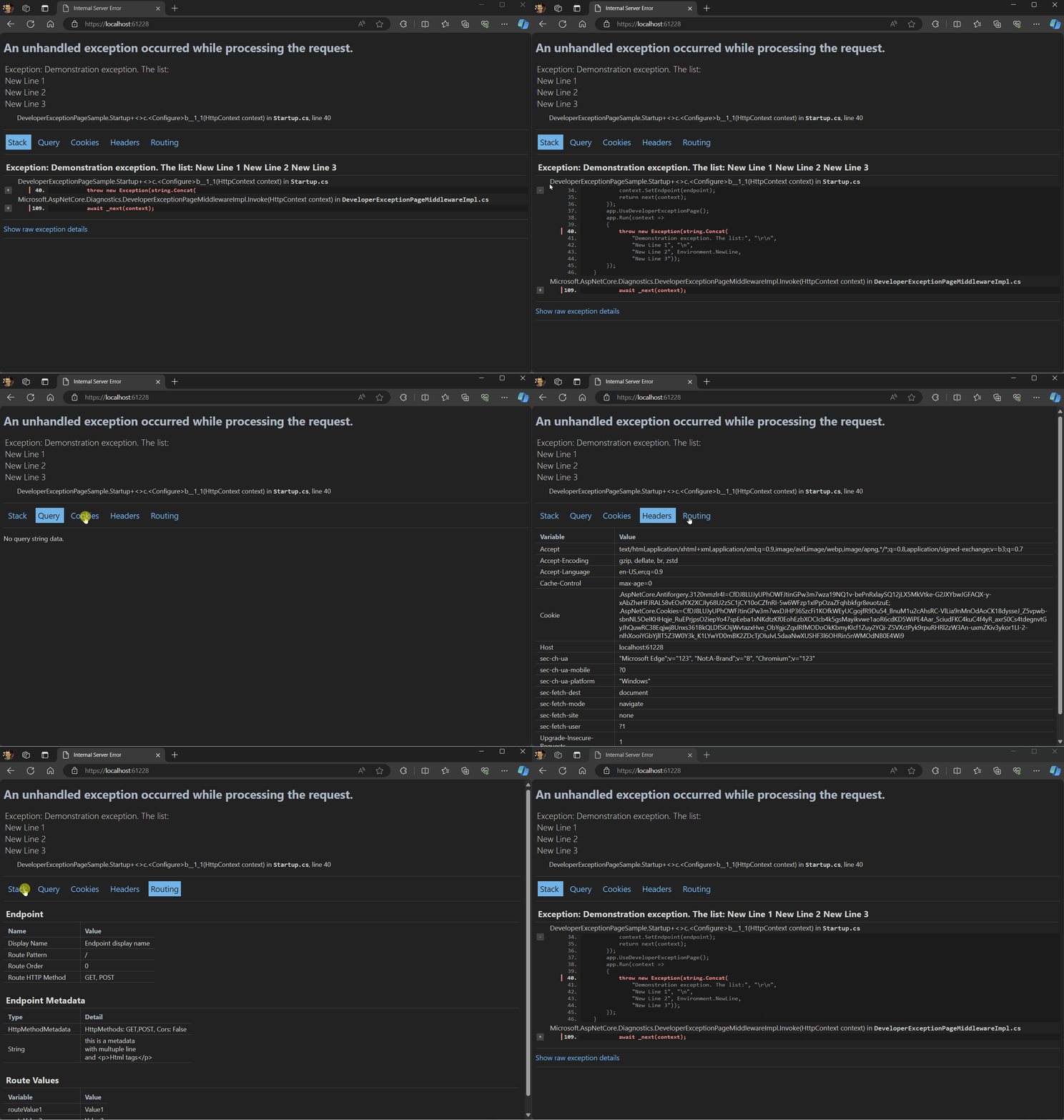
在响应带有 Accept: text/plain 标头的请求时,开发人员异常页将返回纯文本而不是 HTML。 例如:
Status: 500 Internal Server Error
Time: 9.39 msSize: 480 bytes
FormattedRawHeadersRequest
Body
text/plain; charset=utf-8, 480 bytes
System.InvalidOperationException: Sample Exception
   at WebApplicationMinimal.Program.<>c.<Main>b__0_0() in C:\Source\WebApplicationMinimal\Program.cs:line 12
   at lambda_method1(Closure, Object, HttpContext)
   at Microsoft.AspNetCore.Diagnostics.DeveloperExceptionPageMiddlewareImpl.Invoke(HttpContext context)

HEADERS
=======
Accept: text/plain
Host: localhost:7267
traceparent: 00-0eab195ea19d07b90a46cd7d6bf2f
异常处理程序页
若要为生产环境配置自定义错误处理页,请调用 UseExceptionHandler。 此异常处理中间件:
- 捕获并记录未经处理的异常。
- 使用指示的路径在备用管道中重新执行请求。 如果响应已启动,则不会重新执行请求。 模板生成的代码使用
/Error路径重新执行请求。
Warning
如果备用管道引发一个自身的异常,则异常处理中间件会重新引发原始异常。
由于此中间件可以重新执行请求管道:
- 中间件需要处理具有相同请求的重新进入。 这通常意味着在调用
_next后清理它们的状态,或在HttpContext上缓存它们的处理以避免重做。 在处理请求正文时,这意味着缓冲或缓存结果(如表单读取器)。 - 对于模板中使用的 UseExceptionHandler(IApplicationBuilder, String) 重载,只会修改请求路径,并清除路由数据。 请求数据(如标头、方法和项)均按原样重复使用。
- 限定范围内的服务保持不变。
在下面的示例中,UseExceptionHandler 在非开发环境中添加异常处理中间件:
var app = builder.Build();

if (!app.Environment.IsDevelopment())
{
    app.UseExceptionHandler("/Error");
    app.UseHsts();
}
Razor Pages 应用模板在 Pages 文件夹中提供了一个“错误”页面 (.cshtml) 和 PageModel 类 (ErrorModel)。 对于 MVC 应用,项目模板包括 Error 操作方法和 Home 控制器的错误视图。
异常处理中间件使用原始 HTTP 方法重新执行请求。 如果错误处理程序终结点限制为一组特定的 HTTP 方法,那么只会对这些 HTTP 方法运行。 例如,使用 [HttpGet] 属性的 MVC 控制器操作仅对 GET 请求运行。 若要确保所有请求都到达自定义错误处理页,请不要将它们限制为一组特定的 HTTP 方法。
根据原始 HTTP 方法以不同方式处理异常:
- 对于 Razor Pages,创建多个处理程序方法。 例如,使用
OnGet处理 GET 异常,使用OnPost处理 POST 异常。 - 对于 MVC,请将 HTTP 谓词属性应用于多个操作。 例如,使用
[HttpGet]处理 GET 异常,使用[HttpPost]处理 POST 异常。
若要允许未经身份验证的用户查看自定义错误处理页,请确保它支持匿名访问。
访问异常
使用 IExceptionHandlerPathFeature 访问错误处理程序中的异常和原始请求路径。 以下示例使用 IExceptionHandlerPathFeature 获取有关引发的异常详细信息:
[ResponseCache(Duration = 0, Location = ResponseCacheLocation.None, NoStore = true)]
[IgnoreAntiforgeryToken]
public class ErrorModel : PageModel
{
    public string? RequestId { get; set; }

    public bool ShowRequestId => !string.IsNullOrEmpty(RequestId);

    public string? ExceptionMessage { get; set; }

    public void OnGet()
    {
        RequestId = Activity.Current?.Id ?? HttpContext.TraceIdentifier;

        var exceptionHandlerPathFeature =
            HttpContext.Features.Get<IExceptionHandlerPathFeature>();

        if (exceptionHandlerPathFeature?.Error is FileNotFoundException)
        {
            ExceptionMessage = "The file was not found.";
        }

        if (exceptionHandlerPathFeature?.Path == "/")
        {
            ExceptionMessage ??= string.Empty;
            ExceptionMessage += " Page: Home.";
        }
    }
}
Warning
请勿向客户端提供敏感错误信息。 提供服务的错误是一种安全风险。
异常处理程序 lambda
自定义异常处理程序页的替代方法是向 UseExceptionHandler 提供 lambda。 使用 lambda,可以在返回响应前访问错误。
以下代码使用 lambda 处理异常:
var app = builder.Build();

if (!app.Environment.IsDevelopment())
{
    app.UseExceptionHandler(exceptionHandlerApp =>
    {
        exceptionHandlerApp.Run(async context =>
        {
            context.Response.StatusCode = StatusCodes.Status500InternalServerError;

            // using static System.Net.Mime.MediaTypeNames;
            context.Response.ContentType = Text.Plain;

            await context.Response.WriteAsync("An exception was thrown.");

            var exceptionHandlerPathFeature =
                context.Features.Get<IExceptionHandlerPathFeature>();

            if (exceptionHandlerPathFeature?.Error is FileNotFoundException)
            {
                await context.Response.WriteAsync(" The file was not found.");
            }

            if (exceptionHandlerPathFeature?.Path == "/")
            {
                await context.Response.WriteAsync(" Page: Home.");
            }
        });
    });

    app.UseHsts();
}
使用 lambda 的另一种方法是基于异常类型设置状态代码,如以下示例所示:
var builder = WebApplication.CreateBuilder(args);
builder.Services.AddProblemDetails();
var app = builder.Build();
if (app.Environment.IsDevelopment())
{
    app.UseExceptionHandler(new ExceptionHandlerOptions
    {
        StatusCodeSelector = ex => ex is TimeoutException
            ? StatusCodes.Status503ServiceUnavailable
            : StatusCodes.Status500InternalServerError
    });
}
Warning
请勿向客户端提供敏感错误信息。 提供服务的错误是一种安全风险。
IExceptionHandler
IExceptionHandler 是接口,可为开发人员提供用于在中心位置处理已知异常的回叫。 该接口包含单个方法, TryHandleAsync该方法接收一个 HttpContext 和一个 Exception 参数。
IExceptionHandler 实现是通过调用 IServiceCollection.AddExceptionHandler<T> 来注册的。
IExceptionHandler 实例的生存期是 singleton。 可以添加多个实现,并按注册顺序调用它们。
异常处理中间件按顺序遍历已注册的异常处理程序,直到有一个处理程序从true返回TryHandleAsync,表明该异常已被处理。 如果异常处理程序处理异常,则它可以返回 true 停止处理。 如果异常不是由任何异常处理程序处理,则控件将回退到中间件的默认行为和选项。
从 .NET 10 开始,默认行为是禁止发出诊断(如已处理异常的日志和指标)(返回TryHandleAsync时true)。 这与早期版本(.NET 8 和 9)不同,无论是否处理异常,都始终发出诊断信息。 可以通过设置 SuppressDiagnosticsCallback 来更改默认行为。
以下示例说明了 IExceptionHandler 实现:
using Microsoft.AspNetCore.Diagnostics;

namespace ErrorHandlingSample
{
    public class CustomExceptionHandler : IExceptionHandler
    {
        private readonly ILogger<CustomExceptionHandler> logger;
        public CustomExceptionHandler(ILogger<CustomExceptionHandler> logger)
        {
            this.logger = logger;
        }
        public ValueTask<bool> TryHandleAsync(
            HttpContext httpContext,
            Exception exception,
            CancellationToken cancellationToken)
        {
            var exceptionMessage = exception.Message;
            logger.LogError(
                "Error Message: {exceptionMessage}, Time of occurrence {time}",
                exceptionMessage, DateTime.UtcNow);
            // Return false to continue with the default behavior
            // - or - return true to signal that this exception is handled
            return ValueTask.FromResult(false);
        }
    }
}
以下示例显示了如何为依赖项注入注册 IExceptionHandler 实现:
using ErrorHandlingSample;

var builder = WebApplication.CreateBuilder(args);

builder.Services.AddDatabaseDeveloperPageExceptionFilter();
builder.Services.AddRazorPages();
builder.Services.AddExceptionHandler<CustomExceptionHandler>();

var app = builder.Build();

if (!app.Environment.IsDevelopment())
{
    app.UseExceptionHandler("/Error");
    app.UseHsts();
}

// Remaining Program.cs code omitted for brevity
当前面的代码在开发环境中运行时:
- 首先调用
CustomExceptionHandler来处理异常。 - 记录异常后,
TryHandleAsync方法返回false,因此显示开发人员异常页面。
在其他环境中:
- 首先调用
CustomExceptionHandler来处理异常。 - 记录异常后,
TryHandleAsync方法返回false,因此显示/Error页面。
SuppressDiagnosticsCallback
从 .NET 10 开始,可以通过配置 SuppressDiagnosticsCallback 属性 ExceptionHandlerOptions来控制异常处理中间件是否为已处理的异常写入诊断。 此回调接收异常上下文,并允许你根据特定异常或请求确定是否应取消诊断。
若要还原为 .NET 8 和 9 的行为,其中始终针对已处理的异常发出诊断,请将回调设置为始终返回 false:
app.UseExceptionHandler(new ExceptionHandlerOptions
{
    SuppressDiagnosticsCallback = context => false
});
还可以根据异常类型或其他上下文有条件地禁止诊断:
app.UseExceptionHandler(new ExceptionHandlerOptions
{
    SuppressDiagnosticsCallback = context => context.Exception is ArgumentException
});
当任何实现(从IExceptionHandler返回false的所有TryHandleAsync处理程序)未处理异常时,控件会回退到中间件的默认行为和选项,并根据中间件的标准行为发出诊断。
UseStatusCodePages
默认情况下,ASP.NET Core 应用不会为 HTTP 错误状态代码(如“404 - 未找到”)提供状态代码页。 当应用设置没有正文的 HTTP 400-599 错误状态代码时,它将返回状态代码和空响应正文。 若要启用常见错误状态代码的默认纯文本处理程序,请在 UseStatusCodePages 中调用 Program.cs:
var app = builder.Build();

if (!app.Environment.IsDevelopment())
{
    app.UseExceptionHandler("/Error");
    app.UseHsts();
}

app.UseStatusCodePages();
在请求处理中间件之前调用 UseStatusCodePages。 例如,在静态文件中间件和端点中间件之前调用 UseStatusCodePages。
未使用 UseStatusCodePages 时,导航到没有终结点的 URL 会返回一条与浏览器相关的错误消息,指示找不到终结点。 调用 UseStatusCodePages 时,浏览器将返回以下响应:
Status Code: 404; Not Found
UseStatusCodePages 通常不在生产中使用,因为它返回对用户没有用的消息。
Note
状态代码页中间件不捕获异常。 若要提供自定义错误处理页,请使用异常处理程序页。
包含格式字符串的 UseStatusCodePages
若要自定义响应内容类型和文本,请利用需要使用内容类型和格式字符串的 UseStatusCodePages 重载:
var app = builder.Build();

if (!app.Environment.IsDevelopment())
{
    app.UseExceptionHandler("/Error");
    app.UseHsts();
}

// using static System.Net.Mime.MediaTypeNames;
app.UseStatusCodePages(Text.Plain, "Status Code Page: {0}");
在前面的代码中,{0} 是错误代码的占位符。
具有格式字符串的 UseStatusCodePages 通常不在生产环境中使用,因为它返回对用户没有用的消息。
包含 lambda 的 UseStatusCodePages
若要指定自定义错误处理和响应写入代码,请利用需要使用 lambda 表达式的 UseStatusCodePages 重载:
var app = builder.Build();

if (!app.Environment.IsDevelopment())
{
    app.UseExceptionHandler("/Error");
    app.UseHsts();
}

app.UseStatusCodePages(async statusCodeContext =>
{
    // using static System.Net.Mime.MediaTypeNames;
    statusCodeContext.HttpContext.Response.ContentType = Text.Plain;

    await statusCodeContext.HttpContext.Response.WriteAsync(
        $"Status Code Page: {statusCodeContext.HttpContext.Response.StatusCode}");
});
使用 lambda 的 UseStatusCodePages 通常不在生产中使用,因为它返回对用户没有用的消息。
UseStatusCodePagesWithRedirects
UseStatusCodePagesWithRedirects 扩展方法:
- 向客户端发送“302 - 已找到”状态代码。
- 将客户端重定向到 URL 模板中提供的错误处理终结点。 错误处理终结点通常会显示错误信息并返回 HTTP 200。
var app = builder.Build();

if (!app.Environment.IsDevelopment())
{
    app.UseExceptionHandler("/Error");
    app.UseHsts();
}

app.UseStatusCodePagesWithRedirects("/StatusCode/{0}");
URL 模板可能会包括状态代码的 {0} 占位符,如前面的代码中所示。 如果 URL 模板以波形符 ~(代字号)开头,则 ~ 会替换为应用的 PathBase。 在应用中指定终结点时,请为终结点创建 MVC 视图或 Razor 页面。
使用此方法通常是当应用:
- 应将客户端重定向到不同的终结点(通常在不同的应用处理错误的情况下)。 对于 Web 应用,客户端的浏览器地址栏反映重定向终结点。
- 不应保留原始状态代码并通过初始重定向响应返回该代码。
UseStatusCodePagesWithReExecute
UseStatusCodePagesWithReExecute 扩展方法:
- 通过使用备用路径重新执行请求管道,从而生成响应正文。
- 不会在重新执行管道之前或之后更改状态代码。
新管道执行可能会更改响应的状态代码,因为新管道可完全控制状态代码。 如果新管道不更改状态代码,则会将原始状态代码发送到客户端。
var app = builder.Build();

if (!app.Environment.IsDevelopment())
{
    app.UseExceptionHandler("/Error");
    app.UseHsts();
}

app.UseStatusCodePagesWithReExecute("/StatusCode/{0}");
如果在应用中指定终结点,请为终结点创建 MVC 视图或 Razor 页面。
使用此方法通常是当应用应:
- 处理请求,但不重定向到不同终结点。 对于 Web 应用,客户端的浏览器地址栏反映最初请求的终结点。
- 保留原始状态代码并通过响应返回该代码。
URL 模板必须以 / 开头,可能包括状态代码的占位符 {0}。 若要将状态代码作为查询字符串参数传递,请向 UseStatusCodePagesWithReExecute 传递第二个参数。 例如:
var app = builder.Build();
app.UseStatusCodePagesWithReExecute("/StatusCode", "?statusCode={0}");
错误处理终结点可以获取生成错误的原始 URL,如下面的示例所示:
[ResponseCache(Duration = 0, Location = ResponseCacheLocation.None, NoStore = true)]
public class StatusCodeModel : PageModel
{
    public int OriginalStatusCode { get; set; }

    public string? OriginalPathAndQuery { get; set; }

    public void OnGet(int statusCode)
    {
        OriginalStatusCode = statusCode;

        var statusCodeReExecuteFeature =
            HttpContext.Features.Get<IStatusCodeReExecuteFeature>();

        if (statusCodeReExecuteFeature is not null)
        {
            OriginalPathAndQuery = $"{statusCodeReExecuteFeature.OriginalPathBase}"
                                    + $"{statusCodeReExecuteFeature.OriginalPath}"
                                    + $"{statusCodeReExecuteFeature.OriginalQueryString}";

        }
    }
}
由于此中间件可以重新执行请求管道:
- 中间件需要处理具有相同请求的重新进入。 这通常意味着在调用
_next后清理它们的状态,或在HttpContext上缓存它们的处理以避免重做。 在处理请求正文时,这意味着缓冲或缓存结果(如表单读取器)。 - 限定范围内的服务保持不变。
禁用状态代码页
若要禁用 MVC 控制器或操作方法的状态代码页,请使用 [SkipStatusCodePages] 特性。
若要禁用 Razor Pages 处理程序方法或 MVC 控制器中的特定请求的状态代码页,请使用 IStatusCodePagesFeature:
public void OnGet()
{
    var statusCodePagesFeature =
        HttpContext.Features.Get<IStatusCodePagesFeature>();

    if (statusCodePagesFeature is not null)
    {
        statusCodePagesFeature.Enabled = false;
    }
}
异常处理代码
异常处理页中的代码可能也会引发异常。 应彻底测试生产错误页面,并格外小心,避免引发其自己的异常。
响应标头
在响应头发送后:
- 应用无法更改响应的状态代码。
- 任何异常页或处理程序都无法运行。 必须完成响应或中止连接。
服务器异常处理
除了应用中的异常处理逻辑外,HTTP 服务器实现还能处理一些异常。 如果服务器在发送响应标头之前捕获到异常,服务器将发送不包含响应正文的 500 - Internal Server Error 响应。 如果服务器在发送响应标头后捕获到异常,服务器会关闭连接。 应用程序无法处理的请求将由服务器进行处理。 当服务器处理请求时,发生的任何异常都将由服务器的异常处理进行处理。 应用的自定义错误页面、异常处理中间件和筛选器都不会影响此行为。
启动异常处理
应用程序启动期间发生的异常仅可在承载层进行处理。 可以将主机配置为,捕获启动错误和捕获详细错误。
仅当错误在主机地址/端口绑定后出现时,托管层才能显示捕获的启动错误的错误页。 如果绑定失败:
- 托管层将记录关键异常。
- dotnet 进程崩溃。
- 不会在 HTTP 服务器为 Kestrel 时显示任何错误页。
在 IIS(或 Azure 应用服务)或 IIS Express 上运行应用时,如果无法启动进程,ASP.NET Core 模块将返回“502.5 - 进程失败”。 有关详细信息,请参阅对 Azure 应用服务和 IIS 上的 ASP.NET Core 进行故障排除。
数据库错误页
数据库开发人员页面异常筛选器 AddDatabaseDeveloperPageExceptionFilter 捕获可以使用 Entity Framework Core 迁移解决的与数据库相关的异常。 当这些异常出现时,便会生成 HTML 响应,其中包含用于解决问题的可能操作的详细信息。 仅在开发环境中启用此页。 下面的代码添加数据库开发人员页异常筛选器:
var builder = WebApplication.CreateBuilder(args);

builder.Services.AddDatabaseDeveloperPageExceptionFilter();
builder.Services.AddRazorPages();
异常筛选器
在 MVC 应用中,可以全局配置异常筛选器,也可以为每个控制器或每个操作单独配置。 在 Razor Pages 应用中,可以全局配置异常筛选器,也可以为每个页面模型单独配置。 这些筛选器处理在执行控制器操作或其他筛选器时出现的任何未处理的异常。 有关详细信息,请参阅 ASP.NET Core 中的筛选器。
异常筛选器适合捕获 MVC 操作内发生的异常,但它们不如内置异常处理中间件UseExceptionHandler 灵活。 我们建议使用 UseExceptionHandler,除非你需要根据选择的 MVC 操作以不同的方式执行错误处理。
模型状态错误
问题详细信息
问题详细信息并不是描述 HTTP API 错误的唯一响应格式,但它们通常用于报告 HTTP API 的错误。
问题详细信息服务实现 IProblemDetailsService 接口,该接口支持在 ASP.NET Core 中创建问题详细信息。
AddProblemDetails(IServiceCollection) 上的 IServiceCollection 扩展方法注册默认 IProblemDetailsService 实现。
在 ASP.NET Core 应用中,下列中间件会在调用 AddProblemDetails 时生成问题详细信息 HTTP 响应,除非 Accept 请求 HTTP 标头不包含注册的 IProblemDetailsWriter 支持的内容类型之一(默认:application/json):
- ExceptionHandlerMiddleware:未定义自定义处理程序时生成问题详细信息响应。
- StatusCodePagesMiddleware:默认生成问题详细信息响应。
-
DeveloperExceptionPageMiddleware:当
Accept请求 HTTP 标头不包含text/html时,在开发中生成问题详细信息响应。
以下代码将应用配置为为尚未包含正文内容的所有 HTTP 客户端和服务器错误响应生成问题详细信息响应:
builder.Services.AddProblemDetails();

var app = builder.Build();

if (!app.Environment.IsDevelopment())
{
    app.UseExceptionHandler();
    app.UseHsts();
}

app.UseStatusCodePages();
下一部分介绍如何自定义问题详细信息响应正文。
自定义问题详细信息
可以使用以下任一选项自定义 ProblemDetails 的自动创建:
- 使用
ProblemDetailsOptions.CustomizeProblemDetails - 使用自定义
IProblemDetailsWriter - 调用中间件中的
IProblemDetailsService
CustomizeProblemDetails 运算
可以使用 CustomizeProblemDetails 自定义生成的问题详细信息,并将自定义应用于所有自动生成的问题详细信息。
以下代码使用 ProblemDetailsOptions 设置 CustomizeProblemDetails:
builder.Services.AddProblemDetails(options =>
    options.CustomizeProblemDetails = ctx =>
            ctx.ProblemDetails.Extensions.Add("nodeId", Environment.MachineName));

var app = builder.Build();

if (!app.Environment.IsDevelopment())
{
    app.UseExceptionHandler();
    app.UseHsts();
}

app.UseStatusCodePages();
例如,HTTP Status 400 Bad Request 终结点结果生成以下问题详细信息响应正文:
{
  "type": "https://tools.ietf.org/html/rfc9110#section-15.5.1",
  "title": "Bad Request",
  "status": 400,
  "nodeId": "my-machine-name"
}
自定义 IProblemDetailsWriter
可以为高级自定义创建 IProblemDetailsWriter 实现。
public class SampleProblemDetailsWriter : IProblemDetailsWriter
{
    // Indicates that only responses with StatusCode == 400
    // are handled by this writer. All others are
    // handled by different registered writers if available.
    public bool CanWrite(ProblemDetailsContext context)
        => context.HttpContext.Response.StatusCode == 400;

    public ValueTask WriteAsync(ProblemDetailsContext context)
    {
        // Additional customizations.

        // Write to the response.
        var response = context.HttpContext.Response;
        return new ValueTask(response.WriteAsJsonAsync(context.ProblemDetails));
    }
}
注意:使用自定义 IProblemDetailsWriter 时,必须在调用 IProblemDetailsWriter、AddRazorPages、AddControllers 或 AddControllersWithViews 之前注册自定义 AddMvc:
var builder = WebApplication.CreateBuilder(args);

builder.Services.AddTransient<IProblemDetailsWriter, SampleProblemDetailsWriter>();

var app = builder.Build();

// Middleware to handle writing problem details to the response.
app.Use(async (context, next) =>
{
    await next(context);
    var mathErrorFeature = context.Features.Get<MathErrorFeature>();
    if (mathErrorFeature is not null)
    {
        if (context.RequestServices.GetService<IProblemDetailsWriter>() is
            { } problemDetailsService)
        {

            if (problemDetailsService.CanWrite(new ProblemDetailsContext() { HttpContext = context }))
            {
                (string Detail, string Type) details = mathErrorFeature.MathError switch
                {
                    MathErrorType.DivisionByZeroError => ("Divison by zero is not defined.",
                        "https://en.wikipedia.org/wiki/Division_by_zero"),
                    _ => ("Negative or complex numbers are not valid input.",
                        "https://en.wikipedia.org/wiki/Square_root")
                };

                await problemDetailsService.WriteAsync(new ProblemDetailsContext
                {
                    HttpContext = context,
                    ProblemDetails =
                    {
                        Title = "Bad Input",
                        Detail = details.Detail,
                        Type = details.Type
                    }
                });
            }
        }
    }
});

// /divide?numerator=2&denominator=4
app.MapGet("/divide", (HttpContext context, double numerator, double denominator) =>
{
    if (denominator == 0)
    {
        var errorType = new MathErrorFeature
        {
            MathError = MathErrorType.DivisionByZeroError
        };
        context.Features.Set(errorType);
        return Results.BadRequest();
    }

    return Results.Ok(numerator / denominator);
});

// /squareroot?radicand=16
app.MapGet("/squareroot", (HttpContext context, double radicand) =>
{
    if (radicand < 0)
    {
        var errorType = new MathErrorFeature
        {
            MathError = MathErrorType.NegativeRadicandError
        };
        context.Features.Set(errorType);
        return Results.BadRequest();
    }

    return Results.Ok(Math.Sqrt(radicand));
});

app.Run();
中间件中的问题详细信息
将 ProblemDetailsOptions 与 CustomizeProblemDetails 一起使用的替代方法是在中间件中设置 ProblemDetails。 可以通过调用 IProblemDetailsService.WriteAsync 编写问题详细信息响应:
var builder = WebApplication.CreateBuilder(args);

builder.Services.AddControllers();

builder.Services.AddProblemDetails();

var app = builder.Build();

app.UseHttpsRedirection();
app.UseStatusCodePages();

// Middleware to handle writing problem details to the response.
app.Use(async (context, next) =>
{
    await next(context);
    var mathErrorFeature = context.Features.Get<MathErrorFeature>();
    if (mathErrorFeature is not null)
    {
        if (context.RequestServices.GetService<IProblemDetailsService>() is
                                                           { } problemDetailsService)
        {
            (string Detail, string Type) details = mathErrorFeature.MathError switch
            {
                MathErrorType.DivisionByZeroError => ("Divison by zero is not defined.",
                "https://en.wikipedia.org/wiki/Division_by_zero"),
                _ => ("Negative or complex numbers are not valid input.",
                "https://en.wikipedia.org/wiki/Square_root")
            };

            await problemDetailsService.WriteAsync(new ProblemDetailsContext
            {
                HttpContext = context,
                ProblemDetails =
                {
                    Title = "Bad Input",
                    Detail = details.Detail,
                    Type = details.Type
                }
            });
        }
    }
});

// /divide?numerator=2&denominator=4
app.MapGet("/divide", (HttpContext context, double numerator, double denominator) =>
{
    if (denominator == 0)
    {
        var errorType = new MathErrorFeature { MathError =
                                               MathErrorType.DivisionByZeroError };
        context.Features.Set(errorType);
        return Results.BadRequest();
    }

    return Results.Ok(numerator / denominator);
});

// /squareroot?radicand=16
app.MapGet("/squareroot", (HttpContext context, double radicand) =>
{
    if (radicand < 0)
    {
        var errorType = new MathErrorFeature { MathError =
                                               MathErrorType.NegativeRadicandError };
        context.Features.Set(errorType);
        return Results.BadRequest();
    }

    return Results.Ok(Math.Sqrt(radicand));
});

app.MapControllers();

app.Run();
在前面的代码中,最小 API 端点 /divide 和 /squareroot 会在错误输入时返回预期的自定义问题响应。
API 控制器终结点返回错误输入时的默认问题响应,而非自定义问题响应。 返回默认问题响应是因为 API 控制器在调用 之前已写入响应流,即IProblemDetailsService.WriteAsync,不会再次编写响应。
以下 ValuesController 返回 BadRequestResult,它将写入响应流,因而能够阻止返回自定义问题响应。
[Route("api/[controller]/[action]")]
[ApiController]
public class ValuesController : ControllerBase
{
    // /api/values/divide/1/2
    [HttpGet("{Numerator}/{Denominator}")]
    public IActionResult Divide(double Numerator, double Denominator)
    {
        if (Denominator == 0)
        {
            var errorType = new MathErrorFeature
            {
                MathError = MathErrorType.DivisionByZeroError
            };
            HttpContext.Features.Set(errorType);
            return BadRequest();
        }

        return Ok(Numerator / Denominator);
    }

    // /api/values/squareroot/4
    [HttpGet("{radicand}")]
    public IActionResult Squareroot(double radicand)
    {
        if (radicand < 0)
        {
            var errorType = new MathErrorFeature
            {
                MathError = MathErrorType.NegativeRadicandError
            };
            HttpContext.Features.Set(errorType);
            return BadRequest();
        }

        return Ok(Math.Sqrt(radicand));
    }

}
以下 Values3Controller 返回 ControllerBase.Problem,以便返回预期的自定义问题结果:
[Route("api/[controller]/[action]")]
[ApiController]
public class Values3Controller : ControllerBase
{
    // /api/values3/divide/1/2
    [HttpGet("{Numerator}/{Denominator}")]
    public IActionResult Divide(double Numerator, double Denominator)
    {
        if (Denominator == 0)
        {
            var errorType = new MathErrorFeature
            {
                MathError = MathErrorType.DivisionByZeroError
            };
            HttpContext.Features.Set(errorType);
            return Problem(
                title: "Bad Input",
                detail: "Divison by zero is not defined.",
                type: "https://en.wikipedia.org/wiki/Division_by_zero",
                statusCode: StatusCodes.Status400BadRequest
                );
        }

        return Ok(Numerator / Denominator);
    }

    // /api/values3/squareroot/4
    [HttpGet("{radicand}")]
    public IActionResult Squareroot(double radicand)
    {
        if (radicand < 0)
        {
            var errorType = new MathErrorFeature
            {
                MathError = MathErrorType.NegativeRadicandError
            };
            HttpContext.Features.Set(errorType);
            return Problem(
                title: "Bad Input",
                detail: "Negative or complex numbers are not valid input.",
                type: "https://en.wikipedia.org/wiki/Square_root",
                statusCode: StatusCodes.Status400BadRequest
                );
        }

        return Ok(Math.Sqrt(radicand));
    }

}
为异常生成 ProblemDetails 有效负载
请考虑以下应用:
var builder = WebApplication.CreateBuilder(args);

builder.Services.AddControllers();
builder.Services.AddProblemDetails();

var app = builder.Build();

app.UseExceptionHandler();
app.UseStatusCodePages();

if (app.Environment.IsDevelopment())
{
    app.UseDeveloperExceptionPage();
}

app.MapControllers();
app.Run();
在非开发环境中,当发生异常时,以下是返回到客户端的标准问题详细信息响应:
{
"type":"https://tools.ietf.org/html/rfc7231#section-6.6.1",
"title":"An error occurred while processing your request.",
"status":500,"traceId":"00-b644<snip>-00"
}
对大多数应用而言,上述代码是异常所需的全部内容。 然而,下面一节展示了如何获取更详细的问题响应。
自定义异常处理程序页的替代方法是向 UseExceptionHandler 提供 lambda。 使用 Lambda 允许访问错误和使用 IProblemDetailsService.WriteAsync 编写问题详细信息响应:
using Microsoft.AspNetCore.Diagnostics;
using static System.Net.Mime.MediaTypeNames;

var builder = WebApplication.CreateBuilder(args);

builder.Services.AddControllers();
builder.Services.AddProblemDetails();

var app = builder.Build();

app.UseExceptionHandler();
app.UseStatusCodePages();

if (app.Environment.IsDevelopment())
{
    app.UseDeveloperExceptionPage();
}
else
{
    app.UseExceptionHandler(exceptionHandlerApp =>
    {
        exceptionHandlerApp.Run(async context =>
        {
            context.Response.StatusCode = StatusCodes.Status500InternalServerError;
            context.Response.ContentType = Text.Plain;

            var title = "Bad Input";
            var detail = "Invalid input";
            var type = "https://errors.example.com/badInput";

            if (context.RequestServices.GetService<IProblemDetailsService>() is
                { } problemDetailsService)
            {
                var exceptionHandlerFeature =
               context.Features.Get<IExceptionHandlerFeature>();

                var exceptionType = exceptionHandlerFeature?.Error;
                if (exceptionType != null &&
                   exceptionType.Message.Contains("infinity"))
                {
                    title = "Argument exception";
                    detail = "Invalid input";
                    type = "https://errors.example.com/argumentException";
                }

                await problemDetailsService.WriteAsync(new ProblemDetailsContext
                {
                    HttpContext = context,
                    ProblemDetails =
                {
                    Title = title,
                    Detail = detail,
                    Type = type
                }
                });
            }
        });
    });
}

app.MapControllers();
app.Run();
Warning
请勿向客户端提供敏感错误信息。 提供服务的错误是一种安全风险。
生成问题详细信息的替代方法是使用第三方 NuGet 包 Hellang.Middleware.ProblemDetails,该包可用于将异常和客户端错误映射到问题详细信息。
其他资源
本文介绍了处理 ASP.NET Core Web 应用中常见错误的一些方法。 另请参阅 处理 ASP.NET 核心 API 中的错误。
有关 Blazor 错误处理指南(补充或取代本文中的指南),请参阅在 ASP.NET Core Blazor 应用中处理错误。
开发人员异常页
“开发人员异常”页显示未经处理的请求异常的详细信息。 它使用 DeveloperExceptionPageMiddleware 来捕获 HTTP 管道中的同步和异步异常,并生成错误响应。 开发人员异常页运行在中间件管道的前面部分,以便它能够捕获随后中间件中抛出的未经处理的异常。
ASP.NET Core 应用在以下情况下默认启用开发人员异常页:
- 在开发环境中运行。
- 该应用是使用当前模板(即使用 WebApplication.CreateBuilder)创建的。
使用早期模板(即使用 WebHost.CreateDefaultBuilder)创建的应用可以通过调用 app.UseDeveloperExceptionPage 来启用开发人员异常页。
Warning
仅当应用在开发环境中运行时才启用“开发人员异常页”。 当应用在生产环境中运行时,切勿公开共享详细的异常信息。 有关配置环境的详细信息,请参阅 ASP.NET Core 运行时环境。
开发人员异常页可能包括关于异常和请求的以下信息:
- 堆栈跟踪
- 查询字符串参数(如果有)
- Cookie(如有)
- Headers
- 终结点元数据(如果有)
不保证开发人员异常页会提供任何信息。 使用日志记录获取完整的错误信息。
下图显示了一个示例开发人员异常页面,通过动画来显示选项卡和展示的信息:
在响应带有 Accept: text/plain 标头的请求时,开发人员异常页将返回纯文本而不是 HTML。 例如:
Status: 500 Internal Server Error
Time: 9.39 msSize: 480 bytes
FormattedRawHeadersRequest
Body
text/plain; charset=utf-8, 480 bytes
System.InvalidOperationException: Sample Exception
   at WebApplicationMinimal.Program.<>c.<Main>b__0_0() in C:\Source\WebApplicationMinimal\Program.cs:line 12
   at lambda_method1(Closure, Object, HttpContext)
   at Microsoft.AspNetCore.Diagnostics.DeveloperExceptionPageMiddlewareImpl.Invoke(HttpContext context)

HEADERS
=======
Accept: text/plain
Host: localhost:7267
traceparent: 00-0eab195ea19d07b90a46cd7d6bf2f
异常处理程序页
若要为生产环境配置自定义错误处理页,请调用 UseExceptionHandler。 此异常处理中间件:
- 捕获并记录未经处理的异常。
- 使用指示的路径在备用管道中重新执行请求。 如果响应已启动,则不会重新执行请求。 模板生成的代码使用
/Error路径重新执行请求。
Warning
如果备用管道引发一个自身的异常,则异常处理中间件会重新引发原始异常。
由于此中间件可以重新执行请求管道:
- 中间件需要处理具有相同请求的重新进入。 这通常意味着在调用
_next后清理它们的状态,或在HttpContext上缓存它们的处理以避免重做。 在处理请求正文时,这意味着缓冲或缓存结果(如表单读取器)。 - 对于模板中使用的 UseExceptionHandler(IApplicationBuilder, String) 重载,只会修改请求路径,并清除路由数据。 请求数据(如标头、方法和项)均按原样重复使用。
- 限定范围内的服务保持不变。
在下面的示例中,UseExceptionHandler 在非开发环境中添加异常处理中间件:
var app = builder.Build();

if (!app.Environment.IsDevelopment())
{
    app.UseExceptionHandler("/Error");
    app.UseHsts();
}
Razor Pages 应用模板在 Pages 文件夹中提供了一个“错误”页面 (.cshtml) 和 PageModel 类 (ErrorModel)。 对于 MVC 应用,项目模板包括 Error 操作方法和 Home 控制器的错误视图。
异常处理中间件使用原始 HTTP 方法重新执行请求。 如果错误处理程序终结点限制为一组特定的 HTTP 方法,那么只会对这些 HTTP 方法运行。 例如,使用 [HttpGet] 属性的 MVC 控制器操作仅对 GET 请求运行。 若要确保所有请求都到达自定义错误处理页,请不要将它们限制为一组特定的 HTTP 方法。
根据原始 HTTP 方法以不同方式处理异常:
- 对于 Razor Pages,创建多个处理程序方法。 例如,使用
OnGet处理 GET 异常,使用OnPost处理 POST 异常。 - 对于 MVC,请将 HTTP 谓词属性应用于多个操作。 例如,使用
[HttpGet]处理 GET 异常,使用[HttpPost]处理 POST 异常。
若要允许未经身份验证的用户查看自定义错误处理页,请确保它支持匿名访问。
访问异常
使用 IExceptionHandlerPathFeature 访问错误处理程序中的异常和原始请求路径。 以下示例使用 IExceptionHandlerPathFeature 获取有关引发的异常详细信息:
[ResponseCache(Duration = 0, Location = ResponseCacheLocation.None, NoStore = true)]
[IgnoreAntiforgeryToken]
public class ErrorModel : PageModel
{
    public string? RequestId { get; set; }

    public bool ShowRequestId => !string.IsNullOrEmpty(RequestId);

    public string? ExceptionMessage { get; set; }

    public void OnGet()
    {
        RequestId = Activity.Current?.Id ?? HttpContext.TraceIdentifier;

        var exceptionHandlerPathFeature =
            HttpContext.Features.Get<IExceptionHandlerPathFeature>();

        if (exceptionHandlerPathFeature?.Error is FileNotFoundException)
        {
            ExceptionMessage = "The file was not found.";
        }

        if (exceptionHandlerPathFeature?.Path == "/")
        {
            ExceptionMessage ??= string.Empty;
            ExceptionMessage += " Page: Home.";
        }
    }
}
Warning
请勿向客户端提供敏感错误信息。 提供服务的错误是一种安全风险。
异常处理程序 lambda
自定义异常处理程序页的替代方法是向 UseExceptionHandler 提供 lambda。 使用 lambda,可以在返回响应前访问错误。
以下代码使用 lambda 处理异常:
var app = builder.Build();

if (!app.Environment.IsDevelopment())
{
    app.UseExceptionHandler(exceptionHandlerApp =>
    {
        exceptionHandlerApp.Run(async context =>
        {
            context.Response.StatusCode = StatusCodes.Status500InternalServerError;

            // using static System.Net.Mime.MediaTypeNames;
            context.Response.ContentType = Text.Plain;

            await context.Response.WriteAsync("An exception was thrown.");

            var exceptionHandlerPathFeature =
                context.Features.Get<IExceptionHandlerPathFeature>();

            if (exceptionHandlerPathFeature?.Error is FileNotFoundException)
            {
                await context.Response.WriteAsync(" The file was not found.");
            }

            if (exceptionHandlerPathFeature?.Path == "/")
            {
                await context.Response.WriteAsync(" Page: Home.");
            }
        });
    });

    app.UseHsts();
}
使用 lambda 的另一种方法是基于异常类型设置状态代码,如以下示例所示:
var builder = WebApplication.CreateBuilder(args);
builder.Services.AddProblemDetails();
var app = builder.Build();
if (app.Environment.IsDevelopment())
{
    app.UseExceptionHandler(new ExceptionHandlerOptions
    {
        StatusCodeSelector = ex => ex is TimeoutException
            ? StatusCodes.Status503ServiceUnavailable
            : StatusCodes.Status500InternalServerError
    });
}
Warning
请勿向客户端提供敏感错误信息。 提供服务的错误是一种安全风险。
IExceptionHandler
IExceptionHandler 是接口,可为开发人员提供用于在中心位置处理已知异常的回叫。
IExceptionHandler 实现是通过调用 IServiceCollection.AddExceptionHandler<T> 来注册的。
IExceptionHandler 实例的生存期是 singleton。 可以添加多个实现,并按注册顺序调用它们。
如果异常处理程序处理请求,它可以返回 true 来停止处理。 如果异常不是由任何异常处理程序处理,则控件将回退到中间件的默认行为和选项。 对于已处理和未经处理的异常,会发出不同的指标和日志。
以下示例说明了 IExceptionHandler 实现:
using Microsoft.AspNetCore.Diagnostics;

namespace ErrorHandlingSample
{
    public class CustomExceptionHandler : IExceptionHandler
    {
        private readonly ILogger<CustomExceptionHandler> logger;
        public CustomExceptionHandler(ILogger<CustomExceptionHandler> logger)
        {
            this.logger = logger;
        }
        public ValueTask<bool> TryHandleAsync(
            HttpContext httpContext,
            Exception exception,
            CancellationToken cancellationToken)
        {
            var exceptionMessage = exception.Message;
            logger.LogError(
                "Error Message: {exceptionMessage}, Time of occurrence {time}",
                exceptionMessage, DateTime.UtcNow);
            // Return false to continue with the default behavior
            // - or - return true to signal that this exception is handled
            return ValueTask.FromResult(false);
        }
    }
}
以下示例显示了如何为依赖项注入注册 IExceptionHandler 实现:
using ErrorHandlingSample;

var builder = WebApplication.CreateBuilder(args);

builder.Services.AddDatabaseDeveloperPageExceptionFilter();
builder.Services.AddRazorPages();
builder.Services.AddExceptionHandler<CustomExceptionHandler>();

var app = builder.Build();

if (!app.Environment.IsDevelopment())
{
    app.UseExceptionHandler("/Error");
    app.UseHsts();
}

// Remaining Program.cs code omitted for brevity
当前面的代码在开发环境中运行时:
- 首先调用
CustomExceptionHandler来处理异常。 - 记录异常后,
TryHandleAsync方法返回false,因此显示开发人员异常页面。
在其他环境中:
- 首先调用
CustomExceptionHandler来处理异常。 - 记录异常后,
TryHandleAsync方法返回false,因此显示/Error页面。
UseStatusCodePages
默认情况下,ASP.NET Core 应用不会为 HTTP 错误状态代码(如“404 - 未找到”)提供状态代码页。 当应用设置没有正文的 HTTP 400-599 错误状态代码时,它将返回状态代码和空响应正文。 若要启用常见错误状态代码的默认纯文本处理程序,请在 UseStatusCodePages 中调用 Program.cs:
var app = builder.Build();

if (!app.Environment.IsDevelopment())
{
    app.UseExceptionHandler("/Error");
    app.UseHsts();
}

app.UseStatusCodePages();
在请求处理中间件之前调用 UseStatusCodePages。 例如,在静态文件中间件和端点中间件之前调用 UseStatusCodePages。
未使用 UseStatusCodePages 时,导航到没有终结点的 URL 会返回一条与浏览器相关的错误消息,指示找不到终结点。 调用 UseStatusCodePages 时,浏览器将返回以下响应:
Status Code: 404; Not Found
UseStatusCodePages 通常不在生产中使用,因为它返回对用户没有用的消息。
Note
状态代码页中间件不捕获异常。 若要提供自定义错误处理页,请使用异常处理程序页。
包含格式字符串的 UseStatusCodePages
若要自定义响应内容类型和文本,请利用需要使用内容类型和格式字符串的 UseStatusCodePages 重载:
var app = builder.Build();

if (!app.Environment.IsDevelopment())
{
    app.UseExceptionHandler("/Error");
    app.UseHsts();
}

// using static System.Net.Mime.MediaTypeNames;
app.UseStatusCodePages(Text.Plain, "Status Code Page: {0}");
在前面的代码中,{0} 是错误代码的占位符。
具有格式字符串的 UseStatusCodePages 通常不在生产环境中使用,因为它返回对用户没有用的消息。
包含 lambda 的 UseStatusCodePages
若要指定自定义错误处理和响应写入代码,请利用需要使用 lambda 表达式的 UseStatusCodePages 重载:
var app = builder.Build();

if (!app.Environment.IsDevelopment())
{
    app.UseExceptionHandler("/Error");
    app.UseHsts();
}

app.UseStatusCodePages(async statusCodeContext =>
{
    // using static System.Net.Mime.MediaTypeNames;
    statusCodeContext.HttpContext.Response.ContentType = Text.Plain;

    await statusCodeContext.HttpContext.Response.WriteAsync(
        $"Status Code Page: {statusCodeContext.HttpContext.Response.StatusCode}");
});
使用 lambda 的 UseStatusCodePages 通常不在生产中使用,因为它返回对用户没有用的消息。
UseStatusCodePagesWithRedirects
UseStatusCodePagesWithRedirects 扩展方法:
- 向客户端发送“302 - 已找到”状态代码。
- 将客户端重定向到 URL 模板中提供的错误处理终结点。 错误处理终结点通常会显示错误信息并返回 HTTP 200。
var app = builder.Build();

if (!app.Environment.IsDevelopment())
{
    app.UseExceptionHandler("/Error");
    app.UseHsts();
}

app.UseStatusCodePagesWithRedirects("/StatusCode/{0}");
URL 模板可能会包括状态代码的 {0} 占位符,如前面的代码中所示。 如果 URL 模板以波形符 ~(代字号)开头,则 ~ 会替换为应用的 PathBase。 在应用中指定终结点时,请为终结点创建 MVC 视图或 Razor 页面。
使用此方法通常是当应用:
- 应将客户端重定向到不同的终结点(通常在不同的应用处理错误的情况下)。 对于 Web 应用,客户端的浏览器地址栏反映重定向终结点。
- 不应保留原始状态代码并通过初始重定向响应返回该代码。
UseStatusCodePagesWithReExecute
UseStatusCodePagesWithReExecute 扩展方法:
- 通过使用备用路径重新执行请求管道,从而生成响应正文。
- 不会在重新执行管道之前或之后更改状态代码。
新管道执行可能会更改响应的状态代码,因为新管道可完全控制状态代码。 如果新管道不更改状态代码,则会将原始状态代码发送到客户端。
var app = builder.Build();

if (!app.Environment.IsDevelopment())
{
    app.UseExceptionHandler("/Error");
    app.UseHsts();
}

app.UseStatusCodePagesWithReExecute("/StatusCode/{0}");
如果在应用中指定终结点,请为终结点创建 MVC 视图或 Razor 页面。
使用此方法通常是当应用应:
- 处理请求,但不重定向到不同终结点。 对于 Web 应用,客户端的浏览器地址栏反映最初请求的终结点。
- 保留原始状态代码并通过响应返回该代码。
URL 模板必须以 / 开头,可能包括状态代码的占位符 {0}。 若要将状态代码作为查询字符串参数传递,请向 UseStatusCodePagesWithReExecute 传递第二个参数。 例如:
var app = builder.Build();
app.UseStatusCodePagesWithReExecute("/StatusCode", "?statusCode={0}");
错误处理终结点可以获取生成错误的原始 URL,如下面的示例所示:
[ResponseCache(Duration = 0, Location = ResponseCacheLocation.None, NoStore = true)]
public class StatusCodeModel : PageModel
{
    public int OriginalStatusCode { get; set; }

    public string? OriginalPathAndQuery { get; set; }

    public void OnGet(int statusCode)
    {
        OriginalStatusCode = statusCode;

        var statusCodeReExecuteFeature =
            HttpContext.Features.Get<IStatusCodeReExecuteFeature>();

        if (statusCodeReExecuteFeature is not null)
        {
            OriginalPathAndQuery = $"{statusCodeReExecuteFeature.OriginalPathBase}"
                                    + $"{statusCodeReExecuteFeature.OriginalPath}"
                                    + $"{statusCodeReExecuteFeature.OriginalQueryString}";

        }
    }
}
由于此中间件可以重新执行请求管道:
- 中间件需要处理具有相同请求的重新进入。 这通常意味着在调用
_next后清理它们的状态,或在HttpContext上缓存它们的处理以避免重做。 在处理请求正文时,这意味着缓冲或缓存结果(如表单读取器)。 - 限定范围内的服务保持不变。
禁用状态代码页
若要禁用 MVC 控制器或操作方法的状态代码页,请使用 [SkipStatusCodePages] 特性。
若要禁用 Razor Pages 处理程序方法或 MVC 控制器中的特定请求的状态代码页,请使用 IStatusCodePagesFeature:
public void OnGet()
{
    var statusCodePagesFeature =
        HttpContext.Features.Get<IStatusCodePagesFeature>();

    if (statusCodePagesFeature is not null)
    {
        statusCodePagesFeature.Enabled = false;
    }
}
异常处理代码
异常处理页中的代码可能也会引发异常。 应彻底测试生产错误页面,并格外小心,避免引发其自己的异常。
响应标头
在响应头发送后:
- 应用无法更改响应的状态代码。
- 任何异常页或处理程序都无法运行。 必须完成响应或中止连接。
服务器异常处理
除了应用中的异常处理逻辑外,HTTP 服务器实现还能处理一些异常。 如果服务器在发送响应标头之前捕获到异常,服务器将发送不包含响应正文的 500 - Internal Server Error 响应。 如果服务器在发送响应标头后捕获到异常,服务器会关闭连接。 应用程序无法处理的请求将由服务器进行处理。 当服务器处理请求时,发生的任何异常都将由服务器的异常处理进行处理。 应用的自定义错误页面、异常处理中间件和筛选器都不会影响此行为。
启动异常处理
应用程序启动期间发生的异常仅可在承载层进行处理。 可以将主机配置为,捕获启动错误和捕获详细错误。
仅当错误在主机地址/端口绑定后出现时,托管层才能显示捕获的启动错误的错误页。 如果绑定失败:
- 托管层将记录关键异常。
- dotnet 进程崩溃。
- 不会在 HTTP 服务器为 Kestrel 时显示任何错误页。
在 IIS(或 Azure 应用服务)或 IIS Express 上运行应用时,如果无法启动进程,ASP.NET Core 模块将返回“502.5 - 进程失败”。 有关详细信息,请参阅对 Azure 应用服务和 IIS 上的 ASP.NET Core 进行故障排除。
数据库错误页
数据库开发人员页面异常筛选器 AddDatabaseDeveloperPageExceptionFilter 捕获可以使用 Entity Framework Core 迁移解决的与数据库相关的异常。 当这些异常出现时,便会生成 HTML 响应,其中包含用于解决问题的可能操作的详细信息。 仅在开发环境中启用此页。 下面的代码添加数据库开发人员页异常筛选器:
var builder = WebApplication.CreateBuilder(args);

builder.Services.AddDatabaseDeveloperPageExceptionFilter();
builder.Services.AddRazorPages();
异常筛选器
在 MVC 应用中,可以全局配置异常筛选器,也可以为每个控制器或每个操作单独配置。 在 Razor Pages 应用中,可以全局配置异常筛选器,也可以为每个页面模型单独配置。 这些筛选器处理在执行控制器操作或其他筛选器时出现的任何未处理的异常。 有关详细信息,请参阅 ASP.NET Core 中的筛选器。
异常筛选器适合捕获 MVC 操作内发生的异常,但它们不如内置异常处理中间件UseExceptionHandler 灵活。 我们建议使用 UseExceptionHandler,除非你需要根据选择的 MVC 操作以不同的方式执行错误处理。
模型状态错误
问题详细信息
问题详细信息并不是描述 HTTP API 错误的唯一响应格式,但它们通常用于报告 HTTP API 的错误。
问题详细信息服务实现 IProblemDetailsService 接口,该接口支持在 ASP.NET Core 中创建问题详细信息。
AddProblemDetails(IServiceCollection) 上的 IServiceCollection 扩展方法注册默认 IProblemDetailsService 实现。
在 ASP.NET Core 应用中,下列中间件会在调用 AddProblemDetails 时生成问题详细信息 HTTP 响应,除非 Accept 请求 HTTP 标头不包含注册的 IProblemDetailsWriter 支持的内容类型之一(默认:application/json):
- ExceptionHandlerMiddleware:未定义自定义处理程序时生成问题详细信息响应。
- StatusCodePagesMiddleware:默认生成问题详细信息响应。
-
DeveloperExceptionPageMiddleware:当
Accept请求 HTTP 标头不包含text/html时,在开发中生成问题详细信息响应。
以下代码将应用配置为为尚未包含正文内容的所有 HTTP 客户端和服务器错误响应生成问题详细信息响应:
builder.Services.AddProblemDetails();

var app = builder.Build();

if (!app.Environment.IsDevelopment())
{
    app.UseExceptionHandler();
    app.UseHsts();
}

app.UseStatusCodePages();
下一部分介绍如何自定义问题详细信息响应正文。
自定义问题详细信息
可以使用以下任一选项自定义 ProblemDetails 的自动创建:
- 使用
ProblemDetailsOptions.CustomizeProblemDetails - 使用自定义
IProblemDetailsWriter - 调用中间件中的
IProblemDetailsService
CustomizeProblemDetails 运算
可以使用 CustomizeProblemDetails 自定义生成的问题详细信息,并将自定义应用于所有自动生成的问题详细信息。
以下代码使用 ProblemDetailsOptions 设置 CustomizeProblemDetails:
builder.Services.AddProblemDetails(options =>
    options.CustomizeProblemDetails = ctx =>
            ctx.ProblemDetails.Extensions.Add("nodeId", Environment.MachineName));

var app = builder.Build();

if (!app.Environment.IsDevelopment())
{
    app.UseExceptionHandler();
    app.UseHsts();
}

app.UseStatusCodePages();
例如,HTTP Status 400 Bad Request 终结点结果生成以下问题详细信息响应正文:
{
  "type": "https://tools.ietf.org/html/rfc9110#section-15.5.1",
  "title": "Bad Request",
  "status": 400,
  "nodeId": "my-machine-name"
}
自定义 IProblemDetailsWriter
可以为高级自定义创建 IProblemDetailsWriter 实现。
public class SampleProblemDetailsWriter : IProblemDetailsWriter
{
    // Indicates that only responses with StatusCode == 400
    // are handled by this writer. All others are
    // handled by different registered writers if available.
    public bool CanWrite(ProblemDetailsContext context)
        => context.HttpContext.Response.StatusCode == 400;

    public ValueTask WriteAsync(ProblemDetailsContext context)
    {
        // Additional customizations.

        // Write to the response.
        var response = context.HttpContext.Response;
        return new ValueTask(response.WriteAsJsonAsync(context.ProblemDetails));
    }
}
注意:使用自定义 IProblemDetailsWriter 时,必须在调用 IProblemDetailsWriter、AddRazorPages、AddControllers 或 AddControllersWithViews 之前注册自定义 AddMvc:
var builder = WebApplication.CreateBuilder(args);

builder.Services.AddTransient<IProblemDetailsWriter, SampleProblemDetailsWriter>();

var app = builder.Build();

// Middleware to handle writing problem details to the response.
app.Use(async (context, next) =>
{
    await next(context);
    var mathErrorFeature = context.Features.Get<MathErrorFeature>();
    if (mathErrorFeature is not null)
    {
        if (context.RequestServices.GetService<IProblemDetailsWriter>() is
            { } problemDetailsService)
        {

            if (problemDetailsService.CanWrite(new ProblemDetailsContext() { HttpContext = context }))
            {
                (string Detail, string Type) details = mathErrorFeature.MathError switch
                {
                    MathErrorType.DivisionByZeroError => ("Divison by zero is not defined.",
                        "https://en.wikipedia.org/wiki/Division_by_zero"),
                    _ => ("Negative or complex numbers are not valid input.",
                        "https://en.wikipedia.org/wiki/Square_root")
                };

                await problemDetailsService.WriteAsync(new ProblemDetailsContext
                {
                    HttpContext = context,
                    ProblemDetails =
                    {
                        Title = "Bad Input",
                        Detail = details.Detail,
                        Type = details.Type
                    }
                });
            }
        }
    }
});

// /divide?numerator=2&denominator=4
app.MapGet("/divide", (HttpContext context, double numerator, double denominator) =>
{
    if (denominator == 0)
    {
        var errorType = new MathErrorFeature
        {
            MathError = MathErrorType.DivisionByZeroError
        };
        context.Features.Set(errorType);
        return Results.BadRequest();
    }

    return Results.Ok(numerator / denominator);
});

// /squareroot?radicand=16
app.MapGet("/squareroot", (HttpContext context, double radicand) =>
{
    if (radicand < 0)
    {
        var errorType = new MathErrorFeature
        {
            MathError = MathErrorType.NegativeRadicandError
        };
        context.Features.Set(errorType);
        return Results.BadRequest();
    }

    return Results.Ok(Math.Sqrt(radicand));
});

app.Run();
中间件中的问题详细信息
将 ProblemDetailsOptions 与 CustomizeProblemDetails 一起使用的替代方法是在中间件中设置 ProblemDetails。 可以通过调用 IProblemDetailsService.WriteAsync 编写问题详细信息响应:
var builder = WebApplication.CreateBuilder(args);

builder.Services.AddControllers();

builder.Services.AddProblemDetails();

var app = builder.Build();

app.UseHttpsRedirection();
app.UseStatusCodePages();

// Middleware to handle writing problem details to the response.
app.Use(async (context, next) =>
{
    await next(context);
    var mathErrorFeature = context.Features.Get<MathErrorFeature>();
    if (mathErrorFeature is not null)
    {
        if (context.RequestServices.GetService<IProblemDetailsService>() is
                                                           { } problemDetailsService)
        {
            (string Detail, string Type) details = mathErrorFeature.MathError switch
            {
                MathErrorType.DivisionByZeroError => ("Divison by zero is not defined.",
                "https://en.wikipedia.org/wiki/Division_by_zero"),
                _ => ("Negative or complex numbers are not valid input.",
                "https://en.wikipedia.org/wiki/Square_root")
            };

            await problemDetailsService.WriteAsync(new ProblemDetailsContext
            {
                HttpContext = context,
                ProblemDetails =
                {
                    Title = "Bad Input",
                    Detail = details.Detail,
                    Type = details.Type
                }
            });
        }
    }
});

// /divide?numerator=2&denominator=4
app.MapGet("/divide", (HttpContext context, double numerator, double denominator) =>
{
    if (denominator == 0)
    {
        var errorType = new MathErrorFeature { MathError =
                                               MathErrorType.DivisionByZeroError };
        context.Features.Set(errorType);
        return Results.BadRequest();
    }

    return Results.Ok(numerator / denominator);
});

// /squareroot?radicand=16
app.MapGet("/squareroot", (HttpContext context, double radicand) =>
{
    if (radicand < 0)
    {
        var errorType = new MathErrorFeature { MathError =
                                               MathErrorType.NegativeRadicandError };
        context.Features.Set(errorType);
        return Results.BadRequest();
    }

    return Results.Ok(Math.Sqrt(radicand));
});

app.MapControllers();

app.Run();
在前面的代码中,最小 API 终结点 /divide 和 /squareroot 会在错误输入时返回预期的自定义问题响应。
API 控制器终结点返回错误输入时的默认问题响应,而非自定义问题响应。 返回默认问题响应是因为 API 控制器在调用 之前已写入响应流,即IProblemDetailsService.WriteAsync,不会再次编写响应。
以下 ValuesController 返回 BadRequestResult,它将写入响应流,因而能够阻止返回自定义问题响应。
[Route("api/[controller]/[action]")]
[ApiController]
public class ValuesController : ControllerBase
{
    // /api/values/divide/1/2
    [HttpGet("{Numerator}/{Denominator}")]
    public IActionResult Divide(double Numerator, double Denominator)
    {
        if (Denominator == 0)
        {
            var errorType = new MathErrorFeature
            {
                MathError = MathErrorType.DivisionByZeroError
            };
            HttpContext.Features.Set(errorType);
            return BadRequest();
        }

        return Ok(Numerator / Denominator);
    }

    // /api/values/squareroot/4
    [HttpGet("{radicand}")]
    public IActionResult Squareroot(double radicand)
    {
        if (radicand < 0)
        {
            var errorType = new MathErrorFeature
            {
                MathError = MathErrorType.NegativeRadicandError
            };
            HttpContext.Features.Set(errorType);
            return BadRequest();
        }

        return Ok(Math.Sqrt(radicand));
    }

}
以下 Values3Controller 返回 ControllerBase.Problem,以便返回预期的自定义问题结果:
[Route("api/[controller]/[action]")]
[ApiController]
public class Values3Controller : ControllerBase
{
    // /api/values3/divide/1/2
    [HttpGet("{Numerator}/{Denominator}")]
    public IActionResult Divide(double Numerator, double Denominator)
    {
        if (Denominator == 0)
        {
            var errorType = new MathErrorFeature
            {
                MathError = MathErrorType.DivisionByZeroError
            };
            HttpContext.Features.Set(errorType);
            return Problem(
                title: "Bad Input",
                detail: "Divison by zero is not defined.",
                type: "https://en.wikipedia.org/wiki/Division_by_zero",
                statusCode: StatusCodes.Status400BadRequest
                );
        }

        return Ok(Numerator / Denominator);
    }

    // /api/values3/squareroot/4
    [HttpGet("{radicand}")]
    public IActionResult Squareroot(double radicand)
    {
        if (radicand < 0)
        {
            var errorType = new MathErrorFeature
            {
                MathError = MathErrorType.NegativeRadicandError
            };
            HttpContext.Features.Set(errorType);
            return Problem(
                title: "Bad Input",
                detail: "Negative or complex numbers are not valid input.",
                type: "https://en.wikipedia.org/wiki/Square_root",
                statusCode: StatusCodes.Status400BadRequest
                );
        }

        return Ok(Math.Sqrt(radicand));
    }

}
为异常生成 ProblemDetails 有效负载
请考虑以下应用:
var builder = WebApplication.CreateBuilder(args);

builder.Services.AddControllers();
builder.Services.AddProblemDetails();

var app = builder.Build();

app.UseExceptionHandler();
app.UseStatusCodePages();

if (app.Environment.IsDevelopment())
{
    app.UseDeveloperExceptionPage();
}

app.MapControllers();
app.Run();
在非开发环境中,当发生异常时,以下是返回到客户端的标准问题详细信息响应:
{
"type":"https://tools.ietf.org/html/rfc7231#section-6.6.1",
"title":"An error occurred while processing your request.",
"status":500,"traceId":"00-b644<snip>-00"
}
对大多数应用而言,上述代码是异常所需的全部内容。 然而,下面一节展示了如何获取更详细的问题响应。
自定义异常处理程序页的替代方法是向 UseExceptionHandler 提供 lambda。 使用 Lambda 允许访问错误和使用 IProblemDetailsService.WriteAsync 编写问题详细信息响应:
using Microsoft.AspNetCore.Diagnostics;
using static System.Net.Mime.MediaTypeNames;

var builder = WebApplication.CreateBuilder(args);

builder.Services.AddControllers();
builder.Services.AddProblemDetails();

var app = builder.Build();

app.UseExceptionHandler();
app.UseStatusCodePages();

if (app.Environment.IsDevelopment())
{
    app.UseDeveloperExceptionPage();
}
else
{
    app.UseExceptionHandler(exceptionHandlerApp =>
    {
        exceptionHandlerApp.Run(async context =>
        {
            context.Response.StatusCode = StatusCodes.Status500InternalServerError;
            context.Response.ContentType = Text.Plain;

            var title = "Bad Input";
            var detail = "Invalid input";
            var type = "https://errors.example.com/badInput";

            if (context.RequestServices.GetService<IProblemDetailsService>() is
                { } problemDetailsService)
            {
                var exceptionHandlerFeature =
               context.Features.Get<IExceptionHandlerFeature>();

                var exceptionType = exceptionHandlerFeature?.Error;
                if (exceptionType != null &&
                   exceptionType.Message.Contains("infinity"))
                {
                    title = "Argument exception";
                    detail = "Invalid input";
                    type = "https://errors.example.com/argumentException";
                }

                await problemDetailsService.WriteAsync(new ProblemDetailsContext
                {
                    HttpContext = context,
                    ProblemDetails =
                {
                    Title = title,
                    Detail = detail,
                    Type = type
                }
                });
            }
        });
    });
}

app.MapControllers();
app.Run();
Warning
请勿向客户端提供敏感错误信息。 提供服务的错误是一种安全风险。
生成问题详细信息的替代方法是使用第三方 NuGet 包 Hellang.Middleware.ProblemDetails,该包可用于将异常和客户端错误映射到问题详细信息。
其他资源
作者:Tom Dykstra
本文介绍了处理 ASP.NET Core Web 应用中常见错误的一些方法。 另请参阅 处理 ASP.NET 核心 API 中的错误。
开发人员异常页
“开发人员异常”页显示未经处理的请求异常的详细信息。 ASP.NET Core 应用在以下情况下默认启用开发人员异常页:
- 在开发环境中运行。
- 使用当前模板创建的应用,即使用 WebApplication.CreateBuilder。 使用
WebHost.CreateDefaultBuilder创建的应用必须通过在app.UseDeveloperExceptionPage中调用Configure来启用开发人员异常页。
开发人员异常页运行在中间件管道的前面部分,以便它能够捕获随后中间件中抛出的未经处理的异常。
当应用在生产环境中运行时,不应公开显示详细的异常信息。 有关配置环境的详细信息,请参阅 ASP.NET Core 运行时环境。
开发人员异常页可能包括关于异常和请求的以下信息:
- 堆栈跟踪
- 查询字符串参数(如果有)
- Cookie(如有)
- Headers
不保证开发人员异常页会提供任何信息。 使用日志记录获取完整的错误信息。
异常处理程序页
若要为生产环境配置自定义错误处理页,请调用 UseExceptionHandler。 此异常处理中间件:
- 捕获并记录未经处理的异常。
- 使用指示的路径在备用管道中重新执行请求。 如果响应已启动,则不会重新执行请求。 模板生成的代码使用
/Error路径重新执行请求。
Warning
如果备用管道引发一个自身的异常,则异常处理中间件会重新引发原始异常。
由于此中间件可以重新执行请求管道:
- 中间件需要处理具有相同请求的重新进入。 这通常意味着在调用
_next后清理它们的状态,或在HttpContext上缓存它们的处理以避免重做。 在处理请求正文时,这意味着缓冲或缓存结果(如表单读取器)。 - 对于模板中使用的 UseExceptionHandler(IApplicationBuilder, String) 重载,只会修改请求路径,并清除路由数据。 请求数据(如标头、方法和项)均按原样重复使用。
- 限定范围内的服务保持不变。
在下面的示例中,UseExceptionHandler 在非开发环境中添加异常处理中间件:
var app = builder.Build();

if (!app.Environment.IsDevelopment())
{
    app.UseExceptionHandler("/Error");
    app.UseHsts();
}
Razor Pages 应用模板在 Pages 文件夹中提供了一个“错误”页面 (.cshtml) 和 PageModel 类 (ErrorModel)。 对于 MVC 应用,项目模板包括 Error 操作方法和 Home 控制器的错误视图。
异常处理中间件使用原始 HTTP 方法重新执行请求。 如果错误处理程序终结点限制为一组特定的 HTTP 方法,那么只会对这些 HTTP 方法运行。 例如,使用 [HttpGet] 属性的 MVC 控制器操作仅对 GET 请求运行。 若要确保所有请求都到达自定义错误处理页,请不要将它们限制为一组特定的 HTTP 方法。
根据原始 HTTP 方法以不同方式处理异常:
- 对于 Razor Pages,创建多个处理程序方法。 例如,使用
OnGet处理 GET 异常,使用OnPost处理 POST 异常。 - 对于 MVC,请将 HTTP 谓词属性应用于多个操作。 例如,使用
[HttpGet]处理 GET 异常,使用[HttpPost]处理 POST 异常。
若要允许未经身份验证的用户查看自定义错误处理页,请确保它支持匿名访问。
访问异常
使用 IExceptionHandlerPathFeature 访问错误处理程序中的异常和原始请求路径。 以下示例使用 IExceptionHandlerPathFeature 获取有关引发的异常详细信息:
[ResponseCache(Duration = 0, Location = ResponseCacheLocation.None, NoStore = true)]
[IgnoreAntiforgeryToken]
public class ErrorModel : PageModel
{
    public string? RequestId { get; set; }

    public bool ShowRequestId => !string.IsNullOrEmpty(RequestId);

    public string? ExceptionMessage { get; set; }

    public void OnGet()
    {
        RequestId = Activity.Current?.Id ?? HttpContext.TraceIdentifier;

        var exceptionHandlerPathFeature =
            HttpContext.Features.Get<IExceptionHandlerPathFeature>();

        if (exceptionHandlerPathFeature?.Error is FileNotFoundException)
        {
            ExceptionMessage = "The file was not found.";
        }

        if (exceptionHandlerPathFeature?.Path == "/")
        {
            ExceptionMessage ??= string.Empty;
            ExceptionMessage += " Page: Home.";
        }
    }
}
Warning
请勿向客户端提供敏感错误信息。 提供服务的错误是一种安全风险。
异常处理程序 lambda
自定义异常处理程序页的替代方法是向 UseExceptionHandler 提供 lambda。 使用 lambda,可以在返回响应前访问错误。
以下代码使用 lambda 处理异常:
var app = builder.Build();

if (!app.Environment.IsDevelopment())
{
    app.UseExceptionHandler(exceptionHandlerApp =>
    {
        exceptionHandlerApp.Run(async context =>
        {
            context.Response.StatusCode = StatusCodes.Status500InternalServerError;

            // using static System.Net.Mime.MediaTypeNames;
            context.Response.ContentType = Text.Plain;

            await context.Response.WriteAsync("An exception was thrown.");

            var exceptionHandlerPathFeature =
                context.Features.Get<IExceptionHandlerPathFeature>();

            if (exceptionHandlerPathFeature?.Error is FileNotFoundException)
            {
                await context.Response.WriteAsync(" The file was not found.");
            }

            if (exceptionHandlerPathFeature?.Path == "/")
            {
                await context.Response.WriteAsync(" Page: Home.");
            }
        });
    });

    app.UseHsts();
}
Warning
请勿向客户端提供敏感错误信息。 提供服务的错误是一种安全风险。
IExceptionHandler
IExceptionHandler 是一个接口,为开发人员提供了一个用于集中处理已知异常的回调机制。
IExceptionHandler 实现是通过调用 IServiceCollection.AddExceptionHandler<T> [IServiceCollection.AddExceptionHandler<T>] 注册的。
IExceptionHandler 实例的生存期是 singleton。 可以添加多个实现,并按注册顺序调用它们。
如果异常处理程序处理请求,它可以返回 true 来停止处理。 如果异常不是由任何异常处理程序处理,则控件将回退到中间件的默认行为和选项。 对于已处理和未经处理的异常,会发出不同的指标和日志。
以下示例说明了 IExceptionHandler 实现:
using Microsoft.AspNetCore.Diagnostics;

namespace ErrorHandlingSample
{
    public class CustomExceptionHandler : IExceptionHandler
    {
        private readonly ILogger<CustomExceptionHandler> logger;
        public CustomExceptionHandler(ILogger<CustomExceptionHandler> logger)
        {
            this.logger = logger;
        }
        public ValueTask<bool> TryHandleAsync(
            HttpContext httpContext,
            Exception exception,
            CancellationToken cancellationToken)
        {
            var exceptionMessage = exception.Message;
            logger.LogError(
                "Error Message: {exceptionMessage}, Time of occurrence {time}",
                exceptionMessage, DateTime.UtcNow);
            // Return false to continue with the default behavior
            // - or - return true to signal that this exception is handled
            return ValueTask.FromResult(false);
        }
    }
}
以下示例显示了如何为依赖项注入注册 IExceptionHandler 实现:
using ErrorHandlingSample;

var builder = WebApplication.CreateBuilder(args);

builder.Services.AddDatabaseDeveloperPageExceptionFilter();
builder.Services.AddRazorPages();
builder.Services.AddExceptionHandler<CustomExceptionHandler>();

var app = builder.Build();

if (!app.Environment.IsDevelopment())
{
    app.UseExceptionHandler("/Error");
    app.UseHsts();
}

// Remaining Program.cs code omitted for brevity
当前面的代码在开发环境中运行时:
- 首先调用
CustomExceptionHandler来处理异常。 - 记录异常后,
TryHandleException方法返回false,因此显示开发人员异常页面。
在其他环境中:
- 首先调用
CustomExceptionHandler来处理异常。 - 记录异常后,
TryHandleException方法返回false,因此显示/Error页面。
UseStatusCodePages
默认情况下,ASP.NET Core 应用不会为 HTTP 错误状态代码(如“404 - 未找到”)提供状态代码页。 当应用设置没有正文的 HTTP 400-599 错误状态代码时,它将返回状态代码和空响应正文。 若要启用常见错误状态代码的默认纯文本处理程序,请在 UseStatusCodePages 中调用 Program.cs:
var app = builder.Build();

if (!app.Environment.IsDevelopment())
{
    app.UseExceptionHandler("/Error");
    app.UseHsts();
}

app.UseStatusCodePages();
在请求处理中间件之前调用 UseStatusCodePages。 例如,在静态文件中间件和端点中间件之前调用 UseStatusCodePages。
未使用 UseStatusCodePages 时,导航到没有终结点的 URL 会返回一条与浏览器相关的错误消息,指示找不到终结点。 调用 UseStatusCodePages 时,浏览器将返回以下响应:
Status Code: 404; Not Found
UseStatusCodePages 通常不在生产中使用,因为它返回对用户没有用的消息。
Note
状态代码页中间件不捕获异常。 若要提供自定义错误处理页,请使用异常处理程序页。
包含格式字符串的 UseStatusCodePages
若要自定义响应内容类型和文本,请利用需要使用内容类型和格式字符串的 UseStatusCodePages 重载:
var app = builder.Build();

if (!app.Environment.IsDevelopment())
{
    app.UseExceptionHandler("/Error");
    app.UseHsts();
}

// using static System.Net.Mime.MediaTypeNames;
app.UseStatusCodePages(Text.Plain, "Status Code Page: {0}");
在前面的代码中,{0} 是错误代码的占位符。
具有格式字符串的 UseStatusCodePages 通常不在生产环境中使用,因为它返回对用户没有用的消息。
包含 lambda 的 UseStatusCodePages
若要指定自定义错误处理和响应写入代码,请利用需要使用 lambda 表达式的 UseStatusCodePages 重载:
var app = builder.Build();

if (!app.Environment.IsDevelopment())
{
    app.UseExceptionHandler("/Error");
    app.UseHsts();
}

app.UseStatusCodePages(async statusCodeContext =>
{
    // using static System.Net.Mime.MediaTypeNames;
    statusCodeContext.HttpContext.Response.ContentType = Text.Plain;

    await statusCodeContext.HttpContext.Response.WriteAsync(
        $"Status Code Page: {statusCodeContext.HttpContext.Response.StatusCode}");
});
使用 lambda 的 UseStatusCodePages 通常不在生产中使用,因为它返回对用户没有用的消息。
UseStatusCodePagesWithRedirects
UseStatusCodePagesWithRedirects 扩展方法:
- 向客户端发送“302 - 已找到”状态代码。
- 将客户端重定向到 URL 模板中提供的错误处理终结点。 错误处理终结点通常会显示错误信息并返回 HTTP 200。
var app = builder.Build();

if (!app.Environment.IsDevelopment())
{
    app.UseExceptionHandler("/Error");
    app.UseHsts();
}

app.UseStatusCodePagesWithRedirects("/StatusCode/{0}");
URL 模板可能会包括状态代码的 {0} 占位符,如前面的代码中所示。 如果 URL 模板以波形符 ~(代字号)开头,则 ~ 会替换为应用的 PathBase。 在应用中指定终结点时,请为终结点创建 MVC 视图或 Razor 页面。
使用此方法通常是当应用:
- 应将客户端重定向到不同的终结点(通常在不同的应用处理错误的情况下)。 对于 Web 应用,客户端的浏览器地址栏反映重定向终结点。
- 不应保留原始状态代码并通过初始重定向响应返回该代码。
UseStatusCodePagesWithReExecute
UseStatusCodePagesWithReExecute 扩展方法:
- 通过使用备用路径重新执行请求管道,从而生成响应正文。
- 不会在重新执行管道之前或之后更改状态代码。
新管道执行可能会更改响应的状态代码,因为新管道可完全控制状态代码。 如果新管道不更改状态代码,则会将原始状态代码发送到客户端。
var app = builder.Build();

if (!app.Environment.IsDevelopment())
{
    app.UseExceptionHandler("/Error");
    app.UseHsts();
}

app.UseStatusCodePagesWithReExecute("/StatusCode/{0}");
如果在应用中指定终结点,请为终结点创建 MVC 视图或 Razor 页面。
使用此方法通常是当应用应:
- 处理请求,但不重定向到不同终结点。 对于 Web 应用,客户端的浏览器地址栏反映最初请求的终结点。
- 保留原始状态代码并通过响应返回该代码。
URL 模板必须以 / 开头,可能包括状态代码的占位符 {0}。 若要将状态代码作为查询字符串参数传递,请向 UseStatusCodePagesWithReExecute 传递第二个参数。 例如:
var app = builder.Build();
app.UseStatusCodePagesWithReExecute("/StatusCode", "?statusCode={0}");
错误处理终结点可以获取生成错误的原始 URL,如下面的示例所示:
[ResponseCache(Duration = 0, Location = ResponseCacheLocation.None, NoStore = true)]
public class StatusCodeModel : PageModel
{
    public int OriginalStatusCode { get; set; }

    public string? OriginalPathAndQuery { get; set; }

    public void OnGet(int statusCode)
    {
        OriginalStatusCode = statusCode;

        var statusCodeReExecuteFeature =
            HttpContext.Features.Get<IStatusCodeReExecuteFeature>();

        if (statusCodeReExecuteFeature is not null)
        {
            OriginalPathAndQuery = $"{statusCodeReExecuteFeature.OriginalPathBase}"
                                    + $"{statusCodeReExecuteFeature.OriginalPath}"
                                    + $"{statusCodeReExecuteFeature.OriginalQueryString}";

        }
    }
}
由于此中间件可以重新执行请求管道:
- 中间件需要处理具有相同请求的重新进入。 这通常意味着在调用
_next后清理它们的状态,或在HttpContext上缓存它们的处理以避免重做。 在处理请求正文时,这意味着缓冲或缓存结果(如表单读取器)。 - 限定范围内的服务保持不变。
禁用状态代码页
若要禁用 MVC 控制器或操作方法的状态代码页,请使用 [SkipStatusCodePages] 特性。
若要禁用 Razor Pages 处理程序方法或 MVC 控制器中的特定请求的状态代码页,请使用 IStatusCodePagesFeature:
public void OnGet()
{
    var statusCodePagesFeature =
        HttpContext.Features.Get<IStatusCodePagesFeature>();

    if (statusCodePagesFeature is not null)
    {
        statusCodePagesFeature.Enabled = false;
    }
}
异常处理代码
异常处理页中的代码可能也会引发异常。 应彻底测试生产错误页面,并格外小心,避免引发其自己的异常。
响应标头
在响应头发送后:
- 应用无法更改响应的状态代码。
- 任何异常页或处理程序都无法运行。 必须完成响应或中止连接。
服务器异常处理
除了应用中的异常处理逻辑外,HTTP 服务器实现还能处理一些异常。 如果服务器在发送响应标头之前捕获到异常,服务器将发送不包含响应正文的 500 - Internal Server Error 响应。 如果服务器在发送响应标头后捕获到异常,服务器会关闭连接。 应用程序无法处理的请求将由服务器进行处理。 当服务器处理请求时,发生的任何异常都将由服务器的异常处理进行处理。 应用的自定义错误页面、异常处理中间件和筛选器都不会影响此行为。
启动异常处理
应用程序启动期间发生的异常仅可在承载层进行处理。 可以将主机配置为,捕获启动错误和捕获详细错误。
仅当错误在主机地址/端口绑定后出现时,托管层才能显示捕获的启动错误的错误页。 如果绑定失败:
- 托管层将记录关键异常。
- dotnet 进程崩溃。
- 不会在 HTTP 服务器为 Kestrel 时显示任何错误页。
在 IIS(或 Azure 应用服务)或 IIS Express 上运行应用时,如果无法启动进程,ASP.NET Core 模块将返回“502.5 - 进程失败”。 有关详细信息,请参阅对 Azure 应用服务和 IIS 上的 ASP.NET Core 进行故障排除。
数据库错误页
数据库开发人员页面异常筛选器 AddDatabaseDeveloperPageExceptionFilter 捕获可以使用 Entity Framework Core 迁移解决的与数据库相关的异常。 当这些异常出现时,便会生成 HTML 响应,其中包含用于解决问题的可能操作的详细信息。 仅在开发环境中启用此页。 下面的代码添加数据库开发人员页异常筛选器:
var builder = WebApplication.CreateBuilder(args);

builder.Services.AddDatabaseDeveloperPageExceptionFilter();
builder.Services.AddRazorPages();
异常筛选器
在 MVC 应用中,可以全局配置异常筛选器,也可以为每个控制器或每个操作单独配置。 在 Razor Pages 应用中,可以全局配置异常筛选器,也可以为每个页面模型单独配置。 这些筛选器处理在执行控制器操作或其他筛选器时出现的任何未处理的异常。 有关详细信息,请参阅 ASP.NET Core 中的筛选器。
异常筛选器适合捕获 MVC 操作内发生的异常,但它们不如内置异常处理中间件UseExceptionHandler 灵活。 我们建议使用 UseExceptionHandler,除非你需要根据选择的 MVC 操作以不同的方式执行错误处理。
模型状态错误
问题详细信息
问题详细信息并不是描述 HTTP API 错误的唯一响应格式,但它们通常用于报告 HTTP API 的错误。
问题详细信息服务实现 IProblemDetailsService 接口,该接口支持在 ASP.NET Core 中创建问题详细信息。
AddProblemDetails(IServiceCollection) 上的 IServiceCollection 扩展方法注册默认 IProblemDetailsService 实现。
在 ASP.NET Core 应用中,下列中间件会在调用 AddProblemDetails 时生成问题详细信息 HTTP 响应,除非 Accept 请求 HTTP 标头不包含注册的 IProblemDetailsWriter 支持的内容类型之一(默认:application/json):
- ExceptionHandlerMiddleware:未定义自定义处理程序时生成问题详细信息响应。
- StatusCodePagesMiddleware:默认生成问题详细信息响应。
-
DeveloperExceptionPageMiddleware:当
Accept请求 HTTP 标头不包含text/html时,在开发中生成问题详细信息响应。
以下代码将应用配置为为所有 尚未包含正文内容的 HTTP 客户端和服务器错误响应生成问题详细信息响应:
builder.Services.AddProblemDetails();

var app = builder.Build();

if (!app.Environment.IsDevelopment())
{
    app.UseExceptionHandler();
    app.UseHsts();
}

app.UseStatusCodePages();
下一部分介绍如何自定义问题详细信息响应正文。
自定义问题详细信息
可以使用以下任一选项自定义 ProblemDetails 的自动创建:
- 使用
ProblemDetailsOptions.CustomizeProblemDetails - 使用自定义
IProblemDetailsWriter - 调用中间件中的
IProblemDetailsService
CustomizeProblemDetails 运算
可以使用 CustomizeProblemDetails 自定义生成的问题详细信息,并将自定义应用于所有自动生成的问题详细信息。
以下代码使用 ProblemDetailsOptions 设置 CustomizeProblemDetails:
builder.Services.AddProblemDetails(options =>
    options.CustomizeProblemDetails = ctx =>
            ctx.ProblemDetails.Extensions.Add("nodeId", Environment.MachineName));

var app = builder.Build();

if (!app.Environment.IsDevelopment())
{
    app.UseExceptionHandler();
    app.UseHsts();
}

app.UseStatusCodePages();
例如,HTTP Status 400 Bad Request 终结点结果生成以下问题详细信息响应正文:
{
  "type": "https://tools.ietf.org/html/rfc9110#section-15.5.1",
  "title": "Bad Request",
  "status": 400,
  "nodeId": "my-machine-name"
}
自定义 IProblemDetailsWriter
可以为高级自定义创建 IProblemDetailsWriter 实现。
public class SampleProblemDetailsWriter : IProblemDetailsWriter
{
    // Indicates that only responses with StatusCode == 400
    // are handled by this writer. All others are
    // handled by different registered writers if available.
    public bool CanWrite(ProblemDetailsContext context)
        => context.HttpContext.Response.StatusCode == 400;

    public ValueTask WriteAsync(ProblemDetailsContext context)
    {
        // Additional customizations.

        // Write to the response.
        var response = context.HttpContext.Response;
        return new ValueTask(response.WriteAsJsonAsync(context.ProblemDetails));
    }
}
注意:使用自定义 IProblemDetailsWriter 时,必须在调用 IProblemDetailsWriter、AddRazorPages、AddControllers 或 AddControllersWithViews 之前注册自定义 AddMvc:
var builder = WebApplication.CreateBuilder(args);

builder.Services.AddTransient<IProblemDetailsWriter, SampleProblemDetailsWriter>();

var app = builder.Build();

// Middleware to handle writing problem details to the response.
app.Use(async (context, next) =>
{
    await next(context);
    var mathErrorFeature = context.Features.Get<MathErrorFeature>();
    if (mathErrorFeature is not null)
    {
        if (context.RequestServices.GetService<IProblemDetailsWriter>() is
            { } problemDetailsService)
        {

            if (problemDetailsService.CanWrite(new ProblemDetailsContext() { HttpContext = context }))
            {
                (string Detail, string Type) details = mathErrorFeature.MathError switch
                {
                    MathErrorType.DivisionByZeroError => ("Divison by zero is not defined.",
                        "https://en.wikipedia.org/wiki/Division_by_zero"),
                    _ => ("Negative or complex numbers are not valid input.",
                        "https://en.wikipedia.org/wiki/Square_root")
                };

                await problemDetailsService.WriteAsync(new ProblemDetailsContext
                {
                    HttpContext = context,
                    ProblemDetails =
                    {
                        Title = "Bad Input",
                        Detail = details.Detail,
                        Type = details.Type
                    }
                });
            }
        }
    }
});

// /divide?numerator=2&denominator=4
app.MapGet("/divide", (HttpContext context, double numerator, double denominator) =>
{
    if (denominator == 0)
    {
        var errorType = new MathErrorFeature
        {
            MathError = MathErrorType.DivisionByZeroError
        };
        context.Features.Set(errorType);
        return Results.BadRequest();
    }

    return Results.Ok(numerator / denominator);
});

// /squareroot?radicand=16
app.MapGet("/squareroot", (HttpContext context, double radicand) =>
{
    if (radicand < 0)
    {
        var errorType = new MathErrorFeature
        {
            MathError = MathErrorType.NegativeRadicandError
        };
        context.Features.Set(errorType);
        return Results.BadRequest();
    }

    return Results.Ok(Math.Sqrt(radicand));
});

app.Run();
中间件中的问题详细信息
将 ProblemDetailsOptions 与 CustomizeProblemDetails 一起使用的替代方法是在中间件中设置 ProblemDetails。 可以通过调用 IProblemDetailsService.WriteAsync 编写问题详细信息响应:
var builder = WebApplication.CreateBuilder(args);

builder.Services.AddControllers();

builder.Services.AddProblemDetails();

var app = builder.Build();

app.UseHttpsRedirection();
app.UseStatusCodePages();

// Middleware to handle writing problem details to the response.
app.Use(async (context, next) =>
{
    await next(context);
    var mathErrorFeature = context.Features.Get<MathErrorFeature>();
    if (mathErrorFeature is not null)
    {
        if (context.RequestServices.GetService<IProblemDetailsService>() is
                                                           { } problemDetailsService)
        {
            (string Detail, string Type) details = mathErrorFeature.MathError switch
            {
                MathErrorType.DivisionByZeroError => ("Divison by zero is not defined.",
                "https://en.wikipedia.org/wiki/Division_by_zero"),
                _ => ("Negative or complex numbers are not valid input.",
                "https://en.wikipedia.org/wiki/Square_root")
            };

            await problemDetailsService.WriteAsync(new ProblemDetailsContext
            {
                HttpContext = context,
                ProblemDetails =
                {
                    Title = "Bad Input",
                    Detail = details.Detail,
                    Type = details.Type
                }
            });
        }
    }
});

// /divide?numerator=2&denominator=4
app.MapGet("/divide", (HttpContext context, double numerator, double denominator) =>
{
    if (denominator == 0)
    {
        var errorType = new MathErrorFeature { MathError =
                                               MathErrorType.DivisionByZeroError };
        context.Features.Set(errorType);
        return Results.BadRequest();
    }

    return Results.Ok(numerator / denominator);
});

// /squareroot?radicand=16
app.MapGet("/squareroot", (HttpContext context, double radicand) =>
{
    if (radicand < 0)
    {
        var errorType = new MathErrorFeature { MathError =
                                               MathErrorType.NegativeRadicandError };
        context.Features.Set(errorType);
        return Results.BadRequest();
    }

    return Results.Ok(Math.Sqrt(radicand));
});

app.MapControllers();

app.Run();
在前面的代码中,最小 API 终结点 /divide 和 /squareroot 会在错误输入时返回预期的自定义问题响应。
API 控制器终结点返回错误输入时的默认问题响应,而非自定义问题响应。 返回默认问题响应是因为 API 控制器在调用 之前已写入响应流,即IProblemDetailsService.WriteAsync,不会再次编写响应。
以下 ValuesController 返回 BadRequestResult,它将写入响应流,因而能够阻止返回自定义问题响应。
[Route("api/[controller]/[action]")]
[ApiController]
public class ValuesController : ControllerBase
{
    // /api/values/divide/1/2
    [HttpGet("{Numerator}/{Denominator}")]
    public IActionResult Divide(double Numerator, double Denominator)
    {
        if (Denominator == 0)
        {
            var errorType = new MathErrorFeature
            {
                MathError = MathErrorType.DivisionByZeroError
            };
            HttpContext.Features.Set(errorType);
            return BadRequest();
        }

        return Ok(Numerator / Denominator);
    }

    // /api/values/squareroot/4
    [HttpGet("{radicand}")]
    public IActionResult Squareroot(double radicand)
    {
        if (radicand < 0)
        {
            var errorType = new MathErrorFeature
            {
                MathError = MathErrorType.NegativeRadicandError
            };
            HttpContext.Features.Set(errorType);
            return BadRequest();
        }

        return Ok(Math.Sqrt(radicand));
    }

}
以下 Values3Controller 返回 ControllerBase.Problem,以便返回预期的自定义问题结果:
[Route("api/[controller]/[action]")]
[ApiController]
public class Values3Controller : ControllerBase
{
    // /api/values3/divide/1/2
    [HttpGet("{Numerator}/{Denominator}")]
    public IActionResult Divide(double Numerator, double Denominator)
    {
        if (Denominator == 0)
        {
            var errorType = new MathErrorFeature
            {
                MathError = MathErrorType.DivisionByZeroError
            };
            HttpContext.Features.Set(errorType);
            return Problem(
                title: "Bad Input",
                detail: "Divison by zero is not defined.",
                type: "https://en.wikipedia.org/wiki/Division_by_zero",
                statusCode: StatusCodes.Status400BadRequest
                );
        }

        return Ok(Numerator / Denominator);
    }

    // /api/values3/squareroot/4
    [HttpGet("{radicand}")]
    public IActionResult Squareroot(double radicand)
    {
        if (radicand < 0)
        {
            var errorType = new MathErrorFeature
            {
                MathError = MathErrorType.NegativeRadicandError
            };
            HttpContext.Features.Set(errorType);
            return Problem(
                title: "Bad Input",
                detail: "Negative or complex numbers are not valid input.",
                type: "https://en.wikipedia.org/wiki/Square_root",
                statusCode: StatusCodes.Status400BadRequest
                );
        }

        return Ok(Math.Sqrt(radicand));
    }

}
为异常生成 ProblemDetails 有效负载
请考虑以下应用:
var builder = WebApplication.CreateBuilder(args);

builder.Services.AddControllers();
builder.Services.AddProblemDetails();

var app = builder.Build();

app.UseExceptionHandler();
app.UseStatusCodePages();

if (app.Environment.IsDevelopment())
{
    app.UseDeveloperExceptionPage();
}

app.MapControllers();
app.Run();
在非开发环境中,当发生异常时,以下是返回到客户端的标准问题详细信息响应:
{
"type":"https://tools.ietf.org/html/rfc7231#section-6.6.1",
"title":"An error occurred while processing your request.",
"status":500,"traceId":"00-b644<snip>-00"
}
对大多数应用而言,上述代码是异常所需的全部内容。 然而,下面一节展示了如何获取更详细的问题响应。
自定义异常处理程序页的替代方法是向 UseExceptionHandler 提供 lambda。 使用 Lambda 允许访问错误和使用 IProblemDetailsService.WriteAsync 编写问题详细信息响应:
using Microsoft.AspNetCore.Diagnostics;
using static System.Net.Mime.MediaTypeNames;

var builder = WebApplication.CreateBuilder(args);

builder.Services.AddControllers();
builder.Services.AddProblemDetails();

var app = builder.Build();

app.UseExceptionHandler();
app.UseStatusCodePages();

if (app.Environment.IsDevelopment())
{
    app.UseDeveloperExceptionPage();
}
else
{
    app.UseExceptionHandler(exceptionHandlerApp =>
    {
        exceptionHandlerApp.Run(async context =>
        {
            context.Response.StatusCode = StatusCodes.Status500InternalServerError;
            context.Response.ContentType = Text.Plain;

            var title = "Bad Input";
            var detail = "Invalid input";
            var type = "https://errors.example.com/badInput";

            if (context.RequestServices.GetService<IProblemDetailsService>() is
                { } problemDetailsService)
            {
                var exceptionHandlerFeature =
               context.Features.Get<IExceptionHandlerFeature>();

                var exceptionType = exceptionHandlerFeature?.Error;
                if (exceptionType != null &&
                   exceptionType.Message.Contains("infinity"))
                {
                    title = "Argument exception";
                    detail = "Invalid input";
                    type = "https://errors.example.com/argumentException";
                }

                await problemDetailsService.WriteAsync(new ProblemDetailsContext
                {
                    HttpContext = context,
                    ProblemDetails =
                {
                    Title = title,
                    Detail = detail,
                    Type = type
                }
                });
            }
        });
    });
}

app.MapControllers();
app.Run();
Warning
请勿向客户端提供敏感错误信息。 提供服务的错误是一种安全风险。
生成问题详细信息的替代方法是使用第三方 NuGet 包 Hellang.Middleware.ProblemDetails,该包可用于将异常和客户端错误映射到问题详细信息。
其他资源
作者:Tom Dykstra
本文介绍了处理 ASP.NET Core Web 应用中常见错误的一些方法。 另请参阅 处理 ASP.NET 核心 API 中的错误。
开发人员异常页
“开发人员异常”页显示未经处理的请求异常的详细信息。 ASP.NET Core 应用在以下情况下默认启用开发人员异常页:
- 在开发环境中运行。
- 使用当前模板创建的应用,即使用 WebApplication.CreateBuilder。 使用
WebHost.CreateDefaultBuilder创建的应用必须通过在app.UseDeveloperExceptionPage中调用Configure来启用开发人员异常页。
开发人员异常页运行在中间件管道的前面部分,以便它能够捕获随后中间件中抛出的未经处理的异常。
当应用在生产环境中运行时,不应公开显示详细的异常信息。 有关配置环境的详细信息,请参阅 ASP.NET Core 运行时环境。
开发人员异常页可能包括关于异常和请求的以下信息:
- 堆栈跟踪
- 查询字符串参数(如果有)
- Cookie(如有)
- Headers
不保证开发人员异常页会提供任何信息。 使用日志记录获取完整的错误信息。
异常处理程序页
若要为生产环境配置自定义错误处理页,请调用 UseExceptionHandler。 此异常处理中间件:
- 捕获并记录未经处理的异常。
- 使用指示的路径在备用管道中重新执行请求。 如果响应已启动,则不会重新执行请求。 模板生成的代码使用
/Error路径重新执行请求。
Warning
如果备用管道引发一个自身的异常,则异常处理中间件会重新引发原始异常。
由于此中间件可以重新执行请求管道:
- 中间件需要处理具有相同请求的重新进入。 这通常意味着在调用
_next后清理它们的状态,或在HttpContext上缓存它们的处理以避免重做。 在处理请求正文时,这意味着缓冲或缓存结果(如表单读取器)。 - 对于模板中使用的 UseExceptionHandler(IApplicationBuilder, String) 重载,只会修改请求路径,并清除路由数据。 请求数据(如标头、方法和项)均按原样重复使用。
- 限定范围内的服务保持不变。
在下面的示例中,UseExceptionHandler 在非开发环境中添加异常处理中间件:
var app = builder.Build();

if (!app.Environment.IsDevelopment())
{
    app.UseExceptionHandler("/Error");
    app.UseHsts();
}
Razor Pages 应用模板在 Pages 文件夹中提供了一个“错误”页面 (.cshtml) 和 PageModel 类 (ErrorModel)。 对于 MVC 应用,项目模板包括 Error 操作方法和 Home 控制器的错误视图。
异常处理中间件使用原始 HTTP 方法重新执行请求。 如果错误处理程序终结点限制为一组特定的 HTTP 方法,那么只会对这些 HTTP 方法运行。 例如,使用 [HttpGet] 属性的 MVC 控制器操作仅对 GET 请求运行。 若要确保所有请求都到达自定义错误处理页,请不要将它们限制为一组特定的 HTTP 方法。
根据原始 HTTP 方法以不同方式处理异常:
- 对于 Razor Pages,创建多个处理程序方法。 例如,使用
OnGet处理 GET 异常,使用OnPost处理 POST 异常。 - 对于 MVC,请将 HTTP 谓词属性应用于多个操作。 例如,使用
[HttpGet]处理 GET 异常,使用[HttpPost]处理 POST 异常。
若要允许未经身份验证的用户查看自定义错误处理页,请确保它支持匿名访问。
访问异常
使用 IExceptionHandlerPathFeature 访问错误处理程序中的异常和原始请求路径。 以下示例使用 IExceptionHandlerPathFeature 获取有关引发的异常详细信息:
[ResponseCache(Duration = 0, Location = ResponseCacheLocation.None, NoStore = true)]
[IgnoreAntiforgeryToken]
public class ErrorModel : PageModel
{
    public string? RequestId { get; set; }

    public bool ShowRequestId => !string.IsNullOrEmpty(RequestId);

    public string? ExceptionMessage { get; set; }

    public void OnGet()
    {
        RequestId = Activity.Current?.Id ?? HttpContext.TraceIdentifier;

        var exceptionHandlerPathFeature =
            HttpContext.Features.Get<IExceptionHandlerPathFeature>();

        if (exceptionHandlerPathFeature?.Error is FileNotFoundException)
        {
            ExceptionMessage = "The file was not found.";
        }

        if (exceptionHandlerPathFeature?.Path == "/")
        {
            ExceptionMessage ??= string.Empty;
            ExceptionMessage += " Page: Home.";
        }
    }
}
Warning
请勿向客户端提供敏感错误信息。 提供服务的错误是一种安全风险。
异常处理程序 lambda
自定义异常处理程序页的替代方法是向 UseExceptionHandler 提供 lambda。 使用 lambda,可以在返回响应前访问错误。
以下代码使用 lambda 处理异常:
var app = builder.Build();

if (!app.Environment.IsDevelopment())
{
    app.UseExceptionHandler(exceptionHandlerApp =>
    {
        exceptionHandlerApp.Run(async context =>
        {
            context.Response.StatusCode = StatusCodes.Status500InternalServerError;

            // using static System.Net.Mime.MediaTypeNames;
            context.Response.ContentType = Text.Plain;

            await context.Response.WriteAsync("An exception was thrown.");

            var exceptionHandlerPathFeature =
                context.Features.Get<IExceptionHandlerPathFeature>();

            if (exceptionHandlerPathFeature?.Error is FileNotFoundException)
            {
                await context.Response.WriteAsync(" The file was not found.");
            }

            if (exceptionHandlerPathFeature?.Path == "/")
            {
                await context.Response.WriteAsync(" Page: Home.");
            }
        });
    });

    app.UseHsts();
}
Warning
请勿向客户端提供敏感错误信息。 提供服务的错误是一种安全风险。
UseStatusCodePages
默认情况下,ASP.NET Core 应用不会为 HTTP 错误状态代码(如“404 - 未找到”)提供状态代码页。 当应用设置没有正文的 HTTP 400-599 错误状态代码时,它将返回状态代码和空响应正文。 若要启用常见错误状态代码的默认纯文本处理程序,请在 UseStatusCodePages 中调用 Program.cs:
var app = builder.Build();

if (!app.Environment.IsDevelopment())
{
    app.UseExceptionHandler("/Error");
    app.UseHsts();
}

app.UseStatusCodePages();
在请求处理中间件之前调用 UseStatusCodePages。 例如,在静态文件中间件和端点中间件之前调用 UseStatusCodePages。
未使用 UseStatusCodePages 时,导航到没有终结点的 URL 会返回一条与浏览器相关的错误消息,指示找不到终结点。 调用 UseStatusCodePages 时,浏览器将返回以下响应:
Status Code: 404; Not Found
UseStatusCodePages 通常不在生产中使用,因为它返回对用户没有用的消息。
Note
状态代码页中间件不捕获异常。 若要提供自定义错误处理页,请使用异常处理程序页。
包含格式字符串的 UseStatusCodePages
若要自定义响应内容类型和文本,请利用需要使用内容类型和格式字符串的 UseStatusCodePages 重载:
var app = builder.Build();

if (!app.Environment.IsDevelopment())
{
    app.UseExceptionHandler("/Error");
    app.UseHsts();
}

// using static System.Net.Mime.MediaTypeNames;
app.UseStatusCodePages(Text.Plain, "Status Code Page: {0}");
在前面的代码中,{0} 是错误代码的占位符。
具有格式字符串的 UseStatusCodePages 通常不在生产环境中使用,因为它返回对用户没有用的消息。
包含 lambda 的 UseStatusCodePages
若要指定自定义错误处理和响应写入代码,请利用需要使用 lambda 表达式的 UseStatusCodePages 重载:
var app = builder.Build();

if (!app.Environment.IsDevelopment())
{
    app.UseExceptionHandler("/Error");
    app.UseHsts();
}

app.UseStatusCodePages(async statusCodeContext =>
{
    // using static System.Net.Mime.MediaTypeNames;
    statusCodeContext.HttpContext.Response.ContentType = Text.Plain;

    await statusCodeContext.HttpContext.Response.WriteAsync(
        $"Status Code Page: {statusCodeContext.HttpContext.Response.StatusCode}");
});
使用 lambda 的 UseStatusCodePages 通常不在生产中使用,因为它返回对用户没有用的消息。
UseStatusCodePagesWithRedirects
UseStatusCodePagesWithRedirects 扩展方法:
- 向客户端发送“302 - 已找到”状态代码。
- 将客户端重定向到 URL 模板中提供的错误处理终结点。 错误处理终结点通常会显示错误信息并返回 HTTP 200。
var app = builder.Build();

if (!app.Environment.IsDevelopment())
{
    app.UseExceptionHandler("/Error");
    app.UseHsts();
}

app.UseStatusCodePagesWithRedirects("/StatusCode/{0}");
URL 模板可能会包括状态代码的 {0} 占位符,如前面的代码中所示。 如果 URL 模板以波形符 ~(代字号)开头,则 ~ 会替换为应用的 PathBase。 在应用中指定终结点时,请为终结点创建 MVC 视图或 Razor 页面。
使用此方法通常是当应用:
- 应将客户端重定向到不同的终结点(通常在不同的应用处理错误的情况下)。 对于 Web 应用,客户端的浏览器地址栏反映重定向终结点。
- 不应保留原始状态代码并通过初始重定向响应返回该代码。
UseStatusCodePagesWithReExecute
UseStatusCodePagesWithReExecute 扩展方法:
- 通过使用备用路径重新执行请求管道,从而生成响应正文。
- 不会在重新执行管道之前或之后更改状态代码。
新管道执行可能会更改响应的状态代码,因为新管道可完全控制状态代码。 如果新管道不更改状态代码,则会将原始状态代码发送到客户端。
var app = builder.Build();

if (!app.Environment.IsDevelopment())
{
    app.UseExceptionHandler("/Error");
    app.UseHsts();
}

app.UseStatusCodePagesWithReExecute("/StatusCode/{0}");
如果在应用中指定终结点,请为终结点创建 MVC 视图或 Razor 页面。
使用此方法通常是当应用应:
- 处理请求,但不重定向到不同终结点。 对于 Web 应用,客户端的浏览器地址栏反映最初请求的终结点。
- 保留原始状态代码并通过响应返回该代码。
URL 模板必须以 / 开头,可能包括状态代码的占位符 {0}。 若要将状态代码作为查询字符串参数传递,请向 UseStatusCodePagesWithReExecute 传递第二个参数。 例如:
var app = builder.Build();
app.UseStatusCodePagesWithReExecute("/StatusCode", "?statusCode={0}");
错误处理终结点可以获取生成错误的原始 URL,如下面的示例所示:
[ResponseCache(Duration = 0, Location = ResponseCacheLocation.None, NoStore = true)]
public class StatusCodeModel : PageModel
{
    public int OriginalStatusCode { get; set; }

    public string? OriginalPathAndQuery { get; set; }

    public void OnGet(int statusCode)
    {
        OriginalStatusCode = statusCode;

        var statusCodeReExecuteFeature =
            HttpContext.Features.Get<IStatusCodeReExecuteFeature>();

        if (statusCodeReExecuteFeature is not null)
        {
            OriginalPathAndQuery = $"{statusCodeReExecuteFeature.OriginalPathBase}"
                                    + $"{statusCodeReExecuteFeature.OriginalPath}"
                                    + $"{statusCodeReExecuteFeature.OriginalQueryString}";

        }
    }
}
由于此中间件可以重新执行请求管道:
- 中间件需要处理具有相同请求的重新进入。 这通常意味着在调用
_next后清理它们的状态,或在HttpContext上缓存它们的处理以避免重做。 在处理请求正文时,这意味着缓冲或缓存结果(如表单读取器)。 - 限定范围内的服务保持不变。
禁用状态代码页
若要禁用 MVC 控制器或操作方法的状态代码页,请使用 [SkipStatusCodePages] 特性。
若要禁用 Razor Pages 处理程序方法或 MVC 控制器中的特定请求的状态代码页,请使用 IStatusCodePagesFeature:
public void OnGet()
{
    var statusCodePagesFeature =
        HttpContext.Features.Get<IStatusCodePagesFeature>();

    if (statusCodePagesFeature is not null)
    {
        statusCodePagesFeature.Enabled = false;
    }
}
异常处理代码
异常处理页中的代码可能也会引发异常。 应彻底测试生产错误页面,并格外小心,避免引发其自己的异常。
响应标头
在响应头发送后:
- 应用无法更改响应的状态代码。
- 任何异常页或处理程序都无法运行。 必须完成响应或中止连接。
服务器异常处理
除了应用中的异常处理逻辑外,HTTP 服务器实现还能处理一些异常。 如果服务器在发送响应标头之前捕获到异常,服务器将发送不包含响应正文的 500 - Internal Server Error 响应。 如果服务器在发送响应标头后捕获到异常,服务器会关闭连接。 应用程序无法处理的请求将由服务器进行处理。 当服务器处理请求时,发生的任何异常都将由服务器的异常处理进行处理。 应用的自定义错误页面、异常处理中间件和筛选器都不会影响此行为。
启动异常处理
应用程序启动期间发生的异常仅可在承载层进行处理。 可以将主机配置为,捕获启动错误和捕获详细错误。
仅当错误在主机地址/端口绑定后出现时,托管层才能显示捕获的启动错误的错误页。 如果绑定失败:
- 托管层将记录关键异常。
- dotnet 进程崩溃。
- 不会在 HTTP 服务器为 Kestrel 时显示任何错误页。
在 IIS(或 Azure 应用服务)或 IIS Express 上运行应用时,如果无法启动进程,ASP.NET Core 模块将返回“502.5 - 进程失败”。 有关详细信息,请参阅对 Azure 应用服务和 IIS 上的 ASP.NET Core 进行故障排除。
数据库错误页
数据库开发人员页面异常筛选器 AddDatabaseDeveloperPageExceptionFilter 捕获可以使用 Entity Framework Core 迁移解决的与数据库相关的异常。 当这些异常出现时,便会生成 HTML 响应,其中包含用于解决问题的可能操作的详细信息。 仅在开发环境中启用此页。 下面的代码添加数据库开发人员页异常筛选器:
var builder = WebApplication.CreateBuilder(args);

builder.Services.AddDatabaseDeveloperPageExceptionFilter();
builder.Services.AddRazorPages();
异常筛选器
在 MVC 应用中,可以全局配置异常筛选器,也可以为每个控制器或每个操作单独配置。 在 Razor Pages 应用中,可以全局配置异常筛选器,也可以为每个页面模型单独配置。 这些筛选器处理在执行控制器操作或其他筛选器时出现的任何未处理的异常。 有关详细信息,请参阅 ASP.NET Core 中的筛选器。
异常筛选器适合捕获 MVC 操作内发生的异常,但它们不如内置异常处理中间件UseExceptionHandler 灵活。 我们建议使用 UseExceptionHandler,除非你需要根据选择的 MVC 操作以不同的方式执行错误处理。
模型状态错误
问题详细信息
问题详细信息并不是描述 HTTP API 错误的唯一响应格式,但它们通常用于报告 HTTP API 的错误。
问题详细信息服务实现 IProblemDetailsService 接口,该接口支持在 ASP.NET Core 中创建问题详细信息。
AddProblemDetails(IServiceCollection) 上的 IServiceCollection 扩展方法注册默认 IProblemDetailsService 实现。
在 ASP.NET Core 应用中,下列中间件会在调用 AddProblemDetails 时生成问题详细信息 HTTP 响应,除非 Accept 请求 HTTP 标头不包含注册的 IProblemDetailsWriter 支持的内容类型之一(默认:application/json):
- ExceptionHandlerMiddleware:未定义自定义处理程序时生成问题详细信息响应。
- StatusCodePagesMiddleware:默认生成问题详细信息响应。
-
DeveloperExceptionPageMiddleware:当
Accept请求 HTTP 标头不包含text/html时,在开发中生成问题详细信息响应。
以下代码将应用配置为为所有 尚未包含正文内容的 HTTP 客户端和服务器错误响应生成问题详细信息响应:
builder.Services.AddProblemDetails();

var app = builder.Build();

if (!app.Environment.IsDevelopment())
{
    app.UseExceptionHandler();
    app.UseHsts();
}

app.UseStatusCodePages();
下一部分介绍如何自定义问题详细信息响应正文。
自定义问题详细信息
可以使用以下任一选项自定义 ProblemDetails 的自动创建:
- 使用
ProblemDetailsOptions.CustomizeProblemDetails - 使用自定义
IProblemDetailsWriter - 调用中间件中的
IProblemDetailsService
CustomizeProblemDetails 运算
可以使用 CustomizeProblemDetails 自定义生成的问题详细信息,并将自定义应用于所有自动生成的问题详细信息。
以下代码使用 ProblemDetailsOptions 设置 CustomizeProblemDetails:
builder.Services.AddProblemDetails(options =>
    options.CustomizeProblemDetails = ctx =>
            ctx.ProblemDetails.Extensions.Add("nodeId", Environment.MachineName));

var app = builder.Build();

if (!app.Environment.IsDevelopment())
{
    app.UseExceptionHandler();
    app.UseHsts();
}

app.UseStatusCodePages();
例如,HTTP Status 400 Bad Request 终结点结果生成以下问题详细信息响应正文:
{
  "type": "https://tools.ietf.org/html/rfc9110#section-15.5.1",
  "title": "Bad Request",
  "status": 400,
  "nodeId": "my-machine-name"
}
自定义 IProblemDetailsWriter
可以为高级自定义创建 IProblemDetailsWriter 实现。
public class SampleProblemDetailsWriter : IProblemDetailsWriter
{
    // Indicates that only responses with StatusCode == 400
    // are handled by this writer. All others are
    // handled by different registered writers if available.
    public bool CanWrite(ProblemDetailsContext context)
        => context.HttpContext.Response.StatusCode == 400;

    public ValueTask WriteAsync(ProblemDetailsContext context)
    {
        // Additional customizations.

        // Write to the response.
        var response = context.HttpContext.Response;
        return new ValueTask(response.WriteAsJsonAsync(context.ProblemDetails));
    }
}
注意:使用自定义 IProblemDetailsWriter 时,必须在调用 IProblemDetailsWriter、AddRazorPages、AddControllers 或 AddControllersWithViews 之前注册自定义 AddMvc:
var builder = WebApplication.CreateBuilder(args);

builder.Services.AddTransient<IProblemDetailsWriter, SampleProblemDetailsWriter>();

var app = builder.Build();

// Middleware to handle writing problem details to the response.
app.Use(async (context, next) =>
{
    await next(context);
    var mathErrorFeature = context.Features.Get<MathErrorFeature>();
    if (mathErrorFeature is not null)
    {
        if (context.RequestServices.GetService<IProblemDetailsWriter>() is
            { } problemDetailsService)
        {

            if (problemDetailsService.CanWrite(new ProblemDetailsContext() { HttpContext = context }))
            {
                (string Detail, string Type) details = mathErrorFeature.MathError switch
                {
                    MathErrorType.DivisionByZeroError => ("Divison by zero is not defined.",
                        "https://en.wikipedia.org/wiki/Division_by_zero"),
                    _ => ("Negative or complex numbers are not valid input.",
                        "https://en.wikipedia.org/wiki/Square_root")
                };

                await problemDetailsService.WriteAsync(new ProblemDetailsContext
                {
                    HttpContext = context,
                    ProblemDetails =
                    {
                        Title = "Bad Input",
                        Detail = details.Detail,
                        Type = details.Type
                    }
                });
            }
        }
    }
});

// /divide?numerator=2&denominator=4
app.MapGet("/divide", (HttpContext context, double numerator, double denominator) =>
{
    if (denominator == 0)
    {
        var errorType = new MathErrorFeature
        {
            MathError = MathErrorType.DivisionByZeroError
        };
        context.Features.Set(errorType);
        return Results.BadRequest();
    }

    return Results.Ok(numerator / denominator);
});

// /squareroot?radicand=16
app.MapGet("/squareroot", (HttpContext context, double radicand) =>
{
    if (radicand < 0)
    {
        var errorType = new MathErrorFeature
        {
            MathError = MathErrorType.NegativeRadicandError
        };
        context.Features.Set(errorType);
        return Results.BadRequest();
    }

    return Results.Ok(Math.Sqrt(radicand));
});

app.Run();
中间件中的问题详细信息
将 ProblemDetailsOptions 与 CustomizeProblemDetails 一起使用的替代方法是在中间件中设置 ProblemDetails。 可以通过调用 IProblemDetailsService.WriteAsync 编写问题详细信息响应:
var builder = WebApplication.CreateBuilder(args);

builder.Services.AddControllers();

builder.Services.AddProblemDetails();

var app = builder.Build();

app.UseHttpsRedirection();
app.UseStatusCodePages();

// Middleware to handle writing problem details to the response.
app.Use(async (context, next) =>
{
    await next(context);
    var mathErrorFeature = context.Features.Get<MathErrorFeature>();
    if (mathErrorFeature is not null)
    {
        if (context.RequestServices.GetService<IProblemDetailsService>() is
                                                           { } problemDetailsService)
        {
            (string Detail, string Type) details = mathErrorFeature.MathError switch
            {
                MathErrorType.DivisionByZeroError => ("Divison by zero is not defined.",
                "https://en.wikipedia.org/wiki/Division_by_zero"),
                _ => ("Negative or complex numbers are not valid input.",
                "https://en.wikipedia.org/wiki/Square_root")
            };

            await problemDetailsService.WriteAsync(new ProblemDetailsContext
            {
                HttpContext = context,
                ProblemDetails =
                {
                    Title = "Bad Input",
                    Detail = details.Detail,
                    Type = details.Type
                }
            });
        }
    }
});

// /divide?numerator=2&denominator=4
app.MapGet("/divide", (HttpContext context, double numerator, double denominator) =>
{
    if (denominator == 0)
    {
        var errorType = new MathErrorFeature { MathError =
                                               MathErrorType.DivisionByZeroError };
        context.Features.Set(errorType);
        return Results.BadRequest();
    }

    return Results.Ok(numerator / denominator);
});

// /squareroot?radicand=16
app.MapGet("/squareroot", (HttpContext context, double radicand) =>
{
    if (radicand < 0)
    {
        var errorType = new MathErrorFeature { MathError =
                                               MathErrorType.NegativeRadicandError };
        context.Features.Set(errorType);
        return Results.BadRequest();
    }

    return Results.Ok(Math.Sqrt(radicand));
});

app.MapControllers();

app.Run();
在前面的代码中,最小 API 终结点 /divide 和 /squareroot 在错误输入时会返回预期的自定义问题响应。
API 控制器终结点返回错误输入时的默认问题响应,而非自定义问题响应。 返回默认问题响应是因为 API 控制器在调用 之前已写入响应流,即IProblemDetailsService.WriteAsync,不会再次编写响应。
以下 ValuesController 返回 BadRequestResult,它将写入响应流,因而能够阻止返回自定义问题响应。
[Route("api/[controller]/[action]")]
[ApiController]
public class ValuesController : ControllerBase
{
    // /api/values/divide/1/2
    [HttpGet("{Numerator}/{Denominator}")]
    public IActionResult Divide(double Numerator, double Denominator)
    {
        if (Denominator == 0)
        {
            var errorType = new MathErrorFeature
            {
                MathError = MathErrorType.DivisionByZeroError
            };
            HttpContext.Features.Set(errorType);
            return BadRequest();
        }

        return Ok(Numerator / Denominator);
    }

    // /api/values/squareroot/4
    [HttpGet("{radicand}")]
    public IActionResult Squareroot(double radicand)
    {
        if (radicand < 0)
        {
            var errorType = new MathErrorFeature
            {
                MathError = MathErrorType.NegativeRadicandError
            };
            HttpContext.Features.Set(errorType);
            return BadRequest();
        }

        return Ok(Math.Sqrt(radicand));
    }

}
以下 Values3Controller 返回 ControllerBase.Problem,以便返回预期的自定义问题结果:
[Route("api/[controller]/[action]")]
[ApiController]
public class Values3Controller : ControllerBase
{
    // /api/values3/divide/1/2
    [HttpGet("{Numerator}/{Denominator}")]
    public IActionResult Divide(double Numerator, double Denominator)
    {
        if (Denominator == 0)
        {
            var errorType = new MathErrorFeature
            {
                MathError = MathErrorType.DivisionByZeroError
            };
            HttpContext.Features.Set(errorType);
            return Problem(
                title: "Bad Input",
                detail: "Divison by zero is not defined.",
                type: "https://en.wikipedia.org/wiki/Division_by_zero",
                statusCode: StatusCodes.Status400BadRequest
                );
        }

        return Ok(Numerator / Denominator);
    }

    // /api/values3/squareroot/4
    [HttpGet("{radicand}")]
    public IActionResult Squareroot(double radicand)
    {
        if (radicand < 0)
        {
            var errorType = new MathErrorFeature
            {
                MathError = MathErrorType.NegativeRadicandError
            };
            HttpContext.Features.Set(errorType);
            return Problem(
                title: "Bad Input",
                detail: "Negative or complex numbers are not valid input.",
                type: "https://en.wikipedia.org/wiki/Square_root",
                statusCode: StatusCodes.Status400BadRequest
                );
        }

        return Ok(Math.Sqrt(radicand));
    }

}
为异常生成 ProblemDetails 有效负载
请考虑以下应用:
var builder = WebApplication.CreateBuilder(args);

builder.Services.AddControllers();
builder.Services.AddProblemDetails();

var app = builder.Build();

app.UseExceptionHandler();
app.UseStatusCodePages();

if (app.Environment.IsDevelopment())
{
    app.UseDeveloperExceptionPage();
}

app.MapControllers();
app.Run();
在非开发环境中,当发生异常时,以下是返回到客户端的标准问题详细信息响应:
{
"type":"https://tools.ietf.org/html/rfc7231#section-6.6.1",
"title":"An error occurred while processing your request.",
"status":500,"traceId":"00-b644<snip>-00"
}
对大多数应用而言,上述代码是异常所需的全部内容。 然而,下面一节展示了如何获取更详细的问题响应。
自定义异常处理程序页的替代方法是向 UseExceptionHandler 提供 lambda。 使用 Lambda 允许访问错误和使用 IProblemDetailsService.WriteAsync 编写问题详细信息响应:
using Microsoft.AspNetCore.Diagnostics;
using static System.Net.Mime.MediaTypeNames;

var builder = WebApplication.CreateBuilder(args);

builder.Services.AddControllers();
builder.Services.AddProblemDetails();

var app = builder.Build();

app.UseExceptionHandler();
app.UseStatusCodePages();

if (app.Environment.IsDevelopment())
{
    app.UseDeveloperExceptionPage();
}
else
{
    app.UseExceptionHandler(exceptionHandlerApp =>
    {
        exceptionHandlerApp.Run(async context =>
        {
            context.Response.StatusCode = StatusCodes.Status500InternalServerError;
            context.Response.ContentType = Text.Plain;

            var title = "Bad Input";
            var detail = "Invalid input";
            var type = "https://errors.example.com/badInput";

            if (context.RequestServices.GetService<IProblemDetailsService>() is
                { } problemDetailsService)
            {
                var exceptionHandlerFeature =
               context.Features.Get<IExceptionHandlerFeature>();

                var exceptionType = exceptionHandlerFeature?.Error;
                if (exceptionType != null &&
                   exceptionType.Message.Contains("infinity"))
                {
                    title = "Argument exception";
                    detail = "Invalid input";
                    type = "https://errors.example.com/argumentException";
                }

                await problemDetailsService.WriteAsync(new ProblemDetailsContext
                {
                    HttpContext = context,
                    ProblemDetails =
                {
                    Title = title,
                    Detail = detail,
                    Type = type
                }
                });
            }
        });
    });
}

app.MapControllers();
app.Run();
Warning
请勿向客户端提供敏感错误信息。 提供服务的错误是一种安全风险。
生成问题详细信息的替代方法是使用第三方 NuGet 包 Hellang.Middleware.ProblemDetails,该包可用于将异常和客户端错误映射到问题详细信息。
其他资源
作者:Tom Dykstra
本文介绍了处理 ASP.NET Core Web 应用中常见错误的一些方法。 请参阅 处理 Web API ASP.NET 核心 API 中的错误 。
开发人员异常页
“开发人员异常”页显示未经处理的请求异常的详细信息。 ASP.NET Core 应用在以下情况下默认启用开发人员异常页:
- 在开发环境中运行。
- 使用当前模板创建的应用,即使用 WebApplication.CreateBuilder。 使用
WebHost.CreateDefaultBuilder创建的应用必须通过在app.UseDeveloperExceptionPage中调用Configure来启用开发人员异常页。
开发人员异常页运行在中间件管道的前面部分,以便它能够捕获随后中间件中抛出的未经处理的异常。
当应用在生产环境中运行时,不应公开显示详细的异常信息。 有关配置环境的详细信息,请参阅 ASP.NET Core 运行时环境。
开发人员异常页可能包括关于异常和请求的以下信息:
- 堆栈跟踪
- 查询字符串参数(如果有)
- Cookie(如有)
- Headers
不保证开发人员异常页会提供任何信息。 使用日志记录获取完整的错误信息。
异常处理程序页
若要为生产环境配置自定义错误处理页,请调用 UseExceptionHandler。 此异常处理中间件:
- 捕获并记录未经处理的异常。
- 使用指示的路径在备用管道中重新执行请求。 如果响应已启动,则不会重新执行请求。 模板生成的代码使用
/Error路径重新执行请求。
Warning
如果备用管道引发一个自身的异常,则异常处理中间件会重新引发原始异常。
在下面的示例中,UseExceptionHandler 在非开发环境中添加异常处理中间件:
var app = builder.Build();

if (!app.Environment.IsDevelopment())
{
    app.UseExceptionHandler("/Error");
    app.UseHsts();
}
Razor Pages 应用模板在 Pages 文件夹中提供了一个“错误”页面 (.cshtml) 和 PageModel 类 (ErrorModel)。 对于 MVC 应用,项目模板包括 Error 操作方法和 Home 控制器的错误视图。
异常处理中间件使用原始 HTTP 方法重新执行请求。 如果错误处理程序终结点限制为一组特定的 HTTP 方法,那么只会对这些 HTTP 方法运行。 例如,使用 [HttpGet] 属性的 MVC 控制器操作仅对 GET 请求运行。 若要确保所有请求都到达自定义错误处理页,请不要将它们限制为一组特定的 HTTP 方法。
根据原始 HTTP 方法以不同方式处理异常:
- 对于 Razor Pages,创建多个处理程序方法。 例如,使用
OnGet处理 GET 异常,使用OnPost处理 POST 异常。 - 对于 MVC,请将 HTTP 谓词属性应用于多个操作。 例如,使用
[HttpGet]处理 GET 异常,使用[HttpPost]处理 POST 异常。
若要允许未经身份验证的用户查看自定义错误处理页,请确保它支持匿名访问。
访问异常
使用 IExceptionHandlerPathFeature 访问错误处理程序中的异常和原始请求路径。 以下示例使用 IExceptionHandlerPathFeature 获取有关引发的异常详细信息:
[ResponseCache(Duration = 0, Location = ResponseCacheLocation.None, NoStore = true)]
[IgnoreAntiforgeryToken]
public class ErrorModel : PageModel
{
    public string? RequestId { get; set; }

    public bool ShowRequestId => !string.IsNullOrEmpty(RequestId);

    public string? ExceptionMessage { get; set; }

    public void OnGet()
    {
        RequestId = Activity.Current?.Id ?? HttpContext.TraceIdentifier;

        var exceptionHandlerPathFeature =
            HttpContext.Features.Get<IExceptionHandlerPathFeature>();

        if (exceptionHandlerPathFeature?.Error is FileNotFoundException)
        {
            ExceptionMessage = "The file was not found.";
        }

        if (exceptionHandlerPathFeature?.Path == "/")
        {
            ExceptionMessage ??= string.Empty;
            ExceptionMessage += " Page: Home.";
        }
    }
}
Warning
请勿向客户端提供敏感错误信息。 提供服务的错误是一种安全风险。
异常处理程序 lambda
自定义异常处理程序页的替代方法是向 UseExceptionHandler 提供 lambda。 使用 lambda,可以在返回响应前访问错误。
以下代码使用 lambda 处理异常:
var app = builder.Build();

if (!app.Environment.IsDevelopment())
{
    app.UseExceptionHandler(exceptionHandlerApp =>
    {
        exceptionHandlerApp.Run(async context =>
        {
            context.Response.StatusCode = StatusCodes.Status500InternalServerError;

            // using static System.Net.Mime.MediaTypeNames;
            context.Response.ContentType = Text.Plain;

            await context.Response.WriteAsync("An exception was thrown.");

            var exceptionHandlerPathFeature =
                context.Features.Get<IExceptionHandlerPathFeature>();

            if (exceptionHandlerPathFeature?.Error is FileNotFoundException)
            {
                await context.Response.WriteAsync(" The file was not found.");
            }

            if (exceptionHandlerPathFeature?.Path == "/")
            {
                await context.Response.WriteAsync(" Page: Home.");
            }
        });
    });

    app.UseHsts();
}
Warning
请勿向客户端提供敏感错误信息。 提供服务的错误是一种安全风险。
UseStatusCodePages
默认情况下,ASP.NET Core 应用不会为 HTTP 错误状态代码(如“404 - 未找到”)提供状态代码页。 当应用设置没有正文的 HTTP 400-599 错误状态代码时,它将返回状态代码和空响应正文。 若要启用常见错误状态代码的默认纯文本处理程序,请在 UseStatusCodePages 中调用 Program.cs:
var app = builder.Build();

if (!app.Environment.IsDevelopment())
{
    app.UseExceptionHandler("/Error");
    app.UseHsts();
}

app.UseStatusCodePages();
在请求处理中间件之前调用 UseStatusCodePages。 例如,在静态文件中间件和端点中间件之前调用 UseStatusCodePages。
未使用 UseStatusCodePages 时,导航到没有终结点的 URL 会返回一条与浏览器相关的错误消息,指示找不到终结点。 调用 UseStatusCodePages 时,浏览器将返回以下响应:
Status Code: 404; Not Found
UseStatusCodePages 通常不在生产中使用,因为它返回对用户没有用的消息。
Note
状态代码页中间件不捕获异常。 若要提供自定义错误处理页,请使用异常处理程序页。
包含格式字符串的 UseStatusCodePages
若要自定义响应内容类型和文本,请利用需要使用内容类型和格式字符串的 UseStatusCodePages 重载:
var app = builder.Build();

if (!app.Environment.IsDevelopment())
{
    app.UseExceptionHandler("/Error");
    app.UseHsts();
}

// using static System.Net.Mime.MediaTypeNames;
app.UseStatusCodePages(Text.Plain, "Status Code Page: {0}");
在前面的代码中,{0} 是错误代码的占位符。
具有格式字符串的 UseStatusCodePages 通常不在生产环境中使用,因为它返回对用户没有用的消息。
包含 lambda 的 UseStatusCodePages
若要指定自定义错误处理和响应写入代码,请利用需要使用 lambda 表达式的 UseStatusCodePages 重载:
var app = builder.Build();

if (!app.Environment.IsDevelopment())
{
    app.UseExceptionHandler("/Error");
    app.UseHsts();
}

app.UseStatusCodePages(async statusCodeContext =>
{
    // using static System.Net.Mime.MediaTypeNames;
    statusCodeContext.HttpContext.Response.ContentType = Text.Plain;

    await statusCodeContext.HttpContext.Response.WriteAsync(
        $"Status Code Page: {statusCodeContext.HttpContext.Response.StatusCode}");
});
使用 lambda 的 UseStatusCodePages 通常不在生产中使用,因为它返回对用户没有用的消息。
UseStatusCodePagesWithRedirects
UseStatusCodePagesWithRedirects 扩展方法:
- 向客户端发送“302 - 已找到”状态代码。
- 将客户端重定向到 URL 模板中提供的错误处理终结点。 错误处理终结点通常会显示错误信息并返回 HTTP 200。
var app = builder.Build();

if (!app.Environment.IsDevelopment())
{
    app.UseExceptionHandler("/Error");
    app.UseHsts();
}

app.UseStatusCodePagesWithRedirects("/StatusCode/{0}");
URL 模板可能会包括状态代码的 {0} 占位符,如前面的代码中所示。 如果 URL 模板以波形符 ~(代字号)开头,则 ~ 会替换为应用的 PathBase。 在应用中指定终结点时,请为终结点创建 MVC 视图或 Razor 页面。
使用此方法通常是当应用:
- 应将客户端重定向到不同的终结点(通常在不同的应用处理错误的情况下)。 对于 Web 应用,客户端的浏览器地址栏反映重定向终结点。
- 不应保留原始状态代码并通过初始重定向响应返回该代码。
UseStatusCodePagesWithReExecute
UseStatusCodePagesWithReExecute 扩展方法:
- 向客户端返回原始状态代码。
- 通过使用备用路径重新执行请求管道,从而生成响应正文。
var app = builder.Build();

if (!app.Environment.IsDevelopment())
{
    app.UseExceptionHandler("/Error");
    app.UseHsts();
}

app.UseStatusCodePagesWithReExecute("/StatusCode/{0}");
如果在应用中指定终结点,请为终结点创建 MVC 视图或 Razor 页面。
使用此方法通常是当应用应:
- 处理请求,但不重定向到不同终结点。 对于 Web 应用,客户端的浏览器地址栏反映最初请求的终结点。
- 保留原始状态代码并通过响应返回该代码。
URL 模板必须以 / 开头,可能包括状态代码的占位符 {0}。 若要将状态代码作为查询字符串参数传递,请向 UseStatusCodePagesWithReExecute 传递第二个参数。 例如:
app.UseStatusCodePagesWithReExecute("/StatusCode", "?statusCode={0}");
错误处理终结点可以获取生成错误的原始 URL,如下面的示例所示:
[ResponseCache(Duration = 0, Location = ResponseCacheLocation.None, NoStore = true)]
public class StatusCodeModel : PageModel
{
    public int OriginalStatusCode { get; set; }

    public string? OriginalPathAndQuery { get; set; }

    public void OnGet(int statusCode)
    {
        OriginalStatusCode = statusCode;

        var statusCodeReExecuteFeature =
            HttpContext.Features.Get<IStatusCodeReExecuteFeature>();

        if (statusCodeReExecuteFeature is not null)
        {
            OriginalPathAndQuery = string.Join(
                statusCodeReExecuteFeature.OriginalPathBase,
                statusCodeReExecuteFeature.OriginalPath,
                statusCodeReExecuteFeature.OriginalQueryString);
        }
    }
}
禁用状态代码页
若要禁用 MVC 控制器或操作方法的状态代码页,请使用 [SkipStatusCodePages] 特性。
若要禁用 Razor Pages 处理程序方法或 MVC 控制器中的特定请求的状态代码页,请使用 IStatusCodePagesFeature:
public void OnGet()
{
    var statusCodePagesFeature =
        HttpContext.Features.Get<IStatusCodePagesFeature>();

    if (statusCodePagesFeature is not null)
    {
        statusCodePagesFeature.Enabled = false;
    }
}
异常处理代码
异常处理页中的代码可能也会引发异常。 应彻底测试生产错误页面,并格外小心,避免引发其自己的异常。
响应标头
在响应头发送后:
- 应用无法更改响应的状态代码。
- 任何异常页或处理程序都无法运行。 必须完成响应或中止连接。
服务器异常处理
除了应用中的异常处理逻辑外,HTTP 服务器实现还能处理一些异常。 如果服务器在发送响应标头之前捕获到异常,服务器将发送不包含响应正文的 500 - Internal Server Error 响应。 如果服务器在发送响应标头后捕获到异常,服务器会关闭连接。 应用程序无法处理的请求将由服务器进行处理。 当服务器处理请求时,发生的任何异常都将由服务器的异常处理进行处理。 应用的自定义错误页面、异常处理中间件和筛选器都不会影响此行为。
启动异常处理
应用程序启动期间发生的异常仅可在承载层进行处理。 可以将主机配置为,捕获启动错误和捕获详细错误。
仅当错误在主机地址/端口绑定后出现时,托管层才能显示捕获的启动错误的错误页。 如果绑定失败:
- 托管层将记录关键异常。
- dotnet 进程崩溃。
- 不会在 HTTP 服务器为 Kestrel 时显示任何错误页。
在 IIS(或 Azure 应用服务)或 IIS Express 上运行应用时,如果无法启动进程,ASP.NET Core 模块将返回“502.5 - 进程失败”。 有关详细信息,请参阅对 Azure 应用服务和 IIS 上的 ASP.NET Core 进行故障排除。
数据库错误页
数据库开发人员页面异常筛选器 AddDatabaseDeveloperPageExceptionFilter 捕获可以使用 Entity Framework Core 迁移解决的与数据库相关的异常。 当这些异常出现时,便会生成 HTML 响应,其中包含用于解决问题的可能操作的详细信息。 仅在开发环境中启用此页。 下面的代码添加数据库开发人员页异常筛选器:
var builder = WebApplication.CreateBuilder(args);

builder.Services.AddDatabaseDeveloperPageExceptionFilter();
builder.Services.AddRazorPages();
异常筛选器
在 MVC 应用中,可以全局配置异常筛选器,也可以为每个控制器或每个操作单独配置。 在 Razor Pages 应用中,可以全局配置异常筛选器,也可以为每个页面模型单独配置。 这些筛选器处理在执行控制器操作或其他筛选器时出现的任何未处理的异常。 有关详细信息,请参阅 ASP.NET Core 中的筛选器。
异常筛选器适合捕获 MVC 操作内发生的异常,但它们不如内置异常处理中间件UseExceptionHandler 灵活。 我们建议使用 UseExceptionHandler,除非你需要根据选择的 MVC 操作以不同的方式执行错误处理。
模型状态错误
其他资源
作者:Kirk Larkin、Tom Dykstra 和 Steve Smith
本文介绍了处理 ASP.NET Core Web 应用中常见错误的一些方法。 请参阅 处理 Web API ASP.NET 核心 API 中的错误 。
查看或下载示例代码。 (下载方法。)在测试示例应用时,F12 浏览器开发人员工具上的网络选项卡非常有用。
开发人员异常页
“开发人员异常”页显示未经处理的请求异常的详细信息。 ASP.NET Core 模板会生成以下代码:
public void Configure(IApplicationBuilder app, IWebHostEnvironment env)
{
    if (env.IsDevelopment())
    {
        app.UseDeveloperExceptionPage();
    }
    else
    {
        app.UseExceptionHandler("/Error");
        app.UseHsts();
    }

    app.UseHttpsRedirection();
    app.UseStaticFiles();

    app.UseRouting();

    app.UseAuthorization();

    app.UseEndpoints(endpoints =>
    {
        endpoints.MapRazorPages();
    });
}
当应用在开发环境中运行时,前面突出显示的代码启用开发人员异常页。
这些模板将 UseDeveloperExceptionPage 置于中间件管道的前面部分,以便它能够捕获随后中间件中抛出的未经处理的异常。
仅当应用在开发环境中运行时,前面的代码才启用开发人员异常页。 当应用在生产环境中运行时,不应公开显示详细的异常信息。 有关配置环境的详细信息,请参阅 ASP.NET Core 运行时环境。
开发人员异常页可能包括关于异常和请求的以下信息:
- 堆栈跟踪
- 查询字符串参数(如果有)
- Cookie(如有)
- Headers
不保证开发人员异常页会提供任何信息。 使用日志记录获取完整的错误信息。
异常处理程序页
若要为生产环境配置自定义错误处理页,请调用 UseExceptionHandler。 此异常处理中间件:
- 捕获并记录未经处理的异常。
- 使用指示的路径在备用管道中重新执行请求。 如果响应已启动,则不会重新执行请求。 模板生成的代码使用
/Error路径重新执行请求。
Warning
如果备用管道引发一个自身的异常,则异常处理中间件会重新引发原始异常。
在下面的示例中,UseExceptionHandler 在非开发环境中添加异常处理中间件:
if (env.IsDevelopment())
{
    app.UseDeveloperExceptionPage();
}
else
{
    app.UseExceptionHandler("/Error");
    app.UseHsts();
}
Razor Pages 应用模板在 Pages 文件夹中提供了一个“错误”页面 (.cshtml) 和 PageModel 类 (ErrorModel)。 对于 MVC 应用,项目模板包括 Error 操作方法和 Home 控制器的错误视图。
异常处理中间件使用原始 HTTP 方法重新执行请求。 如果错误处理程序终结点限制为一组特定的 HTTP 方法,那么只会对这些 HTTP 方法运行。 例如,使用 [HttpGet] 属性的 MVC 控制器操作仅对 GET 请求运行。 若要确保所有请求都到达自定义错误处理页,请不要将它们限制为一组特定的 HTTP 方法。
根据原始 HTTP 方法以不同方式处理异常:
- 对于 Razor Pages,创建多个处理程序方法。 例如,使用
OnGet处理 GET 异常,使用OnPost处理 POST 异常。 - 对于 MVC,请将 HTTP 谓词属性应用于多个操作。 例如,使用
[HttpGet]处理 GET 异常,使用[HttpPost]处理 POST 异常。
若要允许未经身份验证的用户查看自定义错误处理页,请确保它支持匿名访问。
访问异常
使用 IExceptionHandlerPathFeature 访问错误处理程序中的异常和原始请求路径。 以下代码将 ExceptionMessage 添加到由 ASP.NET Core 模板生成的默认 Pages/Error.cshtml.cs:
[ResponseCache(Duration=0, Location=ResponseCacheLocation.None, NoStore=true)]
[IgnoreAntiforgeryToken]
public class ErrorModel : PageModel
{
    public string RequestId { get; set; }
    public bool ShowRequestId => !string.IsNullOrEmpty(RequestId);
    public string ExceptionMessage { get; set; }
    private readonly ILogger<ErrorModel> _logger;

    public ErrorModel(ILogger<ErrorModel> logger)
    {
        _logger = logger;
    }

    public void OnGet()
    {
        RequestId = Activity.Current?.Id ?? HttpContext.TraceIdentifier;

        var exceptionHandlerPathFeature =
        HttpContext.Features.Get<IExceptionHandlerPathFeature>();
        if (exceptionHandlerPathFeature?.Error is FileNotFoundException)
        {
            ExceptionMessage = "File error thrown";
            _logger.LogError(ExceptionMessage);
        }
        if (exceptionHandlerPathFeature?.Path == "/index")
        {
            ExceptionMessage += " from home page";
        }
    }
}
Warning
请勿向客户端提供敏感错误信息。 提供服务的错误是一种安全风险。
若要在示例应用中测试异常,请执行以下操作:
- 将环境设置为生产环境。
- 从
webBuilder.UseStartup<Startup>();中的Program.cs删除注释。 - 选择 在主页上触发异常。
异常处理程序 lambda
自定义异常处理程序页的替代方法是向 UseExceptionHandler 提供 lambda。 使用 lambda,可以在返回响应前访问错误。
以下代码使用 lambda 处理异常:
public void Configure(IApplicationBuilder app, IWebHostEnvironment env)
{
    if (env.IsDevelopment())
    {
        app.UseDeveloperExceptionPage();
    }
    else
    {
        app.UseExceptionHandler(errorApp =>
        {
            errorApp.Run(async context =>
            {
                context.Response.StatusCode = (int) HttpStatusCode.InternalServerError;;
                context.Response.ContentType = "text/html";

                await context.Response.WriteAsync("<html lang=\"en\"><body>\r\n");
                await context.Response.WriteAsync("ERROR!<br><br>\r\n");

                var exceptionHandlerPathFeature =
                    context.Features.Get<IExceptionHandlerPathFeature>();

                if (exceptionHandlerPathFeature?.Error is FileNotFoundException)
                {
                    await context.Response.WriteAsync(
                                              "File error thrown!<br><br>\r\n");
                }

                await context.Response.WriteAsync(
                                              "<a href=\"/\">Home</a><br>\r\n");
                await context.Response.WriteAsync("</body></html>\r\n");
                await context.Response.WriteAsync(new string(' ', 512));
            });
        });
        app.UseHsts();
    }

    app.UseHttpsRedirection();
    app.UseStaticFiles();

    app.UseRouting();

    app.UseAuthorization();

    app.UseEndpoints(endpoints =>
    {
        endpoints.MapRazorPages();
    });
}
Warning
不要向客户端提供来自 或 IExceptionHandlerFeature 的敏感错误信息。 提供服务的错误是一种安全风险。
若要在示例应用中测试异常处理 lambda:
- 将环境设置为生产环境。
- 从
webBuilder.UseStartup<StartupLambda>();中的Program.cs删除注释。 - 选择 在主页上触发异常。
UseStatusCodePages
默认情况下,ASP.NET Core 应用不会为 HTTP 错误状态代码(如“404 - 未找到”)提供状态代码页。 当应用设置没有正文的 HTTP 400-599 错误状态代码时,它将返回状态代码和空响应正文。 若要提供状态代码页,请使用状态代码页中间件。 若要启用常见错误状态代码的默认纯文本处理程序,请在 UseStatusCodePages 方法中调用 Startup.Configure:
public void Configure(IApplicationBuilder app, IWebHostEnvironment env)
{
    if (env.IsDevelopment())
    {
        app.UseDeveloperExceptionPage();
    }
    else
    {
        app.UseExceptionHandler("/Error");
        app.UseHsts();
    }

    app.UseStatusCodePages();

    app.UseHttpsRedirection();
    app.UseStaticFiles();

    app.UseRouting();

    app.UseAuthorization();

    app.UseEndpoints(endpoints =>
    {
        endpoints.MapRazorPages();
    });
}
在请求处理中间件之前调用 UseStatusCodePages。 例如,在静态文件中间件和端点中间件之前调用 UseStatusCodePages。
未使用 UseStatusCodePages 时,导航到没有终结点的 URL 会返回一条与浏览器相关的错误消息,指示找不到终结点。 例如,导航到 Home/Privacy2。 调用 UseStatusCodePages 时,浏览器返回:
Status Code: 404; Not Found
UseStatusCodePages 通常不在生产中使用,因为它返回对用户没有用的消息。
- 将环境设置为生产环境。
- 从
webBuilder.UseStartup<StartupUseStatusCodePages>();中的Program.cs删除注释。 - 选择主页上的链接。
Note
状态代码页中间件不捕获异常。 若要提供自定义错误处理页,请使用异常处理程序页。
包含格式字符串的 UseStatusCodePages
若要自定义响应内容类型和文本,请利用需要使用内容类型和格式字符串的 UseStatusCodePages 重载:
public void Configure(IApplicationBuilder app, IWebHostEnvironment env)
{
    if (env.IsDevelopment())
    {
        app.UseDeveloperExceptionPage();
    }
    else
    {
        app.UseExceptionHandler("/Error");
        app.UseHsts();
    }

    app.UseStatusCodePages(
        "text/plain", "Status code page, status code: {0}");

    app.UseHttpsRedirection();
    app.UseStaticFiles();

    app.UseRouting();

    app.UseAuthorization();

    app.UseEndpoints(endpoints =>
    {
        endpoints.MapRazorPages();
    });
}
在前面的代码中,{0} 是错误代码的占位符。
具有格式字符串的 UseStatusCodePages 通常不在生产环境中使用,因为它返回对用户没有用的消息。
若要在UseStatusCodePages中测试 ,请从 webBuilder.UseStartup<StartupFormat>(); 中的 Program.cs 删除注释。
包含 lambda 的 UseStatusCodePages
若要指定自定义错误处理和响应写入代码,请利用需要使用 lambda 表达式的 UseStatusCodePages 重载:
public void Configure(IApplicationBuilder app, IWebHostEnvironment env)
{
    if (env.IsDevelopment())
    {
        app.UseDeveloperExceptionPage();
    }
    else
    {
        app.UseExceptionHandler("/Error");
        app.UseHsts();
    }

    app.UseStatusCodePages(async context =>
    {
        context.HttpContext.Response.ContentType = "text/plain";

        await context.HttpContext.Response.WriteAsync(
            "Status code page, status code: " +
            context.HttpContext.Response.StatusCode);
    });

    app.UseHttpsRedirection();
    app.UseStaticFiles();

    app.UseRouting();

    app.UseAuthorization();

    app.UseEndpoints(endpoints =>
    {
        endpoints.MapRazorPages();
    });
}
使用 lambda 的 UseStatusCodePages 通常不在生产中使用,因为它返回对用户没有用的消息。
若要在UseStatusCodePages中测试 ,请从 webBuilder.UseStartup<StartupStatusLambda>(); 中的 Program.cs 删除注释。
UseStatusCodePagesWithRedirects
UseStatusCodePagesWithRedirects 扩展方法:
- 向客户端发送“302 - 已找到”状态代码。
- 将客户端重定向到 URL 模板中提供的错误处理终结点。 错误处理终结点通常会显示错误信息并返回 HTTP 200。
public void Configure(IApplicationBuilder app, IWebHostEnvironment env)
{
    if (env.IsDevelopment())
    {
        app.UseDeveloperExceptionPage();
    }
    else
    {
        app.UseExceptionHandler("/Error");
        app.UseHsts();
    }

    app.UseStatusCodePagesWithRedirects("/MyStatusCode?code={0}");

    app.UseHttpsRedirection();
    app.UseStaticFiles();

    app.UseRouting();

    app.UseAuthorization();

    app.UseEndpoints(endpoints =>
    {
        endpoints.MapRazorPages();
    });
}
URL 模板可能会包括状态代码的 {0} 占位符,如前面的代码中所示。 如果 URL 模板以波形符 ~(代字号)开头,则 ~ 会替换为应用的 PathBase。 在应用中指定终结点时,请为终结点创建 MVC 视图或 Razor 页面。 有关 Razor Pages 示例,请参阅示例应用中的 Pages/MyStatusCode.cshtml。
使用此方法通常是当应用:
- 应将客户端重定向到不同的终结点(通常在不同的应用处理错误的情况下)。 对于 Web 应用,客户端的浏览器地址栏反映重定向终结点。
- 不应保留原始状态代码并通过初始重定向响应返回该代码。
若要在UseStatusCodePages中测试 ,请从 webBuilder.UseStartup<StartupSCredirect>(); 中的 Program.cs 删除注释。
UseStatusCodePagesWithReExecute
UseStatusCodePagesWithReExecute 扩展方法:
- 向客户端返回原始状态代码。
- 通过使用备用路径重新执行请求管道,从而生成响应正文。
public void Configure(IApplicationBuilder app, IWebHostEnvironment env)
{
    if (env.IsDevelopment())
    {
        app.UseDeveloperExceptionPage();
    }
    else
    {
        app.UseExceptionHandler("/Error");
        app.UseHsts();
    }

    app.UseStatusCodePagesWithReExecute("/MyStatusCode2", "?code={0}");

    app.UseHttpsRedirection();
    app.UseStaticFiles();

    app.UseRouting();

    app.UseAuthorization();

    app.UseEndpoints(endpoints =>
    {
        endpoints.MapRazorPages();
    });
}
如果在应用中指定终结点,请为终结点创建 MVC 视图或 Razor 页面。 确保将 UseStatusCodePagesWithReExecute 放置在 UseRouting 之前,以便可以将请求重新路由到状态页。 有关 Razor Pages 示例,请参阅示例应用中的 Pages/MyStatusCode2.cshtml。
使用此方法通常是当应用应:
- 处理请求,但不重定向到不同终结点。 对于 Web 应用,客户端的浏览器地址栏反映最初请求的终结点。
- 保留原始状态代码并通过响应返回该代码。
URL 模板和查询字符串模板可能包括状态代码的占位符 {0}。 URL 模板必须以 / 开头。
错误处理终结点可以获取生成错误的原始 URL,如下面的示例所示:
[ResponseCache(Duration = 0, Location = ResponseCacheLocation.None, NoStore = true)]
public class MyStatusCode2Model : PageModel
{
    public string RequestId { get; set; }
    public bool ShowRequestId => !string.IsNullOrEmpty(RequestId);

    public string ErrorStatusCode { get; set; }

    public string OriginalURL { get; set; }
    public bool ShowOriginalURL => !string.IsNullOrEmpty(OriginalURL);

    public void OnGet(string code)
    {
        RequestId = Activity.Current?.Id ?? HttpContext.TraceIdentifier;
        ErrorStatusCode = code;

        var statusCodeReExecuteFeature = HttpContext.Features.Get<
                                               IStatusCodeReExecuteFeature>();
        if (statusCodeReExecuteFeature != null)
        {
            OriginalURL =
                statusCodeReExecuteFeature.OriginalPathBase
                + statusCodeReExecuteFeature.OriginalPath
                + statusCodeReExecuteFeature.OriginalQueryString;
        }
    }
}
有关 Razor Pages 示例,请参阅示例应用中的 Pages/MyStatusCode2.cshtml。
若要在UseStatusCodePages中测试 ,请从 webBuilder.UseStartup<StartupSCreX>(); 中的 Program.cs 删除注释。
禁用状态代码页
若要禁用 MVC 控制器或操作方法的状态代码页,请使用 [SkipStatusCodePages] 特性。
若要禁用 Razor Pages 处理程序方法或 MVC 控制器中的特定请求的状态代码页,请使用 IStatusCodePagesFeature:
public void OnGet()
{
    // using Microsoft.AspNetCore.Diagnostics;
    var statusCodePagesFeature = HttpContext.Features.Get<IStatusCodePagesFeature>();

    if (statusCodePagesFeature != null)
    {
        statusCodePagesFeature.Enabled = false;
    }
}
异常处理代码
异常处理页中的代码可能也会引发异常。 应彻底测试生产错误页面,并格外小心,避免引发其自己的异常。
响应标头
在响应头发送后:
- 应用无法更改响应的状态代码。
- 任何异常页或处理程序都无法运行。 必须完成响应或中止连接。
服务器异常处理
除了应用中的异常处理逻辑外,HTTP 服务器实现还能处理一些异常。 如果服务器在发送响应标头之前捕获到异常,服务器将发送不包含响应正文的 500 - Internal Server Error 响应。 如果服务器在发送响应标头后捕获到异常,服务器会关闭连接。 应用程序无法处理的请求将由服务器进行处理。 当服务器处理请求时,发生的任何异常都将由服务器的异常处理进行处理。 应用的自定义错误页面、异常处理中间件和筛选器都不会影响此行为。
启动异常处理
应用程序启动期间发生的异常仅可在承载层进行处理。 可以将主机配置为,捕获启动错误和捕获详细错误。
仅当错误在主机地址/端口绑定后出现时,托管层才能显示捕获的启动错误的错误页。 如果绑定失败:
- 托管层将记录关键异常。
- dotnet 进程崩溃。
- 不会在 HTTP 服务器为 Kestrel 时显示任何错误页。
在 IIS(或 Azure 应用服务)或 IIS Express 上运行应用时,如果无法启动进程,ASP.NET Core 模块将返回“502.5 - 进程失败”。 有关详细信息,请参阅对 Azure 应用服务和 IIS 上的 ASP.NET Core 进行故障排除。
数据库错误页
数据库开发人员页面异常筛选器 AddDatabaseDeveloperPageExceptionFilter 捕获可以使用 Entity Framework Core 迁移解决的与数据库相关的异常。 当这些异常出现时,便会生成 HTML 响应,其中包含用于解决问题的可能操作的详细信息。 仅在开发环境中启用此页。 在指定个人用户帐户时,ASP.NET Core Razor Pages 模板生成以下代码:
public void ConfigureServices(IServiceCollection services)
{
    services.AddDbContext<ApplicationDbContext>(options =>
        options.UseSqlServer(
            Configuration.GetConnectionString("DefaultConnection")));
    services.AddDatabaseDeveloperPageExceptionFilter();
    services.AddDefaultIdentity<IdentityUser>(options => options.SignIn.RequireConfirmedAccount = true)
        .AddEntityFrameworkStores<ApplicationDbContext>();
    services.AddRazorPages();
}
异常筛选器
在 MVC 应用中,可以全局配置异常筛选器,也可以为每个控制器或每个操作单独配置。 在 Razor Pages 应用中,可以全局配置异常筛选器,也可以为每个页面模型单独配置。 这些筛选器处理在执行控制器操作或其他筛选器时出现的任何未处理的异常。 有关详细信息,请参阅 ASP.NET Core 中的筛选器。
异常筛选器适合捕获 MVC 操作内发生的异常,但它们不如内置异常处理中间件UseExceptionHandler 灵活。 我们建议使用 UseExceptionHandler,除非你需要根据选择的 MVC 操作以不同的方式执行错误处理。
public void Configure(IApplicationBuilder app, IWebHostEnvironment env)
{
    if (env.IsDevelopment())
    {
        app.UseDeveloperExceptionPage();
    }
    else
    {
        app.UseExceptionHandler("/Error");
        app.UseHsts();
    }

    app.UseHttpsRedirection();
    app.UseStaticFiles();

    app.UseRouting();

    app.UseAuthorization();

    app.UseEndpoints(endpoints =>
    {
        endpoints.MapRazorPages();
    });
}
模型状态错误
其他资源
作者:Tom Dykstra 和 Steve Smith
本文介绍了处理 ASP.NET Core Web 应用中常见错误的一些方法。 请参阅 处理 Web API ASP.NET 核心 API 中的错误 。
开发人员异常页
开发人员异常页显示请求异常的详细信息。 ASP.NET Core 模板会生成以下代码:
if (env.IsDevelopment())
{
    app.UseDeveloperExceptionPage();
}
else
{
    app.UseExceptionHandler("/Error");
    app.UseHsts();
}
当应用在开发环境中运行时,前面的代码启用开发人员异常页。
模板将 UseDeveloperExceptionPage 放在任何中间件之前,以便捕获后面的中间件中的异常。
仅当应用程序在开发环境中运行时,前面的代码才启用开发人员异常页。 当应用在生产环境中运行时,不应公开显示详细的异常信息。 有关配置环境的详细信息,请参阅 ASP.NET Core 运行时环境。
开发人员异常页包括关于异常和请求的以下信息:
- 堆栈跟踪
- 查询字符串参数(如果有)
- Cookie(如有)
- Headers
异常处理程序页
若要为生产环境配置自定义错误处理页,请使用异常处理中间件。 中间件:
- 捕获并记录异常。
- 在备用管道中为指定的页或控制器重新执行请求。 如果响应已启动,则不会重新执行请求。 模板生成的代码将请求重新执行到
/Error。
在下面的示例中,UseExceptionHandler 在非开发环境中添加异常处理中间件:
if (env.IsDevelopment())
{
    app.UseDeveloperExceptionPage();
}
else
{
    app.UseExceptionHandler("/Error");
    app.UseHsts();
}
Razor Pages 应用模板在 Pages 文件夹中提供了一个“错误”页面 (.cshtml) 和 PageModel 类 (ErrorModel)。 对于 MVC 应用,项目模板包括错误操作方法和 Home 控制器的错误视图。
不要使用 HTTP 方法属性(如 HttpGet)标记错误处理程序操作方法。 显式谓词可阻止某些请求访问方法。 如果未经身份验证的用户应看到错误视图,则允许匿名访问该方法。
访问异常
使用 IExceptionHandlerPathFeature 访问错误处理程序控制器或页中的异常和原始请求路径:
[ResponseCache(Duration = 0, Location = ResponseCacheLocation.None, NoStore = true)]
public class ErrorModel : PageModel
{
    public string RequestId { get; set; }
    public bool ShowRequestId => !string.IsNullOrEmpty(RequestId);
    public string ExceptionMessage { get; set; }

    public void OnGet()
    {
        RequestId = Activity.Current?.Id ?? HttpContext.TraceIdentifier;

        var exceptionHandlerPathFeature =
            HttpContext.Features.Get<IExceptionHandlerPathFeature>();
        if (exceptionHandlerPathFeature?.Error is FileNotFoundException)
        {
            ExceptionMessage = "File error thrown";
        }
        if (exceptionHandlerPathFeature?.Path == "/index")
        {
            ExceptionMessage += " from home page";
        }
    }
}
Warning
请勿向客户端提供敏感错误信息。 提供服务的错误是一种安全风险。
若要触发前面的异常处理页,请将环境设置为生产环境并强制引发异常。
异常处理程序 lambda
自定义异常处理程序页的替代方法是向 UseExceptionHandler 提供 lambda。 使用 lambda,可以在返回响应前访问错误。
下面的示例展示了如何使用 lambda 进行异常处理:
if (env.IsDevelopment())
{
    app.UseDeveloperExceptionPage();
}
else
{
   app.UseExceptionHandler(errorApp =>
   {
        errorApp.Run(async context =>
        {
            context.Response.StatusCode = (int) HttpStatusCode.InternalServerError;
            context.Response.ContentType = "text/html";

            await context.Response.WriteAsync("<html lang=\"en\"><body>\r\n");
            await context.Response.WriteAsync("ERROR!<br><br>\r\n");

            var exceptionHandlerPathFeature =
                context.Features.Get<IExceptionHandlerPathFeature>();

            if (exceptionHandlerPathFeature?.Error is FileNotFoundException)
            {
                await context.Response.WriteAsync("File error thrown!<br><br>\r\n");
            }

            await context.Response.WriteAsync("<a href=\"/\">Home</a><br>\r\n");
            await context.Response.WriteAsync("</body></html>\r\n");
            await context.Response.WriteAsync(new string(' ', 512)); // IE padding
        });
    });
    app.UseHsts();
}
在前面的代码中,添加了 await context.Response.WriteAsync(new string(' ', 512));,以便 Internet Explorer 浏览器显示相应的错误消息,而非显示 IE 错误消息。 有关详细信息,请参阅此 GitHub 问题。
Warning
不要向客户端提供来自 或 IExceptionHandlerFeature 的敏感错误信息。 提供服务的错误是一种安全风险。
若要查看 示例应用中异常处理 lambda 的结果,请使用 ProdEnvironment 和 ErrorHandlerLambda 预处理器指令,然后选择 在主页上触发异常。
UseStatusCodePages
默认情况下,ASP.NET Core 应用不会为 HTTP 状态代码(如“404 - 未找到”)提供状态代码页。 应用返回状态代码和空响应正文。 若要提供状态代码页,请使用状态代码页中间件。
此中间件是通过 Microsoft.AspNetCore.Diagnostics 包提供。
若要启用常见错误状态代码的默认纯文本处理程序,请在 UseStatusCodePages 方法中调用 Startup.Configure:
app.UseStatusCodePages();
在请求处理中间件(例如,静态文件中间件和 MVC 中间件)前面调用 UseStatusCodePages。
未使用 UseStatusCodePages 时,导航到没有终结点的 URL 会返回一条与浏览器相关的错误消息,指示找不到终结点。 例如,导航到 Home/Privacy2。 调用 UseStatusCodePages 时,浏览器返回:
Status Code: 404; Not Found
包含格式字符串的 UseStatusCodePages
若要自定义响应内容类型和文本,请利用需要使用内容类型和格式字符串的 UseStatusCodePages 重载:
app.UseStatusCodePages(
    "text/plain", "Status code page, status code: {0}");
包含 lambda 的 UseStatusCodePages
若要指定自定义错误处理和响应写入代码,请利用需要使用 lambda 表达式的 UseStatusCodePages 重载:
app.UseStatusCodePages(async context =>
{
    context.HttpContext.Response.ContentType = "text/plain";

    await context.HttpContext.Response.WriteAsync(
        "Status code page, status code: " +
        context.HttpContext.Response.StatusCode);
});
UseStatusCodePagesWithRedirects
UseStatusCodePagesWithRedirects 扩展方法:
- 向客户端发送“302 - 已找到”状态代码。
- 将客户端重定向到 URL 模板中的位置。
app.UseStatusCodePagesWithRedirects("/StatusCode?code={0}");
URL 模板可能会包括状态代码的 {0} 占位符,如上面的示例所示。 如果 URL 模板以波形符 ~(代字号)开头,则 ~ 会替换为应用的 PathBase。 如果在应用中指向终结点,请为终结点创建 MVC 视图或 Razor 页面。 有关 Razor Pages 示例,请参阅Pages/StatusCode.cshtml中的 。
使用此方法通常是当应用:
- 应将客户端重定向到不同的终结点(通常在不同的应用处理错误的情况下)。 对于 Web 应用,客户端的浏览器地址栏反映重定向终结点。
- 不应保留原始状态代码并通过初始重定向响应返回该代码。
UseStatusCodePagesWithReExecute
UseStatusCodePagesWithReExecute 扩展方法:
- 向客户端返回原始状态代码。
- 通过使用备用路径重新执行请求管道,从而生成响应正文。
app.UseStatusCodePagesWithReExecute("/StatusCode","?code={0}");
如果在应用中指向终结点,请为终结点创建 MVC 视图或 Razor 页面。 确保将 UseStatusCodePagesWithReExecute 放置在 UseRouting 之前,以便可以将请求重新路由到状态页。 有关 Razor Pages 示例,请参阅Pages/StatusCode.cshtml中的 。
使用此方法通常是当应用应:
- 处理请求,但不重定向到不同终结点。 对于 Web 应用,客户端的浏览器地址栏反映最初请求的终结点。
- 保留原始状态代码并通过响应返回该代码。
URL 模板和查询字符串模板可能包括状态代码的占位符 ({0})。 URL 模板必须以斜杠 (/) 开头。 若要在路径中使用占位符,请确认终结点(页或控制器)能否处理路径段。 例如,错误的 Razor 页面应通过 @page 指令接受可选路径段值:
@page "{code?}"
错误处理终结点可以获取生成错误的原始 URL,如下面的示例所示:
var statusCodeReExecuteFeature = HttpContext.Features.Get<IStatusCodeReExecuteFeature>();
if (statusCodeReExecuteFeature != null)
{
    OriginalURL =
        statusCodeReExecuteFeature.OriginalPathBase
        + statusCodeReExecuteFeature.OriginalPath
        + statusCodeReExecuteFeature.OriginalQueryString;
}
不要使用 HTTP 方法属性(如 HttpGet)标记错误处理程序操作方法。 显式谓词可阻止某些请求访问方法。 如果未经身份验证的用户应看到错误视图,则允许匿名访问该方法。
禁用状态代码页
若要禁用 MVC 控制器或操作方法的状态代码页,请使用 [SkipStatusCodePages] 特性。
若要禁用 Razor Pages 处理程序方法或 MVC 控制器中的特定请求的状态代码页,请使用 IStatusCodePagesFeature:
var statusCodePagesFeature = HttpContext.Features.Get<IStatusCodePagesFeature>();

if (statusCodePagesFeature != null)
{
    statusCodePagesFeature.Enabled = false;
}
异常处理代码
异常处理页中的代码可能会引发异常。 建议在生产错误页面中包含纯静态内容。
响应标头
在响应头发送后:
- 应用无法更改响应的状态代码。
- 任何异常页或处理程序都无法运行。 必须完成响应或中止连接。
服务器异常处理
除了应用中的异常处理逻辑外,HTTP 服务器实现还能处理一些异常。 如果服务器在发送响应标头之前捕获到异常,服务器将发送不包含响应正文的“500 - 内部服务器错误”响应。 如果服务器在发送响应标头后捕获到异常,服务器会关闭连接。 应用程序无法处理的请求将由服务器进行处理。 当服务器处理请求时,发生的任何异常都将由服务器的异常处理进行处理。 应用的自定义错误页面、异常处理中间件和筛选器都不会影响此行为。
启动异常处理
应用程序启动期间发生的异常仅可在承载层进行处理。 可以将主机配置为,捕获启动错误和捕获详细错误。
仅当错误在主机地址/端口绑定后出现时,托管层才能显示捕获的启动错误的错误页。 如果绑定失败:
- 托管层将记录关键异常。
- dotnet 进程崩溃。
- 不会在 HTTP 服务器为 Kestrel 时显示任何错误页。
在 IIS(或 Azure 应用服务)或 IIS Express 上运行应用时,如果无法启动进程,ASP.NET Core 模块将返回“502.5 - 进程失败”。 有关详细信息,请参阅对 Azure 应用服务和 IIS 上的 ASP.NET Core 进行故障排除。
数据库错误页
数据库错误页中间件捕获与数据库相关的异常,可使用实体框架迁移来解析这些异常。 当这些异常出现时,便会生成 HTML 响应,其中包含用于解决问题的可能操作的详细信息。 应仅在开发环境中启用此页。 通过向 Startup.Configure 添加代码来启用此页:
if (env.IsDevelopment())
{
    app.UseDatabaseErrorPage();
}
UseDatabaseErrorPage 需要 Microsoft.AspNetCore.Diagnostics.EntityFrameworkCore NuGet 包。
异常筛选器
在 MVC 应用中,可以全局配置异常筛选器,也可以为每个控制器或每个操作单独配置。 在 Razor Pages 应用中,可以全局配置异常筛选器,也可以为每个页面模型单独配置。 这些筛选器处理在执行控制器操作或其他筛选器时出现的任何未处理的异常。 有关详细信息,请参阅 ASP.NET Core 中的筛选器。
Tip
异常筛选器适合捕获 MVC 操作内发生的异常,但它们不如异常处理中间件灵活。 建议使用中间件。 仅在需要根据选定 MVC 操作以不同方式执行错误处理时,才使用筛选器。
