你当前正在访问 Microsoft Azure Global Edition 技术文档网站。 如果需要访问由世纪互联运营的 Microsoft Azure 中国技术文档网站,请访问 https://docs.azure.cn。
了解如何为光栅地理空间数据资产创建时空资产目录 (STAC) 项。 上传到 Microsoft Planetary Computer Pro GeoCatalog 的每个地理空间数据资产都必须有一个与 STAC 兼容的关联项。
在本指南中,你将:
- 使用 PIP 安装所需的 Python 库。
- 使用提供的 Python 代码显示和检查 GOES-18 数据。
- 使用正则表达式从文件名中提取元数据。
- 使用
rio-stac从 Cloud-Optimized GeoTIFF 文件创建 STAC 项目。 - 使用从文件名中提取的元数据增强 STAC 项。
- 将 STAC 项添加到父 STAC 集合。
- 验证并保存 STAC 目录、集合和项。
- 将 STAC 项目添加到 Microsoft 行星计算机 Pro。
本教程通过代码片段演示和说明功能,以获取交互式笔记本样式体验, 以 Jupyter 笔记本的形式下载本教程。
先决条件
若要完成本快速入门指南,你需要:
- 拥有有效订阅的 Azure 帐户。 使用链接 免费创建帐户。
- Azure CLI: 安装 Azure CLI
- 至少版本 3.8 的 Python 环境。
- 对 STAC 标准及其在 Microsoft 行星电脑 Pro 中实现的概述有一定的了解 STAC 概述
STAC 的主要功能
SpatioTemporal 资产目录(STAC)是构建和共享地理空间数据的开放标准。 它提供了一种用于描述地理空间资产的公共语言和格式,使发现、访问和使用这些资源更容易跨不同的平台和应用程序。 以下是 STAC 标准的主要功能:
- 互作性:基于 JSON 的标准化架构可确保跨工具和系统轻松集成和理解。
- 扩展性:具有自定义扩展的灵活核心字段,以满足特定需求。
- 可发现性:一致结构可增强地理空间资产的搜索和发现。
- 可达性:指向数据资产的直接链接有助于无缝检索和集成。
- 自动化:使用标准化元数据实现自动化处理和分析。
STAC 用于标准化元数据的好处
- 跨数据类型的一致性:适用于各种地理空间数据类型的统一框架。
- 增强协作:使用通用元数据格式简化共享和协作。
- 改进了数据集成:促进从多个源集成数据集。
- 简化的数据管理:自动化工具减少了维护元数据的手动工作量。
- 未来证明:可扩展性质适应新的数据类型和技术。
Microsoft行星计算机专业版(MC Pro) 使用 STAC 作为其核心索引标准,在数据集之间提供互作性。 本教程介绍如何使用常见的开源库从头开始创建 STAC 项。
STAC 项规范详细介绍了如何构造 STAC 项以及必须填充的必需最小元数据。 STAC 是一种灵活的标准,允许用户决定要将哪些数据作为元数据的一部分包含。 可用于填充 STAC 项的元数据可能包含在数据资产中、跨斗文件(.XML、.JSON、.TXT 等)中,甚至在文件名等位置中。 在决定要包含的元数据时,用户应考虑将来可能需要搜索和排序的元数据类型。
本教程使用来自国家海洋和大气局(NOAA)地球静止作环境卫星R(GOES-R)卫星陆地表面温度(LST)数据集的示例云优化地理TIFF(COG)图像数据。 此数据作为 COG 文件包含在打开的行星计算机中,但缺少 STAC 元数据。 GOES 卫星生产了许多数据产品。 可以在 GOES-R 系列产品定义和用户指南中找到更多详细信息。
对于使用多个开源库枚举关键元数据字段的任何类型的数据,可以通用化本教程中使用的过程。
安装 Python 库
首先,我们使用 PIP 安装所需的 Python 库:
rasterio:此包用于读取和写入地理空间光栅数据。 它提供用于处理光栅数据格式(如 GeoTIFF)的工具。pystac:此包用于使用 STAC 标准。 它提供了用于创建、读取和操作 STAC 元数据的工具。rio-stac:此包将rasterio与pystac集成,以从光栅数据创建 STAC 项。 它简化了为光栅数据集生成 STAC 元数据的过程。matplotlib:此库用于创建可视化效果和绘图。 在地理空间数据的上下文中,它有助于呈现和显示光栅图像,允许用户在创建 STAC 元数据之前直观地检查数据。azure-storage-blob:此 Azure 存储客户端库提供对 Azure Blob 存储服务的访问权限。 它支持与云存储的地理空间数据的直接交互,使用户能够读取和使用 Azure Blob 容器中存储的文件,而无需先下载这些文件。
!pip install rasterio pystac rio_stac matplotlib azure-storage-blob
下一部分代码显示打开的行星计算机中的一些 GOES-18 数据。 我们选择了 GOES-R“高级基线成像仪 2 级陆地表面温度 - CONUS”数据集,以及 2023 年第 208 天的任意文件。
# Import Necessary Libraries
import requests
from azure.storage.blob import ContainerClient
import matplotlib.pyplot as plt
from rasterio.io import MemoryFile
import os
from urllib.parse import urlparse

# Function to get the SAS token
def get_sas_token(endpoint):
    response = requests.get(endpoint)
    if response.status_code == 200:
        data = response.json()
        return data.get("token")
    else:
        raise Exception(f"Failed to get SAS token: {response.status_code} - {response.text}")

# Define Azure Blob Storage parameters
storage_account_name = "goeseuwest"
container_name = "noaa-goes-cogs"
blob_domain = f"https://{storage_account_name}.blob.core.windows.net"
sas_endpoint = f"https://planetarycomputer.microsoft.com/api/sas/v1/token/{storage_account_name}/{container_name}/"


# Get the SAS token
sas_token = get_sas_token(sas_endpoint)

# Construct the container URL with the SAS token
container_url = f"{blob_domain}/{container_name}?{sas_token}"

# Create a ContainerClient
container_client = ContainerClient.from_container_url(container_url)

# Define data you want, this can be changed for other datasets that are in storage in the open Planetary Computer
satellite = "goes-18"      # The specific GOES satellite (GOES-18, also known as GOES-West)
product = "ABI-L2-LSTC"    # The data product type (Advanced Baseline Imager Level 2 Land Surface Temperature - CONUS)
year = "2023"              # The year the data was collected
day_of_year = "208"        # The day of year (DOY) - day 208 corresponds to July 27, 2023

# Construct the directory path
directory_path = f"{satellite}/{product}/{year}/{day_of_year}/"

# Get just the first blob by using next() and limiting the iterator

first_blob = next(container_client.list_blobs(name_starts_with=directory_path))

# Function to read and display a .tif file from a URL
def display_tif_from_url(url, title):
    response = requests.get(url, stream=True)
    if response.status_code == 200:
        with MemoryFile(response.content) as memfile:
            with memfile.open() as dataset:
                plt.figure(figsize=(10, 10))
                plt.imshow(dataset.read(1), cmap='gray')
                plt.title(title)
                plt.colorbar()
                plt.show()
    else:
        raise Exception(f"Failed to read .tif file: {response.status_code} - {response.text}")

# Create the URL for the blob using the container_url components
file_url = f"{blob_domain}/{container_name}/{first_blob.name}?{sas_token}"

# Extract the filename safely from the URL without the SAS token
parsed_url = urlparse(file_url)
path = parsed_url.path  # Gets just the path portion of the URL
filename = os.path.basename(path)  # Get just the filename part

# Remove .tif extension if present
file_name = filename.replace('.tif', '')

print(f"Extracted File Name: {file_name}")

display_tif_from_url(file_url, file_name)
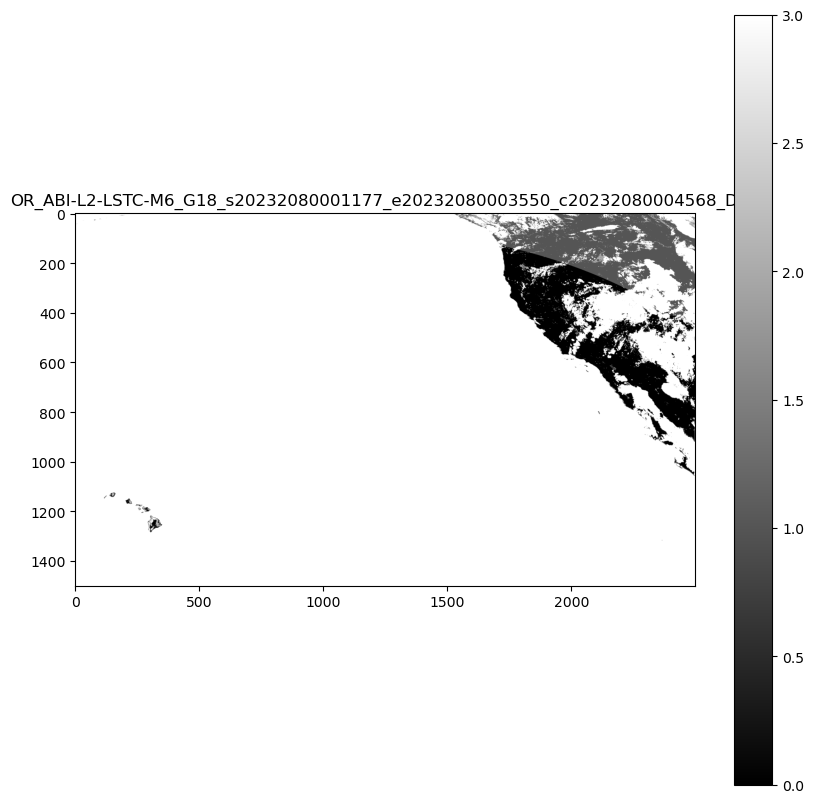
从查看数据和文件名,我们已经可以看到生成 STAC 项所需的元数据的关键部分。 文件名包含有关哪些卫星捕获了数据以及捕获数据时间的信息。
对于示例,文件名是 OR_ABI-L2-LSTC-M6_G18_s20232080101177_e20232080103550_c20232080104570_DQF,基于产品指南,这意味着:
详细组件
| 字段 | DESCRIPTION | 目的 |
|---|---|---|
| OR | 操作系统环境 | 指定在其中收集数据的系统环境 |
| ABI | 高级基线成像仪 | 标识用于获取数据的仪器 |
| L2 | 级别 2 产品 (派生产品) | 表示数据是从原始观测数据处理而来的衍生产品 |
| LSTC | 陆地表面温度(晴天)产品 | 表示特定产品类型,重点介绍晴天条件下陆地表面温度 |
| M6 | 模式 6 扫描 (完整磁盘扫描) | 描述扫描模式,覆盖 Earth 的完整磁盘 |
| G18 | GOES-18 卫星(也称为 GOES-West) | 标识从中收集数据的卫星 |
观察时间详细信息
观测开始 (s20232080201177)-
| 字段 | DESCRIPTION | 目的 |
|---|---|---|
| 年份 | 2023 | 指定观察的年份 |
| 一年的某一日 | 208 | 指示开始观察的一年中的一天 |
| 时间 | 02:01:17 UTC | 提供以 UTC 为单位开始观察的确切时间 |
| 十分之一秒 | 7 | 提高观察开始时间的精确度 |
观测结束 (e20232080203550)-
| 字段 | DESCRIPTION | 目的 |
|---|---|---|
| 年份 | 2023 | 指定观察的年份 |
| 一年的某一日 | 208 | 指示观察结束的一年中的一天 |
| 时间 | 02:03:55 UTC | 提供结束观测的确切 UTC 时间 |
| 十分之一秒 | 0 | 为观测的结束时间添加精度 |
文件创建时间 (c20232080204563) -
| 字段 | DESCRIPTION | 目的 |
|---|---|---|
| 年份 | 2023 | 指定创建文件的年份 |
| 一年的某一日 | 208 | 指示创建文件时的一年中的一天 |
| 时间 | 02:04:56 UTC | 提供文件在 UTC 中创建的确切时间 |
| 十分之一秒 | 3 | 提高文件创建时间的精度 |
其他信息:
| 字段 | DESCRIPTION | 目的 |
|---|---|---|
| DQF | 数据质量标志,指示相应数据的质量信息 | 提供有关数据质量的信息 |
| .tif | 文件扩展名 | 指示数据的文件格式 |
以下代码使用正则表达式从文件名中提取这些元数据。
import re
from datetime import datetime, timedelta

def extract_goes_metadata(filename):
    """
    Extracts key metadata from a NOAA GOES satellite filename using regular expressions.

    Args:
        filename (str): The filename to parse.

    Returns:
        dict: A dictionary containing the extracted metadata.
    """

    # Regular expression pattern to match the filename format
    pattern = re.compile(
        r"^(OR)_"  # System (OR)
        r"(ABI)-(L\d)-(LSTC)-(M\d)_"  # Instrument, Level, Product, Mode
        r"(G\d{2})_"  # Satellite (G18)
        r"s(\d{4})(\d{3})(\d{2})(\d{2})(\d{2})(\d)_"  # Start time
        r"e(\d{4})(\d{3})(\d{2})(\d{2})(\d{2})(\d)_"  # End time
        r"c(\d{4})(\d{3})(\d{2})(\d{2})(\d{2})(\d)_"  # Creation time
        r"([A-Z0-9]+)$"  # Data quality flag
    )

    match = pattern.match(filename)

    if not match:
        return None  # Or raise an exception if you prefer

    # Extract all fields from the regular expression match groups
    (
        system,          # Operational system environment
        instrument,      # Advanced Baseline Imager
        level,           # Product level (L2)
        product_type,    # Product type (LSTC - Land Surface Temperature)
        mode,            # Scanning mode (M6)
        satellite,       # Satellite identifier (G18)
        s_year, s_doy, s_hour, s_minute, s_second, s_tenth,  # Start time components
        e_year, e_doy, e_hour, e_minute, e_second, e_tenth,  # End time components
        c_year, c_doy, c_hour, c_minute, c_second, c_tenth,  # Creation time components
        data_quality_flag  # Quality flag indicator
    ) = match.groups()

    def parse_goes_time(year, doy, hour, minute, second, tenth):
        """Parses GOES time components into an ISO format string."""
        try:
            dt = datetime(int(year), 1, 1) + timedelta(
                days=int(doy) - 1,
                hours=int(hour),
                minutes=int(minute),
                seconds=int(second),
                microseconds=int(tenth) * 100000,
            )
            return dt
        except ValueError:
            return None

    # Parse the time components into datetime objects
    start_time = parse_goes_time(s_year, s_doy, s_hour, s_minute, s_second, s_tenth)
    end_time = parse_goes_time(e_year, e_doy, e_hour, e_minute, e_second, e_tenth)
    creation_time = parse_goes_time(c_year, c_doy, c_hour, c_minute, c_second, c_tenth)

    # Create a dictionary to organize all extracted metadata
    metadata = {
        "system": system,               # Operational system environment (e.g., "OR" for operational)
        "instrument": instrument,       # Instrument used to capture data (e.g., "ABI" for Advanced Baseline Imager)
        "level": level,                 # Processing level of the data (e.g., "L2" for Level 2)
        "product_type": product_type,   # Type of product (e.g., "LSTC" for Land Surface Temperature Clear Sky)
        "mode": mode,                   # Scanning mode (e.g., "M6" for Mode 6, full disk scan)
        "satellite": satellite,         # Satellite identifier (e.g., "G18" for GOES-18)
        "start_time": start_time,       # Observation start time as datetime object
        "end_time": end_time,           # Observation end time as datetime object
        "creation_time": creation_time, # File creation time as datetime object
        "data_quality_flag": data_quality_flag,  # Quality flag for the data (e.g., "DQF")
    }

    return metadata


# Example usage:
print(file_name)
metadata_from_filename = extract_goes_metadata(file_name)
print(metadata_from_filename)
OR_ABI-L2-LSTC-M6_G18_s20232080001177_e20232080003550_c20232080004568_DQF
{'system': 'OR', 'instrument': 'ABI', 'level': 'L2', 'product_type': 'LSTC', 'mode': 'M6', 'satellite': 'G18', 'start_time': datetime.datetime(2023, 7, 27, 0, 1, 17, 700000), 'end_time': datetime.datetime(2023, 7, 27, 0, 3, 55), 'creation_time': datetime.datetime(2023, 7, 27, 0, 4, 56, 800000), 'data_quality_flag': 'DQF'}
从 Cloud-Optimized GeoTIFF 文件创建 STAC 项目
以下代码块使用 rio-stac 库自动从 Cloud-Optimized GeoTIFF (COG) 创建 STAC 项。
当指向 COG 文件时, rio-stac 自动将基本元数据(如空间边界、投影信息和光栅属性)提取和组织为标准化 STAC 格式。 该库处理从 GeoTIFF 读取嵌入式技术元数据并将其转换为符合 STAC 的字段的复杂任务,包括:
- 几何学
- 边界框 (bbox)
- 投影详细信息
- 光栅特征
- STAC 扩展
此自动化可显著减少创建有效 STAC 项所需的手动工作,并确保元数据中的一致性
注释
GeoCatalog 对可在 STAC 项 ID 和资产密钥中使用的字符有限制。 确保 ID 不包含以下字符:-、、_、+(、 )和.。 可能需要修改生成 item_id 逻辑,以替换或删除文件名中的这些字符。
from rio_stac import create_stac_item
from rasterio.io import MemoryFile
import json
from urllib.parse import urlparse, unquote

def create_stac_item_from_cog(url):
    """
    Create a basic STAC Item for GOES data using rio-stac with proper spatial handling

    Args:
        url (str): URL to the COG file

    Returns:
        pystac.Item: STAC Item with basic metadata and correct spatial information
    """

    # Extract the filename safely from the URL
    parsed_url = urlparse(url)
    path = parsed_url.path  # Gets just the path portion of the URL
    filename = os.path.basename(path)  # Get just the filename part

    # Remove .tif extension if present
    item_id = filename.replace('.tif', '')

    response = requests.get(url, stream=True)
    if response.status_code == 200:
        with MemoryFile(response.content) as memfile:
            with memfile.open() as dataset:
                # Create base STAC item from rasterio dataset calling create_stac_item from rio_stac
                stac_item = create_stac_item(
                    source=dataset,  # The rasterio dataset object representing the COG file
                    id=item_id,  # Generate a unique ID by extracting the filename without the .tif extension
                    asset_name='data',  # Name of the asset, indicating it contains the primary data
                    asset_href=url,  # URL to the COG file, used as the asset's location
                    with_proj=True,  # Include projection metadata (e.g., CRS, bounding box, etc.)
                    with_raster=True,  # Include raster-specific metadata (e.g., bands, resolution, etc.)
                    properties={
                        'datetime': None,  # Set datetime to None since explicit start/end times may be added later
                        # Add rasterio-specific metadata for the raster bands
                        'raster:bands': [
                            {
                                'nodata': dataset.nodata,  # Value representing no data in the raster
                                'data_type': dataset.dtypes[0],  # Data type of the raster (e.g., uint16)
                                'spatial_resolution': dataset.res[0]  # Spatial resolution of the raster in meters
                            }
                        ],
                        'file:size': len(response.content)  # Size of the file in bytes
                    },
                    extensions=[
                        'https://stac-extensions.github.io/file/v2.1.0/schema.json'  # Add the file extension schema for additional metadata
                    ]
                )

                return stac_item
    else:
        raise Exception(f"Failed to read .tif file: {response.status_code} - {response.text}")

# Example usage
sas_token = get_sas_token(sas_endpoint) # refresh the SAS token prior to creating STAC item
# Create file URL using the first_blob variable that's already defined
file_url = f"{blob_domain}/{container_name}/{first_blob.name}?{sas_token}"
# Create STAC item for the first blob
stac_item = create_stac_item_from_cog(file_url)

# Print the STAC item as JSON
print(json.dumps(stac_item.to_dict(), indent=2))
    {
      "type": "Feature",
      "stac_version": "1.0.0",
      "stac_extensions": [
        "https://stac-extensions.github.io/file/v2.1.0/schema.json",
        "https://stac-extensions.github.io/projection/v1.1.0/schema.json",
        "https://stac-extensions.github.io/raster/v1.1.0/schema.json"
      ],
      "id": "OR_ABI-L2-LSTC-M6_G18_s20232080001177_e20232080003550_c20232080004568_DQF",
      "geometry": {
        "type": "Polygon",
        "coordinates": [
          [
            [
              -161.57885623466754,
              14.795666555826678
            ],
            [
              -112.42114380921453,
              14.79566655500485
            ],
            [
              -89.5501123912648,
              53.52729778421186
            ],
            [
              175.5501122574517,
              53.52729779865781
            ],
            [
              -161.57885623466754,
              14.795666555826678
            ]
          ]
        ]
      },
      "bbox": [
        -161.57885623466754,
        14.79566655500485,
        175.5501122574517,
        53.52729779865781
      ],
      "properties": {
        "datetime": "2025-03-26T14:46:05.484602Z",
        "raster:bands": [
          {
            "nodata": 65535.0,
            "data_type": "uint16",
            "spatial_resolution": 2004.017315487541
          }
        ],
        "file:size": 118674,
        "proj:epsg": null,
        "proj:geometry": {
          "type": "Polygon",
          "coordinates": [
            [
              [
                -2505021.6463773525,
                1583173.791653181
              ],
              [
                2505021.6423414997,
                1583173.791653181
              ],
              [
                2505021.6423414997,
                4589199.764884492
              ],
              [
                -2505021.6463773525,
                4589199.764884492
              ],
              [
                -2505021.6463773525,
                1583173.791653181
              ]
            ]
          ]
        },
        "proj:bbox": [
          -2505021.6463773525,
          1583173.791653181,
          2505021.6423414997,
          4589199.764884492
        ],
        "proj:shape": [
          1500,
          2500
        ],
        "proj:transform": [
          2004.017315487541,
          0.0,
          -2505021.6463773525,
          0.0,
          -2004.017315487541,
          4589199.764884492,
          0.0,
          0.0,
          1.0
        ],
        "proj:wkt2": "PROJCS[\"unnamed\",GEOGCS[\"unknown\",DATUM[\"unnamed\",SPHEROID[\"Spheroid\",6378137,298.2572221]],PRIMEM[\"Greenwich\",0],UNIT[\"degree\",0.0174532925199433,AUTHORITY[\"EPSG\",\"9122\"]]],PROJECTION[\"Geostationary_Satellite\"],PARAMETER[\"central_meridian\",-137],PARAMETER[\"satellite_height\",35786023],PARAMETER[\"false_easting\",0],PARAMETER[\"false_northing\",0],UNIT[\"metre\",1,AUTHORITY[\"EPSG\",\"9001\"]],AXIS[\"Easting\",EAST],AXIS[\"Northing\",NORTH],EXTENSION[\"PROJ4\",\"+proj=geos +lon_0=-137 +h=35786023 +x_0=0 +y_0=0 +ellps=GRS80 +units=m +no_defs +sweep=x\"]]"
      },
      "links": [],
      "assets": {
        "data": {
          "href": "https://goeseuwest.blob.core.windows.net/noaa-goes-cogs/goes-18/ABI-L2-LSTC/2023/208/00/OR_ABI-L2-LSTC-M6_G18_s20232080001177_e20232080003550_c20232080004568_DQF.tif?st=2025-03-25T14%3A46%3A03Z&se=2025-03-26T15%3A31%3A03Z&sp=rl&sv=2024-05-04&sr=c&skoid=9c8ff44a-6a2c-4dfb-b298-1c9212f64d9a&sktid=72f988bf-86f1-41af-91ab-2d7cd011db47&skt=2025-03-26T12%3A41%3A49Z&ske=2025-04-02T12%3A41%3A49Z&sks=b&skv=2024-05-04&sig=BuMxN2NUTdrhzY7Dvpd/X4yfX8gnFpHOzANHQLkKE1k%3D",
          "type": "image/tiff; application=geotiff",
          "raster:bands": [
            {
              "data_type": "uint16",
              "scale": 1.0,
              "offset": 0.0,
              "sampling": "area",
              "nodata": 65535.0,
              "unit": "1",
              "statistics": {
                "mean": 2.780959413109756,
                "minimum": 0,
                "maximum": 3,
                "stddev": 0.710762086175375,
                "valid_percent": 100.0
              },
              "histogram": {
                "count": 11,
                "min": 0.0,
                "max": 3.0,
                "buckets": [
                  26655,
                  0,
                  0,
                  25243,
                  0,
                  0,
                  7492,
                  0,
                  0,
                  570370
                ]
              }
            }
          ],
          "roles": []
        }
      }
    }
来自 rio-stac 的 STAC 项 JSON
rio-stac 库会自动读取 GOES COG 文件并提取密钥元数据。
此外,根据包括的元数据类型,rio-stac 添加了相关的 STAC 扩展。 STAC 扩展通过添加标准化的特定于域的元数据来增强核心规范。
下表提供了rio-stac找到的所有元数据的说明。
核心字段
| 字段 | DESCRIPTION | 目的 |
|---|---|---|
| 类型 | 始终为“功能” | 将类型标识为 GeoJSON 功能 |
| stac_version | "1.0.0" | 指定 STAC 标准版本 |
| id | 唯一标识符 | 包含卫星、产品和时间信息 |
| stac_extensions | 架构 URL 列表 | 定义额外的元数据字段 |
空间信息
| 字段 | DESCRIPTION | 目的 |
|---|---|---|
| 几何 | GeoJSON 多边形 | 定义 WGS84 坐标中的数据占用情况 |
| bbox | 边界框坐标 | 提供用于快速筛选的简单空间区 |
| proj:geometry | 投影特定的多边形 | 本机投影坐标中的占用情况 |
| proj:bbox | 本机投影边界 | 卫星坐标系中的空间范围 |
| proj:shape | [1500, 2500] | 图像尺寸(以像素为单位) |
| proj:transform | 仿射转换 | 将像素映射到坐标空间 |
| proj:wkt2 | Well-Known Text | 完整的投影定义 |
| proj:epsg | null | 此地图投影不存在标准 EPSG 代码 |
时间信息
| 字段 | DESCRIPTION | 目的 |
|---|---|---|
| 日期/时间 | 创建时间戳 | 创建此 STAC 项时 |
光栅信息
| 字段 | DESCRIPTION | 目的 |
|---|---|---|
| raster:bands | 频段对象数组 | 描述光栅数据属性 |
| → 数据类型 | "uint16" | 像素数据类型 |
| → 空间分辨率 | 2004.02m | 地面样本距离 |
| → 缩放/偏移 | 转换因子 | 将像素值转换为物理单位(开尔文) |
| → 无数据 | 65535.0 | 表示无数据的值 |
| →统计信息 | 统计摘要 | 提供数据分发信息 |
| →直方图 | 值分布 | 可视化数据分布 |
资产信息
| 字段 | DESCRIPTION | 目的 |
|---|---|---|
| assets.data | 主数据资产 | 指向实际数据文件 |
| → href | URL | Cloud-Optimized GeoTIFF 的位置 |
| →类型 | 介质类型 | 标识文件格式 |
文件元数据
| 字段 | DESCRIPTION | 目的 |
|---|---|---|
| file:size | 943,250 字节 | 数据文件的大小 |
从文件名中添加元数据
接下来,添加在文件名中找到的数据,以完成填写此 STAC 项的元数据。
需要注意的一点是 STAC 项的所有日期时间必须符合 ISO 8601。 PySTAC 库具有datetime_to_str函数,可确保数据格式正确。
import pystac

def enhance_stac_item_with_metadata(stac_item, metadata_from_filename):
    """
    Enhances a STAC Item with additional metadata from GOES filename.

    Args:
        stac_item (pystac.Item): Existing STAC Item created by rio-stac
        metadata_from_filename (dict): Metadata extracted from filename

    Returns:
        pystac.Item: Enhanced STAC Item
    """
    # Add satellite/sensor properties to the STAC item
    stac_item.properties.update({
        'platform': f"GOES-{metadata_from_filename['satellite'][1:]}",
        'instruments': [metadata_from_filename['instrument']],
        'constellation': 'GOES'
    })

    # Add temporal properties to the STAC item, use pystac to ensure time conforms to ISO 8601
    stac_item.datetime = None  # Clear the default datetime
    stac_item.properties.update({
        'start_datetime': pystac.utils.datetime_to_str(metadata_from_filename['start_time']),
        'end_datetime': pystac.utils.datetime_to_str(metadata_from_filename['end_time']),
        'created': pystac.utils.datetime_to_str(metadata_from_filename['creation_time'])
    })

    # Add GOES-specific properties to the STAC item
    stac_item.properties.update({
        'goes:system': metadata_from_filename['system'],
        'goes:level': metadata_from_filename['level'],
        'goes:product_type': metadata_from_filename['product_type'],
        'goes:mode': metadata_from_filename['mode'],
        'goes:processing_level': metadata_from_filename['level'],
        'goes:data_quality_flag': metadata_from_filename['data_quality_flag']
    })

    return stac_item


# Example usage in new cell
stac_item = enhance_stac_item_with_metadata(stac_item, metadata_from_filename)
print(json.dumps(stac_item.to_dict(), indent=2))
STAC 项:
    {
      "type": "Feature",
      "stac_version": "1.0.0",
      "stac_extensions": [
        "https://stac-extensions.github.io/file/v2.1.0/schema.json",
        "https://stac-extensions.github.io/projection/v1.1.0/schema.json",
        "https://stac-extensions.github.io/raster/v1.1.0/schema.json"
      ],
      "id": "OR_ABI-L2-LSTC-M6_G18_s20232080001177_e20232080003550_c20232080004568_DQF",
      "geometry": {
        "type": "Polygon",
        "coordinates": [
          [
            [
              -161.57885623466754,
              14.795666555826678
            ],
            [
              -112.42114380921453,
              14.79566655500485
            ],
            [
              -89.5501123912648,
              53.52729778421186
            ],
            [
              175.5501122574517,
              53.52729779865781
            ],
            [
              -161.57885623466754,
              14.795666555826678
            ]
          ]
        ]
      },
      "bbox": [
        -161.57885623466754,
        14.79566655500485,
        175.5501122574517,
        53.52729779865781
      ],
      "properties": {
        "datetime": null,
        "raster:bands": [
          {
            "nodata": 65535.0,
            "data_type": "uint16",
            "spatial_resolution": 2004.017315487541
          }
        ],
        "file:size": 118674,
        "proj:epsg": null,
        "proj:geometry": {
          "type": "Polygon",
          "coordinates": [
            [
              [
                -2505021.6463773525,
                1583173.791653181
              ],
              [
                2505021.6423414997,
                1583173.791653181
              ],
              [
                2505021.6423414997,
                4589199.764884492
              ],
              [
                -2505021.6463773525,
                4589199.764884492
              ],
              [
                -2505021.6463773525,
                1583173.791653181
              ]
            ]
          ]
        },
        "proj:bbox": [
          -2505021.6463773525,
          1583173.791653181,
          2505021.6423414997,
          4589199.764884492
        ],
        "proj:shape": [
          1500,
          2500
        ],
        "proj:transform": [
          2004.017315487541,
          0.0,
          -2505021.6463773525,
          0.0,
          -2004.017315487541,
          4589199.764884492,
          0.0,
          0.0,
          1.0
        ],
        "proj:wkt2": "PROJCS[\"unnamed\",GEOGCS[\"unknown\",DATUM[\"unnamed\",SPHEROID[\"Spheroid\",6378137,298.2572221]],PRIMEM[\"Greenwich\",0],UNIT[\"degree\",0.0174532925199433,AUTHORITY[\"EPSG\",\"9122\"]]],PROJECTION[\"Geostationary_Satellite\"],PARAMETER[\"central_meridian\",-137],PARAMETER[\"satellite_height\",35786023],PARAMETER[\"false_easting\",0],PARAMETER[\"false_northing\",0],UNIT[\"metre\",1,AUTHORITY[\"EPSG\",\"9001\"]],AXIS[\"Easting\",EAST],AXIS[\"Northing\",NORTH],EXTENSION[\"PROJ4\",\"+proj=geos +lon_0=-137 +h=35786023 +x_0=0 +y_0=0 +ellps=GRS80 +units=m +no_defs +sweep=x\"]]",
        "platform": "GOES-18",
        "instruments": [
          "ABI"
        ],
        "constellation": "GOES",
        "start_datetime": "2023-07-27T00:01:17.700000Z",
        "end_datetime": "2023-07-27T00:03:55Z",
        "created": "2023-07-27T00:04:56.800000Z",
        "goes:system": "OR",
        "goes:level": "L2",
        "goes:product_type": "LSTC",
        "goes:mode": "M6",
        "goes:processing_level": "L2",
        "goes:data_quality_flag": "DQF"
      },
      "links": [],
      "assets": {
        "data": {
          "href": "https://goeseuwest.blob.core.windows.net/noaa-goes-cogs/goes-18/ABI-L2-LSTC/2023/208/00/OR_ABI-L2-LSTC-M6_G18_s20232080001177_e20232080003550_c20232080004568_DQF.tif?st=2025-03-25T14%3A46%3A03Z&se=2025-03-26T15%3A31%3A03Z&sp=rl&sv=2024-05-04&sr=c&skoid=9c8ff44a-6a2c-4dfb-b298-1c9212f64d9a&sktid=72f988bf-86f1-41af-91ab-2d7cd011db47&skt=2025-03-26T12%3A41%3A49Z&ske=2025-04-02T12%3A41%3A49Z&sks=b&skv=2024-05-04&sig=BuMxN2NUTdrhzY7Dvpd/X4yfX8gnFpHOzANHQLkKE1k%3D",
          "type": "image/tiff; application=geotiff",
          "raster:bands": [
            {
              "data_type": "uint16",
              "scale": 1.0,
              "offset": 0.0,
              "sampling": "area",
              "nodata": 65535.0,
              "unit": "1",
              "statistics": {
                "mean": 2.780959413109756,
                "minimum": 0,
                "maximum": 3,
                "stddev": 0.710762086175375,
                "valid_percent": 100.0
              },
              "histogram": {
                "count": 11,
                "min": 0.0,
                "max": 3.0,
                "buckets": [
                  26655,
                  0,
                  0,
                  25243,
                  0,
                  0,
                  7492,
                  0,
                  0,
                  570370
                ]
              }
            }
          ],
          "roles": []
        }
      }
    }
将 STAC 项添加到集合
MC Pro 要求所有 STAC 项都有一个引用,以引用它们被引入的父级 STAC 集合 ID。 对于本教程,STAC 集合 ID 是卫星和数据产品的名称。
使用 PySTAC,可以轻松地使用从源文件收集的一些元数据来填充 STAC 集合的关键字段,并使用内置验证函数。
以下代码创建一个父 STAC 集合来容纳 GOES 数据。 然后,该代码会将此信息保存到用于创建 Microsoft 行星计算机专业版 STAC 集合的文件,并将 STAC 项引入 Microsoft 行星计算机专业版。
# Define collection properties
collection_id = f"{satellite}-{product}"
collection_title = f"{satellite.upper()} {product} Collection"
collection_desc = f"Collection of {satellite} {product} Earth observation data"

# Create spatial extent
bbox = [-180, -60, 10, 60]  # placeholder, replace with actual data at a later date
spatial_extent = pystac.SpatialExtent([bbox])

# Create temporal extent, use current date time or replace with existing datetimes in stac_item
start_datetime = datetime.now()
if hasattr(metadata_from_filename, 'get'):
    if metadata_from_filename.get('start_time'):
        start_datetime = metadata_from_filename.get('start_time')

temporal_extent = pystac.TemporalExtent([[start_datetime, None]])
extent = pystac.Extent(spatial=spatial_extent, temporal=temporal_extent)

# Create the STAC Collection
collection = pystac.Collection(
    id=collection_id,
    description=collection_desc,
    extent=extent,
    title=collection_title,
    license="public-domain",
)

# Add keywords and provider
collection.keywords = ["GOES", "satellite", "weather", "NOAA", satellite, product]
collection.providers = [
    pystac.Provider(
        name="NOAA",
        roles=["producer", "licensor"],
        url="https://www.noaa.gov/"
    )
]

# Create output directories
output_dir = "stac_catalog"
collection_dir = os.path.join(output_dir, collection_id)
items_dir = os.path.join(collection_dir, "items")
os.makedirs(items_dir, exist_ok=True)

# Important: Save the collection first to generate proper file paths
collection_path = os.path.join(collection_dir, "collection.json")
collection.set_self_href(collection_path)

# Extract filename for the item
original_filename = first_blob.name.split('/')[-1]
base_filename = original_filename.replace('.tif', '')
item_path = os.path.join(items_dir, f"{base_filename}.json")

# Set the item's proper href
stac_item.set_self_href(item_path)

# Now associate the item with the collection (after setting hrefs)
collection.add_item(stac_item)

# Create a catalog to contain the collection
catalog = pystac.Catalog(
    id="goes-data-catalog",
    description="GOES Satellite Data Catalog",
    title="GOES Data"
)
catalog_path = os.path.join(output_dir, "catalog.json")
catalog.set_self_href(catalog_path)
catalog.add_child(collection)

# Validate the collection and contained items
print("Validating collection and items...")
try:
    collection.validate_all()
    print("✅ Collection and items validated successfully")

    # Save everything to disk
    catalog.normalize_and_save(catalog_path, pystac.CatalogType.SELF_CONTAINED)
    print(f"✅ STAC catalog saved at: {catalog_path}")
    print(f"✅ STAC collection saved at: {collection_path}")
    print(f"✅ STAC item saved at: {item_path}")

except Exception as e:
    print(f"❌ Validation error: {str(e)}")
Validating collection and items...
✅ Collection and items validated successfully
✅ STAC catalog saved at: stac_catalog/catalog.json
✅ STAC collection saved at: stac_catalog/goes-18-ABI-L2-LSTC/collection.json
✅ STAC item saved at: stac_catalog/goes-18-ABI-L2-LSTC/items/OR_ABI-L2-LSTC-M6_G18_s20232080001177_e20232080003550_c20232080004568_DQF.json
后续步骤
现在,你已创建了一些 STAC 项,现在可以将数据引入Microsoft行星计算机专业版。
对于单个项引入:
对于批量摄入:
我们还提供 STAC Forge 工具,该工具通过数据模板提高自动化程度。