你当前正在访问 Microsoft Azure Global Edition 技术文档网站。 如果需要访问由世纪互联运营的 Microsoft Azure 中国技术文档网站,请访问 https://docs.azure.cn。
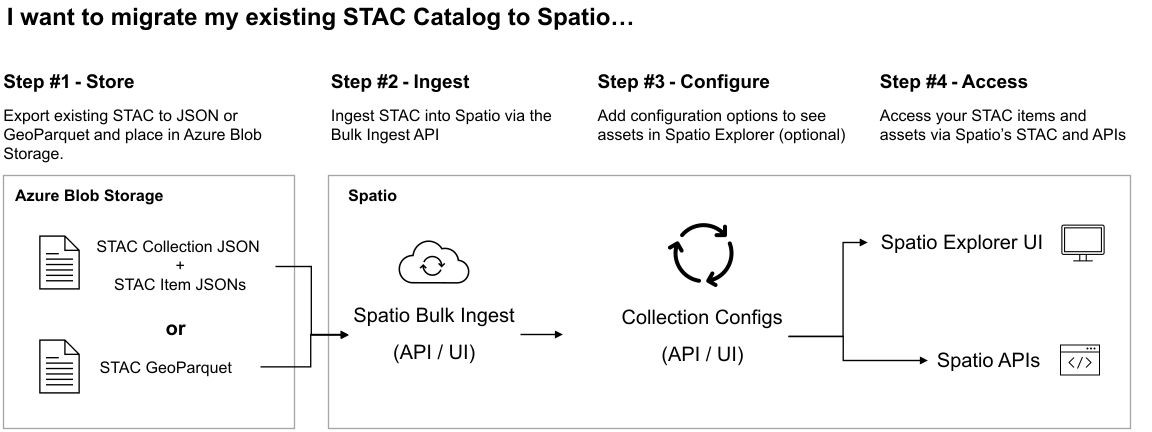
本文介绍如何使用批量引入 API 将许多地理空间数据资产一次性引入 GeoCatalog。 首先,创建并配置 GeoCatalog 引入源。 创建引入源会在 GeoCatalog 资源与现有地理空间数据的存储位置之间建立安全连接。 接下来,我们将在 GeoCatalog 资源中创建 SpatioTemporal Access Catalog (STAC) 集合,以存储要导入的数据。 最后,我们使用批量引入 API 启动引入工作流。 完成这些步骤后,地理空间数据将从 GeoCatalog UI 和 API 引入和访问。
先决条件
在 Azure 订阅中:
存储帐户 blob 容器中的地理空间数据集:
- 地理空间数据资产(例如 GeoTIFF 文件)
- 这些资产的关联 STAC 项创建 STAC 项。
- 引用所有 STAC 项和地理空间数据资产的 STAC 集合 JSON。
在本地/开发环境中:
Microsoft行星计算机专业版必须有权访问 Azure Blob 存储容器。 在本文中,我们将创建并使用临时 SAS 令牌凭据授予此访问权限。 或者,可以使用这些指南设置托管标识或硬编码的 SAS 令牌。
创建引入源
创建引入源为 GeoCatalog 定义从哪个源引入地理空间数据,以及要在引入工作流中使用的凭据机制。
使用 pip 安装所需的 Python 模块
pip install pystac-client azure-identity requests azure-storage-blob pyyaml导入所需的 Python 模块
import os
import requests
from azure.identity import AzureCliCredential
from datetime import datetime, timedelta, timezone
import azure.storage.blob
from urllib.parse import urlparse
import yaml
根据环境设置所需的常量
MPCPRO_APP_ID = "https://geocatalog.spatio.azure.com"
CONTAINER_URI = "<container_uri>" # The URI for the blob storage container housing your geospatial data
GEOCATALOG_URI = "<geocatalog uri>" # The URI for your GeoCatalog can be found in the Azure portal resource overview
API_VERSION = "2025-04-30-preview"
创建 SAS 令牌
# Parse the container URL
parsed_url = urlparse(CONTAINER_URI)
account_url = f"{parsed_url.scheme}://{parsed_url.netloc}"
account_name = parsed_url.netloc.split(".")[0]
container_name = parsed_url.path.lstrip("/")

credential = azure.identity.AzureCliCredential()
blob_service_client = azure.storage.blob.BlobServiceClient(
    account_url=account_url,
    credential=credential,
)

now = datetime.now(timezone.utc).replace(microsecond=0)
key = blob_service_client.get_user_delegation_key(
    key_start_time=now + timedelta(hours=-1),
    key_expiry_time=now + timedelta(hours=1),
)

sas_token = azure.storage.blob.generate_container_sas(
    account_name=account_name,
    container_name=container_name,
    user_delegation_key=key,
    permission=azure.storage.blob.ContainerSasPermissions(
        read=True,
        list=True,
    ),
    start=now + timedelta(hours=-1),
    expiry=now + timedelta(hours=1),
)
获取 GeoCatalog API 访问令牌
# Obtain an access token
credential = AzureCliCredential()
access_token = credential.get_token(f"{MPCPRO_APP_ID}/.default")
为引入源 API 创建 POST 有效负载
# Payload for the POST request
payload = {
    "Kind": "SasToken",
    "connectionInfo": {
        "containerUrl": CONTAINER_URI,
        "sasToken": sas_token,
    },
}
通过将 POST 有效负载发送到引入源终结点来创建引入源
# STAC Collection API endpoint
endpoint = f"{GEOCATALOG_URI}/inma/ingestion-sources"

# Make the POST request
response = requests.post(
    endpoint,
    json=payload,
    headers={"Authorization": f"Bearer {access_token.token}"},
    params={"api-version": API_VERSION},
)
验证响应
# Print the response
if response.status_code == 201:
    print("Ingestion source created successfully")
    ingestion_source_id = response.json().get("id") #saved for later to enable resoource clean up
else:
    print(f"Failed to create ingestion: {response.text}")
注释
连续运行这些步骤多次会导致 409 响应:
Container url <container uri> already contains a SAS token ingestion source with id <sas token id>
引入源 API 不允许为同一容器 URL 创建多个引入源。 若要避免冲突,请确保在创建新的引入源之前清理任何现有引入源。 有关详细信息,请参阅清理资源。
创建集合
STAC 集合是 STAC 项及其关联的地理空间资产的高级容器。 在本部分中,我们将在 GeoCatalog 中创建 STAC 集合来容纳下一部分引入的地理空间数据。
导入所需的模块
import os
import requests
import yaml
from pprint import pprint
from azure.identity import AzureCliCredential
根据环境设置所需的常量
MPCPRO_APP_ID = "https://geocatalog.spatio.azure.com"
GEOCATALOG_URI = "<geocatalog uri>" # The URI for your GeoCatalog can be found in the Azure portal resource overview
API_VERSION = "2025-04-30-preview"

COLLECTION_ID = "example-collection" #You can your own collection ID
COLLECTION_TITLE = "Example Collection" #You can your own collection title
获取 GeoCatalog API 访问令牌
# Obtain an access token
credential = AzureCliCredential()
access_token = credential.get_token(f"{MPCPRO_APP_ID}/.default")
创建基本 STAC 集合规范
collection = {
    "id": COLLECTION_ID,
    "type": "Collection",
    "title": COLLECTION_TITLE,
    "description": "An example collection",
    "license": "CC-BY-4.0",
    "extent": {
        "spatial": {"bbox": [[-180, -90, 180, 90]]},
        "temporal": {"interval": [["2018-01-01T00:00:00Z", "2018-12-31T23:59:59Z"]]},
    },
    "links": [],
    "stac_version": "1.0.0",
    "msft:short_description": "An example collection",
}
注释
此示例集合规范是集合的基本示例。 有关 STAC 集合和 STAC 开放标准的详细信息,请参阅 STAC 概述。 有关创建完整的 STAC 集合的详细信息,请参阅 “创建 STAC 集合”。
使用集合 API 创建新集合
response = requests.post(
    f"{GEOCATALOG_URI}/stac/collections",
    json=collection,
    headers={"Authorization": "Bearer " + access_token.token},
    params={"api-version": API_VERSION},
)
验证响应结果
if response.status_code == 201:
    print("Collection created successfully")
    pprint(response.json())
else:
    print(f"Failed to create ingestion: {response.text}")
创建连接和运行工作流
在此最后一步中,我们将使用引入 API 启动批量引入工作流。
导入所需的模块
import os
import requests
import yaml
from azure.identity import AzureCliCredential
根据环境设置所需的常量
MPCPRO_APP_ID = "https://geocatalog.spatio.azure.com"
GEOCATALOG_URI = "<geocatalog uri>" # The URI for your GeoCatalog can be found in the Azure portal resource overview
API_VERSION = "2025-04-30-preview"

COLLECTION_ID = "example-collection" #You can your own collection ID
catalog_href = "<catalog_href>" #The blob storage location of the STAC Catalog JSON file

skip_existing_items = False
keep_original_assets = False
timeout_seconds = 300
获取 GeoCatalog API 访问令牌
# Obtain an access token
credential = AzureCliCredential()
access_token = credential.get_token(f"{MPCPRO_APP_ID}/.default")
为批量导入 API 创建 POST 有效负载
url = f"{GEOCATALOG_URI}/inma/collections/{COLLECTION_ID}/ingestions"
body = {
    "importType": "StaticCatalog",
    "sourceCatalogUrl": catalog_href,
    "skipExistingItems": skip_existing_items,
    "keepOriginalAssets": keep_original_assets,
}
将有效负载发送到批量引入 API。
ing_response = requests.post(
    url,
    json=body,
    timeout=timeout_seconds,
    headers={"Authorization": f"Bearer {access_token.token}"},
    params={"api-version": API_VERSION},
)
验证响应。
if ing_response.status_code == 201:
    print("Ingestion created successfully")
    ingestion_id = ing_response.json()["ingestionId"]
    print(f"Created ingestion with ID: {ingestion_id}")
else:
    print(f"Failed to create ingestion: {ing_response.text}")
验证引入工作流的状态。
runs_endpoint = (
    f"{geocatalog_url}/inma/collections/{collection_id}/ingestions/{ingestion_id}/runs"
)

wf_response = requests.post(
    runs_endpoint,
    headers={"Authorization": f"Bearer {access_token.token}"},
    params={"api-version": API_VERSION},
)

if wf_response.status_code == 201:
    print("Workflow started successfully")
else:
    print(f"Failed to create ingestion run: {wf_response.text}")
工作流完成后,可以使用 GeoCatalog STAC 或数据 API 或数据资源管理器查询、检索或可视化地理空间数据。 如果遇到问题,请参阅 故障排除指南 或 引入错误代码列表。
清理资源
删除引入源
del_is_endpoint = f"{GEOCATALOG_URI}/inma/ingestion-sources/{ingestion_source_id}"
del_is_response = requests.delete(
    del_is_endpoint,
    headers={"Authorization": f"Bearer {access_token.token}"},
    params={"api-version": API_VERSION},
)

if del_is_response.status_code == 200:
    print("Ingestion source deleted successfully")
else:
    print(f"Failed to delete ingestion source")
后续步骤
添加一些项后,应配置用于可视化的数据。