评估攻击面减少功能时,查看事件查看器中的事件非常有用。 例如,可以为功能或设置启用审核模式,然后查看完全启用这些功能或设置时会发生什么情况。 还可以查看完全启用攻击面减少功能的效果。
本文介绍如何使用 Windows 事件查看器查看从攻击面减少 (ASR) 功能的事件,包括:
若要查看攻击面减少事件,可使用以下选项,如本文其余部分所述:
- 浏览 Windows 事件查看器中的攻击面减少事件:如何导航到事件查看器中的攻击面减少事件,以及每个攻击面减少功能的事件 ID。
- 使用 Windows 事件查看器 中的自定义视图查看攻击面减少事件:如何创建或导入自定义视图以筛选特定 ASR 功能的事件查看器,以及随时可用的 XML 查询模板。
浏览 Windows 事件查看器中的攻击面减少事件
所有攻击面减少事件都位于 应用程序和服务日志中。 若要查看攻击面减少事件,请执行以下步骤:
选择“开始”,键入“事件查看器”,然后按 Enter 打开事件查看器。
在“事件查看器”中,展开“Windows Microsoft>应用程序和服务日志>”。
继续扩展不同类型的攻击面减少事件的路径,如以下小节中所述。
查找并筛选要查看的事件,如以下小节中所述。
ASR 规则事件
ASR 规则事件位于 Windows Defender>操作 日志中:
| 事件 ID | 描述 |
|---|---|
| 1121 | 在块模式下触发规则时发生的事件 |
| 1122 | 在审核模式下触发规则时发生的事件 |
| 1129 | 在警告模式下用户重写块时发生的事件 |
| 5007 | 更改设置时的事件 |
受控文件夹访问事件
受控文件夹访问事件位于 Windows Defender>操作中。
| 事件 ID | 描述 |
|---|---|
| 5007 | 更改设置时的事件 |
| 1124 | 已审核的受控文件夹访问事件 |
| 1123 | 阻止的受控文件夹访问事件 |
| 1127 | 阻止的受控文件夹访问扇区写入阻止事件 |
| 1128 | 审核的受控文件夹访问扇区写入阻止事件 |
Exploit Protection 事件
以下攻击保护事件位于 安全缓解>内核模式 和安全 缓解>用户模式 日志中:
| 事件 ID | 说明 |
|---|---|
| 1 | ACG 审核 |
| 2 | ACG 强制 |
| 3 | 不允许子进程审核 |
| 4 | 不允许子进程阻止 |
| 5 | 阻止低完整性图像审核 |
| 6 | 阻止低完整性图像阻止 |
| 7 | 阻止远程图像审核 |
| 8 | 阻止远程图像阻止 |
| 9 | 禁用 win32k 系统调用审核 |
| 10 | 禁用 win32k 系统调用阻止 |
| 11 | 代码完整性防护审核 |
| 12 | 代码完整性防护阻止 |
| 13 | EAF 审核 |
| 14 | EAF 强制 |
| 15 | EAF+ 审核 |
| 16 | EAF+ 强制 |
| 17 | IAF 审核 |
| 18 | IAF 强制 |
| 19 | ROP StackPivot 审核 |
| 20 | ROP StackPivot 强制 |
| 21 | ROP CallerCheck 审核 |
| 22 | ROP CallerCheck 强制 |
| 23 | ROP SimExec 审核 |
| 24 | ROP SimExec 强制 |
以下 exploit Protection 事件位于 WER-Diagnostics>操作 日志中:
| 事件 ID | 描述 |
|---|---|
| 5 | CFG 阻止 |
以下 exploit Protection 事件位于 Win32k>操作 日志中:
| 事件 ID | 描述 |
|---|---|
| 260 | 不受信任的字体 |
网络保护事件
网络保护事件位于 Windows Defender>操作中。
| 事件 ID | 描述 |
|---|---|
| 5007 | 更改设置时的事件 |
| 1125 | 网络保护在审核模式下触发的事件 |
| 1126 | 网络保护在块模式下触发时的事件 |
使用 Windows 事件查看器 中的自定义视图查看攻击面减少事件
可以在 Windows 事件查看器中创建自定义视图,以便仅查看特定攻击面减少功能的事件。 最简单的方法是将自定义视图导入为 XML 文件。 还可以将 XML 直接复制到 事件查看器。
有关随时可用的 XML 模板,请参阅 攻击面减少事件的自定义 XML 模板 部分。
导入现有 XML 自定义视图
创建一个空 .txt 文件,并将要使用的自定义视图的 XML 复制到 .txt 文件中。 针对要使用的每个自定义视图执行此步骤。 重命名文件,如下所示 (确保将类型从 .txt 更改为 .xml) :
- 受控文件夹访问事件自定义视图: cfa-events.xml
- Exploit Protection 事件自定义视图: ep-events.xml
- 攻击面减少事件自定义视图: asr-events.xml
- 网络保护事件自定义视图: np-events.xml
选择“开始”,键入“事件查看器”,然后按 Enter 打开事件查看器。
选择 “操作>导入自定义视图...”
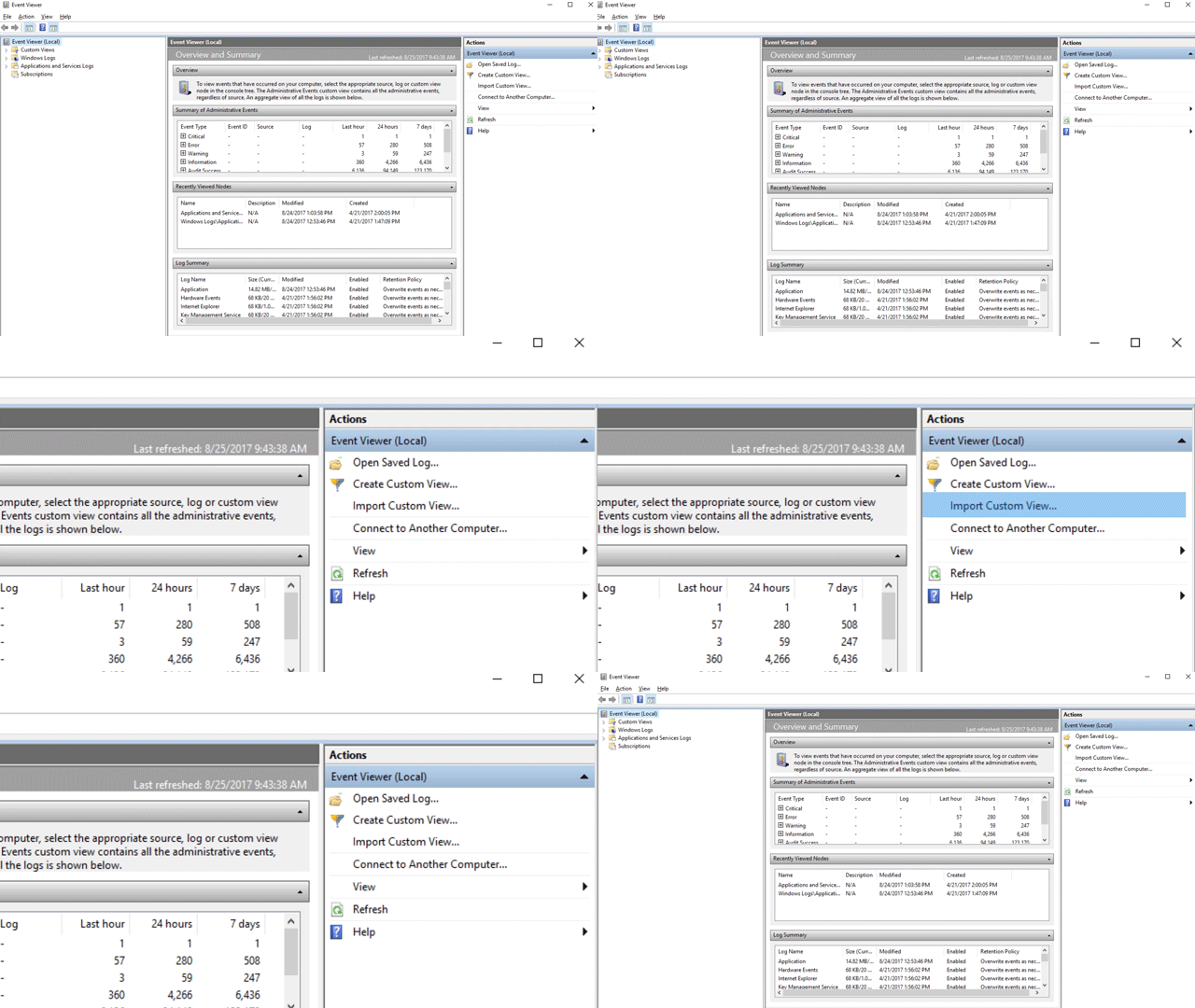
导航到所需自定义视图的 XML 文件并选择它。
选择 “打开”。
自定义视图筛选器仅显示与该功能相关的事件。
直接复制 XML
选择“开始”,键入“事件查看器”,然后按 Enter 打开事件查看器。
在“ 操作 ”窗格中,选择“ 创建自定义视图...”
转到“XML”选项卡,然后选择“ 手动编辑查询”。 警告指示在使用 XML 选项时,无法使用“ 筛选器 ”选项卡编辑查询。 选择“是”。
将要从中筛选事件的功能的 XML 代码粘贴到“XML”部分。
选择“确定”。 指定筛选器的名称。 自定义视图筛选器仅显示与该功能相关的事件。
攻击面减少事件的自定义 XML 模板
攻击面减少规则事件的 XML
<QueryList>
  <Query Id="0" Path="Microsoft-Windows-Windows Defender/Operational">
   <Select Path="Microsoft-Windows-Windows Defender/Operational">*[System[(EventID=1121 or EventID=1122 or EventID=1129 or EventID=5007)]]</Select>
   <Select Path="Microsoft-Windows-Windows Defender/WHC">*[System[(EventID=1121 or EventID=1122 or EventID=1129 or EventID=5007)]]</Select>
  </Query>
</QueryList>
受控文件夹访问事件的 XML
<QueryList>
  <Query Id="0" Path="Microsoft-Windows-Windows Defender/Operational">
   <Select Path="Microsoft-Windows-Windows Defender/Operational">*[System[(EventID=1123 or EventID=1124 or EventID=1127 or EventID=1128 or EventID=5007)]]</Select>
   <Select Path="Microsoft-Windows-Windows Defender/WHC">*[System[(EventID=1123 or EventID=1124 or EventID=1127 or EventID=1128 or EventID=5007)]]</Select>
  </Query>
</QueryList>
攻击保护事件的 XML
<QueryList>
<Query Id="0" Path="Microsoft-Windows-Security-Mitigations/KernelMode">
<Select Path="Microsoft-Windows-Security-Mitigations/KernelMode">*[System[Provider[@Name='Microsoft-Windows-Security-Mitigations' or @Name='Microsoft-Windows-WER-Diag' or @Name='Microsoft-Windows-Win32k' or @Name='Win32k'] and ( (EventID >= 1 and EventID <= 24) or EventID=5 or EventID=260)]]</Select>
<Select Path="Microsoft-Windows-Win32k/Concurrency">*[System[Provider[@Name='Microsoft-Windows-Security-Mitigations' or @Name='Microsoft-Windows-WER-Diag' or @Name='Microsoft-Windows-Win32k' or @Name='Win32k'] and ( (EventID >= 1 and EventID <= 24) or EventID=5 or EventID=260)]]</Select>
<Select Path="Microsoft-Windows-Win32k/Contention">*[System[Provider[@Name='Microsoft-Windows-Security-Mitigations' or @Name='Microsoft-Windows-WER-Diag' or @Name='Microsoft-Windows-Win32k' or @Name='Win32k'] and ( (EventID >= 1 and EventID <= 24) or EventID=5 or EventID=260)]]</Select>
<Select Path="Microsoft-Windows-Win32k/Messages">*[System[Provider[@Name='Microsoft-Windows-Security-Mitigations' or @Name='Microsoft-Windows-WER-Diag' or @Name='Microsoft-Windows-Win32k' or @Name='Win32k'] and ( (EventID >= 1 and EventID <= 24) or EventID=5 or EventID=260)]]</Select>
<Select Path="Microsoft-Windows-Win32k/Operational">*[System[Provider[@Name='Microsoft-Windows-Security-Mitigations' or @Name='Microsoft-Windows-WER-Diag' or @Name='Microsoft-Windows-Win32k' or @Name='Win32k'] and ( (EventID >= 1 and EventID <= 24) or EventID=5 or EventID=260)]]</Select>
<Select Path="Microsoft-Windows-Win32k/Power">*[System[Provider[@Name='Microsoft-Windows-Security-Mitigations' or @Name='Microsoft-Windows-WER-Diag' or @Name='Microsoft-Windows-Win32k' or @Name='Win32k'] and ( (EventID >= 1 and EventID <= 24) or EventID=5 or EventID=260)]]</Select>
<Select Path="Microsoft-Windows-Win32k/Render">*[System[Provider[@Name='Microsoft-Windows-Security-Mitigations' or @Name='Microsoft-Windows-WER-Diag' or @Name='Microsoft-Windows-Win32k' or @Name='Win32k'] and ( (EventID >= 1 and EventID <= 24) or EventID=5 or EventID=260)]]</Select>
<Select Path="Microsoft-Windows-Win32k/Tracing">*[System[Provider[@Name='Microsoft-Windows-Security-Mitigations' or @Name='Microsoft-Windows-WER-Diag' or @Name='Microsoft-Windows-Win32k' or @Name='Win32k'] and ( (EventID >= 1 and EventID <= 24) or EventID=5 or EventID=260)]]</Select>
<Select Path="Microsoft-Windows-Win32k/UIPI">*[System[Provider[@Name='Microsoft-Windows-Security-Mitigations' or @Name='Microsoft-Windows-WER-Diag' or @Name='Microsoft-Windows-Win32k' or @Name='Win32k'] and ( (EventID >= 1 and EventID <= 24) or EventID=5 or EventID=260)]]</Select>
<Select Path="System">*[System[Provider[@Name='Microsoft-Windows-Security-Mitigations' or @Name='Microsoft-Windows-WER-Diag' or @Name='Microsoft-Windows-Win32k' or @Name='Win32k'] and ( (EventID >= 1 and EventID <= 24) or EventID=5 or EventID=260)]]</Select>
<Select Path="Microsoft-Windows-Security-Mitigations/UserMode">*[System[Provider[@Name='Microsoft-Windows-Security-Mitigations' or @Name='Microsoft-Windows-WER-Diag' or @Name='Microsoft-Windows-Win32k' or @Name='Win32k'] and ( (EventID >= 1 and EventID <= 24) or EventID=5 or EventID=260)]]</Select>
</Query>
</QueryList>
网络保护事件的 XML
<QueryList>
 <Query Id="0" Path="Microsoft-Windows-Windows Defender/Operational">
  <Select Path="Microsoft-Windows-Windows Defender/Operational">*[System[(EventID=1125 or EventID=1126 or EventID=5007)]]</Select>
  <Select Path="Microsoft-Windows-Windows Defender/WHC">*[System[(EventID=1125 or EventID=1126 or EventID=5007)]]</Select>
 </Query>
</QueryList>