Span 构造函数
定义
重要
一些信息与预发行产品相关,相应产品在发行之前可能会进行重大修改。 对于此处提供的信息,Microsoft 不作任何明示或暗示的担保。
初始化 Span 类的新实例。
重载
| 名称 | 说明 |
|---|---|
| Span() |
初始化类的新空实例 Span 。 |
| Span(Inline) | |
| Span(Inline, TextPointer) |
初始化类的新实例 Span ,将指定的 Inline 对象作为新 Span内容,并 TextPointer 指定新 Inline 元素的插入位置。 |
| Span(TextPointer, TextPointer) |
初始化类的新实例 Span ,获取两 TextPointer 个对象,这些对象指示新 Span 内容将包含的内容的开始和结尾。 |
Span()
Span(Inline)
public:
 Span(System::Windows::Documents::Inline ^ childInline);
public Span(System.Windows.Documents.Inline childInline);new System.Windows.Documents.Span : System.Windows.Documents.Inline -> System.Windows.Documents.SpanPublic Sub New (childInline As Inline)参数
示例
以下示例演示如何使用此构造函数创建包含 a.Run
// A child Inline element for the new Span element.
Run runx = new Run("The Run element derives from Inline, and is therefore" +
    "an acceptable child element for this new Span.");

// After this line executes, the new element "spanx"
// contains the specified Inline element, "runx".
Span spanx = new Span(runx);
' A child Inline element for the new Span element.
Dim runx1 As New Run("The Run element derives from Inline, and is therefore" & "an acceptable child element for this new Span.")

' After this line executes, the new element "spanx"
' contains the specified Inline element, "runx".
Dim spanx1 As New Span(runx1)
适用于
Span(Inline, TextPointer)
初始化类的新实例 Span ,将指定的 Inline 对象作为新 Span内容,并 TextPointer 指定新 Inline 元素的插入位置。
public:
 Span(System::Windows::Documents::Inline ^ childInline, System::Windows::Documents::TextPointer ^ insertionPosition);
public Span(System.Windows.Documents.Inline childInline, System.Windows.Documents.TextPointer insertionPosition);new System.Windows.Documents.Span : System.Windows.Documents.Inline * System.Windows.Documents.TextPointer -> System.Windows.Documents.SpanPublic Sub New (childInline As Inline, insertionPosition As TextPointer)参数
- insertionPosition
- TextPointer
一个 TextPointer ,指定在创建元素后插入 Span 元素的位置,或者不进行自动插入时为 null。
示例
下面的示例演示如何使用此构造函数创建一个包含Span插入到开头Run的一个新Paragraph构造函数。
// A child Inline element for the new Span element.
Run runx = new Run("The Run element derives from Inline, and is therefore" +
    "an acceptable child element for this new Span.");

// An empty paragraph will serve as the container for the new Span element.
Paragraph parx = new Paragraph();

// After this line executes, the new element "spanx"
// contains the specified Inline element, "runx".  Also, "spanx" is
// inserted at the point indicated by the insertionPosition parameter,
// which in this case indicates the content start position in the Paragraph
// element "parx".
Span spanx = new Span(runx, parx.ContentStart);
' A child Inline element for the new Span element.
Dim runx2 As New Run("The Run element derives from Inline, and is therefore" & "an acceptable child element for this new Span.")

' An empty paragraph will serve as the container for the new Span element.
Dim parx2 As New Paragraph()

' After this line executes, the new element "spanx"
' contains the specified Inline element, "runx".  Also, "spanx" is
' inserted at the point indicated by the insertionPosition parameter,
' which in this case indicates the content start position in the Paragraph
' element "parx".
Dim spanx2 As New Span(runx2, parx2.ContentStart)
适用于
Span(TextPointer, TextPointer)
初始化类的新实例 Span ,获取两 TextPointer 个对象,这些对象指示新 Span 内容将包含的内容的开始和结尾。
public:
 Span(System::Windows::Documents::TextPointer ^ start, System::Windows::Documents::TextPointer ^ end);
public Span(System.Windows.Documents.TextPointer start, System.Windows.Documents.TextPointer end);new System.Windows.Documents.Span : System.Windows.Documents.TextPointer * System.Windows.Documents.TextPointer -> System.Windows.Documents.SpanPublic Sub New (start As TextPointer, end As TextPointer)参数
- start
- TextPointer
指示 TextPointer 新 Span 内容所选内容的开头。
- end
- TextPointer
指示 TextPointer 新 Span 内容所选内容的末尾。
例外
当或start为 null 时end引发。
当和start不解析为适合元素end机箱的内容范围时Span引发;例如,如果start和end指示不同段落中的位置。
示例
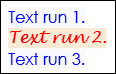
以下示例演示如何使用此构造函数创建应用于一系列内容的新 Span 函数。 内容范围由构造函数指定的开始和结束 TextPointer 对象确定。
// Create a paragraph and three text runs to serve as example content.
Paragraph parx = new Paragraph();
Run run1 = new Run("Text run 1.");
Run run2 = new Run("Text run 2.");
Run run3 = new Run("Text run 3.");

// Add the three text runs to the paragraph, separated by linebreaks.
parx.Inlines.Add(run1);
parx.Inlines.Add(new LineBreak());
parx.Inlines.Add(run2);
parx.Inlines.Add(new LineBreak());
parx.Inlines.Add(run3);

// After this line executes, the selection of content
// indicated by the "start" and "end" parameters will be
// enclosed by the new Span.  In this case, the new Span
// will enclose the entire contents of the Paragraph "parx",
// which happens to contain three text runs and two linebreaks.
Span spanx = new Span(parx.ContentStart, parx.ContentEnd);

// Now, properties set on "spanx" will override default properties
// on elements contained by "spanx".  For example, setting
// these arbitrary display properties on "spanx" will affect
// the child text runs enclosed by "spanx".
spanx.Foreground = Brushes.Blue;
spanx.Background = Brushes.GhostWhite;
spanx.FontFamily = new FontFamily("Century Gothic");

// Non-default property values override any settings on the
// enclosing Span element.
run2.Foreground = Brushes.Red;
run2.Background = Brushes.AntiqueWhite;
run2.FontFamily = new FontFamily("Lucida Handwriting");
' Create a paragraph and three text runs to serve as example content.
Dim parx3 As New Paragraph()
Dim run1 As New Run("Text run 1.")
Dim run2 As New Run("Text run 2.")
Dim run3 As New Run("Text run 3.")

' Add the three text runs to the paragraph, separated by linebreaks.
parx3.Inlines.Add(run1)
parx3.Inlines.Add(New LineBreak())
parx3.Inlines.Add(run2)
parx3.Inlines.Add(New LineBreak())
parx3.Inlines.Add(run3)

' After this line executes, the selection of content
' indicated by the "start" and "end" parameters will be
' enclosed by the new Span.  In this case, the new Span
' will enclose the entire contents of the Paragraph "parx",
' which happens to contain three text runs and two linebreaks.
Dim spanx As New Span(parx3.ContentStart, parx3.ContentEnd)

' Now, properties set on "spanx" will override default properties
' on elements contained by "spanx".  For example, setting
' these arbitrary display properties on "spanx" will affect
' the child text runs enclosed by "spanx".
spanx.Foreground = Brushes.Blue
spanx.Background = Brushes.GhostWhite
spanx.FontFamily = New FontFamily("Century Gothic")

' Non-default property values override any settings on the
' enclosing Span element.
run2.Foreground = Brushes.Red
run2.Background = Brushes.AntiqueWhite
run2.FontFamily = New FontFamily("Lucida Handwriting")
下图显示了此示例在一个 FlowDocument. 中如何呈现。
注解
此构造函数旨在初始化一个新 Span 元素,使其包含一系列预先存在的内容。
