 浏览示例
浏览示例在使用 Model-View-ViewModel (MVVM) 模式的 .NET 多平台应用 UI(.NET MAUI)应用中,数据绑定在 viewmodel 中的属性(通常是派生自 INotifyPropertyChanged的类)和视图中的属性(通常是 XAML 文件)之间定义。 有时,应用的需求超越这些属性绑定,需要用户启动命令来影响视图模型中的某些内容。 这些命令通常通过按钮点击或手指触碰来产生信号,传统上,这些命令在后置代码文件中处理,用于处理 Clicked 的 Button 事件或 Tapped 的 TapGestureRecognizer 事件。
命令接口提供了实现更适合 MVVM 体系结构的命令的替代方法。 viewmodel 可以包含命令,这些命令是在响应视图中的特定活动(例如 Button 单击)时执行的方法。 这些命令和 Button 之间定义了数据绑定。
若要允许在 Button 和 viewmodel 之间绑定数据,Button 会定义两个属性:
-
Command为类型System.Windows.Input.ICommand -
CommandParameter为类型Object
若要使用命令接口,请定义一个数据绑定,用于定位Command源是类型 Buttonviewmodel 中的属性ICommand的属性。 viewmodel 包含与单击按钮时执行的该 ICommand 属性关联的代码。 可以将 CommandParameter 属性设置为任意数据,以便区分多个按钮(如果它们都绑定到视图模型中的同一 ICommand 属性)。
许多其他视图也定义 Command 和 CommandParameter 属性。 所有这些命令都可以在 viewmodel 中使用不依赖于视图中用户界面对象的方法进行处理。
ICommands
该 ICommand 接口在 System.Windows.Input 命名空间中定义,由两种方法和一个事件组成:
public interface ICommand
{
    public void Execute (Object parameter);
    public bool CanExecute (Object parameter);
    public event EventHandler CanExecuteChanged;
}
若要使用命令接口,viewmodel 应包含类型为 ICommand 的属性:
public ICommand MyCommand { private set; get; }
viewmodel 还必须引用实现接口的 ICommand 类。 在视图中,Command 的 Button 属性被绑定到该属性:
<Button Text="Execute command"
        Command="{Binding MyCommand}" />
当用户按下 Button 时,Button 会调用绑定到其 Execute 属性的 ICommand 对象中的 Command 方法。
当绑定首先在Command的Button属性上定义时,并且当数据绑定以某种方式更改时,Button在CanExecute对象中调用ICommand方法。 如果 CanExecute 返回 false,则 Button 禁用自身。 这表示特定命令当前不可用或无效。
此外,Button也会在CanExecuteChanged的ICommand事件上附加处理程序。 每当影响结果的条件发生更改时,都必须从 viewmodel 中手动引发该 CanExecute 事件。 引发该事件时, Button 再次调用 CanExecute 。
Button如果CanExecute返回true,则启用自身;如果CanExecute返回false,则禁用自身。
重要
与某些 UI 框架(如 WPF)不同,.NET MAUI 不会自动检测可能更改的 CanExecute 返回值。 每当任何影响CanExecute结果的条件更改时,都必须手动引发CanExecuteChanged事件(或者在Command类上调用ChangeCanExecute())。 这通常是在修改依赖的属性 CanExecute 时完成的。
注释
还可以使用 IsEnabled 属性 Button 而不是 CanExecute 方法,也可以与该方法结合使用。 在 .NET MAUI 7 及更早版本中,不能在使用IsEnabled命令接口时使用Button属性,因为CanExecute方法的返回值总是会覆盖IsEnabled属性。 在 .NET MAUI 8 及其更高版本中,此问题已得到修复;现在基于命令的 IsEnabled 可以使用 Button 属性。 但是,请注意,IsEnabled 属性和 CanExecute 方法现在必须 同时 返回 true 才能启用 Button(而且父控件也必须启用)。
当 viewmodel 定义类型的 ICommand属性时,viewmodel 还必须包含或引用实现接口的 ICommand 类。 此类必须包含或引用Execute和CanExecute方法,并且每当CanExecute方法可能返回不同值时,手动触发CanExecuteChanged事件。 可以使用 .NET MAUI 中包含的 Command 类或 Command<T> 类来实现 ICommand 接口。 这些类允许您在类构造函数中为Execute和CanExecute方法指定主体。
小窍门
使用 Command<T> 是为了在使用 CommandParameter 属性时区分绑定到同一 ICommand 属性的多个视图;如果不需要此特性,则使用 Command 类。
基本命令
以下示例演示在 viewmodel 中实现的基本命令。
PersonViewModel 类定义了三个属性 Name、Age 和 Skills,这些属性定义了一个人:
public class PersonViewModel : INotifyPropertyChanged
{
    string name;
    double age;
    string skills;

    public event PropertyChangedEventHandler PropertyChanged;

    public string Name
    {
        set { SetProperty(ref name, value); }
        get { return name; }
    }

    public double Age
    {
        set { SetProperty(ref age, value); }
        get { return age; }
    }

    public string Skills
    {
        set { SetProperty(ref skills, value); }
        get { return skills; }
    }

    public override string ToString()
    {
        return Name + ", age " + Age;
    }

    bool SetProperty<T>(ref T storage, T value, [CallerMemberName] string propertyName = null)
    {
        if (Object.Equals(storage, value))
            return false;

        storage = value;
        OnPropertyChanged(propertyName);
        return true;
    }

    protected void OnPropertyChanged([CallerMemberName] string propertyName = null)
    {
        PropertyChanged?.Invoke(this, new PropertyChangedEventArgs(propertyName));
    }
}
PersonCollectionViewModel下面显示的类将创建新的类型PersonViewModel对象,并允许用户填充数据。 为此,类定义了IsEditing类型、bool类型的属性,以及PersonEdit类型、PersonViewModel类型的属性。 此外,该类还定义了三个类型 ICommand 属性和一个名为 Persons 类型的 IList<PersonViewModel>属性:
public class PersonCollectionViewModel : INotifyPropertyChanged
{
    PersonViewModel personEdit;
    bool isEditing;

    public event PropertyChangedEventHandler PropertyChanged;
    ···

    public bool IsEditing
    {
        private set { SetProperty(ref isEditing, value); }
        get { return isEditing; }
    }

    public PersonViewModel PersonEdit
    {
        set { SetProperty(ref personEdit, value); }
        get { return personEdit; }
    }

    public ICommand NewCommand { private set; get; }
    public ICommand SubmitCommand { private set; get; }
    public ICommand CancelCommand { private set; get; }

    public IList<PersonViewModel> Persons { get; } = new ObservableCollection<PersonViewModel>();

    bool SetProperty<T>(ref T storage, T value, [CallerMemberName] string propertyName = null)
    {
        if (Object.Equals(storage, value))
            return false;

        storage = value;
        OnPropertyChanged(propertyName);
        return true;
    }

    protected void OnPropertyChanged([CallerMemberName] string propertyName = null)
    {
        PropertyChanged?.Invoke(this, new PropertyChangedEventArgs(propertyName));
    }
}
在此示例中,对三个 ICommand 属性和 Persons 属性的更改不会导致 PropertyChanged 事件被触发。 这些属性都是在首次创建类时设置的,并且不会更改。
以下示例展示了如何在 XAML 中使用 PersonCollectionViewModel:
<ContentPage xmlns="http://schemas.microsoft.com/dotnet/2021/maui"
             xmlns:x="http://schemas.microsoft.com/winfx/2009/xaml"
             xmlns:local="clr-namespace:DataBindingDemos"
             x:Class="DataBindingDemos.PersonEntryPage"
             Title="Person Entry"
             x:DataType="local:PersonCollectionViewModel">
    <ContentPage.BindingContext>
        <local:PersonCollectionViewModel />
    </ContentPage.BindingContext>
    <Grid Margin="10">
        <Grid.RowDefinitions>
            <RowDefinition Height="Auto" />
            <RowDefinition Height="Auto" />
            <RowDefinition Height="Auto" />
            <RowDefinition Height="*" />
        </Grid.RowDefinitions>

        <!-- New Button -->
        <Button Text="New"
                Grid.Row="0"
                Command="{Binding NewCommand}"
                HorizontalOptions="Start" />

        <!-- Entry Form -->
        <Grid Grid.Row="1"
              IsEnabled="{Binding IsEditing}">
            <Grid x:DataType="local:PersonViewModel"
                  BindingContext="{Binding PersonEdit}">
                <Grid.RowDefinitions>
                    <RowDefinition Height="Auto" />
                    <RowDefinition Height="Auto" />
                    <RowDefinition Height="Auto" />
                </Grid.RowDefinitions>
                <Grid.ColumnDefinitions>
                    <ColumnDefinition Width="Auto" />
                    <ColumnDefinition Width="*" />
                </Grid.ColumnDefinitions>

                <Label Text="Name: " Grid.Row="0" Grid.Column="0" />
                <Entry Text="{Binding Name}"
                       Grid.Row="0" Grid.Column="1" />
                <Label Text="Age: " Grid.Row="1" Grid.Column="0" />
                <StackLayout Orientation="Horizontal"
                             Grid.Row="1" Grid.Column="1">
                    <Stepper Value="{Binding Age}"
                             Maximum="100" />
                    <Label Text="{Binding Age, StringFormat='{0} years old'}"
                           VerticalOptions="Center" />
                </StackLayout>
                <Label Text="Skills: " Grid.Row="2" Grid.Column="0" />
                <Entry Text="{Binding Skills}"
                       Grid.Row="2" Grid.Column="1" />
            </Grid>
        </Grid>

        <!-- Submit and Cancel Buttons -->
        <Grid Grid.Row="2">
            <Grid.ColumnDefinitions>
                <ColumnDefinition Width="*" />
                <ColumnDefinition Width="*" />
            </Grid.ColumnDefinitions>

            <Button Text="Submit"
                    Grid.Column="0"
                    Command="{Binding SubmitCommand}"
                    VerticalOptions="Center" />
            <Button Text="Cancel"
                    Grid.Column="1"
                    Command="{Binding CancelCommand}"
                    VerticalOptions="Center" />
        </Grid>

        <!-- List of Persons -->
        <ListView Grid.Row="3"
                  ItemsSource="{Binding Persons}" />
    </Grid>
</ContentPage>
在此示例中,页面 BindingContext 的属性设置为 PersonCollectionViewModel. 包含Grid,其中有一个Button,文本为New,并将其Command属性绑定到viewmodel中的NewCommand属性;一个输入表单,其属性绑定到IsEditing属性,以及PersonViewModel,将其属性绑定到viewmodel中的相关属性;两按钮分别绑定到viewmodel的SubmitCommand和CancelCommand属性。 显示已经输入的人员集合 ListView:
以下屏幕截图显示了设置年龄后启用的 “提交 ”按钮:
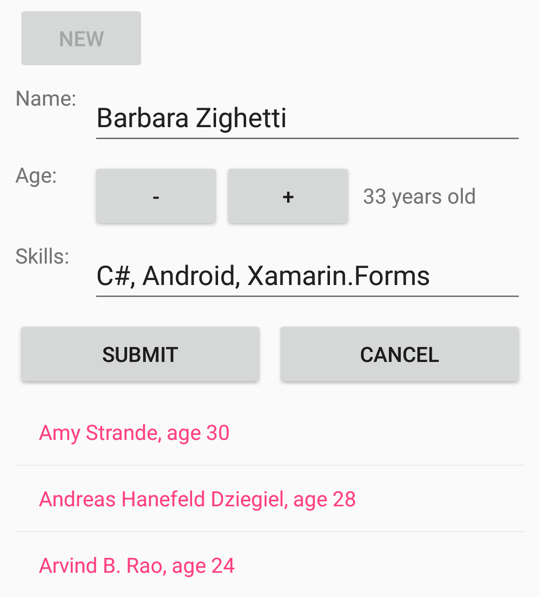
当用户首次按下 “新建 ”按钮时,这将启用输入窗体,但禁用 “新建 ”按钮。 然后,用户输入名称、年龄和技能。 在编辑期间,用户可以随时按 “取消” 按钮开始。 仅当输入名称和有效年龄时,才启用 “提交 ”按钮。 按下此提交按钮会将该人员转移到由ListView显示的集合。 按下 “取消 ”或 “提交 ”按钮后,将清除输入表单,并再次启用 “新建 ”按钮。
“新建”、“提交”和“取消”按钮的所有逻辑都通过属性的定义PersonCollectionViewModelNewCommandSubmitCommand进行处理。CancelCommand 构造函数将这三个属性设置为类型为PersonCollectionViewModel的Command对象。
类的 Command 构造函数允许您传递类型为 Action 和 Func<bool> 的参数,分别对应于 Execute 和 CanExecute 方法。 此操作和函数可以在 Command 构造函数中定义为 lambda 函数。
public class PersonCollectionViewModel : INotifyPropertyChanged
{
    ···
    public PersonCollectionViewModel()
    {
        NewCommand = new Command(
            execute: () =>
            {
                PersonEdit = new PersonViewModel();
                PersonEdit.PropertyChanged += OnPersonEditPropertyChanged;
                IsEditing = true;
                RefreshCanExecutes();
            },
            canExecute: () =>
            {
                return !IsEditing;
            });
        ···
    }

    void OnPersonEditPropertyChanged(object sender, PropertyChangedEventArgs args)
    {
        (SubmitCommand as Command).ChangeCanExecute();
    }

    void RefreshCanExecutes()
    {
        (NewCommand as Command).ChangeCanExecute();
        (SubmitCommand as Command).ChangeCanExecute();
        (CancelCommand as Command).ChangeCanExecute();
    }
    ···
}
当用户单击 “新建 ”按钮时, execute 将执行传递给构造函数的 Command 函数。 这将创建一个新PersonViewModel对象,在该对象的PropertyChanged事件上设置一个处理程序,将IsEditing设置为true,并调用在构造函数后定义的RefreshCanExecutes方法。
除了实现 ICommand 接口外, Command 该类还定义了一个名为 ChangeCanExecute 的方法。 每当发生任何可能更改CanExecute 方法返回值的事情时,viewmodel 必须为ICommand 属性调用ChangeCanExecute。 对ChangeCanExecute的调用导致Command类触发CanExecuteChanged事件。 已为该事件附加了一个处理程序,并通过再次调用 Button 作出响应,然后根据该方法的返回值启用自身。
当execute的方法调用NewCommand时,RefreshCanExecutes的属性将获取对NewCommand的调用,接着ChangeCanExecute调用Button方法。现在,Button方法返回false,因为IsEditing的属性现在是true。
PropertyChanged新PersonViewModel对象的处理程序调用ChangeCanExecute的SubmitCommand方法:
public class PersonCollectionViewModel : INotifyPropertyChanged
{
    ···
    public PersonCollectionViewModel()
    {
        ···
        SubmitCommand = new Command(
            execute: () =>
            {
                Persons.Add(PersonEdit);
                PersonEdit.PropertyChanged -= OnPersonEditPropertyChanged;
                PersonEdit = null;
                IsEditing = false;
                RefreshCanExecutes();
            },
            canExecute: () =>
            {
                return PersonEdit != null &&
                       PersonEdit.Name != null &&
                       PersonEdit.Name.Length > 1 &&
                       PersonEdit.Age > 0;
            });
        ···
    }
    ···
}
当编辑对象中canExecute发生属性更改时,都会调用SubmitCommand的PersonViewModel函数。 仅当true属性长度至少为一个字符且Name大于 0 时,才返回Age。 此时,将启用 “提交 ”按钮。
execute
Submit 的函数从 PersonViewModel 中删除属性更改处理程序,将对象添加到Persons集合,并将所有内容返回到其初始状态。
execute
“取消”按钮的函数执行“提交”按钮执行除将对象添加到集合之外的所有内容:
public class PersonCollectionViewModel : INotifyPropertyChanged
{
    ···
    public PersonCollectionViewModel()
    {
        ···
        CancelCommand = new Command(
            execute: () =>
            {
                PersonEdit.PropertyChanged -= OnPersonEditPropertyChanged;
                PersonEdit = null;
                IsEditing = false;
                RefreshCanExecutes();
            },
            canExecute: () =>
            {
                return IsEditing;
            });
    }
    ···
}
在任何对canExecute进行编辑的情况下,方法true都会返回PersonViewModel。
注释
不需要将execute和canExecute方法定义为 lambda 函数。 可以在 viewmodel 中将其编写为私有方法,并在构造函数中 Command 引用它们。 然而,这种方法可能会导致许多方法在视图模型中只被引用一次。
使用命令参数
有时,一个或多个按钮或其他用户界面对象可以在 viewmodel 中共享同一 ICommand 属性,这有时很方便。 在这种情况下,可以使用 CommandParameter 该属性来区分按钮。
可以继续使用Command类来处理这些共享的ICommand属性。 类定义一个替代构造函数,该构造函数接受 execute 和 canExecute 具有类型 Object参数的方法。
CommandParameter 就是传递给这些方法的方式。 在指定CommandParameter时,最容易使用泛型Command<T>类来指定设置为CommandParameter的对象集的类型。
execute指定的方法和canExecute方法具有该类型的参数。
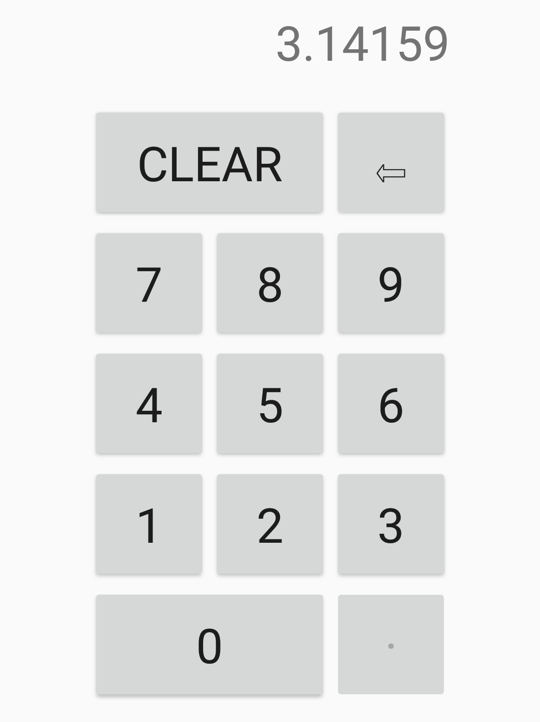
以下示例演示用于输入十进制数字的键盘:
<ContentPage xmlns="http://schemas.microsoft.com/dotnet/2021/maui"
xmlns:x="http://schemas.microsoft.com/winfx/2009/xaml"
xmlns:local="clr-namespace:DataBindingDemos"
x:Class="DataBindingDemos.DecimalKeypadPage"
Title="Decimal Keyboard"
x:DataType="local:DecimalKeypadViewModel">
<ContentPage.BindingContext>
<local:DecimalKeypadViewModel />
</ContentPage.BindingContext>
<ContentPage.Resources>
<Style TargetType="Button">
<Setter Property="FontSize" Value="32" />
<Setter Property="BorderWidth" Value="1" />
<Setter Property="BorderColor" Value="Black" />
</Style>
</ContentPage.Resources>
<Grid WidthRequest="240"
HeightRequest="480"
ColumnDefinitions="80, 80, 80"
RowDefinitions="Auto, Auto, Auto, Auto, Auto, Auto"
ColumnSpacing="2"
RowSpacing="2"
HorizontalOptions="Center"
VerticalOptions="Center">
<Label Text="{Binding Entry}"
Grid.Row="0" Grid.Column="0" Grid.ColumnSpan="3"
Margin="0,0,10,0"
FontSize="32"
LineBreakMode="HeadTruncation"
VerticalTextAlignment="Center"
HorizontalTextAlignment="End" />
<Button Text="CLEAR"
Grid.Row="1" Grid.Column="0" Grid.ColumnSpan="2"
Command="{Binding ClearCommand}" />
<Button Text="⇦"
Grid.Row="1" Grid.Column="2"
Command="{Binding BackspaceCommand}" />
<Button Text="7"
Grid.Row="2" Grid.Column="0"
Command="{Binding DigitCommand}"
CommandParameter="7" />
<Button Text="8"
Grid.Row="2" Grid.Column="1"
Command="{Binding DigitCommand}"
CommandParameter="8" />
<Button Text="9"
Grid.Row="2" Grid.Column="2"
Command="{Binding DigitCommand}"
CommandParameter="9" />
<Button Text="4"
Grid.Row="3" Grid.Column="0"
Command="{Binding DigitCommand}"
CommandParameter="4" />
<Button Text="5"
Grid.Row="3" Grid.Column="1"
Command="{Binding DigitCommand}"
CommandParameter="5" />
<Button Text="6"
Grid.Row="3" Grid.Column="2"
Command="{Binding DigitCommand}"
CommandParameter="6" />
<Button Text="1"
Grid.Row="4" Grid.Column="0"
Command="{Binding DigitCommand}"
CommandParameter="1" />
<Button Text="2"
Grid.Row="4" Grid.Column="1"
Command="{Binding DigitCommand}"
CommandParameter="2" />
<Button Text="3"
Grid.Row="4" Grid.Column="2"
Command="{Binding DigitCommand}"
CommandParameter="3" />
<Button Text="0"
Grid.Row="5" Grid.Column="0" Grid.ColumnSpan="2"
Command="{Binding DigitCommand}"
CommandParameter="0" />
<Button Text="·"
Grid.Row="5" Grid.Column="2"
Command="{Binding DigitCommand}"
CommandParameter="." />
</Grid>
</ContentPage>
在此示例中,页面 BindingContext 是一个 DecimalKeypadViewModel。
Entry此视图模型的属性绑定到TextLabel的属性。
Button所有对象都绑定到 viewmodel 中的命令:ClearCommand、BackspaceCommand和DigitCommand。 10 位数字和小数点的 11 个按钮共享绑定到 DigitCommand。
CommandParameter 区分了这些按钮。 设置为 CommandParameter 的值通常与按钮显示的文本相同,但小数点除外,为了清楚起见,它用中间点字符显示:
定义DecimalKeypadViewModel一个类型Entry属性和三个string类型的ICommand属性:
public class DecimalKeypadViewModel : INotifyPropertyChanged
{
    string entry = "0";

    public event PropertyChangedEventHandler PropertyChanged;
    ···

    public string Entry
    {
        private set
        {
            if (entry != value)
            {
                entry = value;
                PropertyChanged?.Invoke(this, new PropertyChangedEventArgs("Entry"));
            }
        }
        get
        {
            return entry;
        }
    }

    public ICommand ClearCommand { private set; get; }
    public ICommand BackspaceCommand { private set; get; }
    public ICommand DigitCommand { private set; get; }
}
与该按钮对应的 ClearCommand 按钮始终处于启用状态,并将条目设置回“0”:
public class DecimalKeypadViewModel : INotifyPropertyChanged
{
    ···
    public DecimalKeypadViewModel()
    {
        ClearCommand = new Command(
            execute: () =>
            {
                Entry = "0";
                RefreshCanExecutes();
            });
        ···
    }

    void RefreshCanExecutes()
    {
        ((Command)BackspaceCommand).ChangeCanExecute();
        ((Command)DigitCommand).ChangeCanExecute();
    }
    ···
}
由于该按钮始终处于启用状态,因此不需要在canExecute构造函数中指定Command参数。
仅当条目长度大于 1 或不等于字符串“0”时,才启用 Entry 按钮:
public class DecimalKeypadViewModel : INotifyPropertyChanged
{
    ···
    public DecimalKeypadViewModel()
    {
        ···
        BackspaceCommand = new Command(
            execute: () =>
            {
                Entry = Entry.Substring(0, Entry.Length - 1);
                if (Entry == "")
                {
                    Entry = "0";
                }
                RefreshCanExecutes();
            },
            canExecute: () =>
            {
                return Entry.Length > 1 || Entry != "0";
            });
        ···
    }
    ···
}
execute函数用于Backspace按钮的逻辑可确保Entry至少是一串"0"。
该 DigitCommand 属性绑定到 11 个按钮,每个按钮使用 CommandParameter 属性标识自身。
DigitCommand 被设为 Command<T> 类的实例。 将命令接口与 XAML 配合使用时, CommandParameter 属性通常是字符串,这是泛型参数的类型。 然后,execute和canExecute函数的参数为类型string
public class DecimalKeypadViewModel : INotifyPropertyChanged
{
    ···
    public DecimalKeypadViewModel()
    {
        ···
        DigitCommand = new Command<string>(
            execute: (string arg) =>
            {
                Entry += arg;
                if (Entry.StartsWith("0") && !Entry.StartsWith("0."))
                {
                    Entry = Entry.Substring(1);
                }
                RefreshCanExecutes();
            },
            canExecute: (string arg) =>
            {
                return !(arg == "." && Entry.Contains("."));
            });
    }
    ···
}
该方法 execute 将字符串参数追加到 Entry 属性。 但是,如果结果以零(但不是零和小数点)开头,则必须使用 Substring 函数删除初始零。
canExecute仅当参数是小数点(指示按下小数点)并且false已包含小数点时,该方法才返回Entry。
execute 的所有方法调用 RefreshCanExecutes,然后调用 ChangeCanExecute 用于 DigitCommand 和 ClearCommand。 这可确保根据输入的数字的当前序列启用或禁用小数点和后空按钮。
