Copilot Studio 和 Dynamics 365 for Customer Service 平台在支持基于渠道和富媒体消息类型的富媒体消息的方式方面略有不同。 本文介绍如何在 Copilot Studio 中支持富媒体消息。
检索 Apple Messages for Business 的代理 JSON
- 在 Copilot 服务管理中心的站点地图中,选择“支持体验中的生产力”。
- 在“生产力”页上,为“富消息”选择“管理”。
- 从所有可用列表消息的列表中,选择要发送到对话的富消息。
- 对于 Apple Messages for Business 富消息,请使用 Microsoft.Omnichannel.sendMessageToConversation API 发送 JSON 文件。
检索实时聊天表单的代理 JSON、实时聊天自定义 JSON 和 WhatsApp 建议回复
在 Copilot 服务管理中心的站点地图中,选择“支持体验中的生产力”。
在“生产力”页上,为“富消息”选择“管理”。
找到您希望代理发送的富媒体消息,如果它有可用的 JSON,它将显示在 Copilot Studio 的 JSON 列下。 选择 “查看 JSON 和特定通道类型”以复制 JSON。
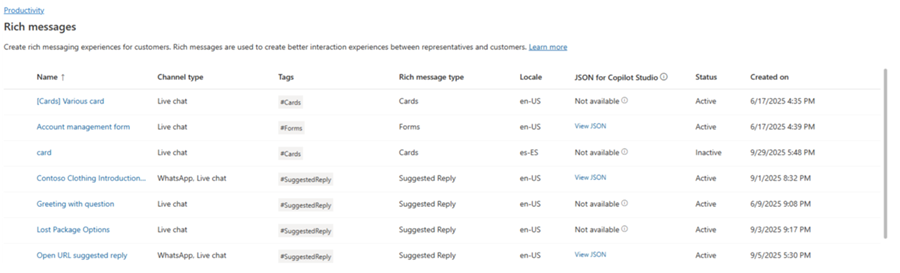
对于实时聊天和 WhatsApp 富媒体模板,您可以将 JSON 直接粘贴到 Copilot Studio 中的自适应卡片节点中。
Apple Messages for Business 的富消息的 JSON 示例
本部分包括 Customer Service 全渠道中 Apple Messages for Business 渠道中可用的富消息类型的 JSON 示例。 详细信息: 管理富消息
注释
您无法向对话发送表单类型的富消息。
Apple Pay
let applePayJSON = // <copy_and_paste_details_content>
applePayJSON.survey = { Questions: JSON.parse(applePayJSON.survey)[0].Questions, Answers: JSON.parse(applePayJSON.survey)[1].Answers };
applePayJSON.survey.Answers.AppleMessagesforBusinessJSON = JSON.parse(applePayJSON.survey.Answers.AppleMessagesforBusinessJSON);
applePayJSON.survey.Answers.AppleMessagesforBusinessJSON = JSON.stringify(applePayJSON.survey.Answers.AppleMessagesforBusinessJSON);
applePayJSON.survey = JSON.stringify(applePayJSON.survey);

// Can now send this payload using the API
Microsoft.Omnichannel.sendMessageToConversation(applePayJSON, false);

// Or take the JSON elsewhere for use in bringing your own logic
copy(applePayJSON);
Authentication
let authJSON = // <copy_and_paste_details_content>
authJSON.survey = { Questions: JSON.parse(authJSON.survey)[0].Questions, Answers: JSON.parse(authJSON.survey)[1].Answers };
authJSON.survey = JSON.stringify(authJSON.survey);

// Can now send this payload using the API
Microsoft.Omnichannel.sendMessageToConversation(authJSON, false);

// Or take the JSON elsewhere for use in bringing your own logic
copy(authJSON);
自定义 JSON(iMessage 应用程序)
let customJSON = // <copy_and_paste_details_content>
customJSON.survey = { Questions: JSON.parse(customJSON.survey)[0].Questions, Answers: JSON.parse(customJSON.survey)[1].Answers };
customJSON.survey.Answers.AppleMessagesforBusinessJSON = JSON.parse(customJSON.survey.Answers.AppleMessagesforBusinessJSON);
customJSON.survey.Answers.AppleMessagesforBusinessJSON = JSON.stringify(customJSON.survey.Answers.AppleMessagesforBusinessJSON);
customJSON.survey = JSON.stringify(customJSON.survey);

// Can now send this payload using the API
Microsoft.Omnichannel.sendMessageToConversation(customJSON, false);

// Or take the JSON elsewhere for use in bringing your own logic
copy(customJSON);
列表选取器
listPickerJSON = // <copy_and_paste_details_content>
listPickerJSON.survey = { Questions: JSON.parse(lpFromDetails.survey)[0].Questions, Answers: JSON.parse(listPickerJSON.survey)[1].Answers };
listPickerJSON.survey = JSON.stringify(listPickerJSON.survey);

// Can now send this payload using the API
Microsoft.Omnichannel.sendMessageToConversation(listPickerJSON, false);

// Or take the JSON elsewhere for use in bringing your own logic
copy(listPickerJSON);
建议回复
suggestedReplyJSON = // <copy_and_paste_details_content>
suggestedReplyJSON.survey = { Questions: JSON.parse(suggestedReplyJSON.survey)[0].Questions, Answers: JSON.parse(suggestedReplyJSON.survey)[1].Answers };
suggestedReplyJSON.survey = JSON.stringify(suggestedReplyJSON.survey);

// Can now send this payload using the API
Microsoft.Omnichannel.sendMessageToConversation(suggestedReplyJSON, false);

// Or take the JSON elsewhere for use in bringing your own logic
copy(suggestedReplyJSON);
时间选取器
timePickerJSON = // <copy_and_paste_details_content>
timePickerJSON.survey = { Questions: JSON.parse(timePickerJSON.survey)[0].Questions, Answers: JSON.parse(timePickerJSON.survey)[1].Answers };
timePickerJSON.survey = JSON.stringify(timePickerJSON.survey);

// Can now send this payload using the API
Microsoft.Omnichannel.sendMessageToConversation(timePickerJSON, false);

// Or take the JSON elsewhere for use in bringing your own logic
copy(timePickerJSON);
视频富媒体链接
videoRichLinkJSON = // <copy_and_paste_details_content>
videoRichLinkJSON.survey = { Questions: JSON.parse(videoRichLinkJSON.survey)[0].Questions, Answers: JSON.parse(videoRichLinkJSON.survey)[1].Answers };
timePickerJSON.survey = JSON.stringify(videoRichLinkJSON.survey);

// Can now send this payload using the API
Microsoft.Omnichannel.sendMessageToConversation(videoRichLinkJSON, false);

// Or take the JSON elsewhere for use in bringing your own logic
copy(videoRichLinkJSON);
网站富链接
websiteRichLinkJSON = // <copy_and_paste_details_content>
websiteRichLinkJSON.survey = { Questions: JSON.parse(websiteRichLinkJSON.survey)[0].Questions, Answers: JSON.parse(websiteRichLinkJSON.survey)[1].Answers };
timePickerJSON.survey = JSON.stringify(websiteRichLinkJSON.survey);

// Can now send this payload using the API
Microsoft.Omnichannel.sendMessageToConversation(websiteRichLinkJSON, false);

// Or take the JSON elsewhere for use in bringing your own logic
copy(websiteRichLinkJSON);
配置代理以发送实时聊天建议回复和卡片/轮播
Copilot Studio 支持开箱即用的建议回复和基本卡片。 在 发送消息 - Microsoft Copilot Studio 中了解更多信息。
注释
Copilot Studio 将建议的回复称为快速回复。