Fabric Maps 可以通过连接到经由 Eventstream 引入并持续更新的 Eventhouse 数据集,来可视化 实时地理空间数据。
与使用 Lakehouse 中存储的文件的静态方案不同,本教程演示了 流式处理、事件驱动的体系结构 ,其中:
- 事件被导入到 Eventhouse 中
- 使用 Kusto 查询语言查询数据 (KQL)
- 新数据到达时,地图会动态刷新
本教程重点介绍如何使用 Fabric REST API 和Python自动完成端到端工作流,从而允许你以编程方式预配资源和配置实时地图体验。 有关使用 Lakehouse 文件的静态数据场景,请参阅 创建使用 REST API 和 Python 的地图。
本教程介绍如何使用 Eventstream、Eventhouse 和 KQL 在Microsoft Fabric生成和自动化实时地理空间解决方案。
使用 Fabric REST API,可以:
- 创建 eventhouse 和 KQL 数据库
- 创建事件流以将数据引入到 eventhouse
- 使用引用事件屋数据的内联定义创建映射
- 将地图图层配置为定期刷新,以实现实时更新
- 预置初始事件,以便地图立即显示数据
若要模拟连续流数据并近乎实时地查看地图更新,请先完成本教程,然后继续学习后续教程 教程:将实时数据引入 Fabric 地图;该教程直接基于你在此处创建的 eventhouse、eventstream、KQL 函数和地图。
方案概述:实时资产跟踪
本教程基于实时资产跟踪场景,类似于原始 Fabric Maps 教程:使用 Fabric Maps 构建实时工单路由中使用的车队跟踪场景。
在本方案中:
- 车辆定期发出位置更新
- 位置事件被采集到 Eventhouse 中
- 地图显示最新的车辆位置,并会在有新事件到达时自动更新
此模式代表常见的实时操作用例,例如:
- 车队跟踪
- 工作订单分派
- 资产和设备监视
Microsoft Fabric使用 Eventstream 和 Eventhouse以近乎实时的方式引入、处理和分析流数据,从而可以直接在地图上可视化实时操作数据。
本教程重点介绍如何使用 REST API 自动执行此方案,而不是在Fabric用户界面中手动配置它。
先决条件
- Python 3.9+
- Fabric 工作区标识符
- 调用 FABRIC REST API 的权限(例如,
Item.ReadWrite.All)
创建种子数据文件(初始映射数据)
为了确保映射在预配后立即显示数据,脚本会将一组少量种子事件发送到事件流。
- 在与Python脚本相同的目录中创建新文件:vehicle_locations_seed.csv
- 粘贴以下内容:
VehicleId,Latitude,Longitude,EventTime
V-001,47.6101,-122.3344,2026-01-01T10:00:00Z
V-002,47.6150,-122.3200,2026-01-01T10:00:00Z
V-003,47.6205,-122.3493,2026-01-01T10:00:00Z
V-004,47.6050,-122.3300,2026-01-01T10:00:00Z
身份验证
本教程使用 DefaultAzureCredential,可以使用多个本地/开发凭据源进行身份验证。 对于首次读取者,最简单的方法是 Azure CLI 登录。
在本地进行身份验证(建议首次运行)
- 打开终端。
- 运行:
az login
DefaultAzureCredential可以使用你已登录的身份来获取 Fabric REST API 的访问令牌。
小窍门
关于 https://api.fabric.microsoft.com/.default 此值是 令牌请求范围,而不是一个可以直接调用的 URL。 它告诉Microsoft Entra,应为 Microsoft Fabric REST API 颁发访问令牌,并应包括 已授予身份验证标识的所有 Fabric 权限 (如 Item.ReadWrite.All 或 Workspace.ReadWrite.All)。
范围 .default 仅在令牌获取期间使用,永远不会发送到 Fabric REST API 终结点。
有关 .default 作用域在微软身份平台中的工作原理的详细信息,请参阅 微软身份平台中的作用域和权限。
登录到 Microsoft Fabric (建议)
在运行本教程之前,建议至少登录到 Microsoft Fabric 一次:
https://app.fabric.microsoft.com
登录可确保在以编程方式获取 Microsoft Entra 访问令牌之前完全预配 Fabric 标识、工作区角色成员身份和容量分配。
如果执行以下步骤,则此步骤特别有用:
- 您是 Microsoft Fabric 的新用户
- 最近创建了工作区
- 您的角色分配最近已添加
注释
本教程通过 DefaultAzureCredential 使用 Microsoft Entra ID 进行身份验证。 Fabric REST API 不需要浏览器会话,但登录到 Fabric Web 体验可以防止因角色预配延迟而导致的首次运行授权问题。
步骤 1 - 创建新的 Python 项目文件
在此步骤中,你将创建一个空白的 Python 文件,然后再一节一节地完善它。
创建名为: 的新文件:
create_realtime_map.py
在编辑器中打开该文件。
步骤 2 - 安装所需的库并添加所需的导入语句
在此步骤中,安装依赖项并添加脚本使用的导入。
安装所需的库
在刚刚打开的终端窗口中,运行以下命令:
pip install httpx azure-identity azure-eventhub
每个库的用途
- httpx:向构造 REST API 发出 HTTP 请求。
- azure-identity:为 Microsoft Entra 身份验证提供 DefaultAzureCredential。
- azure-eventhub:支持将事件发送到 Azure 事件中心,以实现实时数据流传输。
将 import 语句添加到.py文件
在 create_realtime_map.py顶部,添加:
import csv
import os
import base64
import json
import time
import uuid
import httpx
from azure.identity import DefaultAzureCredential
from azure.eventhub import EventHubProducerClient, EventData
from azure.eventhub.exceptions import EventHubError
注释
EventHubError 稍后由种子设定助手用于将异常处理范围缩小到 Event Hub 发送操作。
步骤 3 - 添加配置部分
在此步骤中,定义应用程序使用的变量,包括工作区 ID 和资源名称。
在 import 语句下方添加以下内容:
# =========================================================
# Configuration (centralized)
# =========================================================

class Config:
    """
    Central configuration object for the tutorial.

    Why this exists:
    - Keeps all "things you might change" in one place (workspace ID, names, toggles).
    - Lets step functions accept a single cfg object rather than many parameters.
    - Makes the tutorial easier to teach: you introduce Config once, then build functions.

    Tip:
    - In real projects, you might load these values from env vars or a JSON file.
    - For tutorial clarity, we keep them explicit and readable.
    """
    def __init__(self):
        # Workspace
        self.workspace_id = os.environ.get("FABRIC_WORKSPACE_ID", "")
        if not self.workspace_id:
            raise RuntimeError("Set FABRIC_WORKSPACE_ID environment variable before running the script.")

        # Resource display names / descriptions
        self.eventhouse_display_name = "eh_realtime_locations"
        self.eventhouse_description = "Stores streaming location events for a Fabric Maps real-time tutorial"

        self.eventhouse_table_name = "VehicleLocations"
        self.kql_function_name = "LatestVehicleLocations"

        self.eventstream_display_name = "es_realtime_locations"
        self.eventstream_description = "Streams events into an eventhouse table (created via Eventstream REST API)"

        self.map_display_name = "My Real-Time Fabric Map"
        self.map_description = "Created using Fabric Maps REST API (Eventhouse + Eventstream + Kusto function)"

        # Map refresh
        self.refresh_interval_ms = 5000

        # Seed data (initial map data)
        self.seed_csv_path = os.path.join(os.path.dirname(__file__), "vehicle_locations_seed.csv")

        # Will be provided interactively after eventstream is created
        self.eventhub_connection_string = os.environ.get("EVENTHUB_CONNECTION_STRING", "")
使用环境变量设置工作区 ID
本教程使用环境变量,而不是直接在脚本中硬编码工作区 ID。 此方法可提高安全性,并更轻松地在环境中重复使用脚本,而无需修改代码。
运行此脚本之前,需要创建一个名为 FABRIC_WORKSPACE_ID 的环境变量。
在Windows环境中设置环境变量
在 Windows 上,你可以在任何支持环境变量的终端中设置该变量——包括 PowerShell、Windows PowerShell、Visual Studio 和 Visual Studio Code 中内置的 PowerShell 或命令提示符窗口、Windows 终端,以及大多数其他 shell。 无论选择哪种情况,变量都只存在于 该单个终端会话中:它不会与其他终端窗口共享,具有不同的 shell 类型,或在该终端外部启动的进程,包括从 VS Code 的运行按钮启动的脚本,该按钮通常生成自己的终端。 如果脚本找不到变量,它将失败并出现 Set FABRIC_WORKSPACE_ID environment variable before running the script。
若要避免这种情况,请在设置该变量的 同一终端窗口中运行脚本,或将其定义为 持久用户变量(请参阅 设置持久环境变量(Windows)),以便在每个新的终端会话中都能自动使用该变量。
在 PowerShell 或 VS 终端中运行以下命令:
$env:FABRIC_WORKSPACE_ID="<WORKSPACE_ID>"
若要确认已设置变量,请执行以下操作:
echo $env:FABRIC_WORKSPACE_ID
这仅设置当前终端会话的变量。
设置持久性环境变量(Windows)
若要使变量在将来的会话中可用:
- 打开 系统属性
- 选择“高级系统设置”
- 选择 环境变量
- 在“用户变量”下,选择“新建”
- 进入:
- 名称:FABRIC_WORKSPACE_ID - 值:你的工作区 ID
- 选择 “确定 ”以保存
- 在再次运行脚本之前,请关闭并重新打开终端。
在 macOS 或 Linux 中设置环境变量
在 macOS 和 Linux 上,可以从支持 export 的任何 shell(Bash、Zsh(新式 macOS 上的默认值)、Fish(语法略有不同)以及 Visual Studio Code 和其他编辑器中的集成终端设置变量。 与Windows一样,该变量仅存在于 即单个 shell 会话:它不会与其他终端选项卡或windows共享,也不会与其他 shell 或 shell 外部启动的进程(包括从 VS Code 的运行按钮启动的脚本)共享,后者通常生成自己的终端。 如果脚本找不到变量,它将失败并出现 Set FABRIC_WORKSPACE_ID environment variable before running the script。
若要避免这种情况,请从设置变量 的同一 shell 会话 运行脚本,或添加到 export shell 配置文件 (请参阅“设置永久性环境变量(macOS 或 Linux)”,以便它自动可用于每个新的 shell 会话。
运行:
export FABRIC_WORKSPACE_ID="<WORKSPACE_ID>"
若要确认已设置变量,请执行以下操作:
echo $FABRIC_WORKSPACE_ID
这仅设置当前 shell 会话的变量。
设置持久性环境变量(macOS 或 Linux)
若要使变量在将来的会话中可用,请将该 export 行添加到 shell 配置文件:
-
Zsh (macOS 上的默认值):
~/.zshrc -
Bash:
~/.bashrc(Linux)或~/.bash_profile(macOS) -
Fish:运行
set -Ux FABRIC_WORKSPACE_ID "<WORKSPACE_ID>"而不是编辑文件
更新配置文件后,请打开新终端或运行 source ~/.zshrc (或相应的文件),使更改生效。
步骤 4 - 添加帮助程序函数
此步骤添加可重用的帮助程序函数,使“端到端流”保持可读性:
- Auth 帮助程序:生成 Fabric REST API 的标头
- FabricClient:用于一致的 API 调用的轻型包装器
-
LRO 处理程序:使用
Location/x-ms-operation-id/Retry-After轮询长时间运行操作,包括返回 200 且状态为 Running 的响应以及 Power BI 群集端点 - 定义载荷助手:用于内联定义的 base64 编码 map.json
- 解析 eventhouse ID:检索或重用 eventhouse 资源
- 解析事件流 ID:在异步创建后检索事件流 ID
- Eventstream 连接助手:提示输入自定义终结点连接字符串
- 种子帮助程序:使用重试逻辑发送初始事件,以确保引入成功
- KQL 数据库就绪助手:等待 KQL 数据库可供 Fabric Maps 使用
- 映射 ID 解析程序:在异步创建后解析映射 ID
注释
本教程使用两种类型的 API:
- Fabric REST API(控制平面):用于创建 Eventhouse、Eventstream 和映射资源
- Kusto 管理 API (数据/查询平面):用于在 Eventhouse 中创建和管理 KQL 函数
创建身份验证帮助程序函数
Fabric REST API 需要Microsoft Entra访问令牌(持有者令牌)进行身份验证。
在本教程中,你将对Python应用程序进行身份验证,并在与Fabric资源(如 Eventhouse、Eventstream 和 Map API)交互时,向每个请求传递令牌。
若要调用这些 API,必须向应用程序授予委派权限(如 Item.ReadWrite.All),并针对Microsoft Entra进行身份验证以获取访问令牌。
# =========================================================
# Auth helpers
# =========================================================

class TokenProvider:
    """
    Thin wrapper around DefaultAzureCredential that acquires Entra tokens.

    Why this exists:
    - Keeps token acquisition in one place.
    - Lets _fabric_headers() build a fresh Authorization header when needed.

    Note:
    - DefaultAzureCredential can use several sources (Azure CLI login, VS Code login, etc.).
    """
    def __init__(self):
        self._cred = DefaultAzureCredential()

    def get(self, scope: str) -> str:
        return self._cred.get_token(scope).token


_tokens = TokenProvider()


def _fabric_headers() -> dict[str, str]:
    """
    Build headers for Fabric REST API calls.

    This function is called each time we make a Fabric REST call so the token is fresh.
    """
    return {
        "Authorization": f"Bearer {_tokens.get('https://api.fabric.microsoft.com/.default')}",
        "Content-Type": "application/json"
    }


def _kusto_headers() -> dict[str, str]:
    """
    Build headers for Kusto (Eventhouse queryServiceUri) management calls.
    """
    return {
        "Authorization": f"Bearer {_tokens.get('https://api.kusto.windows.net/.default')}",
        "Content-Type": "application/json",
        "Accept": "application/json"
    }

def _pbi_headers() -> dict[str, str]:
    """
    Build headers for polling Trident/Power BI cluster LRO endpoints
    (e.g., df-*.analysis.windows.net) that require a Power BI audience token.
    """
    return {
        "Authorization": f"Bearer {_tokens.get('https://analysis.windows.net/powerbi/api/.default')}",
        "Content-Type": "application/json"
    }
创建 LRO 辅助函数
本教程中使用的多个 Fabric REST API(例如创建事件库和创建地图)支持长时间运行操作(LROs)。
这些 API 可以返回202 Accepted响应以及标头(例如Locationx-ms-operation-id,)以及Retry-After,指示请求正在异步处理。
若要一致地处理这些响应,请创建一个帮助程序函数,用于轮询操作状态,直到操作状态完成。
在 身份验证 帮助程序函数后添加此帮助程序函数:
# =========================================================
# FabricClient (minimal wrapper so call sites stay clean)
# =========================================================

class FabricClient:
    """
    Small wrapper around httpx.Client so we don't repeat headers everywhere.

    Keeps the tutorial behavior:
    - request() returns the raw httpx.Response so the caller can handle 201 vs 202.
    """
    def __init__(self, http_client: httpx.Client):
        self._http = http_client

    def request(self, method: str, url: str, *, json_body=None) -> httpx.Response:
        return self._http.request(method, url, headers=_fabric_headers(), json=json_body)


# =========================================================
# LRO handler
# =========================================================

def _handle_lro(
    client: httpx.Client,
    initial_response: httpx.Response,
    *,
    list_url: str | None = None,
    match_display_name: str | None = None,
    id_field: str = "id",
) -> str:
    """
    Poll a Fabric long-running operation (LRO) until completion and return the created resource id.

    Why this function exists:
    - Many Fabric create APIs return HTTP 202 + Location header for async creation.
    - Some LRO completion payloads are status-only and do NOT include the created resource id.
      When that happens, we resolve the created resource by listing resources and matching displayName.

    FIX included:
    - The operation endpoint can return HTTP 200 while still "Running".
      In that case, continue polling instead of treating it as complete.
    """
    op_url = initial_response.headers.get("Location")

    # Some Fabric LRO responses may omit Location.
    # Fall back to x-ms-operation-id to construct the polling URL.
    if not op_url:
        op_id = initial_response.headers.get("x-ms-operation-id")
        if op_id:
            op_url = f"https://api.fabric.microsoft.com/v1/operations/{op_id}"
        else:
            raise RuntimeError(
                "Missing LRO Location header and x-ms-operation-id header. "
                f"Status={initial_response.status_code}, Headers={dict(initial_response.headers)}"
            )

    retry_after = int(initial_response.headers.get("Retry-After", "5"))


    # choose headers based on where the LRO is hosted
    poll_headers = _pbi_headers() if "analysis.windows.net" in op_url else _fabric_headers()

    while True:
        time.sleep(retry_after)
        poll = client.get(op_url, headers=poll_headers)

        # Still running (202 pattern)
        if poll.status_code == 202:
            retry_after = int(poll.headers.get("Retry-After", "5"))
            continue

        poll.raise_for_status()
        body = poll.json() if poll.content else {}

        # --- FIX: handle 200 with status=Running ---
        status = (body.get("status") if isinstance(body, dict) else None)

        if status in ("Running", "NotStarted"):
            retry_after = int(poll.headers.get("Retry-After", "5"))
            continue

        if status == "Failed":
            raise RuntimeError(f"LRO failed. Body: {body}")
        # --- END FIX ---

        # Case A: Operation returns the created resource id directly.
        if isinstance(body, dict) and id_field in body and body[id_field]:
            return body[id_field]

        # Case B: Status-only completion payload; resolve by listing.
        if status == "Succeeded" and list_url and match_display_name:
            r = client.get(list_url, headers=_fabric_headers())
            r.raise_for_status()

            items = r.json().get("value", [])
            match = next((i for i in items if i.get("displayName") == match_display_name), None)
            if match and match.get(id_field):
                return match[id_field]

            raise RuntimeError(
                f"LRO succeeded but could not resolve created resource by name. "
                f"match_display_name={match_display_name!r}"
            )

        # Anything else is unexpected
        raise RuntimeError(f"LRO completed but no resource id was returned. Body: {body}")
小窍门
Fabric APIs 采用多种长时间运行操作(LRO)模式。 某些响应返回:
- 一个
Location标题 - an
x-ms-operation-id - 或使用
201立即完成
本教程使用统一的 LRO 帮助程序函数来一致地处理所有模式。
定义负载助手
使用 公共定义创建映射时,将 map.json 作为 payloadType 发送: InlineBase64。 创建 Map API 示例展示如何在 definition.parts 中使用 InlineBase64。
在 LRO 帮助程序函数下面添加:
# ================================================================================
# DEFINITION PAYLOAD HELPER
# - Create Map can include a public definition inline (map.json as InlineBase64).
# ================================================================================

def _json_to_b64(obj: dict) -> str:
    """
    Convert a Python dict to base64-encoded JSON text.

    Fabric Map "Create Map with definition inline" requires:
    - definition.parts[].payloadType = InlineBase64
    - definition.parts[].payload     = base64(json(map_json))
    """
    return base64.b64encode(json.dumps(obj).encode("utf-8")).decode("utf-8")
创建辅助函数,以便在事件库创建后获取其 ID
使用 Fabric REST API 创建事件屋时,API 可以返回不立即包含 eventhouse ID 的响应。 当以下情况发生时,可能会发生这种情况:
- 创建请求会作为长时间运行操作(LRO)以异步方式处理
- 请求的显示名称已存在,API 返回冲突响应 (
ItemDisplayNameAlreadyInUse)
在这些情况下,脚本必须确定事件屋是否已存在,或等待新创建的 Eventhouse 变为可用。
此辅助函数通过查询事件屋列表并匹配 displayName 来检索事件屋 ID。 它会多次重试以应对传播延迟,并确保在工作流继续之前返回有效的事件中心 ID。
通过此方法,可以通过以下方法实现更具弹性和可重复的自动化:
- 支持脚本的幂等执行(在现有资源已存在时重用这些资源)
- 处理异步预配行为
- 避免因新创建资源暂时不可用而导致的失败
在 定义有效负载 帮助程序函数后面添加以下代码(_json_to_b64()):
# ===============================================================================
# Helper: Resolve eventhouse ID (when create eventhouse returns 202 without id)
# ===============================================================================

def resolve_eventhouse_id(client, list_url, headers, eventhouse_name, max_attempts=10, delay=3):
    """
    Resolve an eventhouse ID by listing eventhouses and matching displayName.

    Used when:
    - Create fails with ItemDisplayNameAlreadyInUse
    - Or when you want idempotent re-runs (reuse existing resources)
    """
    for attempt in range(max_attempts):
        resp = client.get(list_url, headers=headers)
        resp.raise_for_status()

        items = resp.json().get("value", [])
        match = next((m for m in items if m.get("displayName") == eventhouse_name), None)

        if match:
            return match["id"]

        time.sleep(delay)

    raise RuntimeError(f"Eventhouse named {eventhouse_name!r} was not found after retries.")
创建帮助程序函数,检索创建后的事件流 ID
使用 Fabric REST API 创建事件流时,资源可能无法立即发现。 即使创建请求成功,在调用 List Eventstreams API 时,由于后端传播延迟,事件流可能不会立即显示。
因此,在创建过程中可能不会直接返回事件流 ID,或者可能无法可靠地在后续 API 调用中使用。
若要可靠地获取事件流 ID,必须查询事件流列表,然后重试,直到新创建的事件流可见。 以下辅助函数实现了这种重试模式,并确保您的自动化流程能够应对异步预配和一致性延迟;仅当您需要事件流 ID 时,才需要使用该函数。
在函数后面 resolve_eventhouse_id() 添加以下代码:
# ===============================================================================
# Helper: Resolve eventstream ID (when create eventstream returns 202 without id)
# ===============================================================================

def resolve_eventstream_id(client, list_url, headers, eventstream_name, max_attempts=10, delay=5):
    """
    Resolve a newly created eventstream ID by listing eventstreams and matching displayName.

    Why this exists:
    - Eventstream creation can return 202 Accepted (async provisioning).
    - Some LRO completion payloads don't contain an id.
    - The newly created eventstream may not appear immediately in list results.
    """
    for attempt in range(max_attempts):
        print(f"Resolving eventstream (attempt {attempt + 1}/{max_attempts})...")

        resp = client.get(list_url, headers=headers)
        resp.raise_for_status()

        items = resp.json().get("value", [])
        match = next((m for m in items if m.get("displayName") == eventstream_name), None)

        if match:
            print("Eventstream found!")
            return match["id"]

        print("Eventstream not visible yet. Retrying...")
        time.sleep(delay)

    raise RuntimeError("Eventstream created but still not visible after retries")
创建用于提供事件流连接字符串的帮助程序
若要将事件发送到 Eventstream,您需要用于自定义终结点的 连接字符串。
与用于创建和管理资源的 Fabric REST API 不同,事件流引入功能使用基于 Event Hub 协议的 数据平面终结点。 此端点需要使用连接字符串进行身份验证。
连接字符串会在创建并发布事件流时生成,并且必须从 Fabric 门户获取。
此辅助函数会提示你在运行时提供连接字符串,从而确保脚本在此之前始终保持完全自动化,而无需预先配置任何值。
在函数后面 resolve_eventstream_id() 添加以下代码:
def get_eventhub_connection_string_interactive(cfg: Config) -> str:
    """
    Prompt for eventstream custom endpoint connection string.

    Why this function is needed:
    - The eventstream connection string is generated only after the eventstream is created.
    - It is not available via the Fabric REST API.
    - It is required to send events using the EventHub protocol.

    What this function does:
    - Prompts the user to copy the connection string from the Fabric portal
    - Stores it in the Config object for reuse by other functions
    """

    if getattr(cfg, "eventhub_connection_string", None):
        return cfg.eventhub_connection_string

    print("\n=== Eventstream connection string required ===")
    print("In the Fabric portal:")
    print("  1) Open the eventstream you just created")
    print("  2) Select the custom  endpoint source")
    print("  3) Select 'SAS Key Authentication'")
    print("  4) Copy 'Connection string-primary key'\n")

    cfg.eventhub_connection_string = input("Paste connection string here: ").strip()

    if not cfg.eventhub_connection_string:
        raise RuntimeError("Connection string cannot be empty.")

    return cfg.eventhub_connection_string
注释
连接字符串与用于 Fabric REST API 的 Microsoft Entra 访问令牌是分开的。 REST API 令牌用于资源管理,而事件流连接字符串用于引入流式数据。
创建用于从 CSV 导入初始事件的辅助程序
为了确保地图在创建后立即显示数据,脚本会在创建映射之前将一组少量 种子事件 发送到事件流中。
如果没有此步骤,Eventhouse 表可能尚不包含任何数据,并且地图在首次加载时可能显示为空。
此帮助程序函数从本地 CSV 文件读取数据,并使用 EventHub 协议将每一行作为 JSON 事件发送到事件流。
由于事件流资源是异步预配的,因此自定义终结点可能无法立即准备好在创建后接受事件。 为了处理此问题,帮助程序函数包括内置的重试逻辑,该逻辑会自动尝试发送事件,直到终结点可用。 这可确保初始化过程可靠且可重复,不需要手动计时调整。
此方法反映了实际引入模式:
- 数据是在外部生成的(例如 IoT 设备或应用程序)
- 将事件流式传输到 Eventstream
- Eventstream 将数据传送到 Eventhouse 进行查询和可视化
通过植入初始事件,您可以模拟这一摄取流程,并确保:
- 目标表已填充
- KQL 函数具有要返回的数据
- 地图创建后会立即渲染
在函数后面 get_eventhub_connection_string_interactive() 添加以下代码:
def seed_eventstream_from_csv(cfg: Config, max_attempts: int = 10, delay: int = 3) -> int:
    """
    Send seed events with retry logic to handle eventstream readiness delay.

    Why this exists:
    - Eventstream custom  endpoint may not be immediately ready after creation.
    - Initial sends can fail or silently drop.
    - This function retries until ingestion succeeds.
    """
    conn_str = get_eventhub_connection_string_interactive(cfg)

    attempt = 0
    last_error = None

    while attempt < max_attempts:
        attempt += 1
        print(f"Seeding attempt {attempt}/{max_attempts}...")

        try:
            sent = 0
            producer = EventHubProducerClient.from_connection_string(conn_str=conn_str)

            try:
                with open(cfg.seed_csv_path, newline="", encoding="utf-8") as f:
                    reader = csv.DictReader(f)

                    batch = producer.create_batch()
                    batch_count = 0

                    for row in reader:
                        event = {
                            "VehicleId": row["VehicleId"],
                            "Latitude": float(row["Latitude"]),
                            "Longitude": float(row["Longitude"]),
                            "EventTime": row["EventTime"],
                        }

                        data = EventData(json.dumps(event))

                        try:
                            batch.add(data)
                            batch_count += 1
                        except ValueError:
                            producer.send_batch(batch)
                            sent += batch_count
                            batch = producer.create_batch()
                            batch.add(data)
                            batch_count = 1

                    if batch_count > 0:
                        producer.send_batch(batch)
                        sent += batch_count

                print(f"Seed events sent: {sent}")
                return sent

            finally:
                producer.close()

        except (EventHubError, ConnectionError, TimeoutError) as exc:
            last_error = exc
            print(f"Seeding failed (attempt {attempt}): {exc}. Retrying in {delay}s...")
            time.sleep(delay)

    raise RuntimeError(f"Seeding failed after {max_attempts} attempts. Last error: {last_error}")
注释
此步骤将少量静态数据引入流式处理管道。
在生产方案中,事件通常由外部系统持续生成,而不是从文件加载。
等待 KQL 数据库可用
创建 KQL 数据库和函数后,该数据库可能无法立即可供其他Fabric服务(如 Maps)使用。 这是因为Fabric服务在分布式后端上运行,新创建的资源可能需要很短的时间才能跨所有服务传播。
如果在创建 KQL 数据库后立即创建映射,则映射可能无法解析数据源并显示错误,例如“找不到 Kusto 数据库”
若要防止此问题,请添加一个帮助程序函数,用于检查 KQL 数据库在创建映射之前是否可用。 这可确保只有在成功解析出数据库后才会创建映射。
在函数后面 seed_eventstream_from_csv() 添加以下代码:
def wait_for_kql_database_ready(client, cfg: Config, kql_database_item_id: str, max_attempts: int = 10, delay: int = 3) -> None:
    """
    Wait until the KQL database is available to other Fabric services.

    Why this exists:
    - Newly created KQL databases may not be immediately visible to Fabric Maps.
    - Creating a map too early can result in missing or broken data sources.

    What this function does:
    - Polls the KQL database endpoint until it becomes available.
    - Retries for a configurable number of attempts with a short delay between checks.
    """
    url = f"https://api.fabric.microsoft.com/v1/workspaces/{cfg.workspace_id}/kqlDatabases/{kql_database_item_id}"

    for attempt in range(max_attempts):
        resp = client.get(url, headers=_fabric_headers())

        if resp.status_code == 200:
            print("KQL database is available to Fabric Maps")
            return

        print(f"Waiting for KQL database availability (attempt {attempt + 1}/{max_attempts})...")
        time.sleep(delay)

    raise RuntimeError("KQL database did not become available after retries.")
创建辅助函数以便创建后立即检索映射 ID
使用 Fabric REST API 创建地图时,请求可以返回“202 已接受”状态的响应。 这表示映射是被异步预配为长时间运行的操作(LRO),而不是立即创建。 在这种情况下,响应不包含映射 ID,LRO 完成终结点可能不会返回可用结果。 此外,即使在操作完成后,由于后端传播而调用列表映射 API 时,新创建的地图可能不会立即显示。
若要可靠地获取地图 ID,必须查询地图列表,然后重试,直到新地图可见。 以下帮助函数实现了这一重试模式,确保您的自动化流程能够应对异步预配延迟,只有在需要映射 ID 时才必需。
在函数后面 wait_for_kql_database_ready() 添加以下代码:
# ---------------------------------------------------------
# Get Map ID
# ---------------------------------------------------------

def resolve_map_id(client, list_url, headers, map_name, max_attempts=10, delay=5):
    """
    Resolve the ID of a newly created Fabric map.

    Why this function is needed:
    - Creating a map can return HTTP 202 (Accepted), indicating an asynchronous
      long-running operation (LRO) rather than immediate creation.
    - LRO responses for map creation don't always return a resource ID.
    - Even after the operation completes, the new map may not be immediately
      visible in the List Maps API due to backend propagation delays.

    What this function does:
    - Repeatedly calls the List Maps API.
    - Searches for a map matching the provided display name.
    - Retries for a configurable number of attempts with a delay between calls.

    Parameters:
        client        : Authenticated HTTP client
        list_url      : Maps list endpoint
        headers       : Authorization headers for Fabric API
        map_name      : Display name of the map to locate
        max_attempts  : Maximum number of retry attempts
        delay         : Delay (seconds) between retries

    Returns:
        The map ID (string) once the map becomes visible.

    Raises:
        RuntimeError if the map is not found after all retry attempts.
    """

    for attempt in range(max_attempts):
        print(f"Resolving map (attempt {attempt + 1}/{max_attempts})...")

        resp = client.get(list_url, headers=headers)
        resp.raise_for_status()

        items = resp.json().get("value", [])
        match = next((m for m in items if m.get("displayName") == map_name), None)

        if match:
            print("Map found!")
            return match["id"]

        print("Map not visible yet. Retrying...")
        time.sleep(delay)

    raise RuntimeError("Map created but still not visible after retries")
创建主函数
接下来,创建定义工作流的主要函数。 所有这些都将从 main()中调用。
主要函数按代码中定义的顺序添加。
main() 以略有不同的顺序调用它们,这样在事件流绑定到该表之前,表就已存在,并且在执行验证之前,预置数据已可用。
- 创建活动屋
- 创建 eventhouse 表
- 验证引入(种子设定后调用)
- 创建事件流
- 创建 KQL 函数
- 构建映射定义(map.json)
- 生成平台元数据 (.platform)
- 创建地图
创建活动屋
使用 Fabric REST API 创建事件屋时,请求可以返回不同的响应模式,具体取决于请求的状态和资源的可用性。
在某些情况下,API 会返回一个 201 Created 响应,其中事件屋 ID 可立即获得。 在其他情况下,可能会返回 202 Accepted,表明 eventhouse 正在以长时间运行操作(LRO)的方式异步预配。 此外,如果所请求的名称被暂时保留,API 可能会返回带有 409 等错误的 ItemDisplayNameNotAvailableYet 响应。
为了可靠地处理这些变体,帮助程序函数实现以下逻辑:
- 检测 Eventhouse 是否通过同步方式创建,还是需要通过 LRO 轮询
- 使用
Retry-After标头处理暂时性名称可用性冲突 - 确保无论响应模式如何,都会返回有效的 eventhouse ID
这种方法可确保您的自动化流程在创建 Eventhouse 资源时能够应对异步预配行为和临时性服务状况。
在 resolve_map_id() 函数后面添加以下内容:
# =========================================================
# Step 1: Create Eventhouse
# =========================================================

def create_eventhouse(client: httpx.Client, fabric: FabricClient, cfg: Config) -> str:
    eventhouse_url = f"https://api.fabric.microsoft.com/v1/workspaces/{cfg.workspace_id}/eventhouses"
    eventhouse_payload = {
        "displayName": cfg.eventhouse_display_name,
        "description": cfg.eventhouse_description
    }

    # Retry loop to handle transient "name not available yet"
    for attempt in range(1, 6):
        eh_resp = fabric.request("POST", eventhouse_url, json_body=eventhouse_payload)

        print("Create eventhouse status:", eh_resp.status_code)
        print("Create eventhouse headers:", dict(eh_resp.headers))

        # 201: created immediately
        if eh_resp.status_code == 201:
            eventhouse_id = eh_resp.json()["id"]
            print("Eventhouse created. Eventhouse ID:", eventhouse_id)
            return eventhouse_id

        # 202: LRO
        if eh_resp.status_code == 202:
            eventhouse_id = _handle_lro(client, eh_resp)
            print("Eventhouse created. Eventhouse ID:", eventhouse_id)
            return eventhouse_id

        # 409: name issues
        if eh_resp.status_code == 409:
            api_code = eh_resp.headers.get("x-ms-public-api-error-code")

            # Name reserved temporarily: wait and retry
            if api_code == "ItemDisplayNameNotAvailableYet":
                wait_s = int(eh_resp.headers.get("retry-after", "20"))
                print(f"Name not available yet (attempt {attempt}/5). Waiting {wait_s}s then retrying...")
                time.sleep(wait_s)
                continue

            # Name already exists: reuse existing eventhouse by displayName
            if api_code == "ItemDisplayNameAlreadyInUse":
                print(f"Eventhouse {cfg.eventhouse_display_name!r} already exists. Reusing it...")
                return resolve_eventhouse_id(client, eventhouse_url, _fabric_headers(), cfg.eventhouse_display_name)

        # Anything else: fail fast with details
        raise RuntimeError(f"Create eventhouse failed: {eh_resp.status_code} {eh_resp.text}")

    # If the name never becomes available, last-resort: pick a unique name and try once
    cfg.eventhouse_display_name = f"{cfg.eventhouse_display_name}-{uuid.uuid4().hex[:8]}"
    print(f"Name still not available; switching to unique name: {cfg.eventhouse_display_name}")
    eh_resp = fabric.request("POST", eventhouse_url, json_body={
        "displayName": cfg.eventhouse_display_name,
        "description": cfg.eventhouse_description
    })
    eh_resp.raise_for_status()
    return eh_resp.json()["id"]
创建 KQL 表
在将事件发送到事件流之前,请确保目标表存在于 eventhouse 中。
尽管在某些情况下,Eventhouse 可以在引入期间自动创建表,但在使用 REST API 时不能保证此行为。 如果目标表不存在,引入可能会以无提示方式失败,或者事件可能无法按预期写入。
为了确保可靠且可重复的自动化,此步骤使用 Kusto 管理 API 显式创建表架构(或合并)。 这可以保证:
- 事件流目标可以绑定到有效的表
- 引入成功一致
- 下游查询和映射层按预期返回数据
在 create_eventhouse() 函数后面添加以下内容:
# =========================================================
# Step 1b: Create KQL table if missing (idempotent)
# =========================================================

def create_kql_table_if_missing(client: httpx.Client, fabric: FabricClient, cfg: Config, eventhouse_id: str) -> None:
    # Get queryServiceUri + KQL database item id
    get_eventhouse_url = f"https://api.fabric.microsoft.com/v1/workspaces/{cfg.workspace_id}/eventhouses/{eventhouse_id}"
    eh = fabric.request("GET", get_eventhouse_url)
    eh.raise_for_status()

    props = eh.json().get("properties") or {}
    query_service_uri = props.get("queryServiceUri")
    databases_item_ids = props.get("databasesItemIds") or []
    if not query_service_uri or not databases_item_ids:
        raise RuntimeError("Eventhouse missing queryServiceUri or databasesItemIds")

    kql_database_item_id = databases_item_ids[0]

    # Resolve actual DB displayName (don't rely on cfg.kql_database_name)
    get_db_url = f"https://api.fabric.microsoft.com/v1/workspaces/{cfg.workspace_id}/kqlDatabases/{kql_database_item_id}"
    db_resp = fabric.request("GET", get_db_url)
    db_resp.raise_for_status()
    kql_database_name = db_resp.json().get("displayName")
    if not kql_database_name:
        raise RuntimeError("KQL database response did not include displayName")

    # Create (or merge) the table schema
    # (Schema matches what your CSV sends: VehicleId, Latitude, Longitude, EventTime)
    csl = f""".create-merge table {cfg.eventhouse_table_name} (
        VehicleId: string,
        Latitude: real,
        Longitude: real,
        EventTime: datetime
    )"""

    mgmt_url = f"{query_service_uri}/v1/rest/mgmt"
    mgmt_payload = {"db": kql_database_name, "csl": csl}
    resp = client.post(mgmt_url, headers=_kusto_headers(), json=mgmt_payload)
    if resp.status_code >= 400:
        raise RuntimeError(f"Create table failed: {resp.status_code}\n{resp.text}")

    print(f"Ensured table exists: {cfg.eventhouse_table_name}")
验证数据引入
完成 seeding 步骤后(在 eventstream 创建好后,再从 main() 运行),该辅助程序会验证数据是否已成功导入到 eventhouse 表中。
此处定义,位于表创建帮助程序旁边,因为两者都在相同的事件库和 KQL 数据库上运行。 它是从main()afterseed_eventstream_from_csv调用的,以确认管道是否正常工作。
此步骤针对表执行简单的计数查询并返回结果。 它有助于验证:
- 已正确配置事件流
- 正在将事件写入该表
- 数据摄取管道端到端运行正常
此步骤对于故障排除尤其有用,否则,数据引入问题可能会在后续表现为空白的地图结果或 KQL 查询结果中缺少数据。
在 create_kql_table_if_missing() 函数后面添加以下内容:
# =========================================================
# Step 3b: Verify data ingestion (called after seeding)
# =========================================================

def verify_eventhouse_data(client: httpx.Client, fabric: FabricClient, cfg: Config, eventhouse_id: str):
    """
    Verify that data has been ingested into the eventhouse table.

    Why this exists:
    - Eventstream ingestion can silently fail if misconfigured
    - This provides an early, clear validation step in the tutorial
    """

    # Reuse your existing pattern to get KQL DB info
    eh = fabric.request("GET", f"https://api.fabric.microsoft.com/v1/workspaces/{cfg.workspace_id}/eventhouses/{eventhouse_id}")
    eh.raise_for_status()

    props = eh.json().get("properties") or {}
    db_ids = props.get("databasesItemIds") or []
    query_service_uri = props.get("queryServiceUri")

    if not db_ids or not query_service_uri:
        raise RuntimeError("Missing eventhouse properties for verification")

    db_id = db_ids[0]

    db_resp = fabric.request("GET", f"https://api.fabric.microsoft.com/v1/workspaces/{cfg.workspace_id}/kqlDatabases/{db_id}")
    db_resp.raise_for_status()

    db_name = db_resp.json().get("displayName")

    # Simple count query
    csl = f"{cfg.eventhouse_table_name} | count"

    resp = client.post(
        f"{query_service_uri}/v1/rest/query",
        headers=_kusto_headers(),
        json={"db": db_name, "csl": csl}
    )

    if resp.status_code >= 400:
        raise RuntimeError(f"Verification query failed: {resp.text}")

    print("Data verification result:", resp.text)
使用定义创建事件流
使用具有定义有效负载的 Fabric REST API 创建事件流时,请求将预配事件流资源及其关联的配置。 根据请求和后端处理,API 可以返回不同的响应模式。
在许多情况下,API 会返回一个 202 Accepted 响应,表明事件流正以异步方式作为长时间运行操作(LRO)创建。 响应可能不会直接包含事件流 ID,LRO 完成终结点可能不会返回可用结果。 此外,即使在操作完成后,由于后端传播延迟而调用 List Eventstreams API 时,新创建的事件流可能不会立即可用。
为了可靠地处理此行为,帮助程序函数实现以下逻辑:
- 根据需要,通过 LRO 轮询处理异步预配
- 通过查询事件流列表在创建后检索事件流 ID
- 重试,直到事件流可用于下游操作
此方法可确保自动化流程在创建带定义的事件流资源时,能够应对异步预配和最终一致性所带来的延迟。
在 verify_eventhouse_data() 函数后面添加以下内容:
# =========================================================
# Step 2: Create eventstream (with definition)
# =========================================================

def create_eventstream_with_definition(client: httpx.Client, fabric: FabricClient, cfg: Config, eventhouse_id: str) -> str:
    """
    Create an eventstream using a public definition and return its item ID.

    Teaching note:
    - Eventstream definition is graph-like (sources, destinations, operators, streams).
    - We create: custom Endpoint source -> DefaultStream -> Eventhouse destination.
    """
    eventstream_url = f"https://api.fabric.microsoft.com/v1/workspaces/{cfg.workspace_id}/eventstreams"

    source_name = "CustomEndpointSource"
    stream_name = "DefaultStream"
    destination_name = "EventhouseDestination"

    # Resolve the KQL database item ID from the Eventhouse
    get_eventhouse_url = f"https://api.fabric.microsoft.com/v1/workspaces/{cfg.workspace_id}/eventhouses/{eventhouse_id}"
    eh = fabric.request("GET", get_eventhouse_url)
    eh.raise_for_status()

    props = (eh.json().get("properties") or {})
    databases_item_ids = props.get("databasesItemIds") or []
    if not databases_item_ids:
        raise RuntimeError("Eventhouse properties did not include databasesItemIds.")

    kql_database_item_id = databases_item_ids[0]

    # Resolve the actual KQL database *name* (displayName) to avoid name drift
    get_db_url = f"https://api.fabric.microsoft.com/v1/workspaces/{cfg.workspace_id}/kqlDatabases/{kql_database_item_id}"
    db_resp = fabric.request("GET", get_db_url)
    db_resp.raise_for_status()
    kql_database_name = db_resp.json().get("displayName")
    if not kql_database_name:
        raise RuntimeError("KQL database response did not include displayName.")

    print("Eventhouse ID:", eventhouse_id)
    print("KQL database item ID:", kql_database_item_id)
    print("KQL database name:", kql_database_name)

    eventstream_json = {
        "sources": [
            {
                "name": source_name,
                "type": "CustomEndpoint",
                "properties": {
                    "inputSerialization": {"type": "Json", "properties": {"encoding": "UTF8"}}
                }
            }
        ],
        "streams": [
            {
                "name": stream_name,
                "type": "DefaultStream",
                "properties": {},
                "inputNodes": [{"name": source_name}]
            }
        ],
        "operators": [],
        "destinations": [
            {
                "name": destination_name,
                "type": "Eventhouse",
                "properties": {
                    "dataIngestionMode": "ProcessedIngestion",
                    "workspaceId": cfg.workspace_id,
                    "itemId": kql_database_item_id,
                    "databaseName": kql_database_name,
                    "tableName": cfg.eventhouse_table_name,
                    "inputSerialization": {"type": "Json", "properties": {"encoding": "UTF8"}}
                },
                "inputNodes": [{"name": stream_name}]
            }
        ],
        "compatibilityLevel": "1.1"
    }

    eventstream_payload = {
        "displayName": cfg.eventstream_display_name,
        "description": cfg.eventstream_description,
        "definition": {
            "parts": [
                {
                    "path": "eventstream.json",
                    "payload": _json_to_b64(eventstream_json),
                    "payloadType": "InlineBase64"
                }
            ]
        }
    }

    es_resp = fabric.request("POST", eventstream_url, json_body=eventstream_payload)

    if es_resp.status_code == 201:
        eventstream_id = es_resp.json()["id"]
    else:
        try:
            eventstream_id = _handle_lro(client, es_resp)
        except RuntimeError as exc:
            # If the LRO succeeded but returned no id, resolve by listing eventstreams (same pattern as resolve_map_id).
            msg = str(exc)
            if "no resource id was returned" in msg or "LRO completed but no resource id was returned" in msg:
                eventstream_id = resolve_eventstream_id(
                    client,
                    eventstream_url,
                    _fabric_headers(),
                    cfg.eventstream_display_name
                )
            else:
                raise

    print("Eventstream created. Eventstream ID:", eventstream_id)
    return eventstream_id
创建 KQL 函数
当你使用 Kusto 管理 REST API 在 Eventhouse 中创建 KQL 函数时,请求执行的是针对 KQL 数据库的控制命令,而不是标准的 Fabric 项 API。 因此,调用的行为与其他资源创建操作不同。
请求将发送到 Kusto 管理终结点 (/v1/rest/mgmt),通常在成功时返回 200 OK 响应。 但是,如果引用的表或架构尚不可用,命令可能会失败,这在首次数据引入时自动创建表的流式处理方案中很常见。
为了可靠地处理此行为,帮助程序函数实现以下逻辑:
- 对 KQL 数据库执行
.create-or-alter function命令 - 使用此选项
skipvalidation=true可减少函数创建过程中的验证错误 - 使用
table("TableName")模式将表解析推迟到运行时 - 如果命令失败,请显示详细的错误信息,以帮助调试
这种方法可确保即使在数据引入之前也能成功创建 KQL 函数,从而使自动化流程能够适应 Eventhouse 中的引入时架构行为。
在 create_eventstream_with_definition() 函数后面添加以下内容:
# =========================================================
# Step 4: Create KQL function (required for Maps layer)
# =========================================================

def create_kql_function(client: httpx.Client, fabric: FabricClient, cfg: Config, eventhouse_id: str) -> str:
    """
    Create or update a stored Kusto function in the Eventhouse-backed KQL database.

    Teaching note:
    - Map layers must be backed by supported Kusto entities (functions).
    - We use the Eventhouse queryServiceUri + Kusto mgmt endpoint to run a .create-or-alter command.
    """
    # Get eventhouse properties (queryServiceUri + databasesItemIds)
    get_eventhouse_url = f"https://api.fabric.microsoft.com/v1/workspaces/{cfg.workspace_id}/eventhouses/{eventhouse_id}"
    eh = fabric.request("GET", get_eventhouse_url)
    eh.raise_for_status()

    props = (eh.json().get("properties") or {})
    query_service_uri = props.get("queryServiceUri")
    databases_item_ids = props.get("databasesItemIds") or []

    if not query_service_uri:
        raise RuntimeError("Eventhouse properties did not include queryServiceUri.")
    if not databases_item_ids:
        raise RuntimeError("Eventhouse properties did not include databasesItemIds.")

    # We'll return this so the caller can wire the map to the correct KQL database item id.
    kql_database_item_id = databases_item_ids[0]

    # Resolve actual KQL database name (displayName)
    get_db_url = f"https://api.fabric.microsoft.com/v1/workspaces/{cfg.workspace_id}/kqlDatabases/{kql_database_item_id}"
    db_resp = fabric.request("GET", get_db_url)
    db_resp.raise_for_status()

    kql_database_name = db_resp.json().get("displayName")
    if not kql_database_name:
        raise RuntimeError("KQL database response did not include displayName.")

    # Create the function that returns the latest location per vehicle.
    # Keep columns explicit so the map config can bind Latitude/Longitude.
    kql = f""".create-or-alter function with (skipvalidation=true) {cfg.kql_function_name}() {{
    table("{cfg.eventhouse_table_name}")
    | summarize arg_max(EventTime, *) by VehicleId
    | project Latitude, Longitude, VehicleId, EventTime
    }}"""

    mgmt_url = f"{query_service_uri}/v1/rest/mgmt"
    mgmt_payload = {"db": kql_database_name, "csl": kql}

    mgmt_resp = client.post(mgmt_url, headers=_kusto_headers(), json=mgmt_payload)

    if mgmt_resp.status_code >= 400:
        # Kusto usually returns a detailed JSON error body on 400s.
        raise RuntimeError(
            "Kusto mgmt call failed.\n"
            f"URL: {mgmt_url}\n"
            f"DB: {mgmt_payload.get('db')}\n"
            f"Status: {mgmt_resp.status_code}\n"
            f"Body: {mgmt_resp.text}"
        )

    print("KQL function created/updated:", cfg.kql_function_name)
    return kql_database_item_id
注释
KQL 函数返回的字段名称必须与映射定义中使用的列名匹配(LatitudeLongitude本教程中)。
生成 map.json
使用具有内联定义的 Fabric REST API 创建映射时,映射配置将作为 JSON 有效负载提供(通常称为 map.json)。 此定义包括数据源、层、样式设置和刷新行为等详细信息。
在本教程中,地图定义包括一个 基于 Kusto 函数的数据层 ,用于查询事件屋并返回要在地图上可视化的地理空间数据。 此层必须引用正确的事件屋项、KQL 数据库和函数名称,并根据 Fabric Maps 架构进行结构化。
为了确保正确且一致地生成定义,帮助程序函数会动态生成 map.json 有效负载。 它实现以下逻辑:
- 定义引用 KQL 函数作为数据源的数据层
- 为图层配置适当的纬度和经度字段
- 启用定期刷新以支持实时更新
- 注入正确的资源标识符(例如 eventhouse ID 和函数名称)
此方法可确保映射定义有效、可重用,并与在自动化流中创建的资源保持一致,使地图能够可视化来自事件库的流数据。
在 create_kql_function() 函数后面添加以下内容:
# =========================================================
# Step 6: Build map.json (Kusto function layer)
# =========================================================

def build_map_json(cfg: Config, kql_database_item_id: str) -> dict:
    """
    Build the map.json payload (map public definition).

    Teaching note:
    - Map layer sources must reference supported Kusto entities (functions).
    - The map points to the KQL database as a data source and uses a kusto layer source.
    """
    layer_source_id = str(uuid.uuid4())
    layer_setting_id = str(uuid.uuid4())
    data_source_name = "kqlConnection"

    map_json = {
        "$schema": "https://developer.microsoft.com/json-schemas/fabric/item/map/definition/2.0.0/schema.json",
        "basemap": {},

        "dataSources": [
            {
                "name": data_source_name,
                "itemType": "KqlDatabase",
                "workspaceId": cfg.workspace_id,
                "itemId": kql_database_item_id
            }
        ],

        "iconSources": [],

        "layerSources": [
            {
                "id": layer_source_id,
                "name": cfg.kql_function_name,
                "type": "kusto",
                "dataSourceName": data_source_name,
                "workspaceId": cfg.workspace_id,
                "itemId": kql_database_item_id,
                "refreshIntervalMs": cfg.refresh_interval_ms,
                "queryType": "function",
                "query": f"{cfg.kql_function_name}()"
            }
        ],
        "layerSettings": [
            {
                "id": layer_setting_id,
                "name": "Live Locations",
                "sourceId": layer_source_id,
                "options": {
                    "type": "vector",
                    "visible": True,
                    "pointLayerType": "bubble",
                    "tooltipKeys": ["VehicleId", "EventTime"],
                    "bubbleOptions": {
                        "color": "#0078D4"
                    }
                },
                "latitudeColumnName": "Latitude",
                "longitudeColumnName": "Longitude"

            }
        ]
    }


    print("Map definition (map.json):", json.dumps(map_json, indent=2))
    return map_json
生成 .platform (平台元数据)
使用内联定义创建 Fabric 映射时,必须包含一个描述项目元数据的 .platform 定义。
此元数据包括:
- 项目类型(
Map) - 显示名称和说明
- 配置属性,例如逻辑标识符
包含 .platform 定义可确保映射已完整注册,并正确集成到 Fabric 中。 如果缺少它,该映射可能会在没有适当元数据的情况下被创建,或者在各个服务之间表现出不一致的行为。
在 build_map_json() 函数后面添加以下内容:
# =========================================================
# Step 6b: Build .platform (platform metadata)
# =========================================================

def build_platform_json(cfg: Config) -> dict:
    """
    Build the .platform payload for a Fabric Map item definition.

    The Map definition supports including a .platform part alongside map.json.
    """
    return {
        "$schema": "https://developer.microsoft.com/json-schemas/fabric/gitIntegration/platformProperties/2.0.0/schema.json",
        "metadata": {
            "type": "Map",
            "displayName": cfg.map_display_name,
            "description": cfg.map_description
        },
        "config": {
            "version": "2.0",
            # Use a stable logicalId if you want deterministic updates; UUID is fine for create.
            "logicalId": str(uuid.uuid4())
        }
    }
使用内联定义创建地图
使用内联定义创建地图时,定义必须包含多个部分才能完全配置地图及其数据层。
除了映射配置(map.json)之外,该定义还包括:
- 描述地图元数据的
.platform定义 - 与层源关联的 KQL 查询文件
查询文件将映射层绑定到 KQL 函数,并确保该层可以在运行时执行函数。
通过在单个请求中包含所有必需的定义部件,此步骤会以原子方式预配映射及其数据层,而无需执行后续更新操作。
根据请求和后端处理,API 可以返回不同的响应模式。 在许多情况下,API 返回一个 202 Accepted 响应,指示映射正在异步预配为长时间运行的操作(LRO)。 响应可能不会直接包含映射 ID,而 LRO 完成端点也可能不会返回可用的结果。 此外,即使在操作完成后,由于后端传播延迟而调用列表映射 API 时,新创建的地图可能不会立即可见。
为了可靠地处理此行为,帮助程序函数实现以下逻辑:
- 提交引用事件屋数据的内联映射定义
- 根据需要,通过 LRO 轮询处理异步预配
- 通过查询地图列表来检索创建后的地图 ID
- 重试,直到映射可用于下游操作
此方法可确保使用内联定义创建映射时,自动化流能够灵活应对异步预配和最终一致性延迟。
在 build_platform_json() 函数后面添加以下内容:
# =========================================================
# Step 7: Create Map with inline definition
# =========================================================


def create_map(client: httpx.Client, fabric: FabricClient, cfg: Config, map_json: dict, platform_json: dict) -> str:
    """
    Create the Fabric Map with its definition inline.

    Teaching note:
    - Includes map.json, platform metadata (.platform), and a KQL query file.
    - The query file binds the Kusto function to the map layer at runtime.
    - This approach avoids separate getDefinition/updateDefinition calls.
    """

    create_map_url = f"https://api.fabric.microsoft.com/v1/workspaces/{cfg.workspace_id}/maps"

    # Extract the layer source id so we can name the query file correctly
    layer_source_id = map_json["layerSources"][0]["id"]

    # Kusto query content (bind to the stored function)
    query_text = f"{cfg.kql_function_name}()"
    query_b64 = base64.b64encode(query_text.encode("utf-8")).decode("utf-8")

    create_map_payload = {
        "displayName": cfg.map_display_name,
        "description": cfg.map_description,
        "definition": {
            "parts": [
                {
                    "path": "map.json",
                    "payload": _json_to_b64(map_json),
                    "payloadType": "InlineBase64"
                },
                {
                    "path": ".platform",
                    "payload": _json_to_b64(platform_json),
                    "payloadType": "InlineBase64"
                },
                {
                    # Kusto layer query file naming convention
                    "path": f"queries/layerSource-{layer_source_id}.kql",
                    "payload": query_b64,
                    "payloadType": "InlineBase64"
                }
            ]
        }
    }

    map_resp = fabric.request("POST", create_map_url, json_body=create_map_payload)

    if map_resp.status_code == 201:
        return map_resp.json()["id"]

    if map_resp.status_code == 202:
        print("LRO completed via 202. Resolving map by name...")
        return resolve_map_id(client, create_map_url, _fabric_headers(), cfg.map_display_name)

    raise RuntimeError(f"Create map failed: {map_resp.status_code} {map_resp.text}")
协调工作流
主(协调)函数协调用于在 Microsoft Fabric 中创建和配置实时地图解决方案的端到端工作流。
此函数执行预配资源、配置依赖项和启用实时可视化所需的完整步骤序列,而不是执行单个操作。 这些步骤必须按特定顺序进行,因为以后的操作取决于过程中前面创建的资源。
为了可靠地管理此工作流,业务流程函数实现以下逻辑:
- 创建一个 eventhouse 和关联的 KQL 数据库,并包含一个表
- 创建和解析用于数据引入的事件流
- 将初始事件种子设定到事件流中并验证引入工作
- 创建 KQL 函数以转换和查询流数据
- 生成地图定义(
map.json和.platform) - 使用内联定义和基于 Kusto 函数的层创建地图
- 在继续执行下一步之前,请确保所有资源都可用
通过协调这些操作,业务流程函数为自动化流提供单个入口点,并确保正确处理依赖项,从而实现完整的、可重复和端到端的实时映射方案。
在 create_map 函数后面添加以下内容:
# =========================================================
# main(): orchestrates the full workflow
# =========================================================

def main():
    """
    Orchestrate the tutorial workflow.

    1) Create Eventhouse
    1b) Create KQL table (required for ingestion)
    2) Create Eventstream (definition-based)
    3) Seed initial data so the map is not empty on first open
    3b) Validate ingestion BEFORE moving on
    4) Create KQL function (required for Maps layer)
    5) Ensure KQL database is available to Maps
    6) Build map.json
    6b) Build .platform metadata
    7) Create Map with inline definition
    """
    cfg = Config()

    print("Initializing clients...")
    with httpx.Client(timeout=60) as client:
        fabric = FabricClient(client)

        # Step 1
        eventhouse_id = create_eventhouse(client, fabric, cfg)

        # Step 1b: Ensure table exists BEFORE Eventstream binds to it
        create_kql_table_if_missing(client, fabric, cfg, eventhouse_id)

        # Step 2
        eventstream_id = create_eventstream_with_definition(client, fabric, cfg, eventhouse_id)

        # Step 3
        seed_count = seed_eventstream_from_csv(cfg)

        # Step 3b: Validate ingestion BEFORE moving on
        verify_eventhouse_data(client, fabric, cfg, eventhouse_id)

        # Step 4
        kql_database_item_id = create_kql_function(client, fabric, cfg, eventhouse_id)

        # Step 5: Ensure KQL database is available to Maps
        wait_for_kql_database_ready(client, cfg, kql_database_item_id)

        # Step 6
        map_json = build_map_json(cfg, kql_database_item_id)

        # Step 6b
        platform_json = build_platform_json(cfg)

        # Step 7
        map_id = create_map(client, fabric, cfg, map_json, platform_json)

        print("\nDONE")
        print("Eventhouse ID:", eventhouse_id)
        print("Eventstream ID:", eventstream_id)
        print(f"Seed events sent: {seed_count}")
        print("KQL database item ID:", kql_database_item_id)
        print("KQL function:", cfg.kql_function_name)
        print("Map ID:", map_id)

if __name__ == "__main__":
    main()
运行应用程序
执行脚本期间,系统将提示你粘贴事件流连接字符串。
若要检索此值,
- 打开 Fabric 工作区
- 打开脚本创建的事件流
- 选择 自定义终结点源
- 打开 SAS 密钥身份验证
- 复制 连接字符串-主密钥
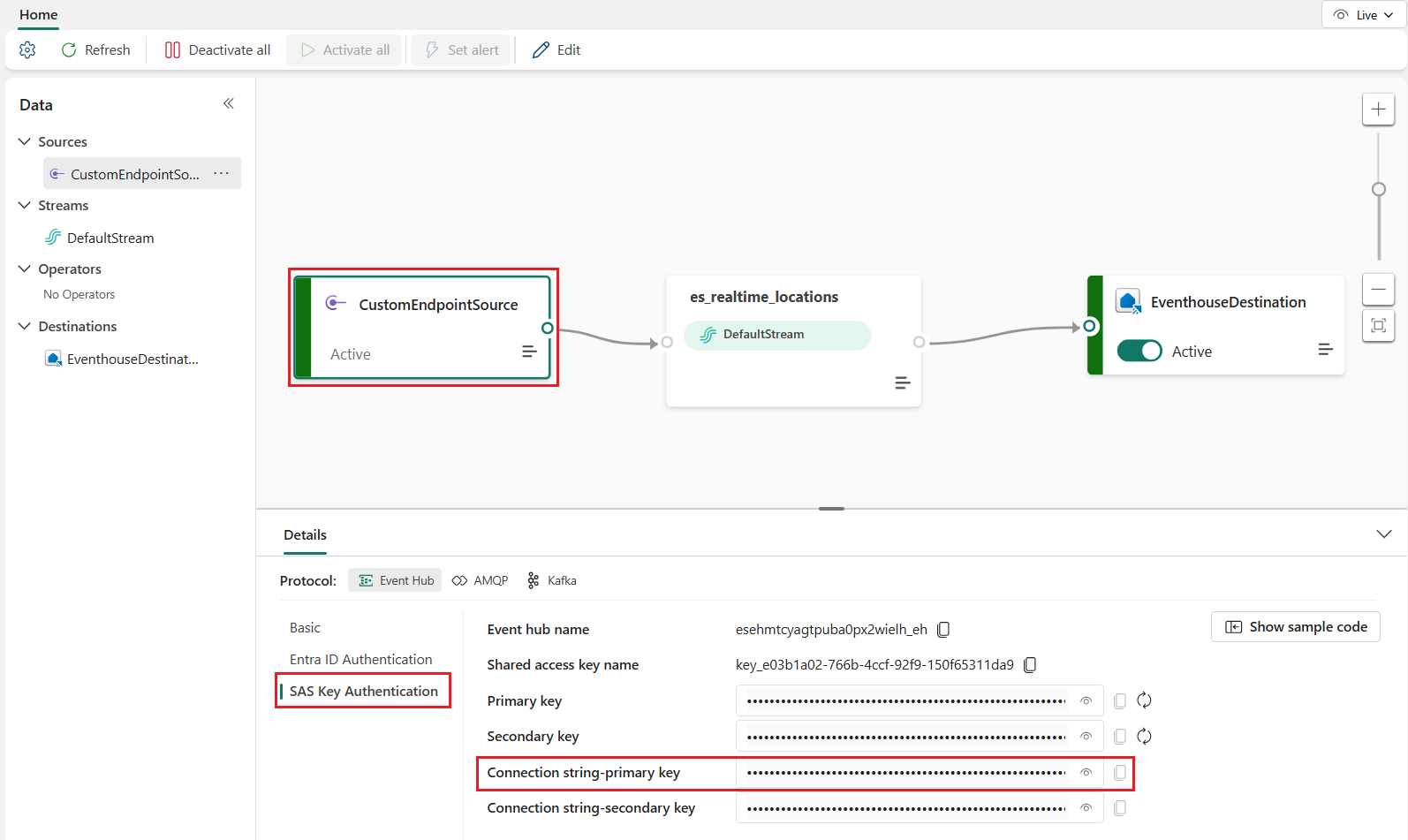
出现提示时,将值粘贴到控制台中。
Important
脚本将暂停执行,直到提供此值。
运行脚本:
python create_realtime_map.py
确认已创建所有项目:
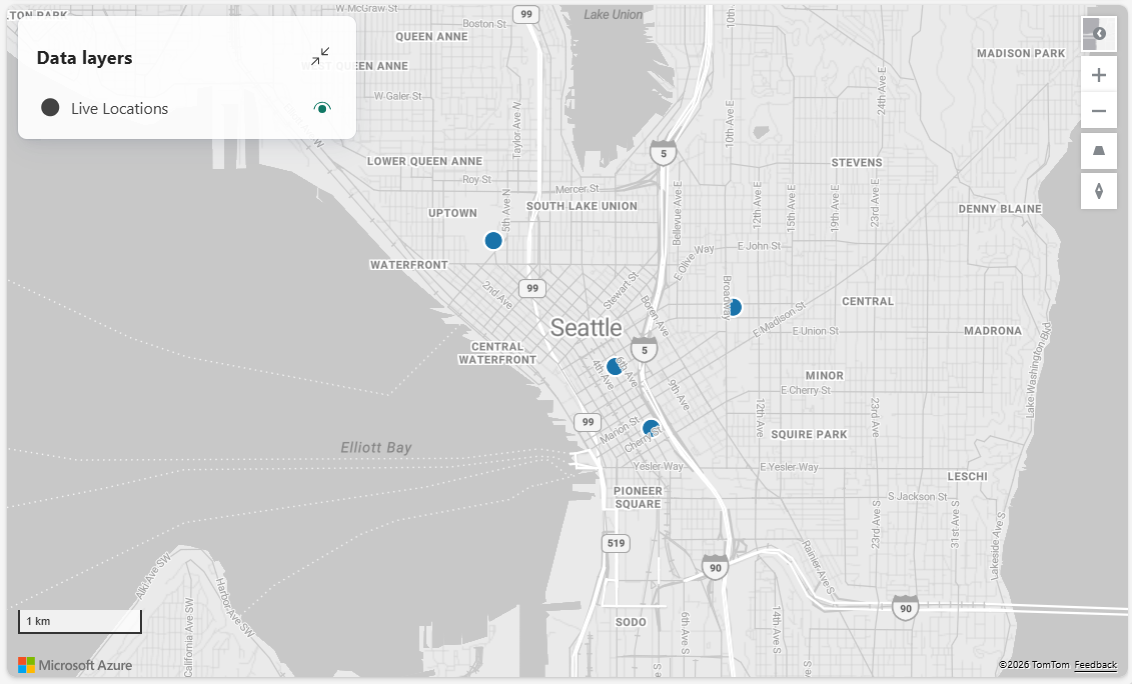
此时,将创建和配置所有资源。
若要模拟连续流式传输并查看地图近乎实时更新,请继续学习后续教程:模拟将实时数据引入 Fabric 地图。 它直接基于本教程进行构建,并重复使用创建的 eventhouse、eventstream、KQL 函数和映射。
总结
在本教程中,你使用 Fabric REST API 和Python在 Microsoft Fabric 中预配了实时地理空间解决方案所需的资源。
你完成了以下任务:
- 使用 Fabric REST API 创建了 eventhouse 和 KQL 数据库
- 使用用于引入流事件的自定义终结点创建事件流
- 定义了用于查询和塑造地图可视化的实时数据的 KQL 函数
- 构建并部署了带有内联定义且引用 Eventhouse 数据的 Fabric 映射
- 向事件流预置初始事件,以便地图立即显示数据
此体系结构演示Fabric中的常见实时分析模式:
- 外部生成者将事件发送到 Eventstream
- Eventstream 将数据路由并引入到 Eventhouse 中
- KQL 函数转换数据
- 地图查询 Eventhouse,并自动刷新以反映新事件
通过使用Python和 REST API 自动创建资源,现在可以使用可重复的方法生成实时空间应用程序,而无需手动配置。 若要将连续数据驱动到地图中,请继续学习后续模拟器教程。
后续步骤
了解端到端流后,可以扩展此解决方案以合并实时模拟器。
有关演示如何为刚使用 REST API 创建的映射创建实时模拟器的教程,请参阅: