本快速入门介绍如何使用 MIP 保护 SDK 列出可供用户使用的保护模板。
先决条件
在继续操作之前,请完成以下先决条件:
- 完成 快速入门 - 客户端应用程序初始化 - 保护 SDK(C++),这会构建一个初始的 Visual Studio 解决方案。 此“列出保护模板”快速入门依赖于前一个快速入门,才能正确创建入门解决方案。
- 可选:查看 RMS 模板 概念。
添加逻辑以列出保护模板
使用保护引擎对象添加逻辑以列出用户可用的保护模板。
打开在前面的“快速入门 - 客户端应用程序初始化 - 保护 SDK (C++)”一文中创建的 Visual Studio 解决方案。
在解决方案资源管理器中,打开项目中包含方法实现
main()的.cpp文件。 它默认与其所在项目同名,这是您在创建项目时指定的。在文件顶部附近的
using之后添加以下using mip::ProtectionEngine;指令:using std::endl;在
main()主体接近末尾的位置,在最后一个}块的右花括号catch下方、return 0;上方(即你在上一个快速入门中结束的位置),插入以下代码:// List protection templates const shared_ptr<ProtectionEngineObserver> engineObserver = std::make_shared<ProtectionEngineObserver>(); // Create a context to pass to 'ProtectionEngine::GetTemplateListAsync'. That context will be forwarded to the // corresponding ProtectionEngine::Observer methods. In this case, we use promises/futures as a simple way to detect // the async operation completes synchronously. auto loadPromise = std::make_shared<std::promise<vector<shared_ptr<mip::TemplateDescriptor>>>>(); std::future<vector<shared_ptr<mip::TemplateDescriptor>>> loadFuture = loadPromise->get_future(); engine->GetTemplatesAsync(engineObserver, loadPromise); auto templates = loadFuture.get(); cout << "*** Template List: " << endl; for (const auto& protectionTemplate : templates) { cout << "Name: " << protectionTemplate->GetName() << " : " << protectionTemplate->GetId() << endl; }
创建 PowerShell 脚本以生成访问令牌
使用以下 PowerShell 脚本生成 SDK 在实现中 AuthDelegateImpl::AcquireOAuth2Token 请求的访问令牌。 该脚本使用你此前在“MIP SDK 设置和配置”中安装的 MSAL.PS 模块中的 Get-MsalToken cmdlet。
创建 PowerShell 脚本文件(.ps1 扩展名),并将以下脚本复制并粘贴到文件中:
-
$authority和$resourceUrl稍后会在下一节中更新。 - 更新
$appId和$redirectUri,使其与您在 Microsoft Entra 应用注册中指定的值一致。
$authority = '<authority-url>' # Specified when SDK calls AcquireOAuth2Token() $resourceUrl = '<resource-url>' # Specified when SDK calls AcquireOAuth2Token() $appId = '<app-ID>' # App ID of the Microsoft Entra app registration $redirectUri = '<redirect-uri>' # Redirect URI of the Microsoft Entra app registration $scope = $resourceUrl + "/.default" $response = Get-MsalToken -ClientId $appId -Authority $authority -RedirectUri $redirectUri -Scopes $scope -Interactive $response.AccessToken | clip # Copy the access token text to the clipboard-
保存脚本文件,以便稍后在客户端应用程序请求时运行它。
生成并测试应用
生成并测试客户端应用程序。
使用 Ctrl+Shift+B(生成解决方案)生成客户端应用程序。 如果生成没有错误,请使用 F5(开始调试)来运行应用程序。
如果项目生成并成功运行,则每次 SDK 调用
AcquireOAuth2Token()方法时,应用程序都会提示输入访问令牌。 如果多次出现提示且请求的值相同,则可以重复使用以前生成的令牌:若要为提示生成访问令牌,请返回到 PowerShell 脚本并:
更新
$authority和$resourceUrl变量。 它们必须与步骤 2 中控制台输出中指定的值匹配。运行 PowerShell 脚本。 该
Get-MsalTokencmdlet 触发Microsoft Entra身份验证提示,类似于以下示例。 在步骤 2 的控制台输出中指定相同的帐户。 成功登录后,PowerShell 会将访问令牌放置在剪贴板上。
你可能还需要同意允许应用程序在登录帐户下运行时访问 MIP API。 当Microsoft Entra 应用程序注册未经预许可(如“MIP SDK 设置和配置”中所述),或者使用不同租户的帐户登录(而不是注册应用程序的帐户)时,就会发生这种情况。 选择 “接受” 以记录同意。
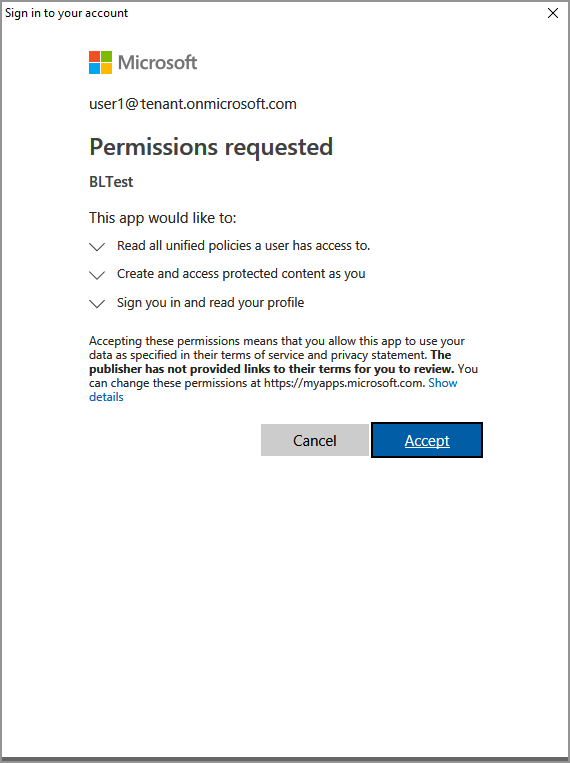
将访问令牌粘贴到步骤 2 中的提示后,控制台输出应显示保护模板,类似于以下示例:
*** Template List:
Name: Confidential \ All Employees : a74f5027-f3e3-4c55-abcd-74c2ee41b607
Name: Highly Confidential \ All Employees : bb7ed207-046a-4caf-9826-647cff56b990
Name: Confidential : 174bc02a-6e22-4cf2-9309-cb3d47142b05
Name: Contoso Employees Only : 667466bf-a01b-4b0a-8bbf-a79a3d96f720

C:\MIP Sample Apps\ProtectionQS\Debug\ProtectionQS.exe (process 8252) exited with code 0.
To automatically close the console when debugging stops, enable Tools->Options->Debugging->Automatically close the console when debugging stops.

Press any key to continue . . .
注释
复制并保存一个或多个保护模板的 ID(例如
f42a3342-8706-4288-bd31-ebb85995028z),以便在下一个快速入门中使用。

故障排除
C++ 应用程序执行期间的问题
| 概要 | 错误消息 | 解决方案 |
|---|---|---|
| 访问令牌不正确 |
发生异常...访问令牌不正确/过期吗? 失败的 API 调用:profile_add_engine_async 失败,详细信息为:[class mip::PolicySyncException] 获取策略失败,请求失败,HTTP 状态代码:401,x-ms-diagnostics:[2000001;reason="无法解析随请求提交的 OAuth 令牌。";error_category="invalid_token"],correlationId:[aaaa0000-bb11-2222-33cc-444444dddddd]' C:\VSProjects\MipDev\Quickstarts\AppInitialization\x64\Debug\AppInitialization.exe(进程 29924)以代码 0 结束。 按任意键关闭此窗口。 . . |
如果项目成功生成,但你看到与左侧类似的输出,则 AcquireOAuth2Token() 方法中可能有一个无效或过期的令牌。 返回到创建 PowerShell 脚本以生成访问令牌并重新生成访问令牌,再次更新 AcquireOAuth2Token(),然后重新生成/重新测试。 还可以使用 jwt.ms 单页 Web 应用程序检查和验证令牌及其声明。 |
后续步骤
了解如何列出可供经过身份验证的用户使用的保护模板后,请尝试下一个快速入门:
- 浏览 GitHub 上的 MIP 保护 SDK C++ 示例。