本快速入门介绍如何实现 MIP C++ SDK 在运行时使用的客户端初始化模式。
注释
使用 MIP 保护 SDK 的任何客户端应用程序都需要本快速入门中的步骤。 在完成应用程序初始化以及实现身份验证委托类和同意委托类后,依次完成这些快速入门。
先决条件
如果尚未这样做,请确保:
- 完成 Microsoft信息保护 (MIP) SDK 设置和配置中的步骤。 本“客户端应用程序初始化”快速入门依赖于正确的 SDK 安装和配置。
- 可选:
创建 Visual Studio 解决方案和项目
首先,创建并配置初始的 Visual Studio 解决方案和项目,后续其他快速入门都将以此为基础。
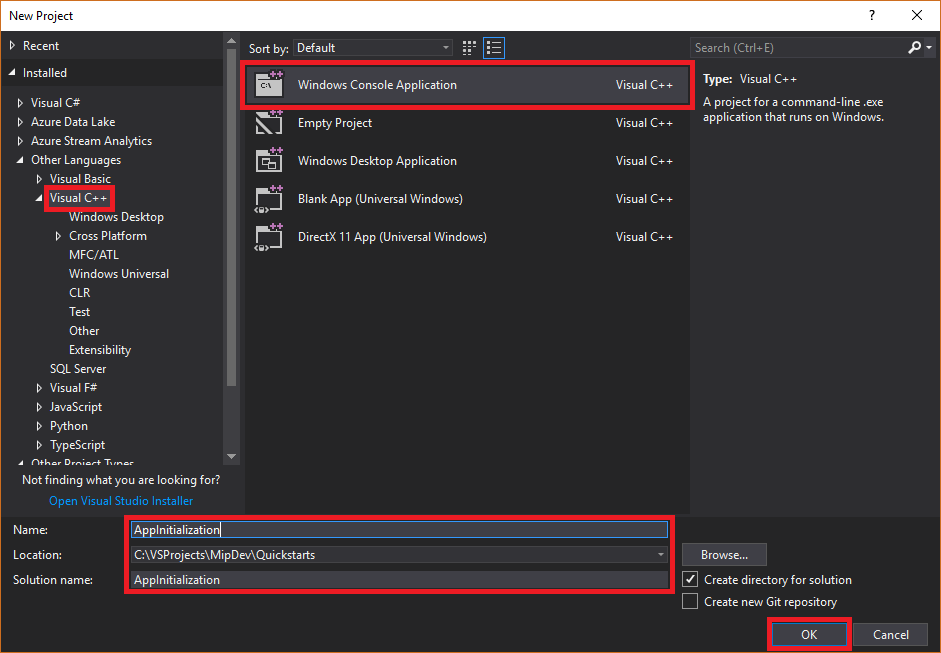
打开 Visual Studio 2022 或更高版本,选择 “文件 ”菜单“ 新建”和 “项目”。 在 “新建项目 ”对话框中:
在左窗格中的 “已安装”下,选择“ 其他语言”,选择 “视觉对象C++。
在中心窗格中,选择 “Windows 控制台应用程序”。
在底部窗格中,相应地更新项目 名称、 位置和包含 的解决方案名称 。
完成后,选择右下角的 “确定 ”。
将 MIP 保护 SDK 的 NuGet 包添加到项目:
在解决方案资源管理器中,右键单击顶部解决方案节点下的项目节点,然后选择“管理 NuGet 包...”:
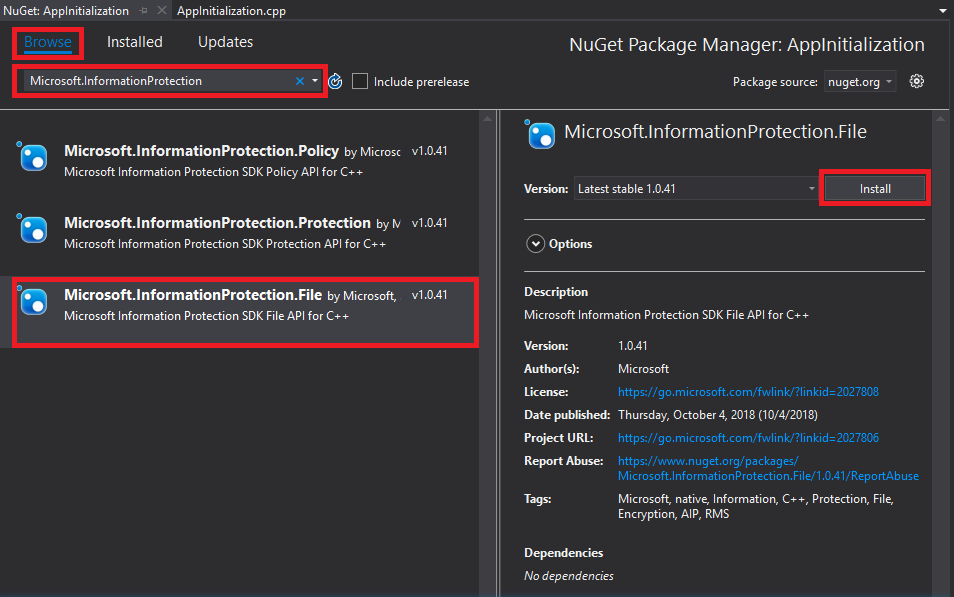
当“NuGet 包管理器”选项卡在编辑器组选项卡区域中打开时:
- 选择“浏览”。
- 在搜索框中输入
Microsoft.InformationProtection。 - 选择
Microsoft.InformationProtection.Protection包。 - 选择“安装”,然后在出现“预览更改确认”对话框时选择“确定”。
实现观察程序类来监视保护配置文件和引擎对象
现在,通过扩展 SDK 的 mip::ProtectionProfile::Observer 类为保护配置文件观察程序类创建基本实现。 SDK 实例化观察程序,稍后使用它监视保护配置文件对象的加载,并将引擎对象添加到配置文件。
向项目添加新类,这将为你生成标头(.h)和实现(.cpp)文件:
在解决方案资源管理器中,再次右键单击项目节点,选择“添加”,然后选择“类”。
在 “添加类 ”对话框中:
- 在 “类名 ”字段中,输入
profile_observer。 请注意,Visual Studio根据输入的名称自动填充 .h 文件和.cpp文件字段。 - 完成后,选择“确定”。

- 在 “类名 ”字段中,输入
生成类的 .h 和.cpp文件后,Visual Studio在编辑器组选项卡中打开这两个文件。 现在更新每个文件,实现新的观察程序类:
通过选中并删除生成的
profile_observer.h类来更新profile_observer。 不要 删除上一步生成的预处理器指令(#pragma,#include)。 然后将以下源复制并粘贴到任何现有预处理器指令之后的文件:#include <memory> #include "mip/protection/protection_profile.h" using std::exception_ptr; using std::shared_ptr; class ProtectionProfileObserver final : public mip::ProtectionProfile::Observer { public: ProtectionProfileObserver() { } void OnLoadSuccess(const std::shared_ptr<mip::ProtectionProfile>& profile, const std::shared_ptr<void>& context) override; void OnLoadFailure(const std::exception_ptr& Failure, const std::shared_ptr<void>& context) override; void OnAddEngineSuccess(const std::shared_ptr<mip::ProtectionEngine>& engine, const std::shared_ptr<void>& context) override; void OnAddEngineFailure(const std::exception_ptr& Failure, const std::shared_ptr<void>& context) override; };通过选择并删除生成的
profile_observer.cpp类实现来更新profile_observer。 不要 删除上一步生成的预处理器指令(#pragma,#include)。 然后将以下源复制并粘贴到任何现有预处理器指令之后的文件:#include <future> using std::promise; using std::shared_ptr; using std::static_pointer_cast; using mip::ProtectionEngine; using mip::ProtectionProfile; void ProtectionProfileObserver::OnLoadSuccess(const shared_ptr<ProtectionProfile>& profile, const shared_ptr<void>& context) { auto promise = static_pointer_cast<std::promise<shared_ptr<ProtectionProfile>>>(context); promise->set_value(profile); } void ProtectionProfileObserver::OnLoadFailure(const std::exception_ptr& error, const shared_ptr<void>& context) { auto promise = static_pointer_cast<std::promise<shared_ptr<ProtectionProfile>>>(context); promise->set_exception(error); } void ProtectionProfileObserver::OnAddEngineSuccess(const shared_ptr<ProtectionEngine>& engine, const shared_ptr<void>& context) { auto promise = static_pointer_cast<std::promise<shared_ptr<ProtectionEngine>>>(context); promise->set_value(engine); } void ProtectionProfileObserver::OnAddEngineFailure(const std::exception_ptr& error, const shared_ptr<void>& context) { auto promise = static_pointer_cast<std::promise<shared_ptr<ProtectionEngine>>>(context); promise->set_exception(error); }
重复步骤 1,为保护引擎观察者
engine_observer向项目添加新类。 此类会为你生成标头 (.h) 和实现 (.cpp) 文件。生成类的 .h 和.cpp文件后,Visual Studio在编辑器组选项卡中打开这两个文件。 现在更新每个文件,实现新的观察程序类:
通过选中并删除生成的
engine_observer.h类来更新engine_observer。 不要 删除上一步生成的预处理器指令(#pragma,#include)。 然后将以下源复制并粘贴到任何现有预处理器指令之后的文件:#include <memory> #include "mip/protection/protection_engine.h" using std::vector; using std::exception_ptr; using std::shared_ptr; class ProtectionEngineObserver final : public mip::ProtectionEngine::Observer { public: ProtectionEngineObserver() {} void OnGetTemplatesSuccess(const vector<std::shared_ptr<mip::TemplateDescriptor>>& templateDescriptors, const shared_ptr<void>& context) override; void OnGetTemplatesFailure(const exception_ptr& Failure, const shared_ptr<void>& context) override; };通过选择并删除生成的
engine_observer.cpp类实现来更新engine_observer。 不要 删除上一步生成的预处理器指令(#pragma,#include)。 然后将以下源复制并粘贴到任何现有预处理器指令之后的文件:#include "mip/protection/protection_profile.h" #include "engine_observer.h" using std::promise; void ProtectionEngineObserver::OnGetTemplatesSuccess(const vector<shared_ptr<mip::TemplateDescriptor>>& templateDescriptors,const shared_ptr<void>& context) { auto loadPromise = static_cast<promise<vector<shared_ptr<mip::TemplateDescriptor>>>*>(context.get()); loadPromise->set_value(templateDescriptors); }; void ProtectionEngineObserver::OnGetTemplatesFailure(const exception_ptr& Failure, const shared_ptr<void>& context) { auto loadPromise = static_cast<promise<vector<shared_ptr<mip::TemplateDescriptor>>>*>(context.get()); loadPromise->set_exception(Failure); };
(可选)使用 Ctrl+Shift+B (生成解决方案)运行解决方案的测试编译和链接,以验证它是否成功生成,然后再继续。

实现身份验证委托和许可委托
MIP SDK 通过类扩展性实现身份验证,该扩展提供一种机制,用于与客户端应用程序共享身份验证工作。 客户端必须获取合适的 OAuth2 访问令牌,并在运行时将其提供给 MIP SDK。
通过扩展 SDK 的 mip::AuthDelegate 类并重写/实现 mip::AuthDelegate::AcquireOAuth2Token() 纯虚拟函数,为身份验证委托创建实现。 按照 文件 SDK 应用程序初始化快速入门下详述的步骤进行操作。 Protection 配置文件和 Protection 引擎对象会实例化身份验证委托,并在之后使用该委托。
实现许可委托
现在,通过扩展 SDK 的 mip::ConsentDelegate 类并重写/实现 mip::AuthDelegate::GetUserConsent() 纯虚拟函数,为同意委托创建实现。 按照 文件 SDK 应用程序初始化快速入门下详述的步骤进行操作。 Protection 配置文件和 Protection 引擎对象会实例化同意委托,并在之后使用该委托。
构造保护配置文件和引擎
如上所述,使用 MIP API 的 SDK 客户端需要配置文件和引擎对象。 添加代码以实例化配置文件和引擎对象,完成此快速入门的编码部分:
在 解决方案资源管理器中,打开项目中包含该方法实现
main()的.cpp文件。 它默认与其所在项目同名,这是您在创建项目时指定的。删除生成的
main()实现。 不要 在项目创建期间删除 Visual Studio 生成的预处理器指令(#pragma,#include)。 在任何预处理器指令之后追加以下代码:
#include "mip/mip_context.h"
#include "auth_delegate.h"
#include "consent_delegate.h"
#include "profile_observer.h"
#include"engine_observer.h"

using std::promise;
using std::future;
using std::make_shared;
using std::shared_ptr;
using std::string;
using std::cout;
using mip::ApplicationInfo;
using mip::ProtectionProfile;
using mip::ProtectionEngine;

int main(){

  // Construct/initialize objects required by the application's profile object
  // ApplicationInfo object (App ID, name, version)
  ApplicationInfo appInfo{"<application-id>",
                          "<application-name>",
                          "<application-version>"};

  std::shared_ptr<mip::MipConfiguration> mipConfiguration = std::make_shared<mip::MipConfiguration>(appInfo,
				                                                                                               "mip_data",
                                                                                      			         mip::LogLevel::Trace,
                                                                                                     false,
                                                                                                     mip::CacheStorageType::OnDisk);

  std::shared_ptr<mip::MipContext> mMipContext = mip::MipContext::Create(mipConfiguration);

  auto profileObserver = make_shared<ProtectionProfileObserver>(); // Observer object
  auto authDelegateImpl = make_shared<AuthDelegateImpl>("<application-id>"); // Authentication delegate object (App ID)
  auto consentDelegateImpl = make_shared<ConsentDelegateImpl>(); // Consent delegate object

  // Construct/initialize profile object
  ProtectionProfile::Settings profileSettings(
    mMipContext,
    mip::CacheStorageType::OnDisk,
    consentDelegateImpl,
    profileObserver);

  // Set up promise/future connection for async profile operations; load profile asynchronously
  auto profilePromise = make_shared<promise<shared_ptr<ProtectionProfile>>>();
  auto profileFuture = profilePromise->get_future();
  try
  {
    mip::ProtectionProfile::LoadAsync(profileSettings, profilePromise);
  }
  catch (const std::exception& e)
  {
    cout << "An exception occurred... are the Settings and ApplicationInfo objects populated correctly?\n\n"
          << e.what() << "'\n";
    system("pause");
    return 1;
  }

  auto profile = profileFuture.get();

  // Construct/initialize engine object
  ProtectionEngine::Settings engineSettings(
     mip::Identity("<engine-account>"),         // Engine identity (account used for authentication)
     authDelegateImpl,                          // Reference to mip::AuthDelegate implementation
     "",                                        // ClientData field
     "en-US");                                  // Locale (default = en-US)

  // Set the engineId so it can be cached and reused.
  engineSettings.SetEngineId("<engine-account>");

  // Set up promise/future connection for async engine operations; add engine to profile asynchronously
  auto enginePromise = make_shared<promise<shared_ptr<ProtectionEngine>>>();
  auto engineFuture = enginePromise->get_future();
  profile->AddEngineAsync(engineSettings, enginePromise);
  std::shared_ptr<ProtectionEngine> engine;

  try
  {
    engine = engineFuture.get();
  }
  catch (const std::exception& e)
  {
    cout << "An exception occurred... is the access token incorrect/expired?\n\n"
         << e.what() << "'\n";
    system("pause");
    return 1;
  }

  // Application shutdown. Null out profile and engine, call ReleaseAllResources();
  // Application may crash at shutdown if resources aren't properly released.
  engine = nullptr;
  profile = nullptr;
  mMipContext->ShutDown();
  mMipContext = nullptr;

  return 0;
}
使用字符串常量替换粘贴的源代码中的所有占位符值:
占位符 价值 示例: <application-id> 在 MIP SDK 设置和配置一文的步骤 2 中注册的应用程序所分配的 Microsoft Entra 应用程序 ID(GUID)。 替换 2 个实例。 "00001111-aaaa-2222-bbbb-3333cccc4444"<应用程序名称> 由用户自定义的应用程序友好名称。 它必须包含有效的 ASCII 字符(不包括 ';“)理想情况下与Microsoft Entra注册中使用的应用程序名称匹配。 "AppInitialization"<应用版本> 应用程序的用户定义的版本信息。 它必须包含有效的 ASCII 字符(不包括“;”)。 "1.1.0.0"<引擎账户> 用于引擎标识的帐户。 在获取令牌期间使用用户帐户进行身份验证时,它必须与此值匹配。 "user1@tenant.onmicrosoft.com"<引擎状态> 与引擎关联的用户定义状态。 "My App State"现在,进行应用程序的最终构建并解决任何错误。 代码应能成功构建,但在完成下一个快速入门之前,还无法正常运行。 如果运行应用程序,则会看到如下所示的输出。 应用程序已成功构建 Protection 配置文件和 Protection 引擎,但不会触发身份验证模块,而且在完成下一篇快速入门之前,你还无法获得访问令牌。
 C:\MIP Sample Apps\ProtectionQS\Debug\ProtectionQS.exe (process 8252) exited with code 0.
 To automatically close the console when debugging stops, enable Tools->Options->Debugging->Automatically close the console when debugging stops.
 Press any key to close this window . . .
后续步骤
完成初始化代码后,即可开始体验 MIP 保护 SDK 的下一个快速入门。
- 浏览 GitHub 上的 MIP 保护 SDK C++ 示例。