[本文是预发行文档,可能会有所更改。]
使用 Azure 应用程序 Insights 监控从托管环境导出的 Copilot Studio 代理跟踪数据。 配置导出后,使用Azure Monitor和Application Insights验证代理运行,监控节点和工具执行,创建警报,并构建自定义查询和仪表盘进行操作分析。
Note
- 环境级遥测适用于由标准线束和 Microsoft Copilot 线束驱动的代理。
- 继私有预览版之后,根代理调用 (
invoke_agent) 现在会输出为dependencies,而不是requests。 因此,较早的代理根调用痕迹仍可能出现在表中requests。 - 为了利用最新的遥测策略和能力评估该预览功能,您可以在非生产环境中测试,启用 早期发布周期 。
- 该功能仅适用于 托管环境。
- Application Insights 中仅提供由 standard harness 驱动、在 Copilot Studio 中构建的代理的日志。
- 为了仅采用环境级应用洞察策略来Copilot Studio代理遥测,组织可以选择禁用代理级应用洞察遥测。
本文介绍了如何通过 Power Platform 管理中心将 Copilot Studio 代理跟踪以环境级别导出到 Azure 应用程序 Insights。
Important
本文包含 Microsoft Copilot Studio 预览版文档,有可能会有变动。
预览功能不适合生产使用且功能可能受限。 这些功能在正式发布之前可用,以便你可以提前访问并提供 反馈。
如果您在构建可投入生产的代理,请参阅 Microsoft Copilot Studio 概述。
Prerequisites
在设置数据导出连接之前,先完成 “导出数据到应用洞察”的先决条件。
导出的内容
启用导出后,Copilot Studio 代理跟踪遥测数据会以面向跟踪、与 OpenTelemetry 保持一致的可观测性格式写入 Application Insights,从而支持调查分析、仪表板和警报。
Copilot Studio 代理事件以 span 的形式写入 dependencies 表。 每个导出的事件(InvokeAgent、ExecuteTool和OutputMessages)都是一个单个跨度行(itemType = dependency)。
跨度如何构成轨迹
该遥测数据遵循 OpenTelemetry 的 trace 和 span 模型,可通过 operation_Id 和 operation_ParentId 列重建:
- 每个代理回合都是独立的 跟踪,通过共享
operation_Id标识,使 Application Insights 能够将该回合分组并在端到端事务视图中渲染。 -
InvokeAgent跨度是其转弯轨迹的根。 其ExecuteTool及其连接的OutputMessages跨度嵌套在其下方,每个跨度都带有operation_ParentId=InvokeAgent跨度的id。 - 一次对话跨越多个轮次,每个轮次都会作为单独的追踪记录生成。 按
gen_ai.conversation.id分组或筛选,以将同一对话的各轮消息重新串联起来。 -
OutputMessagesspan 并不总是发出InvokeAgent根节点,这意味着它们可能(设计上)没有匹配的父节点,并以独立的单节点追踪形式出现。
创建导出包
按照Power Platform管理中心文档中的“创建导出包”中的说明,创建导出包,将导出类型设置为Copilot Studio。
验证配置
保存导出配置后,与代理进行测试对话,确认遥测数据已到达应用洞察。 在新配置下,遥测传输可能需要长达24小时。 验证以下内容:
- 代理跨度显示在
dependencies表中。 - 每回合的
InvokeAgent、ExecuteTool和OutputMessages跨度共享一个operation_Id。
应用洞察字段
下表显示了表中的 dependencies 字段,以及每个导出代理事件中填充的字段: InvokeAgent、、 ExecuteTool和 OutputMessages。 代理和操作的语义体现在 customDimensions 中(即 gen_ai.* 键,如 gen_ai.operation.name),而不在原生列中。
表格中的 dependencies 字段 |
InvokeAgent | 执行工具 | 输出消息 | 示例值 |
|---|---|---|---|---|
timestamp [UTC] |
✔️ | ✔️ | ✔️ | 6/11/2026, 5:02:13.501 AM |
id |
✔️ | ✔️ | ✔️ | 1111aaa1-aa11-11aa-11a1-a1aaa1111aa1 |
name |
✔️ | ✔️ | ✔️ | InvokeAgent / ExecuteTool / OutputMessages |
resultCode |
✔️ | ✔️ | ✔️ |
OK、ERROR |
type |
✔️ | ✔️ | ✔️ | GenAI |
target |
✔️ | ✔️ | ✔️ | GenAI |
data |
✔️ | ✔️ | ✔️ | invoke_agent / execute_tool / output_messages |
success |
✔️ | ✔️ | ✔️ | True |
duration |
✔️ | ✔️ | ✔️ | 0 |
performanceBucket |
✔️ | ✔️ | ✔️ | <250ms |
itemType |
✔️ | ✔️ | ✔️ | dependency |
customDimensions |
✔️ | ✔️ | ✔️ | 请参阅 customDimension 属性 了解更多 |
operation_Id |
✔️ | ✔️ | ✔️ |
trace-1111aaa1-aa11-11aa-11a1-a1aaa1111aa1 (与该轮次中所有跨度共用) |
operation_ParentId |
✔️ | ✔️ | ✔️ | turn 的 InvokeAgentid 子跨度;InvokeAgent 跨度的 trace 根 |
client_Type |
✔️ | ✔️ | ✔️ | PC |
client_IP |
✔️ | ✔️ | ✔️ | 0.0.0.0 |
client_City |
✔️ | ✔️ | ✔️ | San Jose |
client_StateOrProvince |
✔️ | ✔️ | ✔️ | California |
client_CountryOrRegion |
✔️ | ✔️ | ✔️ | United States |
appId |
✔️ | ✔️ | ✔️ | 11111a1a-1111-1111-a111-1a1a1a11111a |
appName |
✔️ | ✔️ | ✔️ | - |
iKey |
✔️ | ✔️ | ✔️ | aa111a1a-a1aa-111a-111a-a111a111111a |
sdkVersion |
✔️ | ✔️ | ✔️ | dotnetc:2.23.0-29 |
itemId |
✔️ | ✔️ | ✔️ | a1a1111a-1111-11a1-1111-111111aa1a1a |
itemCount |
✔️ | ✔️ | ✔️ | 1 |
_ResourceId |
✔️ | ✔️ | ✔️ | - |
customDimensions 属性
每个 span 都包含 customDimensions JSON。 下表显示了每个跨间出现的常见密钥:
| Key | 示例值 |
|---|---|
SpanId |
1111aaa1-aa11-11aa-11a1-a1aaa1111aa1 |
error.type |
404 |
Status.code |
1、2 |
Status.message |
Descriptive failure message |
gen_ai.agent.id |
1aa11a11-1a1a-1a11-1a1a-1111aa1111aa |
gen_ai.agent.name |
MCS Agent |
gen_ai.conversation.id |
aaaaa111-1a1a-1111-1aa1-a111111a11a1 |
gen_ai.request.model |
Sonnet46 |
gen_ai.operation.name |
invoke_agent / execute_tool / output_messages |
env.id |
111a1aa1-a1aa-aaa1-a11a-11a111111111 |
microsoft.tenant.id |
11aaa111-1a11-1a1a-a111-aa1a111a111a |
microsoft.a365.agent.blueprint.id |
1111111a-aa11-1a11-a1a1-a11a1111a1a1 |
microsoft.a365.agent.platform.id |
111a1aa1-…_1a11111a-… |
microsoft.channel.name |
Copilot Studio Test Pane |
resource.provider |
copilot studio |
signal.category |
default |
a365.enabled |
True |
appinsights.enabled |
True |
user.id |
- |
user.email |
My.User@mytenant.onmicrosoft.com |
user.name |
My User |
client.address |
::ffff:00.00.00.00 |
telemetry.sdk.name |
A365ObservabilitySDK |
telemetry.sdk.language |
dotnet |
telemetry.sdk.version |
1.1.9.43597 |
事件特定密钥
下表显示了事件特定的密钥:
| Key | InvokeAgent | 执行工具 | 输出消息 | 说明 |
|---|---|---|---|---|
gen_ai.input.messages |
✔️ | - | - | JSON 数组 {role, parts:[{content, type}]}——用户提示 |
gen_ai.output.messages |
- | - | ✔️ | JSON 数组——代理的回复 |
gen_ai.tool.name |
- | ✔️ | - | 例如: workiqsharepoint:mcp_SharePointRemoteServer |
gen_ai.tool.type |
- | ✔️ | - | 例如: MCP - Power Platform Connector |
gen_ai.tool.call.id |
- | ✔️ | - | 工具调用标识符 |
gen_ai.tool.call.arguments |
- | ✔️ | - | 发送给工具的 JSON 负载 |
gen_ai.tool.call.result |
- | ✔️ | - | 工具返回的 JSON 有效载荷 |
探索当前的模式
本文所记录的模式可能会随着时间演变。 与其仅依赖前面提到的表格,不如使用以下查询来检查你自身环境中最新的模式。
列出本地表列
以下查询返回表的 dependencies 列级模式。 在构建查询、仪表盘或警报时,用它来确认可用的本地列。
dependencies
| getschema
| project ColumnName, ColumnType
| order by ColumnName asc
了解 customDimensions 键(动态属性)
以下查询列出表中 JSON customDimensions 中的dependencies每一个键:属性名称、出现在哪些代理事件(InvokeAgent, , ExecuteToolOutputMessages), 以及一个示例值。 与原生列模式不同,这些属性是动态的,因此当SDK添加新的 gen_ai.* 或其他键时,查询依然保持准确。 将其作为可用属性的实时真实来源。
dependencies
| where timestamp > ago(7d)
| mv-expand Key = bag_keys(customDimensions) to typeof(string)
| summarize Events = make_set(name), SampleValue = take_any(tostring(customDimensions[Key])) by Key
| order by Key asc
监控导出的遥测数据
使用应用洞察 日志 查询代理活动并调查代理或工具的执行情况。 所有导出的遥测数据都会作为 span 写入 dependencies 表中:
- 每个智能体轮次都是一条追踪记录,按共享的
operation_Id分组。 -
InvokeAgentspan 是跟踪根;ExecuteTool和OutputMessagesspan 通过operation_ParentId嵌套在其下。 - 按
gen_ai.conversation.id分组,以将同一会话的多轮消息串联为同一线程;并按_拆分该 ID,以包含子代理轨迹。
Agents(预览)刀片
除了 日志外,Application Insights 还内置了代理 (预览) 视图,可在无需编写 Kusto 查询的情况下可视化导出的生成式人工智能遥测数据。 当Copilot Studio将其跨度写入表时dependencies,这些刀片直接从这些数据读取:
-
代理运行:列出从
InvokeAgent跨度构建的代理调用,包括持续时间、成功率及每次运行所属的对话。 存在一些限制;了解更多内容,请参阅 “已知限制与注意事项”。 -
工具:汇总
ExecuteToolspan,显示代理调用哪些工具、频率及性能。 - 模型:总结模型在各运行中的使用情况,展示所调用的模型及其调用模式。
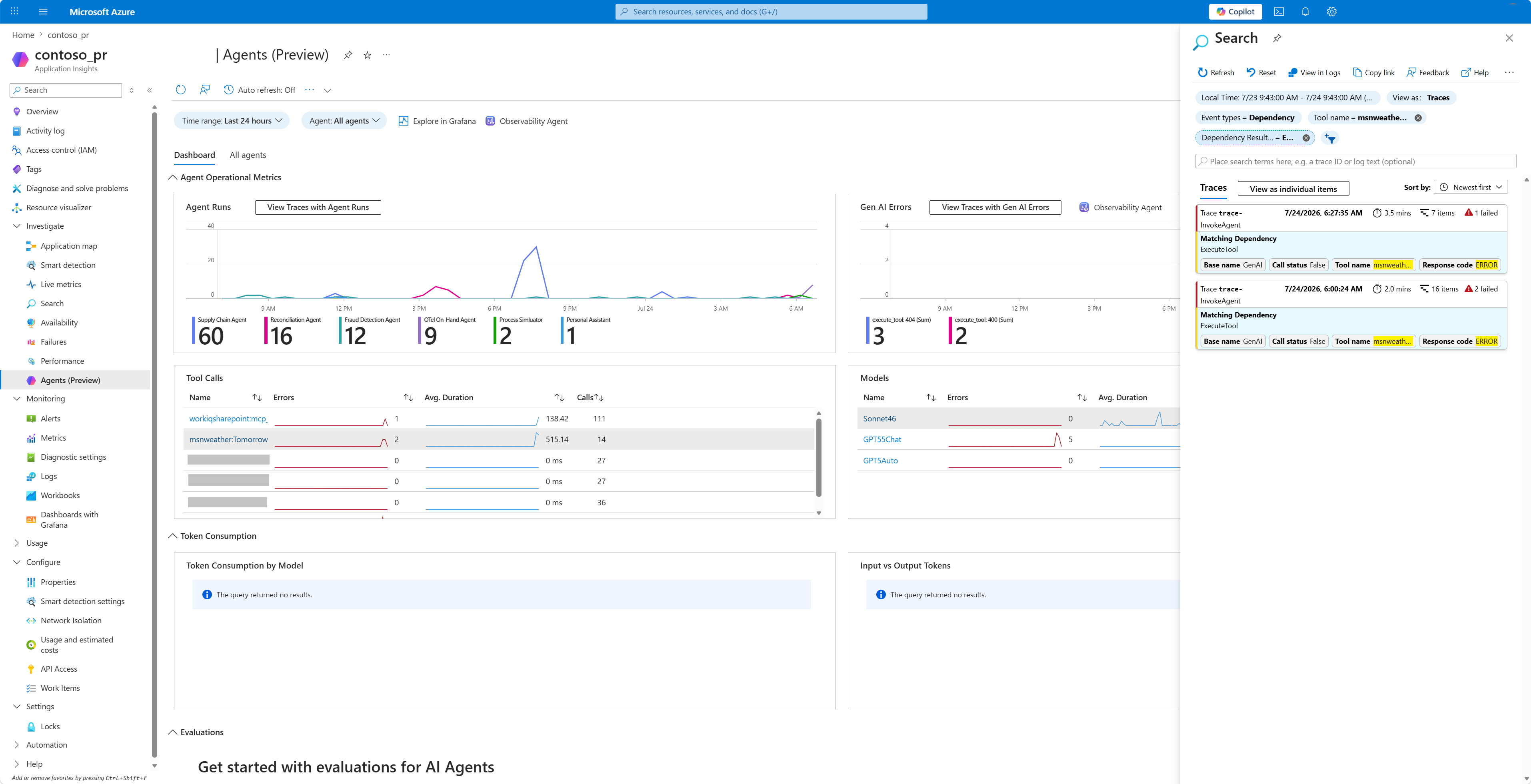
利用应用洞察分析代理遥测数据
将环境连接到 Application Insights 后,当用户与代理交互时,系统会记录代理的遥测数据,包括在 Copilot Studio 中测试期间的数据。 要查看已记录的遥测数据,请访问Azure中应用洞察资源中的日志部分。 在这里,你可以使用 Kusto 查询 来查询和分析你的数据。 在 示例查询中了解更多信息。
示例查询
以下 Kusto 查询示例从 Application Insights 中的 dependencies 表重建 Copilot Studio 代理对话。 由于在每次 turn 中,每个跨度都共享同一条追踪 operation_Id,因此查询会在每条追踪内按从根开始的顺序排列这些跨度(即 InvokeAgent 跨度先于其子跨度)。
查询1:返回特定对话ID的完整追踪
该查询返回一个已知对话的每个段,按时间顺序排列,每个根段先于子段。 将 对话ID 占位符替换为你座席的对话ID。 你可以在测试自定义代理时输入以下命令找到它: /debug conversationid。
let LatestConvo = "<Conversation ID>";
dependencies
| where tostring(customDimensions["gen_ai.conversation.id"]) == LatestConvo
| order by operation_Id asc, iff(name == "InvokeAgent", 0, 1) asc, timestamp asc
| project timestamp, name, id, operation_Id,
          operation_ParentId, duration, target, type, cloud_RoleName,
          resultCode, customDimensions
查询2:返回特定代理的最新对话
该查询查找指定时间窗口内指定代理最近的对话。 它会按相同的时间顺序和根优先顺序返回该对话中的每个 span。 将代理人 名 的占位符替换为你代理人的名字。
let Window = 7d;
let AgentName = "<Agent name>";
let LatestConvo = toscalar(
    dependencies
    | where timestamp > ago(Window)
    | where tostring(customDimensions["gen_ai.agent.name"]) == AgentName
    | where isnotempty(tostring(customDimensions["gen_ai.conversation.id"]))
    | top 1 by timestamp desc
    | project tostring(customDimensions["gen_ai.conversation.id"])
);
dependencies
| where timestamp > ago(Window)
| where tostring(customDimensions["gen_ai.conversation.id"]) == LatestConvo
| order by operation_Id asc, iff(name == "InvokeAgent", 0, 1) asc, timestamp asc
| project timestamp, name, id, operation_Id,
          operation_ParentId, duration, target, type, cloud_RoleName,
          resultCode, customDimensions
问题3:将已知生成式AI的OpenTelemetry属性扩展为列
该查询返回与查询 2 相同的追踪,但还会将每个已知的 OpenTelemetry 语义约定键解析到各自单独的命名列中。 结果是一个扁平且明确定义的表格,你可以直接排序、筛选和扫描生成式AI字段,如工具名称、模型、用户提示、代理回复和对话ID。 将代理人 名 的占位符替换为你代理人的名字。
let Window = 7d;
let AgentName = "<Agent name>";
let LatestConvo =
    toscalar(
        dependencies
        | where timestamp > ago(Window)
        | extend
            AgentName_ = tostring(customDimensions["gen_ai.agent.name"]),
            ConversationId_ = tostring(customDimensions["gen_ai.conversation.id"])
        | where AgentName_ == AgentName
        | where isnotempty(ConversationId_)
        | summarize arg_max(timestamp, ConversationId_)
        | project ConversationId_
    );
dependencies
| where timestamp > ago(Window)
| extend
    ConversationId = tostring(customDimensions["gen_ai.conversation.id"])
| where ConversationId == LatestConvo
| extend
    OperationName    = tostring(customDimensions["gen_ai.operation.name"]),
    AgentId          = tostring(customDimensions["gen_ai.agent.id"]),
    AgentName        = tostring(customDimensions["gen_ai.agent.name"]),
    Model            = tostring(customDimensions["gen_ai.request.model"]),
    ToolName         = tostring(customDimensions["gen_ai.tool.name"]),
    ToolType         = tostring(customDimensions["gen_ai.tool.type"]),
    ToolCallId       = tostring(customDimensions["gen_ai.tool.call.id"]),
    ToolArguments    = tostring(customDimensions["gen_ai.tool.call.arguments"]),
    ToolResult       = tostring(customDimensions["gen_ai.tool.call.result"]),
    EnvironmentId    = tostring(customDimensions["env.id"]),
    TenantId         = tostring(customDimensions["microsoft.tenant.id"]),
    ChannelName      = tostring(customDimensions["microsoft.channel.name"]),
    BlueprintId      = tostring(customDimensions["microsoft.a365.agent.blueprint.id"]),
    PlatformId       = tostring(customDimensions["microsoft.a365.agent.platform.id"]),
    ResourceProvider = tostring(customDimensions["resource.provider"]),
    SignalCategory   = tostring(customDimensions["signal.category"]),
    UserId           = tostring(customDimensions["user.id"]),
    UserName         = tostring(customDimensions["user.name"]),
    UserEmail        = tostring(customDimensions["user.email"])
| extend
    InputMessages  = parse_json(tostring(customDimensions["gen_ai.input.messages"])),
    OutputMessages = parse_json(tostring(customDimensions["gen_ai.output.messages"]))
| extend
    UserInput   = tostring(InputMessages[0].parts[0].content),
    AgentOutput = tostring(OutputMessages[0].parts[0].content)
| order by
    operation_Id asc,
    iff(name == "InvokeAgent", 0, 1) asc,
    timestamp asc
| project
    timestamp, name, id, operation_Id, operation_ParentId, OperationName, ConversationId,
    AgentId, AgentName, Model, ToolName, ToolType, ToolCallId, ToolArguments, ToolResult,
    UserInput, AgentOutput, EnvironmentId, TenantId, ChannelName, BlueprintId, PlatformId,
    ResourceProvider, SignalCategory, UserId, UserName, UserEmail, duration, target, type,
    cloud_RoleName, resultCode, customDimensions
查询 4:动态地展开所有生成式 AI 的 OpenTelemetry 属性
该查询返回与查询 3 相同的跨度,但会将每个 gen_ai.* 键从 customDimensions 中动态展开到各自以 ga_ 为前缀的列中。 由于投影是动态的,SDK 之后发出的任何新 gen_ai.* 属性都会自动出现,无需更改查询。 将代理人 名 的占位符替换为你代理人的名字。
let Window = 7d;
let AgentName = "<Agent name>";
let LatestConvo = toscalar(
    dependencies
    | where timestamp > ago(Window)
    | where tostring(customDimensions["gen_ai.agent.name"]) == AgentName
    | where isnotempty(tostring(customDimensions["gen_ai.conversation.id"]))
    | top 1 by timestamp desc
    | project tostring(customDimensions["gen_ai.conversation.id"])
);
dependencies
| where timestamp > ago(Window)
| where tostring(customDimensions["gen_ai.conversation.id"]) == LatestConvo
| order by operation_Id asc, iff(name == "InvokeAgent", 0, 1) asc, timestamp asc
| mv-apply Key = bag_keys(customDimensions) on (
    where Key startswith "gen_ai."
    | summarize OTelGenAI = make_bag(bag_pack(tostring(Key), customDimensions[tostring(Key)]))
  )
| project timestamp, name, id, operation_Id, operation_ParentId,
          duration, target, type, cloud_RoleName, resultCode,
          OTelGenAI, customDimensions
| evaluate bag_unpack(OTelGenAI, 'ga_')
已知限制和注意事项
- 该功能不支持未认证或 多租户代理配置 场景。 因此,Application Insights不会记录这些数据。
- 此功能目前仅在 Microsoft 公有云环境中可用。
- 对于某些已连接的代理场景,跟踪之间的父子关系未得到正确映射。
- 对于由标准 harness 提供支持的代理追踪,
duration值不可用。 - 确保在目标应用洞察资源中开启 本地认证 属性。
- 遥测导出不是事务型的。 在临时服务事件中,可能会发生少量数据丢失。
- 随着与架构相关的数据摄取更新逐步推出,可能会出现数据不一致。
- 该功能不捕捉与主题相关的事件,如
TopicStart、TopicAction和TopicEnd。 - 目前,追踪 ID 和跨度 ID 使用基于 GUID 的表示形式,而不是采用 OpenTelemetry 标准的 32 字符追踪 ID 和 16 字符跨度 ID 十六进制格式。
- 为了简化报告和故障排除,避免同时向同一个 Application Insights 实例发送代理级和环境级遥测数据。
- 由 Microsoft Copilot 框架驱动的代理和由标准框架驱动的代理之间的遥测数据可能有所不同。
- 确保您的环境级应用洞察配置符合数据驻留性、隐私和基于角色的访问控制(RBAC)要求。
- 大量日志内容,包括代理响应和工具参数,可能会被截断。