向脚本添加参数可让其他用户为脚本提供数据,而无需编辑代码。 当脚本通过功能区或按钮运行时,会弹出一个提示,要求用户输入,例如数组或工作簿。
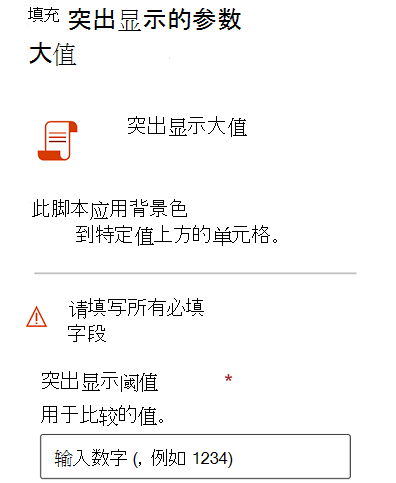
示例方案:突出显示大值
以下示例显示了一个从用户获取数字和字符串的脚本。 若要对其进行测试,请打开一个空工作簿,并在多个单元格中输入一些数字。
/**
 * This script applies a background color to cells over a certain value.
 * @param highlightThreshold The value used for comparisons.
 * @param color A string representing the color to make the high value cells.
 *   This must be a color code representing the color of the background,
 *   in the form #RRGGBB (e.g., "FFA500") or a named HTML color (e.g., "orange").
 */
function main(
  workbook: ExcelScript.Workbook,
  highlightThreshold: number,
  color: string) {
    // Get the used cells in the current worksheet.
    const currentSheet = workbook.getActiveWorksheet();
    const usedRange = currentSheet.getUsedRange();

    const rangeValues = usedRange.getValues();
    for (let row = 0; row < rangeValues.length; row++) {
        for (let column = 0; column < rangeValues[row].length; column++) {
          if (rangeValues[row][column] >= highlightThreshold) {
              usedRange.getCell(row, column).getFormat().getFill().setColor(color);
          }
        }
    }
}
main 参数:将数据传递给脚本
所有脚本输入都指定为函数的其他参数 main 。 新参数是在必需 workbook: ExcelScript.Workbook 参数之后添加的。 例如,如果希望脚本接受 string 表示名称作为输入的 ,请将签名更改为 mainfunction main(workbook: ExcelScript.Workbook, name: string)。
若要允许用户使用参数化脚本导入工作簿,请对接受工作簿的每个参数使用二维数组。 参数的类型可以是 string 或 number。 以下示例演示如何创建接受这两个参数的工作簿导入的脚本。
/**
* This script generates a monthly sales report.
* @param productData The product data for this month.
* @param salesData The sales data for this month.
*/
function main(workbook: ExcelScript.Workbook, productData: string[][], salesData: string[][]) {
// Code to process data goes here.
// Both the `productData` and `salesData` parameters accept workbook imports.
}
可选参数
可选参数不需要用户提供值。 这意味着脚本具有默认行为,或者仅在角事例中需要此参数。 它们用 可选修饰符?在脚本中表示。 例如, 中的 function main(workbook: ExcelScript.Workbook, Name?: string) 参数 Name 是可选的。
默认参数值
默认参数值 自动使用值填充作的字段。 若要设置默认值,请将值分配给签名中的 main 参数。 例如,在 参数location中function main(workbook: ExcelScript.Workbook, location: string = "Seattle")具有 值"Seattle",除非提供了其他内容。
参数的下拉列表
通过提供可接受的参数选项列表,帮助其他人在其流中使用你的脚本。 如果脚本使用的一小部分值,请创建一个参数,即这些文本值。 为此,将参数类型声明为 文本值的并集。 例如, 在 参数location中function main(workbook: ExcelScript.Workbook, location: "Seattle" | "Redmond")只能为 "Seattle" 或 "Redmond"。 运行脚本时,用户会收到包含这两个选项的下拉列表。
记录脚本
在用户运行脚本时,将向用户显示遵循 JSDoc 标准的代码注释。 在说明中输入的详细信息越多,其他人就越容易使用脚本。 描述每个输入参数的用途以及任何限制或限制。 以下示例 JSDoc 演示如何使用 number 名为 的参数 taxRate来记录脚本。
/**
 * A script to apply the current tax rate to sales figures.
 * @param taxRate The current sales tax rate in the region as a decimal number (enter 12% as .12).
 */
function main(workbook: ExcelScript.Workbook, taxRate: number)
注意
无需在每个脚本中记录 ExcelScript.Workbook 参数。
类型限制
添加输入参数和返回值时,请考虑以下允许和限制。
第一个参数的类型必须为
ExcelScript.Workbook。 其参数名称并不重要。类型
string为 、number、boolean、unknown和object。支持 (
[]数组和Array<T>样式) 前面列出的类型。 还支持嵌套数组。如果联合类型是属于单个类型的文本的并集,则允许联合类型 (,
"Left" | "Right"而不是"Left" | 5) 。如果对象类型包含 、、
numberboolean支持数组或其他受支持对象的属性,则允许使用对象类型string。 以下示例显示支持作为参数类型的嵌套对象。// The Employee object is supported because Position is also composed of supported types. interface Employee { name: string; job: Position; } interface Position { id: number; title: string; }对象必须在脚本中定义其接口或类定义。 还可以以匿名方式内联定义对象,如以下示例所示。
function main(workbook: ExcelScript.Workbook, contact: {name: string, email: string})