提示
受到推崇的: 从 Work IQ 开发工具 开始,用于受支持的专业代码声明代理和插件方案。 请参阅 WIQD 快速入门。 基于工具包的说明仍然可用于需要它们的现有项目和工作流。 在选择工具之前,请检查 功能和目标体验支持 : WIQD 不面向自定义引擎代理。
MCP 应用是在 智能 智能 Microsoft 365 Copilot 副驾驶® 副驾驶® 中运行的交互式 UI 小组件,由 MCP) 服务器 (模型上下文协议提供支持。 它们允许声明式代理超越文本响应,直接在 Copilot 聊天中提供丰富的可操作体验。 可以通过添加 基于 MCP 服务器的插件 (其工具返回交互式 UI)来将 MCP 应用添加到声明性代理。 智能 智能 Microsoft 365 Copilot 副驾驶® 副驾驶®支持使用以下方法创建的 UI 小组件。
- MCP 应用 - MCP 的扩展,使 MCP 服务器能够向主机提供交互式用户界面。
- OpenAI Apps SDK - 基于 MCP Apps 标准构建 ChatGPT 应用程序的工具,并具有额外的 ChatGPT 功能。
示例 MCP 服务器插件,请参阅 GitHub 上基于 智能 智能 Microsoft 365 Copilot 副驾驶® 副驾驶® 的交互式 UI 示例。
有关支持哪些 MCP 应用或 OpenAI Apps SDK 功能的详细信息,请参阅 Copilot 中支持的 MCP 应用功能。
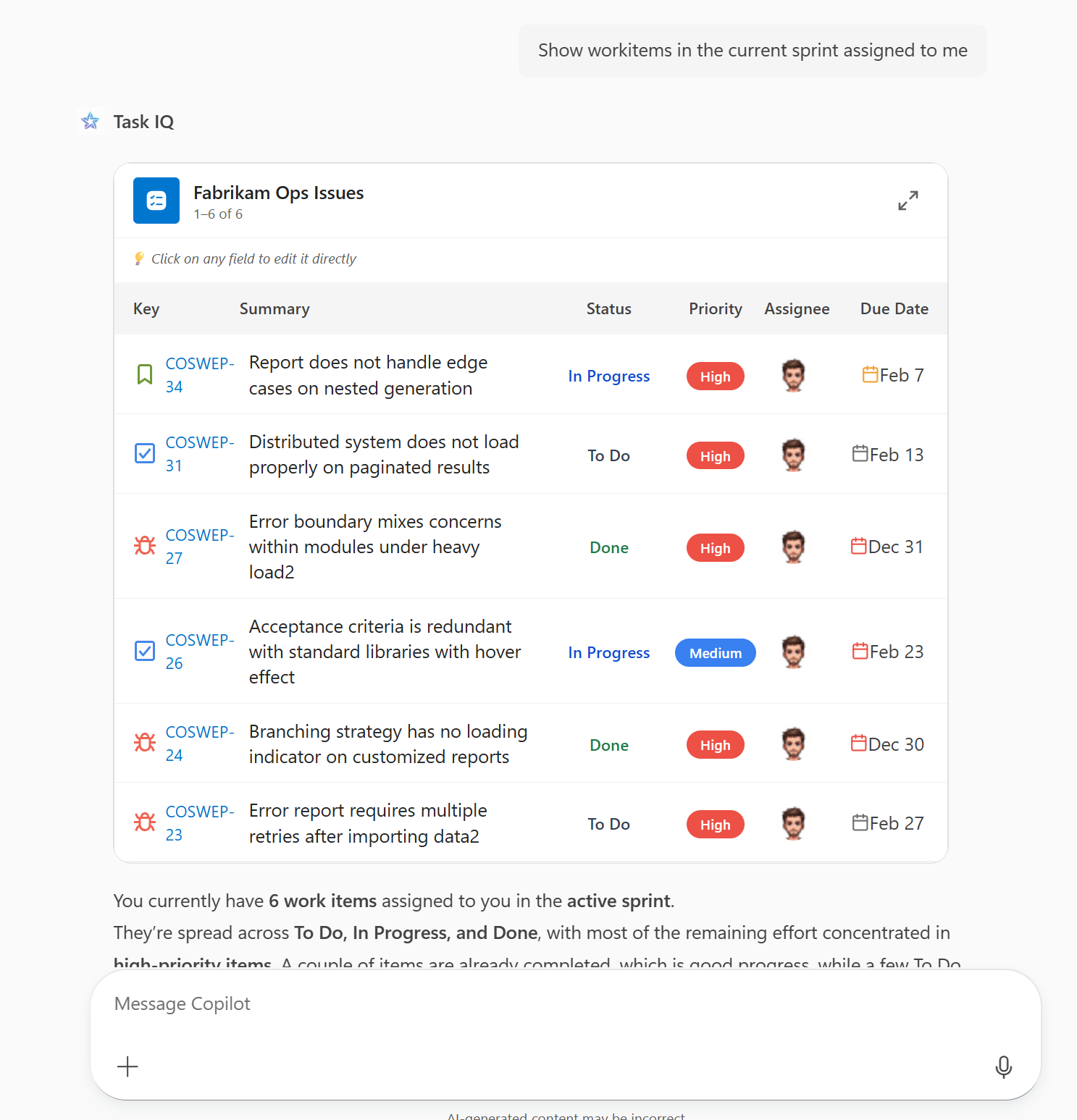
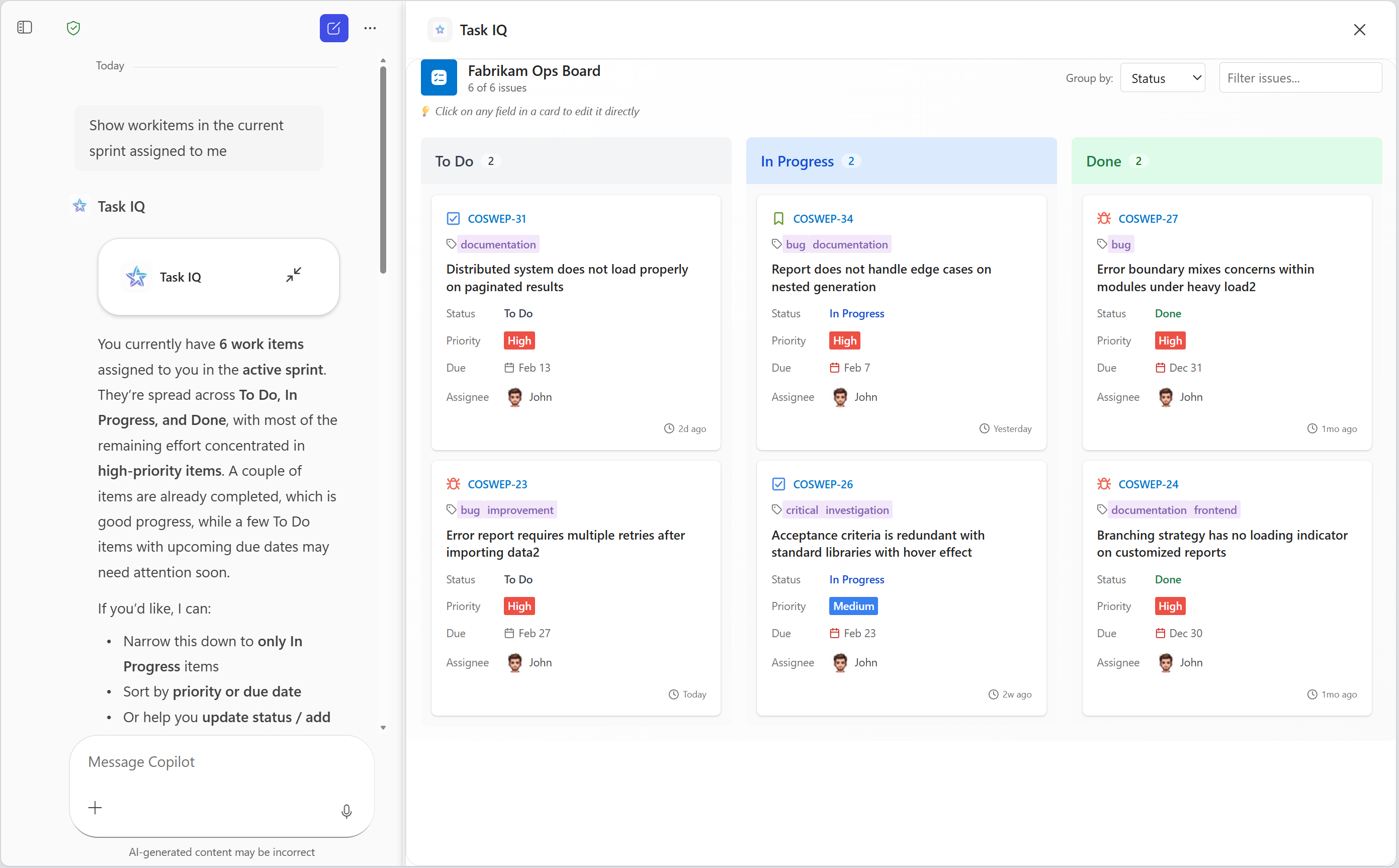
MCP 应用的先决条件
- Copilot 可扩展性选项的要求中指定的要求
- 提供 UI 小组件或可以修改以实现 UI 小组件的远程 MCP 服务器
- 用于查看 MCP 服务器响应的工具,例如 MCP 检查器
- Visual Studio Code
- Microsoft 365 Agents Toolkit (版本 6.12.0 或更高版本)
MCP 应用的 MCP 服务器要求
- 身份验证 - Copilot 支持 OAuth 2.1 和Microsoft Entra单一登录 (SSO) 。 出于开发目的,Copilot 支持使用代理工具包中的“ 无 ”选项进行匿名身份验证。 有关身份验证的详细信息,请参阅 为代理中的 API 插件配置身份验证。
-
允许的 URL - MCP 服务器和标识提供程序必须允许以下 URL。
- CORS 的小组件主机 URL - Copilot 使用以下 URL 在特定于 MCP 服务器的主机下呈现小组件 UI:
{hashed-mcp-domain}.widget-renderer.usercontent.microsoft.com,其中{hashed-mcp-domain}是 MCP 服务器域的 SHA-256 哈希值。 您可以使用 小组件主机 URL 生成器 基于 MCP 服务器 URL 生成主机 URL。 - OAuth 2.1 重定向 URI:
-
https://teams.microsoft.com/api/platform/v1.0/oAuthRedirectfor Copilot -
https://vscode.dev/redirect以便 Visual Studio Code 使用代理工具包提取工具
-
- Microsoft Entra SSO 重定向 URI:
-
https://teams.microsoft.com/api/platform/v1.0/oAuthConsentRedirectfor Copilot - Visual Studio Code 目前不支持用于提取工具的 SSO
-
- CORS 的小组件主机 URL - Copilot 使用以下 URL 在特定于 MCP 服务器的主机下呈现小组件 UI:
- UI 小组件 - 根据 MCP 应用或 OpenAI 应用 SDK 要求实现 UI 小组件。
Copilot 中 MCP 应用的最佳做法
用户体验设计
有关 UX 设计最佳做法的详细信息,请参阅适用于 智能 智能 Microsoft 365 Copilot 副驾驶® 副驾驶® 的声明式代理中 MCP 应用的用户体验指南。
验证 API 可用性
并非所有 window.openai.* API 在每个平台或主机上都可用。 不支持的 API 是 undefined。 始终检查 API 的可用性,并在 API 不可用时提供回退。
示例
此简单模式通过在调用 API 之前进行检查来避免运行时错误。
if (window.openai.callTool) {
  const result = await window.openai.callTool({ name: 'myTool', params: {} });
} else {
  // Handle unsupported case — show fallback UI, skip the feature, etc.
}
在此示例中,仅当主机支持 requestDisplayMode API 时,才会呈现用于进入全屏模式的按钮。
function FullScreenButton() {
  // Don't render the button if the host doesn't support it
  if (!window.openai.requestDisplayMode) {
    return null;
  }

  return (
    <button onClick={() => window.openai.requestDisplayMode({ mode: 'fullscreen' })}>
      Enter Fullscreen
    </button>
  );
}
或者,您的小部件可以检查它在启动时使用的所有 API 的可用性,并相应地启用或禁用功能。
interface PlatformCapabilities {
  canCallTools: boolean;
  canChangeDisplayMode: boolean;
  canSendMessages: boolean;
}

function detectCapabilities(): PlatformCapabilities {
  return {
    canCallTools: !!window.openai.callTool,
    canChangeDisplayMode: !!window.openai.requestDisplayMode,
    canSendMessages: !!window.openai.sendMessage,
  };
}

// Use at widget startup
const capabilities = detectCapabilities();

if (!capabilities.canCallTools) {
  // Show a reduced-functionality experience
}
创建代理并旁加载
无论服务器是否返回 UI 小组件,从 MCP 服务器创建声明性代理、配置身份验证和旁加载它都是相同的。 有关完整演练,请参阅 从 MCP 服务器生成声明性代理插件。
按照该演练操作时,请牢记以下 MCP 应用注意事项:
- MCP 服务器必须根据 MCP 应用或 OpenAI 应用 SDK 要求返回 UI 小组件。 请参阅 MCP 应用的 MCP 服务器要求。
- 默认情况下,代理使用 动态工具发现 并在运行时解析服务器的工具(包括返回 UI 小组件的工具),因此无需手动添加工具。 如果固定一组固定的工具,请确保至少包含一个返回 UI 小组件的工具。
- 如果 MCP 服务器仍处于开发阶段,且未实施身份验证,请选择“ 无 ”作为身份验证类型。 部署到生产环境之前添加身份验证。
测试代理
- 打开浏览器并转到 https://m365.cloud.microsoft/chat。
- 在左侧边栏中选择代理。 如果看不到代理,请选择“ 所有代理”。
- 要求代理执行一些调用 MCP 服务器的操作。
- 出现提示时,允许代理连接到 MCP 服务器。
- 确认代理呈现 UI 小组件。
如果小组件未按预期显示或行为,请参阅 智能 智能 Microsoft 365 Copilot 副驾驶® 副驾驶®中的 MCP 应用疑难解答。
Copilot 中支持的 MCP 应用功能
智能 智能 Microsoft 365 Copilot 副驾驶® 副驾驶®支持以下功能。
组件桥
| OpenAI 应用 SDK | MCP 应用等效项 | 支持 |
|---|---|---|
window.openai.toolInput |
app.ontoolinput |
✅ |
window.openai.toolOutput |
app.ontoolresult |
✅ |
window.openai.toolResponseMetadata |
app.ontoolresult → params._meta |
✅ |
window.openai.widgetState |
— | ✅ |
window.openai.setWidgetState(state) |
不可直接提供。 使用替代机制,包括 app.updateModelContext() |
✅ |
window.openai.callTool(name, args) |
app.callServerTool({ name, arguments }) |
✅ |
window.openai.sendFollowUpMessage({ prompt }) |
app.sendMessage({ ... }) |
✅ |
window.openai.uploadFile(file) |
— | ❌ |
window.openai.getFileDownloadUrl({ fileId }) |
— | ❌ |
window.openai.requestDisplayMode(...) |
app.requestDisplayMode({ mode }) |
✅ 仅 (全屏) |
window.openai.requestModal(...) |
— | ❌ |
window.openai.notifyIntrinsicHeight(...) |
app.sendSizeChanged({ width, height }) |
✅ |
window.openai.openExternal({ href }) |
app.openLink({ url }) |
✅ |
window.openai.setOpenInAppUrl({ href }) |
— | ✅ |
window.openai.theme |
app.getHostContext()?.theme |
✅ |
window.openai.displayMode |
app.getHostContext()?.displayMode |
✅ |
window.openai.maxHeight |
app.getHostContext()?.viewport?.maxHeight |
✅ |
window.openai.safeArea |
app.getHostContext()?.safeAreaInsets |
✅ |
window.openai.view |
— | ✅ |
window.openai.userAgent |
app.getHostContext()?.userAgent |
✅ |
window.openai.locale |
app.getHostContext()?.locale |
✅ |
| — | app.ontoolinputpartial |
❌ |
| — | app.ontoolcancelled |
❌ |
| — | app.getHostContext()?.availableDisplayModes |
❌ |
| — | app.getHostContext()?.toolInfo |
❌ |
| — | app.onhostcontextchanged |
❌ |
| — | app.onteardown |
❌ |
| — | app.sendLog({ level, data }) |
❌ |
| — | app.getHostVersion() |
❌ |
| — | app.getHostCapabilities() |
✅ |
_meta字段的工具描述符
| OpenAI 应用 SDK | MCP 应用等效项 | 支持 |
|---|---|---|
_meta["openai/outputTemplate"] |
_meta.ui.resourceUri |
✅ |
_meta["openai/widgetAccessible"] |
_meta.ui.visibility (string[]) |
❌ |
_meta["openai/visibility"] |
_meta.ui.visibility (string[]) |
✅ |
_meta["openai/toolInvocation/invoking"] |
— | ❌ |
_meta["openai/toolInvocation/invoked"] |
— | ❌ |
_meta["openai/fileParams"] |
— | ❌ |
_meta["securitySchemes"] |
— | ❌ |
工具描述符批注
| OpenAI 应用 SDK | MCP 应用等效项 | 支持 |
|---|---|---|
readOnlyHint |
readOnlyHint |
✅ |
destructiveHint |
destructiveHint |
❌ |
openWorldHint |
openWorldHint |
❌ |
idempotentHint |
idempotentHint |
❌ |
组件资源_meta字段
| OpenAI 应用 SDK | MCP 应用等效项 | 支持 |
|---|---|---|
_meta["openai/widgetDescription"] |
— | ❌ |
_meta["openai/widgetPrefersBorder"] |
_meta.ui.prefersBorder |
❌ |
_meta["openai/widgetCSP"] |
_meta.ui.csp |
✅ |
_meta["openai/widgetDomain"] |
_meta.ui.domain |
❌ |
| — | _meta.ui.permissions |
❌ |
CSP 对象中的属性
| OpenAI 应用 SDK | MCP 应用等效项 | 支持 |
|---|---|---|
connect_domains |
connectDomains |
✅ |
resource_domains |
resourceDomains |
✅ |
frame_domains |
frameDomains |
❌ |
redirect_domains |
— | ❌ |
| — | baseUriDomains |
❌ |
主机提供的工具结果_meta字段
| OpenAI 应用 SDK | MCP 应用等效项 | 支持 |
|---|---|---|
_meta["openai/widgetSessionId"] |
— | ❌ |
客户端提供的_meta字段
| OpenAI 应用 SDK | MCP 应用等效项 | 支持 |
|---|---|---|
_meta["openai/locale"] |
_meta["openai/locale"] |
✅ |
_meta["openai/userAgent"] |
_meta["openai/userAgent"] |
✅ |
_meta["openai/userLocation"] |
_meta["openai/userLocation"] |
✅ |
_meta["openai/subject"] |
— | ❌ |
有关 Copilot 中的 MCP 应用的常见问题解答
什么是 MCP 应用?
MCP 应用是由 MCP 服务器提供的交互式 UI 小组件,直接在 智能 智能 Microsoft 365 Copilot 副驾驶® 副驾驶® 中呈现。 它们将声明性代理扩展到纯文本响应之外,实现数据可视化、表单和任务管理界面等丰富体验。
MCP Apps 和 OpenAI Apps SDK 有什么区别?
MCP 应用 是 MCP 标准的开放扩展,使 MCP 服务器能够向任何兼容主机提供交互式 UI。 OpenAI Apps SDK 基于 MCP Apps 标准构建,并添加了特定于 ChatGPT 的额外功能。 智能 智能 Microsoft 365 Copilot 副驾驶® 副驾驶® 支持这两种功能,但并非所有功能都可用。 有关详细信息,请参阅 Copilot 中支持的 MCP 应用功能 。
是否可以在开发期间无需身份验证即可使用 MCP 应用?
可以。 出于开发目的,支持匿名身份验证。 但是,在部署到生产环境之前,您需要添加身份验证。 OAuth 2.1 和 Microsoft Entra 单一登录 (SSO) 是受支持的身份验证方法。 有关详细信息,请参阅 为代理中的 API 插件配置身份验证。