 瀏覽範例
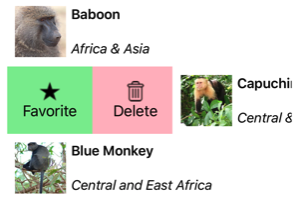
瀏覽範例.NET 多平台應用程式介面(.NET MAUI) SwipeView 是一個容器控制項,環繞著內容項目,並提供透過滑動手勢顯示的情境選單項目:
這很重要
SwipeView 設計用於觸控介面。 在 Windows 上,只能在觸控介面中滑動,無法搭配像滑鼠這類指標裝置使用。
SwipeView 定義下列屬性:
-
LeftItems,是類型為SwipeItems的物件,代表當控制項從左側滑動時可調用的滑動項目。 -
RightItems,其型別為SwipeItems,代表當控制項從右側滑動時可調用的滑動項目。 -
TopItems是一種SwipeItems類型,代表當控制從上往下滑動時將啟動的滑動項目。 -
BottomItems,型別為SwipeItems,代表當從底部向上滑動控制元件時,可以調用的滑動項目。 -
Threshold,屬於double類型,代表能夠觸發滑動手勢以完全顯示滑動項目的設備無關單位數量。
這些屬性由 BindableProperty 物件支援,這表示它們可以成為資料繫結的目標並且可以設定樣式。
此外,SwipeView 類別繼承了ContentView 類別的Content 屬性。 屬性 Content 是類別的內容 SwipeView 屬性,因此不需要明確設定。
類別 SwipeView 也會定義三個事件:
-
SwipeStarted當開始滑動時,標記會升高。SwipeStartedEventArgs伴隨此事件的物件具有SwipeDirection屬性,其類型為SwipeDirection。 -
SwipeChanging在滑動過程中被抬起。 伴隨此事件的SwipeChangingEventArgs物件有一個SwipeDirection屬性,型為SwipeDirection,以及一個Offset屬性為double。 -
SwipeEnded當滑動結束時會上升。 伴隨此事件的SwipeEndedEventArgs物件有一個SwipeDirection屬性,型為SwipeDirection,以及一個IsOpen屬性為bool。
此外,包含 SwipeView 和 OpenClose 方法,分別程式化地開啟和關閉滑動項目。
備註
SwipeView 在 iOS 和 Android 上有專用的平台功能,可以控制開啟 SwipeView 時所使用的轉換效果。 欲了解更多資訊,請參閱 iOS 上的 SwipeView 滑動轉換模式 及 Android 上的 SwipeView 滑動轉換模式。
建立 SwipeView
SwipeView必須定義SwipeView所包裹的內容,以及由滑動手勢揭示的滑動項目。 滑動項目可以是一個或多個SwipeItem,它們被放置在四個方向集合中的任一位置 - LeftItems、RightItems、TopItems 或 BottomItems。
以下範例說明如何在 XAML 中實例化 a SwipeView :
<SwipeView>
    <SwipeView.LeftItems>
        <SwipeItems>
            <SwipeItem Text="Favorite"
                       IconImageSource="favorite.png"
                       BackgroundColor="LightGreen"
                       Invoked="OnFavoriteSwipeItemInvoked" />
            <SwipeItem Text="Delete"
                       IconImageSource="delete.png"
                       BackgroundColor="LightPink"
                       Invoked="OnDeleteSwipeItemInvoked" />
        </SwipeItems>
    </SwipeView.LeftItems>
    <!-- Content -->
    <Grid HeightRequest="60"
          WidthRequest="300"
          BackgroundColor="LightGray">
        <Label Text="Swipe right"
               HorizontalOptions="Center"
               VerticalOptions="Center" />
    </Grid>
</SwipeView>
對等的 C# 程式代碼為:
// SwipeItems
SwipeItem favoriteSwipeItem = new SwipeItem
{
    Text = "Favorite",
    IconImageSource = "favorite.png",
    BackgroundColor = Colors.LightGreen
};
favoriteSwipeItem.Invoked += OnFavoriteSwipeItemInvoked;

SwipeItem deleteSwipeItem = new SwipeItem
{
    Text = "Delete",
    IconImageSource = "delete.png",
    BackgroundColor = Colors.LightPink
};
deleteSwipeItem.Invoked += OnDeleteSwipeItemInvoked;

List<SwipeItem> swipeItems = new List<SwipeItem>() { favoriteSwipeItem, deleteSwipeItem };

// SwipeView content
Grid grid = new Grid
{
    HeightRequest = 60,
    WidthRequest = 300,
    BackgroundColor = Colors.LightGray
};
grid.Add(new Label
{
    Text = "Swipe right",
    HorizontalOptions = LayoutOptions.Center,
    VerticalOptions = LayoutOptions.Center
});

SwipeView swipeView = new SwipeView
{
    LeftItems = new SwipeItems(swipeItems),
    Content = grid
};
在這個例子中,SwipeView 的內容是一個包含Label的 Grid。

滑動項目用於對 SwipeView 內容執行動作,當從左側滑動控制時會顯示:

預設情況下,當使用者點擊滑動項目時會執行。 不過,這種行為是可以改變的。 欲了解更多資訊,請參閱 滑動模式。
一旦執行滑動項目,該滑動項目會被隱藏,內容 SwipeView 會重新顯示。 不過,這種行為是可以改變的。 更多資訊請參見 滑動行為。
備註
滑動內容和滑動項目可以內嵌放置,或定義為一種資源。
滑動以瀏覽項目
這些 LeftItems、 RightItems、 TopItems和 BottomItems 集合皆為型別 SwipeItems。 類別 SwipeItems 會定義下列屬性:
-
Mode,是一種SwipeMode型別,表示滑動互動的影響。 欲了解更多滑動模式資訊,請參見 滑動模式。 -
SwipeBehaviorOnInvoked,其型別為SwipeBehaviorOnInvoked,用來指示當滑動項目被觸發後,SwipeView 的反應行為。 欲了解更多滑動行為資訊,請參見 滑動行為。
這些屬性由 BindableProperty 物件支援,這表示它們可以成為資料繫結的目標並且可以設定樣式。
每個互動滑動項目都被定義為一個物件,該物件放置於四個方向集合中的一個。
SwipeItem 類別是從 MenuItem 類別衍生而來,並新增以下成員:
- 一個
BackgroundColor屬性,型別 Color為 ,定義滑動項目的背景顏色。 此性質由可約束性質作為後盾。 -
Invoked是一個事件,當執行滑動項目時會被觸發。
這很重要
該MenuItem類別定義了數個性質,包括Command、CommandParameterIconImageSource和Text。 這些屬性可以在 SwipeItem 物件上設定,來定義其外觀,以及定義當滑動項目被觸發時要執行的 ICommand。 欲了解更多資訊,請參閱 顯示選單項目。
以下範例顯示 集合SwipeItem中的LeftItems兩個SwipeView物件:
<SwipeView>
    <SwipeView.LeftItems>
        <SwipeItems>
            <SwipeItem Text="Favorite"
                       IconImageSource="favorite.png"
                       BackgroundColor="LightGreen"
                       Invoked="OnFavoriteSwipeItemInvoked" />
            <SwipeItem Text="Delete"
                       IconImageSource="delete.png"
                       BackgroundColor="LightPink"
                       Invoked="OnDeleteSwipeItemInvoked" />
        </SwipeItems>
    </SwipeView.LeftItems>
    <!-- Content -->
</SwipeView>
每個SwipeItem的外觀是由Text、IconImageSource及BackgroundColor這些性質的組合所定義的:
當SwipeItem被點選時,其Invoked事件會觸發,並由已註冊的事件處理程序處理。 此外, MenuItem.Clicked 事件會觸發。 或者,也可以將該 Command 屬性設定為 ICommand 實作,當 SwipeItem 被呼叫時,該實作將會執行。
備註
當一個SwipeItem的外觀僅使用Text或IconImageSource屬性定義時,內容總是置中。
除了將滑動項目定義為 SwipeItem 物件外,也可以定義自訂滑動項目檢視。 更多資訊請參見 自訂滑動項目。
滑動方向
SwipeView 支援四種不同的滑動方向,滑動方向由物件加入的方向 SwipeItems 集合 SwipeItem 定義。 每個滑動方向都可以擁有自己的滑動項目。 例如,以下範例顯示 一個 SwipeView 滑動項目依滑動方向而定:
<SwipeView>
    <SwipeView.LeftItems>
        <SwipeItems>
            <SwipeItem Text="Delete"
                       IconImageSource="delete.png"
                       BackgroundColor="LightPink"
                       Command="{Binding DeleteCommand}" />
        </SwipeItems>
    </SwipeView.LeftItems>
    <SwipeView.RightItems>
        <SwipeItems>
            <SwipeItem Text="Favorite"
                       IconImageSource="favorite.png"
                       BackgroundColor="LightGreen"
                       Command="{Binding FavoriteCommand}" />
            <SwipeItem Text="Share"
                       IconImageSource="share.png"
                       BackgroundColor="LightYellow"
                       Command="{Binding ShareCommand}" />
        </SwipeItems>
    </SwipeView.RightItems>
    <!-- Content -->
</SwipeView>
在這個例子中, SwipeView 內容可以向右或向左滑動。 向右滑動會顯示 刪除 滑動項目,向左滑動則顯示 最愛 與 分享 滑動項目。
SwipeStarted、SwipeChanging和SwipeEnded事件透過事件參數中的SwipeDirection屬性回報滑動方向。 此性質型別為 SwipeDirection,即由四個成員組成的枚舉:
-
Right表示發生了右滑。 -
Left表示發生了左滑事件。 -
Up表示發生了向上滑動。 -
Down表示發生了向下滑動。
滑動閾值
SwipeView 包含屬性 Threshold,其類型為 double:代表觸發滑動手勢以完全顯示滑動項目的裝置獨立單位數量。
以下範例展示了設定屬性的 SwipeView :Threshold
<SwipeView Threshold="200">
    <SwipeView.LeftItems>
        <SwipeItems>
            <SwipeItem Text="Favorite"
                       IconImageSource="favorite.png"
                       BackgroundColor="LightGreen" />
        </SwipeItems>
    </SwipeView.LeftItems>
    <!-- Content -->
</SwipeView>
在此範例中,SwipeView 必須滑動 200 與裝置無關的單位後,SwipeItem 才會完全顯示。
滑動模式
該 SwipeItems 類別有一個 Mode 屬性,表示滑動互動的效果。 此屬性應設為 SwipeMode 列舉成員之一:
-
Reveal表示滑動會顯示滑動項目。 此為SwipeItems.Mode屬性的預設值。 -
Execute表示滑動執行了滑動項目。
在揭露模式中,使用者滑動 a SwipeView 即可開啟包含一個或多個滑動項目的選單,並必須明確點擊滑動項目才能執行。 滑動項目執行後,它們會關閉,SwipeView 的內容會重新顯示。 在執行模式下,使用者滑動 a SwipeView 即可開啟包含另一個滑動項目的選單,這些項目會自動執行。 執行後,滑動項目會被關閉,內容 SwipeView 會重新顯示。
以下範例顯示了一個配置為執行模式的 SwipeView:
<SwipeView>
    <SwipeView.LeftItems>
        <SwipeItems Mode="Execute">
            <SwipeItem Text="Delete"
                       IconImageSource="delete.png"
                       BackgroundColor="LightPink"
                       Command="{Binding DeleteCommand}" />
        </SwipeItems>
    </SwipeView.LeftItems>
    <!-- Content -->
</SwipeView>
在此範例中, SwipeView 內容可以向右滑動以顯示滑動項目,並立即執行。 執行後, SwipeView 內容會重新顯示。
滑動行為
該 SwipeItems 類別有一個 SwipeBehaviorOnInvoked 屬性,表示在呼叫滑動項目後 a SwipeView 的行為。 此屬性應設為 SwipeBehaviorOnInvoked 列舉成員之一:
-
Auto表示在揭露模式下,在觸發滑動道具後關閉 SwipeView ,執行模式下 SwipeView 在滑動道具被觸發後仍保持開啟。 此為SwipeItems.SwipeBehaviorOnInvoked屬性的預設值。 -
Close表示 SwipeView 在觸發滑動項目後關閉。 -
RemainOpen表示在觸發滑動項目後,SwipeView 仍保持開啟。
以下範例展示了設定為在滑動項目被觸發後保持開啟狀態的 SwipeView:
<SwipeView>
    <SwipeView.LeftItems>
        <SwipeItems SwipeBehaviorOnInvoked="RemainOpen">
            <SwipeItem Text="Favorite"
                       IconImageSource="favorite.png"
                       BackgroundColor="LightGreen"
                       Invoked="OnFavoriteSwipeItemInvoked" />
            <SwipeItem Text="Delete"
                       IconImageSource="delete.png"
                       BackgroundColor="LightPink"
                       Invoked="OnDeleteSwipeItemInvoked" />
        </SwipeItems>
    </SwipeView.LeftItems>
    <!-- Content -->
</SwipeView>
自訂滑動項目
自訂滑動項目可以用類型 SwipeItemView 來定義。 該 SwipeItemView 類別由該 ContentView 類別衍生,並加入以下性質:
-
Command,類型為 ICommand,當滑動項目被點擊時執行。 -
CommandParameter,屬於object類型,是傳遞給Command的參數。
這些屬性由 BindableProperty 物件支援,這表示它們可以成為資料繫結的目標並且可以設定樣式。
這個 SwipeItemView 類別還定義了一個 Invoked 事件,當點擊項目後並執行 Command 時會觸發該事件。
以下範例顯示SwipeView的LeftItems集合中的SwipeItemView物件:
<SwipeView>
    <SwipeView.LeftItems>
        <SwipeItems>
            <SwipeItemView Command="{Binding CheckAnswerCommand}"
                           CommandParameter="{Binding x:DataType='Entry', Source={x:Reference resultEntry}, Path=Text}">
                <StackLayout Margin="10"
                             WidthRequest="300">
                    <Entry x:Name="resultEntry"
                           Placeholder="Enter answer"
                           HorizontalOptions="Center" />
                    <Label Text="Check"
                           FontAttributes="Bold"
                           HorizontalOptions="Center" />
                </StackLayout>
            </SwipeItemView>
        </SwipeItems>
    </SwipeView.LeftItems>
    <!-- Content -->
</SwipeView>
在此例中,SwipeItemView 包含一個 StackLayout,這當中含有一個 Entry 和一個 Label。 使用者輸入到Entry後,剩餘的SwipeViewItem可以被點選,執行由SwipeItemView.Command屬性定義的ICommand。
程式化開啟與關閉 SwipeView
SwipeView 包含 Open 和 Close 方法,分別程式化地開啟和關閉滑動項目。 預設情況下,這些方法會在打開或關閉時自動產生 SwipeView 動畫。
此 Open 方法需要一個 OpenSwipeItem 參數,來指定將從哪個方向 SwipeView 開啟。 該 OpenSwipeItem 枚舉有四個成員:
-
LeftItems,表示將會從左側打開SwipeView,以顯示滑動項目在LeftItems收藏中。 -
TopItems,表示 SwipeView 會從頂部打開,顯示收藏中的滑動物品TopItems。 -
RightItems,表示 SwipeView 會從右側打開,以顯示RightItems集合中的滑動項目。 -
BottomItems,表示 SwipeView 會從底部打開,以顯示收藏中的滑動物品BottomItems。
此外,該 Open 方法也接受一個可選 bool 參數,定義開啟時是否 SwipeView 會被動畫化。
給定一個名為 SwipeView 的 swipeView,以下範例說明如何打開 SwipeView 以顯示集合中的 LeftItems 滑動項目:
swipeView.Open(OpenSwipeItem.LeftItems);
swipeView接著可以用以下Close方法閉合:
swipeView.Close();
備註
此 Close 方法也接受一個可選 bool 參數,定義關閉時 是否 SwipeView 會被動畫化。
停用 SwipeView
應用程式可能會進入無法有效滑動內容項目的狀態。 在這種情況下,SwipeView 可以藉由將其 IsEnabled 屬性設定為 false來停用。 這將防止用戶滑動內容來顯示滑動選項。
此外,在定義 Command、SwipeItem 或 SwipeItemView 的屬性時,可以指定 ICommand 的 CanExecute 委派來啟用或停用滑動項目。
