提示 API 是一種實驗性 Web API,可讓您從網站或瀏覽器擴充功能的 JavaScript 程式碼提示小型語言模型 (Microsoft Edge 內建的 SLM) 。 使用提示 API 根據使用者輸入產生和分析文字或建立應用程式邏輯,並探索將 SLM 功能整合到 Web 應用程式中的創新方法。
詳細內容:
提示 API 的可用性
提示 API 可在 Microsoft Edge 中以開發人員預覽形式提供。 您可以透過下列其中一種方式測試提示 API:
- 僅限在您的裝置上的 Microsoft Edge 本機。
- 在您的生產網站上,透過註冊原始試用版。
請參閱下方的 啟用提示 API。
提示 API 旨在協助探索使用案例並瞭解內建 SLM 面臨的挑戰。 提示 API 提供一般用途的提示功能,而相關的實驗性 API 則專為特定的 AI 驅動任務而設計,例如摘要、撰寫協助、決策和翻譯。 若要深入了解這些 API,請參閱:
- 使用撰寫協助 API 摘要、撰寫及改寫文字
- 使用 Decisions API 分類文字
- 使用校對器 API 修正文字中的文法、拼字和標點符號錯誤
- 使用語言偵測器 API 偵測語言
- 使用翻譯工具 API 翻譯文字
提示 API 的替代方案與優點
若要在網站和瀏覽器擴充功能中利用 AI 功能,您也可以使用下列方法:
將網路要求傳送至雲端式 AI 服務,例如 Azure AI 解決方案。
使用 Web 神經網路 (WebNN) API 或適用於 Web 的 ONNX 執行階段來執行本機 AI 模型。
提示 API 會使用在使用模型輸入和輸出的相同裝置上執行的 SLM,也就是 (本機) 。 相較於雲端式解決方案,這有下列優點:
降低成本: 使用雲端 AI 服務無需支付任何費用。
網路獨立性: 除了初始模型下載之外,提示模型時沒有網路延遲,也可以在裝置離線時使用。
改善隱私權: 輸入到模型的資料永遠不會離開裝置,也不會被收集來訓練 AI 模型。
提示 API 使用由 Microsoft Edge 提供並內建於瀏覽器的語言模型,其具有額外的優點,優於自訂本機解決方案,例如以 WebGPU、WebNN 或 WebAssembly 為基礎的解決方案:
共用一次性費用: 第一次呼叫 API 時,就會下載瀏覽器提供的模型,並在瀏覽器中執行的所有網站上共用,從而降低開發人員和使用者的網路成本。
簡化網頁開發人員的使用方式: 內建模型可以使用簡單的 Web API 執行,不需要 AI/ML 專業知識或使用第三方架構。
Aion Instruct 模型
在 Microsoft Edge 中,提示 API 會使用瀏覽器內建的 Aion Instruct 模型。 Aion Instruct 是一個功能強大的 2.3B 參數小型語言模型,擅長基於文本的任務。 若要深入了解模型,請參閱 Hugging Face 的 microsoft/Aion-1.0-Instruct-2.3B 模型卡片。
免責聲明
與其他這種規模的語言模型一樣,Aion Instruct 可能會以不可靠、不準確、不公平或冒犯的方式運作。 您應該考慮將不受信任的內容傳遞給模型的風險,並在使用內容作為模型輸入之前驗證內容的來源和完整性。 若要深入了解,請參閱 Hugging Face,在 microsoft/Aion-1.0-Instruct-2.3B 中的 Bias, Risks, and Limits。
硬體需求
提示 API 開發人員預覽適用於具備硬體功能的裝置,可產生具有可預測品質和延遲的 SLM 輸出。 提示 API 目前僅限於:
作業系統:
- Windows 10 或 11。
- macOS 13.3 或更新版本。
- 64 位元 (x64) Linux,搭配使用 Vulkan GPU 驅動程式和 Microsoft Edge 159 或更新版本。
儲存空間: 包含 Edge 設定檔的磁碟區至少有 20 GB 的可用空間。 如果可用儲存空間低於 5 GB,模型將被刪除,以確保其他瀏覽器功能有足夠的空間來運作。
GPU: 3 GB VRAM 或以上。
網路: 無限數據方案或不限流量連線。 如果使用計量付費連線,則不會下載模型。
若要檢查您的裝置是否支援提示 API 開發人員預覽,請參閱下方 的啟用提示 API ,並檢查您的裝置效能等級。
由於提示 API 的實驗性質,您可能會在特定硬體設定上觀察到問題。 如果您發現特定硬體設定的問題,請在 MSEdgeExplainers 存放庫 開啟新問題 ,以提供意見反應。
Aion Instruct 模型的可用性
網站首次呼叫需要裝置上模型的 API 時,需要初始下載 Aion Instruct 模型。 若要監視模型的下載,請在建立新的提示 API 工作階段時使用 monitor 選項。 若要深入了解,請參閱下方的 監視模型下載進度。
模型在下列情況下無法使用:
- 如果在 [設定>]、[Copilot] 和 AI 下停用 [裝置上的 AI] 選項。
- 如果將 GenAILocalFoundationalModelSettings 或 ComponentUpdatesEnabled 企業原則設定為封鎖模型下載。
- 如果裝置不符合硬體、磁碟空間或網路需求。
考慮 Edge Canary、Dev 和 Beta
在 Microsoft Edge Canary、Dev 和 Beta 中,預設會在 [設定>Copilot 和 AI] 底下停用 [裝置上的 AI] 選項,以避免針對每個通道分別下載模型。
如果您在中edge://flags啟用提示 API 旗標,則在 Canary、Dev 和 Beta 中會自動啟用裝置上的 AI 選項。 請參閱下方的在本 機測試提示 API。
如果您是在 Canary、Dev 或 Beta 中使用原始試用權杖進行測試,但未啟用旗標,請在 [設定>Copilot 與 AI] 底下手動啟用裝置上的 AI 選項以下載模型。 請參閱下方註冊 原始試用版,為您的使用者啟用提示 API。
啟用提示 API
若要在 Microsoft Edge 中使用提示 API,您可以在本機進行測試,或註冊原始試用版以在生產網站上啟用它。 以下各節提供這兩種方法的說明。
在本機測試提示 API
若要只在您的裝置上測試提示 API:
請確定您使用的是 Microsoft Edge 版本 158 或更新版本。
在 Microsoft Edge 中,開啟新的索引標籤或視窗,然後移至
edge://flags。在頁面頂端的搜尋方塊中,輸入 提示 API。
頁面會經過篩選以顯示相符的標幟。
在 提示 API 底下,選取 已啟用:
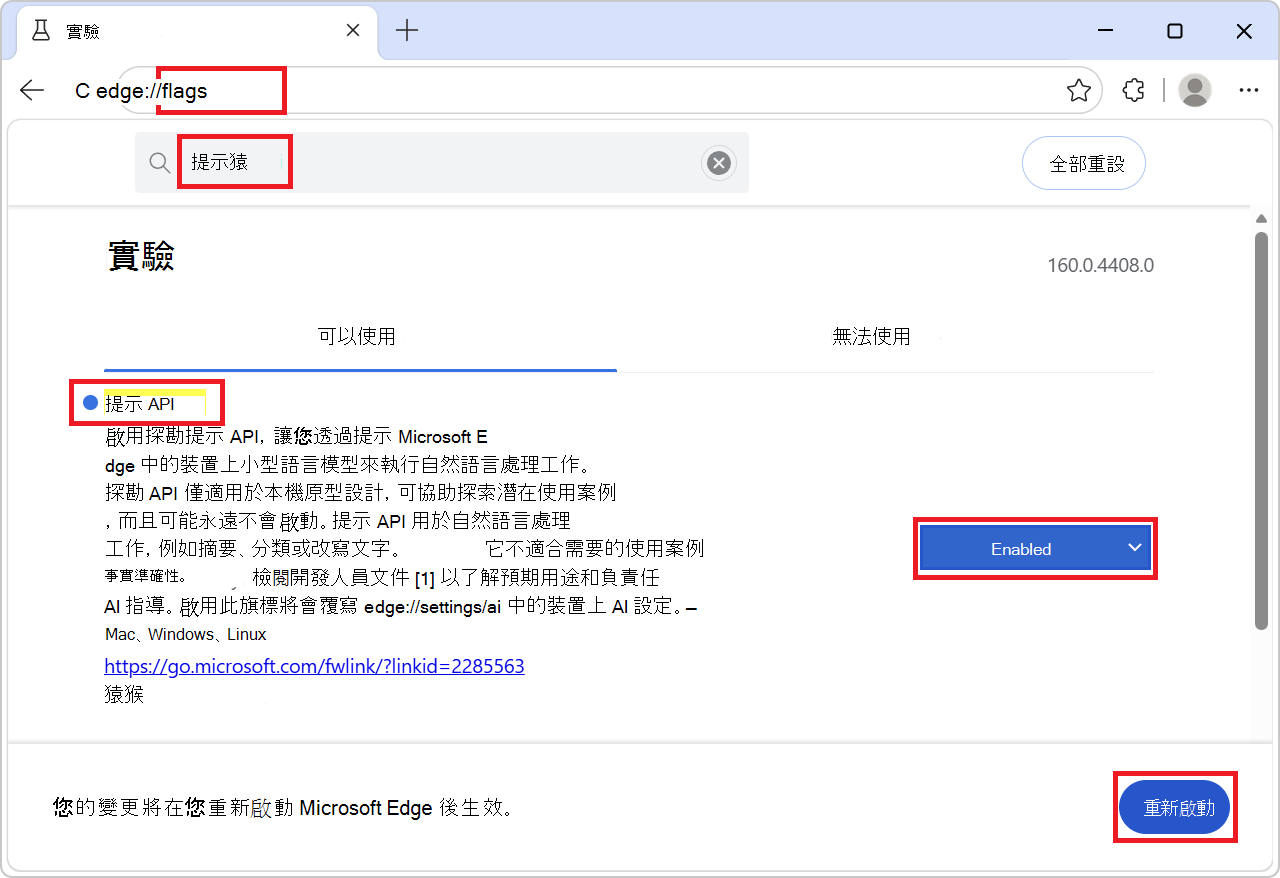
或者,若要在本機記錄可能對偵錯問題有用的資訊,也請啟用 [ 在裝置上啟用 AI 模型偵錯記錄] 旗標。
重新啟動 Edge。
若要檢查您的裝置是否符合提示 API 開發人員預覽的硬體需求,請開啟新的索引標籤,移至
edge://on-device-internals,然後檢查 裝置效能等級 值。如果您的裝置效能等級為 「中」 或更高,您的裝置上應該支援提示 API。
如果您發現這些模型有問題,請在 MSEdgeExplainers 存放庫中 建立新問題 。
註冊原始試用版,以為您的使用者啟用提示 API
您可以使用原始試用版,在自己的即時網站上嘗試提示 API,達限定時間。 使用提示 API 原始試用版時,造訪您網站的 Microsoft Edge 使用者可以執行使用提示 API 的程式碼。
若要深入了解 Microsoft Edge 中的原始試用版,請參閱使用 原始試用版測試實驗 API 和功能。
若要註冊提示 API 原始試用版,請遵循 註冊原始試用 版中的步驟,然後選取提示 API 原始試用版。
查看運作範例
若要查看 Prompt API 的實際運作方式,並檢閱使用該 API 的現有程式碼:
如前所述,啟用提示 API。
在 Microsoft Edge 中,開啟索引標籤或視窗,然後移至 提示 API playground。
在左側的 內建 AI 遊樂場 瀏覽中,已選取 [提示 ]。
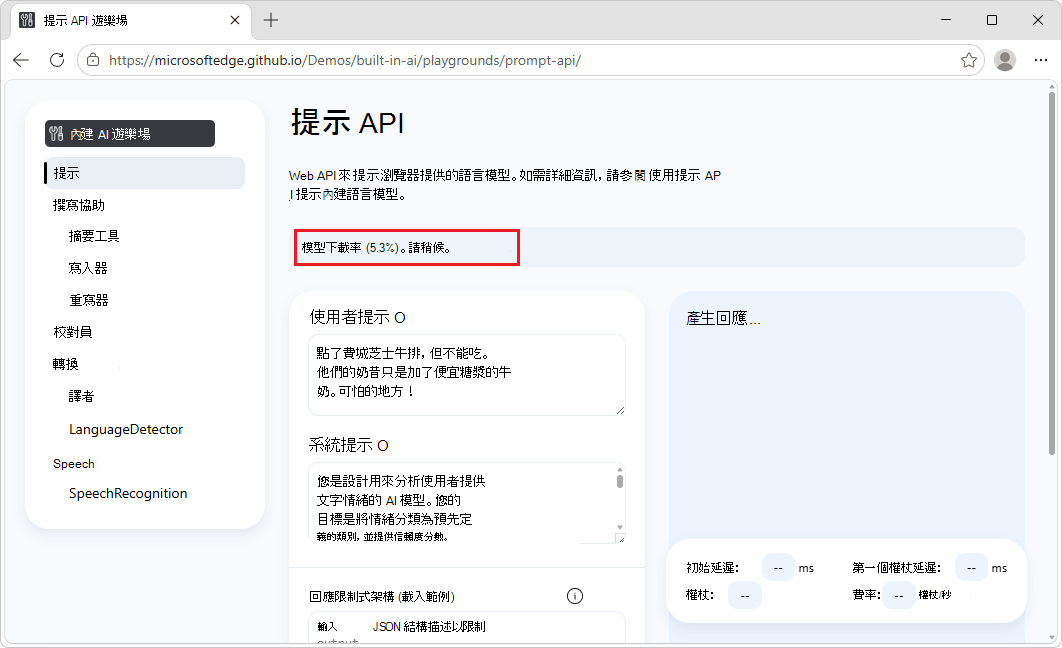
在頂端的資訊橫幅中,檢查狀態:最初顯示為 模型下載中,請稍候:
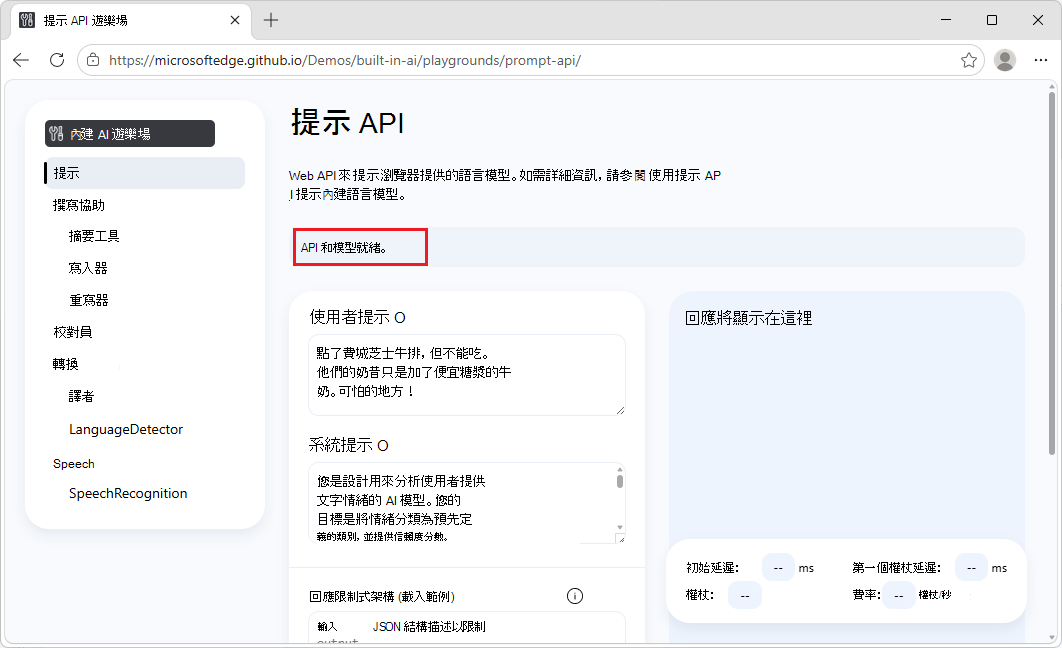
模型下載完成後,資訊橫幅會顯示 API 和模型就緒,表示可以使用 API 和模型:
如果模型下載未開始,請重新啟動 Microsoft Edge 並再試一次。
只有符合特定硬體需求的裝置才支援提示 API。 如需詳細資訊,請參閱上方的 硬體需求。
您可以選擇變更提示設定值,例如:
- 使用者提示
- 系統提示
- 回應限制式架構
- 其他設定>N-shot 提示說明
按一下頁面底部的 [ 提示 ] 按鈕。
回應會在頁面的回應區段中產生:
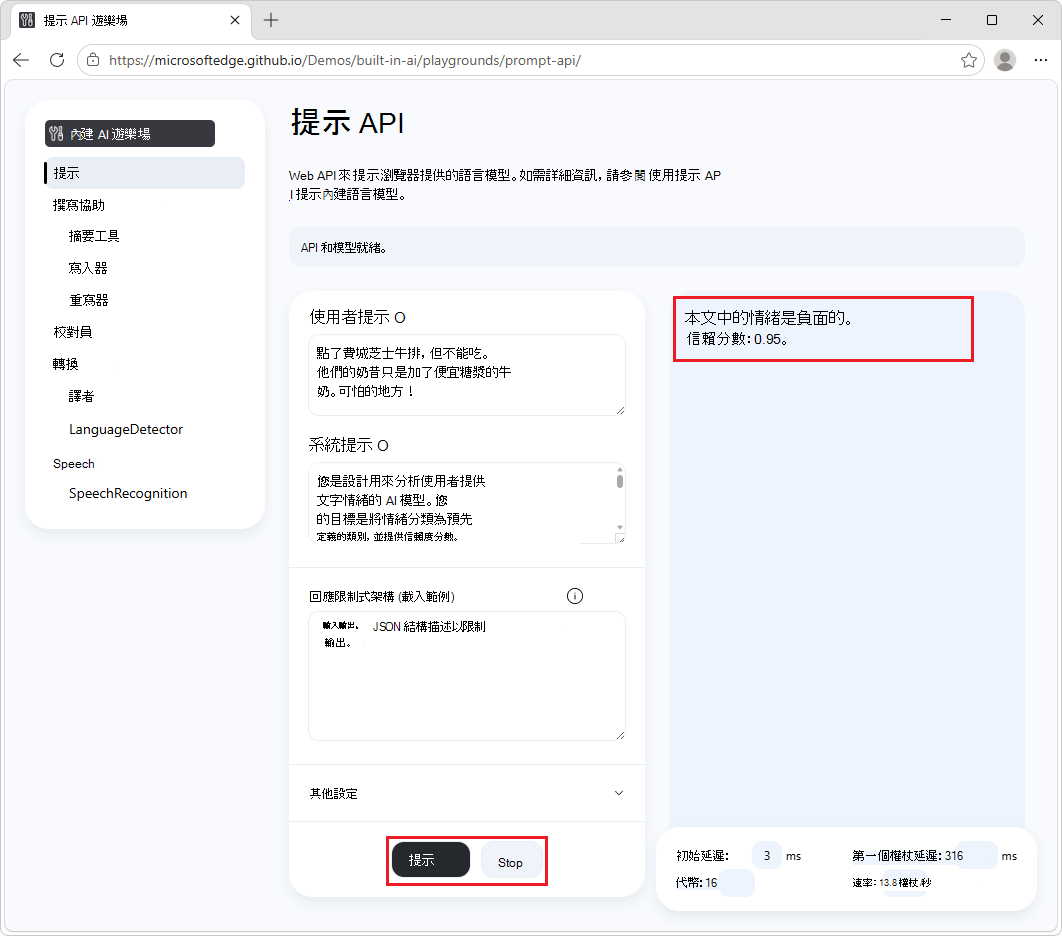
若要停止產生回應,請隨時按一下 [停止 ] 按鈕。
另請參閱:
- /built-in-ai/ - 內建 AI 遊樂場的原始程式碼和讀我檔案,包括提示 API 遊樂場。
使用提示 API
檢查 API 是否已啟用
在網站或擴充功能的程式碼中使用API之前,請測試物件的 LanguageModel 是否存在,以檢查API是否已啟用:
if (!LanguageModel) {
  // The Prompt API is not available.
} else {
  // The Prompt API is available.
}
檢查模型是否可以使用
只有在裝置支援執行模型,且 Microsoft Edge 下載語言模型和模型執行階段後,才能使用提示 API。
若要檢查是否可以使用 API,請使用 LanguageModel.availability() 下列方法:
const availability = await LanguageModel.availability();

if (availability == "unavailable") {
  // The model is not available.
}

if (availability == "downloadable" || availability == "downloading") {
  // The model can be used, but it needs to be downloaded first.
}

if (availability == "available") {
  // The model is available and can be used.
}
建立新的工作階段
建立工作階段會指示瀏覽器在記憶體中載入語言模型,以便可以使用。 在提示語言模型之前,請使用以下 create() 方法建立新的工作階段:
// Create a LanguageModel session.
const session = await LanguageModel.create();
若要自訂模型工作階段,您可以將選項傳遞給方法 create() :
// Create a LanguageModel session with options.
const session = await LanguageModel.create(options);
可用選項包括:
monitor,以追蹤模型下載的進度。initialPrompts,為模型提供將傳送至模型之提示的相關內容,並建立模型應遵循的使用者/助理互動模式,以供未來提示使用。
這些選項記錄如下。
監控模型下載進度
要跟踪模型下載的進度,請使用該 monitor 選項。 當模型尚未完全下載到將要使用該模型的設備上時,這很有用,可以通知您網站的用戶他們需要等待。
// Create a LanguageModel session with the monitor option to monitor the model
// download.
const session = await LanguageModel.create({
  monitor: m => {
    // Use the monitor object argument to add an listener for the
    // downloadprogress event.
    m.addEventListener("downloadprogress", event => {
      // The event is an object with the loaded and total properties.
      if (event.loaded == event.total) {
        // The model is fully downloaded.
      } else {
        // The model is still downloading.
        const percentageComplete = (event.loaded / event.total) * 100;
      }
    });
  }
});
為模型提供系統提示
若要定義系統提示 (這是一種提供模型指令以在產生文字以回應提示時使用的方法),請使用 initialPrompts 選項。
建立新工作階段時所提供的系統提示會保留整個工作階段,即使內容視窗因太多提示而溢位。
// Create a LanguageModel session with a system prompt.
const session = await LanguageModel.create({
  initialPrompts: [{
    role: "system",
    content: "You are a helpful assistant."
  }]
});
將提示放在 { role: "system", content: "You are a helpful assistant." } 中 initialPrompts 第 0 個位置以外的任何位置都會以 TypeError拒絕。
使用 initialPrompts 進行 N-shot 提示
該 initialPrompts 選項還允許您提供使用者/助理互動的範例,您希望模型在出現提示時繼續使用。
此技術也稱為 N-shot 提示 ,有助於使模型產生的回應更具確定性。
// Create a LanguageModel session with multiple initial prompts, for N-shot
// prompting.
const session = await LanguageModel.create({
  initialPrompts: [
    { role: "system", content: "Classify the following product reviews as either OK or Not OK." },
    { role: "user", content: "Great shoes! I was surprised at how comfortable these boots are for the price. They fit well and are very lightweight." },
    { role: "assistant", content: "OK" },
    { role: "user", content: "Terrible product. The manufacturer must be completely incompetent." },
    { role: "assistant", content: "Not OK" },
    { role: "user", content: "Could be better. Nice quality overall, but for the price I was expecting something more waterproof" },
    { role: "assistant", content: "OK" }
  ]
});
複製工作階段,以使用相同的選項重新開始交談
複製現有的工作階段,以在不知道先前互動的情況下提示模型,但使用相同的工作階段選項。
當您想要使用先前工作階段中的選項,但不影響具有先前回應的模型時,複製工作階段非常有用。
// Create a first LanguageModel session.
const firstSession = await LanguageModel.create({
  initialPrompts: [{
    role: "system",
    content: "You are a helpful assistant."
  }]
});

// Later, create a new session by cloning the first session to start a new
// conversation with the model, but preserve the first session's settings.
const secondSession = await firstSession.clone();
提示模型
若要提示模型,請在建立模型工作階段之後,使用 session.prompt() OR session.promptStreaming() 方法。
等待最終回覆
prompt這個方法會傳回一個 Promise,一旦模型完成產生文字以回應您的提示,就會解決該 Promise:
// Create a LanguageModel session.
const session = await LanguageModel.create();

// Prompt the model and wait for the response to be generated.
const result = await session.prompt(promptString);

// Use the generated text.
console.log(result);
在產生權杖時顯示權杖
promptStreaming此方法會立即傳回串流物件。 使用串流在產生回應權杖時顯示:
// Create a LanguageModel session.
 const session = await LanguageModel.create();

// Prompt the model.
 const stream = session.promptStreaming(myPromptString);

// Use the stream object to display tokens that are generated by the model, as
// they are being generated.
for await (const chunk of stream) {
  console.log(chunk);
}
您可以在相同的工作階段物件中多次呼叫 prompt and promptStreaming 方法,以根據先前與該工作階段中模型的互動繼續產生文字。
使用 JSON 結構描述或規則運算式限制模型輸出
若要讓模型回應的格式更具確定性,且更容易以程式設計方式使用,請在提示模型時使用 responseConstraint 選項。
此 responseConstraint 選項接受 JSON 結構描述或規則運算式:
若要讓模型以遵循指定結構描述的字串化 JSON 物件回應,請設定
responseConstraint為您想要使用的 JSON 結構描述。若要讓模型以符合規則運算式的字串回應,請設定
responseConstraint為該規則運算式。
下列範例顯示如何讓模型使用遵循指定結構描述的 JSON 物件來回應提示:
// Create a LanguageModel session, with a system prompt.
const session = await LanguageModel.create({
  initialPrompts: [
    {
      role: "system",
      content: "You are an AI model designed to analyze the sentiment of user-provided text. Your goal is to classify the sentiment into predefined categories and provide a confidence score. Follow these guidelines:\n\n- Identify whether the sentiment is positive, negative, or neutral.\n- Provide a confidence score (0-1) reflecting the certainty of the classification.\n- Ensure the sentiment classification is contextually accurate.\n- If the sentiment is unclear or highly ambiguous, default to neutral.\n\nYour responses should be structured and concise, adhering to the defined output schema."
    }
  ]
});

// Define a JSON schema for the Prompt API to constrain the generated response.
const schema = {
  "type": "object",
  "required": ["sentiment", "confidence"],
  "additionalProperties": false,
  "properties": {
    "sentiment": {
      "type": "string",
      "enum": ["positive", "negative", "neutral"],
      "description": "The sentiment classification of the input text."
    },
    "confidence": {
      "type": "number",
      "minimum": 0,
      "maximum": 1,
      "description": "A confidence score indicating certainty of the sentiment classification."
    }
  }
}
;

// Prompt the model, by providing the JSON schema in the responseConstraint
// option.
const response = await session.prompt(
  "Ordered a Philly cheesesteak, and it was not edible. Their milkshake is just milk with cheap syrup. Horrible place!",
  { responseConstraint: schema }
);
執行上述程式碼會傳回包含字串化 JSON 物件的回應,例如:
{"sentiment": "negative", "confidence": 0.95}
然後,您可以使用以下函數剖 JSON.parse() 析回應,以在程式碼邏輯中使用回應:
// Parse the JSON string generated by the model and extract the sentiment and
// confidence values.
const { sentiment, confidence } = JSON.parse(response);

// Use the values.
console.log(`Sentiment: ${sentiment}`);
console.log(`Confidence: ${confidence}`);
根據每個提示傳送多則訊息
除了字串之外,and promptpromptStreaming 方法也接受物件陣列,用來以自訂角色傳送多個訊息。 您傳送的物件應採用格式 { role, content },其中 role 是 或 assistantuser ,和 content 是訊息。
例如,若要在同一個提示中提供多個使用者訊息和助理訊息:
// Create a LanguageModel session.
const session = await LanguageModel.create();

// Prompt the model by sending multiple messages at once.
const result = await session.prompt([
  { role: "user", content: "First user message" },
  { role: "user", content: "Second user message" },
  { role: "assistant", content: "The assistant message" }
]);
停止產生文字
若要在 Promise 所傳回的 Promise 完成之前,或是在 Response 傳session.prompt()session.promptStreaming()回的資料流程結束之前中止提示,請使用AbortController訊號:
// Create a LanguageModel session.
const session = await LanguageModel.create();

// Create an AbortController object.
const abortController = new AbortController();

// Prompt the model by passing the AbortController object by using the signal
// option.
const stream = session.promptStreaming(myPromptString , {
  signal: abortController.signal
});

// Later, perhaps when the user presses a "Stop" button, call the abort()
// method on the AbortController object to stop generating text.
abortController.abort();
終結工作階段
銷毀會話,讓瀏覽器知道你不再需要語言模型,這樣就可以從記憶體中卸載模型。
您可以使用兩種不同的方式終結工作階段:
- 方法是使用方法
destroy()。 - 透過使用
AbortController。
使用 destroy () 方法終結工作階段
// Create a LanguageModel session.
const session = await LanguageModel.create();

// Later, destroy the session by using the destroy method.
session.destroy();
使用 AbortController 終結工作階段
// Create an AbortController object.
const controller = new AbortController();

// Create a LanguageModel session and pass the AbortController object by using
// the signal option.
const session = await LanguageModel.create({ signal: controller.signal });

// Later, perhaps when the user interacts with the UI, destroy the session by
// calling the abort() function of the AbortController object.
controller.abort();
帳戶 AI 產生的內容浮水印
從 Microsoft Edge 版本 158 開始,提示 API 產生的文字會包含不可見浮水印,表示文字是 AI 產生。 如果您的網站或擴充功能會處理產生的文字,請確定您的程式碼在轉譯、剖析或轉換回應時考慮到浮水印。
若要深入了解浮水印配置,請參閱 Windows AI 文字 API 中的浮水印中的浮水印配置。
浮水印不會套用至使用 responseConstraint 選項產生的回應。 請參閱上方的 使用 JSON 結構描述或規則運算式來限制模型輸出。
移除自動插入浮水印之前,請先考慮下列需求: 您有責任確保您的網站或擴充功能符合所有標示 AI 產生內容的適用需求。
傳送意見反應
提示 API 開發人員預覽和原始試用版旨在協助探索瀏覽器提供的語言模型的使用案例。
我們有興趣了解:
- 您要使用提示 API 的案例範圍。
- 提示 API 的任何問題。
- Aion Instruct 模型的任何問題。
- 在不同瀏覽器和模型之間,提示 API 互通性所面臨的任何挑戰。
- 新的工作特定 API 是否有用。
若要傳送有關您的案例和您想要達成之工作的意見反應,請在 提示 API 意見反應問題中新增留言。
如果您在改用 API 時發現任何問題,請 在存放庫中回報。
您也可以參與 W3C Web 機器學習工作群組存放庫中提示 API 設計的討論。
另請參閱
- 提示 API 草稿規格
- webmachinelearning/prompt-api GitHub 存放庫
- /built-in-ai/ - 內建 AI 遊樂場的原始程式碼和讀我檔案,包括提示 API 遊樂場。
- 使用撰寫協助 API 摘要、撰寫和重寫文字
- 使用 Decisions API 分類文字
- 使用校對器 API 修正文字中的文法、拼字和標點符號錯誤
- 使用語言偵測器 API 偵測語言
- 使用翻譯工具 API 翻譯文字