本文示範如何使用 GitHub Actions 和 Power Automate 雲端流程來擴充 Power Platform 中的管線。 提交管線部署時,雲端流程會觸發 GitHub 工作流程下載、解壓縮成品的原始程式碼,並將其認可到 GitHub 分支。
工作流程詳細資料
工作流程會透過 workflow_dispatch 事件觸發。 工作流程在 ubuntu-latest 上執行,並具有能夠將變更認可到 GitHub 存放庫分支的 contents: write 權限。
工作流程包含下列步驟:
-
actions/checkout@v3:檢出存放庫。 -
create new branch if specified:如果在輸入中指定了target_branch,則建立一個新的分支。 -
download solution from artifact:從管線建立的成品下載解決方案。 -
unpack solution:解壓縮解決方案。 -
commit changes:將變更提交到現有或新的分支。 -
push to branch:將已提交的變更推送至來源分支。
工作流程輸入
以下工作流程輸入是必要的或選擇性的:
-
artifact_url(必要):管線建立的成品的 Microsoft Dataverse 資料列 (記錄) ID 的 URL。 -
solution_name(必要):Dataverse 環境中解決方案的名稱。 -
source_branch(必要):解決方案提交的分支。 -
target_branch(選用):為解決方案提交建立的分支。 如果未指定,系統會使用source_branch。 -
commit_message(必要):提供提交的訊息。
工作流程密碼
使用在 Dataverse 和 Microsoft Entra ID (AD) 中設定的應用程式使用者連線到 Dataverse需要以下密碼。 在 GitHub 存放庫設定中設定這些密碼。
-
CLIENT_ID:已註冊 Microsoft Entra 應用程式的用戶端ID。 -
TENANT_ID:與 Microsoft Entra 應用程式關聯的 Microsoft Entra 目錄的租用戶 ID。 -
CLIENT_SECRET:已註冊 Microsoft Entra 應用程式的用戶端密碼。
有關更多資訊,請前往建立和使用加密密碼和建立應用程式使用者。
工作流程程式碼
下面列出的是 GitHub Actions 工作流程程式碼。
name: Download, unpack and commit the solution to git
run-name: Getting ${{ github.event.inputs.solution_name }} from pipelines host environment and committing
on:
  workflow_dispatch:
    inputs:
      artifact_url:
        description: "The url of the Dataverse record ID for the artifact created by the pipelines (Example: https://[your-env].crm.dynamics.com/api/data/v9.0/deploymentartifacts([your-artifact-id])/artifactfile/$value)."
        required: true
      solution_name:
        description: "Name of the Solution in Dataverse environment"
        required: true
      user_name:
        description: "User name for the commit"
        required: true
      source_branch:
        description: "Branch for the solution commit"
        required: true
      target_branch:
        description: "Branch to create for the solution commit"
        required: false
      commit_message:
        description: "Message to provide for the commit"
        required: true
permissions:
  contents: write
jobs:
  export-unpack-commit:
    runs-on: ubuntu-latest

    steps:
      - uses: actions/checkout@v3
        with:
            ref: ${{ github.event.inputs.source_branch }}

      # Commit changes to the existing or new branch
      - name: create new branch if specified
        shell: pwsh
        run: |
            if('${{ github.event.inputs.target_branch }}' -ne '') {
                git checkout -b ${{ github.event.inputs.target_branch }} ${{ github.event.inputs.source_branch }}
            }

      # Export the solution from the artifact created by pipelines
      - name: download solution from artifact
        env:
            CLIENT_ID: ${{secrets.CLIENT_ID}}
            TENANT_ID: ${{secrets.TENANT_ID}}
            CLIENT_SECRET: ${{secrets.CLIENT_SECRET}}
        shell: pwsh
        run: |
            $aadHost = "login.microsoftonline.com"
            $url = "${{ github.event.inputs.artifact_url }}"
            $options = [System.StringSplitOptions]::RemoveEmptyEntries
            $dataverseHost = $url.Split("://", $options)[1].Split("/")[0]

            $body = @{client_id = $env:CLIENT_ID; client_secret = $env:CLIENT_SECRET; grant_type = "client_credentials"; scope = "https://$dataverseHost/.default"; }
            $OAuthReq = Invoke-RestMethod -Method Post -Uri "https://$aadHost/$env:TENANT_ID/oauth2/v2.0/token" -Body $body
            $spnToken = $OAuthReq.access_token
            $headers = New-Object "System.Collections.Generic.Dictionary[[String],[String]]"
            $headers.Add("Authorization", "Bearer $spnToken")
            $headers.Add("Content-Type", "application/json")

            # Download the managed solution
            $response = Invoke-RestMethod "${{ github.event.inputs.artifact_url }}" -Method 'GET' -Headers $headers
            $bytes = [Convert]::FromBase64String($response.value)
            [IO.File]::WriteAllBytes("${{ github.event.inputs.solution_name }}_managed.zip", $bytes)

            # Download the unmanaged solution (for now we will need to use string manipulation to get the unmanaged solution URL, until the API provides this value)
            $unmanaged_artifact_url = "${{ github.event.inputs.artifact_url }}".Replace("artifactfile", "artifactfileunmanaged")
            $response = Invoke-RestMethod "$unmanaged_artifact_url" -Method 'GET' -Headers $headers
            $bytes = [Convert]::FromBase64String($response.value)
            [IO.File]::WriteAllBytes("${{ github.event.inputs.solution_name }}.zip", $bytes)

      # Unpack the solution
      - name: unpack solution
        uses: microsoft/powerplatform-actions/unpack-solution@v0
        with:
          solution-file: "${{ github.event.inputs.solution_name }}.zip"
          solution-folder: "${{ github.event.repository.name }}"
          solution-type: 'Both'
          process-canvas-apps: false
          overwrite-files: true

      # Commit changes to the existing or new branch
      - name: commit changes
        shell: pwsh
        run: |
          rm -rf ${{ github.event.inputs.solution_name }}.zip
          rm -rf ${{ github.event.inputs.solution_name }}_managed.zip
          git config user.name ${{ github.event.inputs.user_name }}
          git pull
          git add --all
          git commit -am "${{ github.event.inputs.commit_message }}" --allow-empty

      # Push the committed changes to the source branch
      - name: push to branch
        shell: pwsh
        run: |
          if('${{ github.event.inputs.target_branch }}' -ne '') {
              git push origin ${{ github.event.inputs.target_branch }}
          } else {
              git push origin ${{ github.event.inputs.source_branch }}
          }
注意
用於下載解決方案成品的 Dataverse Web API,其最大檔案大小限制為 16 MB。
Power Automate 流程範例
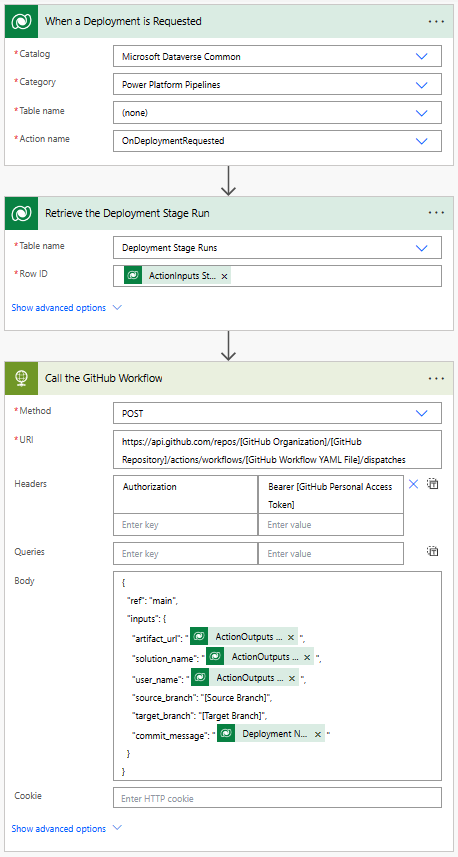
若要呼叫 GitHub 工作流程,您可以建立在 Dataverse 中發出部署要求時觸發的 Power Automate 流程。 可以將該流程設定為將所需的輸入傳遞給 GitHub 工作流程。 有關如何建立 Power Automate 流程的更多資訊,請前往建立流程。
流程詳細資料
當在 Dataverse 中執行 OnDeploymentRequested 動作時會觸發該流程。 該流程會呼叫 HTTP 連接器來觸發 GitHub 工作流程。 該流程會將所需的輸入傳遞給 GitHub 工作流程。 在要求本文包含以下輸入:
-
artifact_url:管線建立的 Dataverse 解決方案成品的 URL。 -
solution_name:Dataverse 環境中解決方案的名稱。 -
user_name:提交的使用者名。 -
source_branch:解決方案提交的來源分支。 -
target_branch:為解決方案提交已建立的分支。 -
commit_message:提供提交的訊息。
傳遞給 artifact_urlsolution_name 和 user_name 的值是從觸發管線之動作的輸出中提取的。
commit_message 是從 Dataverse 中的部署階段執行資料列中提取的。
-
artifact_url:@{triggerOutputs()?['body/OutputParameters/ArtifactFileDownloadLink']} -
solution_name:@{triggerOutputs()?['body/OutputParameters/ArtifactName']} -
user_name:@{triggerOutputs()?['body/OutputParameters/DeployAsUser']} -
commit_message:@{outputs('Retrieve_the_Deployment_Stage_Run')?['body/deploymentnotes']}
該流程還使用個人存取權杖 (PAT) 向 GitHub 進行驗證。 有關如何建立 GitHub 個人存取權杖的更多資訊,請前往建立個人存取權杖。 PAT 在 HTTP 要求的 Authorization 標題中傳遞。
更新流程中的以下值:
-
[GitHub Personal Access Token]- 替換為您的 GitHub 個人存取權權杖。 -
[GitHub Organization]- 替換為您的 GitHub 組織名稱。 -
[GitHub Repository]- 替換為您的 GitHub 存放庫名稱。 -
[GitHub Workflow YAML File]- 替換為您的 GitHub 工作流程 YAML 檔案名稱。 -
[Source Branch]- 用 Git 分支替換來提交解決方案。 -
[Target Branch]- 替換為 Git 分支來為解決方案提交建立。Target Branch是選擇性的。 如果未指定目標分支,則解決方案將認可到Source Branch。