若要渲染位圖,請使用 ID2D1RenderTarget::DrawBitmap 方法。 下列範例示範如何使用 DrawBitmap 方法來繪製 ID2D1Bitmap。 它會建立下圖所示的輸出。
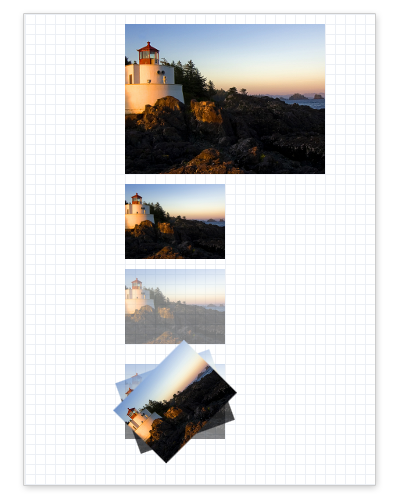
首先,建立 ID2D1Bitmap。 下列範例會從應用程式的資源檔案載入點陣圖,並將它儲存為 m_pBitmap。 (若要查看如何實作 LoadResourceBitmap 方法,請參閱如何從資源 載入位圖。
// Create a bitmap from an application resource.
hr = LoadResourceBitmap(
    m_pRenderTarget,
    m_pWICFactory,
    L"SampleImage",
    L"Image",
    200,
    0,
    &m_pBitmap
    );
在建立將用來繪製位圖的轉譯目標所在的相同方法中,建立 ID2D1Bitmap,並在釋放轉譯目標時釋放位圖。
建立位圖之後,渲染它。 下列範例使用 DrawBitmap 方法,透過不同大小和透明度的設定來多次呈現位圖。
HRESULT DrawBitmapExample::OnRender()
{
    HRESULT hr;

    hr = CreateDeviceResources();

    if (SUCCEEDED(hr))
    {
        // Retrieve the size of the render target.
        D2D1_SIZE_F renderTargetSize = m_pRenderTarget->GetSize();

        m_pRenderTarget->BeginDraw();
        m_pRenderTarget->SetTransform(D2D1::Matrix3x2F::Identity());
        m_pRenderTarget->Clear(D2D1::ColorF(D2D1::ColorF::White));

        // Paint a grid background.
        m_pRenderTarget->FillRectangle(
            D2D1::RectF(0.0f, 0.0f, renderTargetSize.width, renderTargetSize.height),
            m_pGridPatternBitmapBrush
            );

        // Retrieve the size of the bitmap.
        D2D1_SIZE_F size = m_pBitmap->GetSize();

        D2D1_POINT_2F upperLeftCorner = D2D1::Point2F(100.f, 10.f);

        // Draw a bitmap.
        m_pRenderTarget->DrawBitmap(
            m_pBitmap,
            D2D1::RectF(
                upperLeftCorner.x,
                upperLeftCorner.y,
                upperLeftCorner.x + size.width,
                upperLeftCorner.y + size.height)
            );

        // Draw the next bitmap below the first one.
        upperLeftCorner.y = upperLeftCorner.y + size.height + 10.f;

        // Scale the bitmap to half its size using the linear
        // interpolation mode and draw it.
        float scaledWidth = size.width / 2.f;
        float scaledHeight = size.height / 2.f;
        m_pRenderTarget->DrawBitmap(
            m_pBitmap,
            D2D1::RectF(
                upperLeftCorner.x,
                upperLeftCorner.y,
                upperLeftCorner.x + scaledWidth,
                upperLeftCorner.y + scaledHeight),
            1.0,
            D2D1_BITMAP_INTERPOLATION_MODE_LINEAR
            );

        // Draw the bitmap at half its size and half its opacity.
        upperLeftCorner.y = upperLeftCorner.y + size.height / 2.f + 10.f;
        m_pRenderTarget->DrawBitmap(
            m_pBitmap,
            D2D1::RectF(
                upperLeftCorner.x,
                upperLeftCorner.y,
                upperLeftCorner.x + scaledWidth,
                upperLeftCorner.y + scaledHeight),
            0.5,
            D2D1_BITMAP_INTERPOLATION_MODE_LINEAR
            );

        // Draw a series of bitmaps with different opacity and
        // rotation angles.
        upperLeftCorner.y = upperLeftCorner.y + scaledHeight + 20.f;
        m_pRenderTarget->DrawBitmap(
            m_pBitmap,
            D2D1::RectF(
                upperLeftCorner.x,
                upperLeftCorner.y,
                upperLeftCorner.x + scaledWidth,
                upperLeftCorner.y + scaledHeight),
            0.5,
            D2D1_BITMAP_INTERPOLATION_MODE_LINEAR
            );

        D2D1_POINT_2F lowerLeftCorner = D2D1::Point2F(upperLeftCorner.x, upperLeftCorner.y + scaledHeight);
        D2D1_POINT_2F imageCenter = D2D1::Point2F(
            upperLeftCorner.x + scaledWidth / 2,
            upperLeftCorner.y + scaledHeight / 2
            );

        // Rotate the next bitmap by -20 degrees.
        m_pRenderTarget->SetTransform(
            D2D1::Matrix3x2F::Rotation(-20, imageCenter)
            );

        m_pRenderTarget->DrawBitmap(
            m_pBitmap,
            D2D1::RectF(
                upperLeftCorner.x,
                upperLeftCorner.y,
                upperLeftCorner.x + scaledWidth,
                upperLeftCorner.y + scaledHeight),
            0.75,
            D2D1_BITMAP_INTERPOLATION_MODE_LINEAR
            );

        m_pRenderTarget->SetTransform(
            D2D1::Matrix3x2F::Rotation(-45, imageCenter)
            );

        // Make the last bitmap fully opaque.
        m_pRenderTarget->DrawBitmap(
            m_pBitmap,
            D2D1::RectF(
                upperLeftCorner.x,
                upperLeftCorner.y,
                upperLeftCorner.x + scaledWidth,
                upperLeftCorner.y + scaledHeight),
            1.0,
            D2D1_BITMAP_INTERPOLATION_MODE_LINEAR
            );

        hr = m_pRenderTarget->EndDraw();

        if (hr == D2DERR_RECREATE_TARGET)
        {
            hr = S_OK;
            DiscardDeviceResources();
        }
    }

    return hr;
}
DrawBitmap 方法在失敗時不會傳回錯誤碼。 若要判斷繪圖作業(例如 DrawBitmap)是否失敗,請檢查 ID2D1RenderTarget::EndDraw 方法傳回的結果,如下列範例所示。
hr = m_pRenderTarget->EndDraw();
此範例已省略程序代碼。
相關主題
-
如何從資源 載入位圖