Microsoft služba Foundry Agent používá tři základní komponenty modulu runtime – agents, konversations a responses – pro stavové a vícenásobné interakce. Agent používá model z katalogu modelů Foundry spolu s pokyny a nástroji. Konverzace uchovává historii napříč replikami. Odpověď je výstup, který agent vytvoří při zpracování vstupu.
Zvolte komponenty na základě chování a stavu, které vaše aplikace potřebuje:
| Součást |
Vztah |
Použijte ji, když |
|
Agent |
Poskytuje opakovaně použitelný model, pokyny a nástroje pro odpověď. |
Více požadavků vyžaduje stejné chování nebo konfiguraci nástroje. |
|
Konverzace |
Poskytuje trvalé vstupní a výstupní položky pro odpovědi. |
Následující tahy vyžadují historii na straně serveru. |
|
odpověď |
Spustí model nebo agenta proti vstupu a vytvoří výstupní položky. |
Každá interakce vyžaduje jednu jednotku spuštění bez ohledu na to, zda zahrnuje agenta nebo konverzaci. |
Začněte s odpovědí pro jednu interakci. Přidejte agenta pro opakovaně použitelné chování, konverzaci pro trvalou historii nebo obojí. Podrobnosti o implementaci získáte tak, že přímo vytvoříte agenta, vygenerujete odpovědi nebo budete pracovat s konverzacemi a položkami konverzace.
Komponenty spolupracují v předvídatelném životním cyklu. Představte si například asistenta podpory, který odpovídá na následnou otázku:
- Aplikace vybere agenta, který definuje pokyny a nástroje podpory.
- Vytvoří konverzaci a přidá první otázku zákazníka jako vstupní položku.
- Odpověď spustí agenta proti konverzaci a připojí výstupní položky.
- Další odpověď používá stejnou konverzaci, takže agent může odpovědět na následnou otázku v kontextu.
Bez konverzace může aplikace místo toho přenášet kontext dál odkazováním na předchozí uloženou odpověď nebo opětovným odesláním dřívějších položek. Režim streamování a pozadí mění způsob, jakým aplikace přijímá odpověď, nikoli vztah mezi agenty, konverzacemi a odpověďmi.
Následující diagram znázorňuje, jak tyto komponenty komunikují v typické smyčce agenta.
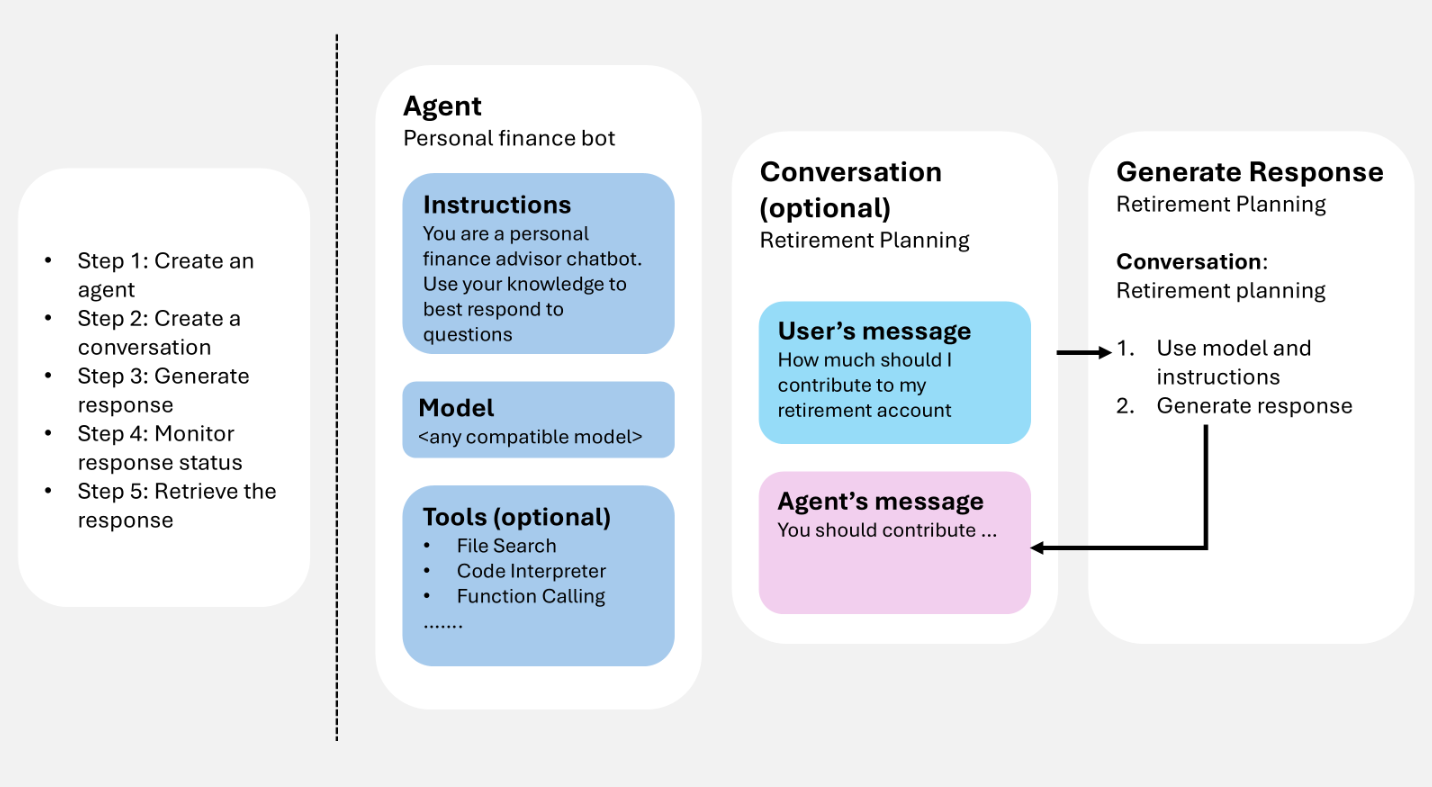
Zadáte uživatelský vstup (a volitelně historii konverzací), služba vygeneruje odpověď (včetně volání nástrojů při konfiguraci) a výsledné položky je možné znovu použít jako kontext pro další turnu.
Pokud k návrhu spolupráce agentů, konverzací a odpovědí používáte programovacího agenta, jako je GitHub Copilot, může vám Microsoft Foundry Skill pomoct tyto komponenty použít na pracovní postup vaší aplikace.
Požadavky
Pokud chcete spustit ukázky v tomto článku, potřebujete:
pip install "azure-ai-projects>=2.0.0"
pip install azure-identity
dotnet add package Azure.AI.Projects
dotnet add package Azure.AI.Projects.Agents
dotnet add package Azure.AI.Extensions.OpenAI
dotnet add package Azure.Identity
npm install @azure/ai-projects
npm install @azure/identity
Použijte Node.js 22 nebo novější s @azure/ai-projects verzí 2.8.0.
<dependency>
    <groupId>com.azure</groupId>
    <artifactId>azure-ai-agents</artifactId>
    <version>2.2.0</version>
</dependency>
<dependency>
    <groupId>com.azure</groupId>
    <artifactId>azure-identity</artifactId>
    <version>1.18.4</version>
</dependency>
Nevyžaduje se žádná instalace sady SDK. K získání přístupového tokenu použijte Azure CLI:
az login
Vytvoření agenta
Agent je trvalá definice orchestrace, která kombinuje modely AI, instrukce, kód, nástroje, parametry a volitelné ovládací prvky zabezpečení nebo řízení zásad správného řízení.
Agenti uložte v Microsoft Foundry jako pojmenovaná, verzovaná aktiva. Během generování odpovědí definice agenta pracuje s historií interakce (konverzací nebo předchozí odpovědí) na zpracování a odpovídání na uživatelský vstup.
Následující příklad vytvoří agenta výzvy s názvem, modelem a pokyny. K vytvoření a správě verzí agenta použijte klienta projektu.
from azure.identity import DefaultAzureCredential
from azure.ai.projects import AIProjectClient
from azure.ai.projects.models import PromptAgentDefinition

# Format: "https://resource_name.services.ai.azure.com/api/projects/project_name"
PROJECT_ENDPOINT = "your_project_endpoint"

# Create project client to call Foundry API
project = AIProjectClient(
    endpoint=PROJECT_ENDPOINT,
    credential=DefaultAzureCredential(),
)

# Create a prompt agent
agent = project.agents.create_version(
    agent_name="my-agent",
    definition=PromptAgentDefinition(
        model="gpt-5-mini",
        instructions="You are a helpful assistant.",
    ),
)
print(f"Agent: {agent.name}, Version: {agent.version}")
using Azure.Identity;
using Azure.AI.Projects;

// Format: "https://resource_name.services.ai.azure.com/api/projects/project_name"
var projectEndpoint = "your_project_endpoint";

// Create project client to call Foundry API
AIProjectClient projectClient = new(
    endpoint: new Uri(projectEndpoint),
    tokenProvider: new DefaultAzureCredential());

// Create a prompt agent
ProjectsAgentVersion agent = await projectClient.AgentAdministrationClient
    .CreateAgentVersionAsync(
        agentName: "my-agent",
        options: new(
            new DeclarativeAgentDefinition("gpt-5-mini")
            {
                Instructions = "You are a helpful assistant.",
            }));
Console.WriteLine($"Agent: {agent.Name}, Version: {agent.Version}");
import { DefaultAzureCredential } from "@azure/identity";
import { AIProjectClient } from "@azure/ai-projects";

// Format: "https://resource_name.services.ai.azure.com/api/projects/project_name"
const PROJECT_ENDPOINT = "your_project_endpoint";

// Create project client to call Foundry API
const project = new AIProjectClient(PROJECT_ENDPOINT, new DefaultAzureCredential());

// Create a prompt agent
const agent = await project.agents.createVersion(
  "my-agent",
  {
    kind: "prompt",
    model: "gpt-5-mini",
    instructions: "You are a helpful assistant.",
  },
);
console.log(`Agent: ${agent.name}, Version: ${agent.version}`);
import com.azure.ai.agents.AgentsClientBuilder;
import com.azure.ai.agents.AgentsClient;
import com.azure.ai.agents.models.PromptAgentDefinition;
import com.azure.identity.DefaultAzureCredentialBuilder;

// Format: "https://resource_name.services.ai.azure.com/api/projects/project_name"
String projectEndpoint = "your_project_endpoint";

// Create agents client to call Foundry API
AgentsClient agentsClient = new AgentsClientBuilder()
    .credential(new DefaultAzureCredentialBuilder().build())
    .endpoint(projectEndpoint)
    .buildAgentsClient();

// Create a prompt agent
PromptAgentDefinition definition = new PromptAgentDefinition("gpt-5-mini");
definition.setInstructions("You are a helpful assistant.");

var agent = agentsClient.createAgentVersion("my-agent", definition);
System.out.println("Agent: " + agent.getName() + ", Version: " + agent.getVersion());
# Configuration
ENDPOINT="https://{resource_name}.services.ai.azure.com/api/projects/{project_name}"
ACCESS_TOKEN="$(az account get-access-token --resource https://ai.azure.com/ --query accessToken -o tsv)"

# Create a prompt agent
curl -X POST "${ENDPOINT}/agents?api-version=v1" \
  -H "Authorization: Bearer ${ACCESS_TOKEN}" \
  -H "Content-Type: application/json" \
  -d '{
    "name": "my-agent",
    "definition": {
      "kind": "prompt",
      "model": "gpt-5-mini",
      "instructions": "You are a helpful assistant."
    }
  }'
Poznámka
Agenti se teď identifikují pomocí názvu agenta a verze agenta. Už nemají identifikátor GUID s názvem AgentID.
Další typy agentů (hostované) najdete v tématu Životní cyklus vývoje agenta.
Nástroje rozšiřují, co může agent dělat nad rámec generování textu. Když k agentu připojíte nástroje, může agent během generování odpovědí volat externí služby, spouštět kód, prohledávat soubory a přistupovat ke zdrojům dat – pomocí nástrojů, jako je vyhledávání na webu nebo volání funkcí.
Při vytváření agenta můžete připojit jeden nebo více nástrojů. Během generování odpovědí se agent rozhodne, jestli má volat nástroj na základě vstupu uživatele a jeho pokynů. Následující příklad vytvoří agenta s připojeným nástrojem pro vyhledávání na webu.
from azure.identity import DefaultAzureCredential
from azure.ai.projects import AIProjectClient
from azure.ai.projects.models import PromptAgentDefinition, WebSearchTool

PROJECT_ENDPOINT = "your_project_endpoint"

project = AIProjectClient(
    endpoint=PROJECT_ENDPOINT,
    credential=DefaultAzureCredential(),
)

# Create an agent with a web search tool
agent = project.agents.create_version(
    agent_name="my-tool-agent",
    definition=PromptAgentDefinition(
        model="gpt-5-mini",
        instructions="You are a helpful assistant that can search the web.",
        tools=[WebSearchTool()],
    ),
)
print(f"Agent: {agent.name}, Version: {agent.version}")
using Azure.Identity;
using Azure.AI.Projects;

var projectEndpoint = "your_project_endpoint";

AIProjectClient projectClient = new(
    endpoint: new Uri(projectEndpoint),
    tokenProvider: new DefaultAzureCredential());

// Create an agent with a web search tool
ProjectsAgentVersion agent = await projectClient.AgentAdministrationClient
    .CreateAgentVersionAsync(
        agentName: "my-tool-agent",
        options: new(
            new DeclarativeAgentDefinition("gpt-5-mini")
            {
                Instructions = "You are a helpful assistant that can search the web.",
                Tools = { ResponseTool.CreateWebSearchTool() },
            }));
Console.WriteLine($"Agent: {agent.Name}, Version: {agent.Version}");
import { DefaultAzureCredential } from "@azure/identity";
import { AIProjectClient } from "@azure/ai-projects";

const PROJECT_ENDPOINT = "your_project_endpoint";
const project = new AIProjectClient(PROJECT_ENDPOINT, new DefaultAzureCredential());

// Create an agent with a web search tool
const agent = await project.agents.createVersion(
  "my-tool-agent",
  {
    kind: "prompt",
    model: "gpt-5-mini",
    instructions: "You are a helpful assistant that can search the web.",
    tools: [{ type: "web_search_preview" }],
  },
);
console.log(`Agent: ${agent.name}, Version: ${agent.version}`);
import com.azure.ai.agents.AgentsClientBuilder;
import com.azure.ai.agents.AgentsClient;
import com.azure.ai.agents.models.PromptAgentDefinition;
import com.azure.ai.agents.models.WebSearchPreviewTool;
import com.azure.identity.DefaultAzureCredentialBuilder;
import java.util.Collections;

String projectEndpoint = "your_project_endpoint";

AgentsClient agentsClient = new AgentsClientBuilder()
    .credential(new DefaultAzureCredentialBuilder().build())
    .endpoint(projectEndpoint)
    .buildAgentsClient();

// Create an agent with a web search tool
WebSearchPreviewTool webSearchTool = new WebSearchPreviewTool();
PromptAgentDefinition definition = new PromptAgentDefinition("gpt-5-mini");
definition.setInstructions("You are a helpful assistant that can search the web.");
definition.setTools(Collections.singletonList(webSearchTool));

var agent = agentsClient.createAgentVersion("my-tool-agent", definition);
System.out.println("Agent: " + agent.getName() + ", Version: " + agent.getVersion());
ENDPOINT="https://{resource_name}.services.ai.azure.com/api/projects/{project_name}"
ACCESS_TOKEN="$(az account get-access-token --resource https://ai.azure.com/ --query accessToken -o tsv)"

# Create an agent with a web search tool
curl -X POST "${ENDPOINT}/agents?api-version=v1" \
  -H "Authorization: Bearer ${ACCESS_TOKEN}" \
  -H "Content-Type: application/json" \
  -d '{
    "name": "my-tool-agent",
    "definition": {
      "kind": "prompt",
      "model": "gpt-5-mini",
      "instructions": "You are a helpful assistant that can search the web.",
      "tools": [{ "type": "web_search_preview" }]
    }
  }'
Úplný seznam dostupných nástrojů a postup jejich přidání do panelu nástrojů najdete v přehledu panelu nástrojů. Osvědčené postupy najdete v tématu Osvědčené postupy pro používání nástrojů.
Generování odpovědí
Generování odpovědí vyvolá agenta. Agent používá svou konfiguraci a veškerou poskytnutou historii (konverzaci nebo předchozí odpověď) k provádění úloh voláním modelů a nástrojů. V rámci generování odpovědí agent připojí položky ke konverzaci.
Můžete také vygenerovat odpověď bez definování agenta. V takovém případě zadáte všechny konfigurace přímo v požadavku a použijete je jenom pro tuto odpověď. Tento přístup je užitečný pro jednoduché scénáře s minimálními nástroji.
Kromě toho můžete konverzaci forkovat u ID první odpovědi nebo id druhé odpovědi.
Vygenerování odpovědi pomocí agenta
Následující příklad vygeneruje odpověď pomocí odkazu na agenta a pak odešle následnou otázku pomocí předchozí odpovědi jako kontextu.
from azure.identity import DefaultAzureCredential
from azure.ai.projects import AIProjectClient

# Format: "https://resource_name.services.ai.azure.com/api/projects/project_name"
PROJECT_ENDPOINT = "your_project_endpoint"
AGENT_NAME = "your_agent_name"

# Create clients to call Foundry API
project = AIProjectClient(
    endpoint=PROJECT_ENDPOINT,
    credential=DefaultAzureCredential(),
)
openai = project.get_openai_client()

# Generate a response using the agent
response = openai.responses.create(
    extra_body={
        "agent_reference": {
            "name": AGENT_NAME,
            "type": "agent_reference",
        }
    },
    input="What is the largest city in France?",
)
print(response.output_text)

# Ask a follow-up question using the previous response
follow_up = openai.responses.create(
    extra_body={
        "agent_reference": {
            "name": AGENT_NAME,
            "type": "agent_reference",
        }
    },
    previous_response_id=response.id,
    input="What is the population of that city?",
)
print(follow_up.output_text)
using Azure.Identity;
using Azure.AI.Projects;
using Azure.AI.Extensions.OpenAI;

// Format: "https://resource_name.services.ai.azure.com/api/projects/project_name"
var projectEndpoint = "your_project_endpoint";
var agentName = "your_agent_name";

// Create project client to call Foundry API
AIProjectClient projectClient = new(
    endpoint: new Uri(projectEndpoint),
    tokenProvider: new DefaultAzureCredential());

// Generate a response using the agent
ProjectResponsesClient responsesClient
    = projectClient.ProjectOpenAIClient.GetProjectResponsesClientForAgent(agentName);
ResponseResult response = await responsesClient.CreateResponseAsync(
    "What is the largest city in France?");
Console.WriteLine(response.GetOutputText());

// Ask a follow-up question using the previous response
ResponseResult followUp = await responsesClient.CreateResponseAsync(
    new CreateResponseOptions
    {
        PreviousResponseId = response.Id,
        InputItems = { ResponseItem.CreateUserMessageItem(
            "What is the population of that city?") },
    });
Console.WriteLine(followUp.GetOutputText());
import { DefaultAzureCredential } from "@azure/identity";
import { AIProjectClient } from "@azure/ai-projects";

// Format: "https://resource_name.services.ai.azure.com/api/projects/project_name"
const PROJECT_ENDPOINT = "your_project_endpoint";
const AGENT_NAME = "your_agent_name";

// Create clients to call Foundry API
const project = new AIProjectClient(PROJECT_ENDPOINT, new DefaultAzureCredential());
const openai = project.getOpenAIClient();

// Generate a response using the agent
const response = await openai.responses.create(
  { input: "What is the largest city in France?" },
  { body: { agent_reference: { name: AGENT_NAME, type: "agent_reference" } } },
);
console.log(response.output_text);

// Ask a follow-up question using the previous response
const followUp = await openai.responses.create(
  {
    input: "What is the population of that city?",
    previous_response_id: response.id,
  },
  { body: { agent_reference: { name: AGENT_NAME, type: "agent_reference" } } },
);
console.log(followUp.output_text);
import com.azure.ai.agents.*;
import com.azure.ai.agents.models.AgentReference;
import com.azure.ai.agents.models.AzureCreateResponseOptions;
import com.azure.identity.DefaultAzureCredentialBuilder;
import com.openai.models.responses.Response;
import com.openai.models.responses.ResponseCreateParams;

// Format: "https://resource_name.services.ai.azure.com/api/projects/project_name"
String projectEndpoint = "your_project_endpoint";
String agentName = "your_agent_name";

// Create clients to call Foundry API
AgentsClientBuilder builder = new AgentsClientBuilder()
    .credential(new DefaultAzureCredentialBuilder().build())
    .endpoint(projectEndpoint);
ResponsesClient responsesClient = builder.buildResponsesClient();

// Generate a response using the agent
AgentReference agentRef = new AgentReference(agentName);

Response response = responsesClient.createAzureResponse(
    new AzureCreateResponseOptions().setAgentReference(agentRef),
    ResponseCreateParams.builder()
        .input("What is the largest city in France?"));
System.out.println(response.output());

// Ask a follow-up question using the previous response
Response followUp = responsesClient.createAzureResponse(
    new AzureCreateResponseOptions().setAgentReference(agentRef),
    ResponseCreateParams.builder()
        .input("What is the population of that city?")
        .previousResponseId(response.id()));
System.out.println(followUp.output());
# Configuration
ENDPOINT="https://{resource_name}.services.ai.azure.com/api/projects/{project_name}"
ACCESS_TOKEN="$(az account get-access-token --resource https://ai.azure.com/ --query accessToken -o tsv)"
AGENT_NAME="your_agent_name"

# Generate a response using an agent
RESPONSE=$(curl -s -X POST "${ENDPOINT}/openai/v1/responses" \
  -H "Authorization: Bearer ${ACCESS_TOKEN}" \
  -H "Content-Type: application/json" \
  -d '{
    "input": "What is the largest city in France?",
    "agent_reference": {
      "name": "'"${AGENT_NAME}"'",
      "type": "agent_reference"
    }
  }')
RESPONSE_ID=$(echo "$RESPONSE" | jq -r '.id')

# Ask a follow-up question using the previous response
curl -X POST "${ENDPOINT}/openai/v1/responses" \
  -H "Authorization: Bearer ${ACCESS_TOKEN}" \
  -H "Content-Type: application/json" \
  -d '{
    "input": "What is the population of that city?",
    "previous_response_id": "'"${RESPONSE_ID}"'",
    "agent_reference": {
      "name": "'"${AGENT_NAME}"'",
      "type": "agent_reference"
    }
  }'
Pokud agent používá nástroje během generování odpovědi, výstup odpovědi obsahuje položky volání nástroje spolu s konečnou zprávou. Před tiskem textové odpovědi můžete iterovat přes response.output, abyste zkontrolovali každou položku a zobrazili volání nástrojů, jako jsou webová vyhledávání, volání funkcí nebo hledání souborů.
from azure.identity import DefaultAzureCredential
from azure.ai.projects import AIProjectClient

PROJECT_ENDPOINT = "your_project_endpoint"
AGENT_NAME = "your_agent_name"

project = AIProjectClient(
    endpoint=PROJECT_ENDPOINT,
    credential=DefaultAzureCredential(),
)
openai = project.get_openai_client()

response = openai.responses.create(
    extra_body={
        "agent_reference": {
            "name": AGENT_NAME,
            "type": "agent_reference",
        }
    },
    input="What happened in the news today?",
)

# Print each output item, including tool calls
for item in response.output:
    if item.type == "web_search_call":
        print(f"[Tool] Web search: status={item.status}")
    elif item.type == "function_call":
        print(f"[Tool] Function call: {item.name}({item.arguments})")
    elif item.type == "file_search_call":
        print(f"[Tool] File search: status={item.status}")
    elif item.type == "message":
        print(f"[Assistant] {item.content[0].text}")
using Azure.Identity;
using Azure.AI.Projects;
using Azure.AI.Extensions.OpenAI;

var projectEndpoint = "your_project_endpoint";
var agentName = "your_agent_name";

AIProjectClient projectClient = new(
    endpoint: new Uri(projectEndpoint),
    tokenProvider: new DefaultAzureCredential());

ProjectResponsesClient responsesClient
    = projectClient.ProjectOpenAIClient.GetProjectResponsesClientForAgent(agentName);
ResponseResult response = await responsesClient.CreateResponseAsync(
    "What happened in the news today?");

// Print each output item, including tool calls
foreach (var item in response.OutputItems)
{
    switch (item)
    {
        case ResponseWebSearchCallItem webSearch:
            Console.WriteLine($"[Tool] Web search: status={webSearch.Status}");
            break;
        case ResponseFunctionCallItem functionCall:
            Console.WriteLine($"[Tool] Function call: {functionCall.Name}({functionCall.Arguments})");
            break;
        case ResponseFileSearchCallItem fileSearch:
            Console.WriteLine($"[Tool] File search: status={fileSearch.Status}");
            break;
        case ResponseOutputMessage message:
            Console.WriteLine($"[Assistant] {message.Content[0].Text}");
            break;
    }
}
import { DefaultAzureCredential } from "@azure/identity";
import { AIProjectClient } from "@azure/ai-projects";

const PROJECT_ENDPOINT = "your_project_endpoint";
const AGENT_NAME = "your_agent_name";

const project = new AIProjectClient(PROJECT_ENDPOINT, new DefaultAzureCredential());
const openai = project.getOpenAIClient();

const response = await openai.responses.create(
  { input: "What happened in the news today?" },
  { body: { agent_reference: { name: AGENT_NAME, type: "agent_reference" } } },
);

// Print each output item, including tool calls
for (const item of response.output) {
  switch (item.type) {
    case "web_search_call":
      console.log(`[Tool] Web search: status=${item.status}`);
      break;
    case "function_call":
      console.log(`[Tool] Function call: ${item.name}(${item.arguments})`);
      break;
    case "file_search_call":
      console.log(`[Tool] File search: status=${item.status}`);
      break;
    case "message":
      console.log(`[Assistant] ${item.content[0].text}`);
      break;
  }
}
import com.azure.ai.agents.*;
import com.azure.ai.agents.models.AgentReference;
import com.azure.ai.agents.models.AzureCreateResponseOptions;
import com.azure.identity.DefaultAzureCredentialBuilder;
import com.openai.models.responses.Response;
import com.openai.models.responses.ResponseCreateParams;
import com.openai.models.responses.ResponseOutputItem;

String projectEndpoint = "your_project_endpoint";
String agentName = "your_agent_name";

AgentsClientBuilder builder = new AgentsClientBuilder()
    .credential(new DefaultAzureCredentialBuilder().build())
    .endpoint(projectEndpoint);
ResponsesClient responsesClient = builder.buildResponsesClient();

AgentReference agentRef = new AgentReference(agentName);
Response response = responsesClient.createAzureResponse(
    new AzureCreateResponseOptions().setAgentReference(agentRef),
    ResponseCreateParams.builder()
        .input("What happened in the news today?"));

// Print each output item, including tool calls
for (ResponseOutputItem item : response.output()) {
    item.webSearchCall().ifPresent(ws ->
        System.out.println("[Tool] Web search: status=" + ws.status()));
    item.functionCall().ifPresent(fc ->
        System.out.println("[Tool] Function call: " + fc.name()
            + "(" + fc.arguments() + ")"));
    item.fileSearchCall().ifPresent(fs ->
        System.out.println("[Tool] File search: status=" + fs.status()));
    item.message().ifPresent(msg ->
        System.out.println("[Assistant] "
            + msg.content().get(0).asOutputText().text()));
}
ENDPOINT="https://{resource_name}.services.ai.azure.com/api/projects/{project_name}"
ACCESS_TOKEN="$(az account get-access-token --resource https://ai.azure.com/ --query accessToken -o tsv)"
AGENT_NAME="your_agent_name"

RESPONSE=$(curl -s -X POST "${ENDPOINT}/openai/v1/responses" \
  -H "Authorization: Bearer ${ACCESS_TOKEN}" \
  -H "Content-Type: application/json" \
  -d '{
    "input": "What happened in the news today?",
    "agent_reference": {
      "name": "'"${AGENT_NAME}"'",
      "type": "agent_reference"
    }
  }')

# Print each output item, including tool calls
echo "$RESPONSE" | jq -r '.output[] |
  if .type == "web_search_call" then "[Tool] Web search: status=\(.status)"
  elif .type == "function_call" then "[Tool] Function call: \(.name)(\(.arguments))"
  elif .type == "file_search_call" then "[Tool] File search: status=\(.status)"
  elif .type == "message" then "[Assistant] \(.content[0].text)"
  else "[Unknown] \(.type)"
  end'
Vygenerování odpovědi bez uložení
Ve výchozím nastavení služba ukládá historii odpovědí na straně serveru, takže můžete odkazovat previous_response_id na kontext s více servery. Pokud nastavíte store na false, služba neuchová odpověď. Kontext konverzace musíte přenést sami předáním předchozích výstupních položek jako vstupu do dalšího požadavku.
Tento přístup je užitečný, když potřebujete úplnou kontrolu nad stavem konverzace, chcete minimalizovat uložená data nebo pracovat v prostředí nulového uchovávání dat.
from azure.identity import DefaultAzureCredential
from azure.ai.projects import AIProjectClient

PROJECT_ENDPOINT = "your_project_endpoint"
AGENT_NAME = "your_agent_name"

project = AIProjectClient(
    endpoint=PROJECT_ENDPOINT,
    credential=DefaultAzureCredential(),
)
openai = project.get_openai_client()

# Generate a response without storing
response = openai.responses.create(
    extra_body={
        "agent_reference": {
            "name": AGENT_NAME,
            "type": "agent_reference",
        }
    },
    input="What is the largest city in France?",
    store=False,
)
print(response.output_text)

# Carry forward context client-side by passing previous output as input
follow_up = openai.responses.create(
    extra_body={
        "agent_reference": {
            "name": AGENT_NAME,
            "type": "agent_reference",
        }
    },
    input=[
        {"role": "user", "content": "What is the largest city in France?"},
        {"role": "assistant", "content": response.output_text},
        {"role": "user", "content": "What is the population of that city?"},
    ],
    store=False,
)
print(follow_up.output_text)
using Azure.Identity;
using Azure.AI.Projects;
using Azure.AI.Extensions.OpenAI;

var projectEndpoint = "your_project_endpoint";
var agentName = "your_agent_name";

AIProjectClient projectClient = new(
    endpoint: new Uri(projectEndpoint),
    tokenProvider: new DefaultAzureCredential());

// Generate a response without storing
ProjectResponsesClient responsesClient
    = projectClient.ProjectOpenAIClient.GetProjectResponsesClientForAgent(agentName);
ResponseResult response = await responsesClient.CreateResponseAsync(
    new CreateResponseOptions
    {
        InputItems = { ResponseItem.CreateUserMessageItem(
            "What is the largest city in France?") },
        Store = false,
    });
Console.WriteLine(response.GetOutputText());

// Carry forward context client-side by passing previous output as input
ResponseResult followUp = await responsesClient.CreateResponseAsync(
    new CreateResponseOptions
    {
        InputItems =
        {
            ResponseItem.CreateUserMessageItem(
                "What is the largest city in France?"),
            ResponseItem.CreateAssistantMessageItem(
                response.GetOutputText()),
            ResponseItem.CreateUserMessageItem(
                "What is the population of that city?"),
        },
        Store = false,
    });
Console.WriteLine(followUp.GetOutputText());
import { DefaultAzureCredential } from "@azure/identity";
import { AIProjectClient } from "@azure/ai-projects";

const PROJECT_ENDPOINT = "your_project_endpoint";
const AGENT_NAME = "your_agent_name";

const project = new AIProjectClient(PROJECT_ENDPOINT, new DefaultAzureCredential());
const openai = project.getOpenAIClient();

// Generate a response without storing
const response = await openai.responses.create(
  { input: "What is the largest city in France?", store: false },
  { body: { agent_reference: { name: AGENT_NAME, type: "agent_reference" } } },
);
console.log(response.output_text);

// Carry forward context client-side by passing previous output as input
const followUp = await openai.responses.create(
  {
    input: [
      { role: "user", content: "What is the largest city in France?" },
      { role: "assistant", content: response.output_text },
      { role: "user", content: "What is the population of that city?" },
    ],
    store: false,
  },
  { body: { agent_reference: { name: AGENT_NAME, type: "agent_reference" } } },
);
console.log(followUp.output_text);
import com.azure.ai.agents.*;
import com.azure.ai.agents.models.AgentReference;
import com.azure.ai.agents.models.AzureCreateResponseOptions;
import com.azure.identity.DefaultAzureCredentialBuilder;
import com.openai.models.responses.Response;
import com.openai.models.responses.ResponseCreateParams;
import com.openai.models.responses.EasyInputMessage;
import java.util.List;

String projectEndpoint = "your_project_endpoint";
String agentName = "your_agent_name";

AgentsClientBuilder builder = new AgentsClientBuilder()
    .credential(new DefaultAzureCredentialBuilder().build())
    .endpoint(projectEndpoint);
ResponsesClient responsesClient = builder.buildResponsesClient();

// Generate a response without storing
AgentReference agentRef = new AgentReference(agentName);

Response response = responsesClient.createAzureResponse(
    new AzureCreateResponseOptions().setAgentReference(agentRef),
    ResponseCreateParams.builder()
        .input("What is the largest city in France?")
        .store(false));
System.out.println(response.output());

// Carry forward context client-side by passing previous output as input
Response followUp = responsesClient.createAzureResponse(
    new AzureCreateResponseOptions().setAgentReference(agentRef),
    ResponseCreateParams.builder()
        .inputOfResponse(List.of(
            EasyInputMessage.builder()
                .role(EasyInputMessage.Role.USER)
                .content("What is the largest city in France?").build(),
            EasyInputMessage.builder()
                .role(EasyInputMessage.Role.ASSISTANT)
                .content(response.outputText()).build(),
            EasyInputMessage.builder()
                .role(EasyInputMessage.Role.USER)
                .content("What is the population of that city?").build()))
        .store(false));
System.out.println(followUp.output());
ENDPOINT="https://{resource_name}.services.ai.azure.com/api/projects/{project_name}"
ACCESS_TOKEN="$(az account get-access-token --resource https://ai.azure.com/ --query accessToken -o tsv)"
AGENT_NAME="your_agent_name"

# Generate a response without storing
RESPONSE=$(curl -s -X POST "${ENDPOINT}/openai/v1/responses" \
  -H "Authorization: Bearer ${ACCESS_TOKEN}" \
  -H "Content-Type: application/json" \
  -d '{
    "input": "What is the largest city in France?",
    "store": false,
    "agent_reference": {
      "name": "'"${AGENT_NAME}"'",
      "type": "agent_reference"
    }
  }')
OUTPUT_TEXT=$(echo "$RESPONSE" | jq -r '.output[] | select(.type=="message") | .content[0].text')

# Carry forward context client-side by passing previous output as input
curl -X POST "${ENDPOINT}/openai/v1/responses" \
  -H "Authorization: Bearer ${ACCESS_TOKEN}" \
  -H "Content-Type: application/json" \
  -d '{
    "input": [
      {"role": "user", "content": "What is the largest city in France?"},
      {"role": "assistant", "content": "'"${OUTPUT_TEXT}"'"},
      {"role": "user", "content": "What is the population of that city?"}
    ],
    "store": false,
    "agent_reference": {
      "name": "'"${AGENT_NAME}"'",
      "type": "agent_reference"
    }
  }'
Konverzace a položky konverzace
Konverzace jsou trvalé objekty s jedinečnými identifikátory. Po vytvoření je můžete znovu použít napříč sezeními.
Konverzace ukládají položky, které můžou zahrnovat zprávy, volání nástrojů, výstupy nástrojů a další data.
Vytvoření konverzace
Následující příklad vytvoří konverzaci s počáteční zprávou uživatele. Ke konverzacím a odpovědím použijte klienta OpenAI (získaného z klienta projektu).
from azure.identity import DefaultAzureCredential
from azure.ai.projects import AIProjectClient

# Format: "https://resource_name.services.ai.azure.com/api/projects/project_name"
PROJECT_ENDPOINT = "your_project_endpoint"

# Create clients to call Foundry API
project = AIProjectClient(
    endpoint=PROJECT_ENDPOINT,
    credential=DefaultAzureCredential(),
)
openai = project.get_openai_client()

# Create a conversation with an initial user message
conversation = openai.conversations.create(
    items=[
        {
            "type": "message",
            "role": "user",
            "content": "What is the largest city in France?",
        }
    ],
)
print(f"Conversation ID: {conversation.id}")
using Azure.Identity;
using Azure.AI.Projects;
using Azure.AI.Extensions.OpenAI;

// Format: "https://resource_name.services.ai.azure.com/api/projects/project_name"
var projectEndpoint = "your_project_endpoint";

// Create project client to call Foundry API
AIProjectClient projectClient = new(
    endpoint: new Uri(projectEndpoint),
    tokenProvider: new DefaultAzureCredential());

// Create a conversation
ProjectConversation conversation
    = await projectClient.ProjectOpenAIClient.GetProjectConversationsClient().CreateProjectConversationAsync();
Console.WriteLine($"Conversation ID: {conversation.Id}");
import { DefaultAzureCredential } from "@azure/identity";
import { AIProjectClient } from "@azure/ai-projects";

// Format: "https://resource_name.services.ai.azure.com/api/projects/project_name"
const PROJECT_ENDPOINT = "your_project_endpoint";

// Create clients to call Foundry API
const project = new AIProjectClient(PROJECT_ENDPOINT, new DefaultAzureCredential());
const openai = project.getOpenAIClient();

// Create a conversation with an initial user message
const conversation = await openai.conversations.create({
  items: [
    {
      type: "message",
      role: "user",
      content: "What is the largest city in France?",
    },
  ],
});
console.log(`Conversation ID: ${conversation.id}`);
import com.azure.ai.agents.AgentsClientBuilder;
import com.azure.identity.DefaultAzureCredentialBuilder;
import com.openai.models.conversations.Conversation;
import com.openai.services.blocking.ConversationService;

// Format: "https://resource_name.services.ai.azure.com/api/projects/project_name"
String projectEndpoint = "your_project_endpoint";

// Create conversations client to call Foundry API
ConversationService conversationService = new AgentsClientBuilder()
    .credential(new DefaultAzureCredentialBuilder().build())
    .endpoint(projectEndpoint)
    .buildOpenAIClient()
    .conversations();

// Create a conversation
Conversation conversation = conversationService.create();
System.out.println("Conversation ID: " + conversation.id());
# Configuration
ENDPOINT="https://{resource_name}.services.ai.azure.com/api/projects/{project_name}"
ACCESS_TOKEN="$(az account get-access-token --resource https://ai.azure.com/ --query accessToken -o tsv)"

# Create a conversation with an initial user message
curl -X POST "${ENDPOINT}/openai/v1/conversations" \
  -H "Authorization: Bearer ${ACCESS_TOKEN}" \
  -H "Content-Type: application/json" \
  -d '{
    "items": [
      {
        "type": "message",
        "role": "user",
        "content": "What is the largest city in France?"
      }
    ]
  }'
Kdy použít konverzaci
Použijte konverzaci, když chcete:
-
Kontinuita více toků: Zachování stabilní historie napříč obraty bez nutnosti opětovného sestavení kontextu sami.
-
Kontinuita mezi relacemi: Znovu použijte stejnou konverzaci pro uživatele, který se vrátí později.
-
Jednodušší ladění: Zkontrolujte, co se v průběhu času stalo (například volání a výstupy nástrojů).
Když se konverzace používá k vygenerování odpovědi (s agentem nebo bez agenta), bude úplná konverzace poskytována jako vstup do modelu. Vygenerovaná odpověď se pak připojí ke stejné konverzaci.
Poznámka
Pokud konverzace překročí podporovanou velikost kontextu modelu, model automaticky zkrátí vstupní kontext. Samotná konverzace není zkrácena, ale k vygenerování odpovědi se používá jenom podmnožina.
Pokud konverzaci nevytváříte, můžete stále vytvářet vícekrokové procesy pomocí výstupu z předchozí odpovědi jako výchozí bod pro další požadavek. Tento přístup poskytuje větší flexibilitu než starší vzor založený na vláknech, kde byl stav úzce svázaný s objekty vláken. Pokyny k migraci najdete v tématu Migrace do sady SDK agentů.
Typy položek konverzace
Konverzace ukládají položky místo jenom chatových zpráv. Položky zachycují, co se stalo během generování odpovědi, aby bylo možné tento kontext znovu použít.
Mezi běžné typy položek patří:
-
Položky zpráv: Uživatelské nebo asistenční zprávy
-
Položky volání nástroje: Záznamy vyvolání nástroje, o které se agent pokusil.
-
Výstupní položky nástroje: Výstupy vrácené nástroji (například načítání výsledků)
-
Výstupní položky: Obsah odpovědi, který se zobrazí zpět uživateli.
Přidání položek do konverzace
Po vytvoření konverzace použijte conversations.items.create() pro přidání dalších uživatelských zpráv nebo jiných položek.
# Add a follow-up message to an existing conversation
openai.conversations.items.create(
    conversation_id=conversation.id,
    items=[
        {
            "type": "message",
            "role": "user",
            "content": "What about Germany?",
        }
    ],
)
// In C#, send follow-up input directly
// through the responses client
var followUp = await responsesClient.CreateResponseAsync(
    "What about Germany?");
Console.WriteLine(followUp.GetOutputText());
// Add a follow-up message to an existing conversation
await openai.conversations.items.create(
  conversation.id,
  {
    items: [
      {
        type: "message",
        role: "user",
        content: "What about Germany?",
      },
    ],
  },
);
// In Java, send follow-up input directly
// through the responses client
AgentReference agentRef = new AgentReference("my-agent");

Response followUp = responsesClient.createAzureResponse(
    new AzureCreateResponseOptions().setAgentReference(agentRef),
    ResponseCreateParams.builder()
        .input("What about Germany?"));
System.out.println(followUp.output());
# Add items to an existing conversation
CONVERSATION_ID="conv_abc123"

curl -X POST "${ENDPOINT}/openai/v1/conversations/${CONVERSATION_ID}/items" \
  -H "Authorization: Bearer ${ACCESS_TOKEN}" \
  -H "Content-Type: application/json" \
  -d '{
    "items": [
      {
        "type": "message",
        "role": "user",
        "content": "What about Germany?"
      }
    ]
  }'
Použití konverzace s agentem
Zkombinujte konverzaci s odkazem na agenta, abyste zachovali historii napříč několika otočeními. Agent zpracuje všechny položky v konverzaci a automaticky připojí svůj výstup.
from azure.identity import DefaultAzureCredential
from azure.ai.projects import AIProjectClient

PROJECT_ENDPOINT = "your_project_endpoint"
AGENT_NAME = "your_agent_name"

# Create clients to call Foundry API
project = AIProjectClient(
    endpoint=PROJECT_ENDPOINT,
    credential=DefaultAzureCredential(),
)
openai = project.get_openai_client()

# Create a conversation for multi-turn chat
conversation = openai.conversations.create()

# First turn
response = openai.responses.create(
    conversation=conversation.id,
    extra_body={
        "agent_reference": {
            "name": AGENT_NAME,
            "type": "agent_reference",
        }
    },
    input="What is the largest city in France?",
)
print(response.output_text)

# Follow-up turn in the same conversation
follow_up = openai.responses.create(
    conversation=conversation.id,
    extra_body={
        "agent_reference": {
            "name": AGENT_NAME,
            "type": "agent_reference",
        }
    },
    input="What is the population of that city?",
)
print(follow_up.output_text)
using Azure.Identity;
using Azure.AI.Projects;
using Azure.AI.Extensions.OpenAI;

var projectEndpoint = "your_project_endpoint";
var agentName = "your_agent_name";

AIProjectClient projectClient = new(
    endpoint: new Uri(projectEndpoint),
    tokenProvider: new DefaultAzureCredential());

// Create a conversation for multi-turn chat
ProjectConversation conversation
    = await projectClient.ProjectOpenAIClient.GetProjectConversationsClient().CreateProjectConversationAsync();

// First turn
ProjectResponsesClient responsesClient
    = projectClient.ProjectOpenAIClient.GetProjectResponsesClientForAgent(
        agentName, conversation);
ResponseResult response = await responsesClient.CreateResponseAsync(
    "What is the largest city in France?");
Console.WriteLine(response.GetOutputText());

// Follow-up turn in the same conversation
ResponseResult followUp = await responsesClient.CreateResponseAsync(
    "What is the population of that city?");
Console.WriteLine(followUp.GetOutputText());
import { DefaultAzureCredential } from "@azure/identity";
import { AIProjectClient } from "@azure/ai-projects";

const PROJECT_ENDPOINT = "your_project_endpoint";
const AGENT_NAME = "your_agent_name";

const project = new AIProjectClient(PROJECT_ENDPOINT, new DefaultAzureCredential());
const openai = project.getOpenAIClient();

// Create a conversation for multi-turn chat
const conversation = await openai.conversations.create();

// First turn
const response = await openai.responses.create(
  { conversation: conversation.id, input: "What is the largest city in France?" },
  { body: { agent_reference: { name: AGENT_NAME, type: "agent_reference" } } },
);
console.log(response.output_text);

// Follow-up turn in the same conversation
const followUp = await openai.responses.create(
  { conversation: conversation.id, input: "What is the population of that city?" },
  { body: { agent_reference: { name: AGENT_NAME, type: "agent_reference" } } },
);
console.log(followUp.output_text);
import com.azure.ai.agents.*;
import com.azure.ai.agents.models.AgentReference;
import com.azure.ai.agents.models.AzureCreateResponseOptions;
import com.azure.identity.DefaultAzureCredentialBuilder;
import com.openai.models.conversations.Conversation;
import com.openai.models.responses.Response;
import com.openai.models.responses.ResponseCreateParams;
import com.openai.services.blocking.ConversationService;

String projectEndpoint = "your_project_endpoint";
String agentName = "your_agent_name";

AgentsClientBuilder builder = new AgentsClientBuilder()
    .credential(new DefaultAzureCredentialBuilder().build())
    .endpoint(projectEndpoint);
ResponsesClient responsesClient = builder.buildResponsesClient();
ConversationService conversationService
    = builder.buildOpenAIClient().conversations();

// Create a conversation for multi-turn chat
Conversation conversation = conversationService.create();

// First turn
AgentReference agentRef = new AgentReference(agentName);
Response response = responsesClient.createAzureResponse(
    new AzureCreateResponseOptions().setAgentReference(agentRef),
    ResponseCreateParams.builder()
        .conversation(conversation.id())
        .input("What is the largest city in France?"));
System.out.println(response.output());

// Follow-up turn in the same conversation
Response followUp = responsesClient.createAzureResponse(
    new AzureCreateResponseOptions().setAgentReference(agentRef),
    ResponseCreateParams.builder()
        .conversation(conversation.id())
        .input("What is the population of that city?"));
System.out.println(followUp.output());
ENDPOINT="https://{resource_name}.services.ai.azure.com/api/projects/{project_name}"
ACCESS_TOKEN="$(az account get-access-token --resource https://ai.azure.com/ --query accessToken -o tsv)"
AGENT_NAME="your_agent_name"

# Create a conversation
CONVERSATION=$(curl -s -X POST "${ENDPOINT}/openai/v1/conversations" \
  -H "Authorization: Bearer ${ACCESS_TOKEN}" \
  -H "Content-Type: application/json" \
  -d '{}')
CONVERSATION_ID=$(echo "$CONVERSATION" | jq -r '.id')

# First turn
curl -s -X POST "${ENDPOINT}/openai/v1/responses" \
  -H "Authorization: Bearer ${ACCESS_TOKEN}" \
  -H "Content-Type: application/json" \
  -d '{
    "input": "What is the largest city in France?",
    "conversation": "'"${CONVERSATION_ID}"'",
    "agent_reference": {
      "name": "'"${AGENT_NAME}"'",
      "type": "agent_reference"
    }
  }'

# Follow-up turn in the same conversation
curl -X POST "${ENDPOINT}/openai/v1/responses" \
  -H "Authorization: Bearer ${ACCESS_TOKEN}" \
  -H "Content-Type: application/json" \
  -d '{
    "input": "What is the population of that city?",
    "conversation": "'"${CONVERSATION_ID}"'",
    "agent_reference": {
      "name": "'"${AGENT_NAME}"'",
      "type": "agent_reference"
    }
  }'
Příklady, které ukazují, jak konverzace a odpovědi spolupracují v kódu, najdete v tématu Vytvoření a použití paměti ve službě Foundry Agent Service.
Streamování a odpovědi na pozadí
V případě dlouhotrvajících operací můžete výsledky postupně vracet pomocí streaming režimu nebo je spouštět zcela asynchronně background . V těchto případech obvykle monitorujete odpověď, dokud se nedokončí, a pak spotřebováváte konečné výstupní položky.
Streamování odpovědi
Streamování vrací částečné výsledky při jejich vygenerování. Tento přístup je užitečný pro zobrazení výstupu uživatelům v reálném čase.
from azure.identity import DefaultAzureCredential
from azure.ai.projects import AIProjectClient

# Format: "https://resource_name.services.ai.azure.com/api/projects/project_name"
PROJECT_ENDPOINT = "your_project_endpoint"
AGENT_NAME = "your_agent_name"

# Create clients to call Foundry API
project = AIProjectClient(
    endpoint=PROJECT_ENDPOINT,
    credential=DefaultAzureCredential(),
)
openai = project.get_openai_client()

# Stream a response using the agent
stream = openai.responses.create(
    extra_body={
        "agent_reference": {
            "name": AGENT_NAME,
            "type": "agent_reference",
        }
    },
    input="Explain how agents work in one paragraph.",
    stream=True,
)
for event in stream:
    if hasattr(event, "delta") and event.delta:
        print(event.delta, end="", flush=True)
using Azure.Identity;
using Azure.AI.Projects;
using Azure.AI.Extensions.OpenAI;

// Format: "https://resource_name.services.ai.azure.com/api/projects/project_name"
var projectEndpoint = "your_project_endpoint";
var agentName = "your_agent_name";

// Create project client to call Foundry API
AIProjectClient projectClient = new(
    endpoint: new Uri(projectEndpoint),
    tokenProvider: new DefaultAzureCredential());

// Stream a response using the agent
ProjectResponsesClient responsesClient
    = projectClient.ProjectOpenAIClient.GetProjectResponsesClientForAgent(agentName);
await foreach (StreamingResponseUpdate update
    in responsesClient.CreateResponseStreamingAsync(
        "Explain how agents work in one paragraph."))
{
    if (update is StreamingResponseOutputTextDeltaUpdate textDelta)
    {
        Console.Write(textDelta.Delta);
    }
}
import { DefaultAzureCredential } from "@azure/identity";
import { AIProjectClient } from "@azure/ai-projects";

// Format: "https://resource_name.services.ai.azure.com/api/projects/project_name"
const PROJECT_ENDPOINT = "your_project_endpoint";
const AGENT_NAME = "your_agent_name";

// Create clients to call Foundry API
const project = new AIProjectClient(PROJECT_ENDPOINT, new DefaultAzureCredential());
const openai = project.getOpenAIClient();

// Stream a response using the agent
const stream = await openai.responses.create(
  { input: "Explain how agents work in one paragraph.", stream: true },
  { body: { agent_reference: { name: AGENT_NAME, type: "agent_reference" } } },
);
for await (const event of stream) {
  if (event.type === "response.output_text.delta") {
    process.stdout.write(event.delta);
  }
}
import com.azure.ai.agents.*;
import com.azure.ai.agents.models.AgentReference;
import com.azure.ai.agents.models.AzureCreateResponseOptions;
import com.azure.core.util.IterableStream;
import com.azure.identity.DefaultAzureCredentialBuilder;
import com.openai.models.responses.ResponseCreateParams;
import com.openai.models.responses.ResponseStreamEvent;

// Format: "https://resource_name.services.ai.azure.com/api/projects/project_name"
String projectEndpoint = "your_project_endpoint";
String agentName = "your_agent_name";

AgentsClientBuilder builder = new AgentsClientBuilder()
    .credential(new DefaultAzureCredentialBuilder().build())
    .endpoint(projectEndpoint);
ResponsesClient responsesClient = builder.buildResponsesClient();

// Stream a response using the agent
AgentReference agentRef = new AgentReference(agentName);
IterableStream<ResponseStreamEvent> events =
    responsesClient.createStreamingAzureResponse(
        new AzureCreateResponseOptions()
            .setAgentReference(agentRef),
        ResponseCreateParams.builder()
            .input("Explain how agents work in one paragraph."));
for (ResponseStreamEvent event : events) {
    event.outputTextDelta()
        .ifPresent(textEvent ->
            System.out.print(textEvent.delta()));
}
# Configuration
ENDPOINT="https://{resource_name}.services.ai.azure.com/api/projects/{project_name}"
ACCESS_TOKEN="$(az account get-access-token --resource https://ai.azure.com/ --query accessToken -o tsv)"
AGENT_NAME="your_agent_name"

# Stream a response using an agent (returns server-sent events)
curl -N -X POST "${ENDPOINT}/openai/v1/responses" \
  -H "Authorization: Bearer ${ACCESS_TOKEN}" \
  -H "Content-Type: application/json" \
  -d '{
    "input": "Explain how agents work in one paragraph.",
    "stream": true,
    "agent_reference": {
      "name": "'"${AGENT_NAME}"'",
      "type": "agent_reference"
    }
  }'
Podrobnosti o režimech odezvy a o tom, jak využívat výstupy, najdete v tématu Rozhraní API pro odpovědi.
Spuštění agenta v režimu na pozadí
Režim na pozadí spouští agenta asynchronně, což je užitečné pro dlouhotrvající úlohy, jako je komplexní odůvodnění nebo generování image. Nastavte background na true a pak se dotazujte na stav odpovědi, dokud není dokončeno.
from time import sleep
from azure.identity import DefaultAzureCredential
from azure.ai.projects import AIProjectClient

PROJECT_ENDPOINT = "your_project_endpoint"
AGENT_NAME = "your_agent_name"

# Create clients to call Foundry API
project = AIProjectClient(
    endpoint=PROJECT_ENDPOINT,
    credential=DefaultAzureCredential(),
)
openai = project.get_openai_client()

# Start a background response using the agent
response = openai.responses.create(
    extra_body={
        "agent_reference": {
            "name": AGENT_NAME,
            "type": "agent_reference",
        }
    },
    input="Write a detailed analysis of renewable energy trends.",
    background=True,
)

# Poll until the response completes
while response.status in ("queued", "in_progress"):
    sleep(2)
    response = openai.responses.retrieve(response.id)

print(response.output_text)
using Azure.Identity;
using Azure.AI.Projects;
using Azure.AI.Extensions.OpenAI;

var projectEndpoint = "your_project_endpoint";
var agentName = "your_agent_name";

AIProjectClient projectClient = new(
    endpoint: new Uri(projectEndpoint),
    tokenProvider: new DefaultAzureCredential());

// Start a background response using the agent
ProjectResponsesClient responsesClient
    = projectClient.ProjectOpenAIClient.GetProjectResponsesClientForAgent(agentName);
ResponseResult response = await responsesClient.CreateResponseAsync(
    new CreateResponseOptions
    {
        InputItems = { ResponseItem.CreateUserMessageItem(
            "Write a detailed analysis of renewable energy trends.") },
        Background = true,
    });

// Poll until the response completes
while (response.Status is "queued" or "in_progress")
{
    await Task.Delay(2000);
    response = await responsesClient.RetrieveResponseAsync(response.Id);
}
Console.WriteLine(response.GetOutputText());
import { DefaultAzureCredential } from "@azure/identity";
import { AIProjectClient } from "@azure/ai-projects";

const PROJECT_ENDPOINT = "your_project_endpoint";
const AGENT_NAME = "your_agent_name";

const project = new AIProjectClient(PROJECT_ENDPOINT, new DefaultAzureCredential());
const openai = project.getOpenAIClient();

// Start a background response using the agent
let response = await openai.responses.create(
  {
    input: "Write a detailed analysis of renewable energy trends.",
    background: true,
  },
  { body: { agent_reference: { name: AGENT_NAME, type: "agent_reference" } } },
);

// Poll until the response completes
while (response.status === "queued" || response.status === "in_progress") {
  await new Promise((r) => setTimeout(r, 2000));
  response = await openai.responses.retrieve(response.id);
}
console.log(response.output_text);
import com.azure.ai.agents.*;
import com.azure.ai.agents.models.AgentReference;
import com.azure.ai.agents.models.AzureCreateResponseOptions;
import com.azure.identity.DefaultAzureCredentialBuilder;
import com.openai.models.responses.Response;
import com.openai.models.responses.ResponseCreateParams;
import com.openai.models.responses.ResponseStatus;

String projectEndpoint = "your_project_endpoint";
String agentName = "your_agent_name";

// Create clients to call Foundry API
AgentsClientBuilder builder = new AgentsClientBuilder()
    .credential(new DefaultAzureCredentialBuilder().build())
    .endpoint(projectEndpoint);
ResponsesClient responsesClient = builder.buildResponsesClient();

// Start a background response using the agent
AgentReference agentRef = new AgentReference(agentName);

Response response = responsesClient.createAzureResponse(
  new AzureCreateResponseOptions().setAgentReference(agentRef),
  ResponseCreateParams.builder()
    .input("Write a detailed analysis of renewable energy trends.")
    .background(true));

while (response.status().orElse(null) == ResponseStatus.QUEUED
  || response.status().orElse(null) == ResponseStatus.IN_PROGRESS) {
  Thread.sleep(1000);
  response = responsesClient.getResponseService().retrieve(response.id());
}

System.out.println("Response status: " + response.status().orElse(null));
System.out.println(response.output());
ENDPOINT="https://{resource_name}.services.ai.azure.com/api/projects/{project_name}"
ACCESS_TOKEN="$(az account get-access-token --resource https://ai.azure.com/ --query accessToken -o tsv)"
AGENT_NAME="your_agent_name"

# Start a background response using an agent
RESPONSE=$(curl -s -X POST "${ENDPOINT}/openai/v1/responses" \
  -H "Authorization: Bearer ${ACCESS_TOKEN}" \
  -H "Content-Type: application/json" \
  -d '{
    "input": "Write a detailed analysis of renewable energy trends.",
    "background": true,
    "agent_reference": {
      "name": "'"${AGENT_NAME}"'",
      "type": "agent_reference"
    }
  }')
RESPONSE_ID=$(echo "$RESPONSE" | jq -r '.id')

# Poll until the response completes
STATUS=$(echo "$RESPONSE" | jq -r '.status')
while [ "$STATUS" = "queued" ] || [ "$STATUS" = "in_progress" ]; do
  sleep 2
  RESPONSE=$(curl -s -X GET "${ENDPOINT}/openai/v1/responses/${RESPONSE_ID}" \
    -H "Authorization: Bearer ${ACCESS_TOKEN}")
  STATUS=$(echo "$RESPONSE" | jq -r '.status')
done
echo "$RESPONSE" | jq -r '.output[0].content[0].text'
Připojení paměti k agentu (náhled)
Paměť dává agentům možnost uchovávat informace napříč relacemi, aby mohli v průběhu času přizpůsobit odpovědi a vzpomenout si uživatelské předvolby. Bez paměti začíná každá konverzace úplně od začátku.
Služba Foundry Agent poskytuje řešení spravované paměti (Preview), které konfigurujete prostřednictvím úložišť paměti. Úložiště paměti definuje, které typy informací by měl agent uchovávat. Připojte k agentu úložiště paměti a agent během generování odpovědi používá uložené paměti jako další kontext.
Následující příklad vytvoří úložiště paměti a připojí ho k agentu.
from azure.identity import DefaultAzureCredential
from azure.ai.projects import AIProjectClient
from azure.ai.projects.models import (
    MemoryStoreDefaultDefinition,
    MemoryStoreDefaultOptions,
)

PROJECT_ENDPOINT = "your_project_endpoint"

project = AIProjectClient(
    endpoint=PROJECT_ENDPOINT,
    credential=DefaultAzureCredential(),
)

# Create a memory store
options = MemoryStoreDefaultOptions(
    chat_summary_enabled=True,
    user_profile_enabled=True,
)
definition = MemoryStoreDefaultDefinition(
    chat_model="gpt-5.2",
    embedding_model="text-embedding-3-small",
    options=options,
)
memory_store = project.beta.memory_stores.create(
    name="my_memory_store",
    definition=definition,
    description="Memory store for my agent",
)
print(f"Memory store: {memory_store.name}")
using Azure.Identity;
using Azure.AI.Projects;

#pragma warning disable AAIP001

var projectEndpoint = "your_project_endpoint";

AIProjectClient projectClient = new(
    new Uri(projectEndpoint),
    new DefaultAzureCredential());

// Create a memory store
MemoryStoreDefaultDefinition memoryStoreDefinition = new(
    chatModel: "gpt-5.2",
    embeddingModel: "text-embedding-3-small");
memoryStoreDefinition.Options = new(
    userProfileEnabled: true,
    chatSummaryEnabled: true);

MemoryStore memoryStore = await projectClient.MemoryStores
    .CreateMemoryStoreAsync(
        name: "my_memory_store",
        definition: memoryStoreDefinition,
        description: "Memory store for my agent");
Console.WriteLine($"Memory store: {memoryStore.Name}");
import { DefaultAzureCredential } from "@azure/identity";
import { AIProjectClient } from "@azure/ai-projects";

const PROJECT_ENDPOINT = "your_project_endpoint";
const project = new AIProjectClient(PROJECT_ENDPOINT, new DefaultAzureCredential());

// Create a memory store
const memoryStore = await project.beta.memoryStores.create(
  "my_memory_store",
  {
    kind: "default",
    chat_model: "gpt-5.2",
    embedding_model: "text-embedding-3-small",
    options: {
      user_profile_enabled: true,
      chat_summary_enabled: true,
    },
  },
  { description: "Memory store for my agent" },
);
console.log(`Memory store: ${memoryStore.name}`);
import com.azure.ai.agents.AgentsClientBuilder;
import com.azure.ai.agents.BetaMemoryStoresClient;
import com.azure.ai.agents.models.MemoryStoreDefaultDefinition;
import com.azure.ai.agents.models.MemoryStoreDetails;
import com.azure.identity.DefaultAzureCredentialBuilder;

String projectEndpoint = "your_project_endpoint";

// Create memory stores client
BetaMemoryStoresClient memoryStoresClient = new AgentsClientBuilder()
    .credential(new DefaultAzureCredentialBuilder().build())
    .endpoint(projectEndpoint)
    .beta()
    .buildBetaMemoryStoresClient();

// Create a memory store
MemoryStoreDefaultDefinition definition =
    new MemoryStoreDefaultDefinition("gpt-5.2", "text-embedding-3-small");
MemoryStoreDetails memoryStore = memoryStoresClient
    .createMemoryStore("my_memory_store", definition,
        "Memory store for my agent", null);
System.out.println("Memory store: " + memoryStore.getName());
ENDPOINT="https://{resource_name}.services.ai.azure.com/api/projects/{project_name}"
API_VERSION="2025-11-15-preview"
ACCESS_TOKEN="$(az account get-access-token --resource https://ai.azure.com/ --query accessToken -o tsv)"

# Create a memory store
curl -X POST "${ENDPOINT}/memory_stores?api-version=${API_VERSION}" \
  -H "Authorization: Bearer ${ACCESS_TOKEN}" \
  -H "Content-Type: application/json" \
  -d '{
    "name": "my_memory_store",
    "description": "Memory store for my agent",
    "definition": {
      "kind": "default",
      "chat_model": "gpt-5.2",
      "embedding_model": "text-embedding-3-small",
      "options": {
        "chat_summary_enabled": true,
        "user_profile_enabled": true
      }
    }
  }'
Koncepční podrobnosti najdete v tématu Paměť ve službě Foundry Agent Service. Úplné pokyny k implementaci najdete v tématu Vytvoření a použití paměti.
Zabezpečení a zpracování dat
Vzhledem k tomu, že konverzace a odpovědi můžou uchovávat obsah a výstupy nástrojů poskytované uživatelem, zacházejte s daty modulu runtime, jako jsou data aplikací:
-
Vyhněte se ukládání tajných kódů do výzev nebo historie konverzací. Místo toho použijte připojení a spravovaná úložiště tajných kódů (například Nastavte připojení Key Vault).
-
Pro přístup k nástrojům používejte nejnižší oprávnění. Když nástroj přistupuje k externím systémům, může agent prostřednictvím nástroje potenciálně číst nebo odesílat data.
-
Buďte opatrní se službami jiných než od Microsoftu. Pokud agent volá nástroje, které nejsou služby Microsoft, můžou do těchto služeb proudit některá data. Související aspekty najdete v přehledu panelu nástrojů.
Limity a omezení
Limity můžou záviset na modelu, oblasti a nástrojích, které připojíte (například dostupnost streamování a podpora nástrojů). Aktuální dostupnost a omezení odpovědí najdete v tématu Rozhraní API pro odpovědi.
Související obsah