Bemærk
Adgang til denne side kræver godkendelse. Du kan prøve at logge på eller ændre mapper.
Adgang til denne side kræver godkendelse. Du kan prøve at ændre mapper.
Copilot Studio- og Dynamics 365 for Customer Service-platformene adskiller sig lidt i, hvordan de understøtter rich media-meddelelser baseret på kanal og rich media-meddelelsestype. I denne artikel beskrives det, hvordan du kan understøtte rich media-meddelelser i Copilot Studio.
Hent agent JSON til Apple Messages for Business
- På oversigten over webstedet for Copilot Service Administration skal du vælge Produktivitet i supportoplevelsen.
- På siden Produktivitet skal du vælge Administrer for RTF-meddelelser.
- Vælg en udvidet meddelelse, som du vil sende til samtalen, på listen over alle tilgængelige listemeddelelser.
- I forbindelse med avancerede meddelelser i Apple Messages for Business skal du bruge API'en Microsoft.Omnichannel.sendMessageToConversation til at sende JSON-filer.
Hent agent JSON til Live Chat-formularer, Live Chat brugerdefineret JSON og WhatsApp foreslåede svar
På oversigten over webstedet for Copilot Service Administration skal du vælge Produktivitet i supportoplevelsen.
På siden Produktivitet skal du vælge Administrer for RTF-meddelelser.
Find den rich media-meddelelse, du vil have en helpdesk-medarbejder til at sende, og hvis den har JSON tilgængelig, vises den under kolonnen JSON til Copilot Studio . Vælg Vis JSON og den specifikke kanaltype for at kopiere JSON.
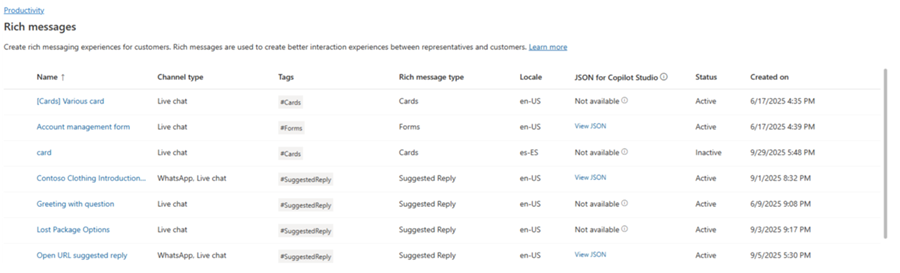
For Live Chat og WhatsApp rich media-skabeloner kan du indsætte JSON direkte i en adaptiv kortnode i Copilot Studio.
JSON-eksempler til detaljerede meddelelser til Apple Messages for Business
Dette afsnit indeholder JSON-eksempler for de omfattende meddelelsestyper, der er tilgængelige i Apple Messages for Business-kanalen i Omnikanal til Customer Service. Flere oplysninger: Administrere udvidede meddelelser
Notat
Du kan ikke sende avancerede beskeder af typen Formularer til samtaler.
Apple Pay
let applePayJSON = // <copy_and_paste_details_content>
applePayJSON.survey = { Questions: JSON.parse(applePayJSON.survey)[0].Questions, Answers: JSON.parse(applePayJSON.survey)[1].Answers };
applePayJSON.survey.Answers.AppleMessagesforBusinessJSON = JSON.parse(applePayJSON.survey.Answers.AppleMessagesforBusinessJSON);
applePayJSON.survey.Answers.AppleMessagesforBusinessJSON = JSON.stringify(applePayJSON.survey.Answers.AppleMessagesforBusinessJSON);
applePayJSON.survey = JSON.stringify(applePayJSON.survey);

// Can now send this payload using the API
Microsoft.Omnichannel.sendMessageToConversation(applePayJSON, false);

// Or take the JSON elsewhere for use in bringing your own logic
copy(applePayJSON);
Authentication
let authJSON = // <copy_and_paste_details_content>
authJSON.survey = { Questions: JSON.parse(authJSON.survey)[0].Questions, Answers: JSON.parse(authJSON.survey)[1].Answers };
authJSON.survey = JSON.stringify(authJSON.survey);

// Can now send this payload using the API
Microsoft.Omnichannel.sendMessageToConversation(authJSON, false);

// Or take the JSON elsewhere for use in bringing your own logic
copy(authJSON);
Brugerdefineret JSON (iMessage-applikation)
let customJSON = // <copy_and_paste_details_content>
customJSON.survey = { Questions: JSON.parse(customJSON.survey)[0].Questions, Answers: JSON.parse(customJSON.survey)[1].Answers };
customJSON.survey.Answers.AppleMessagesforBusinessJSON = JSON.parse(customJSON.survey.Answers.AppleMessagesforBusinessJSON);
customJSON.survey.Answers.AppleMessagesforBusinessJSON = JSON.stringify(customJSON.survey.Answers.AppleMessagesforBusinessJSON);
customJSON.survey = JSON.stringify(customJSON.survey);

// Can now send this payload using the API
Microsoft.Omnichannel.sendMessageToConversation(customJSON, false);

// Or take the JSON elsewhere for use in bringing your own logic
copy(customJSON);
Listevælger
listPickerJSON = // <copy_and_paste_details_content>
listPickerJSON.survey = { Questions: JSON.parse(lpFromDetails.survey)[0].Questions, Answers: JSON.parse(listPickerJSON.survey)[1].Answers };
listPickerJSON.survey = JSON.stringify(listPickerJSON.survey);

// Can now send this payload using the API
Microsoft.Omnichannel.sendMessageToConversation(listPickerJSON, false);

// Or take the JSON elsewhere for use in bringing your own logic
copy(listPickerJSON);
Foreslået svar
suggestedReplyJSON = // <copy_and_paste_details_content>
suggestedReplyJSON.survey = { Questions: JSON.parse(suggestedReplyJSON.survey)[0].Questions, Answers: JSON.parse(suggestedReplyJSON.survey)[1].Answers };
suggestedReplyJSON.survey = JSON.stringify(suggestedReplyJSON.survey);

// Can now send this payload using the API
Microsoft.Omnichannel.sendMessageToConversation(suggestedReplyJSON, false);

// Or take the JSON elsewhere for use in bringing your own logic
copy(suggestedReplyJSON);
Tidsvælger
timePickerJSON = // <copy_and_paste_details_content>
timePickerJSON.survey = { Questions: JSON.parse(timePickerJSON.survey)[0].Questions, Answers: JSON.parse(timePickerJSON.survey)[1].Answers };
timePickerJSON.survey = JSON.stringify(timePickerJSON.survey);

// Can now send this payload using the API
Microsoft.Omnichannel.sendMessageToConversation(timePickerJSON, false);

// Or take the JSON elsewhere for use in bringing your own logic
copy(timePickerJSON);
Rigt link til video
videoRichLinkJSON = // <copy_and_paste_details_content>
videoRichLinkJSON.survey = { Questions: JSON.parse(videoRichLinkJSON.survey)[0].Questions, Answers: JSON.parse(videoRichLinkJSON.survey)[1].Answers };
timePickerJSON.survey = JSON.stringify(videoRichLinkJSON.survey);

// Can now send this payload using the API
Microsoft.Omnichannel.sendMessageToConversation(videoRichLinkJSON, false);

// Or take the JSON elsewhere for use in bringing your own logic
copy(videoRichLinkJSON);
Rigt link til websted
websiteRichLinkJSON = // <copy_and_paste_details_content>
websiteRichLinkJSON.survey = { Questions: JSON.parse(websiteRichLinkJSON.survey)[0].Questions, Answers: JSON.parse(websiteRichLinkJSON.survey)[1].Answers };
timePickerJSON.survey = JSON.stringify(websiteRichLinkJSON.survey);

// Can now send this payload using the API
Microsoft.Omnichannel.sendMessageToConversation(websiteRichLinkJSON, false);

// Or take the JSON elsewhere for use in bringing your own logic
copy(websiteRichLinkJSON);
Konfigurer agenter til at sende Live Chat foreslåede svar og kort/karruseller
Copilot Studio understøtter foreslåede svar og grundlæggende kort med det samme. Få mere at vide i Send en meddelelse – Microsoft Copilot Studio.
Notat
Copilot Studio refererer til foreslåede svar som hurtige svar.
Relaterede oplysninger
Reference til JavaScript-API for livechat
Omnikanal JavaScript API-reference
sendMessageToConversation