Hinweis
Für den Zugriff auf diese Seite ist eine Autorisierung erforderlich. Sie können versuchen, sich anzumelden oder das Verzeichnis zu wechseln.
Für den Zugriff auf diese Seite ist eine Autorisierung erforderlich. Sie können versuchen, das Verzeichnis zu wechseln.
Die Plattformen Copilot Studio und Dynamics 365 for Customer Service unterscheiden sich geringfügig in der Art und Weise, wie sie Rich-Media-Nachrichten basierend auf Kanal und Rich-Media-Nachrichtentyp unterstützen. In diesem Artikel wird beschrieben, wie Sie Rich-Media-Nachrichten in Copilot Studio unterstützen können.
Abrufen von Agent-JSON für Apple Messages for Business
- Wählen Sie auf der Websitekarte des Copilot Service Admin Centers die Option "Produktivität im Support"-Erlebnis aus.
- Wählen Sie auf der Seite Produktivität die Option Verwalten für Rich-Nachrichten aus.
- Wählen Sie aus der Liste aller verfügbaren Listennachrichten eine Rich-Nachricht aus, die Sie an die Konversation senden möchten.
- Verwenden Sie für Apple Messages for Business-Rich-Nachrichten die Microsoft.Omnichannel.sendMessageToConversation-API , um JSON-Dateien zu senden.
Abrufen von Agenten-JSON für Live-Chat-Formulare, benutzerdefiniertem Live-Chat-JSON und von WhatsApp vorgeschlagenen Antworten
Wählen Sie auf der Websitekarte des Copilot Service Admin Centers die Option "Produktivität im Support"-Erlebnis aus.
Wählen Sie auf der Seite Produktivität die Option Verwalten für Rich-Nachrichten aus.
Suchen Sie die Rich-Media-Nachricht, die ein Agent senden soll, und wenn JSON verfügbar ist, wird sie in der Spalte JSON für Copilot Studio angezeigt. Wählen Sie JSON anzeigen und den spezifischen Kanaltyp aus, um den JSON-Code zu kopieren.
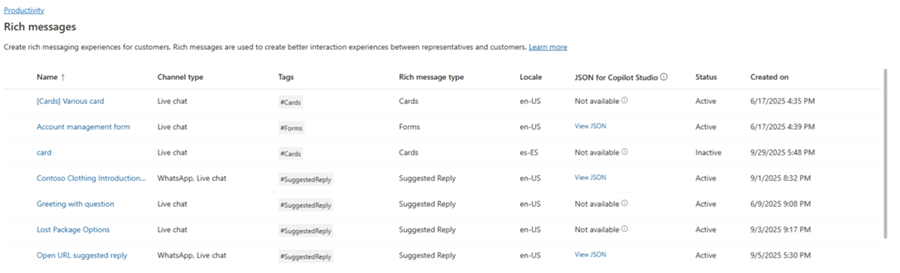
Bei Live-Chat- und WhatsApp-Rich-Media-Vorlagen können Sie den JSON-Code direkt in einen adaptiven Kartenknoten in Copilot Studio einfügen.
JSON-Beispiele für Rich Messages für Apple Messages for Business
Dieser Abschnitt enthält JSON-Beispiele für die Rich-Nachrichtentypen, die im Apple Messages for Business-Kanal in Omnichannel for Customer Service verfügbar sind. Weitere Informationen: Verwalten von Rich-Nachrichten
Hinweis
Sie können keine Rich-Nachrichten vom Typ Formulare an Unterhaltungen senden.
Apple Bezahlen
let applePayJSON = // <copy_and_paste_details_content>
applePayJSON.survey = { Questions: JSON.parse(applePayJSON.survey)[0].Questions, Answers: JSON.parse(applePayJSON.survey)[1].Answers };
applePayJSON.survey.Answers.AppleMessagesforBusinessJSON = JSON.parse(applePayJSON.survey.Answers.AppleMessagesforBusinessJSON);
applePayJSON.survey.Answers.AppleMessagesforBusinessJSON = JSON.stringify(applePayJSON.survey.Answers.AppleMessagesforBusinessJSON);
applePayJSON.survey = JSON.stringify(applePayJSON.survey);

// Can now send this payload using the API
Microsoft.Omnichannel.sendMessageToConversation(applePayJSON, false);

// Or take the JSON elsewhere for use in bringing your own logic
copy(applePayJSON);
Authentifizierung
let authJSON = // <copy_and_paste_details_content>
authJSON.survey = { Questions: JSON.parse(authJSON.survey)[0].Questions, Answers: JSON.parse(authJSON.survey)[1].Answers };
authJSON.survey = JSON.stringify(authJSON.survey);

// Can now send this payload using the API
Microsoft.Omnichannel.sendMessageToConversation(authJSON, false);

// Or take the JSON elsewhere for use in bringing your own logic
copy(authJSON);
Benutzerdefiniertes JSON (iMessage-Anwendung)
let customJSON = // <copy_and_paste_details_content>
customJSON.survey = { Questions: JSON.parse(customJSON.survey)[0].Questions, Answers: JSON.parse(customJSON.survey)[1].Answers };
customJSON.survey.Answers.AppleMessagesforBusinessJSON = JSON.parse(customJSON.survey.Answers.AppleMessagesforBusinessJSON);
customJSON.survey.Answers.AppleMessagesforBusinessJSON = JSON.stringify(customJSON.survey.Answers.AppleMessagesforBusinessJSON);
customJSON.survey = JSON.stringify(customJSON.survey);

// Can now send this payload using the API
Microsoft.Omnichannel.sendMessageToConversation(customJSON, false);

// Or take the JSON elsewhere for use in bringing your own logic
copy(customJSON);
Listenauswahl
listPickerJSON = // <copy_and_paste_details_content>
listPickerJSON.survey = { Questions: JSON.parse(lpFromDetails.survey)[0].Questions, Answers: JSON.parse(listPickerJSON.survey)[1].Answers };
listPickerJSON.survey = JSON.stringify(listPickerJSON.survey);

// Can now send this payload using the API
Microsoft.Omnichannel.sendMessageToConversation(listPickerJSON, false);

// Or take the JSON elsewhere for use in bringing your own logic
copy(listPickerJSON);
Vorgeschlagene Antwort
suggestedReplyJSON = // <copy_and_paste_details_content>
suggestedReplyJSON.survey = { Questions: JSON.parse(suggestedReplyJSON.survey)[0].Questions, Answers: JSON.parse(suggestedReplyJSON.survey)[1].Answers };
suggestedReplyJSON.survey = JSON.stringify(suggestedReplyJSON.survey);

// Can now send this payload using the API
Microsoft.Omnichannel.sendMessageToConversation(suggestedReplyJSON, false);

// Or take the JSON elsewhere for use in bringing your own logic
copy(suggestedReplyJSON);
Zeitauswahl
timePickerJSON = // <copy_and_paste_details_content>
timePickerJSON.survey = { Questions: JSON.parse(timePickerJSON.survey)[0].Questions, Answers: JSON.parse(timePickerJSON.survey)[1].Answers };
timePickerJSON.survey = JSON.stringify(timePickerJSON.survey);

// Can now send this payload using the API
Microsoft.Omnichannel.sendMessageToConversation(timePickerJSON, false);

// Or take the JSON elsewhere for use in bringing your own logic
copy(timePickerJSON);
Video-Rich-Link
videoRichLinkJSON = // <copy_and_paste_details_content>
videoRichLinkJSON.survey = { Questions: JSON.parse(videoRichLinkJSON.survey)[0].Questions, Answers: JSON.parse(videoRichLinkJSON.survey)[1].Answers };
timePickerJSON.survey = JSON.stringify(videoRichLinkJSON.survey);

// Can now send this payload using the API
Microsoft.Omnichannel.sendMessageToConversation(videoRichLinkJSON, false);

// Or take the JSON elsewhere for use in bringing your own logic
copy(videoRichLinkJSON);
Website-Rich-Link
websiteRichLinkJSON = // <copy_and_paste_details_content>
websiteRichLinkJSON.survey = { Questions: JSON.parse(websiteRichLinkJSON.survey)[0].Questions, Answers: JSON.parse(websiteRichLinkJSON.survey)[1].Answers };
timePickerJSON.survey = JSON.stringify(websiteRichLinkJSON.survey);

// Can now send this payload using the API
Microsoft.Omnichannel.sendMessageToConversation(websiteRichLinkJSON, false);

// Or take the JSON elsewhere for use in bringing your own logic
copy(websiteRichLinkJSON);
Konfigurieren von Agenten zum Senden von Live-Chat-Antwortvorschlägen und Karten/Karussells
Copilot Studio unterstützt sofort einsatzbereite Antwortvorschläge und einfache Karten. Weitere Informationen finden Sie unter Senden einer Nachricht – Microsoft Copilot Studio.
Hinweis
Copilot Studio bezeichnet vorgeschlagene Antworten als Schnellantworten.
Verwandte Informationen
JavaScript-API-Referenz für das Live-Chat-SDK
Referenz zur Omnichannel-JavaScript-API
sendMessageToConversation