Note
Access to this page requires authorization. You can try signing in or changing directories.
Access to this page requires authorization. You can try changing directories.
Applies to:
- iOS
- Windows
Groups in Intune for Education are organized as hierarchies, with parent groups above and subgroups below. When you assign settings to a parent group, those settings automatically apply to all its subgroups. This process is called settings inheritance. It makes it easier to apply consistent policies across large numbers of users and devices.
Important
On October 14, 2025, Windows 10 reached end of support and no longer receives quality and feature updates. Windows 10 is an allowed version in Intune. Devices running this version can still enroll in Intune and use eligible features, but functionality isn't guaranteed and can vary.
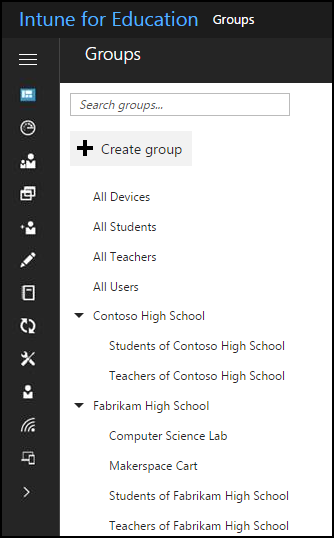
Configure subgroups individually
To override inherited settings, go directly to the subgroup and configure it individually by removing or adding settings. For steps, see Configure settings in Groups. When you're done, save your changes.
Settings in conflict
If you apply conflicting settings to the same group, Intune analyzes each setting individually and resolves the conflict where possible. When Intune can't resolve the conflict automatically, it flags the affected settings and you should review the settings conflict report.
Example of inheritance conflict
As an example, consider the subgroup, 12th Grade AP Computer Science. The subgroup falls under the parent group, 12th Grade. You assign a strict security scanning requirement to all files and apps downloaded to devices in the 12th Grade group.
However, you know that for an upcoming assignment, 12th Grade AP Computer Science must download JavaScript files that don't need to be scanned. If you don't override settings inheritance, the more restrictive 12th Grade setting applies to the users in 12th Grade AP Computer Science.
Next steps
- Create user and device groups to start organizing your school's users and devices.
- Troubleshoot groups if settings conflicts aren't resolving as expected.
- Learn more about the full groups experience in Intune.