Note
Access to this page requires authorization. You can try signing in or changing directories.
Access to this page requires authorization. You can try changing directories.
Use this FAQ for data handling, privacy, compliance, residency, RBAC access, disable controls, and guardrails for Azure Copilot Observability Agent.
For transparency behavior, reliability interpretation, limitations, and user-facing AI output expectations, see Transparency FAQ for Azure Copilot Observability Agent.
The Observability Agent has two governance surfaces:
- Interactive workflows such as chat and deep investigations, where the agent runs by using the signed-in user's identity and Azure RBAC permissions.
- Autonomous operations such as alert correlation and issue creation, where the agent runs from an Observability Agent resource by using its assigned identity and configured scope.
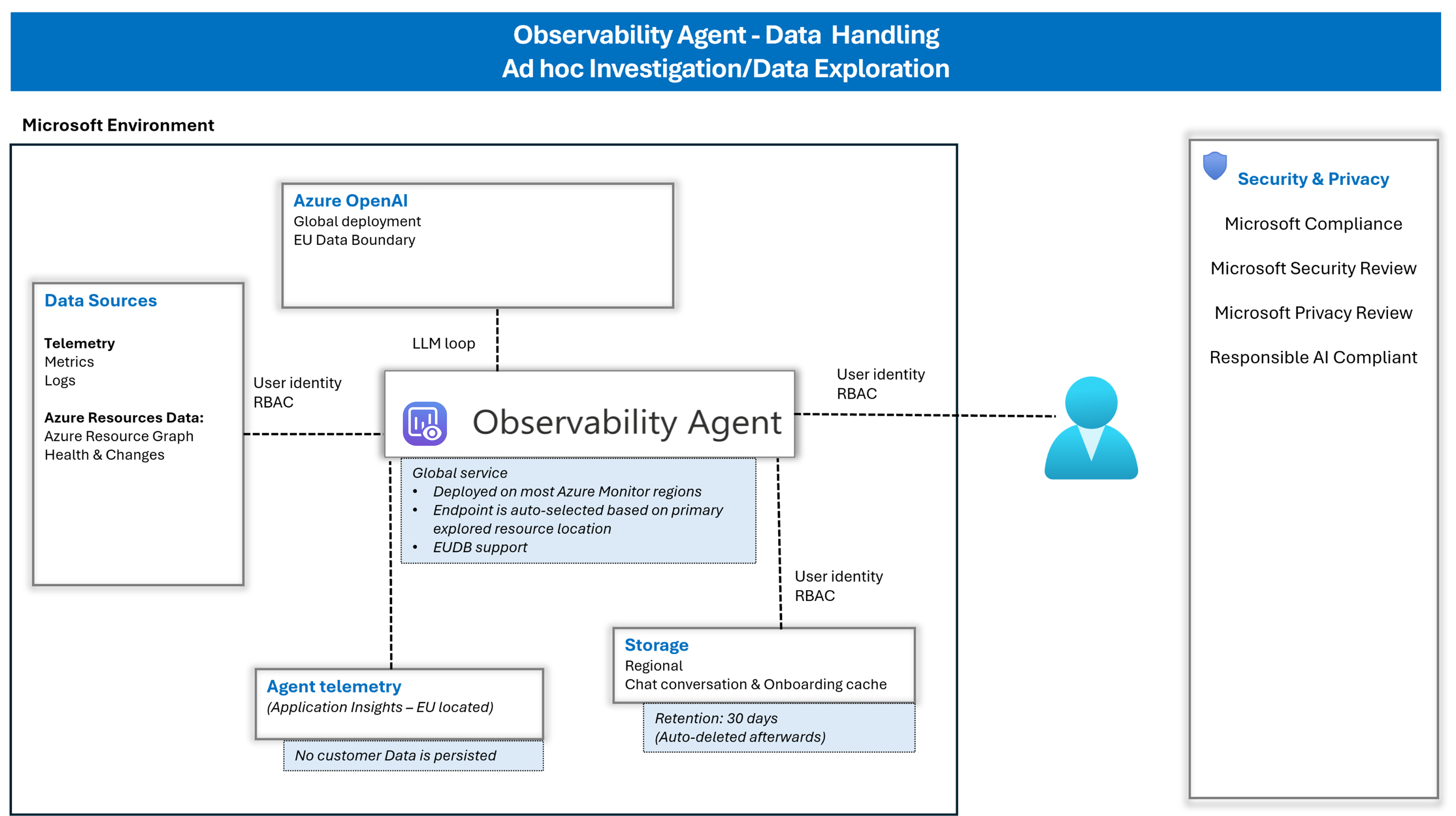
The following diagram shows data handling for interactive chat and deep investigations.
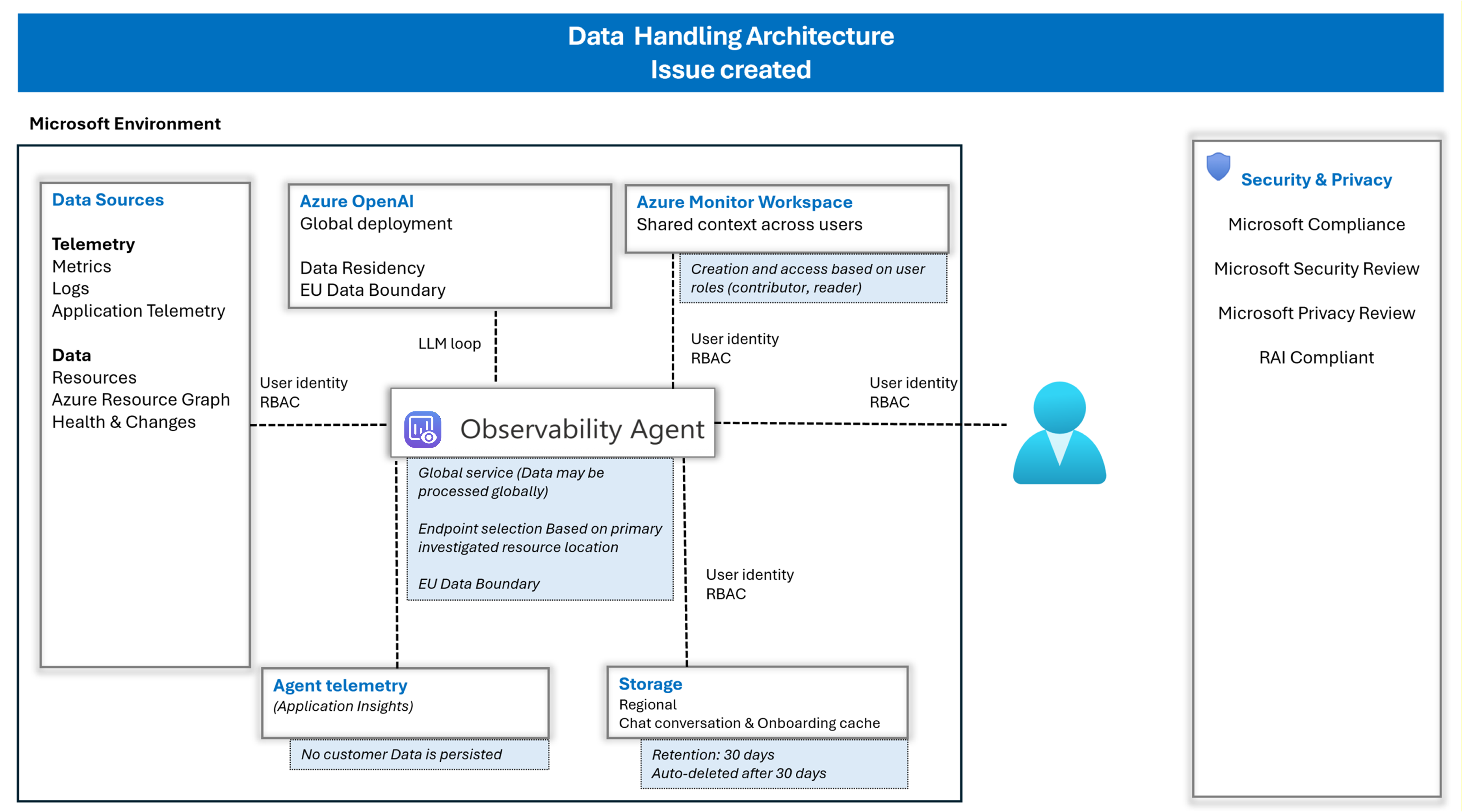
The following diagram shows data handling after an issue is created, including shared context in Azure Monitor Workspace and role-based access.
Data retention and access
How does the Observability Agent retain data?
The Observability Agent might retain limited service data to support investigations and user interactions. Any retention is scoped, access-controlled, and time-bound.
The service handles three categories of data with different retention behavior:
- Conversation data (chat and onboarding cache):
- Includes user prompts and agent responses generated during investigation or chat.
- Stored regionally and retained for up to 30 days.
- Automatically deleted after 30 days.
- Session behavior (when an issue doesn't exist):
- Conversation access is session-scoped in the UX.
- If the session tab is closed, conversation content is no longer immediately available in that session context.
- Retained data might still exist for up to 30 days.
- Telemetry data:
- The agent doesn't retain extra copies of telemetry data.
- It reads telemetry already stored in Azure Monitor based on allowed permissions.
Who can access issues, and what data do issues include?
Issues are part of Azure Monitor Workspace (AMW) and follow AMW shared context and Azure RBAC access rules.
Users can access issues based on their assigned AMW roles, such as reader or contributor.
Issues can include summarized findings such as trends, anomalies, correlations, suggested root causes, visualizations, and structured findings.
Compliance and data residency
Is the Observability Agent compliant with enterprise standards?
Yes. The Observability Agent follows Microsoft's Responsible AI principles and approach. Microsoft also publishes the Microsoft Responsible AI Standard, which describes its framework for building and reviewing AI systems.
For Azure AI workloads, see Responsible AI guidance for Microsoft Foundry and Transparency Note for Azure OpenAI in Microsoft Foundry Models.
Can I control where my data is processed?
The Observability Agent is a global service, and data processing follows Azure regional and compliance frameworks.
For customers in supported EU regions, data processing and storage remain within the EU in alignment with Microsoft's EU Data Boundary commitments. For supported regions, see Regions.
Model use and controls
What AI models does the agent use?
The Observability Agent uses Azure OpenAI Service models to analyze telemetry and generate investigation insights.
Model processing occurs in Microsoft-managed infrastructure and follows Azure security and compliance practices.
Is my data used to train models?
No. The service doesn't use customer data to train models.
Can I control which data is shared with the LLM?
Yes, you control data sharing through scope and permissions rather than per-field filtering.
For interactive workflows, workflow scope and the initiating user's Azure RBAC permissions constrain model-visible data.
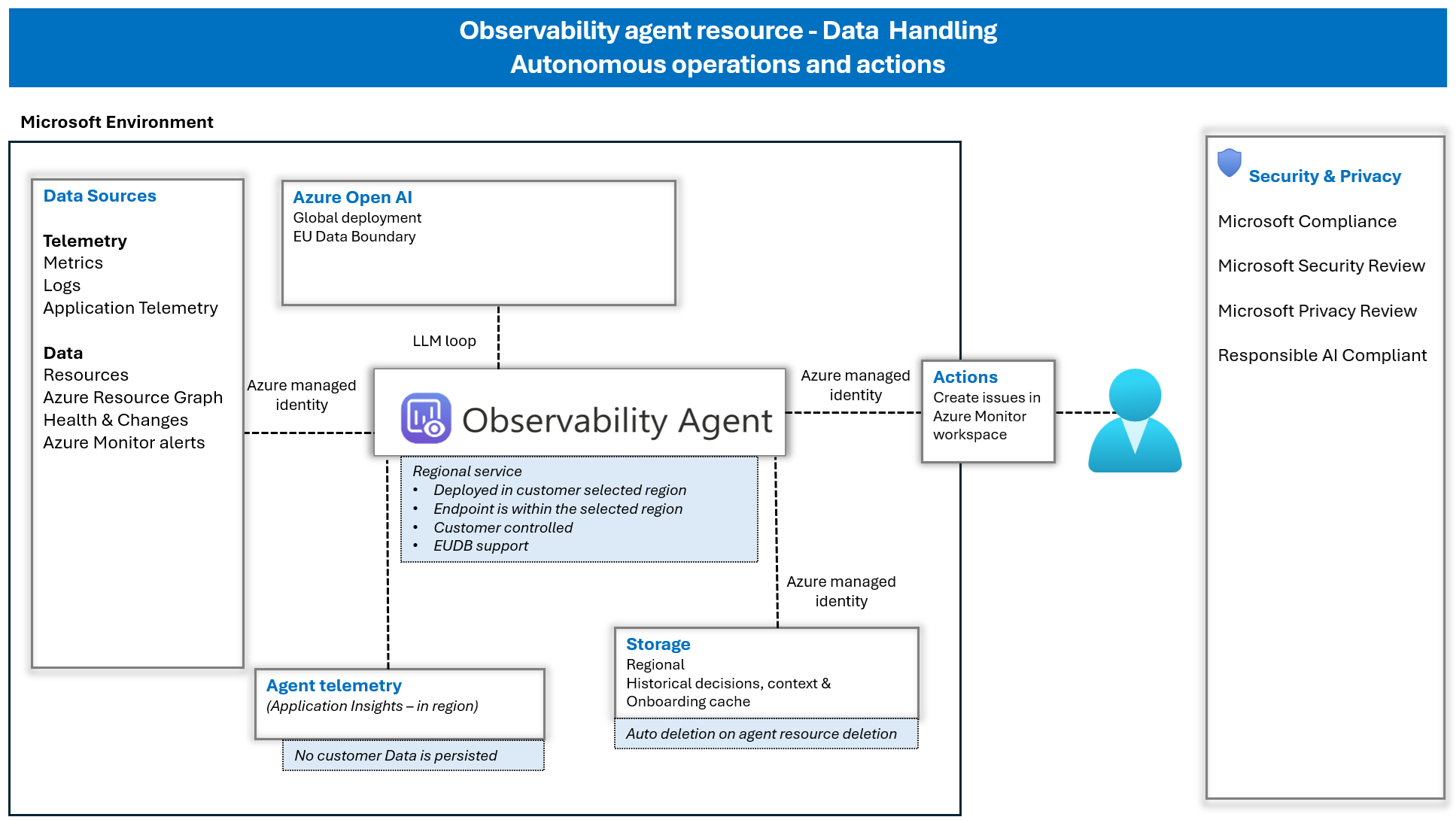
For autonomous operations, the Observability Agent resource scope and permissions granted to its managed identity constrain model-visible data.
You can't selectively exclude individual telemetry tables or fields from an otherwise in-scope resource.
Governance controls
What permissions does the agent use?
Interactive workflows run under the signed-in user's identity and Azure RBAC permissions.
Autonomous operations run under the managed identity assigned to the Observability Agent resource, not under a user identity. The identity requires appropriate permissions, including Monitoring Contributor on the Azure Monitor Workspace where issues are created.
How is autonomous correlation governed?
Autonomous correlation is limited to resources attached to the Observability Agent resource.
Issues created autonomously are stored in Azure Monitor Workspace and follow the same Azure RBAC model as user-created issues.
Custom instructions provide business and topology context, but they don't grant new permissions and don't allow direct environment changes.
The following diagram shows data handling for autonomous operations, including scoped correlation, issue creation, managed identity access, and governance boundaries.
Can I disable the Observability Agent?
Yes. Azure Copilot access controls can disable access to the Observability Agent. For more information, see Manage access to Azure Copilot.
Can I enforce guardrails on what the agent is allowed to do?
Yes. The agent follows built-in service controls, responsible AI practices, and Azure governance controls.
- System controls define the intended operating behavior.
- Organizational controls, including RBAC, policy, and scope configuration, define what the agent can access and where it can create problems.