Note
Access to this page requires authorization. You can try signing in or changing directories.
Access to this page requires authorization. You can try changing directories.
Vertical ads are powered by dynamic data feeds to generate ads with high-quality placements. With no keyword requirement, Microsoft AI dynamically generates these personalized ads, yielding more volume, increased click-through rates (CTR), and lower cost per click (CPC) rates.
These ads include:
-
- Doctors and clinics
- Home services
- Insurance
- Lawyer and legal services
- Real estate
- Tax services
Look out for more Vertical ads coming soon! If you don't see your area of business covered above, we'd love to hear from you.
How Vertical ads work
Vertical ads leverage the Search campaign framework, but contain specific requirements (such as feeds and placeholder keywords).
Items to disregard
The following is a list of items in the Search campaign creation process that you should disregard for Vertical ads, even if Microsoft Advertising is providing recommendations for them:
- Any ad type that isn't Responsive Search ads (the only ad type supported by Vertical ads)
- Any bid strategy that isn't enhanced CPC
- The Assets tab at the campaign level
- The campaign-level Landing pages tab (as the Final URL attribute in your feed file is what's relevant for Vertical ads)
- Extensions
- Keywords
Vertical ads' setup
No matter the type of vertical you're creating ads for, the setup process is straightforward.
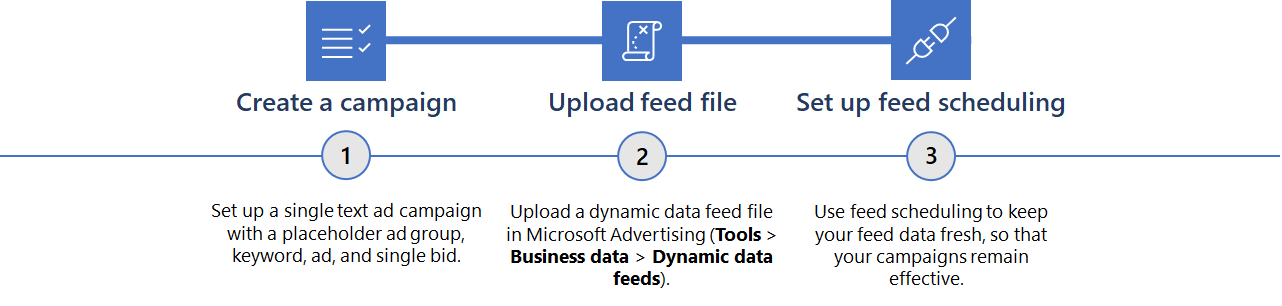
For more detailed information, see the individual Vertical ads' help articles (linked above).
What you need to know about Vertical ads
- Vertical ads' auctions are independent from text ads' auctions. This means that you may serve in both the text ad block and the Vertical ads block.
- Vertical ads' auctions are based on enhanced cost per click (CPC). Target cost per acquisition (CPA) is coming soon. Learn more about bid strategies.
- Vertical ads generated by Search campaigns require the creation of a separate text ad, which is associated to the Vertical ad in its data feed file. Please see the individual Vertical ads' help articles (linked above) for step-by-step instructions.
- It'll take 48 hours for your Vertical ads to go live after your feed is submitted and your campaign and ad groups are activated.
- If you create multiple Vertical ads from the same account and feed, they can show simultaneously on search results pages, as long as they win the auction.
- We'll use the Final URL you provide as the display URL in your ads.
Best practices for Vertical ads
Feeds: Provide a comprehensive feed of all available offerings. (For example, your Automotive inventory listings or all of your Professional Services offerings.) Because search terms are curated and matched to relevant offers based on your feed's rich attributes (e.g., image URLs), they are critical to the success of your Vertical ads.
Keywords: Input a placeholder keyword during campaign setup, so that we can best match your Vertical ads to potential customers' search queries. The information we use to inform the best match is your feed file. Adding contextual keywords to your feed file and negative keywords in your campaign setup will help with targeting.
Optimization: Use tracking templates and conversion goals to optimize your Vertical ads. Learn more.
Prioritization: You can prioritize ads (feed items) by linking each to a different Target ad group and assigning different bids or ad scheduling to the ad groups.
Reporting: You can download standard performance reports by navigating to Reports > Reports > Performance > either Campaign, Ad, or Keyword. You can also access feed item reporting for Vertical ads.
Note
Share of voice reports are currently not supported.
Targeting: Set location targeting in your campaign settings to the appropriate markets to ensure ads are eligible to serve to all relevant customers. We recommend that you measure and monitor baseline performance first, and then fine-tune the return on investment based on audiences. Learn more about location targeting.
Troubleshoot
Making sure the bid strategy is set to enhanced CPC.
Check the individual feed file requirements and recommendations:
-
Note
Make sure you're using one of the specified categories for the Profession attribute.
If you have a target campaign or ad group, in Microsoft Advertising, make sure that they are active and contain enough budget.
At the campaign and ad group levels, check for any restrictive settings (e.g., location or ad scheduling that may be limiting delivery).
Check that your ad group contains a placeholder keyword with no additional keywords.
Make sure that any image URLs you provided can be opened into a browser.