Note
Access to this page requires authorization. You can try signing in or changing directories.
Access to this page requires authorization. You can try changing directories.
Note
To get your ad campaigns up and running, you first need to create a Microsoft Advertising account.
Microsoft Advertising offers search advertising and audience advertising. With search advertising, you can use keywords and targeting options to reach potential customers who are interested in or actively searching for your products and services. With audience advertising, you can use engaging, visually rich ad formats to reach your ideal audience. Audience advertising provides highly relevant content to individuals based on their interests, as well as those who have demonstrated purchase intent and are ready to buy.
For more information about search advertising, see What are Search ads? and How do I create a Search campaign?
For more information about audience advertising, see What are Audience campaigns? and How do I create an Audience campaign?
About search advertising
How do keywords trigger ads?
Keywords are the words or phrases that you associate with your ads so that potential customers who are searching the web can find your ads. For example, Paul is the owner of Contoso Bistro. Since he wants to increase his lunch take-out business, he uses "lunch take-out" as a keyword for his ad. When someone searches for "lunch take-out" his ad will show on the Microsoft Advertising Network search results page.

You can choose how closely you want the words or phrases a customer searches to match your keywords. You can use exact match, which is just that—the search query must match your keywords exactly for your ad to show. Using exact match gives you the ability to show your ads to specific audiences, as your keywords are targeted more precisely. If Paul chooses his exact match keyword to be "lunch take out," the search query has to be exactly "lunch take out" as well.
On the other hand, you can use broad match, which means that your ads can show even when a relevant variation of your keyword is included when a customer does a search. Using broad match can show your ad to a wider range of customers without having to spend a lot of time building keyword lists. So, if Paul decides to use broad match for his campaign, his keyword of "lunch take-out" could be triggered by a search query for "lunch delivery."
Where do ads show up?
Now that you know what can trigger your ad and where it can appear, let's take a quick look at ad position. When a customer does a search on the Microsoft Advertising Network, an auction determines which ads are shown and where they're placed on the page. This placement is what we call ad position, and it's where your ad appears on search results pages—on top of the search results, on the side of the page, or at the bottom of the page. It's generally more desirable to have your ad appear higher along the page, as it's more likely that customers will be able to see it.
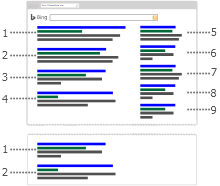
Ad position is determined by a variety of factors:
- The amount you bid for your keyword.
- The amount the competition bid for that keyword.
- Your ad's relevance.
- Your ad's performance.
Note
Text ads no longer serve in the sidebar on Bing owned and operated sites in the United States, United Kingdom, Germany, France, Canada, or Australia.
How much will it cost?
How much you want to spend is up to you. You decide on the bid amount for keywords, which is the price you want to pay each time your ad is clicked. Then, every time someone does a search on the Microsoft Advertising Network, an auction determines which ads are shown and where they'll appear on the search results page. If your ad is eligible and appears in the search results page, you'll only be charged when the ad is clicked.
The actual pay-per-click (PPC) amount is, at the most, the bid amount you set and never more than that and you can pay now (prepay) or later (postpay) for those charges. When you prepay for your clicks, charges are deducted from funds you add to your account. Once you run out of funds, your account is put on hold until more money is added. When you pay later, charges accumulate as your ads are clicked. You then pay either on your monthly billing date or when you reach your billing threshold (a spending limit before we automatically bill you), whichever comes first.
About audience advertising
How does audience advertising work?
While search advertising shows ads to people who have demonstrated explicit interest in a product or serve by searching for it, audience advertising shows ads to your ideal audience when they interact with websites across the internet. With audience marketing, you can increase brand awareness, attract customers to your website, and drive engagement.
Microsoft AI learns about individual consumers, including: (1) Their content preferences, (2) what products and services they're searching for, (3) what they've read on the web, (4) what they've purchased, and (5) LinkedIn profile data, among other variables. Then, our AI matches individuals with Audience ads that are personalized for them, so advertisers can reach an audience that's ready to take action.
What unique targeting options does audience advertising offer?
Take advantage of unique targeting options with LinkedIn audiences, in-market audiences, impression-based remarketing, and ad placement targeting. To learn more about audience types, see What are my options for audiences?
How can I get started with audience advertising?
To get your Audience campaigns up and running, there are three types of Audience ads: Display, Native, and Online Video ads. You can also create ads by importing campaigns, or providing a feed (a dynamic remarketing list) to remarket to potential customers based on the specific products they have looked at, considered, or already purchased on your website. To learn more about import, see Import campaigns directly from Google Ads, Import campaigns directly from Meta Ads, and Import campaigns directly from Pinterest Ads.