Hi @Rajesh H,
Thank you for reaching out. To better understand the PowerPoint issue and assist you effectively, I’d like to gather a bit more information.
Could you please help clarify the following:
- Does the issue occur with all PowerPoint files, or only one specific file?
- If it’s just one file, how was it created or obtained (for example: downloaded, shared via email, recovered, etc.)?
- If possible, could you provide a screenshot of the error? (Feel free to hide or blur any private information.)
- Which version of PowerPoint are you currently using?
- Does the same issue occur with other Office applications?
- Are you opening the file from a local computer, network drive, email attachment, or OneDrive/SharePoint?
- You mentioned trying a repair option previously could you please let me know which repair option you used (Quick Repair or Online Repair)?
If possible, could you please try the two repair options below to see if the issue persist :
- Right‑click the Start button (lower‑left corner) and select Installed apps.
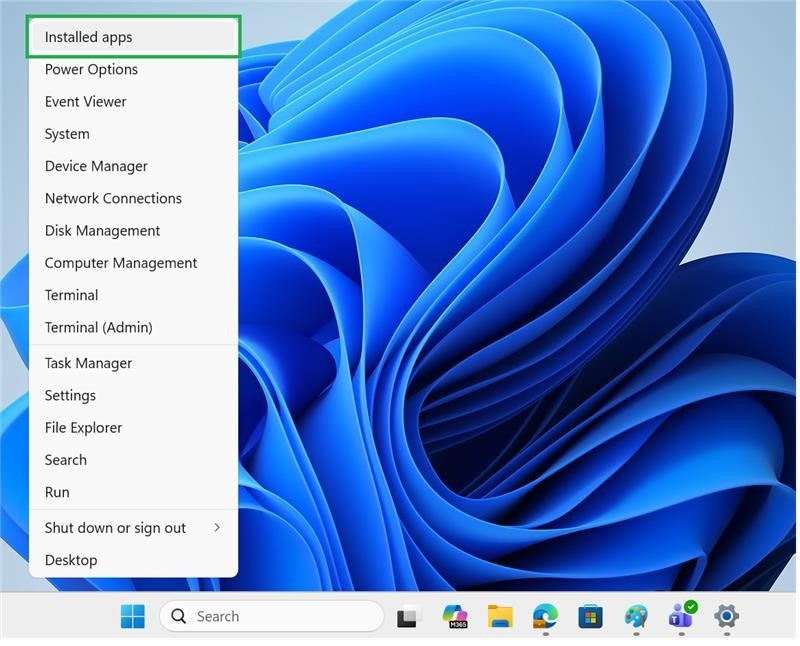
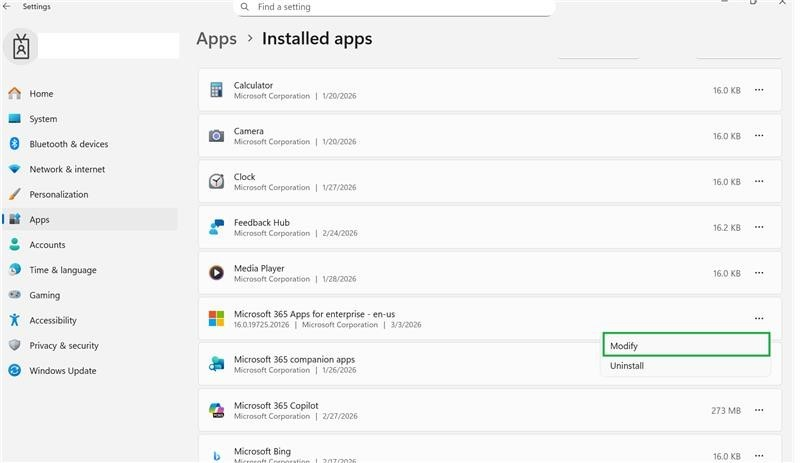
- Locate Microsoft 365 or Office, click the three dots (⋯), and select Modify.
- If prompted to allow changes to your device, click Yes.
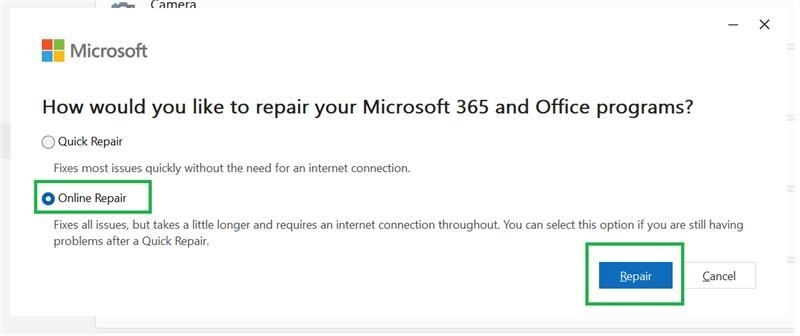
- Choose Online Repair and follow the on‑screen instructions.
Thank you very much for your time and understanding. While this initial response may not resolve the issue immediately, the information above will help me narrow down the cause and provide a more accurate solution.
I truly appreciate your patience and look forward to your reply.
If the answer is helpful, please click "Accept Answer" and kindly upvote it. If you have extra questions about this answer, please click "Comment".
Note: Please follow the steps in our documentation to enable e-mail notifications if you want to receive the related email notification for this thread
' cx='32' cy='32' r='32' /%3E%3Ctext x='50%25' y='55%25' dominant-baseline='middle' text-anchor='middle' fill='%23FFF' %3ERH%3C/text%3E%3C/svg%3E)

' cx='32' cy='32' r='32' /%3E%3Ctext x='50%25' y='55%25' dominant-baseline='middle' text-anchor='middle' fill='%23FFF' %3EHN%3C/text%3E%3C/svg%3E)