I’m facing an issue with NVIDIA GPUs in my Windows virtual machine (VM) using Hyper-V with Discrete Device Assignment (DDA).
I’ve added two GPUs to my Hyper-V Windows VM, both visible in Device Manager under Display Adapters. However, one GPU is working perfectly, while the other is encountering a Code 12 error.
Here’s what I’ve tried:
- GPU Assignment with DDA:
- NVIDIA Driver Installation:
- After adding the GPUs, I installed the NVIDIA drivers on the VM.
- Device Manager Status:
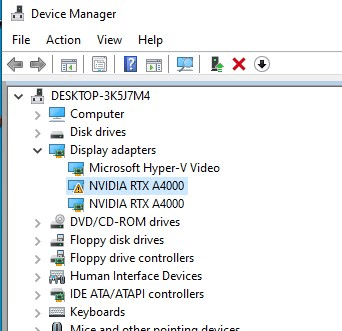
- Both GPUs are visible in Device Manager under Display Adapters.
- Code 12 Error:
- One GPU is working fine.
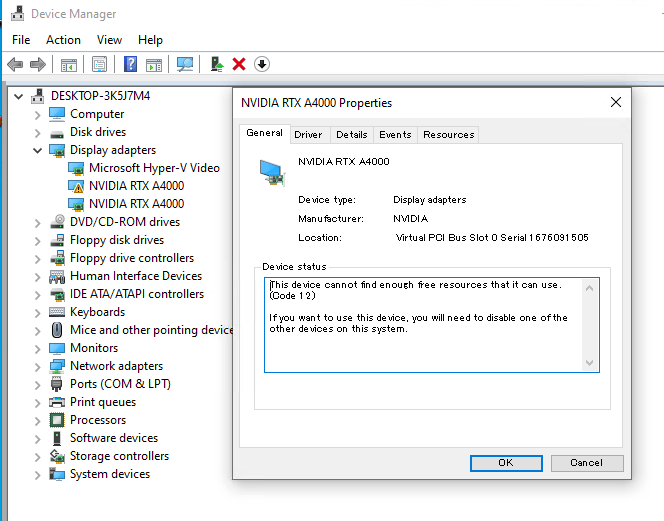
- The second GPU, however, displays a warning and is not functioning properly.
- The error message states: “This device cannot find enough free resources that it can use. (Code 12) If you want to use this device, you will need to disable one of the other devices on this system.”
5. Disable/Enable Test:
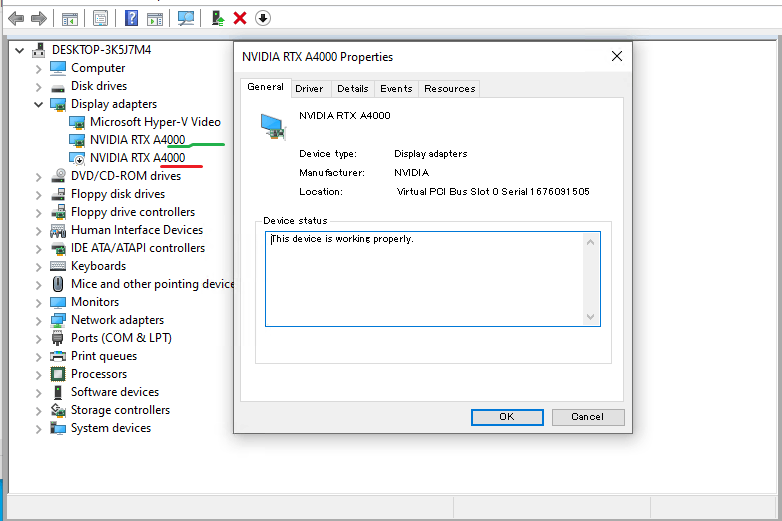
- When I disable the GPU1 adapter, GPU2 works fine.
- Enabling GPU1 and disabling GPU2 and vice versa also confirms the individual functionality of each GPU.
Question:
How can I overcome the Code 12 error and utilize both NVIDIA GPUs simultaneously in my Hyper-V Windows VM?
Any insights, experiences, or tips from the community would be greatly appreciated.
Thanks in advance!
' cx='32' cy='32' r='32' /%3E%3Ctext x='50%25' y='55%25' dominant-baseline='middle' text-anchor='middle' fill='%23FFF' %3EA%3C/text%3E%3C/svg%3E)
