Just jumping in here, folks.
Although I don't have QuickBooks, perhaps the following will help.
This thread, which started over 7 years ago, plainly points to an incompatibility between some (most?) versions of QuickBooks and some versions of Microsoft Office. Whenever tech support for an application program works a customer's problem for hours and
ends up saying "this is a Windows issue," that should be a red flag indicating that they really don't know what they're talking about.
From what I can gather from reading the posts here, the problem appears to arise when you have completed an invoice and attempt to email it directly from QuickBooks. See, e.g., Louis Holder's 12/31/17 post ("The problem returned the next time I tried e-mailing
an invoice.") and WarningU2's 1/9/18 post ("What version of Outlook do you have?").
If my understanding of the problem is correct (i.e., the "com error" occurs when attempting to send an email from QB via Outlook), I can suggest two potential work-arounds until Intuit gets around to definitively fixing this problem. The first is probably
more palatable than the second.
1. As suggested by owcm1514 on 1/9/18, save the invoice as a pdf file and then create an email separately and attach the file. This obviously creates more work when sending invoices, but if it works, it's better than the alternative. If you have a number
of invoices to send, you might consider creating a folder (e.g., InvoicesToSend), saving all the pdf files there using file names that will let you know the correct email address quickly, then after all the invoices have been created, open your email program
and send them out one by one.
Although most Intuit/Quicken programs incorporate some sort of "pdf printer," I wouldn't rely on that in this case. Instead, download and install (or ask your IT department to do it) CutePDF Writer. This is a free program. You select it just as if you
were going to print an invoice on paper. http://cutepdf.com/Products/CutePDF/writer.asp After you click "Print," a "Save to" window opens where you can name the file and choose the folder where it will be saved. This is an example of printing from Quicken:
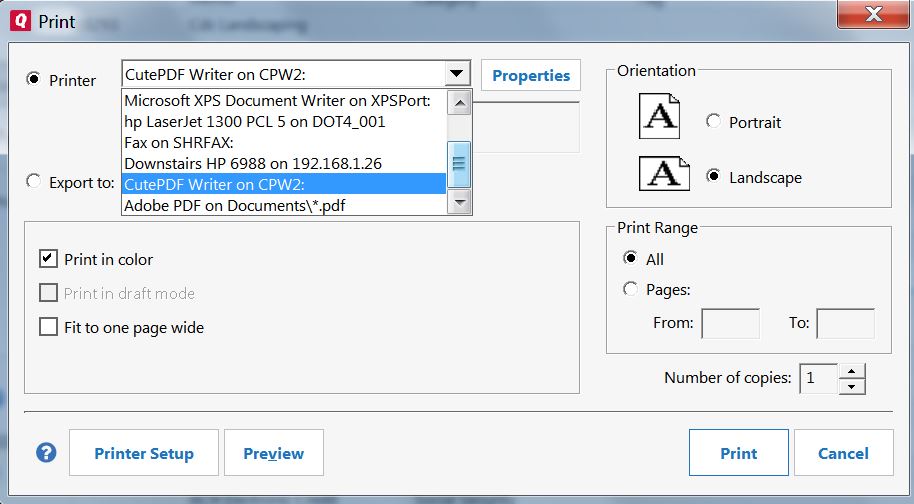
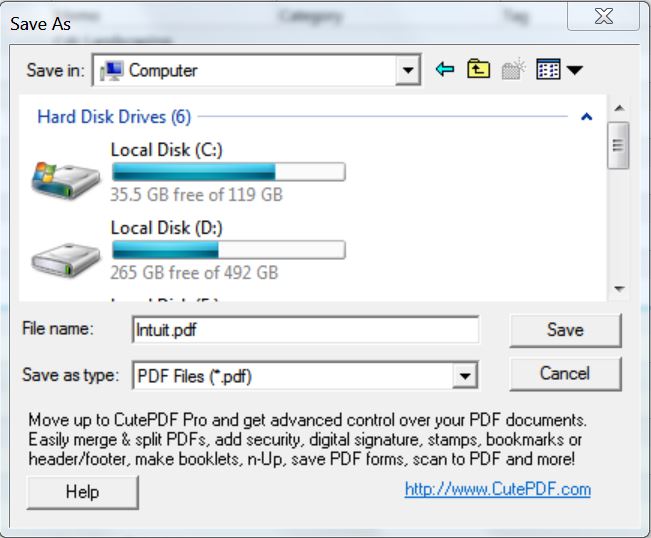
2. Although, as I wrote initially, I don't have QB, most application programs that have a "send to email" function operate by using the Windows "Default Email Client" and I assume that this is what QB does (or tries to do but somehow gets things wrong resulting
in the "com error").
You can set or change the "Default Email Client" as described, for example, here: http://www.ubergizmo.com/how-to/set-default-email-client-windows/
Unfortunately, the "Default Email Client" must be an actual program installed on your computer. There are a few of these, including Outlook, Thunderbird, Mailbird, emClient, Postbox, and others. The "Default Email Client" can't be a web-based email provider
such as Gmail or Outlook.com (which is very different than Outlook).
Although you can generally export your contacts from Outlook to one of the other desktop email clients, if you're already heavily invested in Outlook, you might be uncomfortable in giving it up. That's why I meant above that this second work-around is likely
to be unpalatable.
' cx='32' cy='32' r='32' /%3E%3Ctext x='50%25' y='55%25' dominant-baseline='middle' text-anchor='middle' fill='%23FFF' %3EA%3C/text%3E%3C/svg%3E)

' cx='32' cy='32' r='32' /%3E%3Ctext x='50%25' y='55%25' dominant-baseline='middle' text-anchor='middle' fill='%23FFF' %3EL%3C/text%3E%3C/svg%3E)