Share via

Task Manager Incorrect CPU Usage

Anonymous
2019-04-17T03:25:02+00:00

EDIT: I would delete this post since this was actually a hardware fault, but I won't do it myself on the 0.0001% chance someone's processor also acts up in the same way mine did.

So for roughly the past couple of weeks, I have been having issues with task manager giving me incorrect readings on the CPU usage. Before noticing this issue, I have been running my 9900K at 4.8 GHz all core with an AVX offset of 1. Initially, reducing my clock speed by 100 MHz down to 4.7 GHz all core (AVX offset 0) solved the problem for a couple of weeks, but the problem has now resurfaced despite the CPU literally running at specified stock speeds.

The Task Manager program is incorrectly reporting CPU usage spiking up to 100% at times, sometimes accompanied by the display turning into a black screen for a half-second while playing SCP: Secret Laboratory. Meanwhile, other programs that were running at the time such as Google Chrome or DIscord turn into black windows and require restarting. Other programs such as HWiNFO64, Corsair iCUE, and Process Explorer are reporting much lower CPU usage percentages.

Any ideas on what is causing Task Manager to behave like this? I thought Windows shipped out an update that fixed the broken Task Manager, but apparently not for me. I have already tried a clean installation of Windows 10 Pro to no avail.

CPU: i9-9900K @ 4.7 GHz all core

RAM: 4x8 GB @ 3200 MHz, XMP I

Motherboard: Asus ROG Maximus XI Formula, BIOS - American Megatrends Inc. 0905, 4/10/2019

Windows 10.0.17763 Pro Version 1809

OS Build 17763.437

Full Desktop Parts List: https://pcpartpicker.com/list/Cz87LJ
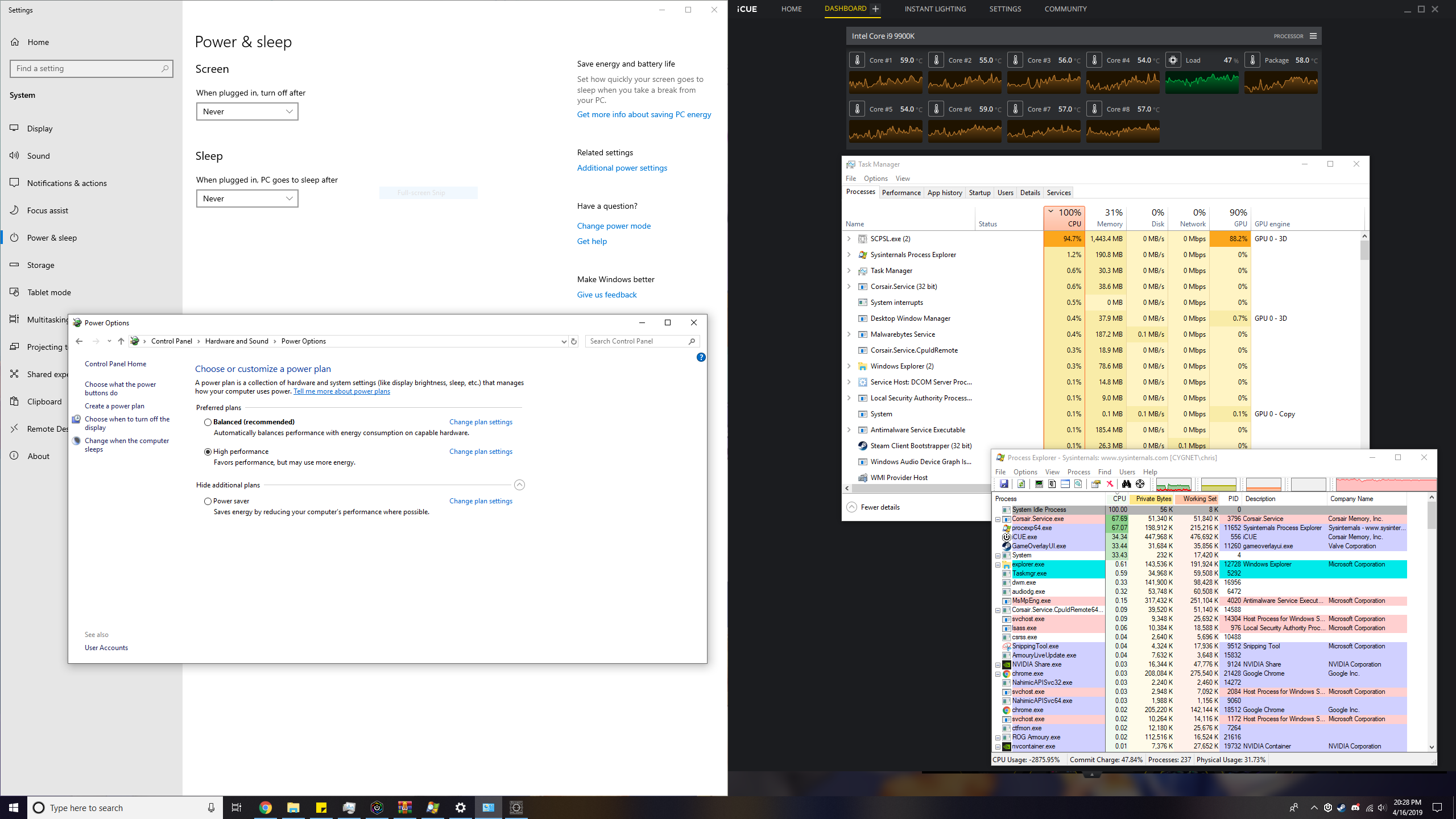
This was taken while running a game (SCP: Secret Laboratory, SCPSL.exe). Something seems off with the process explorer too since the game should be the highest in CPU usage, and the CPU use of the processes don't add up to 100%. I have seen this occur when the computer freezes for a half-second for no apparent reason.
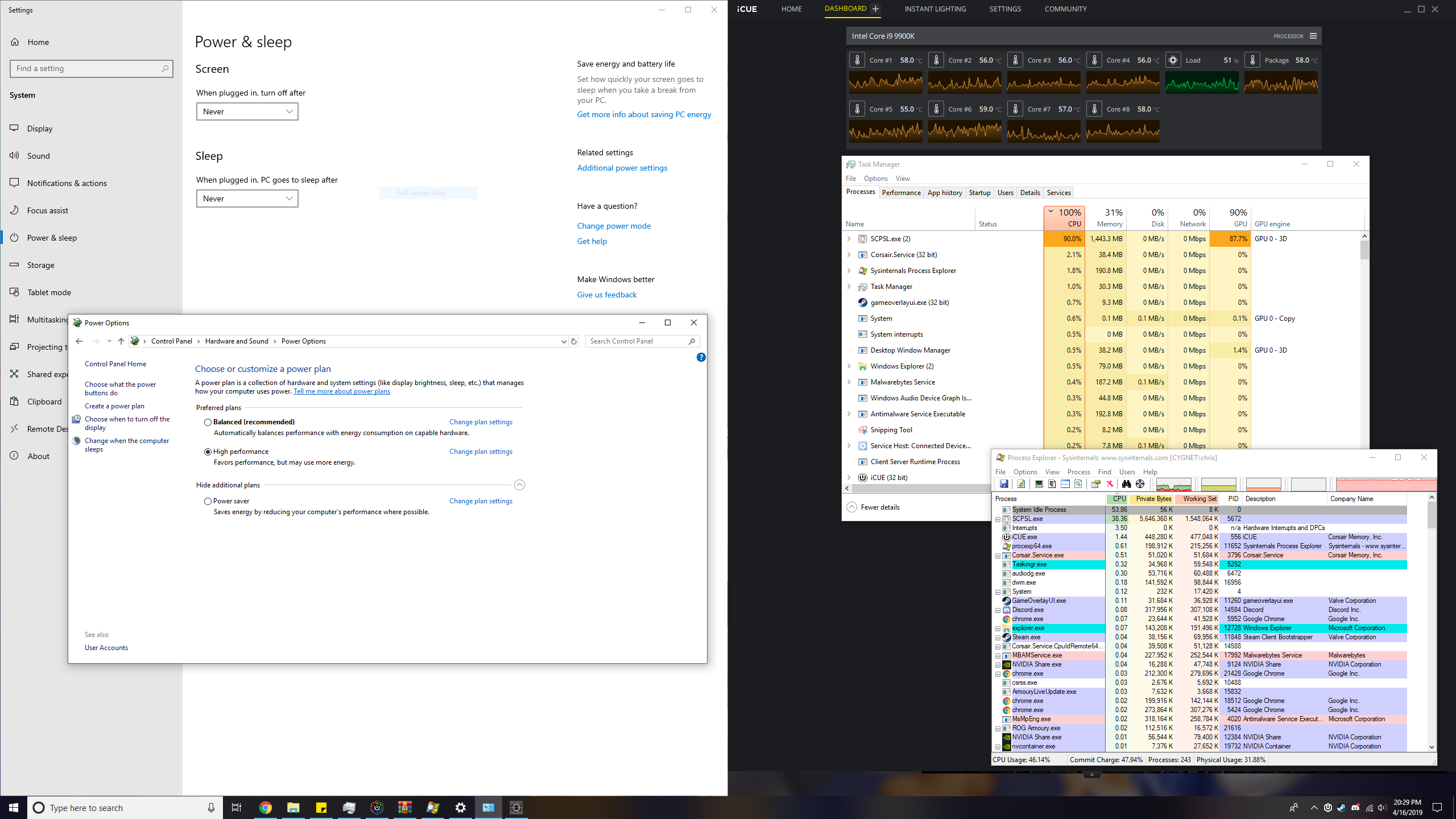
This was also taken while running the same game mentioned above, except this time only the Task Manager is reporting an incorrect CPU usage while Process Explorer says otherwise.
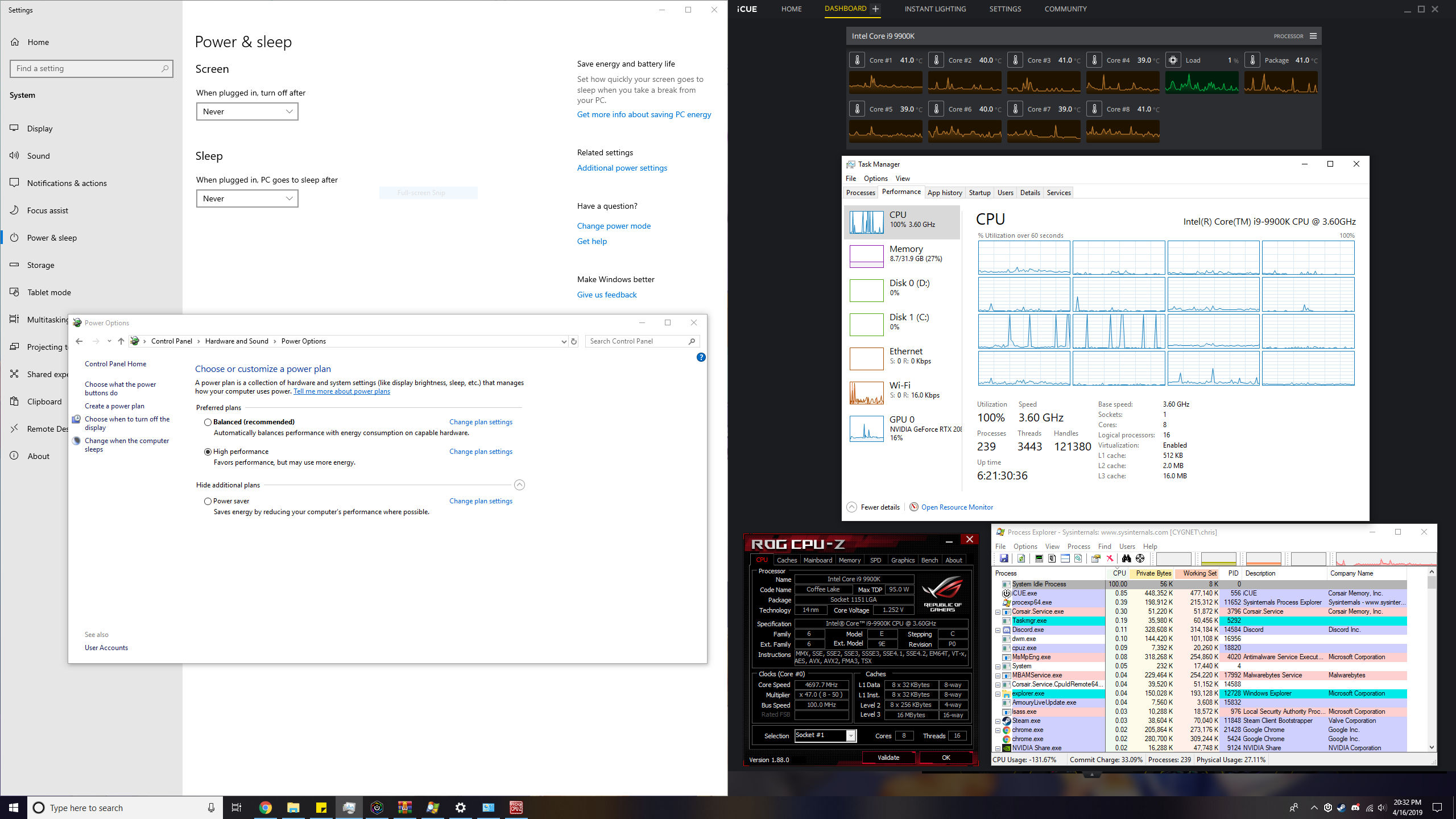
This image shows Task Manager claiming that the CPU frequency is being throttled to 3.6 GHz. CPU-Z is reporting a clock speed of about 4.7 GHz. Task Manager also seems to think CPUs #8 and #9 (starting from #0) are going crazy. I've checked both CPUs in HWiNFO64 and Process Explorer and found nothing wrong with them.
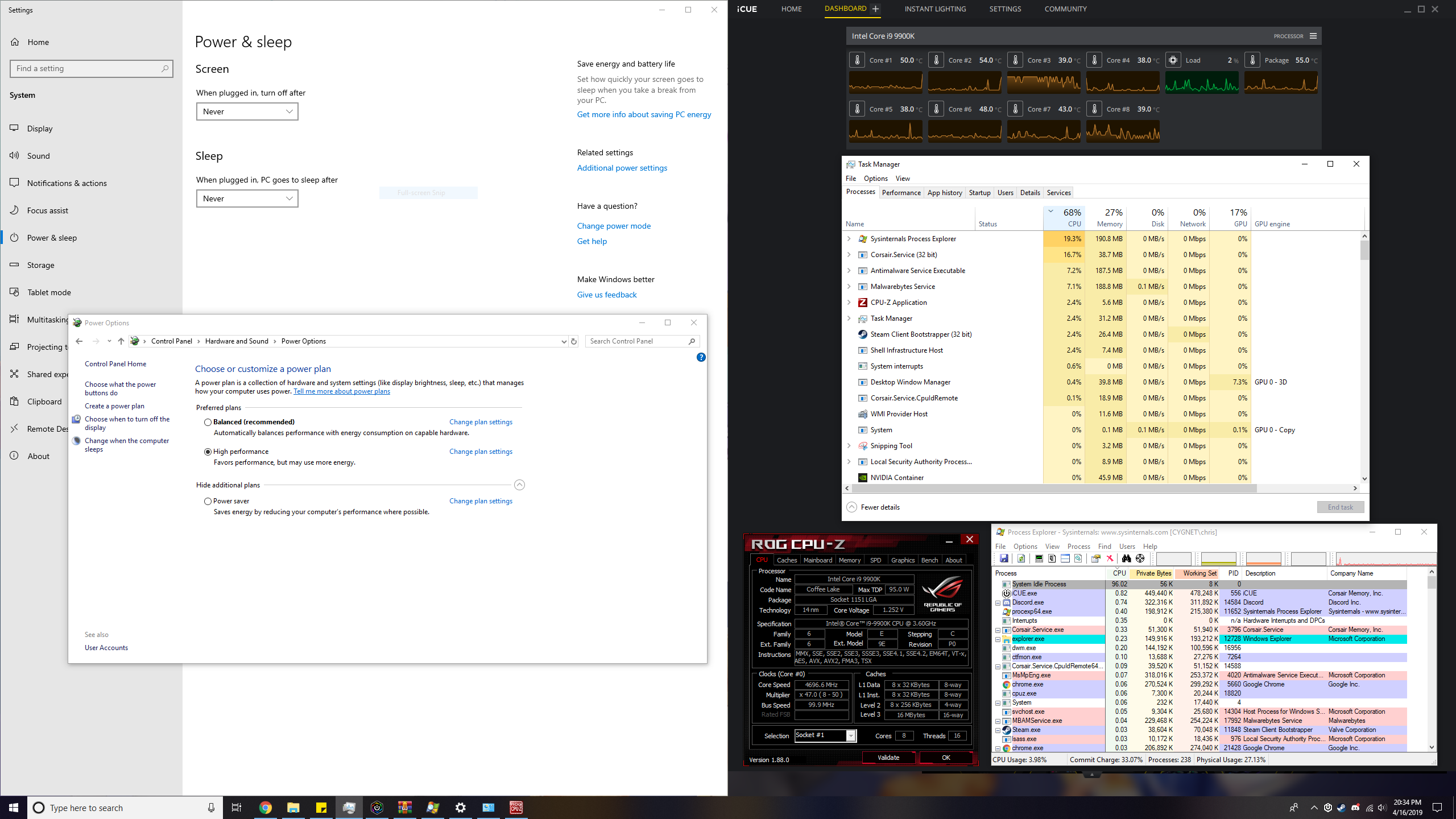
This image is another example of incorrect CPU usage where the actual CPU usage is much less than 50%.

Windows for home | Windows 10 | Performance and system failures

Locked Question. This question was migrated from the Microsoft Support Community. You can vote on whether it's helpful, but you can't add comments or replies or follow the question.

0 comments No comments

Answer accepted by question author

Anonymous
2019-04-19T21:12:27+00:00

Frankly, I would not revert back to 1803 just because of this issue unless you feel you just have to do it. Remember 1903 should be out in May.

How to download the Windows 10 version 1803 ISO file after version 1809 releases

https://pureinfotech.com/download-windows-10-18...

How to Download ISO Files or Reinstall Files for Older Versions of Windows 10

https://www.groovypost.com/howto/download-iso-o...

Please let me know how its going after you decide what to do.

Rob

Was this answer helpful?

1 person found this answer helpful.
0 comments No comments

9 additional answers

Sort by: Most helpful
  1. Anonymous
    2019-04-19T06:26:43+00:00

    Did a complete reinstall of Windows 10 using a USB stick. Problem still persists.

    Was this answer helpful?

    1 person found this answer helpful.
    0 comments No comments
  2. Anonymous
    2019-04-18T00:14:18+00:00

    Well it is not fixed as you have found out. 1903 (19H1 in final release) may have more.

    Rob

    Was this answer helpful?

    0 comments No comments
  3. Anonymous
    2019-04-17T23:36:11+00:00

    I've sent more feedback using the Feedback Hub app. According to that article, the problem should have been fixed already a while ago, so I'm not sure why Windows is acting up.

    Was this answer helpful?

    0 comments No comments
  4. Anonymous
    2019-04-17T03:43:52+00:00

    Hi Cappycot, I am Rob, an independent and a 12 time and dual award MVP specializing in Windows troubleshooting and Bluescreen analysis. Please remember as independents we are not responsible for the development of Windows or the computer hardware and drivers. If you will work with me I will be here to help until the issue is resolved.

    Windows Task Manager has never been known as "extremely" accurate. More like a consistent gauge. Since 1809 Task Manager has been known to be a little more inaccurate, though still consistent. And has remained so though there have been a few minor changes to improve Task Manager in Windows Updates.

    Task Manager shows Incorrect CPU usage in Windows 10 October 2018 Update

    https://www.bleepingcomputer.com/news/microsoft...

    Please use the Feedback Hub to report your findings so the Developers will actually see them.

    Start - type in the Search box --> Feedback

    Find at top and click on it.


    Standard Disclaimer: There are links to non-Microsoft websites. The pages appear to be providing accurate, safe information. Watch out for ads on the sites that may advertise products frequently classified as a PUP (Potentially Unwanted Products). Thoroughly research any product advertised on the sites before you decide to download and install it.

    Please let us know the results and if you need further assistance. Feedback definitely helps us help all.

    Was this answer helpful?

    0 comments No comments
