Hello Paul Hulsbosch,
Thank you for posting back. But we don’t have access to customer’s data and by policy will never be allowed to do it. Currently I can collect log file, then check it on my side and may be it need further consulting
according to the issue complexity.
The log file are often saved in:
- Windows: %userprofile%\Downloads
- Mac OSX: Downloads
- Browser: You will be prompted to save the debug log to default save location
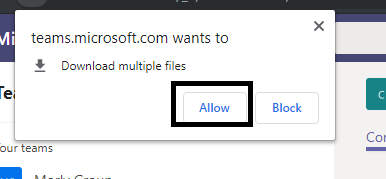
When I collect log for Teams Web App, there would be an notification as below, and then files would be downloaded:

You may refer to this article to collect log:
https://docs.microsoft.com/en-us/microsoftteams/log-files#debug-logs
According to this issue, I recommend you to try to collect log again. You may change a different browser to see if you can collect it. Since every member are having this issue, you may contact one impacted
user and let him help collecting log. Besides, update all browsers, if there’s any plug-in, temporarily disable it.
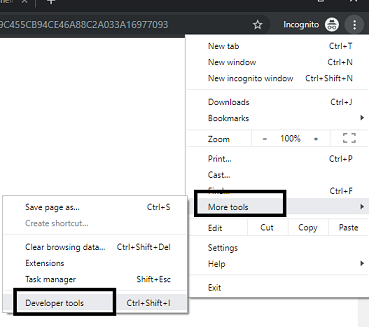
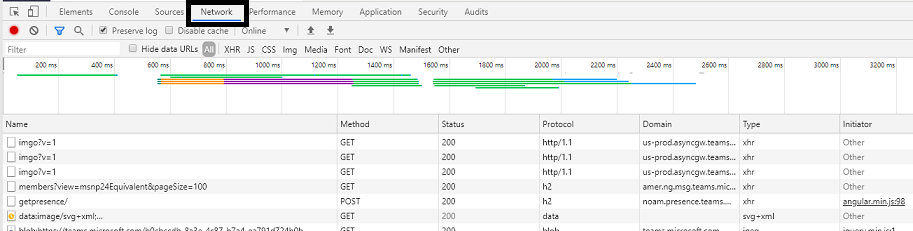
In fact, you can use browser developer tool: after login Teams and navigate to that team-> before trying to open one section in Teams, open developer tool of a browser (like Chrome)and select Network tab->
then click one section in Teams to open section-> check if there’s related requests as well as other traffics generated in Network tab:
If you still can’t collect related log, please feel free to contact me, I will try my best to find another way.
Best Regards,
Anna
' cx='32' cy='32' r='32' /%3E%3Ctext x='50%25' y='55%25' dominant-baseline='middle' text-anchor='middle' fill='%23FFF' %3EA%3C/text%3E%3C/svg%3E)
