How to generate a site map of SharePoint sites

Anonymous
2016-01-19T08:19:02+00:00

I'd like to generate a site map of SharePoint sites - nothing special and something akin to the DOS TREE command would be perfect:

ourcompany.sharepoint.com/.../start.aspx

+---Business Management

+---Clients

|   +---Citrix

|   +---Microsoft

|   ---VMware

---Library

    +---Graphics

    ---Template

Any ideas?

Thanks, Rob.

Microsoft 365 and Office
A comprehensive suite of productivity tools and cloud services that enhance collaboration, communication, and efficiency. Combining classic Office apps with advanced Microsoft 365 features, it supports both personal and business needs

Locked Question. This question was migrated from the Microsoft Support Community. You can vote on whether it's helpful, but you can't add comments or replies or follow the question.

0 comments No comments
{count} votes
Answer accepted by question author
  1. Anonymous
    2016-01-24T04:02:13+00:00

    hi rob,

    to view the structure of a sharepoint online site, you may click the content and structure under site administration. to do that:

    1.let the site admin log into a sharepoint online site(the root site)>click the gear on the upper right corner>site settings.

    2.under site administration, click content and structure.

    note: if you couldn't find the content and structure, please click  site collection features under site collection administration> find sharepoint server publishing infrastructure> click activate
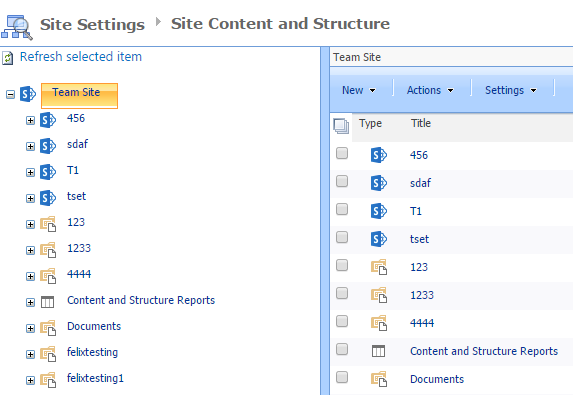
     

    if there is any update, please let us know.

    thanks,

    felix

    11 people found this answer helpful.
    0 comments No comments

6 additional answers

Sort by: Most helpful
  1. Anonymous
    2016-01-30T02:09:47+00:00

    Hi Rob,

    Have you referred Felix's reply?

    Regards,

    Spike

    0 comments No comments
  2. Anonymous
    2016-01-31T12:25:59+00:00

    Yes I've tried Felix's suggestion and it was useful to discover where that feature that I've used before was in Office 365. As Felix suggested, the feature was indeed not enabled on a new Office 365 SharePoint system so I've now enabled it. That feature is indeed useful.

    My main requirement was to be able to export the structure into a text file for documentation and as there doesn't appear to be a handy command line utility to do it, I'll have a look at PowerShell. I know PowerShell very well but not the SharePoint cmdlets very well but there appears to be good documentation for the SharePoint cmdlets online.

    2 people found this answer helpful.
    0 comments No comments