How to import Access database files to SharePoint Access app?

Anonymous
2016-03-04T12:21:42+00:00

I am trying to move an Access application with 2 database files into a SharePoint Access app. I created the Access app but can't get the database files to be uploaded to it? I want both the Access app and the database files to be located in the SharePoint site so it can be accessed from any external PC  using the browser. After searching can't find any solution to this problem.

Microsoft 365 and Office
A comprehensive suite of productivity tools and cloud services that enhance collaboration, communication, and efficiency. Combining classic Office apps with advanced Microsoft 365 features, it supports both personal and business needs

Locked Question. This question was migrated from the Microsoft Support Community. You can vote on whether it's helpful, but you can't add comments or replies or follow the question.

0 comments No comments
{count} votes

8 answers

Sort by: Most helpful
  1. Anonymous
    2016-03-04T15:14:03+00:00

    hi stanley,

    to better understand the situation, i'd like to confirm the following things:

    1.do you use sharepoint online or on-premises sharepoint server?

    2.do the access application created directly in desktop version? is it related to on-premises sharepoint server or sharepoint online?

    3.could you let us know how do you crate the access applications and add it to sharepoint online?

    4.the screenshot for the error message about "can't get the database files to be uploaded to it".

    to post a picture, click use rich formatting>insert/edit media  in the thread page.

    moreover, here is an article for your reference:upload an access app to a site.

    best regards,

    tim

    2 people found this answer helpful.
    0 comments No comments
  2. Anonymous
    2016-03-06T03:58:38+00:00

    hi stanley,

    it is not feasible to import access database files directly to a sharepoint online access app. you can consider the following two workarounds first

    workaround1:

    open access 2013 or 2016 client->select custom web app -> set web location as your team site url and click create -> next to create a table from an existing data source, select access. see the screenshot below.

    ![](http://fud.community.services.support.microsoft.com/Fud/FileDownloadHandler.ashx?fid=0c06d355-b346-49a5-978c-6b431be7d3fa)

    on the next page, browser to your local access database and click ok-> on the import objects window, select all and ok. then all objects will be imported to sharepoint online. then a new access app will be created.

    workaround2:

    import access database as sharepoint lists. refer to: http://sharepoint.rackspace.com/sharepoint-2013-how-to-publish-an-access-database 

    third party link disclaimer

    disclaimer: microsoft provides no assurances and/or warranties, implied or otherwise, and is not responsible for the download you receive from the third-party linked sites or any support related to the download or the downloaded technology. if you need support relating to the third party technology, please contact the manufacturer directly.

    thanks,

    sky

    0 comments No comments
  3. Anonymous
    2016-03-08T13:56:38+00:00

    Thank you Sky for your suggestions, however I was unable to move the Access application. The application was split into 2 database files that work together. Your samples seem to convert individual tables and does not seem to address the problem of moving the whole 2 file application which run the application.

    0 comments No comments
  4. Anonymous
    2016-03-08T14:08:01+00:00

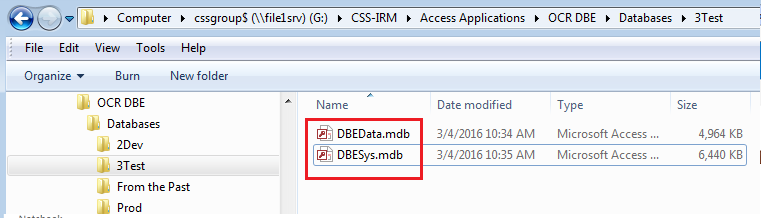
    Please keep in mind that the 2 files make up a database application and are not just tables. The Access database is split into 2 files (DBESys.mdb -the objects and DBEData.mdb - the data)

    0 comments No comments
  5. Anonymous
    2016-03-04T19:06:55+00:00

    to better understand the situation, i'd like to confirm the following things:

    1.do you use sharepoint online or on-premises sharepoint server?

    a site was created for me at https://haw***oimt.sharepoint.com/sites/dot-ocr-dbe.

    2.do the access application created directly in desktop version? is it related to on-premises sharepoint server or sharepoint online?

    we have a access desktop database application which is split in to 2 files (dbedata.mdb & dbesys.mdb). which is located on a shared local drive. i would like to move the access application to the online sharepoint site.
    3.could you let us know how do you crate the access applications and add it to sharepoint online?\

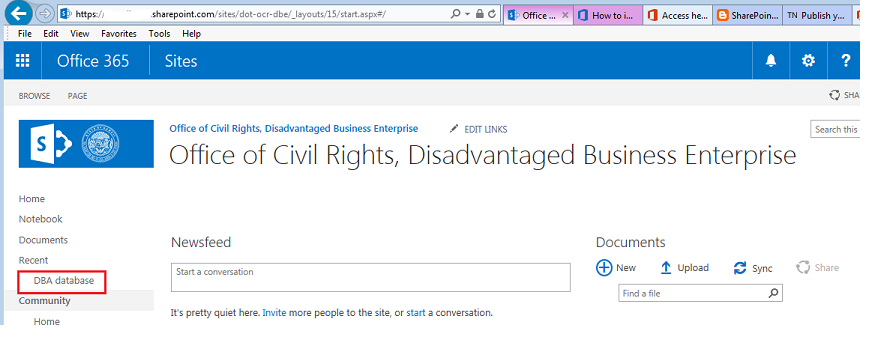
    i created access app named dba database.

    but don't know how to upload the 2 access application files (dbedata.mdb & dbesys.mdb) to it.
    4.the screenshot for the error message about "can't get the database files to be uploaded to it".

    there is no error message.

    i want to upload the access application with the 2 files to the online accesss app so i can access the

    the application on any non company computer using my browser to connect to the sharepoint sitehttps://haw***oimt.sharepoint.com/sites/dot-ocr-dbeand run the access app.

    however i cannot find instructions on how to upload the access application to the online access app.

    0 comments No comments