Note
Access to this page requires authorization. You can try signing in or changing directories.
Access to this page requires authorization. You can try changing directories.
This article provides an executive overview of Microsoft Sovereign Cloud and answers the key questions decision makers need to make an informed adoption decision.
Sovereignty has become an increasingly important business priority for organizations. The challenge with sovereignty is meeting the requirements without creating unnecessary barriers to innovation, agility, and scale. Organizations that use a patchwork of products and manual controls often see higher costs and slower delivery without increased confidence that they can demonstrate compliance.
The Microsoft Sovereign Cloud helps solve those challenges. It provides sovereign capabilities across sovereign public, private, and partner clouds. This continuum of deployment options reduces the need for isolated solutions and helps organizations maintain a consistent approach to governance, security, and operations as requirements evolve.
Outcome: This guidance helps decision makers understand how to meet sovereignty requirements for Azure workloads in Microsoft Sovereign Cloud and establish the policies and standards needed to sustain them over time.
Sovereignty solutions and decision tree
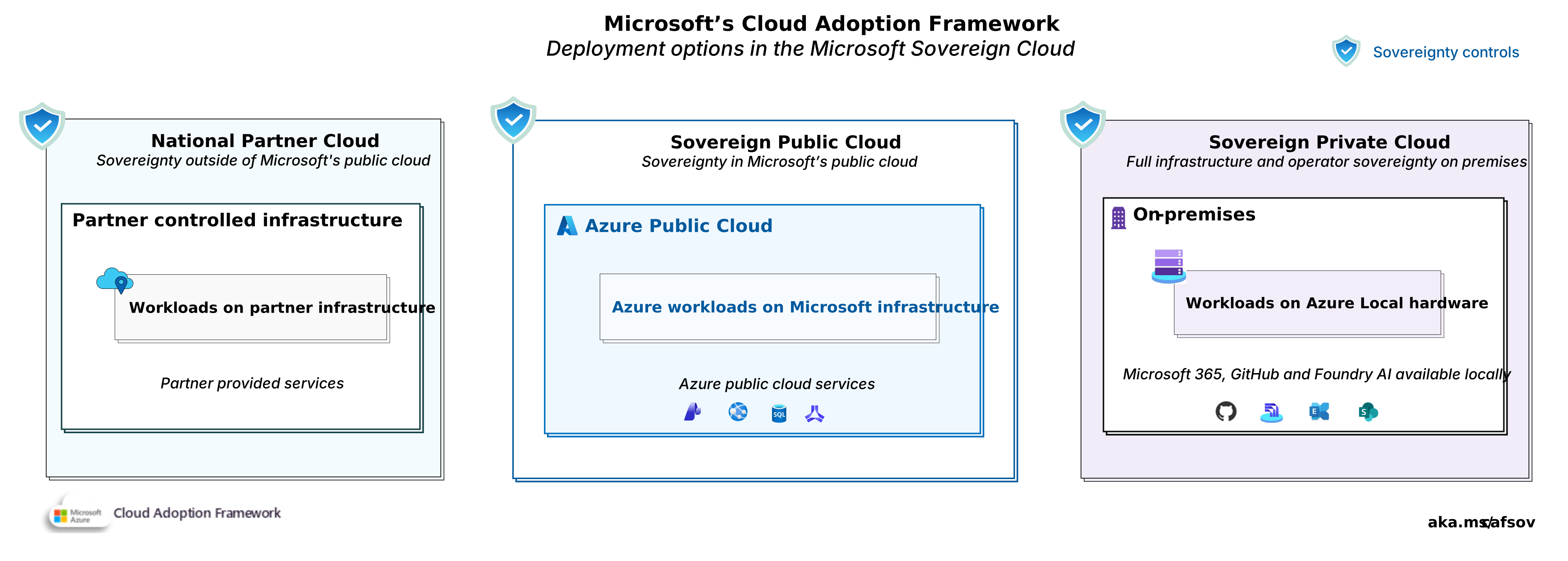
Overview of Microsoft Sovereign Cloud deployment options. Download a PowerPoint file of this architecture.
1. What is digital sovereignty?
Digital sovereignty is the ability for organizations to exercise control over their data, technology, and operational governance in accordance with their legal, regulatory, and business requirements. A combination of technical, operational, and contractual sovereign controls enables it.
Sovereignty is a subset of your broader compliance obligations. Compliance encompasses all legal, regulatory, contractual, and organizational requirements. Sovereignty focuses on the specific requirements that govern control, jurisdiction, data residency, administrative access, and operational governance.
Digital sovereignty is not achieved through isolation or concentration alone. The goal is to apply proportionate controls while maximizing the availability and resilience of systems and data. Designs should mitigate jurisdictional and operational risk without creating unnecessary dependencies, single points of failure, or concentrations of data and infrastructure that increase risk.
2. Do you need sovereignty?
Sovereignty is a risk decision, not an on-off switch. You choose which risks to mitigate and which risks to accept, and you decide how much control is worth its cost. Sovereign controls can't compensate for weak security. Reducing security to increase sovereignty can introduce greater operational and regulatory risk.
Most organizations don't need a sovereign solution for every workload. Many workloads run well on standard Azure with regional data residency and strong security controls. Sovereignty requirements usually arise when a workload needs stronger control because of:
- National or regional regulations
- Industry regulations, such as finance or healthcare rules
- Government, defense, or critical-infrastructure obligations
- Contracts that require local control or operation
Start by identifying the combination of data, operator, and infrastructure controls needed to reduce sovereignty risk while preserving the highest practical levels of availability, resilience, and innovation. The objective is to apply only the controls each workload requires, avoiding unnecessary restrictions that increase cost, complexity, or operational risk.
3. Why Microsoft Sovereign Cloud?
Most sovereignty strategies fail when organizations are forced to choose between control and innovation. Microsoft Sovereign Cloud provides sovereign controls across a continuum of deployment options. You can apply the level of control required for each workload while continuing to use a common Microsoft platform. Key benefits include:
Consistent platform: Use consistent management, services, APIs, governance, and developer tooling across sovereign deployment models. This approach reduces operational complexity and allows teams to reuse skills, processes, and investments.
Innovation and control: Workloads can continue to benefit from the hyperscale cloud's broad service portfolio, elastic capacity, global infrastructure, rapid platform updates, and advanced AI capabilities.
Adapt over time: As regulations, geopolitical conditions, or business requirements change, workloads can move along the sovereignty continuum.
Sovereign AI: Sovereign Public Cloud provides access to AI services in Azure with sovereign controls. For workloads that can't leave your premises, you can run AI locally on Azure Local.
4. Which Microsoft sovereign solution do I choose?
Microsoft Sovereign Cloud offers three deployment models with increasing levels of sovereignty. More control usually means higher cost, more operational responsibility, and innovation tradeoffs. For that reason, most organizations use more than one model across their Azure estate. Here are the current options:
Sovereign Public Cloud: Sovereign controls layered on the Azure public cloud as you know it. It's best when you need data residency, data confidentiality, and operational oversight but want the innovation capabilities of the Azure public cloud. See Sovereign Public Cloud
Sovereign Private Cloud: Runs on Azure Local in facilities you control or designate. Best when workloads must stay on your premises with connectivity to Azure or run fully disconnected from Microsoft. You can run Microsoft 365, Foundry, and GitHub locally. See Sovereign Private Cloud.
National Partner Clouds: This option is restricted to eligible customers in a limited number of geographies, such as Germany and France. Each cloud is operated by a local partner under national governance, independent of Microsoft operations. Best when law or policy requires operational independence from Microsoft. See National Partner Clouds.
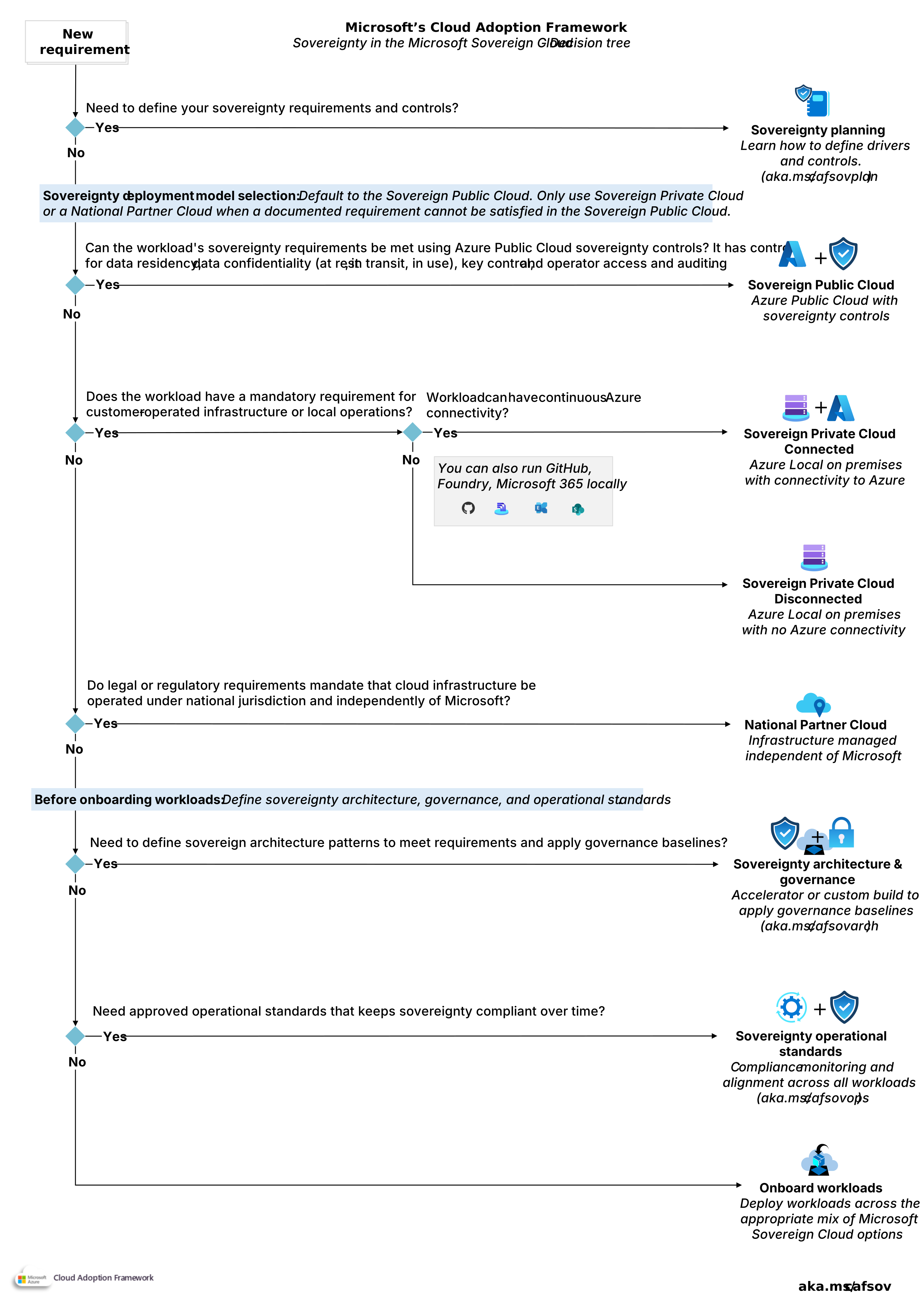
For help choosing between the different solutions, see the Sovereignty decision tree.
5. What does sovereignty cost?
Cost rises as requirements rise, because more isolation and operational control call for more dedicated infrastructure. Two things drive cost: the offering you choose, and the sovereignty controls you turn on. Here's an overview of the main cost factors:
Sovereign Public Cloud cost factors: You pay standard Azure prices. Added cost comes from the specific services, SKUs, or regions you select to get the controls you need, such as confidential computing or customer-managed keys in Azure Key Vault. For standard pricing, see Azure pricing.
Sovereign Private Cloud cost factors: This model adds both infrastructure and operational cost. You buy validated Azure Local hardware and software licenses and take responsibility for operating and securing the environment. Greater infrastructure control means higher upfront investment and operating expense. Depending on your deployment type (hyperconverged only), you might be eligible for a Hybrid Benefit.
National Partners Cloud cost factors: The partner sets pricing, service availability, and support, and these differ from global Azure. Evaluate both price and available services before you choose.
For workload specific estimates, use the Azure pricing calculator, though the sovereignty controls available in the calculator might be incomplete.
6. How are sovereignty responsibilities shared?
Sovereignty is a shared responsibility. The split depends on the model you choose for each workload. As requirements rise, you take on more. Here's an overview of the main responsibilities:
Sovereign Public Cloud: Microsoft operates the infrastructure and provides sovereignty capabilities. You decide which controls apply, configure them, and keep the evidence that proves compliance and sovereignty. You also manage encryption keys when required.
Sovereign Private Cloud: You control and operate the infrastructure. Microsoft provides the software. The specific division of responsibilities between you and Microsoft differs between connected and disconnected Azure Local deployments.
Azure Local Connected: Microsoft is responsible for operating and maintaining the Azure public cloud services that support Azure Local connected capabilities.
Azure Local Disconnected: The deployment doesn't rely on Microsoft cloud services after deployment. Microsoft has fewer operational responsibilities and you assume greater responsibility for operating the environment.
National Partner Clouds: A designated sovereign cloud operator, headquartered and operating within the country or region, owns and operates the cloud under local governance and jurisdiction. The operator manages the environment independently of Microsoft operations. Work with the operator to define an operating model that meets your sovereignty requirements. Verify that the operator's certifications, controls, and compliance capabilities satisfy your sovereignty needs.
7. Sovereignty time to value
How fast you reach production depends on how much infrastructure you must deploy and operate yourself. The more you control, the longer the path.
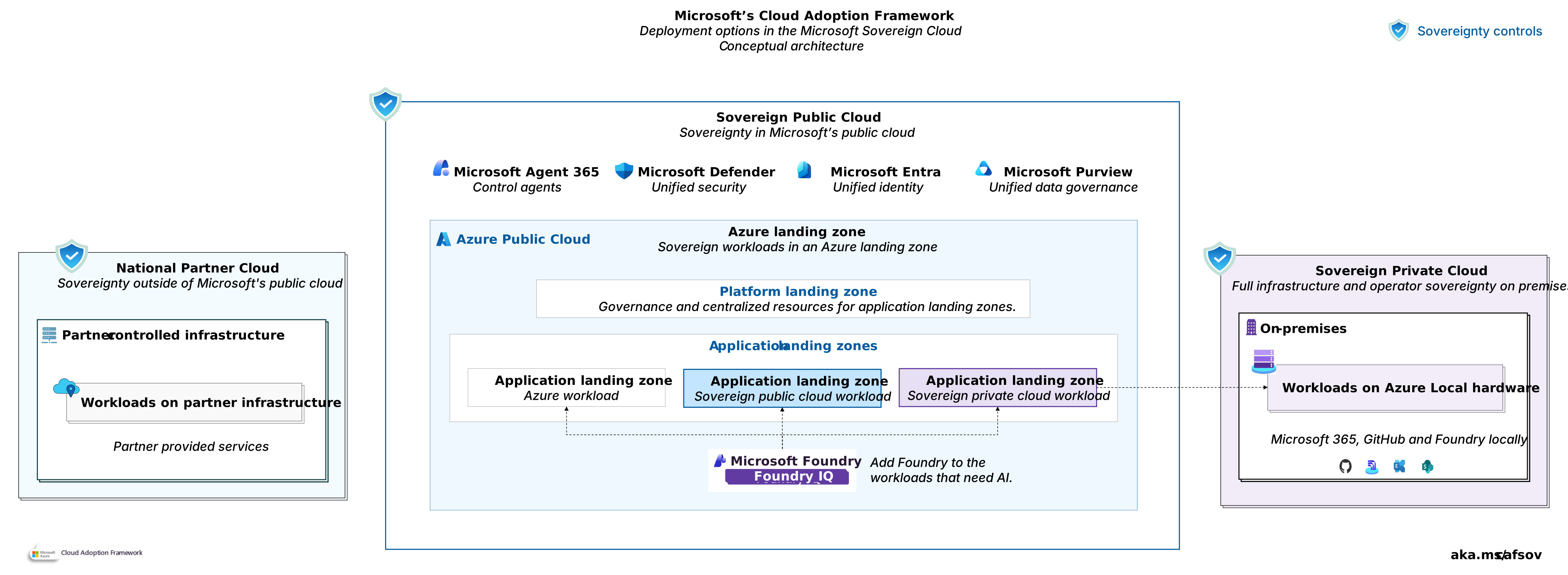
Sovereign Public Cloud: Fastest to value, because it runs on Azure infrastructure with no hardware to procure or facilities to prepare. You have no hardware to procure or facilities to prepare. A Sovereign Landing Zone helps you stand up a compliant environment quickly and deploy with standard Azure patterns.
Sovereign Private Cloud: Plan for a longer cycle. Azure Local requires validated hardware, facility readiness, and local operational capabilities. Timelines depend on hardware availability and deployment readiness.
National Partner Clouds: Timelines vary based on customer onboarding requirements, eligibility verification, and regulatory approvals. Service availability and operating models vary by provider and region. Validate requirements early in the planning process.
8. How to adopt sovereign controls
Microsoft's Cloud Adoption Framework gives you a structured path, and you can distill it into steps for sovereignty. Each step builds on the one before it.

Sovereignty planning and organizational readiness: Learn how to identify sovereignty requirements and apply controls the Microsoft Sovereign Cloud. Learn how to define your deployment model, operating model, skilling, and cost management and FinOps.
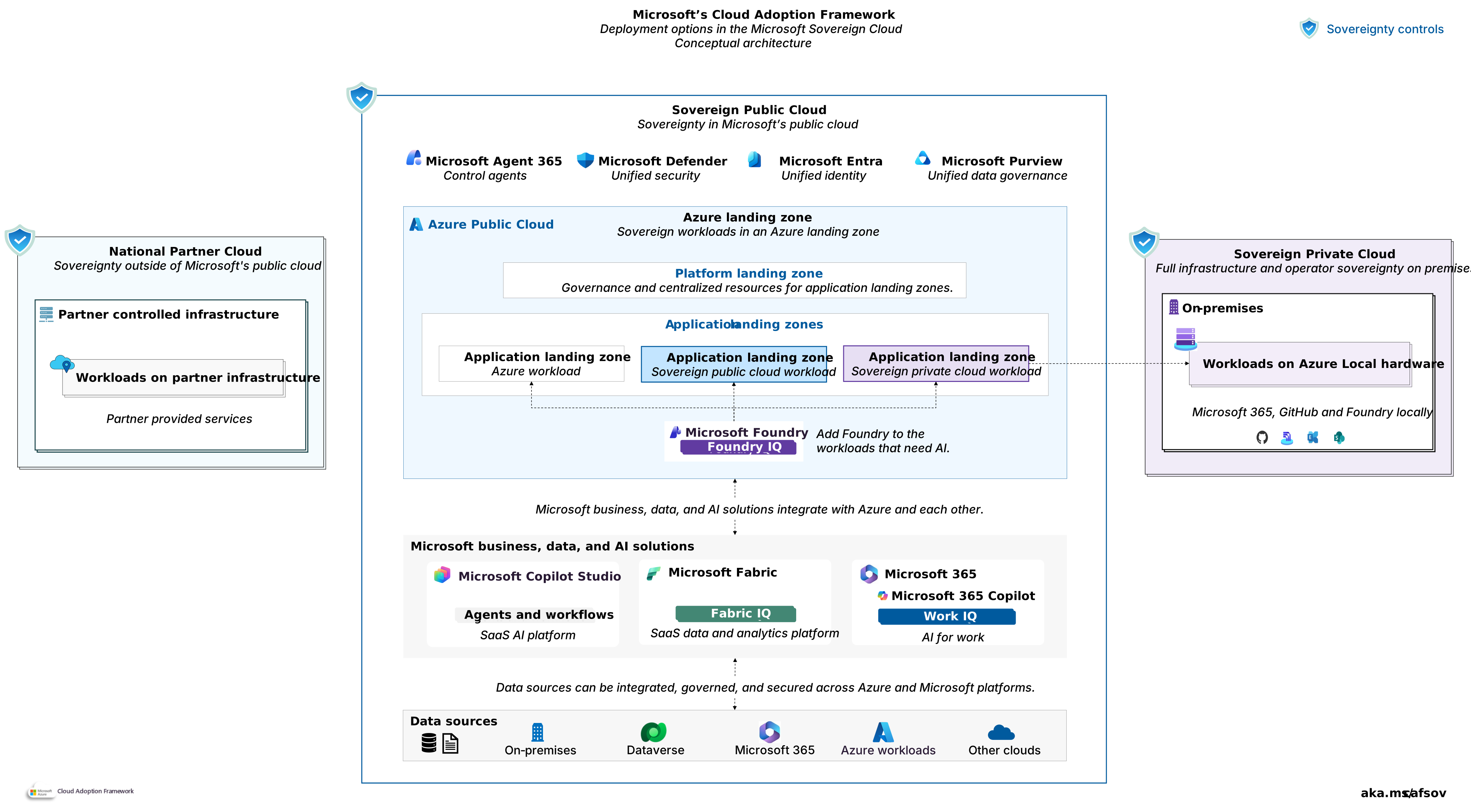
Sovereignty architecture and governance: Learn how to select and standardize the target architecture, governance model, and platform controls for each Microsoft Sovereign Cloud deployment model.
Sovereignty operational standards: Learn how to establish operational standards, compliance processes, and evidence requirements that sustain sovereignty requirements across their lifecycle.
Use the Sovereignty decision tree to determine your next step or start with planning and organizational readiness.