Note
Access to this page requires authorization. You can try signing in or changing directories.
Access to this page requires authorization. You can try changing directories.
Azure DevOps is now available in Microsoft Copilot Cowork, bringing work items, pull requests, test plans, pipelines, and more into the Copilot experience. In addition, Agentic Autofix is now in public preview, helping developers address dependency and code scanning alerts by using the Copilot coding agent to draft fixes as pull requests.
Check out the release notes for details.
General
GitHub Advanced Security for Azure DevOps
- Agentic Autofix now in public preview
- Batch dismiss security alerts through the REST API
- CodeQL changes for macOS 27, Xcode 27, and Swift 6.4
- Security overview metrics are generally available
- Pipeline access requirements for Advanced Security API calls
Azure Boards
Azure Repos
General
Azure DevOps now available in Microsoft Copilot Cowork
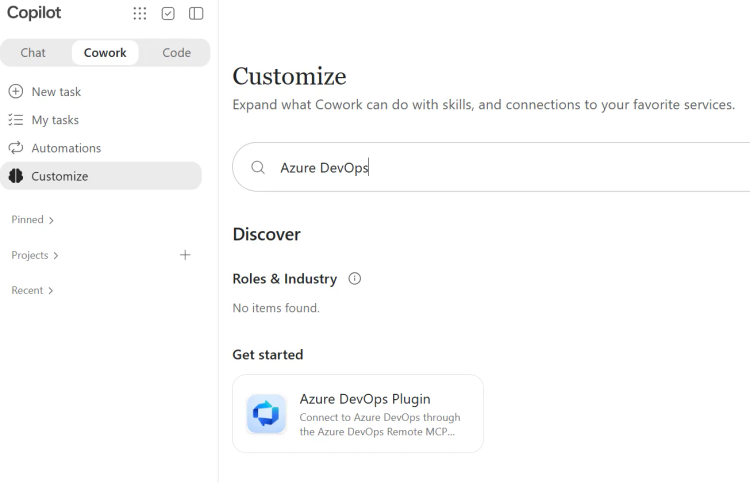
The Azure DevOps Plugin is now available in Microsoft Copilot Cowork, allowing you to interact with your Azure DevOps projects directly from Copilot. You can access work items, pull requests, test plans, pipelines, and more without switching between applications. The plugin also includes built-in skills to help you review your backlog, triage bugs, and turn feature requests into structured work items.
You can also use Azure DevOps alongside other Microsoft 365 content. For example, Cowork can turn a requirements document into a feature with related work items or use meeting notes to add comments to existing work items.
To get started, open Customize in Copilot Cowork, install the Azure DevOps Plugin, and connect it to your Azure DevOps organization.
Note
Availability depends on your organization's access to Copilot Cowork.
GitHub Advanced Security for Azure DevOps
Agentic Autofix now in public preview
Agentic Autofix for GitHub Advanced Security for Azure DevOps is now in public preview, supporting both dependency scanning vulnerabilities and code scanning alerts. After enablement, select Generate fix on an alert. The Copilot coding agent uses your repository context to draft a fix in a pull request, making it easy to review and validate changes before merging.
For more information, see Copilot Autofix for code security alerts.
Batch dismiss security alerts through the REST API
You can now dismiss up to 100 GitHub Advanced Security for Azure DevOps alerts in a single REST API request, reducing the number of calls needed to automate alert triage. Each request targets one repository and alert type, with a dismissal reason and optional comment for each alert.
For request details, see the Alerts Batch - Update API documentation.
Security overview metrics are generally available
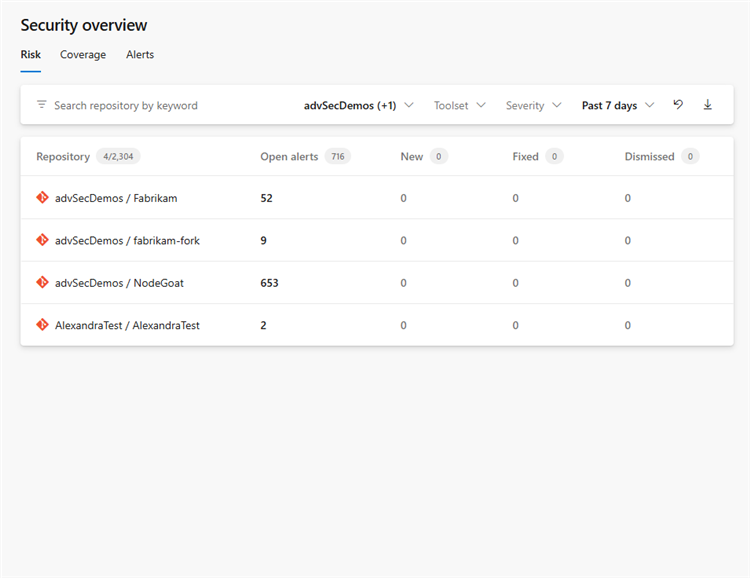
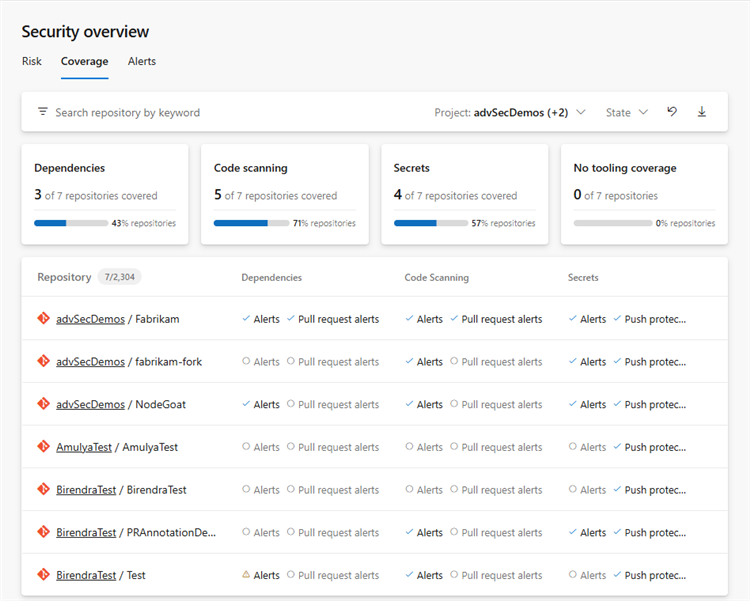
The security overview risk and coverage pages now show organization-wide rollup metrics for alert exposure and scanning coverage. Apply filters to narrow the results and understand your security posture.
Risk:
Coverage:
Pipeline access requirements for Advanced Security API calls
Azure Pipelines that query Advanced Security data might return permission errors or incomplete results if the job doesn't reference every repository it queries. In YAML, reference each required repository in the job with a checkout step or, for script-only use, a uses.repositories entry.
To reference a repository by using checkout:
jobs:
- job: SecurityScan
  steps:
  - checkout: self
  - checkout: git://FabrikamProject/FabrikamTools
  - script: echo "Run your Advanced Security API call here"
Or, to reference it without checking it out:
resources:
  repositories:
  - repository: FabrikamTools
    type: git
    name: FabrikamProject/FabrikamTools

jobs:
- job: SecurityScan
  uses:
    repositories:
    - FabrikamTools
  steps:
  - script: echo "Run your Advanced Security API call here"
For more information about repository access, see Protect access to repositories in YAML pipelines.
CodeQL changes for macOS 27, Xcode 27, and Swift 6.4
CodeQL cannot perform traced extraction with Xcode 27 for C/C++, C#, Go, Java, Kotlin, or Swift; traced extraction may also be unavailable on macOS 27. Swift 6.4 is unsupported on all platforms. To keep scans running, pin workflows to macOS 26 or earlier and Xcode 26 or earlier. For C/C++, C#, and Java, none build mode avoids build tracing. Support for Intel-based Macs is scheduled for deprecation in mid-December 2026.
Read the CodeQL compatibility announcement.
Azure Boards
Improved audit events for Area and Iteration path changes
Azure Boards improved how it records Area and Iteration path changes in the audit log.
- Audit events are only recorded for successful changes. Previously, failed attempts to rename or move an Area or Iteration path could still generate an audit event. Now, events are only recorded when a change is successful.
- More details in each audit event. Audit events now include the node's name, ID, and identifier before and after the change, making it easier to see what changed and where the node was moved.
Azure Repos
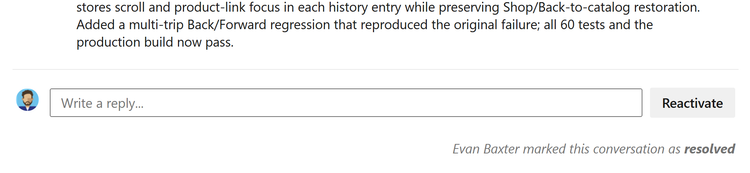
See who resolved or reactivated a pull request comment
Pull request comments now display a label showing who last resolved or reactivated the comment, making it easier to track changes and follow up on discussions.
Filter pull request comments by name
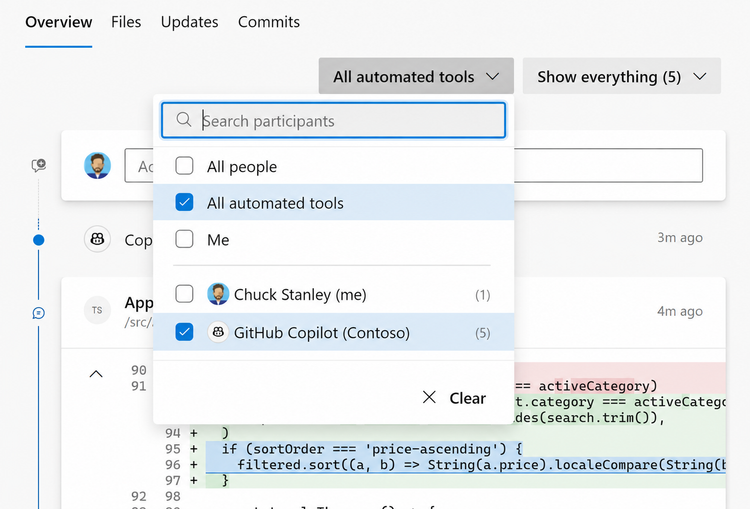
You can now filter pull request comments by participant, including automated tools like GitHub Copilot Code Review. This feature makes it easier to focus on the feedback that matters to you by showing comments from specific reviewers or hiding comments from automated tools.
Next steps
Note
These features will roll out over the next two to three weeks.
Go to Azure DevOps and take a look.
How to provide feedback
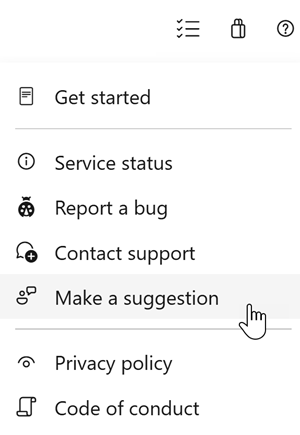
We want to hear what you think about these features. Use the help menu to report a problem or provide a suggestion.
You can also get advice and have your questions answered by the community on Stack Overflow.