Note
Access to this page requires authorization. You can try signing in or changing directories.
Access to this page requires authorization. You can try changing directories.
As organizations adopt AI agents, managing tools across agents can become increasingly complex. Agents often connect directly to tools, APIs, MCP servers, and other services, requiring separate configuration, authentication, and governance for each implementation. This approach can lead to duplicated effort, inconsistent behavior, fragile production deployments, and additional operational overhead as the number of agents grows.
Toolbox provides a centralized way to manage and share tools in Microsoft Foundry. With Toolbox, you define a curated set of tools once and expose them through a single MCP-compatible endpoint that agents can consume across frameworks and runtimes. Toolbox helps simplify tool integration while enabling centralized credential management, governance, observability, and access control. Instead of configuring tools independently for every agent, teams can manage tools in one place, reuse them across multiple agents, and update tool implementations without requiring changes to agent code. This approach helps organizations scale agent development while maintaining consistent security and operational practices.
This article explains how Toolbox works, its core concepts and architecture, and how to create and manage toolboxes in Microsoft Foundry.
Why use a toolbox?
Consider an agent that helps onboard new employees. A single request might require the agent to:
- Retrieve onboarding guidance using a knowledge base.
- Create a Microsoft Entra ID account using a REST API.
- Provision cloud resources using a long-running agent.
- Draft a personalized welcome email using agent skills.
- Post a welcome message to a Microsoft Teams channel using an MCP server.
That's five types, five authentication models, and five owning teams - for one agent. Now multiply that across every agent your organization builds:
- Teams re-implement the same tools independently.
- Credentials are duplicated and each agent manages its own secrets and token refresh.
- Governance is inconsistent or missing, with little visibility into what tools exist or who's using them.
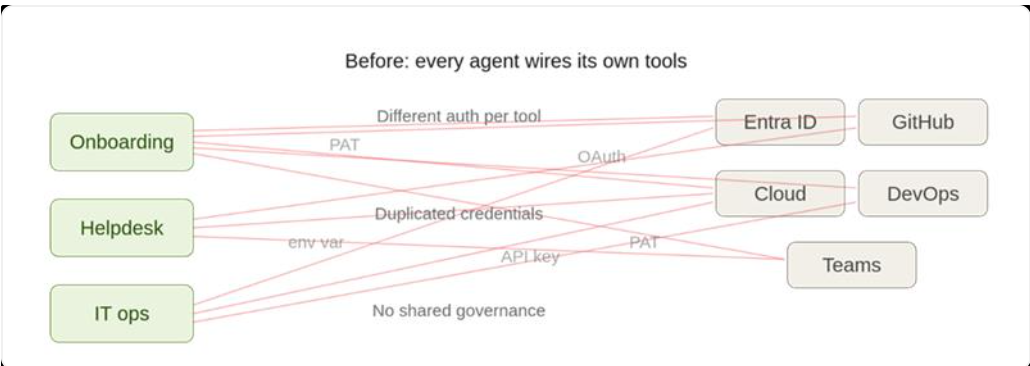
Without a centralized approach, each agent must be configured with its own tool definitions, credentials, and integration logic. As organizations create more agents, this model can lead to duplicated tool implementations, inconsistent security controls, and increased operational overhead.
Toolbox addresses these challenges by allowing teams to define and manage tools centrally and expose them through a single MCP-compatible endpoint. Agents can then consume approved tools without requiring custom integrations for each agent, helping organizations improve tool reuse, simplify credential management, and apply governance consistently across agent deployments.
The tool lifecycle - Build, Discover, Consume, and Govern
Toolbox covers the full tool lifecycle through four pillars - Build, Discover, Consume, and Govern:
| Pillar | Value proposition |
|---|---|
| Build | Create reusable collections of tools and skills (preview), publish once, and configure authentication centrally so any team can use the same tools without duplicating per-agent configuration or credentials. |
| Discover | Use tool search (preview) to help agents find the most relevant tools at runtime. A single toolbox can hold hundreds of tools without flooding the model's context, inflating token cost, or degrading selection accuracy. |
| Consume | Connect agents to a single MCP-compatible endpoint that provides access to the tools in a toolbox. Agents can discover and invoke tools across protocols and authentication models without requiring custom integrations. |
| Govern | Apply authentication, authorization, guardrails, observability, and version management at the toolbox level. Centralized governance helps organizations maintain consistent security and operational controls across agents and tools. |

Foundry-homed, not Foundry-bound
Toolboxes are created and managed in Microsoft Foundry, but they aren't limited to Foundry-based agents. Any MCP-compatible runtime or client can use a toolbox, including custom agents built with Microsoft Agent Framework, LangGraph, or your own code.
Because a toolbox is a managed resource, you can add, remove, or update tools without changing agent code. Agents continue to connect to the same endpoint while administrators manage tool availability and configuration centrally. With Versioning, you can promote a new default version of a toolbox and make it available to consuming agents without redeploying those agents.
Watch these demos to see toolboxes in action:
Key capabilities
Microsoft Foundry Agent Toolbox adds capabilities that keep large, fast-growing tool collections manageable and safe.
- Single endpoint. Your agent connects to one MCP-compatible endpoint and discovers every tool at runtime. You can add, remove, or reconfigure tools without changing agent code or redeploying.
- Centralized authentication. The toolbox handles credential injection, token refresh, and policy enforcement at runtime by using Microsoft Entra ID and OAuth identity passthrough, so consuming agents don't manage per-tool credentials.
- Governance by default. Apply guardrails (Responsible AI policies) to tool inputs and outputs at the toolbox level.
- Versioning. Create and test a new toolbox version, then promote it to default when you're ready. Every agent that points to the toolbox picks up the promoted version automatically, with no code changes.
In addition to these key capabilities, Toolbox enables the following new preview features:
Tool search (preview)
As your application grows, so does the number of available tools. A toolbox that starts with a few tools can quickly expand to dozens or even hundreds. Sending every tool definition with every model request creates challenges:
- Cost increases as tool count scales: Every tool definition adds input tokens, whether the model uses that tool or not.
- Reduced context capacity: Tool definitions compete with conversation history, domain knowledge, and other context for space in the model's context window.
- Less accurate tool selection: When a model must choose from hundreds of tools, it's more likely to select a similar but incorrect tool or overlook the best option.
Tool search addresses these challenges by hiding tools by default and exposing only two meta-tools:
tool_search- describe what you need and get back the most relevant tools.call_tool- invoke any discovered tool by name.
You control how tools are surfaced.
- Pin critical tools so they're always available.
- Add context to improve tool discovery using the terms your organization uses.
- Auto-pin frequently used tools.
Learn more: Tool search (preview).
Skills (preview)
Tools define what an agent can do. Skills define how it performs a task.
Skills package reusable, multi-step workflows as capabilities that agents can invoke like any other tool. For example, a skill might generate a formatted report, perform a triage workflow, or orchestrate a sequence of tool calls.
Skills are versioned and immutable. You can attach a specific skill version to a toolbox to ensure consistent and predictable behavior across environments.
Skills reduce the setup required to use shared workflows. Agents discover and load skills automatically through MCP resources at startup.
See Skills (preview).
Supported tools
The following tools are supported.
| Tool | Toolbox | Direct tool integration |
|---|---|---|
| Model Context Protocol (MCP) | ✅ Yes | ✅ Yes |
| Web search | ✅ Yes | ✅ Yes |
| Azure AI Search | ✅ Yes | ✅ Yes |
| Code interpreter | ✅ Yes | ✅ Yes |
| File search | ✅ Yes | ✅ Yes |
| OpenAPI | ✅ Yes | ✅ Yes |
| Agent-to-agent (A2A) | ✅ Yes | ✅ Yes |
| Browser automation | ✅ Yes | ✅ Yes |
| Fabric IQ | ✅ Yes | ✅ Yes |
| Work IQ | ✅ Yes | ✅ Yes |
| Tool search | ✅ Yes | ❌ No |
| Skills | ✅ Yes | ❌ No |
| Reminder tool | ✅ Yes | ❌ No |
| Function calling | ❌ No (client-side execution) | ✅ Yes |
| Grounding with Bing | ❌ No | ✅ Yes |
| Computer use | ❌ No | ✅ Yes |
| Image generation | ❌ No | ✅ Yes |
| SharePoint | ❌ No | ✅ Yes |
| Fabric data agent | ❌ No | ✅ Yes |
| Azure Functions | ❌ No | ✅ Yes |
Get started
- Create and manage a toolbox in Foundry - set up a toolbox and integrate it into your agent.
- Toolbox quickstart - build a toolbox and use it with a hosted agent end to end.