Note
Access to this page requires authorization. You can try signing in or changing directories.
Access to this page requires authorization. You can try changing directories.
Use measured results to find better model coefficients. In this example, a Python application fits a weight-prediction formula, checks it against separate validation records, and approves it if the predictions improve.
The application (called the supervisor) stores approved coefficients for later predictions. Fitting runs in NumPy, outside the data flow graph. A built-in map transform then evaluates the approved formula.
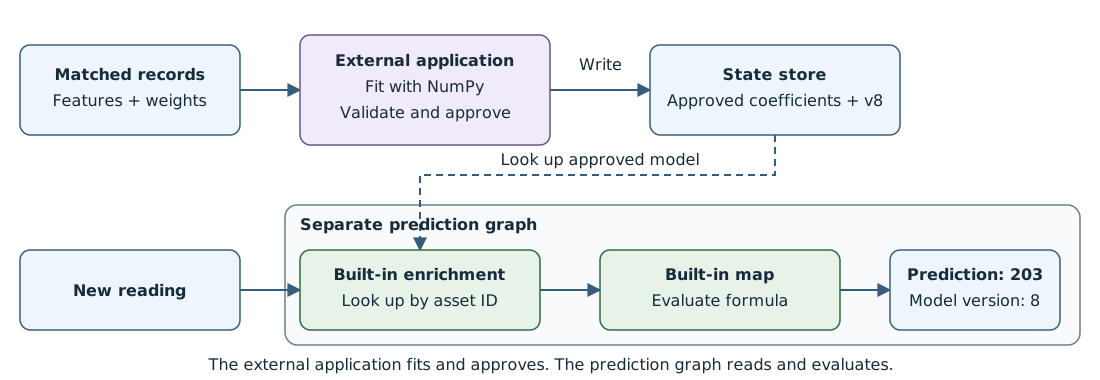
How the pieces connect
- Export matches. The export graph relays completed matches to the application.
- Fit and approve externally. The Python example calculates a candidate and a review decision. Your supervisor owns approval and persistence.
- Store approved coefficients. The supervisor writes the complete active-model record to the state store.
To consume that record, see Read coefficients from the state store.
For delivery through MQTT instead of state-store lookup, see Deliver approved model updates through MQTT.
Prerequisites
Complete the shared example prerequisites, including the default profile and factory-mqtt endpoint. Use YAML for debugging and Azure CLI or Bicep for production management.
For CLI deployments, set AIO_INSTANCE_NAME and RESOURCE_GROUP to your existing instance and resource group. For Bicep deployments, also set CUSTOM_LOCATION_NAME to the instance's existing custom location. The deployment tabs reference the existing instance, profile, and endpoint; they don't create them. The export graph doesn't require a registry endpoint because it has no transforms.
The fitting script also requires Python 3 and NumPy. The state-store write example
uses the mosquitto_pub and mosquitto_sub MQTT clients.
Prepare matched records
Prepare completed matches with the feature values used by each prediction. The alignment and correlation pattern shows one way to produce them.
Fit a candidate from synthetic matched records
Start with model v7: weight = 2 * speed + 0.5 * temperature + 175.
Each matched record must include the feature values used for that piece,
its measured weight, and the model version that produced the prediction.
For example, a training input to the supervisor is:
{"assetId":"line-1","pieceId":"part-1","modelVersion":7,"speed":8,"temperature":18,"predictedWeight":200,"measuredWeight":198,"residual":-2}
Use these synthetic matches: four for fitting and two for validation. Keep the sets' piece IDs distinct.
| Use | Piece | Speed | Temperature | Measured weight | Model v7 prediction |
|---|---|---|---|---|---|
| Training | part-1 |
8 | 18 | 198 | 200 |
| Training | part-2 |
10 | 18 | 202 | 204 |
| Training | part-3 |
8 | 22 | 200 | 202 |
| Training | part-4 |
10 | 22 | 204 | 206 |
| Validation | part-5 |
9 | 20 | 201 | 203 |
| Validation | part-6 |
11 | 24 | 207 | 209 |
The fitting operation minimizes the sum of squared errors for
b0 + b1 * speed + b2 * temperature. These training values give:
- Speed coefficient:
(202 - 198) / (10 - 8) = 2. - Temperature coefficient:
(200 - 198) / (22 - 18) = 0.5. - Intercept:
198 - 2 * 8 - 0.5 * 18 = 173.
The candidate predicts 201 and 207 on the two validation pieces. Its root mean
square error (RMSE) is 0; model v7's RMSE is 2. Choose an adequate validation sample size
for your application.
For live input, deploy the export graph by using one of the following methods. The application subscribes to
factory/supervisor-input; publish completed matches to factory/matches.
The standalone Python demo below uses the table directly and doesn't require MQTT.
- In the operations experience, open your instance and select Data flow graph > Create data flow graph.
- Name the graph
export-training-matchesand select thedefaultprofile. - Add source
sourcewith endpointfactory-mqttand topicfactory/matches. - Add destination
destinationwith endpointfactory-mqttand topicfactory/supervisor-input. - Connect
sourcedirectly todestination, without adding a transform, and select Save.
The graph forwards each completed match unchanged. The application collects matches, keeps training and validation records separate, and fits a candidate.
An example candidate emitted by that application on factory/model-proposals:
{
  "kind": "modelProposal",
  "assetId": "line-1",
  "updateId": "update-42",
  "expectedModelVersion": 7,
  "modelVersion": 8,
  "coefficients": {
    "speedCoefficient": 2,
    "temperatureCoefficient": 0.5,
    "intercept": 173
  },
  "validation": {
    "trainingPieceIds": ["part-1", "part-2", "part-3", "part-4"],
    "validationPieceIds": ["part-5", "part-6"],
    "activeRmse": 2,
    "candidateRmse": 0
  }
}
For this example, approval requires the configured asset line-1, active
version 7, candidate version 8, finite coefficients, disjoint sample sets,
lower validation RMSE, and an intercept change no larger than 3. The
intercept changed by -2, so this candidate passes. A candidate with intercept
180 fails the last check. Reject a retry after v8 is active.
These checks are example application policies.
Save this example as fit-model.py and run python3 fit-model.py. It uses the six
records above and prints a candidate and review decision. Your supervisor handles
MQTT and active-state writes; the script only fits and reviews.
import json
import numpy as np

# Each row is (piece ID, speed, temperature, measured weight).
training = [
    ("part-1", 8, 18, 198),
    ("part-2", 10, 18, 202),
    ("part-3", 8, 22, 200),
    ("part-4", 10, 22, 204),
]
validation = [("part-5", 9, 20, 201), ("part-6", 11, 24, 207)]
if {r[0] for r in training} & {r[0] for r in validation}:
    raise ValueError("Training and validation pieces must be distinct.")

x = np.array([[1, speed, temperature] for _, speed, temperature, _ in training], dtype=float)
y = np.array([weight for _, _, _, weight in training], dtype=float)
candidate, _, rank, _ = np.linalg.lstsq(x, y, rcond=None)
if rank != 3 or not np.isfinite(candidate).all():
    raise ValueError("The fit needs three independent, finite parameters.")

vx = np.array([[1, speed, temperature] for _, speed, temperature, _ in validation], dtype=float)
vy = np.array([weight for _, _, _, weight in validation], dtype=float)
active = np.array([175, 2, 0.5])  # Intercept, speed, temperature for v7.
active_rmse = float(np.sqrt(np.mean((vx @ active - vy) ** 2)))
candidate_rmse = float(np.sqrt(np.mean((vx @ candidate - vy) ** 2)))
proposal = {
    "kind": "modelProposal",
    "assetId": "line-1",
    "updateId": "update-42",
    "expectedModelVersion": 7,
    "modelVersion": 8,
    "coefficients": {
        "intercept": float(candidate[0]),
        "speedCoefficient": float(candidate[1]),
        "temperatureCoefficient": float(candidate[2]),
    },
    "validation": {
        "trainingPieceIds": [row[0] for row in training],
        "validationPieceIds": [row[0] for row in validation],
        "activeRmse": active_rmse,
        "candidateRmse": candidate_rmse,
    },
}


def review(update, active_model, committed_update_ids):
    """Example policy for candidates produced by this trusted fitting process."""
    coefficients = update["coefficients"]
    metrics = update["validation"]
    if update["updateId"] in committed_update_ids:
        return {"approved": False, "reason": "duplicate update"}
    if update["assetId"] != active_model["assetId"]:
        return {"approved": False, "reason": "wrong asset"}
    if (update["expectedModelVersion"] != active_model["modelVersion"]
            or update["modelVersion"] != active_model["modelVersion"] + 1):
        return {"approved": False, "reason": "stale or unexpected version"}
    if (set(metrics["trainingPieceIds"]) & set(metrics["validationPieceIds"])
            or not metrics["trainingPieceIds"] or not metrics["validationPieceIds"]):
        return {"approved": False, "reason": "invalid validation split"}
    numbers = [*coefficients.values(), metrics["activeRmse"], metrics["candidateRmse"]]
    if not np.isfinite(numbers).all():
        return {"approved": False, "reason": "non-finite coefficient or metric"}
    if metrics["candidateRmse"] < 0 or metrics["activeRmse"] < 0:
        return {"approved": False, "reason": "invalid RMSE"}
    if metrics["candidateRmse"] >= metrics["activeRmse"]:
        return {"approved": False, "reason": "no validation improvement"}
    if abs(coefficients["intercept"] - active_model["intercept"]) > 3:
        return {"approved": False, "reason": "intercept change exceeds policy"}
    return {"approved": True, "reason": "candidate passes example policy"}


active_record = {"assetId": "line-1", "modelVersion": 7, "intercept": 175}
decision = review(proposal, active_record, set())
print(json.dumps({"candidate": proposal, "review": decision}, allow_nan=False))
Floating-point fitting can print values close to 173, 2, 0.5, and 0.
Use numerical tolerances and persist the exact coefficients approved.
Review expects well-formed candidates and metrics from the trusted fitting process.
Before writing the approved record, the supervisor rechecks the active version
and records the approval and update ID in its own persistent log. Serialize review
and writes per asset so competing updates can't both pass the same version check.
Store approved coefficients
After approval, the supervisor writes one complete active-model record
under key factory-active-models. Initially it contains:
{"assetId":"line-1","modelVersion":7,"speedCoefficient":2,"temperatureCoefficient":0.5,"intercept":175}
After accepting update-42, replace it with:
{"assetId":"line-1","modelVersion":8,"speedCoefficient":2,"temperatureCoefficient":0.5,"intercept":173}
For a standalone lookup demo, write the synthetic v8 record directly. For a fitted
model, replace all three coefficients below with the exact approved values.
To compare v7 and v8, first run the writer with modelVersion: 7 and intercept: 175,
then restore the v8 values and run it again.
Use the state-store SET protocol. Save this Python as write-model.py;
it creates the request file with the required byte lengths.
import json
from pathlib import Path

record = {
    "assetId": "line-1",
    "modelVersion": 8,
    "speedCoefficient": 2,
    "temperatureCoefficient": 0.5,
    "intercept": 173,
}
parts = [b"SET", b"factory-active-models", json.dumps(record, separators=(",", ":")).encode("utf-8")]
request = b"*3\r\n" + b"".join(
    b"$" + str(len(part)).encode("ascii") + b"\r\n" + part + b"\r\n"
    for part in parts
)
Path("set-model.resp").write_bytes(request)
For a debug write, generate the file, then send it with the required MQTT v5 properties. Run the subscriber first in another terminal; add your broker's authentication and TLS options to both MQTT commands.
Keep the writer's clock within one minute of the broker's clock.
The __ts property carries the request timestamp. If the response reports that
the timestamp is too far in the future, correct the clock mismatch before retrying.
mosquitto_sub -h <BROKER_HOST> -p <BROKER_PORT> -V mqttv5 -q 1 \
  -F '%D %p' \
  -t 'clients/model-writer/services/statestore/_any_/command/invoke/response'
python3 write-model.py
mosquitto_pub -h <BROKER_HOST> -p <BROKER_PORT> -V mqttv5 -q 1 \
  -t 'statestore/v1/FA9AE35F-2F64-47CD-9BFF-08E2B32A0FE8/command/invoke' \
  -D publish response-topic 'clients/model-writer/services/statestore/_any_/command/invoke/response' \
  -D publish correlation-data 'update-42' \
  -D publish user-property __ts "$(date +%s%3N):0:model-writer" \
  -f set-model.resp
A successful write displays update-42 +OK: the request's correlation data
followed by the response payload. For transport and authorization requirements, see the
state store protocol reference.
The manual SET replaces the record without an expected-model-version check.
Use a single authorized writer for this demo. In your application, retain the
approved history and update IDs outside the predictor for recovery and duplicate
checks. To roll back the formula, approve the old coefficients as a new version.
For the graph that reads the stored model and calculates predictions, see Read coefficients from the state store.